

_eH2jDg7dZ.png)
As technology advances, businesses constantly upgrade their IT infrastructure to stay competitive. However, as assets like computers, servers, and software age, their value diminishes. This natural reduction in value is known as depreciation.
- Untracked IT requests get lost, duplicated, or forgotten, costing teams time and trust.
- Every request logged as a ticket creates ownership, a timeline, and a searchable record.
- An IT ticketing system turns scattered requests into data you can use to reduce repeat issues.
- Simple habits, plus the right IT helpdesk ticket tool, make 100% ticket coverage realistic, not extra work.
It starts small. A colleague stops by your helpdesk and asks you to reset a password. Someone messages you on chat about a slow laptop. Another person calls to say their email is not syncing. None of these feel like a big deal on their own, so you just fix them and move on.
But multiply that by ten requests a day, five days a week, across a growing team, and a pattern shows up fast: nothing is tracked. There is no record of what was asked, who fixed it, how long it took, or whether the same issue keeps coming back. This is exactly why a simple rule changes everything for IT teams: every IT request should become a ticket, no matter how small it seems.
In this guide, you will learn what it really means to “ticket” a request, the hidden cost of skipping this step, and how the right IT ticketing system makes it effortless to log, track, and resolve every IT support ticket your team receives.
What Does It Mean to "Ticket" an IT Request?
Ticketing an IT request simply means turning any ask, an email, a chat message, a phone call, or a walk-up conversation, into a recorded entry in your IT helpdesk ticket system. That entry captures who asked, what they need, when they asked, and who is responsible for solving it.
Think of it as the difference between a verbal promise and a written agreement. A verbal promise is easy to forget. A written ticket has a timestamp, an owner, and a status that anyone on the team can check. It does not rely on memory.
A good IT support ticket usually includes a few simple details:
- Requester information — Who submitted the request and how to reach them.
- Issue summary — A short description of the issue or ask, in plain language.
- Request type — A category, such as hardware, software, access, or network.
- Priority — A priority level based on how urgent or business-critical the issue is.
- Owner — The person or team currently responsible for resolving it.
None of this needs to be complicated. Most modern IT ticketing systems capture these details automatically the moment a request comes in through email, a web form, or a chat tool like Microsoft Teams.
The Hidden Cost of Untracked IT Requests
When IT requests are not ticketed, problems do not disappear, they just become invisible. And invisible problems are the hardest ones to fix.
Requests Get Forgotten
Without a ticket, a request lives only in an inbox, a chat thread, or someone’s memory. If that person is out sick or simply busy, the request can sit untouched for days, and no one else even knows it exists.
No One Knows Who Owns What
When requests are handled ad hoc, two people might work on the same issue, or worse, everyone assumes someone else is handling it. This is one of the most common reasons small IT issues turn into bigger ones.
There Is No Data to Learn From
If your team never logs an IT support ticket, you never build a history. You cannot tell whether laptop issues are rising, whether one application causes most of your requests, or whether your team is actually getting faster at solving problems over time.
Accountability Disappears
When a manager or auditor asks, “How long did this take to fix?” or “Who approved this access change?” an untracked request has no answer. A ticketed request has a full timeline, ready to show.
See how ticketing works in practice
Try Helpdesk 365 free and turn every email, chat, and call into a trackable IT support ticket in minutes.
Why Every IT Request Should Become a Ticket
Some requests feel too small to log. A password reset takes two minutes, so why bother creating a ticket for it? Here is why that habit is worth building anyway.
- Accountability and Ownership
A ticket assigns a clear owner. There is no confusion about who is responsible, and no request quietly falls between two people who each assumed the other was handling it.
- Visibility Across the Whole Team
When every request lives inside one IT ticketing system, anyone on the team, including a manager covering for someone on leave, can see what is open, what is overdue, and what needs attention right away.
- Faster Resolution Times
Tickets can be prioritised, escalated, and routed automatically. An urgent request, like a server outage, gets flagged and pushed to the front of the queue instead of sitting in the same inbox as a routine software update request.
- Real Data for Continuous Improvement
Every ticket adds to a growing record of what your team handles. Over weeks and months, this data shows you which issues repeat, which departments need more support, and where self-service resources could reduce ticket volume.
- A Clear Audit Trail
Regulated industries and internal audits often require proof of how requests were handled, especially access changes, software installs, or security-related fixes. A ticketed system keeps this record automatically, without extra paperwork.
- Fewer Repeat Issues
When tickets are tagged by category, patterns become obvious. If ten people report the same printer error in a month, that is a signal to fix the root cause instead of solving the same problem again and again.
Common IT Requests That Slip Through the Cracks
Certain types of requests are especially easy to miss if they are not ticketed from the start:
- Instant messages — A quick chat message asking for a software licence or access change.
- Walk-up requests — Someone stopping by in person to report a slow computer or broken headset.
- Phone calls — A short call about a Wi-Fi issue that gets fixed and then forgotten.
- Email threads — A request buried inside a long email thread about something else entirely.
- Social or team channels — A comment dropped into a project channel, never meant as a formal request, but still one.
Each of these feels informal in the moment. But each one is still a real IT request, and each one deserves the same ticket, the same tracking, and the same follow-up as a request submitted through a formal helpdesk portal.
How an IT Ticketing System Makes This Easy
The idea of ticketing every single request can sound like more work, not less. In practice, a good IT ticketing system removes that burden almost entirely.
Omni-Channel Capture
Modern helpdesk tools convert emails, web form submissions, and even Microsoft Teams messages into tickets automatically. Nothing needs to be typed twice.
Automatic Categorisation and Routing
Keywords in a request — like “password,” “VPN,” or “laptop” — can trigger automatic tagging and routing to the right person or team, so no manual sorting is required.
SLA Timers and Escalation
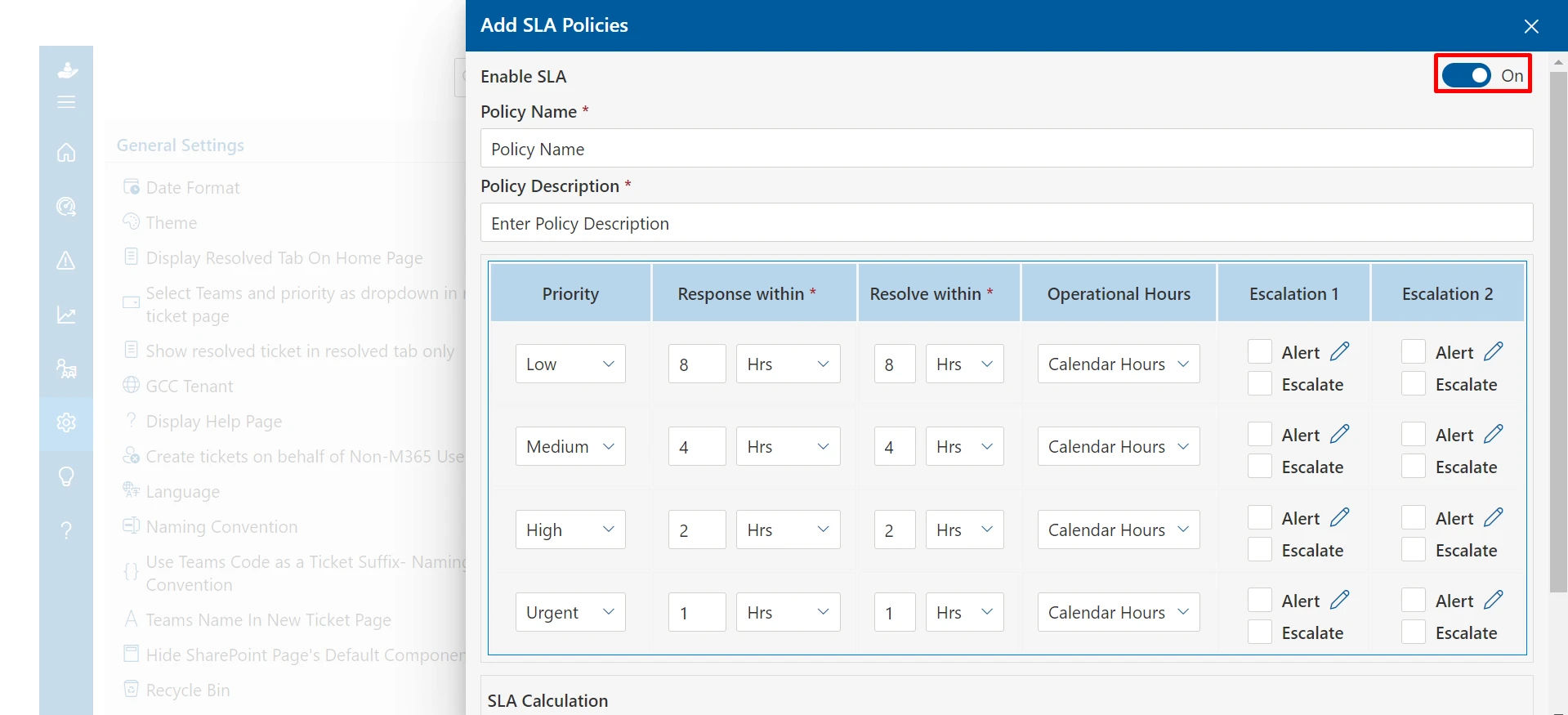
Every ticket can carry a target resolution time based on its priority. If a ticket is close to breaching that target, it escalates automatically, so nothing urgent sits quietly in a queue.
A Searchable History
Once every request becomes a ticket, your team gains a searchable archive. If a similar issue comes up again, someone can search past tickets instead of starting from zero.
Bring every IT request into one place
Book a personalised demo to see how Helpdesk 365 automatically logs, routes, and tracks every IT support ticket your team receives.
Best Practices for Ticketing Every IT Request
Making “ticket everything” a habit is easier with a few simple guardrails in place:
- Reduce friction — Make it just as fast to raise a ticket as it is to send a chat message or walk over to someone’s helpdesk.
- Standardise categories — Give the team a small set of clear categories, like Hardware, Software, Access, and Network, so tagging takes seconds.
- Set the expectation early — Encourage employees to submit even small asks through a self-service portal, rather than a direct message.
- Automate wherever possible — Turn quick chats and phone calls into tickets automatically, instead of relying on someone to remember.
- Review the data — Look back at ticket volume and categories monthly to spot repeat issues and training opportunities.
None of these practices require a big process overhaul. They simply need the right tool doing the logging work in the background, so ticketing becomes the easy option, not an extra chore.
How Helpdesk 365 Helps IT Teams Ticket Everything
Helpdesk 365 is built around this exact idea: no IT request should be too small, too quick, or too informal to track.
- Omni-channel ticketing — Emails, web forms, and Microsoft Teams messages are all converted into organised tickets automatically, so nothing depends on someone remembering to log it.
- Smart automation — Keyword-based rules route password resets, access requests, and hardware issues to the right person without manual sorting.
- SLA escalation — Priority-based SLA timers make sure urgent issues, like a network outage, get escalated before deadlines are missed.
- Self-service portal — Employees can raise their own tickets and find answers to common questions before they ever need to contact IT.
- Reporting and insights — Built-in dashboards show ticket trends, repeat issues, and team performance, turning your ticket history into real insight.
The result is simple: every request, however small, becomes a ticket with an owner, a timeline, and a record, without adding extra work for your IT team.
Conclusion
Small requests add up. A password reset here, a slow laptop there, and a missed chat message somewhere else can quietly cost your IT team hours of untracked, unaccountable work every week.
Turning every IT request into a ticket is not about adding bureaucracy. It is about giving your team a clear, searchable, and fair record of everything they handle, so nothing gets lost, no one is left guessing who owns what, and every fix contributes to a bigger picture of how your IT support is really performing.
With the right IT ticketing system in place, this becomes the easy default, not extra effort. Every email, chat, call, and walk-up request turns into a proper IT support ticket automatically, giving your team the visibility, accountability, and data they need to keep improving.
Ready to Turn Every IT Request Into Action?
See how HelpDesk 365 helps your team capture every request, automate ticket management, improve accountability, and deliver faster IT support all within Microsoft 365.
Frequently Asked Questions
Isn't it extra work to raise a ticket for every small IT request?
Not with the right tool. A good IT ticketing system captures emails, chats, and form submissions automatically, so most tickets are created without anyone typing extra steps.
What counts as an IT request that should be ticketed?
Any ask directed at IT, a password reset, a software install, a hardware issue, an access request, or a network problem, should become a ticket, regardless of how it was raised.
How does ticketing every request improve response times?
Tickets can be prioritised and escalated automatically. Urgent issues are flagged and routed to the right person immediately, instead of waiting in a shared inbox with routine requests.
Can an IT ticketing system work with tools our team already uses, like Microsoft Teams?
Yes. Modern helpdesk platforms, including Helpdesk 365, integrate directly with Microsoft Teams and email, so requests raised there are automatically converted into tickets.


_JiluXJRGNl.svg)























