


The last step in any transaction is invoices, but most organizations continue to use slow and archaic ways of approving invoices.
While companies invest heavily in pricing strategies, currency planning, and financial forecasting, invoice approvals are often treated as a routine administrative task rather than a critical financial function.
- Manual invoice approval takes an average of 14.6 days per invoice, while automated workflows can cut that cycle down to a matter of hours by routing bills instantly to the right approver.
- Nearly half of finance teams spend more than five days a month on invoice-related tasks alone, time that automation frees up for forecasting, planning, and higher-value financial work.
- Good invoice approval software combines a centralized dashboard, custom templates, and audit-ready activity logs, so nothing gets lost between departments.
- Platforms like Revenue 365 integrate directly with Microsoft 365 tools, meaning finance teams get automation without abandoning the software they already use daily.
What Is Invoice Approval Software?
Anyone searching for a fix to invoice delays usually starts with a simple question: what actually is this software, and what does it replace?
Here’s the short answer before we go deeper into how it works.
Invoice approval software is a digital system that helps businesses review, route, and approve supplier bills without printed paperwork or manual sign-offs. It replaces email threads and physical folders with a single workflow where invoices move automatically to the right approver, get tracked in real time, and are stored for future audits.
- Removes paper-based sign-offs and replaces them with digital, rule-based routing
- Gives every stakeholder visibility into where an invoice sits in the approval chain
- Keeps a permanent, searchable record of who approved what and when
How Does Invoice Approval Software Work?
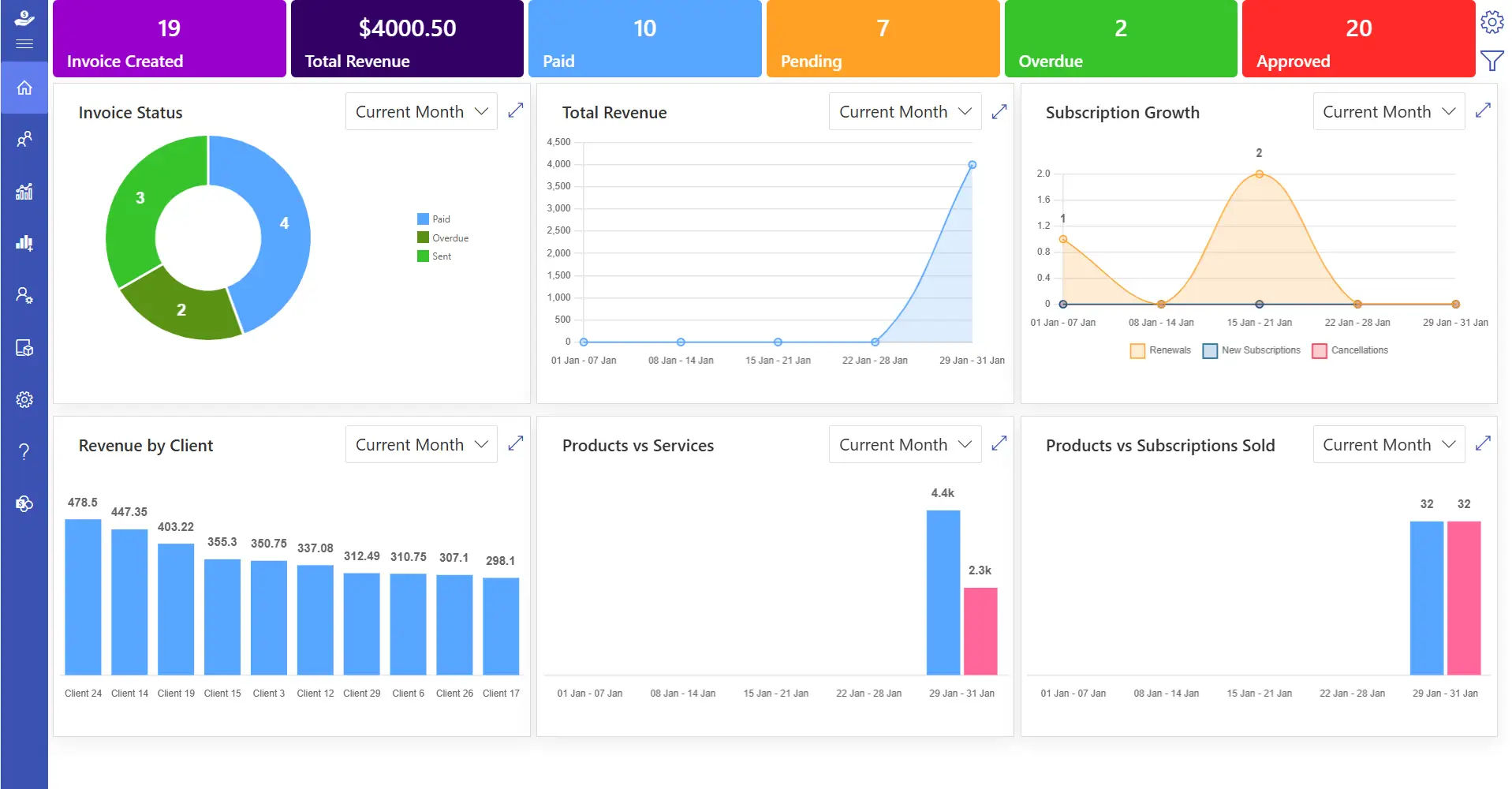
Before adopting any system, it helps to see the actual mechanics behind it. Below is the step-by-step flow most invoice approval platforms follow, from the moment a bill arrives to the moment it’s archived for reporting.
The invoice approval software assists companies in the management of the invoice checking and approval process, until the final stage. It saves time and ensures that payments are made on time. The process generally works in the following way.
Step 1: Create or Upload an Invoice
The invoice may be generated within the system or uploaded when it is received by a vendor. The invoicing software records important information including invoice value, date of payment, and supplier information.
Step 2: Based Assignment
After this, the invoice is posted to the appropriate individuals according to predetermined regulations. As an example it can pass through a team lead, to finance and then to senior management.
Step 3: Instant Review and Action
The invoice can be opened by approvers and they can accept it, make notes or request updates immediately. All actions are tracked in real-time, ensuring complete visibility and faster decision-making.
Step 4: Records and Insights
All the invoices and approval activities are kept under a single place. This facilitates easy tracking of past payments, making of reports and facilitating audits.
Think of it as a digital system that keeps invoices organized and makes sure every step is monitored, helping teams stay on time.
🚀 Start Automating Approvals Now
Challenges Faced During Manual Process
To this day, several organisations still use manual systems to handle invoices. Although this might be a familiar feeling, it causes delays, introduces additional work, and restricts the effectiveness of the finance teams. The following are the key challenges that businesses experience when using manual invoice processing.
1. Slow Approval Cycles
Manual invoices are forwarded to the various desks to be reviewed and signed. In case any of the approvers is not available or is occupied, the invoice is pending.
This makes the payment cycles very long and in most cases results in multiple follow-ups by the vendors.
An average of 14.6 days is spent manually processing a single invoice, thus leading to unnecessary time spent and that would have been spent in planning, analysis or financial control.
2. High Administrative Effort
Approximately 37% of companies continue to make invoices on paper. This includes printing papers, filing and physical storage area.
Finance departments waste hours in paperwork and it can take a long time to find an old invoice.
These activities increase the workload daily and decrease the overall production.
3. Slow Processing and Manual Mistakes
There may be challenges with typing in invoice details manually like typing in incorrect values, duplicate entries or missing approvals.
It has been found that 49% of professionals spend over five days a month just on invoice processing.
Even a small mistakes may affect the accuracy of payment, tax records, and relations with vendors.
4. Limited Visibility Across Teams
The status of invoices cannot be clearly seen with manual systems.
Finance managers usually must check emails, folders, or even talk to the team members to understand what invoices are pending or approved.
This absence of an overview complicates the monitoring of progress and postpones financial decisions.
5. Audit and Compliance Difficulties
In the case of audits, manual record teams usually have difficulties in finding previous invoices or approval information.
This puts an extra burden on the audit process and exposes the possibility of compliance-related queries.
💡 Tired of Chasing Down Approvals?
See how Revenue 365 replaces email chains and folders with one automated workflow
Key Features of Invoice Approval Workflow Software
An effective invoice approval software is not a digital tool. It serves as a central control mechanism of invoice flow, approvals and financial records. Below are the key features that make such software valuable and how each one supports daily business operations.
1. Invoice Approval Workflow
Invoices move digitally for review, without paper or physical signatures. Approvers can access invoices at any point and act instantly, with each step recorded by date, time, and responsibility — preserving a consistent payment cycle and reducing delays between teams.
2. Centralised Dashboard
All invoices, pending, approved, or completed, are displayed in one dashboard. Finance and leadership teams can monitor progress without digging through emails or spreadsheets, making it easier to spot delays and speed up invoice management.
3. Custom Invoice
Businesses can design invoices that match their brand with logos, colour styles, tax fields, and currency details For companies dealing with foreign vendors, custom invoice formats also help present a more professional, consistent image.
4. Proforma Invoice Creation
Proforma invoices let teams share cost estimates before a final bill is issued useful for exports, advance orders, and large projects where cost visibility matters before commitments are madegeneral.
5. Real-Time Team Collaboration
Multiple users can review, comment on, and act on invoices simultaneously, so remote teams aren’t stuck waiting on physical files. Every action is documented, keeping responsibilities clear and approvals faster.
6. Advanced Reporting and Insights
Built-in reports show approval time, payment schedules, and vendor activity, helping managers spot patterns, identify delays, and plan budgets. These insights also support better SaaS revenue forecasting over time.
7. Integration with Business Tools
Invoice approval software connects with SharePoint, Microsoft Teams, Outlook, Power BI, and Power Automate, so data moves easily across systems without manual re-entry — improving reporting accuracy and audit readiness.
8. Secure and Scalable Apps
Financial data is protected with encryption, access permissions, and secure backups. The system scales with growing invoice volumes, so it keeps performing as the business expands.
See Your Invoice Dashboard Live
Benefits of Invoice Approval Software
Invoice approval software assists companies to handle invoices in an orderly and trustworthy manner. Here are some benefits to consider.
1) Accurate Invoices for Clients
Invoices are prepared with correct values, dates, client information, and service descriptions, so completed work and transactions are easy to identify, making accounting simpler and more reliable.
2) Cost Savings Through Branding
Invoices tailored with company branding, logos, colours, and client-specific information give every bill a professional, consistent look that clients recognize instantly.
3) Custom Invoices
A shared invoice format across departments and vendors improves readability and keeps billing details easy to review, reinforcing brand consistency at every touchpoint.
4) Simple Structured Workflow
The process of invoice creation, review and approval is clear and organized.
Invoice automation minimizes human errors Manual systems are prone to errors, and automated systems can minimize them to approximately 0.8 per year.
There are clear steps that facilitate the cooperation between finance, managers, and approvers.
5) Better Data Accuracy
Consistent invoice details support clean financial records and easier account matching, helping teams make informed decisions and reducing the need for later corrections.
6) Stronger Vendor Partnerships
Precise, on-time billing supports good vendor contracts, improves communication, and reduces misunderstandings that can strain long-term relationships.
7) Full Activity History
Every approval, edit, and submission is logged in detail, so teams can review past decisions without manual searching, aiding both planning and audits.
8) Rule-Based Invoice Handling
Invoices follow required financial and regulatory standards automatically, keeping records audit-ready and reflecting a disciplined approach to financial operations.
Want Fewer Errors, Faster Payments?
Revenue 365 automates invoice checks and approvals so your team spends less time fixing mistakes
How Much Does Invoice Approval Software Cost?
Pricing is usually the next question once the value is clear, so here’s a realistic way to think about it before you start comparing vendors.
Costs vary widely based on invoice volume, number of approvers, and how deeply the software integrates with your existing accounting or ERP tools. Most vendors price by user seats or monthly invoice volume rather than a flat fee, and many including Revenue 365 —offer a free trial period so teams can test the workflow before committing.
- Entry-level plans typically suit small teams processing a low monthly invoice volume
- Mid-tier plans add multi-currency support, custom templates, and deeper reporting
- Enterprise pricing scales with integrations, user seats, and compliance requirements
Is Invoice Approval Software Right for Small Businesses?
This is one of the most common hesitations business owners raise, so it deserves a direct answer rather than a sales pitch.
Yes even small teams benefit, often more noticeably than larger ones, because a single delayed approval can stall cash flow when there’s less financial buffer. Small businesses don’t need every enterprise feature on day one; starting with core approval routing and a shared dashboard is usually enough to see faster payment cycles and fewer vendor disputes within the first month
Secure Every Approval, Instantly Now
Steps to Consider Before Implementing Invoice Approval Workflow Software
Before selecting invoice approval software, it is important to understand your business needs clearly. Proper planning helps you choose a solution that supports your operations over the long term.
1) Understand Your Approval Process
Start by reviewing how invoices are currently approved in your company. Not all invoices follow the same approval path, especially when values or categories differ.
- Identify all invoice types your business receives
- Decide who should approve the invoices
- Write down each approval steps
2) Check System Compatibility
Invoice approval software should work well with the tools your business already uses. Connecting systems reduces repeated data entry and keeps records aligned.
- List the accounting system used in your company
- Confirm whether the invoice software can connect with these tools
- Check if invoice data such as amounts, vendor names, and dates move automatically
3) Review Data Protection Measures
Financial data must be always protected. It is important to understand how the software keeps your information safe and controls access.
- Ask about the type of data protection methods used by the software
- Check whether regular backups are in place to protect records
- Decide which users can view, edit, or approve invoices and set access
4) Plan for Business Growth
Your invoice approval software should support future business needs as your operations expand. It should handle increased workloads without slowing performance.
- Ask how many invoices the system can process each month
- Check if new users can be added easily as teams grow
- Confirm whether the system can support new departments or office locations
5) Check User Simplicity
The invoice approval software should be easy to use for all team members, including those with limited technical knowledge. A clear interface helps users’ complete tasks quickly.
- Users should approve or send invoices with minimal steps
- A simple layout helps reduce mistakes during daily tasks
- Teams can start using the system quickly without long learning periods
How Revenue 365 Supports the Invoice Approval Workflow
Revenue 365 assists companies in the administration of invoice approvals through the introduction of visibility, structure, and control in a single system. It assists in funding teams to pay invoices in a transparent manner and maintain all the steps in order.
- Smart Approval Routing: Approval routes can be configured in such a way that invoices are directed to the appropriate people before being forwarded to the clients. This will prevent approvals being missed and will ensure that billing is in line with internal rules.
- Live Invoice Dashboard: Invoices that are pending, approved or paid can be accessed on one dashboard. The status of every invoice can be checked by teams within a short time without having to search in files.
- Custom Invoice Templates: It is possible to create invoices with logos of the brand, favorite layouts, and the choice of currencies. This makes each invoice look professional and uniform. Invoice details are also easier to read because of clear layouts.
- Team-Based Approval Flow: Invoices can be reviewed and approved by the finance and procurement teams using the same system. Notes and updates remain attached to the invoice so that they can be easily referred to.
- Integration with Existing System: Revenue 365 is integrated with Microsoft 365 applications and other business applications. There is no duplication of invoice data between systems. This helps in the management of records and time saved in day-to-day activities.
- Strong Data Protection: Data security is ensured using sophisticated security controls and user access controls. Invoice information can only be updated or viewed by authorized users.
- Useful Reports and Insights: Revenue 365 provides reports on approval timeframes, vendor spending, and invoice activity. Teams can review patterns and identify areas that need improvement.
With Revenue 365, finance teams gain better visibility and control over invoices, helping businesses manage payments clearly and maintain healthy financial operations.
Conclusion
Every decision in business, from choosing the currency you invoice in to how quickly invoices are approved, directly impacts your revenue and overall efficiency.
A well-designed invoice approval system helps teams save time, avoid delays, and maintain clear financial records.
🎯 Ready to Stop Chasing Approvals?
Revenue 365 gives your finance team one dashboard, smart routing, and full audit trails from day one
Join Our Creative Community
Frequently Asked Questions
Can invoice approval software handle multi-currency invoices?
Yes, the system supports multiple currencies and converts them based on current exchange rates.
Is invoice approval software actually worth it for a 10-person startup, or is that overkill?
Even small teams see value quickly, mainly because one delayed approval can hold up cash flow when there’s little financial cushion. Starting with basic routing and a shared dashboard is usually enough at this size.
What's everyone using instead of email chains and spreadsheets for approving vendor invoices?
Most teams that outgrow email move to a dedicated workflow tool with rule-based routing, a central dashboard, and integration with their existing accounting or Microsoft 365 setup
How do you stop invoices from getting 'lost' when the approver is out of office?
Modern platforms handle this with backup approvers or automatic escalation rules, so an invoice never sits untouched just because one person is unavailable.
Anyone know if these tools can actually catch duplicate invoices before they get paid twice?
Yes, most systems flag duplicate invoice numbers or matching amounts automatically during upload, which is one of the more common ways manual processes lose money.


_JiluXJRGNl.svg)























