
What Is Internal Help Desk Software? Benefits, Features & Best Practices
_eH2jDg7dZ.png)
Every organization runs on requests. An employee needs a laptop fixed, a new hire needs payroll access, someone forgets their VPN password, or a team needs approval for new software. When these requests live in scattered emails, chat threads, and phone calls, things fall through the cracks. This is exactly the problem internal help desk software is built to solve.
- Internal help desk software centralizes employee requests (IT, HR, admin) into one internal ticketing system, replacing scattered emails and chats.
- It reduces response time, improves accountability, and gives every request a clear owner and status.
- Core features to look for include ticket automation, a self-service knowledge base, SLA tracking, and reporting dashboards.
- Best practices like clear SLAs, self-service portals, and regular feedback loops make adoption smoother across teams.
- Helpdesk 365 brings all these capabilities together in one easy-to-use platform built for internal teams.
In this guide, we will explain what internal help desk software is, why it matters, the benefits it brings to growing teams, the features you should look for, and best practices for rolling it out successfully. By the end, you will know exactly how a tool like Helpdesk 365 can help your internal teams work faster and stay organized.
This is not just an IT problem. HR teams field questions about leave and payroll, Admin teams handle facility and travel requests, and Finance teams deal with reimbursement approvals. Every one of these is, at its core, a request that needs to be tracked from start to finish. Internal help desk software gives all these teams the same structured, reliable process, so no request is ever left hanging.
What Is Internal Help Desk Software?
Internal help desk software is a system that helps organizations manage and resolve requests raised by their own employees, rather than external customers. It works like a traditional customer support desk, but the “customers” are your staff members across departments such as IT, HR, Finance, and Admin.
In simple terms: it is an internal ticketing system where every employee request becomes a trackable ticket, assigned to the right person, with a clear status and deadline.
Instead of employees emailing IT directly or messaging HR on chat, they raise a ticket through a portal. The request is logged, categorized, and routed to the right team automatically. Nothing gets lost, and everyone can see where a request stands.
For example, when a new employee joins, they might need a laptop, software licenses, building access, and payroll setup, all handled by different teams. Instead of sending four separate emails, the new hire (or HR, on their behalf) can raise one request in the internal help desk software, and each task is automatically routed to the right department while HR tracks overall progress from a single screen.
Signs Your Organization Needs Internal Help Desk Software
Many teams keep managing requests manually until the cracks become too big to ignore. Here are common signs that it is time to move to a dedicated internal ticketing system.
- IT, HR, or Admin teams cannot say how many open requests they currently have.
- Employees regularly ask “any update on my request?” because there is no visibility into status.
- Important requests get missed because they were buried in a busy inbox.
- New hires do not have a consistent, repeatable onboarding checklist.
- There is no data to show leadership how support teams are performing.
If any of these sound familiar, it is a strong signal that spreadsheets, email, and chat have reached their limit, and a proper internal help desk software is overdue.
Why Every Growing Organization Needs an Internal Ticketing System
As companies grow, the number of internal requests grows even faster. What worked for a 10-person team, a quick message on chat, breaks down completely once you have 100 or 500 employees. Without a proper system, common problems start to appear:
- Requests get lost in crowded inboxes or forgotten chat threads.
- There is no way to track how long a request has been pending.
- Employees follow up repeatedly, wasting their time and the support team’s time.
- Support teams cannot measure their own workload or performance.
- There is no historical record to refer back to when similar issues occur again.
An internal help desk software fixes all of this by giving every request a single home. It becomes the one place where requests are raised, tracked, and resolved, with full visibility for both employees and support teams.
See How Helpdesk 365 Organizes Every Request
Common Use Cases of Internal Help Desk Software Across Departments
While IT support is the most common use case, internal help desk software is useful for almost any team that receives repeated requests from employees. Here is how different departments typically use an internal ticketing system.
IT Support
Password resets, hardware issues, software access requests, and network problems are the classic IT tickets. An internal help desk software lets IT teams prioritize urgent issues, like a server outage, over routine ones, like a printer not working, without losing track of either.
HR and People Operations
HR teams handle leave requests, payroll queries, onboarding tasks, and policy questions. Routing these through a ticketing system keeps sensitive employee information organized and ensures nothing is missed during busy periods like appraisal season or year-end payroll.
Admin and Facilities
Requests for office supplies, meeting room bookings, travel arrangements, or maintenance issues fall under Admin. A ticketing system helps Admin teams track recurring facility problems and plan maintenance schedules more effectively.
Finance
Expense reimbursements, invoice queries, and budget approval requests can all be tracked as tickets. This creates a clear audit trail and prevents approval requests from getting stuck in someone’s inbox.
Benefits of Internal Help Desk Software
Adopting internal help desk software is not just about looking organized. It creates measurable improvements across the business. Here are the biggest benefits.
Faster Response and Resolution Times
When tickets are automatically routed to the right team and prioritized by urgency, requests do not sit unanswered for days. Employees get quicker responses, and support teams can focus on solving problems instead of sorting through messages.
Better Accountability Across Teams
Every ticket has an owner. Managers can see who is handling what, how long tickets have been open, and which requests are overdue. This visibility naturally improves accountability, since nothing is hidden in a private inbox.
Improved Employee Experience
Employees do not enjoy chasing IT or HR for updates. A self-service portal with real-time ticket status keeps them informed without extra follow-ups, which leads to a smoother, more professional internal experience.
Reduced Repetitive Work
Common questions, like how to reset a password or apply for leave, can be answered through a self-service knowledge base. This cuts down repetitive tickets and frees up the support team for more complex issues.
Data-Backed Decision Making
An internal ticketing system captures data on ticket volume, resolution time, and recurring issues. This data helps leaders identify bottlenecks, plan staffing, and justify budget for new tools or headcount.
Stronger Compliance and Audit Trail
Every action on a ticket, who raised it, who responded, and when it was closed, is recorded. This history is valuable during audits, security reviews, or when investigating recurring problems.
Lower Operational Costs
Faster resolutions and fewer repetitive tickets mean support teams can handle a growing employee base without a proportional increase in headcount. Automation also reduces the manual work of sorting and assigning requests by hand.
Room to Scale as You Grow
As your organization adds new departments, locations, or hundreds of new employees, an internal ticketing system scales with you. New categories, teams, and workflows can be added without redesigning the entire support process from scratch.
See How Helpdesk 365 Organizes Every Request
Must-Have Features of Internal Help Desk Software
Not all internal helpdesk software is built the same. When evaluating a platform, look for these core features to make sure it can actually support your teams at scale.
Ticket Management and Automation
The foundation of any internal ticketing system is the ability to create, assign, prioritize, and track tickets automatically. Look for rule-based routing, so requests reach the right department without manual sorting. Automation rules can also send reminders when a ticket is close to breaching its deadline, so nothing is forgotten.
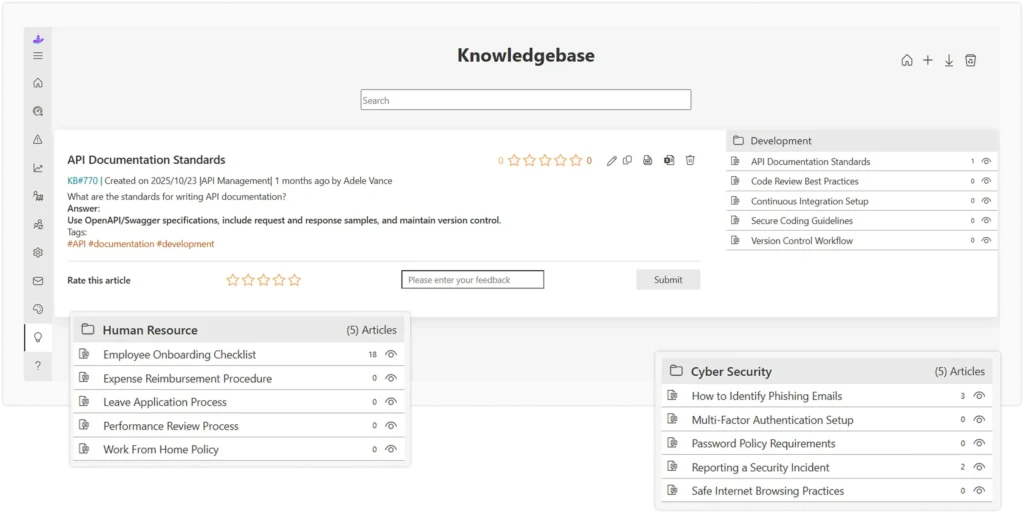
Self-Service Knowledge Base
A searchable library of guides and FAQs lets employees solve simple issues themselves. This reduces ticket volume and speeds up resolution for common, repetitive questions. Over time, the knowledge base becomes a living record of institutional knowledge that outlasts any single employee.
Multi-Channel Ticket Creation
Employees should be able to raise requests through email, a web portal, or even chat, and have them all land in the same system. This flexibility increases adoption across different departments, since people can use whichever channel feels most natural to them.
SLA Management and Alerts
Service Level Agreements (SLAs) define how quickly a ticket should be resolved. Good internal help desk software tracks SLA timers and sends alerts before deadlines are missed, keeping teams proactive rather than reactive. This is especially useful for urgent issues that directly affect employee productivity.
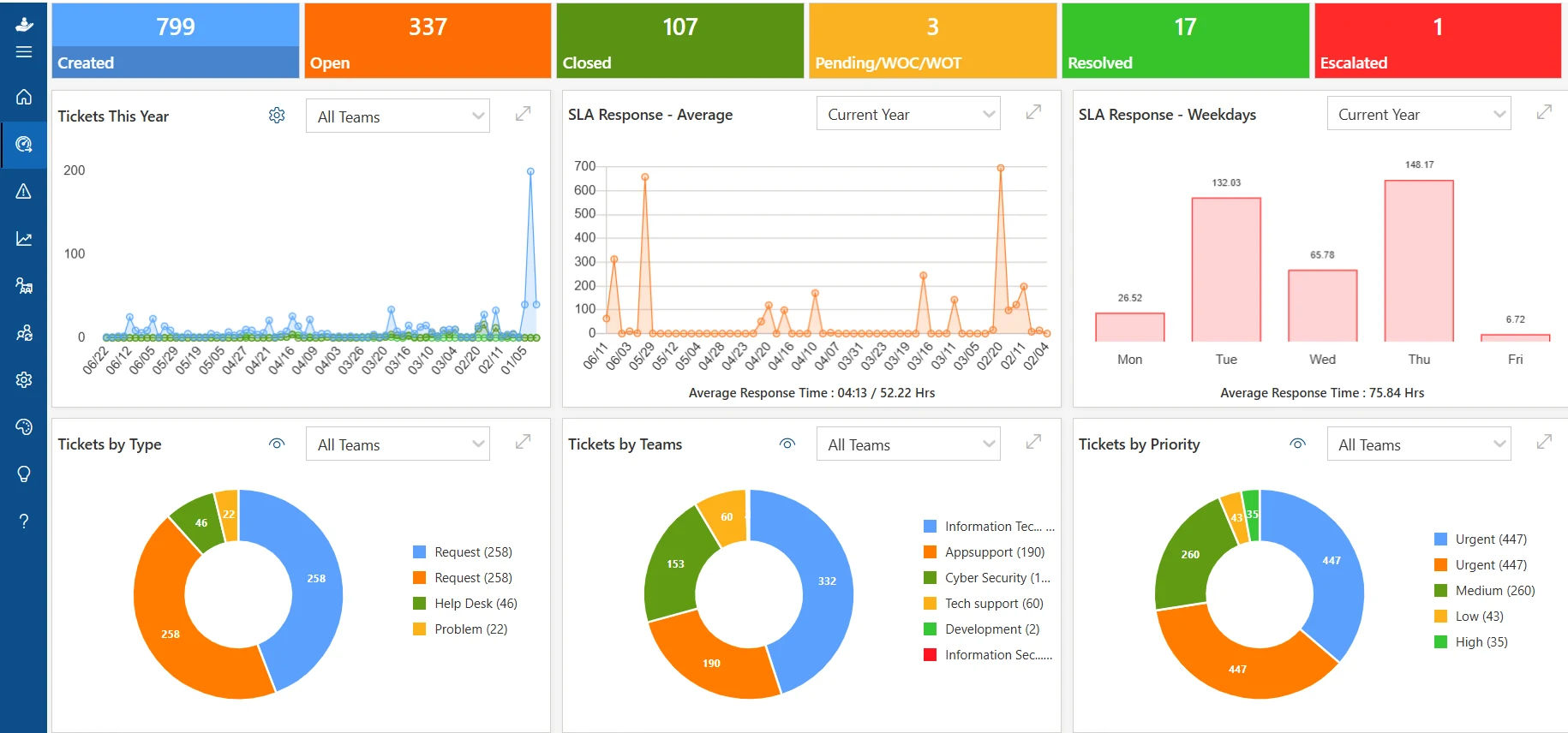
Reporting and Analytics Dashboards
Dashboards that show ticket trends, average resolution time, and team workload help managers spot problems early and plan resources more effectively. Exportable reports also make it easy to share performance updates with leadership.
Role-Based Access and Permissions
Different departments handle different types of requests. The software should let you set permissions so HR tickets, IT tickets, and Admin tickets are only visible to the right teams, protecting sensitive employee information from unnecessary exposure.
Integrations with Existing Tools
Look for software that connects with tools you already use, such as email, chat apps, and HR systems, so employees do not need to learn a completely new workflow. Fewer new tools to learn means faster adoption across the organization.
Mobile Access
Support staff and employees are not always at their desks. Mobile-friendly access lets tickets be raised and updated from anywhere, which keeps response times low even outside office hours or while traveling.
Internal Help Desk vs. Customer-Facing Help Desk
It is easy to confuse internal help desk software with customer support software, but the two solve different problems.
Internal help desk software: manages requests from employees, focused on internal operations like IT, HR, and Admin support.
Customer-facing help desk software: manages requests from paying customers, focused on product support, billing, and customer satisfaction.
Both are built around an internal ticketing system logic, tickets, assignments, SLAs, and reporting. But the workflows, permissions, and reporting needs differ. Using a dedicated internal help desk tool, rather than forcing your customer support tool to do both jobs, keeps internal data private and workflows simpler for employees.
Empower your internal teams with AI-powered ticketing, automation, and seamless Microsoft Teams integration.
Best Practices for Implementing Internal Help Desk Software
Buying the right software is only half the job. How you roll it out determines whether employees actually use it. Follow these best practices for a smooth adoption.
Start with Clear Categories and Ownership
Before launch, map out request categories, IT, HR, Finance, Admin, Facilities, and assign clear owners for each. This prevents confusion about who should handle what once tickets start coming in. It also makes routing rules much easier to configure from day one.
Set Realistic SLAs
Define response and resolution targets for each ticket type based on urgency. Overly strict SLAs create pressure and burnout, while loose SLAs defeat the purpose of having a system at all. Review these targets every few months and adjust them as your team’s capacity changes.
Build a Strong Knowledge Base Early
Document answers to your most common questions before launch. A helpful knowledge base reduces ticket volume from day one and shows employees the value of self-service. Keep articles short, and update them whenever a process changes.
Communicate the Change Clearly
Employees need to know why the new system exists and how it benefits them, faster responses, clear tracking, less back-and-forth. A short internal announcement or training session goes a long way toward getting teams to actually use the new system instead of falling back on old habits.
Monitor and Improve Continuously
Review your reporting dashboard regularly. Look for recurring issues, bottlenecks, and slow categories, then adjust routing rules, staffing, or documentation accordingly. Treat the first few months as a tuning period rather than a one-time setup.
Collect Employee Feedback
Add a quick satisfaction rating after each ticket is closed. This feedback loop helps you catch service gaps early and continuously improve the support experience, and it gives support agents recognition for the tickets they handle well.
How to Choose the Right Internal Help Desk Software
With many options on the market, it helps to evaluate internal help desk software against a simple checklist before making a decision.
Ease of Use for Both Employees and Agents
If raising or resolving a ticket takes too many steps, people will avoid the system altogether. Look for a clean, simple interface on both the employee and support-agent side.
Scalability
Choose software that can grow with you, from a 20-person team to a 2,000-person organization, without needing to switch platforms later.
Customization
Every organization has different departments and workflows. The software should let you customize ticket categories, forms, and approval steps to match how your teams actually work.
Transparent Pricing
Understand exactly what is included at each pricing tier, and whether costs scale predictably as you add more agents or employees.
Support and Onboarding
A vendor that offers hands-on onboarding and responsive support makes the transition to a new internal ticketing system far smoother for your team.
Why Teams Choose Helpdesk 365 for Internal Support
Helpdesk 365 is built specifically for internal support teams that want a simple, reliable internal ticketing system without unnecessary complexity. It brings together everything covered in this guide, automated ticket routing, a built-in knowledge base, SLA tracking, and detailed reporting, in one easy-to-use platform.
- Quick setup with ready-made templates for IT, HR, and Admin request categories.
- Automated routing so tickets reach the right team instantly.
- Real-time dashboards to track team performance and resolution times.
- A self-service portal that reduces repetitive tickets.
- Flexible plans that scale as your organization grows.
Whether you are setting up an internal help desk for the first time or replacing a system that is not keeping up, Helpdesk 365 makes it easy to bring structure, speed, and accountability to internal support.
Teams that switch to Helpdesk 365 typically notice the difference within the first few weeks: fewer follow-up messages, faster ticket resolution, and a support inbox that finally feels under control. Instead of firefighting requests one by one, IT, HR, and Admin teams can plan their work around clear priorities and SLAs.
See how Helpdesk 365 simplifies internal support with AI-powered ticketing, automation, and Microsoft Teams integration.
Conclusion
Internal help desk software centralizes employee requests, improves response times, and gives teams complete visibility into every support ticket.
If you’re still managing IT, HR, or admin requests through emails and chats, it’s time to switch to a dedicated solution. Helpdesk 365 helps you automate ticket management, improve collaboration, and deliver faster internal support. Start your free trial or book a demo today.
Join Our Creative Community
Frequently Asked Questions
Is internal help desk software only for IT teams?
No. While IT is the most common user, HR, Admin, and Finance teams also use internal help desk software to manage their own requests, such as leave approvals, facility bookings, and expense queries.
How is an internal ticketing system different from a shared inbox?
A shared inbox is just a mailbox multiple people can access, with no structure. An internal ticketing system turns each request into a tracked ticket with a status, owner, priority, and deadline, giving far more visibility and accountability.
How long does it take to set up internal help desk software?
Most modern platforms, including Helpdesk 365, can be set up within a few days using ready-made templates for common request types. Full rollout across all departments may take a few weeks as teams get trained.
Can small businesses benefit from internal help desk software too?
Yes. Even small teams benefit from having requests organized in one place. As the business grows, having this system already in place prevents the chaos that comes with scaling on email alone.
Does internal help desk software integrate with other tools?
Most platforms, including Helpdesk 365, integrate with email, chat apps, and HR systems, so employees can raise tickets from tools they already use daily.


_JiluXJRGNl.svg)























