
_eH2jDg7dZ.png)
Managing employee requests is one of the most overlooked challenges in modern organizations. When teams rely on email threads, to handle internal requests, things fall through the cracks, fast. Deadlines are missed, responsibilities are unclear, and employees are left frustrated wondering if anyone ever received their request.
An internal ticketing system solves exactly this problem. It gives organizations a structured, centralized platform where employees can submit requests, support teams can track and resolve them, and managers can monitor performance, all from one place
Whether you’re managing IT issues, HR queries, facilities requests, or employee onboarding, an internal help desk ticketing system brings order, accountability, and speed to your support operations. In this complete guide, we break down everything you need to know: what an internal ticketing system is, how it works, why your organization needs one, and how AI is transforming the way modern businesses manage internal support.
What Is an Internal Ticketing System?
An internal ticketing system is a software platform that allows employees to submit requests, issues, or inquiries to internal support teams, such as IT, HR, Facilities, or Operations, in a structured and trackable format. Each submission becomes a “ticket”: a unique record that captures the details of the request, its current status, the assigned agent, and the communication history.
Unlike external customer support tools (which face outward toward paying customers), an internal ticket system faces inward, it exists entirely to serve the people inside your organization. The goal is to streamline how employees get help and how support teams deliver it.
Think of it as the backbone of your internal support infrastructure. Instead of sending an email that may get buried or asking a question in a crowded Slack channel, employees submit a ticket. That ticket is logged, categorized, assigned to the right person, tracked through resolution, and archived for future reference.
Common Users Across Departments
Internal ticketing systems aren’t limited to IT teams. They’re used across multiple departments:
- IT Teams: Handle hardware issues, software installations, password resets, and network problems.
- HR Departments: Manage onboarding requests, benefits inquiries, policy questions, and employee relations.
- Facilities Teams: Respond to maintenance requests, office supply orders, and space management needs.
- Operations Teams: Coordinate cross-departmental tasks, vendor management, and administrative support.
- Finance & Legal: Process reimbursement requests, contract reviews, and compliance queries.
How Does an Internal Ticketing System Work?
Understanding the lifecycle of a ticket helps organizations appreciate how much structure and efficiency these systems add. Here’s a step-by-step breakdown of how a modern internal ticketing system operates:
1. Request Submission
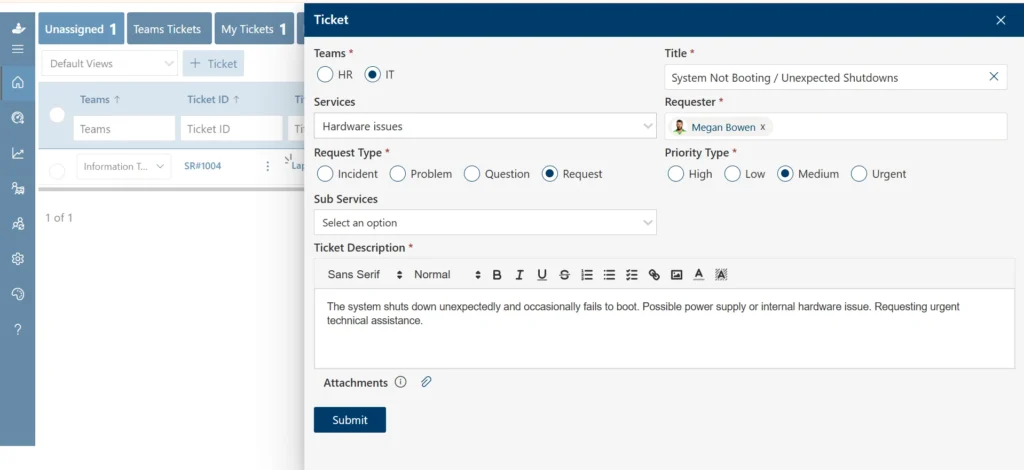
An employee encounters an issue or needs assistance, perhaps their laptop is malfunctioning, they have a question about their benefits package, or they need a new software tool installed. Instead of calling a colleague or composing an email, they navigate to the internal portal or submit via a connected channel (like Microsoft Teams or Slack) and fill out a simple request form.
The form typically captures key details: the type of request, a description of the issue, priority level, and any relevant attachments. This structured submission ensures no critical information is lost at the very first step.
2. Ticket Creation and Categorization
Once submitted, the system automatically generates a ticket with a unique ID. The platform then categorizes the ticket based on predefined rules, for example, a password reset request is automatically tagged as an “IT” ticket with “Low Priority.” This categorization determines where the ticket goes next.
Advanced systems use AI to categorize tickets more accurately, detecting intent from the description and assigning the correct category even when the submitter isn’t sure where their request belongs.
3. Assignment and Routing
The ticket is then routed to the appropriate team or individual. Routing logic can be based on category, department, agent availability, workload balancing, or skill-based matching. For instance, a networking issue might automatically route to a senior network engineer, while a general IT request goes to the first available agent.
Modern systems support both automated routing (using rules and AI) and manual assignment, giving team leads flexibility to redirect tickets when needed.
4. Resolution and Closure
The assigned agent works on the ticket, communicates with the employee through the system (keeping all communication in one thread), and resolves the issue. Once resolved, they update the ticket status to “Resolved” or “Closed.”
Employees often receive an automated notification when their ticket is resolved, and many systems send a short satisfaction survey to collect feedback. This closure loop ensures quality and accountability at every step.
5. Reporting and Performance Tracking
Every resolved (and unresolved) ticket contributes to a growing dataset. Managers can view dashboards showing metrics like average resolution time, ticket volume by department, SLA compliance rates, agent performance, and common request types. This data is invaluable for identifying bottlenecks, justifying resource investments, and continuously improving internal support operations.
Why Businesses Need an Internal Ticketing System
Many organizations still rely on email and chat for internal support, and the consequences are predictable: requests get lost, priorities are unclear, and no one knows who’s responsible for what. Here’s why that model breaks down and why businesses are making the switch.
The Problem with Email-Based Request Management
Email might seem like a simple, familiar solution, but it’s fundamentally ill-suited for managing support requests at scale. When an employee emails the IT team, that email sits in one person’s inbox, invisible to the rest of the team. If that person is out sick, on vacation, or simply overwhelmed, the request dies quietly.
There’s no ticket number, no status update, no escalation path, and no record of the resolution. For the employee, it’s a black hole. For the team, it’s unmanageable chaos disguised as productivity.
The Accountability Gap
Without a ticketing system, accountability is nearly impossible to enforce. Who picked up the request? When was it acknowledged? Was it resolved within the promised timeframe? Email threads and chat messages provide no reliable answers to these questions, especially as teams grow and request volume increases.
An internal ticketing system closes this accountability gap by assigning every ticket to a specific person, tracking every interaction, and measuring every outcome.
Supporting Growing and Distributed Teams
Common Use Cases for an Internal Ticket System
One of the greatest strengths of an internal ticketing system is its versatility. Across virtually every department, these platforms deliver measurable improvements to how work gets done.
Internal Help Desk Ticketing System
Beyond IT, the internal help desk ticketing system serves as a general support hub for the entire organization:
- Employee Service Requests: From requesting a standing desk to ordering business cards, any employee need becomes a trackable ticket.
- Cross-Department Support: Finance needs legal sign-off on a contract. Operations needs HR to complete a compliance form. Ticketing systems route these cross-functional requests efficiently.
- General Workplace Assistance: Questions about company policies, procedures, or tools are captured, answered, and archived, building a knowledge base over time.
HR Support Requests
HR teams manage an enormous volume of employee interactions, and most of them benefit from structured tracking. Common HR tickets include benefits enrollment questions, leave of absence requests, payroll discrepancies, performance management queries, and policy clarifications.
With a ticketing system, HR teams can handle higher volumes without sacrificing response quality, and employees always know the status of their requests.
Facilities and Administrative Requests
Facilities teams deal with physical workplace needs: broken equipment, HVAC complaints, meeting room reservations, office relocations, and supply replenishment. Without a structured system, these requests often get lost or de-prioritized.
An internal ticket system gives facilities teams a clear queue of , prevents duplication, and enables tracking of recurring issues like equipment that needs regular maintenance.
Employee Onboarding and Offboarding
Onboarding a new employee involves dozens of coordinated tasks across IT, HR, Facilities, and Finance, provisioning accounts, setting up equipment, scheduling orientation, and issuing access badges.
An internal ticketing system can trigger automated workflows when a new hire joins, ensuring every task is assigned, tracked, and completed. The same applies to offboarding, where account deactivation, equipment retrieval, and final payroll processing must be handled promptly and accurately.
Key Features of an Internal Help Desk Ticketing System
Not all ticketing platforms are created equal. The best internal help desk ticketing systems combine the following capabilities:
Ticket Management
At the core of any ticketing system is robust ticket management: the ability to create, view, update, assign, prioritize, merge, and close tickets from a single interface. Look for systems that support custom fields, ticket templates, and bulk actions for team efficiency.
Automated Routing
Manual ticket assignment doesn’t scale. Automated routing engines direct tickets to the right team or agent based on category, keywords, workload, and priority, without human intervention. This reduces response times and eliminates the “who handles this?” confusion.
SLA Tracking
Service Level Agreements (SLAs) define how quickly tickets should be acknowledged, responded to, and resolved based on their priority. A capable ticketing system tracks SLA compliance in real time, sends escalation alerts when deadlines are at risk, and generates SLA performance reports for management review.
Self-Service Portal
A self-service portal empowers employees to find answers independently before submitting a ticket. Common questions, how to reset a password, how to request time off, how to connect to the VPN, are answered through searchable articles, reducing ticket volume significantly and freeing support agents for more complex issues.
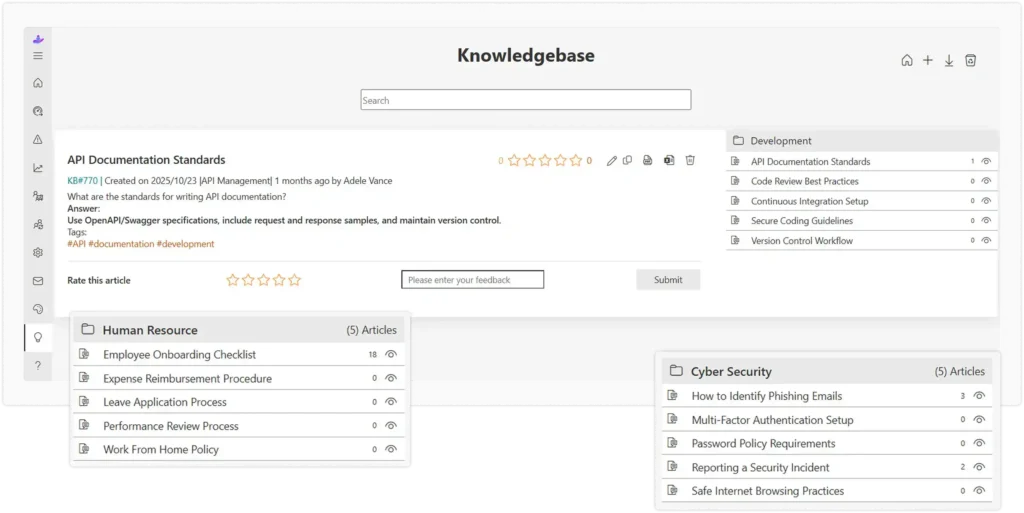
Knowledge Base Integration
Connected to the self-service portal, an integrated knowledge base stores solved tickets, FAQs, how-to guides, and policy documents. As more tickets are resolved, the knowledge base grows richer, creating a compounding return on every support interaction.
Multi-Channel Support
Modern employees don’t want to navigate to a separate portal to submit a request. The best ticketing systems integrate with tools your employees already use: Microsoft Teams, Slack, email, and mobile apps. Tickets can be created and updated from wherever employees work.
Benefits of Using an Internal IT Ticketing System
Faster Issue Resolution
With automated routing, clear ownership, and prioritization built in, tickets reach the right person faster and get resolved more quickly. Employees spend less time waiting and more time working.
Improved Employee Satisfaction
Nothing frustrates employees more than submitting a request and hearing nothing back. A ticketing system provides automatic acknowledgment, status updates, and resolution notifications, giving employees confidence that their needs are being addressed.
Better Workload Management
Managers can see exactly how many tickets each agent has open, their resolution rates, and their average handling time. This visibility enables fair workload distribution, prevents burnout, and helps identify when teams need additional resources.
Increased Visibility Into Support Operations
Before ticketing systems, support operations were largely invisible. With a modern internal help desk ticketing system, everything is tracked and measured. Leaders can see where bottlenecks occur, which request types consume the most time, and how support quality has changed over time.
Internal Ticket System vs Email-Based Support
The differences between a structured ticketing system and traditional email-based support are stark:
Internal Ticket System | Email-Based Support |
Centralized tracking | Scattered communication |
Automated workflows | Manual follow-ups |
Clear ownership & accountability | Unclear responsibility |
SLA monitoring & enforcement | Limited visibility |
Detailed analytics & reporting | Minimal insights |
Priority-based queue management | First-come, first-served chaos |
Self-service knowledge base | Repetitive manual responses |
The conclusion is clear: for any organization handling more than a handful of internal requests per week, email is a liability. An internal ticket system is an investment that pays back in speed, quality, and employee trust.
How AI Systems Reduce Internal Ticket Backlog
Many organizations are discovering how AI systems reduce internal ticket backlog by automating repetitive tasks and accelerating issue resolution. Artificial intelligence is no longer a futuristic add-on, it’s becoming a core component of modern internal ticketing platforms.
Automated Ticket Categorization
AI models trained on historical ticket data can analyze incoming requests and automatically assign the correct category, priority, and tags, with accuracy that often exceeds manual classification. This eliminates a tedious step for agents and ensures tickets are routed correctly from the very first moment.
Intelligent Ticket Routing
Going beyond rule-based routing, AI-powered routing engines learn from patterns over time. They consider agent expertise, past resolution outcomes, current workload, and ticket complexity to make smarter assignment decisions. The result: fewer misrouted tickets, faster resolutions, and better utilization of specialized skills within your support team.
AI-Powered Self-Service
Modern AI chatbots and virtual agents can handle a significant portion of internal support requests without any human involvement. An employee asks “How do I reset my VPN?” the AI understands the intent, searches the knowledge base, and delivers an accurate answer instantly. This dramatically reduces ticket volume for common, repetitive queries.
Suggested Responses for Agents
For tickets that do reach human agents, AI can suggest relevant responses based on similar past tickets. Agents review and send the suggestion (or modify it), cutting average handling time while maintaining quality. This is particularly valuable for new team members who are still learning common request types and standard resolutions.
Best Practices for Managing an Internal Ticketing System
Implementing a ticketing system is only half the battle. Getting the most out of it requires thoughtful management and continuous improvement.
Define Ticket Categories
Before going live, invest time in defining your category taxonomy. Well-designed categories make routing more accurate, reporting more meaningful, and the employee experience smoother. Avoid creating too many categories (which overwhelms employees) or too few (which reduces specificity). Start with broad categories, IT, HR, Facilities, Finance, and add subcategories as patterns emerge.
Establish SLAs
Every ticket category should have defined response and resolution SLAs based on business priority. A server outage is not the same urgency as a monitor stand request. Clear SLAs set expectations for employees, guide agents’ prioritization decisions, and give managers an objective framework for performance evaluation.
Automate Repetitive Processes
Identify your highest-volume, lowest-complexity request types and automate them. Password resets, software access requests, and standard information queries are perfect candidates. Automation frees your best agents to focus on complex, high-value issues where human judgment genuinely matters.
Build a Self-Service Knowledge Base
Every resolved ticket is a potential knowledge base article. Establish a process for converting common resolutions into searchable guides. Over time, a rich knowledge base becomes a force multiplier, deflecting tickets before they’re even created and reducing the load on your support team.
How to Choose the Right Internal Help Desk Ticketing System
With dozens of platforms on the market, selecting the right internal help desk ticketing system requires evaluating several key dimensions:
- The best system is one your employees and agents will actually adopt. Look for intuitive interfaces, simple ticket submission flows, and minimal training requirements. A complex system that goes unused is worse than no system at all.Ease of Use:
- Evaluate the depth of automation on offer. Can you create routing rules based on multiple conditions? Can you trigger workflows automatically? Can you set up SLA escalation alerts? Strong automation is the difference between a system that saves hours and one that simply digitizes existing manual work.Automation Capabilities:
- For organizations deeply embedded in the Microsoft ecosystem, native integration with Teams and SharePoint is critical. Employees should be able to submit tickets without leaving their primary work environment, and ticket updates should surface where teams communicate.Integration with Microsoft Teams and SharePoint:
- Ensure the platform offers the reporting depth your organization needs. Basic ticket counts are table stakes, look for customizable dashboards, trend analysis, SLA reporting, and the ability to export data for further analysis.Reporting and Analytics:
- Your ticketing system should grow with your organization. Verify that the platform can handle increased ticket volumes, additional departments, and new integration requirements. Equally important is security: check for role-based access controls, data encryption, audit logs, and compliance with relevant regulations (GDPR, SOC 2, etc.).Scalability and Security:
Future Trends in Internal Ticketing Systems
The internal ticketing landscape is evolving rapidly, driven by AI advancements, changing work patterns, and rising employee expectations. Here’s what to watch:
AI-Driven Automation
The next generation of ticketing platforms will move beyond rule-based automation to truly intelligent systems. AI models will not only categorize and route tickets automatically, they will proactively identify problems before employees submit tickets, generate resolution recommendations for agents in real time, and continuously learn from every interaction to improve over time
Conversational Ticketing
The future of ticket submission isn’t a form, it’s a conversation. Conversational ticketing allows employees to describe their issues in natural language through chat interfaces, and the system intelligently creates, categorizes, and routes the ticket in the background. This frictionless experience dramatically increases adoption and reduces the effort required to get help.
Microsoft Teams-Based Support
As Microsoft Teams becomes the central hub for workplace communication, internal support will increasingly live within it. Native Teams-based ticketing allows employees to submit requests via chat or commands, receive status updates in Teams, and get AI-powered answers, all without switching applications. This convergence of communication and support is a defining trend for the next several years.
Conclusion
An internal ticketing system helps organizations manage employee requests more efficiently by replacing scattered emails with a structured, trackable process. Whether for IT, HR, facilities, or other departments, it improves visibility, accountability, and response times.
By centralizing requests, organizations can boost employee satisfaction, streamline workflows, and gain valuable operational insights. Modern solutions also leverage AI and automation to reduce manual work and accelerate issue resolution.
When selecting a solution, look for ease of use, automation capabilities, seamless integrations, reporting features, and scalability. The right internal help desk ticketing system can improve support operations today while supporting future growth.
Join Our Creative Community
Frequently Asked Questions
What is an internal ticketing system?
An internal ticketing system is a software platform that allows employees to submit requests or issues to internal support teams (IT, HR, Facilities, etc.) in a structured format. Each request becomes a “ticket” that is tracked from submission through resolution, ensuring accountability, transparency, and measurable outcomes.
What is an internal IT ticketing system?
An internal IT ticketing system is a specialized version focused specifically on technology-related requests: hardware support, software installations, password resets, network issues, and device management. It gives IT teams a structured queue, enables prioritization, and provides data on recurring issues that may indicate systemic problems
How does an internal help desk ticketing system work?
Employees submit requests through a portal, chat integration, or email. The system creates a ticket, categorizes it, routes it to the appropriate agent or team, tracks all communications and updates, and closes the ticket upon resolution. Throughout the process, both the employee and the support team have real-time visibility into status and progress.
What are the benefits of an internal ticket system?
Key benefits include faster issue resolution through automated routing and prioritization; improved employee satisfaction through transparent communication and timely updates; better workload management for support teams; increased visibility for managers through analytics; and reduced operational inefficiencies by eliminating lost requests and duplicated work.
How do AI systems reduce internal ticket backlog?
AI reduces backlog through automated ticket categorization and routing, AI-powered chatbots that resolve common queries without human involvement, suggested responses that speed up agent handling time, and predictive workload management that anticipates volume spikes. Together, these capabilities allow support teams to handle significantly more requests with the same (or fewer) resources.
Which departments can use an internal ticketing system?
Any department that receives and processes internal requests can benefit. Common departments include IT (hardware and software support), HR (employee services and policy queries), Facilities (maintenance and space management), Finance (expense and reimbursement requests), Legal (contract reviews), and Operations (cross-departmental coordination).
What features should an internal help desk ticketing system include?
Essential features include robust ticket management, automated routing, SLA tracking and escalation, a self-service portal, knowledge base integration, multi-channel support (especially Microsoft Teams and Slack), and comprehensive analytics. Advanced systems also offer AI-powered categorization, conversational interfaces, and predictive analytics capabilities.


_JiluXJRGNl.svg)























