

_eH2jDg7dZ.png)
Managing employee information across a growing organization is harder than it looks. HR teams end up maintaining spreadsheets that go stale within weeks. Employees spend time hunting through old org charts or sending emails just to find a colleague’s department or direct line. For companies using Microsoft 365, there is a far better way to handle this.
Microsoft 365 is perfect for internal employee directories, offering seamless integration with tools like SharePoint, Outlook, and Teams. This allows easy access to employee info and enhances collaboration across teams.
It also ensures robust security and compliance, with customizable permissions and real-time updates, making it a secure and scalable solution for managing employee data.
Employee Directory 365 is built specifically to work within the Microsoft 365 ecosystem, turning the tools your team already uses every day into a powerful, self-updating employee directory. Whether your team has 50 people or 5,000, Employee Directory 365 gives everyone the ability to find who they need, understand how teams are structured, and connect instantly through Microsoft Teams or Outlook, all from a single, unified interface.
This blog breaks down exactly why Microsoft 365 is such a strong foundation for an internal employee directory, and how Employee Directory 365 takes full advantage of that foundation.
Centralized Employee Data Management in Microsoft 365
One of the most persistent challenges in any organization is keeping employee data accurate and consistent. When information lives across separate systems, a payroll platform here, an HR tool there, a shared spreadsheet somewhere else, things fall apart quickly. Phone numbers go out of date. Job titles do not reflect recent promotions. New hires are missing entirely from the company directory for weeks after they start.
Microsoft 365 addresses this problem at the foundation. Azure Active Directory (Azure AD), which underpins every Microsoft 365 deployment, stores authoritative employee records including names, job titles, departments, office locations, email addresses, and more. When IT or HR makes a change in one place, that update flows through the entire Microsoft 365 environment automatically.
Employee Directory 365 connects directly to Azure AD and Microsoft 365 profiles, meaning the directory you publish to your employees is always drawing from your most current data. There is no manual syncing, no spreadsheet to maintain, and no risk of employees seeing outdated information.
Key advantages of this centralized approach include:
- A single source of truth for all employee records
- Automatic updates when employee profiles are edited in Microsoft 365 admin tools
- No duplicate data entry or additional database to manage
- Reduced burden on HR and IT teams for directory maintenance
For organizations that have invested in Microsoft 365, this is one of the clearest productivity gains available. Employee Directory 365 makes it actionable without requiring any custom development or third-party integrations.
Seamless Integration with SharePoint and Microsoft Teams
The value of an employee directory depends largely on where people can access it. A tool that lives in a separate application or requires a separate login will always see low adoption, employees will simply go back to emailing HR or asking around. The most effective directories are embedded directly inside the tools people are already using.
Employee Directory 365 integrates natively with both SharePoint and Microsoft Teams, the two most widely used collaboration platforms within Microsoft 365.
SharePoint Integration
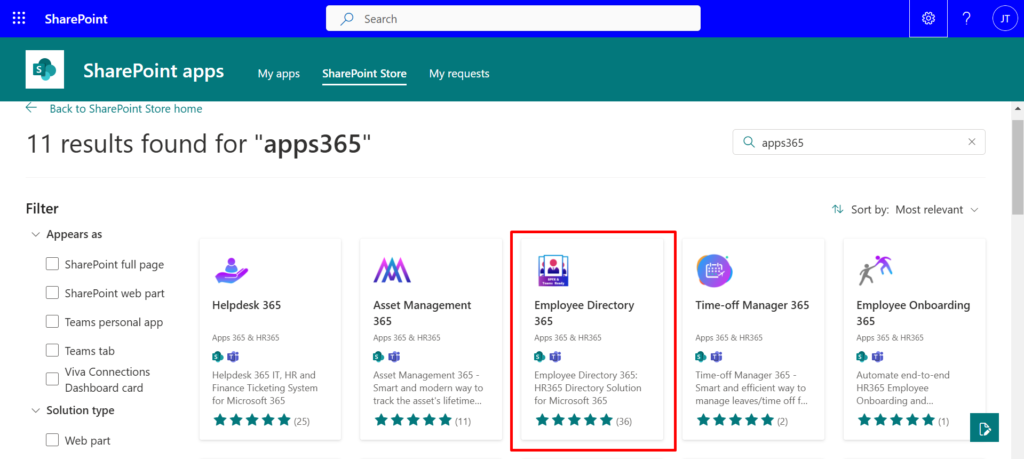
For organizations that use SharePoint as their intranet or internal portal, Employee Directory 365 can be added as a web part directly to any SharePoint page. Employees searching for a colleague can do so right from the company homepage, without navigating away or opening a separate application. The directory inherits SharePoint’s familiar interface, which reduces training time and encourages regular use.
Microsoft Teams Integration
Teams has become the daily hub for most Microsoft 365 users. Employee Directory 365 brings the directory directly into Teams as a tab within any channel or as a personal app pinned to the sidebar. When an employee needs to find a project manager in another department or locate the right contact in a regional office, they can search the directory right inside Teams and then initiate a chat, call, or video meeting with a single click.
This kind of tight integration is not possible with generic directory tools. Because Employee Directory 365 was purpose-built for the Microsoft 365 environment, it works with the grain of how your team already operates rather than adding friction to it.
Role-Based Permissions and Secure Access Control
Not all employee information should be visible to everyone in the organization. A company might want frontline workers to see basic contact details but restrict access to salary bands, personal phone numbers, or HR notes. Executive profiles might warrant a different level of visibility than general staff. In regulated industries, access to certain employee data may have compliance implications.
Microsoft 365 has one of the most mature access control frameworks available in enterprise software, built around Azure AD roles, security groups, and conditional access policies. Employee Directory 365 leverages this framework rather than reinventing it.
Administrators can configure the directory to:
- Control which fields are visible to different groups of users
- Restrict directory access to employees within the organization only
- Apply different visibility rules for contractors, part-time staff, or external collaborators
- Use existing Azure AD security groups to manage access without creating new administrative overhead
- Ensure sensitive HR attributes are never exposed in public-facing views
Because Employee Directory 365 inherits permissions directly from Microsoft 365, there is no second system to maintain for access management. When an employee’s role changes in Azure AD, their directory permissions update automatically. When someone leaves the organization and their account is deactivated, they disappear from the directory immediately.
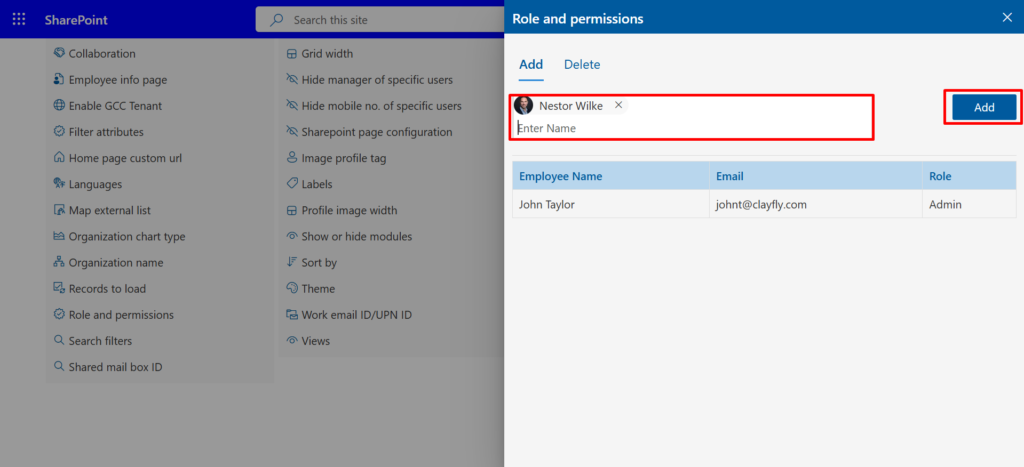
For compliance-conscious organizations, this integration means the directory stays within the governance boundaries already established for the rest of the Microsoft 365 environment.
Real-Time Updates and Directory Synchronization
A directory is only useful when it is accurate. Most organizations that rely on manually maintained directories know the frustration of searching for a employee contact and finding information that is months out of date. This problem is compounded as companies grow or go through organizational changes such as rebranding, restructuring, or rapid hiring.
Employee Directory 365 solves this problem entirely through real-time synchronization with Microsoft 365 user profiles. There is no nightly sync job to worry about, no CSV import process, and no manual update queue.
The moment an administrator updates a user profile in Microsoft 365, changing a job title, assigning a new manager, adding a phone number, or updating a department, that change is reflected in Employee Directory 365 immediately.
What This Means in Practice
- A new hire added to Microsoft 365 on their start date appears in the directory the same day
- An employee who changes departments shows up under the correct team without any additional action
- Profile photos updated in Microsoft 365 sync automatically, keeping the directory visually current
- Manager hierarchies and org chart views update dynamically as reporting structures change
For HR teams, this eliminates a category of ongoing work entirely. There is no longer a need to manually update a separate directory system whenever employee information changes. For employees, it means they can trust what they see in the directory rather than second-guessing whether it is current.
Scalability and Customization for Growing Organizations
Employee directories often start small and grow in complexity over time. A startup might need a simple list of names and email addresses. As the company grows into multiple offices across different regions, the directory needs to handle department filters, location searches, org chart views, and custom fields specific to the company’s structure. The directory solution needs to grow with the organization rather than requiring a replacement every few years.
Employee Directory 365 is designed to scale from small teams to enterprise organizations without requiring additional infrastructure or significant reconfiguration. It is hosted within your existing Microsoft 365 tenant, which means the same platform that handles your email and document storage also supports your employee directory as your headcount grows.
Customization Capabilities
Different organizations have different needs, and a one-size-fits-all directory will always come up short in some areas. Employee Directory 365 provides a range of customization options to match the specific way your organization operates:
- Custom fields to capture information unique to your company, such as certifications, skills, or project affiliations
- Configurable employee search filters allowing employees to search by department, location, team, or any custom attribute
- Org chart views that reflect your actual reporting structure, useful for new employees navigating the organization
- Branded interfaces that match your company’s visual identity within SharePoint
- Multi-language support for international organizations with employees across different regions
The platform is also designed to handle common enterprise complexities such as subsidiaries, multiple legal entities under one tenant, and mixed employee types including full-time employees, contractors, and external partners who need limited directory access.
As your organization evolves, Employee Directory 365 evolves with it. Adding a new office location, restructuring teams, or rolling out to a new region involves configuring existing settings rather than rebuilding from scratch.
Conclusion
Microsoft 365 offers a strong foundation for internal employee directories with centralized data management through Azure AD, integration with SharePoint and Teams, and real-time synchronization. Employee Directory 365 leverages this platform, transforming your existing Microsoft 365 environment into an efficient, accurate, and easy-to-use directory without adding extra systems.
For organizations already using Microsoft 365, Employee Directory 365 is the perfect solution, seamlessly integrating with your existing tools and IT-managed identities and permissions.
Join Our Creative Community
Frequently Asked Questions
What is Employee Directory 365 and how is it different from the standard Microsoft 365 directory?
Employee Directory 365 is a dedicated employee directory solution built on top of Microsoft 365 and Azure Active Directory. While Microsoft 365 includes basic profile pages through Delve and the People app, Employee Directory 365 provides a much richer, searchable, and customizable directory experience, including advanced search filters, org chart views, custom fields, and direct integration with SharePoint and Teams. It is purpose-built for the use case of finding and connecting with colleagues across an organization.
Does Employee Directory 365 require any additional infrastructure outside of Microsoft 365?
No. Employee Directory 365 runs entirely within your existing Microsoft 365 tenant. There are no additional servers to provision, no separate database to maintain, and no outside hosting to arrange. Everything operates within the Microsoft 365 environment your IT team already manages, which also means it stays within your existing security and compliance boundaries.
How does Employee Directory 365 keep employee data up to date?
Employee Directory 365 syncs in real time with Microsoft 365 user profiles and Azure Active Directory.
Any changes made to employee records through standard Microsoft 365 admin tools, including name changes, department moves, title updates, new profile photos, or manager assignments, are reflected in the directory immediately. There is no manual update process or batch sync required.
Can we control which employee information is visible to different groups of users?
Yes. Employee Directory 365 uses Microsoft 365’s native role-based access control and Azure AD security groups to manage visibility. Administrators can configure which fields are visible to different user groups and restrict directory access to internal employees only.
Sensitive HR attributes can be hidden from standard directory views while remaining accessible to authorized administrators. Since this access control is managed through existing Microsoft 365 tools, there is no separate permissions system to maintain.
Is Employee Directory 365 suitable for large organizations with multiple offices or regions?
Yes. Employee Directory 365 is designed to scale with your organization, from small teams to large enterprises with thousands of employees across multiple offices, countries, or subsidiaries.
The platform supports custom fields, multi-language interfaces, location-based filters, and complex reporting structures. As your organization grows, you can extend and reconfigure the directory without requiring a platform change.
How does Employee Directory 365 integrate with Microsoft Teams?
Employee Directory 365 integrates with Microsoft Teams both as a tab within team channels and as a personal app that employees can pin to their Teams sidebar.
Employees can search the full directory without leaving Teams and initiate chats, calls, or video meetings directly from a colleague’s profile card. This makes the directory a natural part of the daily Teams workflow rather than a separate tool employees have to remember to use.
Can we add custom fields to capture information specific to our organization?
Yes. Employee Directory 365 supports custom attributes beyond the standard Microsoft 365 profile fields. Organizations can add fields for skills, certifications, project roles, office locations, spoken languages, or any other attribute relevant to how their team operates.
These custom fields are fully searchable and filterable within the directory, making it easier for employees to find colleagues with the specific expertise they need.
What does the implementation process look like for Employee Directory 365?
Because Employee Directory 365 is built on Microsoft 365 and draws from Azure Active Directory, the setup process is significantly simpler than implementing a standalone HR system.
There is no data migration required for core employee attributes, as the directory connects to your existing Microsoft 365 profiles. Most organizations can deploy Employee Directory 365 within their SharePoint environment and make it available in Teams within a short setup period. Your IT team handles the deployment through standard Microsoft 365 administration tools.


_JiluXJRGNl.svg)























