

_eH2jDg7dZ.png)
Choosing the right help desk software can make or break how your team handles support requests. If your organization already runs on Microsoft 365 and SharePoint, the decision often comes down to two names you have probably come across in your research: Helpdesk 365 and RaiseATicket.
- Helpdesk 365 is built directly on SharePoint and Microsoft 365, so there is no separate platform to manage.
- RaiseATicket works as a standalone ticketing tool that sits outside your existing Microsoft ecosystem.
- Helpdesk 365 offers deeper automation using Power Automate and native Microsoft 365 workflows.
- Security and compliance are easier to manage with Helpdesk 365 because your data stays inside your Microsoft 365 tenant.
- For teams already invested in SharePoint and Microsoft 365, Helpdesk 365 offers a smoother, more connected experience.
Both tools promise faster ticket resolution, better tracking, and happier end users. But they take very different paths to get there. Helpdesk 365 is built natively for SharePoint and Microsoft 365, while RaiseATicket positions itself as a standalone, general-purpose ticketing tool.
In this guide, we will break down how these two platforms compare across features, integration, automation, security, and day-to-day usability, so you can pick the one that truly fits your workplace and your team’s way of working.
Why the Right Help Desk Tool Matters
Support tickets pile up fast once a company grows past a handful of employees. Without a proper system, requests get lost in email threads, response times slip, and employees lose trust in internal support. A dedicated help desk tool fixes this by giving every request a clear owner, a status, and a paper trail.
But the tool you pick also shapes how much extra work your IT team takes on. A platform that fits naturally into your existing systems needs less babysitting than one that lives on its own island. That is exactly the kind of decision Helpdesk 365 and RaiseATicket represent, and it is worth understanding before you commit your team to either one.
What Is Helpdesk 365?

Helpdesk 365 is a help desk and ticket management solution built to run natively inside SharePoint and Microsoft 365. Instead of asking your team to learn and log into a brand-new platform, it works within tools your employees already use every day, such as SharePoint, Microsoft Teams, and Outlook.
Because it lives inside your Microsoft 365 environment, Helpdesk 365 makes it easy to manage tickets, assign owners, track SLAs, and generate reports without switching between multiple systems. It is designed for IT teams, HR helpdesks, and internal support teams that want a connected, low-friction way to manage requests.
This approach also means new employees do not need separate training on a brand-new ticketing system. If they already know how to open a SharePoint page or a Teams tab, they already know how to raise a ticket. For IT administrators, it also means one less vendor, one less login system, and one less set of permissions to manage separately from the rest of the company’s Microsoft 365 setup.
Key highlights of Helpdesk 365 include:
- Customizable ticket forms and workflows
- Automation powered by Power Automate
- Role-based access and permissions through Microsoft Entra ID
- Built-in reporting and dashboards, extendable with Power BI
- Support for multiple departments from a single platform
- Ticket submission directly from Microsoft Teams
Helpdesk 365 G2 Rating: 4.7/5
Ready to simplify your SharePoint help desk?
What Is Raiseaticket?
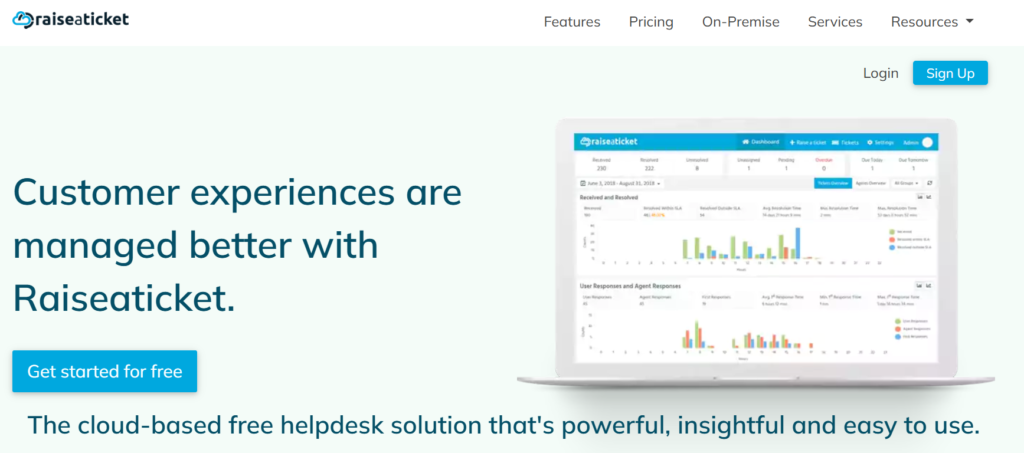
Raiseaticket is a cloud-based ticketing and help desk platform designed to work independently of any specific ecosystem. It focuses on core ticketing functionality such as logging requests, assigning agents, tracking status, and closing tickets.
Since it is not tied to SharePoint or Microsoft 365, RaiseATicket can appeal to organizations that use a mix of tools or are not deeply invested in the Microsoft ecosystem. It offers a standalone dashboard, its own login system, and its own set of integrations that need to be configured separately from your existing Microsoft 365 setup.
Because it is a general-purpose product, RaiseATicket is often positioned as a fit for smaller support teams or businesses that want a quick, no-frills ticketing system without connecting it deeply into a larger Microsoft 365 environment. This can simplify initial setup for companies that are not already SharePoint users, though it also means the tool exists as one more separate system for IT to maintain.
Key highlights of RaiseATicket include:
- Standalone, cloud-hosted ticketing system
- Basic automation and ticket routing
- Multi-channel ticket submission
- Independent dashboard and reporting
- Works across different business environments, not limited to Microsoft 365
Quick Comparison Overview
Category | Helpdesk 365 | RaiseATicket |
Platform type | Native SharePoint & Microsoft 365 app | Standalone cloud ticketing tool |
Best fit for | Microsoft 365 based organizations | Teams outside the Microsoft ecosystem |
Integration | Built into SharePoint & Teams | Requires separate integration setup |
Automation | Power Automate powered workflows | Basic ticket routing rules |
Reporting | Power BI ready dashboards | Built-in standalone dashboard |
Data & compliance | Stays inside Microsoft 365 tenant | Stored on separate infrastructure |
Setup effort | Low for existing Microsoft 365 users | New environment setup required |
See Helpdesk 365 in Action
Feature by Feature Comparison
See how each solution compares across key features, capabilities, integrations, automation, reporting, and usability. This makes it easier to identify which platform best fits your team’s needs and existing workflow.
SharePoint and Microsoft 365 Integration
This is where the two platforms differ the most. Helpdesk 365 is built on top of SharePoint, which means tickets, forms, and workflows live inside the same environment your team already uses for documents, intranet pages, and collaboration. There is no extra login, no separate app to maintain, and no data silo sitting outside your Microsoft 365 tenant.
RaiseATicket, on the other hand, runs as its own separate application. If your organization relies heavily on SharePoint and Microsoft 365, you will need extra effort to connect RaiseATicket with your existing systems, which can mean additional setup, extra licensing considerations, and ongoing maintenance for your IT team.
Ticket Management and Automation
Both platforms let you log, assign, and track tickets. However, Helpdesk 365 goes a step further by tapping into Power Automate, letting you build custom approval flows, escalation rules, and notifications without writing code. Since it sits inside Microsoft 365, these automations can also pull in data from other Microsoft apps like Teams, Outlook, and SharePoint lists, making it easier to trigger actions across departments.
RaiseATicket offers standard ticket routing and basic automation rules, which cover the essentials but may not offer the same depth of customization for teams with complex approval chains, multi-department workflows, or advanced escalation needs.
Customization and Flexibility
Helpdesk 365 allows you to customize ticket forms, fields, and workflows directly within SharePoint, so you can tailor the system to match how your departments already work. Because it uses familiar SharePoint lists and libraries under the hood, IT teams can extend it further using standard Microsoft 365 tools they already know, without relying on the vendor for every small change.
RaiseATicket provides configuration options within its own interface, but customization is generally limited to what the platform allows through its settings, since it does not share the same open, extensible foundation as SharePoint.
Reporting and Analytics
Helpdesk 365 comes with built-in dashboards and reporting that can be extended using Power BI, giving IT managers a clear, visual way to track ticket volume, resolution times, and agent performance. Since the data already lives in SharePoint, connecting it to other Microsoft 365 reporting tools is straightforward, and reports can be shared through the same channels your team already uses.
RaiseATicket also provides reporting features, though they are limited to its own built-in dashboard and may require exporting data if you want to combine it with reports from other systems or build a company-wide reporting view.
Security and Compliance
For organizations that care about where their data lives, this is an important difference. Helpdesk 365 keeps all ticket data inside your Microsoft 365 tenant, so it inherits the same compliance certifications, data residency options, and security controls your organization already trusts, including permissions managed through Microsoft Entra ID and conditional access policies.
RaiseATicket, being a separate cloud platform, stores data on its own infrastructure. This means you will need to review its individual security practices and compliance certifications separately from your Microsoft 365 setup, and manage a second set of user access controls.
Ease of Use and Setup
Helpdesk 365 has an advantage for teams already comfortable with SharePoint, since the learning curve is minimal. End users can raise tickets from a familiar SharePoint page or Teams tab, and IT staff can manage the backend using tools they already know, cutting down on training time for new hires.
RaiseATicket requires learning a new interface, though its standalone nature can feel simpler for organizations that are not using Microsoft 365 at all and want a lightweight tool with fewer moving parts to configure.
Mobile Access and Remote Support
Modern teams expect to raise and track tickets from anywhere. Helpdesk 365 benefits from the Microsoft 365 mobile ecosystem, so employees can submit and follow up on requests through Teams or SharePoint mobile apps they may already have installed on their phones.
RaiseATicket offers its own access methods for submitting tickets remotely, though this means employees need to use a separate app or mobile view rather than one already installed for other work purposes.
Scalability for Growing Teams
As a company adds more departments or locations, Helpdesk 365 scales by extending the same SharePoint and Microsoft 365 foundation already used across the business, so growth does not require a parallel licensing or infrastructure decision.
RaiseATicket can also scale to support more agents and tickets, but scaling often means expanding within its own separate platform rather than leveraging infrastructure your company has already invested in.
Customer Support
Both providers offer customer support channels for onboarding and troubleshooting. Helpdesk 365, backed by Apps365, offers guidance specifically focused on SharePoint and Microsoft 365 environments, which can be valuable if your issues are tied to that ecosystem. RaiseATicket offers general platform support suited to its standalone product.
Real World Use Cases
IT Support Teams: An IT department using Helpdesk 365 can let employees log hardware, software, and access requests directly from a Teams tab, with tickets automatically routed to the right technician using Power Automate rules. RaiseATicket can handle the same basic requests, but technicians would work from a separate dashboard disconnected from the Microsoft 365 tools they use for everything else.
HR Helpdesks: HR teams often deal with sensitive requests such as leave approvals, onboarding tasks, or policy questions. With Helpdesk 365, these tickets stay inside the same secure Microsoft 365 tenant as employee records, with permissions managed through familiar SharePoint groups. RaiseATicket would require HR to trust a separate system with similarly sensitive information.
Facilities and Admin Teams: Facilities requests, like maintenance or office supplies, tend to be simple and high volume. Both tools can manage this well, but Helpdesk 365 allows facilities staff to raise and track requests from the same SharePoint intranet page employees already visit for company announcements, reducing the need for a separate bookmark or login.
Multi-Department Organizations: Larger organizations running IT, HR, and facilities support side by side benefit from Helpdesk 365’s ability to separate each department’s tickets using SharePoint’s existing site and permission structure, while still offering centralized reporting through Power BI. RaiseATicket can support multiple departments too, but each one operates within its own standalone dashboard rather than a shared Microsoft 365 foundation.
Deployment Time and Rollout
Many teams pick a help desk tool based on price or a quick demo, without checking how well it fits their existing technology stack. This often leads to double data entry, extra logins, and a support tool that employees avoid using because it feels disconnected from their daily work.
Another common mistake is underestimating automation needs early on. A tool that looks sufficient for a small team can quickly become a bottleneck once ticket volume grows and approval chains get more complex. It is worth thinking ahead about whether the platform can grow with automation needs, not just ticket volume.
Finally, many organizations overlook where their support data will live. If compliance and data residency matter to your business, checking whether a tool sits inside your existing Microsoft 365 tenant, like Helpdesk 365 does, or on a separate third-party platform, like RaiseATicket, should be part of the decision from day one.
Common Mistakes to Avoid When Choosing a Help Desk Tool
Many teams pick a help desk tool based on price or a quick demo, without checking how well it fits their existing technology stack. This often leads to double data entry, extra logins, and a support tool that employees avoid using because it feels disconnected from their daily work.
Another common mistake is underestimating automation needs early on. A tool that looks sufficient for a small team can quickly become a bottleneck once ticket volume grows and approval chains get more complex. It is worth thinking ahead about whether the platform can grow with automation needs, not just ticket volume.
Finally, many organizations overlook where their support data will live. If compliance and data residency matter to your business, checking whether a tool sits inside your existing Microsoft 365 tenant, like Helpdesk 365 does, or on a separate third-party platform, like RaiseATicket, should be part of the decision from day one.
Which One Should You Choose?
Choose Helpdesk 365 if:
Your organization already uses SharePoint and Microsoft 365 as its core workplace platform. Since your team is already comfortable navigating these tools, adopting Helpdesk 365 feels like an extension of daily work rather than a new system to learn from scratch.
You want tickets, workflows, and reports to live inside the same ecosystem as your other business tools, avoiding the extra step of exporting or syncing data between separate systems. Teams that need deeper automation using Power Automate and reporting through Power BI will also find Helpdesk 365 more capable out of the box.
Data residency and compliance within Microsoft 365 matter to your organization, since Helpdesk 365 keeps everything under the same trusted framework your IT and security teams already manage.
Choose RaiseATicket if:
Your organization does not use Microsoft 365 or SharePoint as its primary platform, since there would be little advantage gained from a SharePoint-native tool. It also suits businesses that want a simple, standalone ticketing tool without any ecosystem dependency, or whose support needs are straightforward and do not require deep workflow automation. It may also work as a temporary option for teams still deciding on a long-term Microsoft 365 strategy.
Things to Confirm Before You Decide
Before finalizing either tool, it helps to map out how tickets currently move through your organization, from the moment a request is raised to the moment it is closed. This makes it easier to spot whether a platform’s automation and approval features actually match your real workflow, rather than just its marketing checklist.
It is also worth asking who will own the system long term. Since Helpdesk 365 lives inside SharePoint, your existing Microsoft 365 administrators can usually manage it without hiring for a new skill set. A standalone platform like RaiseATicket may need a dedicated owner familiar with its specific interface and settings.
Conclusion
For most organizations that already run on Microsoft 365, Helpdesk 365 is the stronger choice. It removes the friction of managing a separate application, keeps your data inside a compliance framework you already trust, and lets you build deeper automation using tools like Power Automate and Power BI. Employees do not need to learn a new system since everything works inside SharePoint and Teams, which they already use daily.
RaiseATicket can still work well for organizations that are not built around Microsoft 365 and simply need a lightweight, standalone ticketing tool. But if your workplace already lives inside SharePoint, Helpdesk 365 offers a more connected, secure, and scalable path forward, with less overhead for your IT team to manage long term.
Join Our Creative Community
Frequently Asked Questions
Is Helpdesk 365 only for IT support teams?
No. While it is popular for IT helpdesks, Helpdesk 365 can also be used by HR, facilities, finance, and any internal team that needs to manage requests and tickets.
Do I need any extra software to run Helpdesk 365?
No separate software is required. Helpdesk 365 runs inside your existing SharePoint and Microsoft 365 environment.
Can RaiseATicket integrate with Microsoft 365?
RaiseATicket can be connected to other systems through its available integrations, but since it is a standalone platform, this typically requires additional setup compared to a solution built natively on Microsoft 365.
Which tool is easier to set up for a Microsoft 365 based company?
Helpdesk 365 is generally easier to set up for Microsoft 365 based organizations since it works within tools your team already uses, reducing onboarding time and training effort.
Does Helpdesk 365 support automation without coding?
Yes. Helpdesk 365 uses Power Automate, which lets you build automated workflows and approval chains without writing any code.
Can multiple departments use the same help desk instance?
Yes, both platforms allow multiple departments to use the same instance, though Helpdesk 365 makes it easier to keep each department’s data organized using SharePoint’s existing structure of sites and permissions.
Is employee training needed to start using either tool?
Helpdesk 365 typically needs less training since employees already work inside SharePoint and Teams. RaiseATicket may require a short onboarding session since it introduces a new interface employees have not used before.
Which tool is better for a company planning to grow quickly?
Helpdesk 365 tends to scale more smoothly for growing Microsoft 365 based companies, since it extends infrastructure already in place rather than requiring a separate platform to grow alongside the business.


_JiluXJRGNl.svg)























