

Top 12 FAQ Software Solutions to Improve Customer Support

Your customers have questions. Your support team has answered them hundreds of times. So why are people still waiting for the same answers?
The problem often isn’t missing information. It’s that customers cannot find it when they need it.
- FAQ software helps users find answers and resolve common issues.
- Key features include AI search, knowledge bases, and support integrations.
- Helpdesk 365 combines knowledge management with AI-powered ticketing.
- Choose FAQ software based on usability, features, security, and business needs.
FAQ software helps businesses organize common questions, publish helpful answers, and make support information available around the clock. Some platforms offer simple FAQ pages, while others provide searchable knowledge bases, AI-powered answers, and ticket management.
According to Salesforce, 61% of customers prefer self-service for simple issues. Yet a Gartner survey found that only 14% of customer service issues were fully resolved through self-service in its study.
This gap shows why choosing the right software matters.
In this guide, we’ll compare 12 FAQ software tools, explain their features, identify where each works best, and help you choose a solution that fits your support needs.
What Is FAQ Software?
FAQ software is a tool that helps businesses create, organize, publish, and manage answers to frequently asked questions. It allows customers and employees to find information independently through searchable help centers, knowledge bases, or website FAQ sections.
Unlike a basic webpage, dedicated FAQ management software can support article editing, content categories, user permissions, feedback collection, and search analytics.
For example, imagine a SaaS company receiving 80 questions about password resets every week.
Instead of replying to every request individually, the company can publish one clear troubleshooting guide and make it available through its support portal.
Customers get instructions immediately, while agents can focus on issues that need more attention.
However, FAQ software is not the same as a complete customer service platform. Some products only publish answers. Others connect those answers with live chat, AI assistants, and support tickets.
Understanding that distinction is important before comparing products.
12 Best FAQ Software Tools: Quick Comparison
The following tools serve different business needs, from basic website FAQs to complete support environments.
Our evaluation focused on the following areas:
FAQ Software | Best For | Main Strength |
Helpdesk 365 | Microsoft 365 employee support | Knowledge base and IT ticketing |
Zendesk | Large customer support teams | Knowledge base and ticket management |
Freshdesk | Small and growing businesses | Customer portal and support automation |
Help Scout | Email-focused support teams | Help articles and shared inbox |
Document360 | SaaS documentation teams | Structured product knowledge |
Helpjuice | Businesses with large knowledge bases | AI search and content management |
Intercom | AI-assisted customer support | Conversational answers and human handoff |
ProProfs Knowledge Base | Small businesses and startups | FAQ creation and templates |
Zoho Desk | Businesses using Zoho products | Help center and ticket tracking |
Stonly | Product onboarding and troubleshooting | Interactive support guides |
BetterDocs | WordPress websites | FAQ and documentation publishing |
Crisp | Small customer service teams | Live chat and multilingual help center |
1. Helpdesk 365
Best for: Organizations using Microsoft 365 for internal IT and employee support.
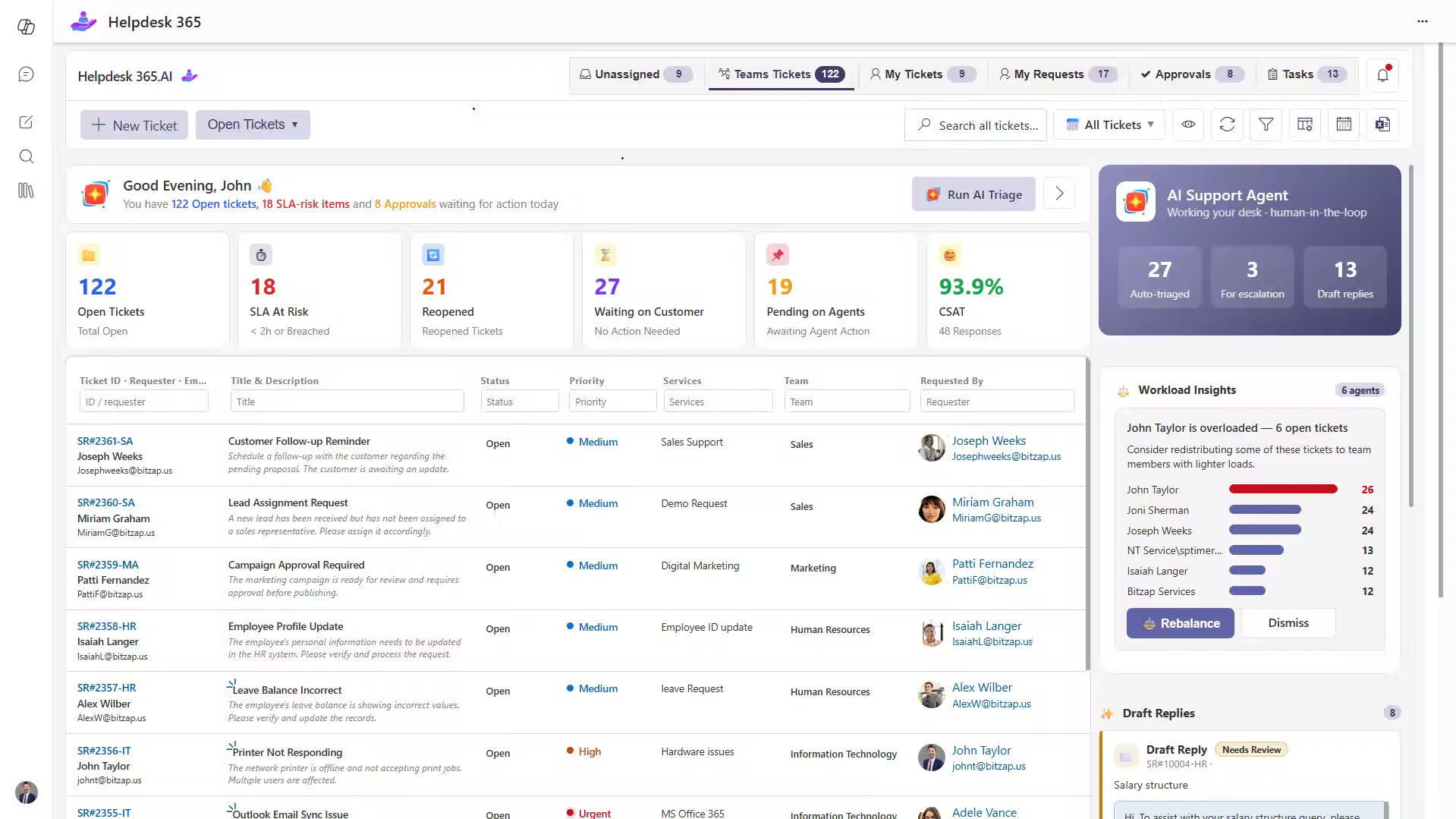
SharePoint Helpdesk 365 is an AI-powered helpdesk software platform built for Microsoft 365, SharePoint, and Microsoft Teams.
Unlike conventional customer-facing FAQ builders, Helpdesk 365 focuses primarily on employee support and internal service requests.
Its knowledge base helps employees and support agents access useful answers, troubleshooting instructions, and documented solutions.
Key Features
- Knowledge article creation from resolved tickets
- Searchable troubleshooting information
- Microsoft Teams and SharePoint integration
- Automated ticket routing and notifications
Why Consider Helpdesk 365?
Imagine an employee who cannot access a business application.
The IT team may have resolved the same problem several times before, but the solution is buried inside old support tickets.
Helpdesk 365 helps teams turn resolved requests into reusable knowledge articles.
Employees and support agents can then find documented solutions instead of starting each investigation from the beginning.
If a problem requires technical assistance, the request can be handled through the ticketing system.
This connection between knowledge management and everyday support makes Helpdesk 365 relevant for Microsoft 365 organizations.
Things to consider: Helpdesk 365 is designed primarily for internal employee support. Businesses needing a public customer-facing FAQ website should confirm their external access and publishing requirements separately.
2. Zendesk
Best for: Businesses managing high volumes of customer support requests.
Zendesk combines customer service software with knowledge management features. Its knowledge base lets businesses publish FAQs, troubleshooting instructions, and detailed support articles.
The platform connects self-service content with the support workflow, allowing agents to use approved information while handling customer requests.
Key Features
- Searchable customer help center
- AI-generated answers based on knowledge content
- Article publishing and review workflows
- Customer ticket management
- Knowledge base analytics
- Content access permissions
Why Consider Zendesk?
Suppose customers regularly contact your business about shipping policies, refunds, and account problems.
Zendesk can organize answers in a branded help center while allowing customers to contact support when an article does not solve their problem.
Support teams can also identify outdated content and improve existing instructions.
Things to consider: Zendesk may require more configuration than a simple FAQ builder. Businesses that only need a small question-and-answer section could find a complete helpdesk platform unnecessary.
3. Freshdesk
Best for: Small and medium businesses that need FAQs and ticket management together.
Freshdesk is customer support software that includes a self-service knowledge base.
Businesses can create articles, organize them into categories, and publish information through a customer portal.
Customers can use these resources before contacting an agent, while support teams manage requests through the same platform.
Key Features
- Customer-facing knowledge base
- Customizable support portals
- Multilingual knowledge content
- Ticket creation and tracking
- Support workflows and automation
- Reporting and customer feedback
Why Consider Freshdesk?
Consider a growing online business receiving questions about delivery delays, damaged products, and order changes.
Freshdesk allows the company to publish answers while keeping more complex cases within its ticketing system.
The connection between documentation and support makes it useful for businesses that want to manage both activities together.
Things to consider: Features such as multilingual content and advanced automation may depend on the selected plan. Review the exact capabilities before buying.
4. Help Scout
Best for: Customer service teams that rely heavily on email support.
Help Scout combines a shared inbox with its Docs knowledge base and Beacon website widget.
Businesses can create public help articles and display them directly on their websites or applications.
Customers can read instructions without leaving the page they are using.
Key Features
- Help Scout Docs knowledge base
- Searchable support articles
- Beacon website support widget
- Shared team inbox
- AI-assisted customer answers
- Article performance and search reports
Why Consider Help Scout?
Imagine a customer visiting your pricing page because they want to cancel a subscription.
Rather than searching through several website sections, they can use the Beacon widget to find cancellation instructions.
If the answer does not cover their situation, they can contact the support team.
This approach suits businesses that want self-service and personal communication in the same experience.
Things to consider: Check the availability and cost of AI features, reporting, and additional documentation sites before selecting a plan.
5. Document360
Best for: SaaS companies that publish detailed product documentation.
Document360 focuses on creating and maintaining structured knowledge bases.
It is particularly useful for companies managing technical guides, API documentation, installation instructions, and product FAQs.
Teams can organize content into categories and control how articles are created, reviewed, and published.
Key Features
- Public and private knowledge bases
- Rich-text and Markdown editors
- Article review workflows
- Search and content analytics
- Reader feedback
- Knowledge base customization
Why Consider Document360?
A SaaS company may release product updates every month.
Without organized documentation, customers can follow instructions written for older software versions.
Document360 helps documentation teams manage content changes and track which articles need improvement.
Its search analytics can also identify questions that customers ask but cannot find answers to.
Things to consider: Document360 is primarily a documentation platform. Businesses needing full ticket management should evaluate integrations or additional support software.
6. Helpjuice
Best for: Organizations managing large collections of support information.
Helpjuice is knowledge base software designed for internal and external information sharing.
Businesses can publish frequently asked questions, product guides, company procedures, and troubleshooting articles.
Its search and analytics features help teams understand how people use published information.
Key Features
- AI-assisted knowledge search
- Content organization and editing
- Multilingual articles
- Knowledge base analytics
- Article access controls
- Customizable help centers
Why Consider Helpjuice?
Imagine an organization supporting several software products with hundreds of troubleshooting articles.
Customers need to find instructions for their specific product without searching through unrelated documents.
Helpjuice provides tools for organizing articles and improving access to relevant information.
It also supports internal knowledge sharing, making it useful for teams that want consistent answers across departments.
Things to consider: Compare the cost of a dedicated knowledge management platform with the number of articles, users, and publishing features your business actually needs.
7. Intercom
Best for: Businesses using AI and live messaging for customer support.
Intercom connects customer messaging, help center articles, and AI-assisted support.
Its Fin AI Agent can use approved knowledge sources to answer customer questions through conversational interactions.
When a request needs further attention, businesses can configure a handoff to human support.
Key Features
- Customer help center
- AI-powered conversational answers
- Knowledge content management
- Live messaging
- Human support escalation
- AI performance reporting
Why Consider Intercom?
Suppose a customer asks, “Why was I charged after cancelling my subscription?”
A standard FAQ search may display several billing articles.
Intercom’s AI assistant can interpret the question, look for relevant information, and guide the customer toward the appropriate response.
However, account-specific questions may require access to connected systems or a human representative.
Things to consider: AI-generated answers depend on accurate source content. Review usage-based charges, knowledge permissions, and escalation settings carefully.
8. ProProfs Knowledge Base
Best for: Small businesses that want a dedicated FAQ or help center.
ProProfs Knowledge Base helps businesses create searchable documentation without building a help center from scratch.
Teams can use templates to prepare FAQ pages, user manuals, and product support instructions.
Key Features
- Ready-made knowledge base templates
- Content editing and organization
- Multiple knowledge base sites
- Branding and design customization
- Content versioning
- Customer self-service articles
Why Consider ProProfs?
A startup launching its first software product might need answers to common questions about pricing, registration, and account setup.
ProProfs provides a practical way to publish those answers without developing a custom website.
As the product grows, the business can add troubleshooting guides and organize information into separate sections.
Things to consider: Compare its publishing features with your requirements for ticket tracking, live support, and integrations.
9. Zoho Desk
Best for: Businesses already using the Zoho ecosystem.
Zoho Desk combines customer support tickets with a help center where customers can find answers and manage requests.
Its knowledge base supports FAQs, product information, and troubleshooting content.
Key Features
- Customer help center
- Knowledge base articles
- Community discussions
- Ticket submission and tracking
- Help center customization
- Customer feedback
Why Consider Zoho Desk?
A customer may need help with a product installation but cannot find the correct instructions.
They can search the help center, read relevant articles, and create a ticket if the problem remains unresolved.
Registered customers can also review their request history through the portal.
Things to consider: Businesses planning to use advanced customization or AI features should check plan availability and compatibility with their existing systems.
10. Stonly
Best for: Companies providing interactive troubleshooting and product guidance.
Stonly focuses on interactive support guides rather than traditional question-and-answer pages.
Its guides can take users through different steps depending on their responses.
This approach is useful when solving a problem requires several decisions.
Key Features
- Interactive step-by-step guides
- Contextual website support widgets
- Knowledge base publishing
- Personalized guidance
- AI and workflow capabilities
- Guide performance insights
Why Consider Stonly?
Consider a customer having trouble installing software.
The correct solution might depend on the operating system, error message, or installation method.
Instead of presenting one long article, an interactive guide can ask a few questions and show the relevant steps.
This helps customers avoid instructions that do not apply to their situation.
Things to consider: Interactive guides require careful planning and maintenance. A conventional FAQ system may be simpler when customers only need short answers.
11. HelpDocs
Best for: SaaS companies and businesses creating searchable FAQ pages and customer knowledge bases.
HelpDocs is knowledge base software that helps businesses create, organize, and publish FAQs, troubleshooting guides, and support documentation.
It provides AI-powered search, customizable help centers, and content analytics to help customers find answers independently.
Key Features
AI-powered knowledge base search
Customizable FAQ and help center pages
Multilingual support documentation
Article feedback and search analytics
AI-assisted content creation
Embedded help widget for websites and apps
Why Consider HelpDocs?
Imagine a SaaS company receiving repeated questions about account setup, billing, and product configuration.
Instead of answering every question through email, the support team can create a searchable knowledge base with clear instructions.
Customers can find relevant articles directly from the website or application without contacting an agent.
HelpDocs also provides search analytics that help businesses identify unanswered questions and improve existing documentation.
Things to consider: HelpDocs focuses mainly on knowledge management and self-service documentation. Businesses requiring advanced ticket management and automated support workflows may need additional integrations.
12. Crisp
Best for: Small teams that need live chat and a customer help center.
Crisp provides customer messaging tools along with a knowledge base for publishing self-service content.
Businesses can organize answers into categories, customize the help center, and support multiple languages.
Key Features
- Public knowledge base
- Multilingual support articles
- Website live chat
- Custom help center branding
- Shared customer communication
- AI-assisted support options
Why Consider Crisp?
Imagine a small e-commerce company receiving questions from customers in different countries.
Its help center can provide common answers in supported languages, while live chat gives visitors another way to ask for assistance.
This combination is useful for teams that need both written guidance and customer conversations.
Things to consider: Crisp’s knowledge base is available on specific paid plans. Confirm plan limits and AI-related costs before making a decision.
What Features Should You Look for in FAQ Software?
The best FAQ software is not necessarily the platform with the longest feature list. It is the one that helps users find accurate answers and complete their next action.
When evaluating a solution, prioritize these capabilities.
Search That Understands Customer Questions
People rarely use the same language as your product documentation.
A customer might search “payment failed,” while your article is titled “Transaction authorization error.”
Your software should return useful results for both questions.
Test real customer searches before purchasing.
Easy Content Creation and Updates
Support teams should be able to create or edit articles without depending on developers.
Look for templates, simple editors, review permissions, and clear publishing controls.
When a company changes its refund policy, the FAQ should be updated quickly.
Knowledge Base Analytics
Useful reports show more than article views.
Check whether the platform can identify unsuccessful searches, poorly rated answers, and content that customers frequently abandon.
These signals help you decide which articles need attention.
AI Assistance With Reliable Sources
AI can improve how people search and understand support information.
However, an AI assistant must use approved knowledge and provide a clear path to human support when it cannot answer confidently.
Test it with outdated instructions, unusual questions, and requests involving personal information.
Integration With Support Systems
An FAQ page becomes more useful when customers can create a ticket directly after reading an article.
For internal service teams, integration with Microsoft Teams or existing helpdesk software can also reduce unnecessary switching between applications.
How to Choose the Right FAQ Software for Your Business
Before purchasing, answer one important question:
What do your customers need to accomplish after finding an answer?
If they only need a shipping policy, a basic FAQ page may be enough.
If they need to report an issue, track progress, or request approval, a connected helpdesk is usually more appropriate.
Follow these steps to narrow your options.
Step 1: Identify Repeated Questions
Review recent support tickets, emails, and chat conversations.
Group the most frequent questions into categories such as billing, account access, troubleshooting, and orders.
Start with topics that have clear, repeatable answers.
Step 2: Define Your Audience
Decide whether the content will serve external customers, internal employees, or both.
This affects security, access permissions, publishing requirements, and integrations.
Step 3: Compare Your Required Features
Create a shortlist based on your actual tasks.
For example, a SaaS documentation team might prioritize article versioning, while an IT manager may need knowledge articles connected to support tickets.
Step 4: Test the Customer Experience
Ask someone unfamiliar with your product to find three answers.
Observe how long they search, which terms they use, and whether they understand the instructions.
A polished interface means little if users cannot complete their tasks.
Step 5: Evaluate the Total Cost
Check subscription prices, editor limits, AI usage charges, additional knowledge bases, integrations, and implementation costs.
Compare the complete expense rather than the advertised starting price.
Step 6: Measure Results After Launch
Track search success, article feedback, repeated contacts, and completed self-service tasks.
Do not assume fewer tickets always mean better support. Customers may abandon the process without solving their problems.
FAQ Software vs. Knowledge Base Software: What's the Difference?
These terms are often used interchangeably, but their scope can differ.
FAQ Software | Knowledge Base Software |
Focuses on frequently asked questions | Manages broader support information |
Usually provides short answers | Supports detailed guides and procedures |
Often suited to website FAQ pages | Suited to help centers and documentation |
May offer basic search | Often includes more advanced search and organization |
Can work independently | May connect with helpdesk and AI tools |
A business with ten common questions may only need an FAQ builder.
An organization supporting several products, departments, and customer groups will usually benefit from a more structured knowledge base.
How to Measure FAQ Software Performance
Publishing articles is only the first step. The real measure of success is whether customers can use those answers to solve problems.
Focus on four practical metrics.
Search success rate: The percentage of searches that return useful results.
Self-service resolution rate: The percentage of eligible issues customers fully resolve without agent assistance.
Article helpfulness: Feedback showing whether users found an answer clear and useful.
Repeat contact rate: How often customers contact support after using self-service for the same issue.
Review these measures together.
For example, an article might attract 2,000 views but still lead to hundreds of support requests. That could mean the instructions are incomplete, unclear, or no longer accurate.
The goal is not simply to increase article traffic. It is to help people finish what they came to do.
Conclusion:
FAQ software should do more than publish a list of questions.
It should help customers find trustworthy information, resolve simple issues, and reach a support representative when additional help is needed.
For businesses building a public help center, tools such as Zendesk, Freshdesk, Help Scout, Document360, and Helpjuice offer different ways to manage customer knowledge.
For smaller websites, dedicated FAQ builders may provide everything necessary without the complexity of a larger support platform.
And for organizations managing employee support within Microsoft 365, connecting knowledge articles with ticket management can make documented solutions more useful.
Want to improve internal support with a searchable knowledge base and AI-assisted ticket management?
See how your team can manage knowledge, support requests, and everyday IT issues within Microsoft 365
Join Our Creative Community
Frequently Asked Questions
1. Can FAQ software reduce support tickets?
Yes, when customers can find accurate solutions to common problems. However, ticket reduction should be measured alongside successful resolutions and satisfaction. Fewer requests do not automatically mean customers received the help they needed.
2. How does AI improve FAQ software?
AI can recognize natural language questions, suggest relevant articles, summarize instructions, and identify missing support information. Its usefulness depends on the quality of the source content and how safely the system handles uncertain answers.
3. Can FAQ software be used for internal IT support?
Yes. Internal FAQ systems help employees find guidance about software access, devices, company policies, and common technical problems.
For Microsoft 365 organizations, Helpdesk 365 connects knowledge management with internal ticketing and employee support workflows.
4. What is the difference between FAQ software and a chatbot?
FAQ software stores and publishes answers that users can search or browse. A chatbot provides a conversational interface for asking questions.
Modern AI chatbots may use FAQ articles as their information source, allowing both tools to work together.


























