

Employee Training Analytics: How to Measure and Improve Employee Learning

Training a workforce takes time, money, and effort. But how do you know if that effort is actually working? This is where employee training analytics comes in. It helps HR teams look past attendance sheets and completion certificates to understand what employees are really learning, where they are struggling, and what needs to change.
- Employee training analytics helps HR measure learning effectiveness beyond course completion.
- Key metrics include completion, assessment scores, engagement, knowledge retention, skill improvement, certifications, and ROI.
- Training insights help HR improve courses, identify knowledge gaps, personalize learning, and support better manager coaching.
- An LMS with built-in analytics provides real-time dashboards and automated reports, helping HR make better decisions without relying on manual spreadsheets.
Studies from the Association for Talent Development have found that only a small share of employees apply everything they learn in training back on the job, which is exactly why measurement matters so much. Without the right metrics, HR teams are left guessing whether their training programs are helping the business or just checking a box.
In this guide, we will cover what employee training analytics means, why it matters, the 12 metrics every HR team should track, and how to pick learning software that makes analytics easy.
What Is Employee Training Analytics?
Employee training analytics is the practice of collecting and studying data from learning programs to understand how well training is working. It goes beyond basic record-keeping. Instead of just noting who signed up or who finished a course, it looks at behavior, performance, and outcomes.
There is an important difference between collecting training data and using insights from that data. Collecting data means logging numbers such as course completions or quiz scores. Using insights means asking why those numbers look the way they do, and what to do next.
Organizations rely on analytics because raw numbers alone don’t explain much. A completion rate of 95% sounds good, but it doesn’t tell you if employees actually understood the material or can apply it at work.
Example: Imagine 500 employees complete a cybersecurity course. Completion data tells you who finished the course, while training analytics reveals who struggled with assessments, where learners stopped watching videos, and which departments may need additional support. These insights help HR improve future training instead of simply recording attendance.
Why Employee Training Analytics Matters
Training employees is only the first step. To know whether your learning programs are actually making a difference, you need data. Employee training analytics helps HR teams measure learning progress, identify areas for improvement, and understand the real impact of training on employee performance and business goals. Instead of relying on assumptions, organizations can make informed decisions backed by measurable insights.
Improves Employee Performance
Training analytics helps identify which employees are learning effectively and which may need additional support. By tracking quiz scores, course completion, assessment results, and skill progress, managers can provide targeted coaching instead of using the same approach for everyone. This leads to better performance, higher confidence, and faster skill development.
Identifies Knowledge Gaps Early
Analytics highlights areas where employees or teams consistently struggle. If multiple employees score poorly on the same topic or fail a required assessment, HR can quickly identify the knowledge gap and update the training before it affects productivity, customer service, or compliance. Addressing these issues early helps prevent costly mistakes later.
Supports Better Business Decisions
Training data becomes even more valuable when connected with business outcomes such as productivity, sales performance, customer satisfaction, or employee retention. HR leaders can identify which learning programs produce measurable improvements and prioritize future investments based on real results rather than assumptions.
Increases Training Completion Rates
Many employees start online courses but never finish them. Training analytics shows exactly where learners stop, skip modules, or spend unusually long periods of time. These insights help HR improve course structure, simplify content, or adjust delivery methods to increase completion rates and improve the overall learning experience.
Enhances Compliance Management
For industries with mandatory certifications or regulatory training, analytics helps HR monitor compliance in real time. Managers can easily see which employees have completed required courses, whose certifications are about to expire, and who still needs training. This reduces compliance risks and helps organizations stay audit-ready.
Maximizes Training ROI
Employee training requires time, budget, and resources. Analytics helps organizations measure whether these investments are delivering value. HR can compare course completion, learner engagement, assessment performance, and business outcomes to identify which programs generate the best return and which ones need improvement or replacement.
Helps Managers Coach Employees with Data
This comparison is built around practical business needs. Our goal is to give you clear and structured information so you can confidently select the right TalentLMS alternative for your organization.
Training analytics gives managers meaningful insights into each employee’s learning journey. Instead of relying on personal opinions or limited observations, they can use actual performance data to guide coaching conversations, recommend relevant learning paths, and support career development. This makes feedback more objective, personalized, and effective.
According to LinkedIn’s Workplace Learning Report, organizations that invest in structured learning and continuously measure its effectiveness tend to achieve stronger employee engagement, better retention, and improved workforce development. When HR teams use training analytics to make data-driven decisions, they create learning programs that not only help employees grow but also contribute directly to long-term business success.
Employee Training Analytics at a Glance
Here is a quick summary table for a fast overview of the metrics that matter most.
| Metric | Why It Matters | Example Target |
| Course Completion Rate | Measures training completion | Above 90% |
| Assessment Scores | Evaluates knowledge gained | Above 80% |
| Learner Engagement | Tracks participation | Increasing trend |
| Knowledge Retention | Measures long-term learning | Quarterly improvement |
| Certification Completion | Confirms required training | 100% for compliance |
| Training Feedback | Shows learner satisfaction | 4/5 or higher |
Employee Training Analytics vs Employee Training Reports
People often use these two terms as if they mean the same thing, but they don’t.
| Employee Training Analytics | Employee Training Reports |
| Explains why results happen | Shows what happened |
| Focuses on trends and insights | Focuses on raw data |
| Helps improve learning programs | Helps monitor progress |
| Supports decision-making | Supports reporting |
| Ongoing analysis | Snapshot of performance |
Reports provide the data, while analytics helps organizations understand what the data means and what actions to take next.
12 Employee Training Metrics Every HR Team Should Track
1. Course Completion Rate
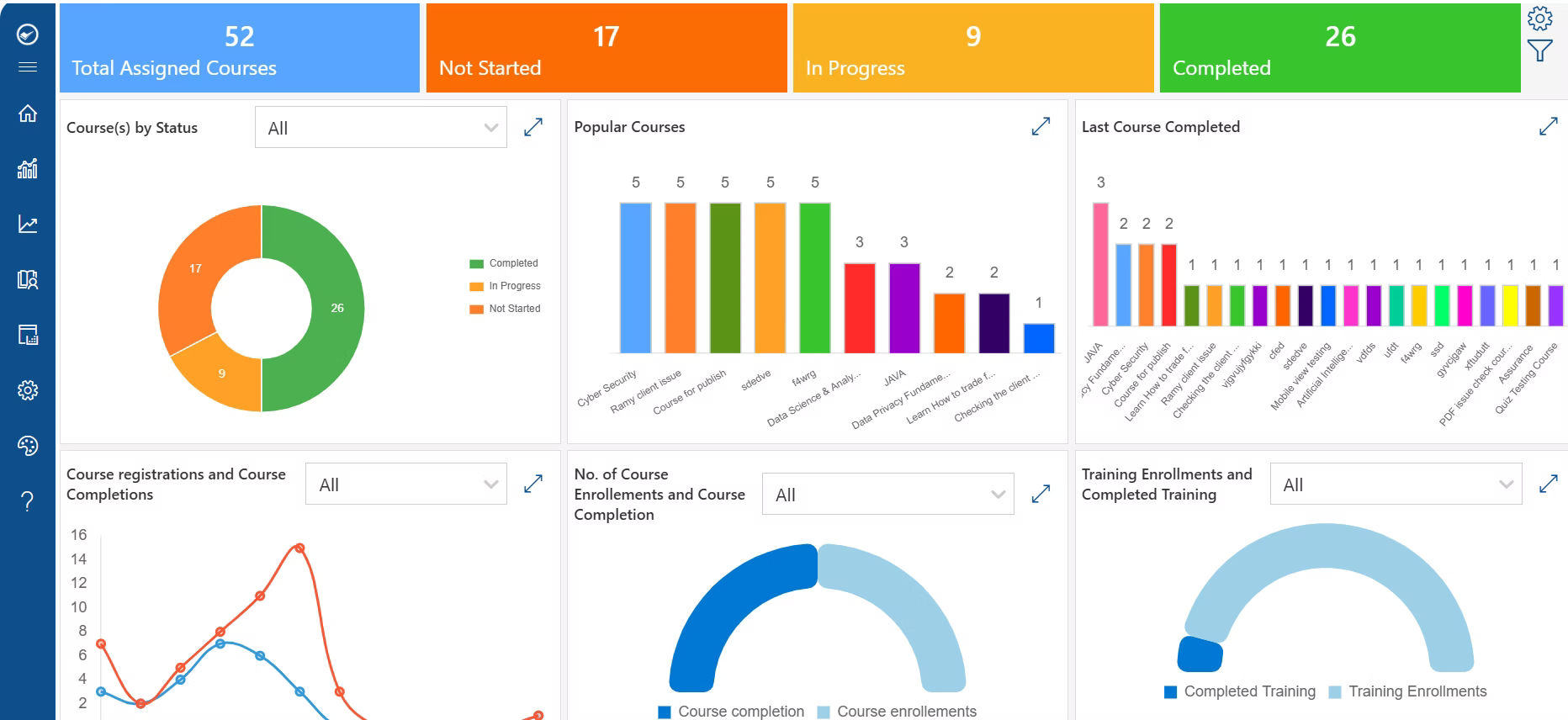
What it measures: The percentage of employees who finish an assigned course.
Why it matters: It is the most basic sign of whether training is being taken seriously.
Formula: (Number of employees who completed the course ÷ Number of employees enrolled) × 100
Common benchmarks: Most organizations aim for a completion rate above 90% for mandatory training.
What low or high values indicate: A low rate may point to scheduling conflicts, unclear deadlines, or content that feels irrelevant. A high rate shows strong participation but doesn’t confirm learning quality on its own.
Improvement tips: Send reminder notifications, break long courses into shorter modules, and set clear deadlines with manager visibility.
2. Training Participation Rate
What it measures: How many eligible employees actually enroll in and attend available training.
Why it matters: Low participation, even in optional courses, often signals disengagement or lack of awareness.
What low or high values indicate: A low rate may mean employees don’t see the value of the course or are too busy. A high rate reflects a strong learning culture.
How HR can improve it: Track enrollment against attendance, review participation trends by department, and promote courses through internal communication.
3. Assessment Scores
What it measures: How well employees perform on quizzes and knowledge checks tied to a course.
Why it matters: Completion shows attendance, but assessment scores show actual understanding.
What low or high values indicate: Low pass rates on quiz results may mean the content is too difficult, poorly explained, or not relevant to the learner’s role.
How HR can improve it: Review question difficulty, add practice quizzes, and offer follow-up coaching for employees who don’t pass.
4. Average Time to Complete Training
What it measures: How long it takes employees to finish a course from start to end.
Why it matters: It reflects both learning speed and course complexity.
What low or high values indicate: Extremely long completion times may point to confusing content or poor course design. Very short times might mean employees are rushing through without absorbing the material.
How HR can improve it: Use drop-off analysis to find where employees slow down or abandon a course, then simplify those sections.
5. Learner Engagement
What it measures: How actively employees interact with the course, including video completion, learning sessions, and time spent on activities.
Why it matters: Engagement is often a stronger predictor of learning success than completion alone.
What low or high values indicate: Low engagement, such as employees skipping videos or logging in briefly, suggests the material isn’t holding attention.
How HR can improve it: Add interactive elements, keep videos short, and mix formats such as text, video, and quizzes.
6. Knowledge Retention
What it measures: How much information employees remember weeks or months after training, tracked through post-training assessments and refresher quizzes.
Why it matters: Training that isn’t retained doesn’t change behavior on the job.
What low or high values indicate: A drop in scores over time on refresher quizzes points to knowledge decay, which is common without reinforcement.
How HR can improve it: Schedule refresher courses, send periodic knowledge checks, and reinforce key concepts through manager conversations.
7. Certification Completion Rate
What it measures: The share of employees who complete required or professional certifications on time.
Why it matters: Many certifications are tied to compliance and legal requirements, not just professional development.
What low or high values indicate: A low completion rate on mandatory certifications can create real compliance and legal exposure for the company.
How HR can improve it: Set automated reminders before certification deadlines and track expired certifications by department.
8. Training Drop-Off Rate
What it measures: The point in a course where employees stop or abandon the training.
Why it matters: It helps identify exactly where a course loses learners’ attention.
What it usually reveals: Common causes include difficult modules, long videos, and poor user experience within the course platform.
How HR can improve it: Break up long sections, simplify difficult modules, and test the course experience from a learner’s point of view.
9. Training Feedback Score
What it measures: Learner satisfaction, gathered through course ratings, surveys, and comments.
Why it matters: Feedback captures the human side of training that numbers alone can miss.
What low or high values indicate: A low net satisfaction score often points to content that feels outdated or not applicable to daily work.
How HR can improve it: Ask short surveys right after course completion, review open comments regularly, and act on repeated feedback themes.
10. Skill Improvement
What it measures: The change in an employee’s ability before and after training, based on before-and-after assessments and manager observations.
Why it matters: This metric connects training directly to competency development, not just knowledge recall.
What low or high values indicate: Little to no improvement may mean the training wasn’t targeted at the right skill gaps.
How HR can improve it: Pair training with on-the-job practice and manager check-ins to reinforce new skills.
11. Compliance Training Completion
What it measures: Completion of mandatory learning tied to legal, safety, or industry requirements.
Why it matters: Expired certifications and missed mandatory learning can expose the company to risk.
What low or high values indicate: Departments with lower completion often need closer follow-up or reminders from managers.
How HR can improve it: Track completion at the department level and automate alerts for expiring requirements.
12. Learning ROI
What it measures: The overall value training delivers compared to its cost, connected to business outcomes rather than costs alone.
Why it matters: This is what turns training analytics into a conversation leadership actually cares about.
Connect training to outcomes such as:
- Higher productivity
- Faster onboarding
- Reduced compliance risks
- Improved customer service
- Better employee retention
- Lower retraining costs
How HR can improve it: Tie training programs to specific business goals from the start, so ROI can be measured against something concrete.
Turning Training Data into Action
Collecting employee training data is important, but it only creates value when it leads to meaningful action. Reports and dashboards should not sit unused they should help HR teams improve learning programs, support employees, and make smarter business decisions. By regularly reviewing analytics and acting on the insights, organizations can build a culture of continuous learning and improvement.
Identify Courses with Low Completion Rates
Analytics can quickly highlight courses that employees fail to complete. Low completion rates may indicate that the course is too long, difficult to understand, or not relevant to learners. HR teams can use these insights to redesign the course, simplify the content, or divide it into shorter learning modules that encourage higher completion.
Update Outdated Training Content
Training materials should evolve as business processes, technology, and regulations change. Analytics can reveal courses with declining engagement, poor assessment scores, or negative learner feedback. These indicators help HR identify outdated content and update it so employees continue learning relevant and accurate information.
Assign Refresher Training Where Needed
Not every employee requires the same level of training. By reviewing assessment results and certification reports, HR can identify employees who need additional practice or refresher courses. This targeted approach saves time, improves knowledge retention, and ensures employees remain confident in their roles.
Personalize Learning Paths
Training analytics helps organizations move away from one-size-fits-all learning. Based on an employee’s role, skills, performance, previous learning history, or career goals, HR can recommend personalized learning paths that focus on the knowledge and skills most relevant to each individual.
Improve Onboarding Programs
Onboarding analytics provide valuable insights into how new employees progress through training. HR can identify where new hires struggle, which modules take the longest to complete, and where learners drop off. These insights help improve onboarding programs, allowing new employees to become productive more quickly.
Support Manager Coaching with Real Data
Managers are more effective when coaching conversations are backed by data rather than assumptions. Training analytics allows managers to review learning progress, assessment scores, completed certifications, and skill development before meeting with employees. This leads to more focused discussions, better feedback, and personalized development plans.
Compare Department Performance
Department-level analytics help HR compare learning performance across teams. By analyzing completion rates, assessment scores, certification status, and engagement levels, organizations can identify departments that need additional support while also learning from teams with consistently strong results. These comparisons help create more balanced and effective training strategies.
Allocate Training Budgets More Effectively
Training budgets should be invested in programs that deliver measurable results. Analytics helps HR evaluate which courses improve employee performance, increase engagement, and support business objectives. Instead of funding every training initiative equally, organizations can prioritize high-impact programs and optimize future learning investments.
Follow a Continuous Improvement Cycle
Training analytics delivers the greatest value when it becomes part of an ongoing improvement process rather than a one-time review. A simple framework is:
Collect → Measure → Analyze → Improve → Repeat
Each stage builds on the previous one. HR teams collect learning data, measure performance against defined goals, analyze trends and knowledge gaps, make improvements to courses and learning strategies, and then repeat the process using new insights. Following this cycle ensures training programs continue to evolve alongside changing business needs, employee expectations, and organizational goals, rather than remaining static year after year.
How to Collect Employee Training Analytics
There are two main approaches to gathering training data, and they look very different in practice.
Manual Tracking | LMS-Based Tracking |
Excel spreadsheets | Automated dashboards |
Manual attendance | Real-time completion tracking |
Paper assessments | Online quizzes |
Delayed reporting | Instant insights |
High administrative effort | Automated reporting |
Manual tracking might work for a small team, but it becomes hard to manage as the number of employees and courses grows. Automated tracking through an LMS saves time, reduces human error, and gives HR real-time visibility instead of waiting on spreadsheets that are already out of date by the time they are reviewed.
Common Mistakes When Measuring Employee Training
Tracking employee training is valuable only when you’re measuring the right data. Many organizations collect learning data but fail to use it effectively, leading to poor decisions and missed opportunities for improvement. Here are some of the most common mistakes HR teams should avoid.
Tracking Only Completion Rates
Many organizations consider training successful simply because employees completed a course. However, course completion doesn’t always mean employees understood or retained the information. To get a complete picture, combine completion rates with assessment scores, engagement metrics, and on-the-job performance improvements.
Ignoring Learner Engagement
Employees may complete a course without actively engaging with the content. Metrics such as video watch time, lesson completion, quiz attempts, discussion participation, and time spent on each module reveal how learners interact with training. Low engagement often indicates that content needs to be updated or presented differently.
Overlooking Assessment Results
Quizzes, tests, and practical assessments show whether employees have actually learned the material. Focusing only on attendance or course completion while ignoring assessment performance makes it difficult to identify knowledge gaps. Reviewing assessment data helps HR understand where additional training or support is needed.
Not Collecting Employee Feedback
Analytics tells you what employees are doing, but feedback explains why. Employees can share whether the content was useful, easy to understand, relevant to their role, or too difficult. Regular surveys and course evaluations help HR improve future training programs based on real learner experiences.
Measuring Too Many Metrics Without Clear Goals
Modern learning platforms provide dozens of reports and dashboards. Tracking every available metric often creates confusion instead of clarity. Start by defining your training objectives, such as improving compliance, reducing onboarding time, or developing leadership skills, and then measure the metrics that directly support those goals.
Failing to Review Analytics Regularly
Training analytics should not be reviewed only at the end of a course or once a year. Regular monitoring helps HR identify problems early, such as low participation, declining engagement, or poor assessment results. Reviewing reports consistently allows organizations to make timely improvements and keep learning programs effective.
Not Sharing Insights with Managers
Managers play an important role in employee development, but they often don’t have access to training insights. Sharing analytics with managers enables them to understand their team’s progress, recognize employees who need additional coaching, and support learning through regular one-on-one discussions. When HR and managers work together using the same data, training becomes more impactful and aligned with business goals.
Best Practices for Employee Training Analytics
Employee training analytics delivers the most value when it is used as an ongoing improvement tool rather than just a reporting feature. Following a few best practices helps HR teams collect meaningful data, make better decisions, and continuously improve learning programs.
Define KPIs Before Launching Training
Before employees begin a training program, decide what success looks like. Set clear key performance indicators (KPIs) such as course completion rates, assessment scores, skill improvement, certification completion, or reduced onboarding time. Having defined goals from the beginning makes it easier to measure whether the training achieved its intended outcomes.
Focus on Metrics That Support Business Goals
Not every learning metric is equally important. Choose metrics that align with your organization’s objectives. For example, if the goal is improving customer service, track customer satisfaction scores alongside training results. If the goal is compliance, monitor certification completion and renewal rates. Aligning analytics with business goals ensures training contributes to measurable business success.
Review Dashboards Regularly
Training data should be reviewed consistently rather than only after a course ends. Monthly dashboard reviews help HR identify trends, monitor learner progress, and detect issues such as declining engagement or low assessment scores. Regular reviews allow teams to make timely adjustments instead of waiting until problems become larger.
Combine Quantitative Data with Qualitative Feedback
Numbers tell part of the story, but employee feedback provides valuable context. Combine analytics such as completion rates, assessment scores, and time spent learning with surveys, course evaluations, and employee comments. This balanced approach helps HR understand both how employees performed and how they experienced the training.
Compare Departments Over Time
Looking at data across different departments or teams can reveal valuable insights. Some groups may consistently complete training faster, score higher on assessments, or engage more actively with learning content. Comparing results over time helps HR identify best practices, recognize successful learning strategies, and provide additional support where performance is lower.
Use Analytics to Improve Future Training
Training analytics should drive continuous improvement rather than simply evaluate past performance. Use the insights to update outdated content, redesign difficult modules, improve course delivery, and create more personalized learning paths. Each training cycle should become more effective based on what the data reveals.
Automate Recurring Reports
Manually creating reports every week or month can be time-consuming and increase the risk of errors. Automating recurring reports saves time and ensures stakeholders receive consistent, up-to-date information. HR teams can then spend more time analyzing results and implementing improvements instead of preparing spreadsheets.
Share Insights with Stakeholders
Training analytics should not remain within the HR department. Share relevant insights with managers, department heads, and business leaders so they can support employee development and make informed decisions. When stakeholders have access to learning data, they can identify skill gaps, recognize high performers, and align training initiatives with broader business objectives.
How to Choose LMS Software with Built-In Training Analytics
Choosing an LMS isn’t just about delivering courses it’s also about understanding how effective your training programs are. The right platform should give HR teams clear, actionable insights without requiring multiple reporting tools or manual data collection. As you evaluate different LMS solutions, look for features that make it easy to monitor learning, measure outcomes, and improve future training.
Real-Time Dashboards
A good LMS should provide live dashboards that display key training metrics in one place. HR and managers should be able to see course progress, learner activity, completion rates, and overdue training at a glance, allowing them to take action quickly when needed.
Course Completion Tracking
Completion tracking helps monitor which employees have started, completed, or abandoned training courses. This is especially useful for onboarding programs, mandatory learning, and compliance training, ensuring employees stay on track and deadlines are met.
Assessment Analytics
Assessment reports should go beyond showing pass or fail results. Look for an LMS that provides detailed insights into quiz scores, question-level performance, knowledge gaps, and learning trends. These analytics help HR identify where employees need additional support and whether training content needs improvement.
Certification Reports
If your organization requires certifications, the LMS should automatically track certification status, expiration dates, and renewal requirements. Automated reminders and compliance reports help reduce administrative work while ensuring employees maintain required certifications.
Learner Engagement Insights
Employee engagement is an important indicator of training effectiveness. An LMS should provide insights such as video completion rates, time spent learning, course participation, login frequency, and content interaction. These metrics help identify courses that engage learners and those that may require updates.
Department-Level Reporting
Training needs often vary across departments and job roles. Department-level reports allow HR to compare learning progress, assessment results, and completion rates across teams. This makes it easier to identify skill gaps and provide targeted learning where it’s needed most.
Custom Reports
Every organization has unique reporting requirements. Choose an LMS that allows you to build custom reports based on specific departments, job roles, locations, training programs, or business goals. Flexible reporting helps HR generate the insights that matter most without relying on manual spreadsheets.
Survey and Feedback Analytics
Employee feedback provides valuable context that numbers alone cannot. Look for a platform that collects course evaluations and learner surveys while analyzing trends in satisfaction, course quality, and learner experience. This helps continuously improve training programs based on employee input.
Power BI Integration
For organizations that rely on advanced reporting, Power BI integration is a valuable feature. It enables HR teams to combine learning data with other business metrics, build interactive dashboards, and create customized reports that support strategic decision-making.
Microsoft 365 Integration
If your organization already uses Microsoft 365, selecting an LMS that integrates natively with the platform can significantly simplify training management. Employees can access courses through familiar applications such as Microsoft Teams and SharePoint, while administrators benefit from centralized user management, authentication, and reporting without introducing another standalone system.
Why LMS 365 Is a Strong Choice
LMS 365 includes all of these analytics capabilities within the Microsoft 365 ecosystem. HR teams can deliver training, monitor learner progress, generate reports, and track certifications without switching between multiple applications. Because learning takes place inside the Microsoft tools employees already use every day, adoption is often easier and administrative work is reduced.
With built-in dashboards, detailed reporting, Power BI integration, and real-time learning insights, LMS 365 helps organizations move beyond spreadsheets and manual reporting. Instead of simply tracking training activity, HR teams gain the data they need to continuously improve learning programs, demonstrate training ROI, and make better workforce development decisions.
Conclusion
Employee training analytics helps HR teams clearly understand whether learning programs are actually working. Instead of guessing, you can use data like completion rates, engagement, assessment scores, and retention to see what is effective and what needs improvement. This makes training more focused, useful, and aligned with business goals.
When you track the right metrics consistently, training becomes easier to manage and more valuable for both employees and the organization. Over time, it helps improve performance, reduce skill gaps, and support better decision-making across teams.
Using an LMS with built-in analytics makes this even simpler. For example, LMS 365 gives HR teams real-time dashboards, automated reports, and clear insights without relying on manual tracking or spreadsheets.
If you are ready to improve how your organization tracks and manages employee learning, here’s what you can do next:
👉 Book a Demo to see how training analytics works in real time
👉 Start a 14-Day Free Trial to explore reporting, dashboards, and learning insights
👉 Talk to Our Team to understand how to set up analytics for your HR and training goals
Frequently Asked Questions
What is employee training analytics?
Employee training analytics is the process of collecting and studying data from learning programs, such as completion rates, assessment scores, and engagement, to understand how effective training is and where it can improve.
What are the most important employee training metrics?
Course completion rate, assessment scores, learner engagement, knowledge retention, certification completion, and training feedback are among the most important metrics to track.
How do HR teams measure training effectiveness?
HR teams measure effectiveness by combining completion data with assessment scores, engagement levels, and post-training performance, rather than relying on attendance alone.
What is the difference between training analytics and training reports?
Training reports show what happened, such as who completed a course. Training analytics explains why it happened and what actions to take based on that information.
How often should employee training analytics be reviewed?
Most HR teams benefit from reviewing dashboards on a monthly basis, with a deeper review of trends every quarter.
How can an LMS improve employee training analytics?
An LMS automates data collection, generates real-time dashboards, and removes the manual work of tracking completion, scores, and feedback across spreadsheets.
What KPIs should HR track for employee learning?
HR should track completion rates, assessment scores, engagement, retention, certification status, and feedback scores as core learning KPIs.


_JiluXJRGNl.svg)























