

_mVFFaHUZhS.webp)
Employee time-off can become a nightmare to manage, specifically when you apply multiple projects involving several teams. The missed absence request, that’s all it takes to derail a deadline and slingshot priorities overnight. That’s why many HR professionals are now using an employee leave tracker app to simplify the system and keep everyone up-to-date.
Automating requests, approvals and visibility means managing time off becomes a breeze in the 21st century using an employee leave tracker app! With spreadsheets and emails out of the way, teams have real-time clarity, allow for better planning and more seamless collaboration across departments.
Time Off Manager 365 sets itself apart with rich Microsoft 365 integration, automated workflows, and clear reporting that saves managers’ time and ensures against conflicts. It facilitates scalable, auditable leave management for modern hybrid workforces.
New time-off software is what changes that process around—it takes an entire workflow that used to be based on spreadsheets and automates it. Managers also get real-time visibility into team availability so there’s no conflicting schedules and no need for time-consuming back and forth coordination. The outcome? Fewer disruptions and happier teams.
A solid leave management system is more than simply logging absences — it’s creating transparency and trust. It’s easy for employees to request time off, and there is no more emailing back and forth for managers to keep track of time off. It’s an easy upgrade that gives a quantifiable boost to productivity and job satisfaction.
Why You Need an Employee Leave Tracker App
Tracking leaves manually using spreadsheets, sticky notes or never-ending email chains is time-consuming and inaccurate. This is solved by a digital tracker that automates all the steps and keeps everyone updated in real time.
Key reasons to go digital:
- Immediate approvals: Accept or reject requests within a few seconds. There is no time wasting or missed email messages; decisions are made at the appropriate time.
- Centralized calendar: Find out who is off and when. All people receive the same clear view and thus no one is caught unawares by overlapping vacations.
- Precise leave balances: No longer must guess on the number of days left. Balances are automatically updated in the system following approval or change.
- Improved planning: Do not have overlapping vacations or gaps in coverage. Managers are able to make informed decisions with the visibility of team availability.
- Time savings: Spend less time on repetitive tasks done by the HR and managers. Automation will handle the details, and your team will have more time per week.
With the right and readily available leave information, employees feel secure, and managers can concentrate on what is really important, people and performance.
How an Employee Leave Tracker App Helps Managers
You are a manager, and you have workloads, deadlines, and people, and you have to balance all of them at the same time. The right employee leave tracker application balances everything and makes you one step ahead rather than always responding to scheduling shocks.
Here’s what it offers:
- Transparency: See who is available on a daily basis.
- Team balance: Do not overload any person in the plans.
- Less unexpectedness: Receive notifications about leave being taken by key members.
- Data insights: View absence trends and detect burnout risks in advance.
- Improved communication: All people will be aware of one common calendar.
According to Deloitte’s, organizations that adopt digital HR technologies and automation improve workforce visibility, reduce operational friction, and enable faster, more informed managerial decision-making—particularly in areas like scheduling, leave management, and workforce planning.
Essential Features to Look for in a Leave Tracking App
Leave tracking tools are not all created for the way we work today. The ideal answer should enable flexible work models, grow with your business and minimize the reliance on manual coordination all while keeping employees and managers in full check.
1. Intuitive Employee Experience
The day you start using a modern leave app should feel natural. Workers should not require training sessions and the help desk to submit requests, see balances or look up approvals.
2. Flexible Policy Configuration
Companies should be able to set-up multiple leave types like vacation, sick leave, comp-off, unpaid leaves etc. Rules for accruals, carryovers & regional compliance policy should be adjustable to real business requirements.
3. Centralized Availability Visibility
A team view allows managers to take a look at daily, weekly and future absences in order to plan for coverage gaps. Seamless integration with Microsoft 365 calendars provides up-to-date availability information so you can manage meetings and project planning more effectively.
4. Live Leave Balance Visibility
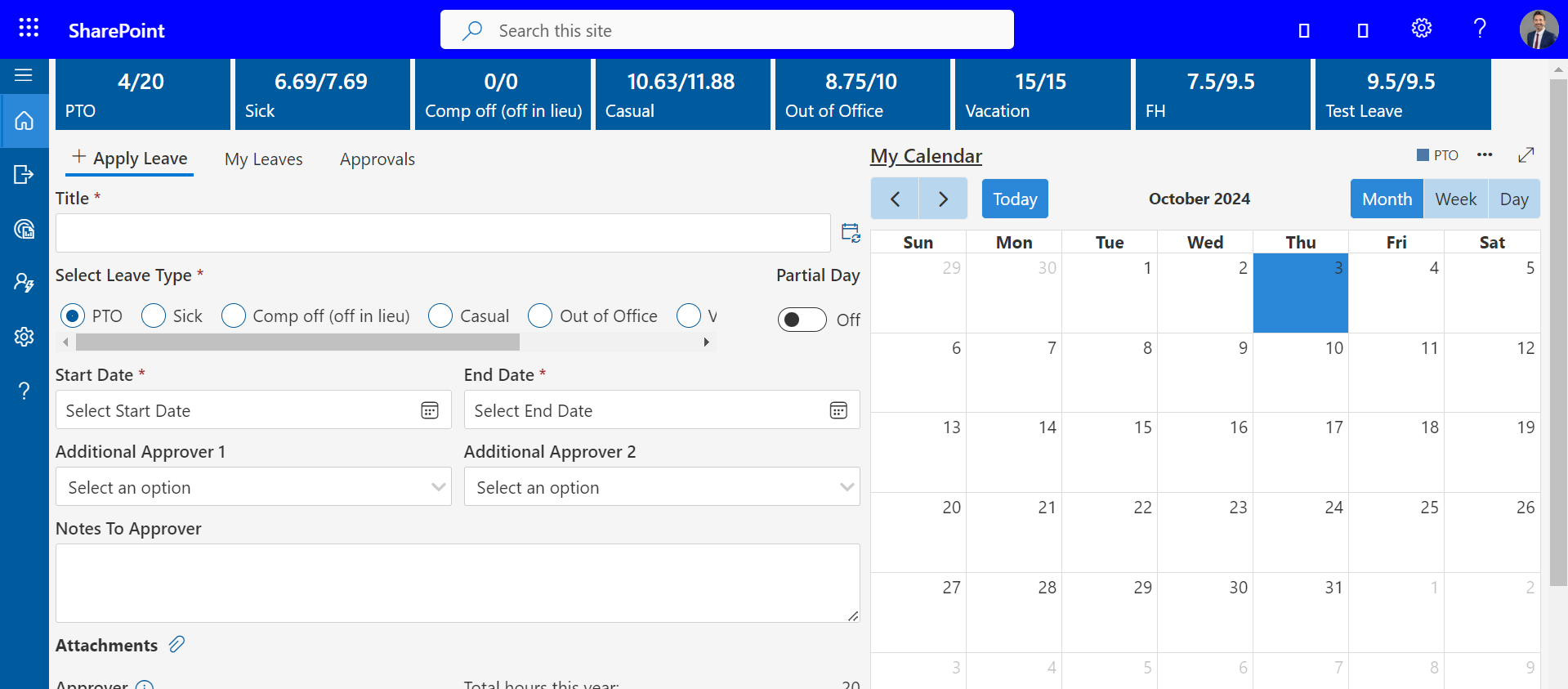
An employee should always be aware of what time-off they have available without contacting HR. Automatic balance updates after approval / change increase transparency and minimize internal questions.
5. Structured Approval Routing
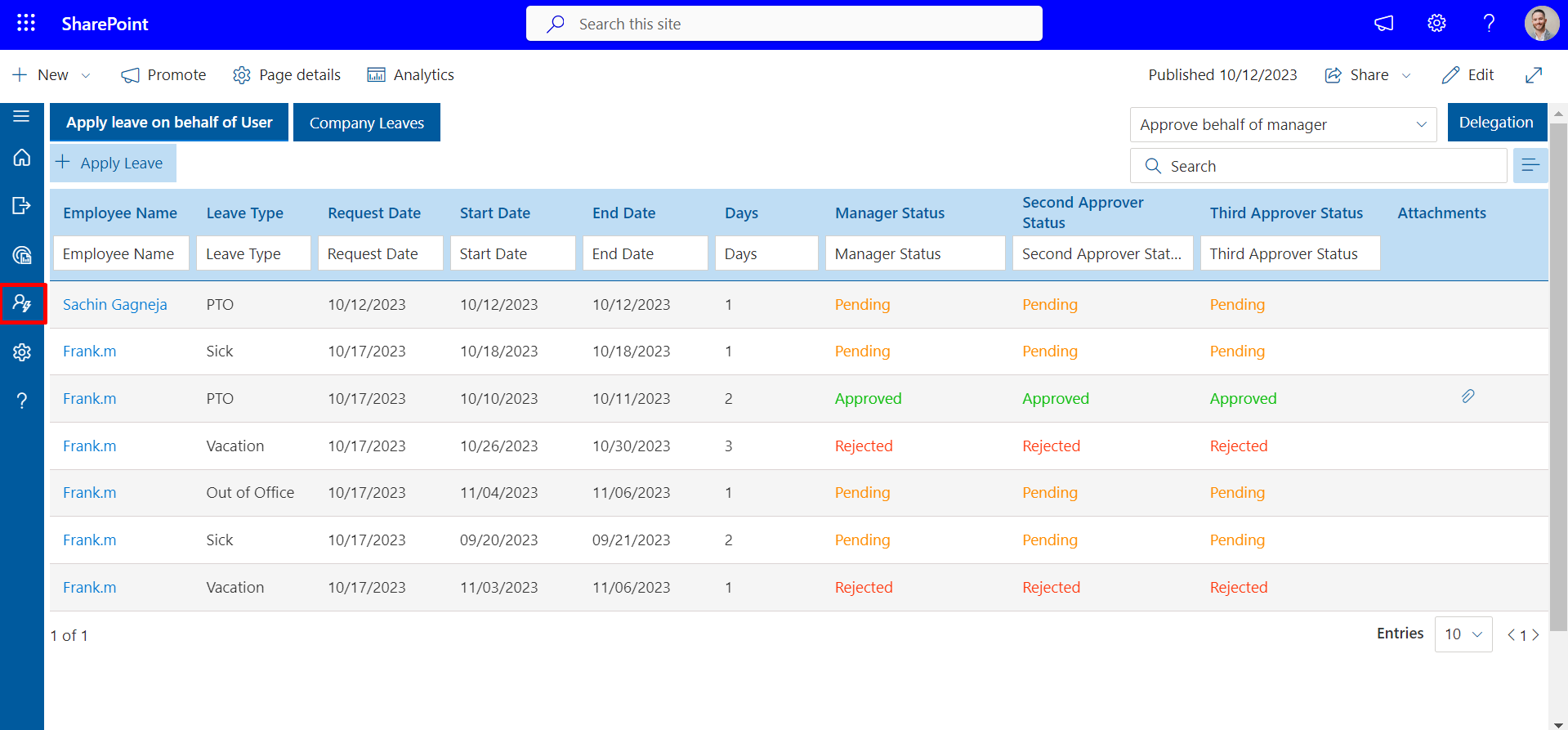
Requests should be routed along predetermined approval tracks, based on roles or departments. Having a discernible status update ensure alignment for both the employee and manager while also preventing bottlenecks in getting approvals.
6. Anywhere Access for Modern Teams
Accommodate Remote Work Environments Whether your organization is developing a remote-first work culture or hybrid work model, a leave tracking app should provide secure access from any desktop and mobile device and accommodate people working from anywhere.
7. Role-Based Data Control
Permission-based access should be enforced on leave records. Only those in the role should have visibility into aspects of their work, so they feel protected and relieved from being bombarded with unnecessary information about others.
8. Workforce Insights and Trends
Advanced reporting can bring to light the deserts of availability, peeks of leave and the work-related dangers that a company could face. These insights are intended to empower leadership with decision support for staffing and planning.
Benefits of Integration with Microsoft 365
Microsoft 365 is already used by most teams in email, Teams and calendar scheduling. When selecting an employee leave tracking application that can be directly connected to Microsoft 365, it becomes easy to work and cooperate.
1. Calendar Sync
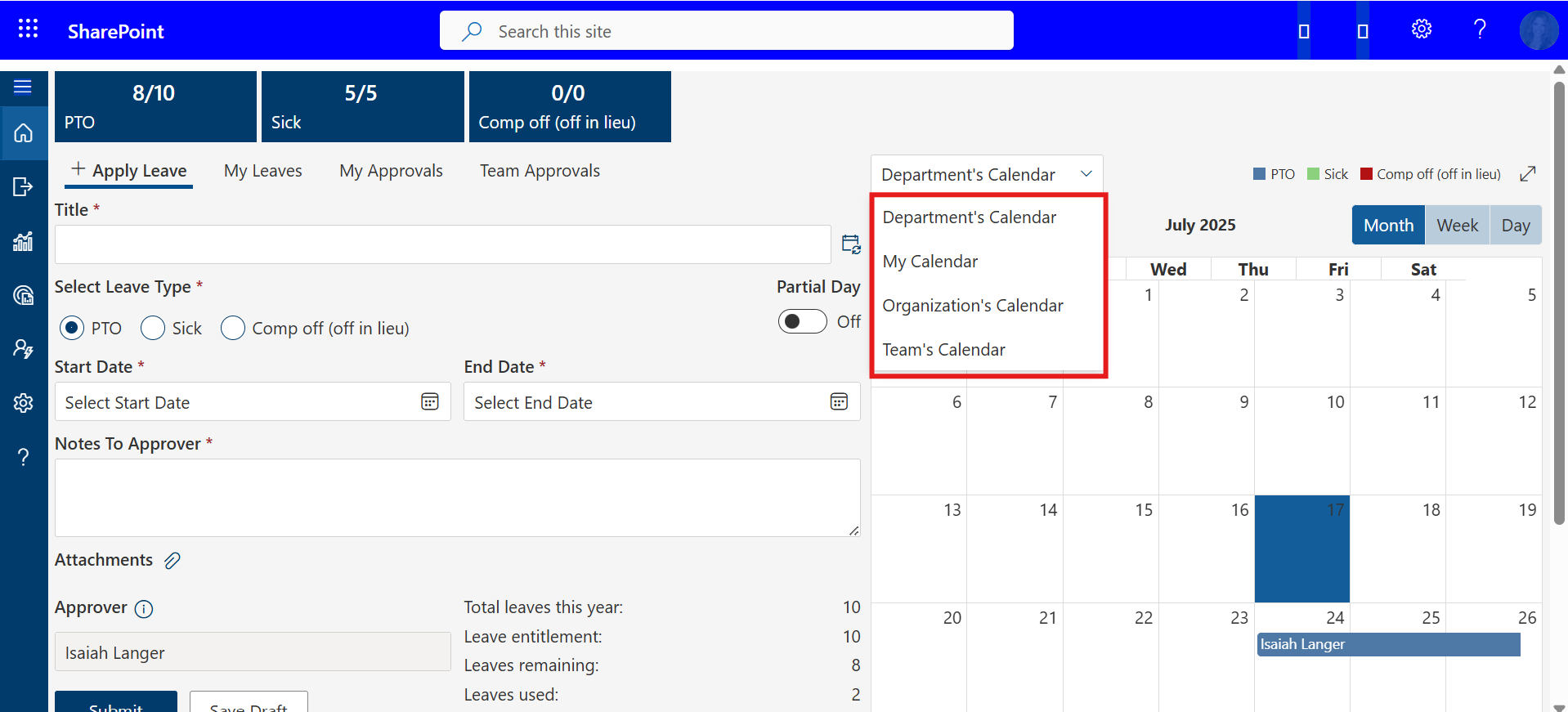
Approved leaves are automatically added to the Outlook calendars. This will make sure that everyone in the team is able to arrange meetings and projects based on established absences. It reduces last-minute confusion and helps to schedule better.
2. Teams Notifications
Receive real-time notifications in Microsoft Teams when a request to take leave is made or approved. It also keeps the managers and employees informed in real time without additional emails. This rapid communication is useful in keeping the workflow going.
3. Single Sign-On (SSO)
Employees are able to use their Microsoft 365 credentials to log in – they do not have to remember several passwords. It also enhances data security and convenience to users. This single log in saves time and eliminates access problems.
4. Unified Workflow
Communication, approvals and schedules are managed in a single ecosystem. It removes the hopping of the apps and makes all the processes run concurrently. Manual coordination is unnecessary to make teams work smoothly.
5. Document Sharing
Store and share HR policies, leave guidelines or forms and do so through SharePoint integration. This maintains centralization of resources and their accessibility. It minimizes back and forth and makes sure that everybody is on the most recent version.
6. Automatic Calendar Updates
The calendars update automatically when leave dates are changed in Outlook and Teams, eliminating confusion and overlapping. This real-time synchronization enhances accuracy in planning within the departments.
7. Collaboration Boost
Managers can arrange coverage by verifying availability within Microsoft Teams, which assists in preventing project delays. It promotes openness and collaboration within the departments.
8. Performance Insights
Integration enables the export of attendance and leaves data to Excel or Power BI to further analyze and make smarter HR planning. This is a data-driven method that helps in improving workforce forecasting and decision-making.
Using your time off management software in conjunction with Microsoft 365, you will have a seamless digital workplace where HR, managers, and employees are informed, efficient, and connected on a daily basis.
Common Mistakes of Choosing a Leave Tracker App
The correct employee leave tracker application can save your team hundreds of hours, but the wrong one can cause more issues than it will resolve. Most companies do not take their time during the selection process only to find out that the system they have selected does not suit their actual requirements. The following are some of the typical pitfalls to be avoided and their importance.
1. Disregard of Ease of Use
A complex system may confuse workers and make them avoid using it. Unless individuals find it easy to request leave or balance, they will revert to the manual way of doing things such as emails or spreadsheets.
It is always necessary to find a leave tracking application with a clear interface, easy navigation, and a minimum number of clicks to perform the most important operations.
2. Omitting Mobile Support
In the modern hybrid workplace, your team does not necessarily sit behind a desk. Remote employees will not be able to request or monitor their time off remotely without mobile access.
An effective time off management software must also have a mobile application that is responsive and allows users to access the calendars, request leave, and receive approval messages in real time.
3. Ignoring Integrations
A leave tracker, which does not integrate with Microsoft 365, Slack, or your HR system, introduces unnecessary manual work. Integrations tie together all the calendars, chats, and employee information, making the whole process easier.
When your tools communicate with one another, HR departments will spend less time duplicating information and more time dealing with people.
4. Failure to Check Scalability
What works with a 10-person startup may not work with a 200-person company. Your leave tracker must be scalable to accommodate growth in the number of users, departments, or types of custom leave without slowness. Be long-term and choose a leave tracking application that can grow with your business as it grows.
5. Forgetting About Support
The best tools experience problems occasionally. Without a responsive support provided by your vendor, minor issues may become major inconveniences. Find a provider that has 24/7 support, live chat, or knowledge base. Customer support is reliable so you can always be sure that you are not left waiting.
These errors can be prevented in the early stages of your business, which will save you time, frustration, and money and make your employee leave tracker app a real productivity booster, rather than an additional administrative burden.
How to Implement Your Leave Tracking App
Step 1: Define Your Policy
Identify all the forms of leave and determine who approves what. A well-defined policy will provide uniformity and transparency, and the employees will know precisely how their leave requests are processed.
Step 2: Choose the Right App
Search for clean design, solid support, and Microsoft 365 integration. Your perfect leave tracking app must be easy to use, scalable, and compatible with your business workflow to reduce confusion.
Step 3: Onboard Your Team
Train all users through short video tutorials or live demonstrations. The more comfortable employees are, the quicker they will adopt features within the departments.
Step 4: Go Live
Begin with one department, collect feedback, and implement it throughout the company. Staged testing assists you to detect and correct minor problems prior to expansion to the whole organization.
Step 5: Monitor and Optimize
Check monthly to perfect your policy and improve scheduling. Apply knowledge gained with your leave tracking application to discover trends, manage workloads, and implement data-driven changes.
Why Managers Depend on Leave Tracking Apps for Efficient Team Management
- Saves time: Managers save up to 40% of their time in approving and managing leave requests, allowing them to focus on team development and improving overall performance.
- Creates trust: Open leave tracking software promotes fairness and accountability, making employees feel valued and well-informed about their attendance and time-off records.
- Avoids burnout: With better insight into workloads, managers can distribute tasks evenly to prevent overwork and maintain high motivation across the team.
- Enhances planning: Clear scheduling reduces last-minute chaos before deadlines and ensures better coordination between projects and employee absences.
- Boosts productivity: Well-organized teams with balanced attendance stay more focused, achieve results faster, and maintain a steady work rhythm.
In short, a time off tracking application isn’t just another HR tool, it’s a manager’s secret weapon for ensuring efficiency, balance, and peace of mind.
Why Time Off Manager 365 Is the Right Choice for Your Business
Time Off Manager 365 is the perfect fit to consider in case you are seeking a simple and yet powerful employee leave tracker application.
It is built to fit modern teams, automating, making transparent and controllable in your leave management process right in your familiar Microsoft 365 environment. It can be vacation tracking, sick days, PTO tracker data, etc., but this tool makes sure that nothing goes wrong, and everything is efficient.
Major Benefits of Time Off Manager 365
- Fluent Microsoft 365 Integration: Integrate seamlessly with Outlook and Teams to see, approve or manage leave requests in real-time.
- All-in-One Dashboard: See all the leave balances, future absences, and approval of workflows in a single clean interface.
- Automated Notifications: Be informed of approvals with real-time notifications via Teams or email, and no requests are missed.
- Custom Leave Policies: Determine vacation, sick and comp-off policies based on the policies of your organization and local regulations.
- Employee Self-Service Portal: Enable your staff to view balances, make requests, and monitor approvals without the help of HR decreasing the workload of the HR.
- Smart Reporting and Insights: Get more detailed analytics to see absence trends, better schedules, and predict upcoming staffing requirements.
- Multi-Device Access: You can access your leave tracker safely on desktop, tablet, or mobile whether you are in the office or remote.
- Data Security: Secure employee data using sophisticated encryption and role permissions based on Microsoft.
Why Businesses Love Time Off Manager 365
Managers like the ease with which this leave tracking application allows them to schedule their employees, remove confusion, and enhance communication. It also improves the tracking of employee vacations, which assists the HR and leaders to have a good balance between work and rest.
Having the correct data and immediate visibility, the HR teams will be able to plan, avoid burnout, make informed decisions, and save hours of manual work every week.
Transparent Pricing Time Off Manager 365 has a flexible pricing that fits all sizes of businesses:
- Basic Plan: Perfect fit with small teams – it has the essential leave tracking, Microsoft 365 sync, and email notifications.
- Professional Plan: Ideal to expand companies – includes expanded analytics, Teams integration, and custom policy configuration.
- Enterprise Plan: Designed to support large businesses – dedicated, role-based access control, and API integration.
All plans have a free trial and thus can be used to sample the difference.
Time Off Manager 365 makes attendance and time off management a breeze – keeping your team on track, legal, and stress-free daily.
Conclusion
An employee leave tracker app systematizes the management of time-off requests, approvals and visibility, minimizing mistakes and saving time. It increases employees’ and managers’ visibility and trust and promotes forward planning for timely work without scheduling conflicts. Integrations such as Microsoft 365 drive collaboration and productivity, so today’s businesses can manage leave with ease.
Try Time Off Manager 365 free for 14 days and experience effortless leave tracking with real-time visibility and Microsoft 365 integration.
Start your free trial today and see how easy managing time off can be—no setup hassles, no commitments.
Join Our Creative Community
Frequently Asked Questions
What features does your employee leave tracker app offer during the 14-day free trial?
The 14-day free trial includes full access to core features such as leave requests and approvals, real-time leave balance visibility, team calendars, automated notifications, and Microsoft 365 integration. This allows teams to test the complete leave management workflow without limitations.
How can our HR team customize the leave policies for different employees using your app?
HR teams can configure multiple leave types like vacation, sick leave, comp-off, and unpaid leave. Policies can be customized based on roles, departments, locations, or employee categories, ensuring accurate accruals, carryovers, and compliance with internal policies.
Is it possible to integrate the attendance and leave tracker with our existing payroll system?
Yes, leave data can be exported and aligned with payroll systems to support accurate salary calculations. Platforms like Time Off Manager 365 also integrate with Microsoft 365, making it easier to manage attendance and leave data from a centralized ecosystem.
What reporting capabilities does your employee leave tracking software provide for managers and finance teams?
Managers and finance teams can access detailed reports on leave usage, absence patterns, team availability, and policy compliance. These insights help with workforce planning, budgeting, and identifying trends that impact productivity.
Are there any limitations on the number of users or types of leaves that can be tracked in the free version of your app?
During the free trial period, there are typically no restrictions on the number of users or leave types. This gives organizations the flexibility to evaluate the system at scale before choosing a paid plan.


_JiluXJRGNl.svg)























