

Employee Directory vs Org Chart: What's the Real Difference?
_eH2jDg7dZ.png)
Most businesses use both an employee directory and an org chart, but many teams don’t fully understand how the two are different, or how they work best together. If you’ve ever searched for a colleague’s phone number and ended up staring at a reporting-line diagram instead, you already know the confusion is real.
- An employee directory is a searchable contact database; an org chart is a visual map of reporting relationships.
- Directories update often (roles, phone numbers); org charts change mainly during restructures or promotions.
- Small teams may survive with just one tool, but growing companies need both to stay organized.
- Modern platforms like Employee Directory 365 combine both features in a single, easy-to-search tool.
What Is an Employee Directory?
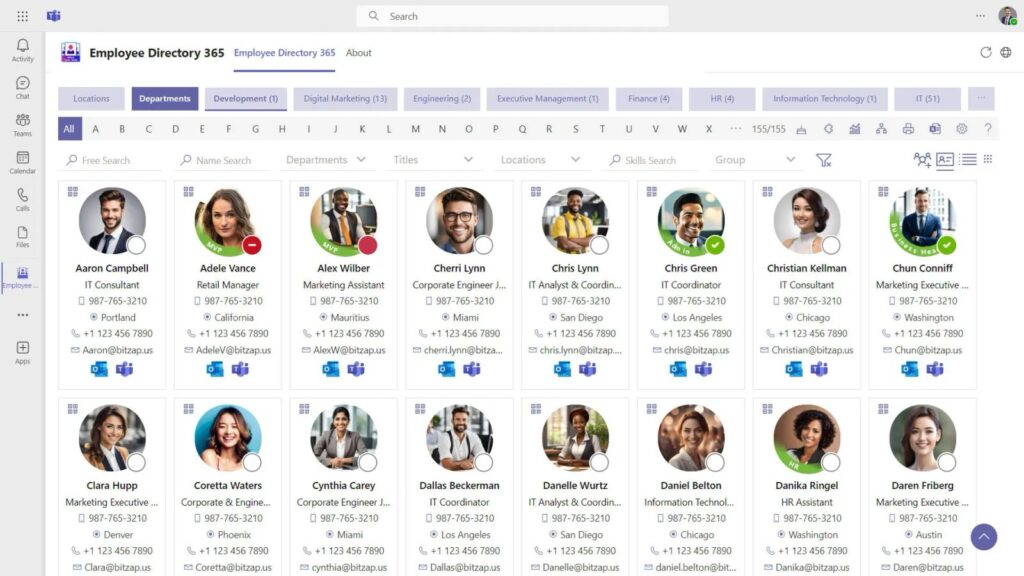
An employee directory is a searchable list of everyone who works at a company. Think of it as a company’s internal phone book, but far more useful. A good directory holds each employee’s name, job title, department, email address, phone number, office location, and sometimes a photo.
The main job of a directory is to help people find each other fast. New hires use it to learn who does what. Managers use it to reach team members across departments. IT teams use it to route support requests to the right person. Because a directory is built for lookup and search, it usually lives inside HR software, an intranet, or a dedicated tool.
Employee directories are almost always kept up to date in real time. When someone changes roles, updates a phone number, or moves to a new office, the directory reflects that change immediately. This is what makes it different from a chart that only shows structure.
What Is an Org Chart?
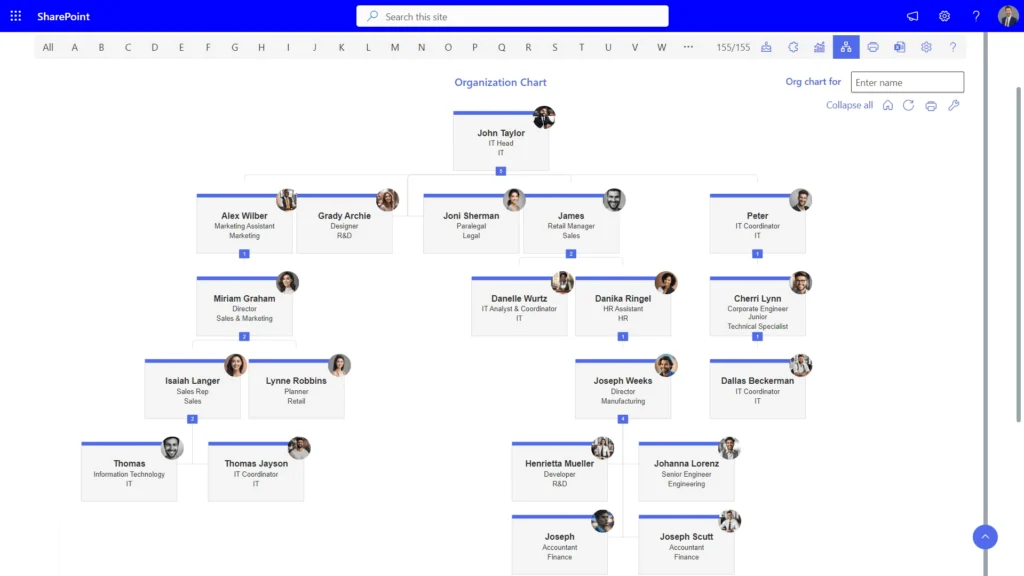
An org chart, short for organizational chart, is a visual diagram that shows how a company is structured. It uses boxes and connecting lines to show who reports to whom, starting from the CEO or founder at the top and branching down through departments, teams, and individual roles.
Org charts answer a different question than directories do. Instead of “how do I contact this person,” an org chart answers “where does this person sit in the company, and who do they report to.” This makes it a planning and communication tool rather than a lookup tool.
Because org charts represent structure rather than contact details, they don’t need to change every day. A company usually updates its org chart after a hire, a promotion, a department reshuffle, or a leadership change. Some companies review and refresh their chart every quarter or after any major restructuring.
Employee Directory vs Org Chart: Key Differences
On the surface, both tools show information about employees, and that’s exactly why people mix them up. But once you look closely, the differences are clear.
- Purpose. A directory is built for contact lookup. An org chart is built to show hierarchy and reporting lines.
- Format. A directory is usually a searchable list, table, or grid. An org chart is a visual tree diagram with connected boxes.
- Update frequency. Directories change often because contact details change often. Org charts change only when the structure itself changes.
- Primary users. Everyone in the company uses a directory. Org charts are used more by managers, HR, and leadership for planning.
- Depth of information. A directory goes deep on individual details. An org chart goes wide, showing the big picture of how teams connect.
In short: a directory helps you find people, and an org chart helps you understand how those people fit together.
| Aspect | Employee Directory | Org Chart |
| Purpose | Find contact & profile details of employees | Show reporting lines & hierarchy |
| Main Users | All employees, HR, IT helpdesk | Managers, HR, leadership |
| Format | Searchable list or database | Visual tree/flowchart |
| Updates | Frequent (contact info, roles) | Occasional (restructures, promotions) |
| Core Data | Name, email, phone, department, location | Reporting relationships, titles, teams |
| Best For | Quick lookup & communication | Understanding structure & planning |
When Should You Use an Employee Directory?
Reach for an employee directory whenever the goal is to find or contact someone quickly. Common situations include:
- A new employee wants to know who to contact in the finance team.
- Someone needs a colleague’s direct phone number or email address.
- A receptionist needs to confirm which floor or office a person sits on.
- IT support needs to look up a department to route a ticket correctly.
- Remote teams want a simple way to see who works where and in which time zone.
If your team spends time searching Slack, email threads, or old spreadsheets just to find a colleague’s contact information, that’s a clear sign you need a proper directory.
When Should You Use an Org Chart?
An org chart becomes useful whenever the question is about structure, not contact details. Typical use cases include:
- Planning a company reorganization or new department.
- Explaining reporting lines to a new manager or employee.
- Reviewing team size and structure during budget planning.
- Helping leadership spot gaps, overlaps, or too many direct reports under one manager.
- Onboarding new hires so they understand where their role fits in the bigger picture.
Org charts are especially valuable during growth phases, mergers, or leadership changes, when the shape of the company itself is shifting.
Can You Use Both Together?
Yes, and for most growing businesses, using both is the smart choice rather than picking one over the other. A directory alone won’t tell a new employee who their manager’s manager is. An org chart alone won’t give someone a phone number when they need to make a quick call.
The two tools solve different problems, so combining them removes blind spots. Many modern HR platforms now merge both features into a single system: you can search for a person like you would in a directory, then click their profile to instantly view their place on the org chart. This gives employees one place to go instead of switching between two disconnected tools.
Benefits of Combining an Employee Directory and Org Chart
Bringing both tools into a single platform creates real, measurable advantages for a business:
- Faster onboarding, since new hires can see both contact details and reporting lines in one place.
- Fewer support tickets to HR or IT asking “who do I contact for this?”
- Better cross-team collaboration, because employees understand both who someone is and where they sit.
- Easier workforce planning, since HR and leadership can view headcount, structure, and contact data together.
- Improved accuracy, since one connected system is easier to keep updated than two separate spreadsheets.
Companies that rely on outdated spreadsheets or static PDF charts often find that information goes stale within weeks. A connected, cloud-based system solves this by updating both the directory and the chart automatically whenever employee data changes.
How Employee Directory 365 Brings Both Together
Employee Directory 365 was built specifically to close the gap between static directories and disconnected org charts. Instead of maintaining two separate systems, teams get one searchable, always-updated hub for both.
- Instant search across names, departments, titles, and locations.
- Auto-generated org charts that update the moment employee data
- Employee profile pages that show contact details and reporting lines side by side.
- Simple integration with existing HR systems, so there’s no manual double entry.
- Secure, permission-based access so sensitive data stays protected.
For businesses tired of stitching together spreadsheets, PDFs, and outdated intranet pages, this kind of unified system saves hours every month and keeps everyone on the same page, literally.
Common Mistakes Businesses Make
Even well-organized companies fall into a few common traps when managing employee information:
Relying on outdated spreadsheets. A spreadsheet directory or chart is only accurate the day someone remembers to update it. After that, it starts to drift.
Treating the org chart as a static image. A PDF or PowerPoint chart looks fine on the day it’s made, but becomes useless after the next hire or promotion.
Ignoring mobile access. Employees increasingly need to look up a colleague from their phone, not just a desktop browser.
Skipping access controls. Not every employee needs to see salary bands or private HR notes; permissions matter.
Not linking the two tools. Keeping the directory and chart in separate systems doubles the maintenance work and increases the chance of errors.
Conclusion
An employee directory and an org chart are not competing tools, they’re complementary ones. A directory answers “how do I reach this person,” while an org chart answers “where does this person fit in the company.” Businesses that rely on only one often run into communication gaps or planning blind spots.
The simplest way forward is to stop treating these as two separate projects. With a connected platform like Employee Directory 365, your team gets a searchable directory and a live, auto-updating org chart in one place, saving time for HR, managers, and every employee who just wants to find the right person, fast.
Frequently Asked Questions
Is an org chart the same as an employee directory?
No. An org chart shows reporting relationships and structure, while an employee directory is a searchable list of contact details for each person in the company.
Which one should a small business set up first?
Most small businesses start with a simple employee directory, since day-to-day communication needs come up more often than structural planning. As the team grows past 15 to 20 people, an org chart becomes just as important.
Can an org chart be generated automatically?
Yes. Modern HR tools, including Employee Directory 365, can auto-generate an org chart directly from employee and reporting-line data, removing the need to build it manually in a design tool.
How often should an org chart be updated?
Ideally, it should update automatically whenever a hire, exit, or role change happens. If updates are manual, aim to review the chart at least once a quarter.
Do remote and hybrid teams need both tools?
Yes, arguably even more than in-office teams. Without hallway conversations, a searchable directory and a clear org chart are often the only ways remote employees learn who’s who.


_JiluXJRGNl.svg)























