

Employee Attendance Calendar Template & Software: The Complete 2027 Guide
_mVFFaHUZhS.webp)
It’s Monday morning. Half your team is remote, two people are on leave you didn’t know about, and the attendance spreadsheet hasn’t been updated since Thursday. Sound familiar? For many HR managers and team leads, the humble employee attendance calendar is still the backbone of workforce planning — and also one of its biggest blind spots.
- An attendance calendar gives you a visual, day-by-day view of who is present, absent, remote, or on leave.
- Templates work for very small teams but break down with hybrid work, approvals, and compliance needs.
- Attendance software automates tracking, reduces payroll errors, and gives managers real-time visibility.
- Tools that live inside Microsoft Teams and SharePoint, like Timesheet 365, get adopted faster because employees don’t need to learn a new app.
In this guide, we’ll walk through what an employee attendance calendar is, what a good template should include, where templates fall short, and why more organizations are moving to AI-powered attendance software as we head into 2027.
What Is an Employee Attendance Calendar?
An employee attendance calendar is a structured, date-based record that shows each employee’s attendance status for every working day of a month or year. Instead of scrolling through clock-in logs or email threads, managers can glance at a single grid and see exactly who was in the office, who worked remotely, who called in sick, and who was on planned leave.
Most attendance calendars follow a simple layout: employee names run down the left side, dates run across the top, and each cell holds a short code. Common codes include P for present, A for absent, R for remote, SL for sick leave, PL for paid leave, H for public holiday, and HD for half day. Color coding makes patterns easy to spot — a cluster of red cells on Mondays, for example, tells a very different story than a scattered week of planned leave.
Attendance calendars serve several groups at once:
- HR teams use them to calculate leave balances, track absenteeism, and support payroll.
- Team managers use them to plan shifts, deadlines, and coverage.
- Finance and payroll use them to verify paid days and overtime.
- Employees use them to check their own leave history and plan time off.
In short, an attendance calendar turns scattered attendance data into a shared, visual source of truth. The question for most organizations in 2027 is not whether they need one, but how they should build and maintain it.
Why Attendance Tracking Matters More in 2027
Attendance used to be simple: you either showed up at the office or you didn’t. Today, the picture is far more complex. Teams are spread across locations and time zones, hybrid schedules change week to week, and leave policies have expanded to include wellness days, parental leave, and flexible hours. A static calendar struggles to keep up.
The stakes are also higher. According to Gallup’s State of the Global Workplace 2025 report, global employee engagement fell to 21% in 2024, and Gallup estimates that low engagement cost the world economy around $438 billion in lost productivity. Attendance patterns — rising unplanned absences, frequent late starts, or sudden leave spikes — are often the earliest visible signals of disengagement and burnout. If you can’t see those patterns clearly, you can’t act on them.
At the same time, leaders are under pressure to do more with the same teams. Microsoft’s 2025 Work Trend Index found that 53% of leaders say productivity must increase, while 80% of the global workforce say they lack the time or energy to do their work. Every hour an HR coordinator spends chasing attendance updates or fixing spreadsheet errors is an hour taken away from higher-value work.
- Correct payroll — paying people accurately for hours worked, leave taken, and overtime earned.
- Compliance — keeping reliable records for labor laws, audits, and internal policies.
- Workforce planning — knowing who is available before deadlines, launches, or busy seasons.
- Employee wellbeing — spotting overwork or chronic absence early and starting the right conversations.
What a Good Employee Attendance Calendar Template Includes
If you’re building or evaluating an attendance calendar template in Excel, Google Sheets, or a printable format, these are the elements that separate a useful template from one that gets abandoned after a month.
- Employee details. Each row should include the employee’s name, ID, department, and manager. This makes it easier to filter by team and route questions to the right person.
- A full date grid. Columns should cover every day of the month, with weekends and public holidays clearly shaded. A yearly view with twelve monthly tabs is helpful for leave planning.
- Standard attendance codes. Define a short legend (P, A, R, SL, PL, H, HD) and stick to it. Inconsistent codes are the number one reason template data becomes unreliable.
- Color coding. Use conditional formatting so each status has its own color. Patterns — like frequent Friday absences — become visible instantly.
- Automatic totals. Add formula columns that count days present, days absent, and leave taken per employee each month. This saves time at payroll cut-off.
- Leave balance tracking. Show each employee’s opening balance, leave taken, and remaining balance so there are no surprises at year-end.
- Notes and approvals. A comments column helps record reasons for absence or manager approvals, though this is where templates start to get messy.
- Monthly summary. A summary tab that rolls up attendance rate by team or department gives leadership a quick overview.
A template built with these elements is a solid starting point for small teams. It gives structure, encourages consistency, and costs nothing beyond the time to set it up.
Where Attendance Calendar Templates Fall Short
Templates are popular because they’re free and familiar. But as soon as a team grows past a handful of people, or moves to hybrid work, the cracks start to show.
Manual entry creates errors. Someone has to type every status into every cell. One wrong code or a copy-paste mistake can flow straight into payroll.
Data is always out of date. A spreadsheet only reflects reality as of its last update. If a manager forgets to update it on Friday, Monday’s planning is based on old information.
Version chaos. Files get emailed, downloaded, and edited offline. Soon there are three versions of the same calendar and nobody knows which is correct.
No real approval workflow. Leave requests arrive by email or chat, approvals happen informally, and the calendar is updated (or not) afterwards. There’s no clear audit trail.
Weak compliance and security. Spreadsheets rarely have proper access controls or change history. Anyone with the file can edit or delete records, which is a risk during audits.
No insights. A template can show you what happened, but it can’t warn you about rising absenteeism, overtime risks, or upcoming coverage gaps.
It doesn’t scale. What works for 10 people becomes a full-time job at 100, and nearly impossible at 1,000.
This is why most growing organizations eventually treat the template as a stepping stone rather than a long-term solution.
Still managing attendance in spreadsheets?
See how Timesheet 365 tracks attendance automatically inside Microsoft Teams — no extra apps, no manual updates.
Attendance Calendar Template vs Attendance Software
Both options aim to answer the same question — who was working, and when? The difference is how much effort it takes to get a reliable answer.
Feature | Spreadsheet Template | Attendance Software |
Setup cost | Free | Subscription |
Data entry | Manual, cell by cell | Automatic or one-click |
Real-time updates | No | Yes |
Leave requests and approvals | Email or chat, offline | Built-in workflow with audit trail |
Access control | Basic file sharing | Role-based permissions |
Payroll readiness | Needs manual checks | Export-ready reports |
Reports and insights | Manual formulas | Dashboards and alerts |
Scalability | Breaks down past small teams | Scales with the organization |
Hybrid and remote support | Limited | Designed for it |
A template makes sense if you have a very small team, simple schedules, and no payroll or compliance pressure. Software makes sense once you need accuracy, accountability, and visibility across teams.
The newest generation of attendance software goes a step further. Instead of just digitizing the calendar, it uses AI to do the tedious parts of the job — reminding people to log time, flagging missing entries, and answering questions like “Who’s out next week?” in plain language.
There’s an important caution here. Gartner also warns that over 40% of agentic AI projects may be canceled by the end of 2027 because of rising costs and unclear business value. The lesson for HR teams: choose AI tools that solve a specific, measurable problem — like attendance accuracy — and that fit into the platforms your people already use.
Timesheet 365: AI-Powered Attendance Tracking Inside Microsoft 365
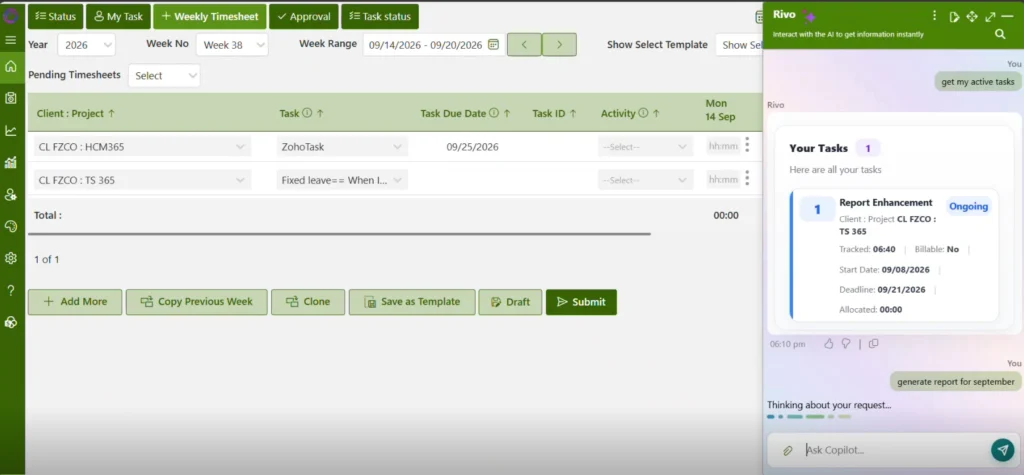
Timesheet 365 is built for organizations that have outgrown spreadsheets and want attendance tracking that works where their teams already work — inside Microsoft Teams and SharePoint. Instead of downloading a template or asking employees to learn a new tool, Timesheet 365 brings the attendance calendar into the Microsoft 365 environment your organization already trusts.
AI agents that do the follow-up for you. Timesheet 365’s AI agents take on the repetitive work that eats up HR and manager time. They can remind employees to submit attendance or timesheets, highlight missing or unusual entries, and help managers get quick answers about who is available, who is on leave, and where coverage gaps might appear. Instead of chasing updates, your team reviews and approves.
Microsoft Teams integration. Employees can log attendance, request leave, and check their records without leaving Teams. Managers can approve requests in the same place they already chat and meet. Because there’s no new app to adopt, participation goes up and gaps in data go down.
SharePoint integration. Attendance data lives within your Microsoft 365 environment through SharePoint, so it follows the security, permissions, and governance policies your IT team already manages. That means fewer data silos, easier audits, and more confidence for compliance teams.
A live attendance calendar, not a static file. Timesheet 365 replaces the manually updated grid with a real-time calendar view. Present, remote, on leave, or absent — every status updates as it happens, giving HR, managers, and payroll the same accurate picture.
Reports that are ready when you need them. Attendance summaries, leave balances, and timesheet data can be pulled together for payroll and leadership reviews without rebuilding formulas every month.
Why this matters: most attendance tools fail not because of missing features, but because people don’t use them consistently. By meeting employees inside Teams and keeping data in SharePoint, Timesheet 365 removes the friction that causes templates — and many standalone tools — to fall apart.
How to Choose the Right Attendance Calendar Software in 2027
Whether you choose Timesheet 365 or another tool, use these criteria to evaluate your options.
- Fit with your existing tools. If your organization runs on Microsoft 365, a tool that works natively in Teams and SharePoint will see faster adoption than a standalone app.
- Ease of use for employees. Logging attendance or requesting leave should take seconds. If it feels like extra work, people will skip it.
- Approval workflows. Look for clear, trackable approvals for leave, overtime, and attendance corrections.
- Practical AI, not hype. Ask what the AI actually does. Reminders, anomaly detection, and natural-language answers save real time; vague “AI-powered” labels do not.
- Security and governance. Check where data is stored, who can access it, and how changes are logged.
- Reporting and payroll readiness. Make sure you can export accurate attendance and leave data without manual cleanup.
- The tool should handle new teams, locations, and policies without a rebuild.
A Simple Rollout Plan
- Audit your current process. Document how attendance and leave are tracked today and where errors happen.
- Define your attendance codes and policies. Standardize statuses, leave types, and approval rules before migrating.
- Start with a pilot team. Test the software with one department for two to four weeks.
- Train managers first. Managers drive adoption; when they approve in the tool, employees follow.
- Retire the spreadsheet. Once the pilot is stable, make the software the single source of truth and archive old templates.
- Review monthly. Use reports to track attendance trends and refine policies over time.
Join Our Creative Community
Frequently Asked Questions
What is an employee attendance calendar?
It’s a date-based record showing each employee’s daily status, such as present, absent, remote, or on leave. It helps HR and managers track attendance, plan coverage, and support payroll.
Can I use an Excel template to track employee attendance?
Yes, Excel templates work well for small teams with simple schedules. As your team grows, manual updates, version issues, and errors make software a better choice.
What should an attendance calendar include
It should include employee details, a full date grid, standard attendance codes, and color coding. Automatic totals, leave balances, and approval notes make it far more useful.
How does AI help with attendance tracking?
AI agents can send reminders, flag missing or unusual entries, and answer attendance questions instantly. This reduces manual follow-up and improves data accuracy.
Does Timesheet 365 work with Microsoft Teams and SharePoint?
Yes, Timesheet 365 integrates with both Microsoft Teams and SharePoint. Employees track attendance inside Teams, while data stays within your Microsoft 365 environment.


























