

Automated Time and Attendance System: The Smarter Way to Run Your Workforce in 2026
_mVFFaHUZhS.webp)
Are you still chasing paper timesheets, fixing payroll mistakes every month, or dealing with buddy punching that quietly drains your budget? An automated time and attendance system can end all of that starting today.
Timesheet 365 is an automated time and attendance system that tracks employee work hours in real time, eliminates manual errors, and integrates with Microsoft 365. It simplifies payroll, scheduling, and compliance in one platform.
Businesses using it save time, reduce costs, and gain full visibility over their workforce—making attendance management faster, smarter, and more reliable.
Businesses across the U.S. are switching to smart, cloud-based workforce tracking tools because they save money, eliminate errors, and give managers real-time control over their teams.
Why Manual Timekeeping Is Costing You More Than You Think
Most business owners do not realize how much money slips through the cracks with old-school timekeeping. A few minutes here, a forgotten punch there – it adds up fast.
That is not a small number. For a company with 50 employees earning $40,000 each, that could mean losing up to $160,000 annually money that simply disappears.
Here is what manual systems actually cost you:
- Payroll errors that take hours to fix every pay period
- Buddy punching — where one employee clocks in for another
- Time theft from rounded clock-ins and untracked overtime
- Lost productivity when HR manually compiles attendance data
- Legal risk from non-compliant scheduling and missing record
What Is an Automated Time and Attendance System?
An automated time and attendance system is a digital platform that tracks when employees start work, take breaks, and end their shifts without requiring any manual input. It replaces paper logs, spreadsheets, and punch cards with smart, connected technology.
That is exactly what our product delivers. It is a cloud-based SaaS platform built to handle the full attendance lifecycle from clock-in to payroll with zero paper, zero manual entry, and near-zero errors. Whether you run a 10-person startup or a 5,000-employee enterprise, it scales with your business from day one.
Core Features Built Into Timesheet 365
- AI-powered scheduling and labor forecasting
- Real-time attendance dashboards for supervisors and HR teams
- Native Microsoft 365 and Microsoft Teams integration
- Automated overtime calculations and instant alerts
- Leave and absence management built in
- Payroll-ready data exports and integrations
- Compliance reporting for labor laws and audits
- Employee self-service portal for schedules and time-off requests
Who Needs an Automated Attendance Tracking Solution?
The short answer? Almost every business with more than five employees. But here is who benefits the most and how Timesheet 365 serves each one.
Small Businesses (1–50 Employees)
You are wearing ten hats at once. You do not have time to review timesheets every Friday. It automates the entire process saving 5–10 hours of admin work per week. Setup takes hours, not weeks, and you do not need an IT team to run it.
Mid-Size Companies (51–500 Employees)
Growth brings complexity. Multiple departments, shift rotations, and remote workers all need accurate tracking. The real-time dashboards give HR managers a single view of every employee across every location all from one screen.
A study by Deloitte found that HR departments using automated time tracking app reduce payroll processing time by up to 80%.
Enterprise Organizations (500+ Employees)
Large teams demand enterprise-grade reliability. It integrates directly with Microsoft 365 and Teams tools your enterprise already uses every day making adoption fast and disruption minimal. AI-powered forecasting helps you optimize labour costs before problems happen.
Healthcare, Retail, and Manufacturing
These industries deal with complex shift schedules, strict labour compliance rules, and high turnover. It was built with these realities in mind tracking certifications, managing rotating shifts, and flagging compliance gaps automatically.
Top Benefits of Switching to Timesheet 365
- Eliminate Payroll Errors Instantly
Manual data entry leads to mistakes. Automated capture does not. It sends accurate, verified attendance data directly to payroll — so you stop overpaying and underpaying employees. - Harness AI-Powered Scheduling
The majority of attendance tools are merely documenting what occurred. This goes further. It uses its inbuilt AI to analyze past attendance trends, predict staffing requirements, and propose the best schedules before shortages emerge. It implies less scramble at the last moment and reduced expenses on overtime.
The Aberdeen Group found that companies using AI-driven workforce scheduling reduce overtime costs by up to 22%.
- Manage Your Whole Team Inside Microsoft Teams
Your employees are already on Microsoft Teams. It is also natively integrated with Microsoft 365 and Teams to enable staff to clock in, check schedules, submit leave requests, and see their hours without leaving the apps they already use. Zero friction. Maximum adoption. - Get Real-Time Visibility With Live Dashboards
No longer waiting till end of day to see who came. The real-time dashboards display the attendance status, late arrivals, absent employees, and overtime hours as soon as they occur. Managers are able to do things in a hurry. - Stay Legally Compliant Automatically
The legislation of overtime, breaks, and minimum wage is constantly evolving. This follows up on all the rules and warns of violations prior to lawsuits or fines. Automatically generated audit-ready reports are created. - Improve Employee Trust and Satisfaction
Employees who are paid accurately and on time trust their employer more. When staff can view their own schedules, request time off, and track their hours through a self-service portal, job satisfaction goes up and turnover goes down.
Gallup research shows that employees who feel compensated are 27% more likely to report high job satisfaction.
How Timesheet 365 Works - Step by Step
The process is simple on the surface, but powerful underneath designed to remove manual effort while giving you full control and visibility:
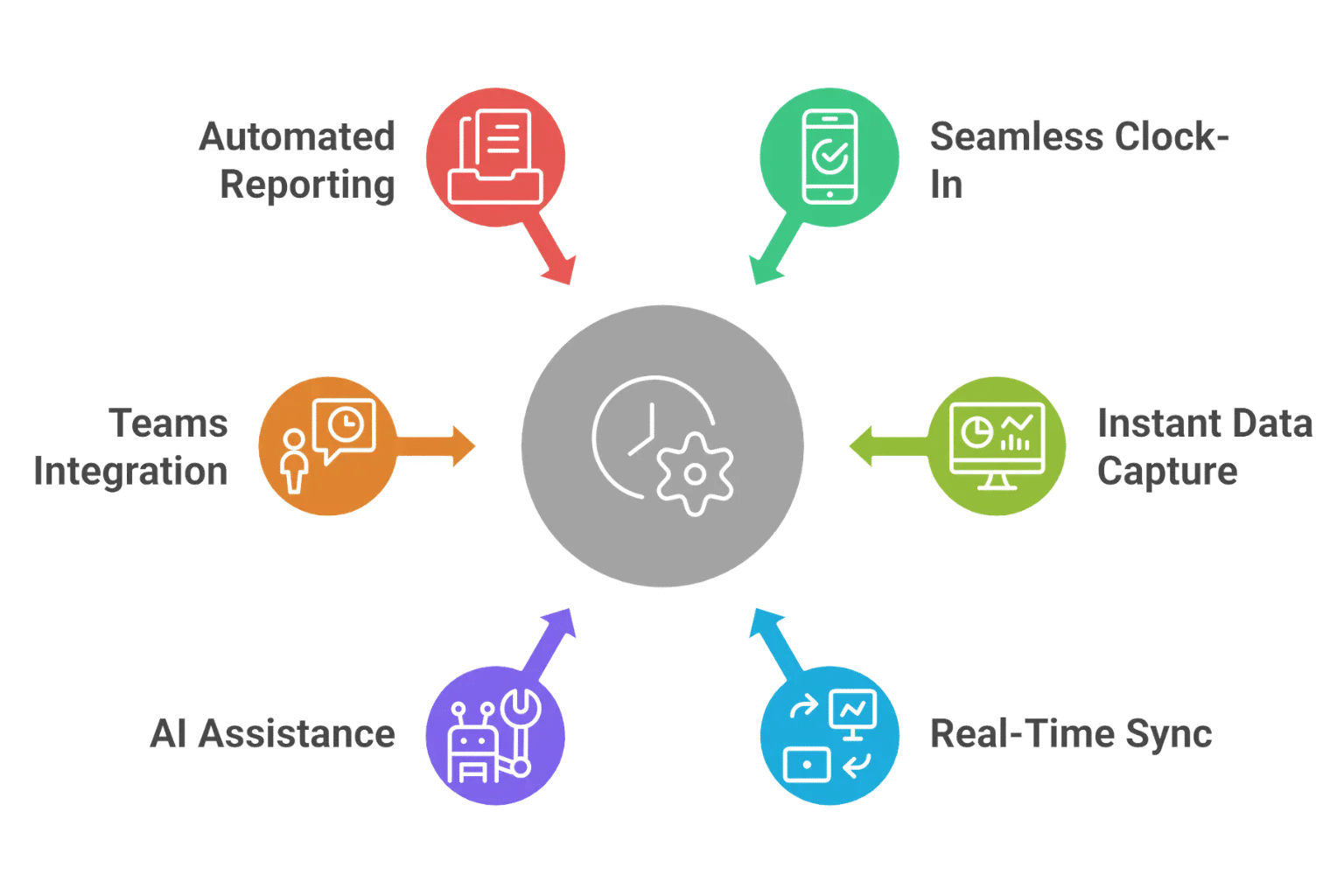
Step 1 — Employees clock in seamlessly
With Microsoft 365, employees can check in via mobile app, web browser, or even in Microsoft Teams. Time entries can be made at any location whether they are in the office, working remotely or on-site. It is fast and can be easily incorporated in daily work routines without additional procedures.
Step 2 — Data is captured instantly and accurately
The system captures precise timestamps and optional location and device information at the time of entry. This guarantees real-time and reliable tracking without the need to input manually or slow updates. It also assists in avoiding mistakes like omissions or wrong reporting.
Step 3 — Real-time sync to dashboards
All attendance and work-hour data is instantly available in dashboards for managers and HR teams. This gives real-time employee activity such as presence, absences, and working hours. Centralized visibility eliminates the need to make manual follow-ups to get updates.
Step 4 — AI does the heavy lifting
It calculates the total hours worked with the help of overtime and break time, according to specific rules. It also detects problems like missed punches or an odd pattern that might require to be addressed. This minimizes manual checks and helps to track time more precisely.
Step 5 — Smooth Teams integration
It is connected to Microsoft 365, where users can track time in applications such as Microsoft Teams and SharePoint. The ecosystem supports collaboration and centralized management by data flowing across the ecosystem. This keeps it all linked in the tools that your organization already has.
Step 6 — Compliance and reporting handled automatically
The system produces detailed attendance, working hours and policy tracking reports. These reports complement internal reviews, audit and compliance with labor regulations. All the records are kept and arranged so that they can be accessed easily whenever they are needed.
Everything runs on the cloud. No servers to maintain. No software to install. You access from your phone, tablet, or laptop any device, anywhere, at any time.
Why Microsoft 365 Integration Changes Everything
Most businesses already pay for Microsoft 365. Most attendance tools sit separate from it meaning employees must juggle yet another login, yet another app, yet another workflow. It eliminates that problem entirely.
Because Timesheet 365 runs inside Microsoft Teams and integrates with the full Microsoft 365 suite, your workforce adoption rate is dramatically higher from day one. There is nothing new to learn. It fits right into how your team already works.
Here is what that integration unlocks:
- Clock-ins and clock-outs directly inside Microsoft Teams
- Schedule notifications sent as Teams messages
- Leave approvals handled through Outlook calendar sync
- Attendance reports accessible via SharePoint and OneDrive
- Single sign-on (SSO) with existing Microsoft 365 credentials
For IT teams, this means faster deployment and lower support burden. For employees, it means zero disruption. For HR managers, it means gets used not abandoned after the first week.
The Future of Workforce Management Is Already Here
Artificial intelligence and machine learning are reshaping how attendance systems work. Predictive scheduling, anomaly detection, and AI-driven labor forecasting are not futuristic concepts they are live features inside right now.
Remote work is permanent for many teams. Hybrid schedules are the new normal. Multi-location operations are growing. The businesses investing in smart, automated workforce tools today are building a competitive advantage that will only widen over time.
Grand View Research projects the global time and attendance software market will reach $3.52 billion by 2030, growing at a CAGR of 9.2% — driven by demand from businesses of every size.
If your team is still running on spreadsheets and manual punch cards, you are already behind. It is the platform built to bring you forward — fast.
Real-World Impact: What Businesses Experience After Switching
Across industries, businesses switching to automated cloud-based attendance platforms report similar outcomes:
- A mid-size retail chain with 120 employees cut payroll processing time from 2 days to 3 hours per cycle
- A healthcare staffing firm reduced overtime disputes by 91% within the first 3 months of automation
- A manufacturing plant with 200 workers eliminated missed-punch errors entirely through real-time dashboard alerts
- A professional services firm with remote teams saved 8 hours of HR admin work weekly after integrating attendance with Microsoft 365
- A restaurant group with 8 locations reduced total labor costs by 12% in year one through AI-informed scheduling
These are not outliers. These are the typical results when businesses stop relying on manual processes and start using a purpose-built platform.
How Timesheet 365 Checks Every Box W
- Easy-to-use interface for admins and employees — built with simplicity first
- Cloud-based access from any device — fully cloud-native SaaS
- Microsoft 365 and Teams integration — native, not bolted on
- AI-powered scheduling and forecasting — built-in intelligence, not an add-on
- Real-time dashboards and reporting — live data, every minute
- Leave and PTO management — fully integrated
- SharePoint – ready data exports — clean, accurate, automatic
- Labor law compliance features — automated alerts and audit reports
- Scalability from 5 to 5,000+ employees — one platform, every size
- Free demo available — no commitment, no credit card
Conclusion
Your team is your most valuable asset. Paying them accurately, tracking attendance without friction, and staying legally compliant should not be a battle you fight every two weeks.
Timesheet 365 gives you the control, clarity, and confidence to run your workforce without payroll drama. It pays for itself fast. Your employees notice the difference. Your HR team gets their sanity back.
The question is not whether you need this technology. The question is: how much longer can you afford to go without it?
Every day you delay is another day of lost money, avoidable errors, and unnecessary stress. Take the first step today — book a free demo and see what smarter workforce management actually looks like.
Frequently Asked Questions
What is Timesheet 365?
Timesheet 365 is a cloud-based SaaS platform that automates employee time and attendance tracking. It integrates natively with Microsoft 365 and Teams, includes AI-powered scheduling and forecasting, and delivers real-time dashboards — serving businesses from 5 to 5,000+ employees.
How does Timesheet 365 integrate with Microsoft Teams?
Employees can clock in and out, view schedules, check attendance history, and submit leave requests directly inside Microsoft Teams. Timesheet 365 also syncs with Outlook calendars and Microsoft 365 accounts, so there is no separate login or extra app to manage.
Can small businesses afford Timesheet 365?
Timesheet 365 uses a per-employee SaaS pricing model, making it accessible for businesses of all sizes. Most customers recover their investment within the first payroll cycle through reduced errors and eliminated time theft. A free demo is available with no commitment.
What does the AI scheduling feature actually do?
The AI inside Timesheet 365 analyzes historical attendance data, seasonal demand patterns, and employee availability to suggest optimized shift schedules before problems arise. It flags potential overtime risks, understaffed shifts, and scheduling conflicts — so managers can act proactively, not reactively.
Does Timesheet 365 work for remote and hybrid teams?
Absolutely. Because Timesheet 365 is cloud-based and integrated with Microsoft Teams, remote and hybrid employees access everything from wherever they work. Geo-tagged clock-ins confirm location when needed, and managers see the full team in one real-time dashboard regardless of where people are.


_JiluXJRGNl.svg)























