
Alternative to Live Agent: 10 Best Tools to Consider in 2027

Looking for an alternative to Live Agent that offers better automation, simpler ticket management, or stronger integration with your existing tools? Several help desk platforms are worth considering, including Helpdesk 365, Freshdesk, Zendesk, Zoho Desk, Help Scout, and Intercom.
LiveAgent brings email ticketing, live chat, call center tools, and customer support features into one platform. However, it may not be the right fit for every business. Some teams need an easier interface, more flexible workflows, or support software that works directly with Microsoft 365.
- Helpdesk 365 offers ticket management, automation, and Microsoft Teams and SharePoint integration
- Freshdesk and Zendesk provide customer support workflows, reporting, and automation
- Zoho Desk and Help Scout offer accessible ways to manage customer requests
- Intercom, Crisp, and Tidio focus on real-time conversations and customer engagement
- Compare total costs, integration needs, and the features included in each plan before replacing LiveAgent
The best alternative depends on how your team handles support requests. For example, Helpdesk 365 is a practical choice for Microsoft 365-based ticket management, while Freshdesk supports growing customer service teams, and Crisp focuses on customer conversations.
This guide compares 10 LiveAgent alternatives based on features, pricing, ease of use, and business needs. It also explains when switching makes sense and how to choose a tool without disrupting your support operations.
Why Look for an Alternative to Live Agent?
LiveAgent is a customer support platform that helps businesses manage requests across email, chat, phone, and other channels.
It offers a useful mix of features, but businesses may start exploring alternatives to LiveAgent when their support needs change.
Advanced features require higher plans
LiveAgent provides several pricing plans. However, capabilities such as call center support, service level agreements (SLAs), and additional reporting become available on higher tiers.
For businesses that only need ticket management and automation, paying for a broader support suite may not be necessary.
Teams need better integration with existing tools
Businesses using Microsoft Teams, SharePoint, or Outlook may prefer a help desk that connects closely with their existing workplace.
This can help agents manage support requests without moving between several separate applications.
Support workflows become more complex
As ticket volume increases, teams need tools that help them assign requests, set priorities, track response times, and manage escalations.
Some businesses may find that another platform offers a workflow or interface better suited to their support process.
AI and automation needs are changing
Modern support teams are looking for AI-assisted ticket summaries, automated responses, self-service options, and workflow automation.
While LiveAgent also offers AI capabilities, the best choice depends on how much automation your team needs and how those features are priced.
Businesses want simpler daily operations
Support agents work more efficiently when they can quickly find tickets, review customer information, and update requests.
A business may consider a LiveAgent competitor if its team prefers a different interface or a more focused set of tools.
The goal is not simply to find cheaper software. It is to choose a platform that makes support easier for both agents and customers.
10 Best Alternatives to LiveAgent in 2027
The following tools cover different support needs, from traditional customer service and live chat to Microsoft 365-based ticketing and AI-powered assistance.
Tool | Best For | Standout Capability |
Helpdesk 365 | Microsoft 365 businesses | Teams and SharePoint-based ticketing |
Freshdesk | Growing support teams | Ticket automation and reporting |
Zendesk | Large customer service teams | Omnichannel support |
Zoho Desk | Budget-conscious businesses | Customizable support workflows |
Help Scout | Small and midsize teams | Shared inbox and knowledge base |
Intercom | SaaS businesses | AI-powered conversational support |
Crisp | Chat-focused businesses | Unified customer messaging |
Front | Email-focused teams | Collaborative shared inboxes |
Tidio | Small online businesses | Live chat and AI assistance |
Hiver | Google Workspace users | Gmail-based customer support |
1. Helpdesk 365: Best for Microsoft 365-Based Support
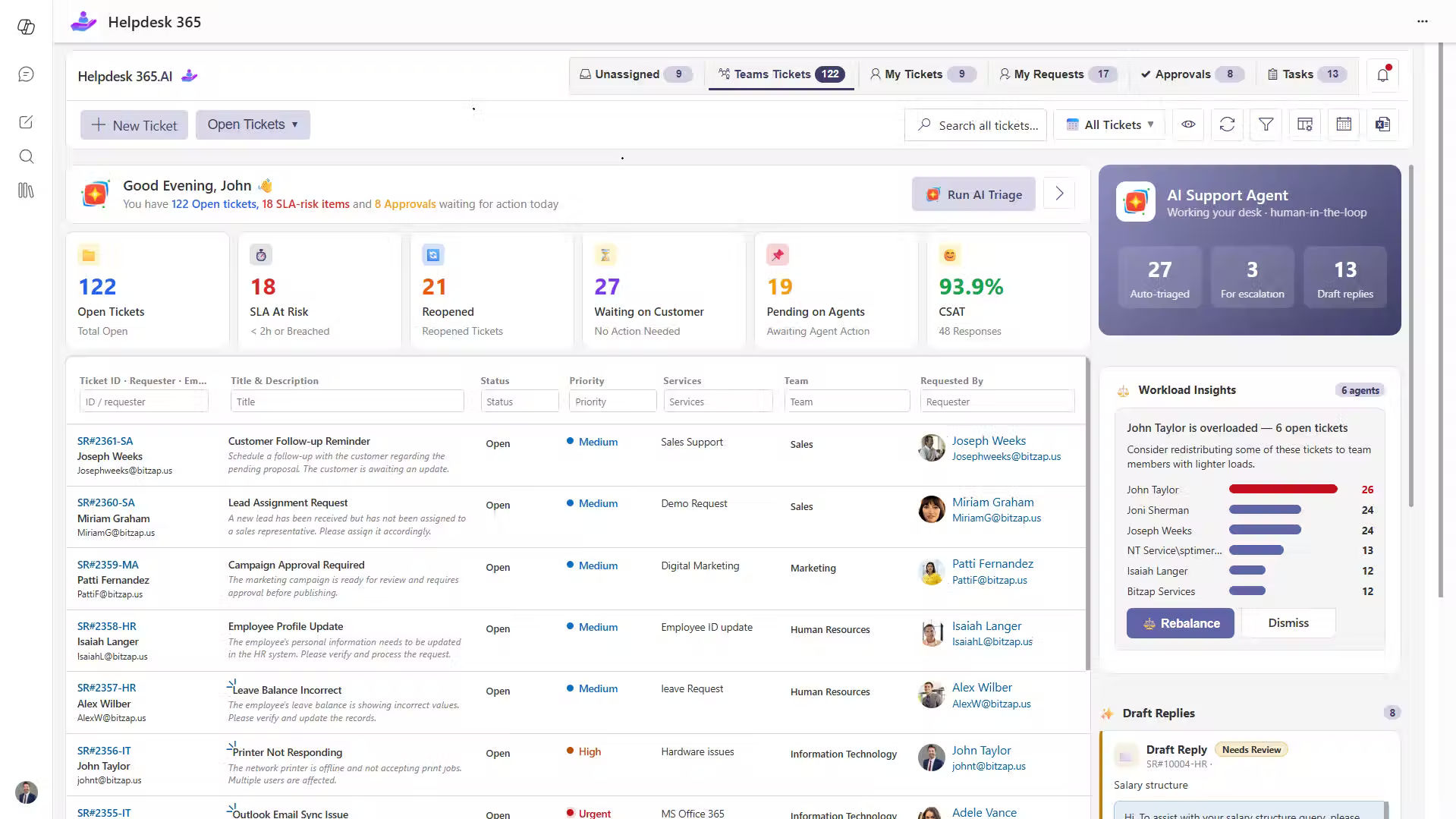
Best for: Organizations using Microsoft 365, Microsoft Teams, and SharePoint
SharePoint Helpdesk 365 is an AI-powered ticketing platform designed for businesses that use Microsoft 365. It helps IT, HR, facilities, and customer support teams manage requests through a centralized system.
Unlike LiveAgent, which focuses mainly on customer communication across several channels, Helpdesk 365 is designed for structured ticket management within the Microsoft workplace.
Employees can submit requests, track progress, and receive updates, while support agents can manage assignments, priorities, and resolutions.
Key features
- Microsoft 365 integration: Support workflows connected with Teams, SharePoint, and Outlook
- Ticket management: Organize, assign, prioritize, and track requests
- AI assistance: Ticket summaries and AI-powered help desk capabilities on eligible plans
- Workflow automation: Automate assignments, notifications, and escalations
- SLA management: Set response and resolution targets
- Knowledge base: Help users find answers without contacting support
Pricing: Starts at $19.99 per user/month, billed annually, with a minimum of five users. Advanced automation and AI features are available on higher plans.
What to consider: Helpdesk 365 is a stronger fit for Microsoft-based ticket workflows than for businesses whose main requirement is a full customer-facing call center and live chat platform.
Why choose Helpdesk 365?
Choose Helpdesk 365 if your employees already use Microsoft 365 and you want to manage support requests within a familiar work environment.
Already using Microsoft 365 ?
Explore Helpdesk 365 to see how it can support your IT and employee service workflows.
2. Freshdesk: Best for Growing Customer Support Teams
Best for: Growing businesses managing customer service requests
Freshdesk is a customer support platform that helps businesses organize incoming tickets, automate routine work, and monitor service performance.
It is a practical alternative to Live Agent for teams that want a structured help desk with reporting and AI-assisted support.
Freshdesk works well for businesses moving beyond shared email inboxes into a more organized ticketing process.
Key features
- Ticket management: Assign, categorize, and track customer issues
- Automation: Route requests and reduce repetitive work
- Knowledge base: Publish answers to common customer questions
- AI assistance: Use Freddy AI features on eligible plans
- Reporting: Monitor support workload and performance
Pricing: Growth starts at $19 per agent/month, Pro at $55, and Enterprise at $89, billed annually. Additional AI usage and features may cost extra.
Freshworks
What to consider: Freshdesk’s core product focuses on ticket-based support. Businesses that need a broader combination of messaging and voice should also compare Freshworks’ omnichannel offerings.
Why choose Freshdesk?
Freshdesk suits businesses that need scalable ticket management without immediately adopting a complex enterprise support system.
3. Zendesk: Best for Enterprise Customer Service
Best for: Large businesses managing support across multiple channels
Zendesk is a customer service platform that connects support requests from email, messaging, chat, and voice in one system.
It is one of the more established LiveAgent competitors for businesses that need advanced workflows, customer context, and reporting.
Zendesk is particularly useful when several support teams need shared processes and visibility into customer conversations.
Key features
- Omnichannel support: Connect requests across customer communication channels
- Ticket routing: Direct requests to suitable agents or teams
- AI tools: Assist agents and automate selected service activities
- Knowledge base: Provide customer self-service resources
- Analytics: Measure performance and support trends
Pricing: Support Team starts at $19 per agent/month, while Suite Team starts at $55, billed annually. Suite Professional starts at $115 per agent/month.
Starting from $19/month
What to consider: Costs can increase when businesses need higher-tier AI, reporting, and omnichannel capabilities.
Why choose Zendesk?
Zendesk is worth considering when your organization needs a broad customer service platform with room for complex support operations.
4. Zoho Desk: Best for Budget-Conscious Businesses
Best for: Small and midsize businesses seeking flexible ticketing
Zoho Desk is a help desk solution for businesses that want to manage customer requests, improve agent productivity, and maintain service quality.
It supports ticket workflows, customer information, automation, and self-service. It can be particularly useful for businesses already using other Zoho applications.
Key features
- Ticket management: Track customer requests through resolution
- Automation: Assign tickets and create workflow rules
- Customer context: View customer information and past interactions
- Knowledge base: Provide self-service support
- Reporting: Review ticket activity and team performance
Pricing: A free plan is available for up to three users. Standard starts at $14 per user/month, billed annually, in the US. Pricing varies by region and plan.
Flexible free trial
What to consider: Some advanced automation and AI capabilities require higher plans. Businesses using Microsoft 365 should compare native workflow integration before choosing.
Why choose Zoho Desk?
Zoho Desk is a suitable option for businesses seeking a customizable help desk without starting with an expensive enterprise plan.
5. Help Scout: Best for Simple Customer Support
Best for: Small and midsize teams that prioritize ease of use
Help Scout provides customer support tools built around shared inboxes, collaboration, and self-service.
For teams that find a traditional ticketing interface more complex than necessary, Help Scout offers a conversation-focused approach.
Agents can manage customer emails, use saved responses, and work together without losing conversation history.
Key features
- Shared inbox: Organize customer conversations in one place
- Saved replies: Respond to common questions faster
- Knowledge base: Publish help articles
- Collaboration: Use internal notes and conversation assignments
- AI assistance: Support agent writing and responses
Pricing: A limited free plan is available. Standard starts at $25 per user/month, Plus at $45, and Pro at $75 on the pricing page. Billing options and add-on fees should be confirmed before purchase.
helpscout.com
What to consider: Help Scout is best suited to conversation-based customer service. Teams with complex IT service management needs may prefer a more specialized solution.
Why choose Help Scout?
Help Scout works well for teams that want customer support to feel like a shared, organized conversation rather than a complicated ticketing process.
6. Intercom: Best for AI-Powered Conversational Support
Best for: SaaS businesses and digital product teams
Intercom focuses on customer communication through live messaging, AI agents, and support workflows.
It is a strong LiveAgent alternative for software businesses that want to answer customer questions directly inside their apps or websites.
Its Fin AI Agent can handle supported customer questions and pass more complex conversations to human agents.
Key features
- Live messenger: Support users through websites and apps
- AI agent: Automate selected customer conversations
- Shared inbox: Manage requests across the support team
- Help center: Publish self-service articles
- Workflows: Route and organize customer conversations
Pricing: Essential is advertised from $19 per seat/month under a promotional annual offer, with standard pricing varying by billing terms. Fin usage starts at $0.99 per outcome.
Plans for every team size
What to consider: AI outcome charges and messaging costs can increase total spending as support volume grows.
Why choose Intercom?
Intercom is useful for SaaS teams that need proactive messaging, in-app support, and AI-powered customer conversations.
7. Crisp: Best for Live Chat and Customer Messaging
Best for: Businesses that depend on real-time customer messaging
Crisp brings customer conversations together through live chat, email, and supported messaging applications.
It helps businesses communicate with website visitors, manage customer questions, and build automated chat workflows.
Crisp is worth considering for teams that value a shared messaging inbox more than traditional ticket management.
Key features
- Live chat: Communicate with website visitors
- Shared inbox: Bring customer conversations into one workspace
- Chatbots: Automate common questions and responses
- Knowledge base: Create self-service support articles
- Customer information: View conversation details and contact history
Pricing: A free plan is available. Mini starts at $45 per workspace/month, Essentials at $95, and Plus at $295. Seat allowances and advanced features differ by plan.
Crisp
What to consider: Crisp’s dedicated customer ticketing system is listed under its Plus plan. Smaller plans are better aligned with messaging-focused needs.
Why choose Crisp?
Crisp is a suitable option for businesses prioritizing live conversations, chatbot workflows, and website visitor engagement.
8. Front: Best for Email Collaboration
Best for: Teams handling large volumes of customer emails
Front combines shared inboxes, customer communication, and team collaboration.
It helps businesses manage messages without relying on forwarded email chains or disconnected conversations.
Front is particularly useful for support and account management teams that need to collaborate on customer requests.
Key features
- Shared inboxes: Centralize customer emails
- Internal comments: Collaborate without sending extra emails
- Workflow rules: Route and organize requests
- Customer context: Review earlier messages and customer details
- Analytics: Track team response activity
Pricing: Starter begins at $25 per seat/month, Professional at $65, and Enterprise at $105, billed annually.
Front
What to consider: Starter is primarily designed for single-channel support. Broader omnichannel functionality requires a higher plan.
Why choose Front?
Front is a practical LiveAgent replacement for teams that focus on email-based customer relationships and need better internal collaboration.
9. Tidio: Best for Small Business Live Chat
Best for: Small businesses and online stores
Tidio combines live chat, ticketing, and AI-powered support features to help businesses handle customer questions.
It is a useful alternative to Live Agent for businesses that want to offer quick assistance to website visitors without investing in a large customer service platform.
Key features
- Live chat: Answer visitor questions in real time
- Ticketing: Manage customer conversations
- AI assistance: Use Lyro AI to handle supported questions
- Chat automation: Guide visitors through common tasks
- Customer engagement: Connect with visitors during their website journey
Pricing: A free plan is available. Under the updated November 2026 pricing, human-only Starter begins at $29/month when billed monthly, while Starter with Lyro AI begins at $39/month. Prices vary by conversation volume and billing term.
Tidio Help Center
What to consider: Conversation limits, AI usage, and optional add-ons affect the total cost.
Why choose Tidio?
Tidio works well for smaller businesses that need customer chat and basic ticketing without a full enterprise help desk.
10. Hiver: Best for Gmail-Based Customer Support
Best for: Businesses using Gmail and Google Workspace
Hiver helps teams manage customer support and shared inbox workflows within Gmail and through its support platform.
It is a useful option for organizations that want to collaborate on customer emails while continuing to use familiar Google Workspace tools.
Rather than managing support through forwarded emails and separate spreadsheets, agents can assign conversations and track progress.
Key features
- Gmail integration: Manage shared customer conversations
- Ticket assignments: Give requests clear ownership
- Collaboration: Add internal notes and coordinate replies
- Workflow automation: Reduce repetitive support tasks
- Reporting: Review response performance and workload
Pricing: Plan availability and fees depend on the selected edition and billing cycle. Check Hiver’s official pricing page for the current per-user rate and included features.
What to consider: Businesses should assess Hiver’s broader channel support and compare its Gmail-based experience with dedicated ticketing platforms.
Why choose Hiver?
Hiver is a practical choice for Google Workspace teams that want to improve email-based support without completely changing their working environment.
LiveAgent vs. Its Alternatives: What Should You Compare?
Before choosing an alternative to Live Agent, consider how each platform supports your daily operations.
Evaluation Area | What to Check |
Ease of use | Can agents learn and use the platform quickly? |
Ticket management | Can teams assign, prioritize, and monitor requests? |
Automation | Can repetitive tasks be handled automatically? |
Integrations | Does it work with your existing business applications? |
AI capabilities | Are summaries, suggestions, and automated answers available? |
Reporting | Can managers track response times, SLA performance, and ticket trends? |
Pricing | Are required features included in the plan? |
For example, a business using Microsoft Teams to communicate internally may benefit more from Helpdesk 365 than from a customer-facing chat platform.
However, a SaaS company that answers most customer questions through an in-app messenger may find Intercom or Crisp more suitable.
How to Choose the Right Live Agent Alternative
Finding the best LiveAgent alternative requires more than comparing feature lists. Consider the problems your current platform does not solve.
Identify your main support channels
Start by reviewing where requests come from.
If customers mainly contact you through email, a shared inbox or ticketing platform may be enough. If your team handles website chats and phone calls, check whether those channels are included in the selected plan.
Check integration requirements
Choose software that fits your existing applications.
For instance, Microsoft 365 businesses may want integrations with Teams, SharePoint, and Outlook. Google Workspace teams may prefer Gmail-based workflows.
Compare automation capabilities
Look for features that reduce manual work, such as automatic ticket assignment, SLA reminders, and predefined responses.
Test these features using common support scenarios rather than relying only on product descriptions.
Calculate the total cost
Compare the actual price for your team size, not just the advertised starting rate.
Include user licenses, minimum seat requirements, AI usage charges, support channel add-ons, and implementation costs.
Test the software before switching
Create a small trial with real support scenarios.
Check whether agents can easily submit, assign, update, escalate, and resolve tickets. Also review reporting accuracy and the experience for requesters.
A trial can help you identify workflow problems before moving your full support operation.
How to Switch From LiveAgent Without Disrupting Support
Once you select a replacement, plan the migration carefully.
Review your existing data: Identify tickets, contacts, knowledge base articles, and historical conversations that must be retained
Confirm migration support: Check what data the new vendor can import and which information requires manual handling
Set up workflows: Configure ticket categories, priorities, assignment rules, and SLAs
Test integrations: Verify email delivery, notifications, authentication, and connected applications
Train support agents: Show employees how to manage tickets and find information
Run a pilot: Move a small set of requests before switching the entire support operation
Monitor results: Review response time, unresolved requests, and agent feedback after launch
Not every LiveAgent alternative supports the same import formats or preserves complete conversation history. Confirm these details with the vendor before canceling your existing subscription.
Which Alternative to Live Agent Should You Choose?
The right platform depends on your support channels, existing software, and business goals.
- Choose Helpdesk 365 when Microsoft 365 integration, internal ticket management, and structured support workflows are priorities.
- Freshdesk and Zendesk are suitable choices for businesses that need broader customer service capabilities. Zoho Desk is worth considering for budget-conscious teams, while Help Scout and Front focus on collaborative customer conversations.
- For businesses focused on customer messaging, Intercom, Crisp, and Tidio offer different combinations of live chat, automation, and AI assistance.
If you are comparing tools primarily on cost, review the features available at the plan you can afford. A lower starting price does not always mean lower overall spending.
Conclusion
Choosing between LiveAgent alternatives comes down to understanding what your support team needs most.
LiveAgent offers ticketing, live chat, and customer service features, but other platforms may provide a better fit for specific workflows. Businesses should compare ease of use, integrations, automation, pricing, and support requirements before switching.
For organizations already working with Microsoft 365, Helpdesk 365 provides an option for managing tickets, automating support processes, and improving visibility across internal requests.
The best decision is to choose software that fits your existing workflow and can support your team as demand grows.
Ready to move beyond traditional ticket management?
Explore Helpdesk 365 to see how it can support your IT and employee service workflows
Join Our Creative Community
Frequently Asked Questions
1. What is the best alternative to Live Agent?
The best option depends on your support requirements. Helpdesk 365 is a practical choice for Microsoft 365-based ticket management, Freshdesk for growing customer support teams, and Zendesk for complex omnichannel customer service.
2. Is Helpdesk 365 better than LiveAgent?
Helpdesk 365 may be a better fit for organizations that use Microsoft Teams and SharePoint and need structured ticketing, automation, and internal support workflows. LiveAgent may be more suitable when built-in live chat and call center support are essential.
3. Which LiveAgent alternative works with Microsoft Teams?
Helpdesk 365 is designed for Microsoft 365 environments and supports ticket management workflows connected with Microsoft Teams and SharePoint. It is worth evaluating if your business already uses these applications.
4. What should I consider before replacing LiveAgent?
Review ease of use, required support channels, automation, integrations, pricing, data migration, and reporting. Testing the new platform with real support scenarios will help you make a better decision.