
AI IT Service Desk: Automate Tickets and Resolve Faster

An AI IT Service Desk uses artificial intelligence to understand support requests, automate repetitive work, route tickets, suggest answers, and help employees resolve common issues faster.
It matters because IT teams can reduce manual triage, shorten wait times, improve service consistency, and give specialists more time for problems that need human judgment.
- An AI IT Service Desk automates ticket routing, responses, and routine support tasks.
- AI for Service Desk helps teams reduce manual work and resolve issues faster.
- A modern IT Service Desk combines automation with human oversight.
- Helpdesk 365 supports AI-driven ticket management within Microsoft 365.
What Is an AI IT Service Desk?
An AI IT Service Desk is an IT support system that combines service management workflows with technologies such as natural language processing, machine learning, generative AI, and automation. It can interpret requests, classify tickets, recommend solutions, trigger approved actions, and escalate complex cases while keeping a record of ownership, status, service levels, and outcomes.
A traditional IT service desk already gives employees a structured place to report incidents and request services. AI adds a decision and assistance layer. Instead of asking an agent to read every new ticket, choose a category, set priority, search the knowledge base, write a reply, and assign the case, the system can complete or support many of those steps.
AI service desk as a system that can receive, understand, route, and resolve service requests, while Salesforce highlights AI agents, intelligent routing, and predictive insights as core capabilities.
AI does not replace the service desk; it improves how requests move through it.
How Does an AI IT Service Desk Work?
An AI IT Service Desk follows the same basic path as good IT support: capture the request, understand it, decide what should happen, take an approved action, and confirm the result. The difference is that AI can handle many decisions that once required repetitive agent work.
Step answer:
- Capture: A user reports an issue through chat, email, Teams, or a portal.
- Understand: AI identifies intent, urgency, category, and useful context.
- Act: The system suggests an answer or runs an approved workflow.
- Route: Complex cases go to the right person with context attached.
- Learn: Outcomes improve knowledge, rules, and future recommendations.
For example, an employee writes, “I changed phones and cannot sign in to the VPN.” The system can recognize an access problem, search approved knowledge, suggest the correct device-registration steps, and create a ticket if self-service fails. The assigned technician receives the original message, actions already attempted, device details if available, and a concise summary.
That is more useful than a chatbot that simply says, “Please contact IT.”
Key Components and Features of an AI IT Service Desk
The best AI features are the ones that solve a specific support challenge.
Intelligent Ticket Classification
AI reads a request and suggests its category, priority, and service. This reduces sorting work and keeps reporting cleaner.
Smart Ticket Routing
Requests can be assigned by issue type, skills, workload, priority, or rules. The goal is fewer transfers, not automation for its own sake.
AI Self-Service
Employees ask questions in plain language instead of guessing search terms. Strong systems answer from approved sources and offer human escalation when confidence is low.
Agent Assistance
Generative AI can summarize ticket history, draft replies, suggest troubleshooting steps, and recommend knowledge. Agents should review important actions.
Workflow Automation
Approvals, reminders, status updates, standard requests, and fulfillment steps can run automatically when policy conditions are met.
SLA Monitoring
The platform should track response and resolution targets, warn agents before breaches, and escalate cases when needed.
Knowledge Management
AI needs reliable source material. Knowledge should have owners, review dates, permissions, feedback, and a process for removing outdated guidance.
Analytics and Pattern Detection
Teams need visibility into recurring incidents, reassignment, backlog age, self-service success, automation failures, SLA risk, and high-effort categories.
The most useful AI service desk capabilities are intelligent classification, skill-based routing, grounded self-service, agent summaries, response suggestions, workflow automation, SLA alerts, knowledge recommendations, duplicate detection, and operational analytics. Together, these features reduce repetitive handling while keeping difficult, sensitive, or uncertain requests visible to human support staff.
Benefits and Business Impact of an AI IT Service Desk
The value of AI for service desk operations should be measured in outcomes, not in how many AI features are enabled.
Faster Response and Resolution
Correct classification, instant knowledge suggestions, and routing remove waiting between steps. Common requests can be answered immediately, while complex tickets reach specialists sooner.
Less Repetitive Agent Work
A ServiceNow infographic based on EMA research reported that before AI, 49% of respondents said agents spent more than half of a typical day on routine tasks. After AI, none reported that level, while 74% said routine work took one-third of the day or less. These survey results are not a guaranteed outcome for every organization.
More Consistent Support
AI can suggest answers from approved knowledge and follow repeatable workflow rules, reducing variation between agents.
Better Employee Experience
Employees want help without repeating the issue. A good IT service desk gives them one path, clear updates, and a useful answer.
Stronger Operational Visibility
Consistent categorization helps leaders identify which incidents, access delays, devices, applications, or requests drive the queue.
More Capacity
Automation can absorb repeatable work as demand grows, giving specialists more time for security, infrastructure, complex incidents, root-cause analysis, and service improvement
AI IT Service Desk vs. Traditional IT Service Desk
A traditional IT service desk depends heavily on agents to read, classify, route, research, respond to, and close tickets. An AI IT Service Desk keeps the same service controls but assists or automates selected steps. The biggest difference is not the presence of a chatbot; it is whether the system can turn request context into a safe next action.
| Area | Traditional IT Service Desk | AI IT Service Desk |
| Triage | Manual review | AI-assisted classification |
| Routing | Rules or agent choice | Context-aware routing |
| Knowledge | Manual search | Recommended or conversational answers |
| Replies | Written by agents | AI drafts with review |
| Reporting | Historical dashboards | Trends plus AI-assisted insights |
How Helpdesk 365 Supports an AI IT Service Desk
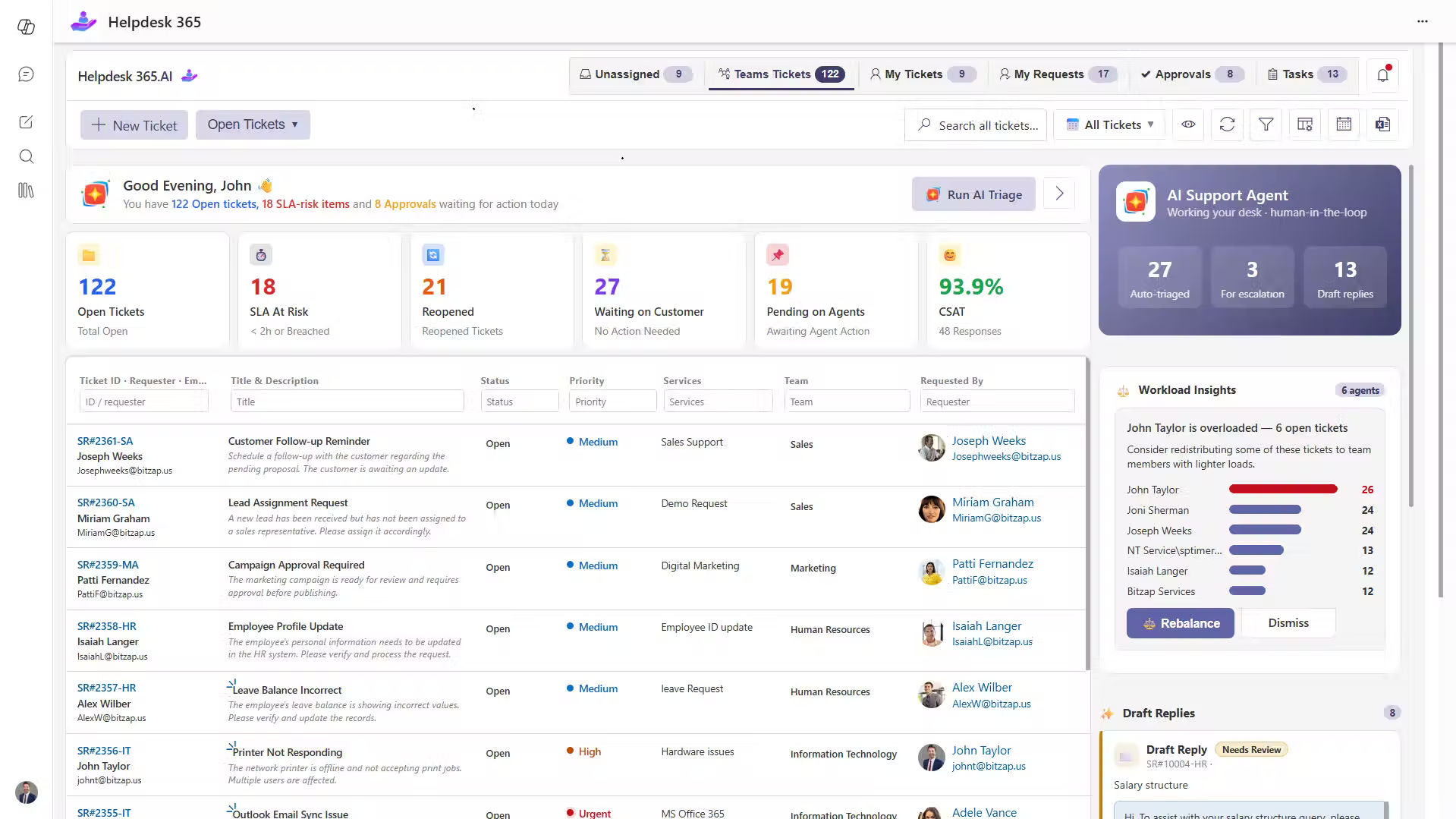
Helpdesk 365 helps Microsoft 365 teams manage support with less manual effort by bringing ticketing, automation, AI assistance, and SLA tracking into familiar tools such as Microsoft Teams, Outlook, and SharePoint.
It can help teams:
- Automatically categorize and route tickets to the right team.
- Use AI summaries and suggested responses to understand requests faster.
- Reduce repeated questions with knowledge-based support.
- Track SLAs, priorities, and escalations more clearly.
- Manage requests from Teams, email, and SharePoint in one structured process.
For organizations already using Microsoft 365, Helpdesk 365 can support an AI IT Service Desk by reducing repetitive ticket work, improving visibility, and helping support teams resolve requests faster without forcing employees to switch between multiple systems.
Real-World AI IT Service Desk Examples
Real-world AI IT Service Desk use cases show how AI can reduce manual effort and speed up everyday support. From access requests to recurring incidents, AI helps teams handle common issues with more consistency and control.
Password and Access Request
An employee cannot access a finance application. AI identifies an access issue, checks approved knowledge, asks for the missing application name, and creates a correctly categorized request. If approval is required, the workflow starts automatically.
New Employee Onboarding
A manager requests access for a new hire. The service desk creates tasks for identity, device, applications, and permissions. Standard steps are automated; exceptions go to the responsible team. One controlled process replaces several disconnected messages.
Major Incident Detection
Ten employees report that email is unavailable. AI can identify similarity, link the reports, flag a possible major incident, notify the service owner, and send consistent updates while technicians investigate.
Repetitive Software Problem
Tickets repeatedly report an application failure after an update. Analytics reveal the pattern. IT publishes a verified fix and adds an automated recommendation while the application owner investigates the root cause.
The goal is not fewer tickets at any cost. It is less avoidable effort per useful resolution.
The Role of AI and Technology in Modern IT Service Desks
AI for service desk work is moving from assistance toward controlled action.
Natural language processing helps systems interpret what users mean. Machine learning can improve classification and pattern detection. Generative AI creates summaries, suggested replies, and conversational answers. Automation engines execute predefined workflows. AI agents can go further by deciding among approved steps and completing multi-stage tasks.
IBM cites Gartner research predicting that 33% of enterprise software applications will include agentic AI by 2028, compared with less than 1% in 2024.
That trend makes governance more important, not less.
The useful question is not, “Can AI do this?” It is, “Should AI do this without review, what data may it use, what action may it take, and how will we know when it is wrong?
A mature AI IT Service Desk should therefore combine automation with permissions, logs, approved knowledge, human escalation, and measurable controls.
How to Choose the Right AI IT Service Desk Solution
Do not start with a long feature checklist. Start with the support problems you need to remove.
Ask vendors to demonstrate your real workflows, not polished sample tickets. Give them one routine request, one ambiguous incident, one approval-heavy request, and one urgent case.
Evaluate these areas:
- Channel fit: Can employees request help where they already work?
- AI accuracy: Does the system explain or ground suggested answers?
- Routing: Can it use your categories, teams, priorities, and ownership rules?
- Automation: Can you control which actions run automatically?
- Knowledge: Does it respect permissions and approved sources?
- ITSM controls: Are SLAs, escalation, approvals, history, and audit trails supported?
- Integration: Does it connect with identity, collaboration, asset, monitoring, and business tools you use?
- Security: Can you define roles, data access, retention, and administrative control?
- Analytics: Can you measure outcomes rather than vanity metrics?
- Human handoff: Can users reach a person without restarting the conversation?
Conclusion
An AI IT Service Desk can make support faster when it tackles the work that creates delay: manual triage, repeated questions, poor routing, status chasing, knowledge searches, and routine updates.
The strongest results come from combining AI with clear processes, reliable knowledge, controlled automation, measurable service goals, and human judgment. Do not automate a broken workflow simply because a tool can automate it. Fix the process first, then let AI handle the repeatable parts.
For Microsoft 365 organizations, Helpdesk 365 brings ticket management, AI assistance, automation, SLA tracking, and support workflows into tools such as Teams, Outlook, and SharePoint.
If your support team is spending too much time sorting tickets instead of solving problems, test Sharepoint Helpdesk 365 against your own requests, routing rules, SLA targets, and Microsoft 365 workflows.
See how AI-assisted ticketing can help your team resolve requests faster while keeping people in control.
Join Our Creative Community
Frequently Asked Questions
Can an AI IT Service Desk resolve tickets without a human?
Yes, some routine requests can be resolved automatically when the answer or workflow is known, authorized, and low risk. Examples may include knowledge questions, standard status checks, or approved fulfillment steps. Complex, uncertain, sensitive, or high-impact issues should move to a human with the context already collected.
Is AI for service desk support the same as a chatbot?
No. A chatbot is only one interface. AI for service desk operations can also classify tickets, prioritize requests, summarize conversations, recommend knowledge, route work, detect patterns, monitor SLA risk, and trigger approved workflows behind the scenes.
Will AI replace IT service desk agents?
AI is better suited to repetitive support work than to every support decision. Agents are still needed for ambiguous incidents, security concerns, exceptions, stakeholder communication, root-cause analysis, and situations that require judgment. The practical goal is to remove avoidable administration so specialists can focus on higher-value work.
What should we automate first?
Start with high-volume, low-risk requests that follow a stable process. Good candidates include common access questions, knowledge searches, ticket categorization, status updates, standard software requests, summaries, and routing. Avoid beginning with processes that are poorly documented or require frequent exceptions.
How do we measure whether an AI IT Service Desk is working?
Track outcomes before and after implementation. Useful measures include first-response time, mean resolution time, transfer rate, reopen rate, SLA attainment, self-service resolution, automation failure rate, agent handling effort, user satisfaction, and the percentage of AI actions that require correction.
Does an AI IT Service Desk need a knowledge base?
For reliable self-service and agent assistance, yes. AI needs trusted information to ground answers. A smaller, well-maintained knowledge base is usually more valuable than a large collection of outdated documents. Assign article owners, review content regularly, manage permissions, and use failed searches to identify missing guidance.


_JiluXJRGNl.svg)























