
AI Bug Detection: How AI Finds Bug Patterns and Prevents Recurring Software Issues

Software bugs slow down development, delay releases, and create extra work for QA and engineering teams. When the same issues keep appearing, finding the root cause becomes even harder. AI bug detection helps teams identify duplicate bugs, analyze recurring patterns, and improve software quality by turning historical bug data into useful insights.
- AI Bug Detection helps QA and development teams identify software defects, analyze bug reports, and improve software quality.
- AI Bug Pattern Analysis identifies recurring issues, similar defects, and duplicate bug reports across applications.
- Automated Bug Detection reduces manual bug review efforts and helps teams improve bug reporting and investigation workflows.
- Historical Bug Analysis helps teams learn from previous defects, recognize repeated problems, and make better software quality decisions.
- AI Bug Pattern & Learning Agent by Apps 365 helps teams improve bug report quality, identify duplicate issues, and uncover recurring bug patterns with AI-powered insights.
With AI-powered bug detection, teams can reduce manual effort, improve bug reporting, and identify repeated defects across applications. In this guide, we will explore how AI bug detection works, its key benefits, leading tools, and how the AI Bug Pattern & Learning Agent helps QA and development teams detect recurring issues and make smarter decisions.
What Is AI Bug Detection?
AI bug detection is the use of artificial intelligence to analyze software bug reports, identify similar issues, recognize recurring defects, and help teams improve software quality. Traditional bug management depends heavily on manual reviews. QA engineers write bug reports, developers examine them, and testing teams track issues until they are resolved. This process can become difficult when teams handle large numbers of defects. AI changes this process by helping teams understand bug information more quickly.
An AI-powered bug detection system can help teams:
- Analyze bug reports and their descriptions.
- Identify missing or unclear information.
- Suggest better bug descriptions.
- Find similar and duplicate bug reports.
- Recognize recurring issues across applications.
- Discover patterns in historical defect reports.
- Provide useful insights for software quality improvements.
For example, imagine a QA team reports a login issue in three different applications. The errors may have different titles, but their descriptions and symptoms may be similar. An AI bug detection tool can help identify these connections and bring related issues to the team’s attention.
Why Do Software Teams Struggle With Bug Management?
Software development teams work with changing requirements, frequent releases, multiple applications, and different testing environments. Managing bugs across these activities is not always easy. Here are some common challenges:
1. Incomplete Bug Reports
A bug report may contain only a short description, such as “Login page not working.” But developers need more information to understand the issue. They may need:
- Steps to reproduce the problem.
- Expected and actual results.
- Browser or device details.
- Error messages.
- Screenshots or supporting evidence.
- Application and product information.
When these details are missing, developers must contact testers for clarification. This creates delays and slows down issue resolution.
2. Duplicate Bug Reports
- Different testers may report the same issue without knowing that someone has already identified it.
- For example, one tester reports a payment error as “Checkout failed,” while another reports it as “Payment page not responding.”
- Both reports may describe the same underlying problem.
- Without duplicate bug detection, teams may spend time reviewing and investigating the same issue more than once.
3. Recurring Software Defects
- Fixing a bug does not always prevent it from appearing again.
- A similar issue may return after a new release, a code change, or an update to another application.
- When teams focus only on individual bug tickets, they may miss the bigger pattern behind repeated problems.
4. Manual Bug Analysis
- Reviewing hundreds of bug reports manually takes time.
- QA engineers and developers must read descriptions, compare symptoms, check previous issues, and look for similar defects.
- This makes it harder to focus on testing, development, and quality improvements.
5. Poor Collaboration Between QA and Developers
- QA teams understand how an issue appears during testing. Developers need clear technical details to investigate and fix it.
- When bug reports lack context, communication becomes slower.
- A better bug management process helps both teams work with clearer information from the beginning.
How Does AI Bug Detection Work?
AI bug detection analyzes available bug information and helps teams identify useful connections between issues. The exact process depends on the tool, its AI capabilities, and the information available. A typical AI-powered bug analysis workflow includes the following steps:
Step 1: Collect Bug Information
The process starts when a tester or developer creates a bug report. The report may include:
- Bug title and description.
- Steps to reproduce.
- Comments and additional details.
- Screenshots.
- Product or application information.
The more useful context a report contains, the easier it is to understand the problem.
Step 2: Evaluate Bug Report Quality
AI reviews the available information and checks whether the report contains enough details.
It can help identify missing information, unclear descriptions, and incomplete context.
A bug quality health score can help QA teams understand whether a report is ready for developer review.
Step 3: Improve Bug Descriptions
AI can suggest clearer bug descriptions using the information already provided. For example:
- Original report: “App crashes when I click Submit.”
- Improved report: “The application crashes after the user clicks the Submit button on the registration form. The issue prevents the form from being submitted successfully.”
This gives developers a clearer starting point for investigation.
Step 4: Identify Similar and Duplicate Bugs
AI compares bug descriptions and available context to identify issues that may be related.
It can help teams recognize similar symptoms even when testers use different words to describe them.
Step 5: Discover Recurring Patterns
AI analyzes bug history to identify repeated issues across applications and products.
For example, several reports may point to a recurring problem with form validation, authentication, or application performance.
These patterns can help teams identify areas that need further investigation.
Step 6: Turn Bug Data Into Actionable Insights
QA, product and engineering teams can use these findings to understand repeated quality issues and decide where to focus their improvement efforts.
The goal is not simply to record more bugs. It is to learn more from the bugs teams already report.
How AI Bug Pattern Analysis Helps Identify Recurring Issues
AI bug pattern analysis goes beyond reviewing one bug at a time. It helps teams understand how different defects may be connected and whether similar problems appear across multiple products or applications.
Consider this example: A company manages three applications
- Application A reports a login failure.
- Application B reports an authentication error.
- Application C reports a session timeout.
At first, these issues may look unrelated. However, they could point to a similar authentication problem. AI bug pattern analysis can help identify these similarities and bring them to the attention of engineering teams.
Common Patterns AI Can Help Identify
- Recurring functional defects: Similar features may fail repeatedly across different applications.
- Duplicate error reports: Multiple reports may describe the same issue using different language.
- Repeated user experience problems: Similar issues may affect navigation, forms, buttons, or other user interactions.
- Cross-product issues: Related defects may appear in multiple products that share components or workflows.
- Historical defect trends: Previous bug reports may reveal areas that need closer attention during future testing.
Identifying these patterns helps teams move from reactive bug fixing toward more informed software quality management.
Key Features of AI-Powered Bug Detection
An effective AI-powered bug detection solution should do more than identify errors. It should improve the way teams report, understand, and manage software defects. Here are the important capabilities to consider:
1. Bug Quality Health Score
A bug report is useful only when it contains enough information for someone to understand the issue. A bug quality health score evaluates the information available in a report and helps QA teams understand whether it is ready for developer handoff. It supports:
- Better report quality.
- More complete issue details.
- Consistent bug documentation.
- Smoother QA-to-developer handoffs.
2. AI-Suggested Bug Descriptions
- Writing detailed bug reports takes time.
- AI can use the information provided by testers to suggest clearer and more complete descriptions.
- This helps developers understand the problem without spending extra time requesting basic information.
3. Missing Information Detection
- A report may describe what happened but fail to explain how to reproduce the issue.
- AI can help identify missing details and highlight areas that need clarification.
- This improves communication between testing and development teams.
4. Screenshot-Aware Bug Analysis
- A report may describe what happened but fail to explain how to reproduce the issue.
- AI can help identify missing details and highlight areas that need clarification.
- This improves communication between testing and development teams.
5. Similar and Duplicate Bug Detection
- Duplicate bug reports increase investigation time and make backlogs harder to manage.
- AI can compare related issue descriptions and help identify reports that may describe the same problem.
- This helps teams reduce repeated investigation and maintain a cleaner bug backlog.
6. Recurring Bug Pattern Detection
- Recurring bug detection helps teams discover issues that repeatedly appear across applications and products.
- Instead of treating every defect as a separate problem, teams can investigate broader software quality patterns.
- This creates opportunities for more informed product and engineering improvements.
Benefits of Automated Bug Detection for QA and Development Teams
Automated bug detection can improve several parts of the software development and testing process. Here are the major benefits:
1. Reduce Manual Bug Documentation
QA engineers often spend time writing, reviewing, and updating bug reports.
AI-assisted descriptions and report quality checks can reduce repetitive documentation work.
Teams can spend more time testing applications and investigating important defects.
2. Improve QA and Developer Collaboration
Better bug reports help developers understand issues faster.
When reports contain clearer descriptions, supporting screenshots, and useful context, teams can reduce unnecessary communication.
This creates a smoother handoff between QA and development.
3. Identify Duplicate Issues Faster
Duplicate reports can make bug backlogs confusing.
AI-powered similarity analysis helps teams identify related issues before spending time on separate investigations.
4. Understand Recurring Software Problems
Historical bug analysis helps teams recognize issues that appear repeatedly.
These insights can help engineering leaders identify areas that deserve additional attention.
5. Improve Software Quality Decisions
Bug reports contain useful information about product quality.
When teams analyze these reports together, they can better understand repeated problems and make informed decisions about testing and improvements.
6. Support Multiple Products and Applications
Organizations that manage multiple applications may struggle to identify shared defect patterns.
Cross-product bug analysis helps teams discover related issues across different products and applications.
This gives product and engineering leaders a broader view of software quality.
AI Bug Detection vs Traditional Bug Tracking
Traditional bug tracking helps teams record, assign, monitor, and resolve software defects. AI bug detection adds another layer by analyzing bug information and identifying patterns that may be difficult to notice through manual reviews.
Traditional Bug Tracking | AI Bug Detection |
Records individual bug reports | Analyzes bug information |
Relies on manual report reviews | Supports AI-assisted report evaluation |
Depends on testers for clear descriptions | Suggests improved descriptions |
Requires manual duplicate checks | Helps identify similar and duplicate bugs |
Tracks individual defects | Uncovers recurring defect patterns |
Focuses on issue status | Adds insights from historical bug data |
Provides basic issue visibility | Supports broader quality analysis |
The key difference:
Traditional bug tracking helps teams manage issues. AI bug detection helps teams understand their issues, identify connections, and discover opportunities for improvement.
Both approaches can work together. AI is not a replacement for QA engineers, developers, or established bug management processes.
Top AI Bug Detection Tools and Solutions
The AI bug detection market includes platforms for AI-powered bug tracking, issue triage, production debugging, and code review. Each tool has a different focus. Some improve bug reporting, while others analyze production errors, identify related issues, or find defects in code. Here are five solutions worth evaluating:
#1. Bugasura – AI-Powered Bug Tracking
Bugasura is an AI-powered bug tracking platform that helps QA and development teams capture, organize, and manage software defects. Its capabilities include:
- AI-generated bug descriptions and reproduction steps.
- Automatic tagging and issue context.
- Semantic duplicate bug detection.
- Screenshots, videos, and other evidence attachments.
- Defect traceability with requirements and test cases.
Best for: QA and development teams looking for AI-assisted bug reporting, duplicate detection, and defect tracking.

#2. Sentry – AI Debugging and Root Cause Analysis
Sentry provides application monitoring and error tracking. Its Seer AI capabilities support debugging and issue investigation using application context. Its capabilities include:
- Error and performance monitoring.
- AI-assisted issue investigation.
- Root cause analysis support.
- Issue investigation using application context.
- Debugging and suggested fixes.
Best for: Development teams that need production error visibility and AI-assisted debugging.

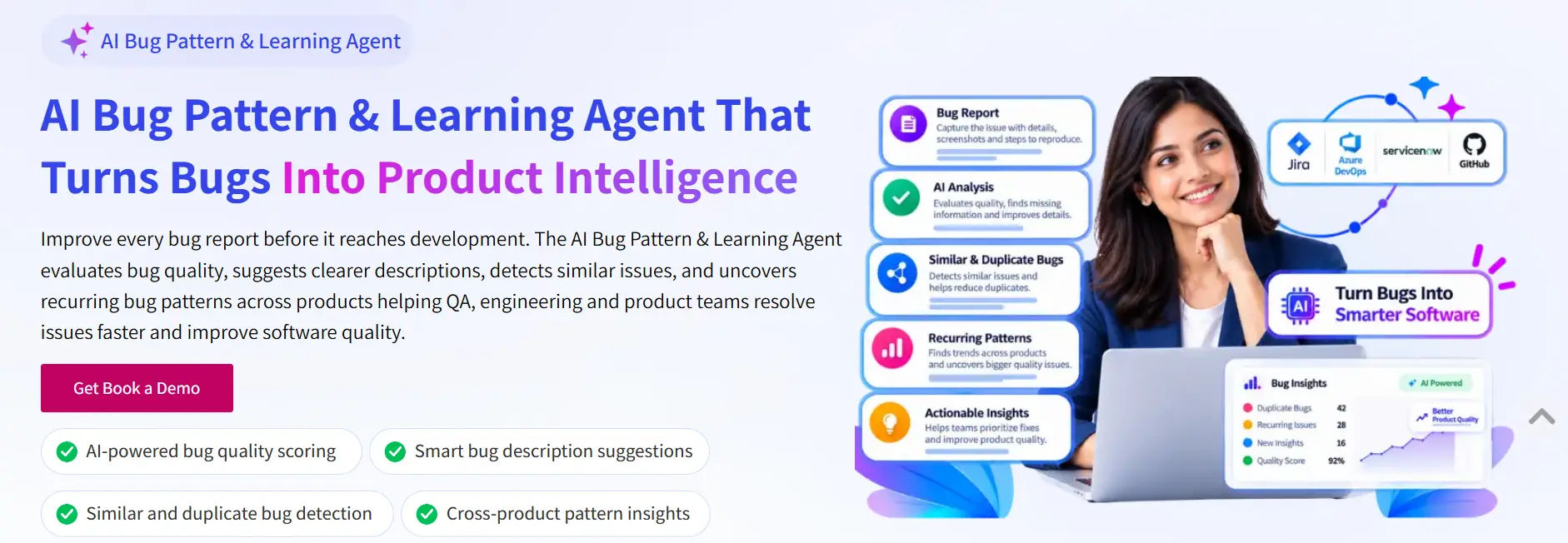
#3. AI Bug Pattern & Learning Agent
The AI Bug Pattern & Learning Agent helps QA and development teams improve bug report quality, identify similar issues, and discover recurring software defects across products and applications. Unlike a traditional bug tracker, the agent focuses on turning bug reports into useful quality intelligence. Its capabilities include:
- Bug Quality Health Score: Evaluate bug report quality and completeness before developer handoff.
- AI-Suggested Bug Descriptions: Generate clearer and more useful bug descriptions.
- Missing Information Detection: Identify gaps or unclear details in bug reports.
- Screenshot-Aware Bug Analysis: Use screenshots as additional context to improve issue descriptions.
- Similar and Duplicate Bug Detection: Identify related reports and reduce repeated investigations.
- Recurring Bug Pattern Detection: Discover repeated defects across products and applications.
- Cross-Product Quality Insights: Help engineering and product teams identify broader software quality trends.
Best for: QA engineers, software developers, engineering leaders, and product teams looking to improve bug report quality, identify duplicate issues, and understand recurring defects across multiple applications.
#4. Linear – AI-Powered Issue Triage
Linear provides issue management with AI-powered Triage Intelligence. Its capabilities include:
- AI-assisted issue assessment.
- Related issue suggestions.
- Semantic duplicate detection.
- Suggested teams, projects, labels, and assignees.
- Historical issue-based recommendations.
Best for: Product and engineering teams that want to organize incoming issues and improve issue routing.

#5. Qodo – AI Code Review and Bug Detection
Qodo focuses on AI-powered code review and software quality across the development lifecycle. Its capabilities include:
- AI-assisted code review.
- Bug and issue detection in code changes.
- Cross-repository conflict detection.
- Context-aware code feedback.
- Code quality and governance support.
Best for: Development teams that want to identify code-level issues and improve code quality before changes are merged.

AI Bug Detection Tools: Comparison
The following table compares the primary focus and publicly described capabilities of these solutions:
Features | AI Bug Pattern | Bugasura | Sentry | Linear | Qodo |
Bug report quality scoring | Yes | Not confirmed | Not confirmed | Not confirmed | Not confirmed |
AI bug description suggestions | Yes | Yes | Not confirmed | Not confirmed | Not confirmed |
Missing information detection | Yes | Context generation | Not confirmed | Not confirmed | Not confirmed |
Screenshot-aware bug analysis | Yes | Screenshot-based capture and context | Not confirmed | Not confirmed | Not confirmed |
Similar and duplicate bug detection | Yes | Yes | Not confirmed | Yes | Not confirmed |
Recurring bug pattern analysis | Yes | Requirement-area defect patterns | Not confirmed | Related issue intelligence | Not confirmed |
Cross-product bug insights | Yes | Not confirmed | Application monitoring context | Workspace issue relationships | Cross-repository analysis |
AI root cause investigation | Not confirmed | Not confirmed | Yes | Not confirmed | Code-level analysis |
AI code review | Not confirmed | Not confirmed | Not confirmed | Not confirmed | Yes |
Intelligent issue triage | Not confirmed | AI-assisted tracking | Yes | Yes | Not confirmed |
Note: “Not confirmed” means the capability was not established from the product information reviewed. It does not mean the platform cannot support it through another feature or integration. Capabilities and availability may vary by plan and configuration.
How to Identify Recurring Software Bugs
Identifying recurring software bugs requires more than looking at recently reported issues. Teams need to compare current defects with historical bug reports and understand whether similar problems have appeared before. Here are practical steps:
Step 1: Maintain Organized Bug Reports
- Store bug reports with useful information such as titles, descriptions, application details, screenshots, and reproduction steps.
- Consistent documentation makes it easier to compare issues.
Step 2: Review Historical Bug Data
- Look at previously reported and resolved defects.
- Check whether similar problems have appeared in earlier testing cycles or product releases.
Step 3: Compare Similar Bug Descriptions
- Search for reports that mention similar symptoms, affected features, or user actions.
- Remember that different descriptions may refer to the same underlying problem.
Step 4: Group Duplicate Bug Reports
- Combine related findings for review rather than treating every similar report as a separate investigation.
- AI-assisted similarity analysis can make this process easier.
Step 5: Look for Patterns Across Products
- Check whether the same type of issue appears in different applications.
- Shared components, workflows, or integrations may deserve closer investigation.
Step 6: Prioritize Issues for Investigation
- Consider the impact, frequency, affected features, and business importance of repeated problems.
- Use these factors to decide which issues need further attention.
Step 7: Track Improvements
- After investigating and resolving recurring issues, continue reviewing new bug reports.
- This helps teams understand whether the same problems are returning and where additional improvements may be needed.
- An AI Bug Pattern & Learning Agent can support this process by analyzing available bug history, identifying similar reports, and surfacing recurring patterns.
How AI Bug Detection Supports Different Teams
AI bug detection provides value to different roles involved in software development and quality management.
QA Engineers:
QA engineers can improve bug report quality, identify missing details, and find similar issues.
This helps them spend less time refining documentation and more time testing applications.
Software Developers:
Developers receive clearer bug descriptions and better issue context.
This can reduce back-and-forth communication and provide a stronger starting point for debugging.
Testing Teams:
Testing teams can use historical bug analysis to understand repeated defects and improve their testing approach.
DevOps Managers:
DevOps managers can use defect insights to support collaboration between development, testing, and operational teams.
They can also review recurring problem areas when evaluating software quality across releases.
Engineering Leaders:
Engineering leaders need visibility into broader software quality challenges.
Recurring bug patterns can help them identify problem areas and guide improvement priorities.
IT Decision-Makers:
IT decision-makers can use AI-assisted defect analysis to support better workflows, reduce repetitive effort, and improve visibility into software quality management.
Best Practices for Improving Software Bug Management
Choosing an AI bug detection tool is only one part of improving software quality. Teams should also follow consistent practices to get better results.
- Standardize bug report formats: Use consistent fields for titles, descriptions, reproduction steps, expected results, and actual results.
- Include supporting evidence: Add screenshots and relevant context whenever possible.
- Keep historical bug records organized: Accurate and accessible bug history helps teams compare issues.
- Review duplicate reports regularly: Identify related issues and avoid repeated investigations.
- Use AI suggestions as recommendations: QA engineers and developers should review AI-generated descriptions and insights before acting on them.
- Encourage QA and developer collaboration: Both teams should follow a shared process for reporting, reviewing, and resolving defects.
- Focus on recurring problems: Look beyond individual bug tickets to understand repeated issues and broader quality trends.
- Review software quality continuously: Use bug history and team feedback to guide ongoing improvements.
These practices help organizations build a more consistent and informed bug management process.
How AI Bug Pattern & Learning Agent Helps Teams
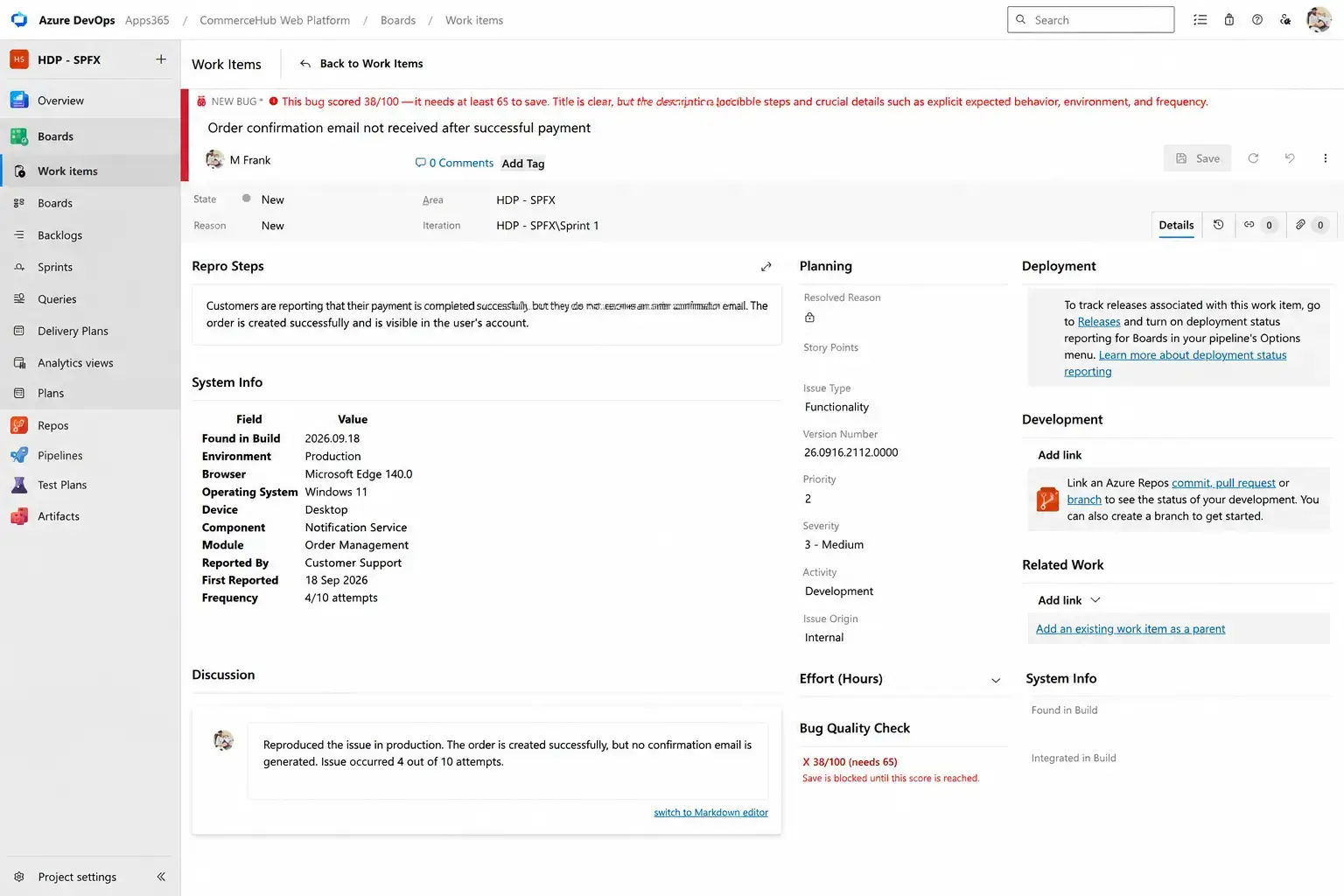
Finding bugs is important, but understanding why similar issues keep appearing is equally valuable. The AI Bug Pattern & Learning Agent helps QA, engineering, and product teams turn bug reports into useful software quality intelligence. It goes beyond traditional bug tracking by improving report quality, identifying similar issues, and uncovering recurring patterns across products and applications.
Improve Bug Report Quality
The agent evaluates bug reports and provides a Bug Quality Health Score.
This helps testers understand whether a report contains enough useful information before sending it to developers.
Generate Clearer Bug Descriptions
When a report contains limited or unclear details, the agent can suggest a more complete description using the available information.
This supports better communication and faster understanding.
Identify Missing Information
The agent helps detect missing or unclear details in bug reports.
QA teams can use these suggestions to improve reports before developer handoff.
Analyze Screenshots
The agent uses screenshots as additional context when analyzing bugs.
This helps improve the clarity and completeness of suggested issue descriptions.
Detect Similar and Duplicate Bugs
The agent analyzes bug reports to identify similar or duplicate issues.
This helps reduce repeated investigations and keeps bug backlogs more organized.
Discover Recurring Bug Patterns
One of the key capabilities is recurring bug pattern detection.
The agent analyzes bug history across products and applications to uncover repeated issues and broader software quality trends.
This helps product and engineering teams look beyond individual defects and understand where improvements may be needed.
Connect With Existing Engineering Workflows
The agent supports integration with tools such as:
- Jira
- Azure DevOps
- GitHub
- ServiceNow
Integration availability and supported workflows depend on the technical setup.
Turn Bug Reports Into Actionable Intelligence
The overall process follows four simple stages:
- Report: Capture bug details, descriptions, screenshots, and available context.
- Evaluate: Check report quality, missing information, and developer readiness.
- Improve: Generate clearer descriptions and identify similar issues.
- Learn: Discover recurring bug patterns and cross-product quality insights.
The result is a more informed approach to bug management that supports QA, engineering, and product teams. Importantly, the agent supports human decision-making. It does not replace testers, developers, or the need to validate defects.
Want to improve how your team manages software bugs?
Explore the AI Bug Pattern & Learning Agent and see how AI can help your team create better bug reports, identify duplicate issues, uncover recurring software defects.
Conclusion
Software quality is not just about fixing individual bugs. It is also about understanding why problems happen and recognizing when similar issues appear again. AI bug detection helps teams move beyond manual bug reviews by improving report quality, identifying duplicate issues, and discovering recurring software defects.
With the AI Bug Pattern & Learning Agent, QA, development, and product teams can turn historical bug reports into actionable quality insights. From clearer descriptions to cross-product pattern detection, it helps teams build a more informed approach to software bug management.
Stop treating every bug as a separate problem. Start learning from every bug!
Explore the AI Bug Pattern & Learning Agent and discover a smarter way to improve bug reporting, identify recurring issues, and support better software quality. Book a free demo today.
Frequently Asked Questions
What is AI bug detection, and how does it work?
AI bug detection uses artificial intelligence to analyze software bug reports, identify similar issues, detect recurring defects, and improve bug report quality. It helps QA and development teams find patterns and make better software quality decisions.
How does AI identify recurring software bugs?
AI analyzes historical bug reports, compares descriptions and symptoms, and identifies similar issues across applications. This helps teams recognize repeated defects and investigate underlying software quality problems.
Can AI detect duplicate bug reports automatically?
Yes. AI can compare bug descriptions, symptoms, and available context to identify similar or duplicate reports. This helps QA teams reduce repeated investigations and maintain an organized bug backlog.
How does AI bug pattern analysis improve software quality?
AI bug pattern analysis helps teams identify recurring defects, discover common problem areas, and understand historical bug trends. These insights support better testing decisions and proactive software improvements.
What is the difference between AI bug detection and traditional bug tracking?
Traditional bug tracking focuses on recording, assigning, and resolving defects. AI bug detection adds intelligent analysis, duplicate identification, bug description improvement, and recurring pattern detection to help teams understand issues more effectively.