

Web Based Helpdesk: Ticketing Software for Modern Teams

A web based helpdesk is browser-accessible ticketing software that helps teams capture, assign, track, and resolve support requests from one system.
- A web based helpdesk keeps support requests organized in one place.
- It improves ticket tracking, response time, and accountability.
- Clear SLAs, ownership, and automation improve support efficiency.
- Helpdesk 365 brings ticketing and AI-assisted support into Microsoft 365.
It gives IT and service teams better control over requests, priorities, SLAs, communication, and support performance.
Support becomes difficult when requests arrive through email, chat, spreadsheets, calls, and direct messages. Important issues can be overlooked, users may not know who is working on their request, and managers struggle to see the real workload.
Web based helpdesk software solves this by converting support requests into structured tickets that remain visible from submission to resolution.
What Is Web Based Helpdesk Software?
Web based helpdesk software is a support platform that users and agents access through a browser or connected online workspace.
Instead of installing software on every device, teams can log in, view tickets, respond to users, update statuses, and manage support activity from a shared system.
A typical web-based helpdesk includes:
- Ticket creation through email, forms, portals, or collaboration tools
- Priority and category management
- Automation and escalation rules
- User and agent notifications
- Access controls and activity history
The main goal is simple: create a structured process for support requests instead of allowing them to remain scattered across different communication channels.
NIST defines cloud computing as on-demand network access to shared computing resources. Many modern helpdesk platforms follow a similar model by making support tools available online rather than tying access to one local computer.
Web Based Helpdesk vs. Desktop: What's the Difference?
The main difference is how teams access and manage the software.
Web based helpdesk software runs through a browser or online workspace. Desktop helpdesk software usually requires applications to be installed and maintained on specific devices.
Area | Web Based Helpdesk | Desktop Helpdesk |
Access | Browser or online workspace | Installed application |
Setup | Centralized | Device-based |
Updates | Usually managed centrally | May require local updates |
Remote access | Easier for distributed teams | May require additional configuration |
Collaboration | Shared online ticket environment | Depends on local setup |
Expansion | Users can often be added centrally | May require added infrastructure |
Maintenance | Typically lower device-level effort | More local administration |
Web based systems are often better suited to distributed teams and organizations that want centralized administration.
Desktop helpdesk software can still make sense in highly controlled or isolated environments where internet access, hosting requirements, or internal security policies limit cloud-based tools.
The right choice depends on your infrastructure, security requirements, workforce model, and existing business applications.
Why Do Modern Teams Need a Web Based Helpdesk?
The real value of a web-based helpdesk is not simply online access. It is operational visibility.
When support requests are spread across different channels, teams often experience three common problems.
Requests get lost
An employee sends an issue through chat. Another sends an email. Someone else contacts an agent directly.
Without a central ticket record, there is no reliable way to confirm that every request has been handled.
Priorities become inconsistent
Teams may respond based on who follows up most often instead of business impact.
A company-wide system outage and a minor formatting issue should not receive the same treatment.
Managers lack useful support data
Shared inboxes may show message counts, but they rarely explain recurring problems, workload patterns, SLA performance, or bottlenecks.
A web based ticketing software platform gives managers structured data they can use to improve service decisions.
Expectations are also increasing. Zendesk’s 2026 CX Trends research reports that 74% of consumers expect customer service to be available 24/7, while 88% expect faster responses than they did a year earlier.
Internal users may not expect round-the-clock IT support, but they increasingly expect visibility, timely updates, and clear resolution paths.
How Does a Web Based Helpdesk Work?
A web based helpdesk follows a structured support workflow from request intake to resolution.
In simple terms, the system captures a request, creates a ticket, categorizes it, assigns responsibility, tracks progress, records communication, and closes the request once the issue is resolved.
Step 1: A request enters the system
Users submit issues through supported channels such as email, forms, service portals, Microsoft Teams, or other integrated tools.
The helpdesk creates a ticket containing the request details.
Step 2: The ticket is classified
The system or agent adds relevant information such as:
- Category
- Department
- Priority
- Request type
- Impact
- Urgency
Good classification makes later reporting and assignment more accurate.
Step 3: The request reaches the correct team
Assignment rules can route tickets based on category, department, location, request type, or other conditions.
Agents can also assign requests manually when human review is required.
Step 4: Agents manage the issue
Agents communicate with the requester, add internal notes, update status, collaborate with other teams, and complete required actions.
The full ticket history remains available for context.
Step 5: The ticket is resolved
Once the issue is fixed, the agent records the solution and closes the ticket according to the team’s process.
Recurring solutions can later be turned into knowledge articles.
Step 6: Support data is reviewed
Teams can analyze ticket categories, backlog, response time, resolution time, workload, and common issues to improve future service.
This final step is what turns ticket management into continuous support improvement.
How Helpdesk 365 Supports Web Based Ticketing
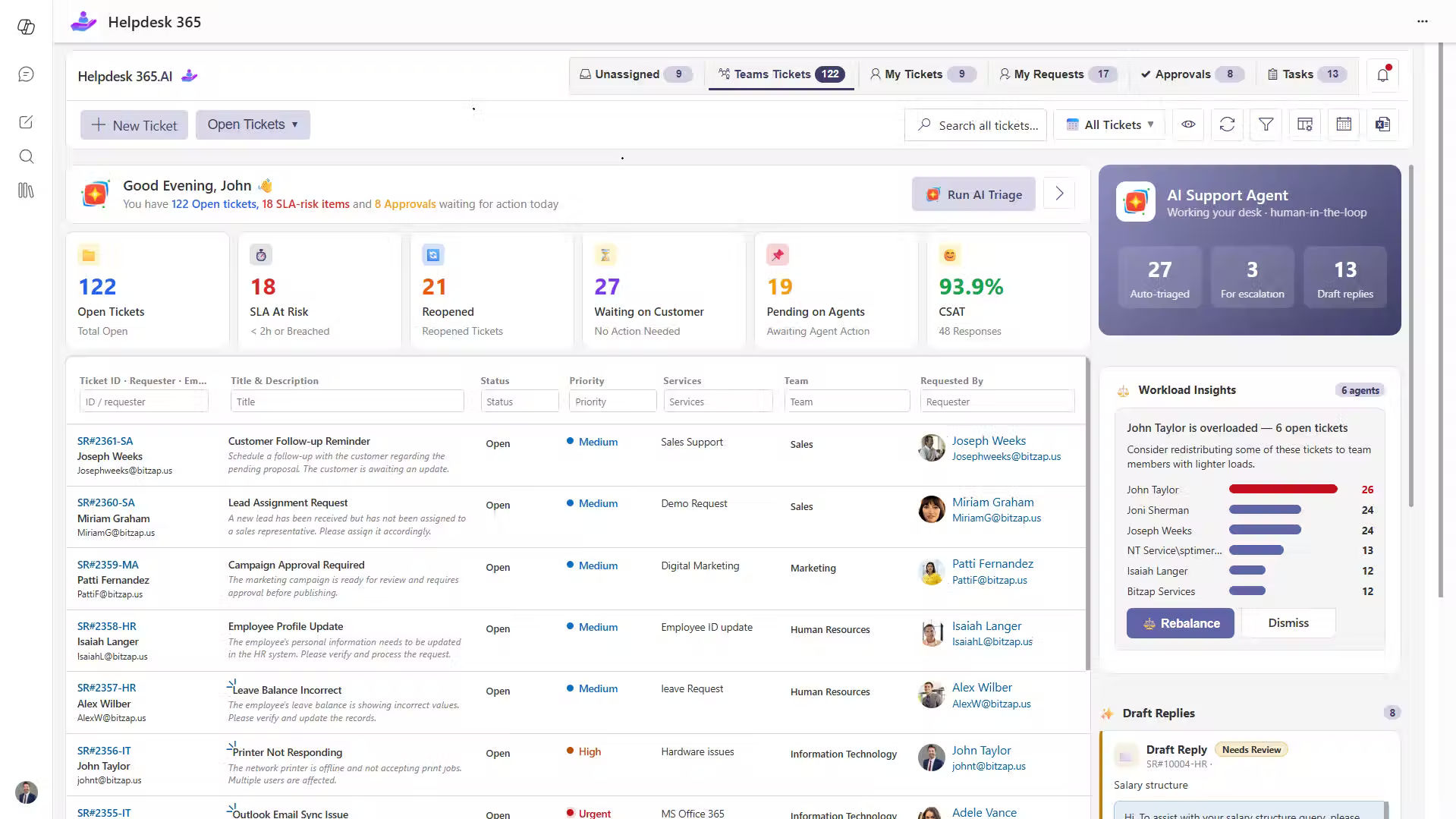
Organizations already using Microsoft 365 may prefer a helpdesk that works closely with their existing environment.
Helpdesk 365 is designed for organizations that want to manage support requests through Microsoft Teams, SharePoint, email, and related Microsoft 365 tools.
Its capabilities include ticket management, automated assignment, SLA tracking, knowledge management, workflows, reporting, and AI-assisted support features.
One practical advantage is reducing unnecessary movement between disconnected tools.
Microsoft’s 2025 Work Trend Index found that employees are interrupted by a meeting, email, or chat roughly every two minutes during the workday.
For support teams, repeatedly moving between communication tools, ticketing systems, documentation, and reporting platforms can add further friction.
Helpdesk 365 keeps more of the support process within the Microsoft environment teams may already use every day.
It can help organizations:
- Manage tickets from Microsoft Teams
- Receive requests through multiple channels
- Automate common assignment rules
- Track response and resolution targets
- Maintain support knowledge
- Build custom workflows
- Review ticket and agent performance
- Apply access controls within Microsoft 365
Helpdesk 365 also includes AI capabilities that can assist with tasks such as ticket categorization, summaries, and response suggestions.
However, organizations should evaluate AI features based on actual workflow value rather than treating AI itself as the buying reason.
Salesforce’s 2025 State of Service research reported that service teams estimated AI was already handling about 30% of cases and expected that figure to reach 50% by 2027.
That makes one question increasingly important:
That makes one question increasingly important:
Which repetitive support activities can AI handle reliably while keeping agents involved where judgment is required?
Benefits of Web Based Helpdesk Software
A web based helpdesk can improve both daily support operations and long-term service management.
Fewer overlooked requests
Each support issue becomes a visible ticket instead of remaining buried in an inbox or chat conversation.
This gives teams a more reliable record of outstanding work.
Faster request handling
Routing rules help move tickets to the correct team without requiring agents to manually forward every request.
Faster assignment can reduce the time between submission and action.
Better support for distributed teams
Agents in different offices or remote locations can work from the same ticket environment.
Everyone sees the latest status, communication history, and ownership information.
More consistent support
Templates, workflows, service targets, and knowledge articles create a more predictable support process.
This is especially valuable when new agents join the team.
Clearer accountability
Managers can see who owns each request, where delays occur, and which tickets require attention.
This makes workload discussions more evidence-based.
Better planning
Ticket data can reveal patterns that are difficult to see in email.
For example:
- Repeated login issues may show an identity-management problem
- Frequent onboarding requests may signal weak employee documentation
- Rising hardware incidents may indicate aging devices
- A growing backlog may point to a staffing or workflow issue
These patterns help IT leaders move from reacting to tickets toward improving the service environment itself.
Best Practices for Web Based Helpdesk Management
A helpdesk works best when the operating rules remain simple enough for users and agents to follow.
Keep request forms focused
Do not ask users for information that agents do not need.
Long forms often discourage adoption and push employees back toward informal channels.
Use clear ticket statuses
Keep status names easy to understand.
For example:
- New
- Assigned
- In Progress
- Waiting for User
- Resolved
- Closed
Too many statuses can make reporting unreliable.
Build escalation rules before problems happen
Define what should happen when:
- A ticket approaches an SLA deadline
- An agent is unavailable
- A critical incident affects several users
- Another department must become involved
Documented escalation rules reduce uncertainty during urgent situations.
Maintain the knowledge base
Knowledge content loses value when articles become outdated.
Assign owners and review important articles regularly, especially after process, product, or security changes.
Review permissions
Support tickets may contain employee information, financial details, screenshots, credentials, or business-sensitive data.
Restrict access based on role and responsibility.
Measure service quality, not ticket volume alone
Closing more tickets does not automatically mean support is improving.
Track metrics such as:
- First response time
- Resolution time
- SLA compliance
- Reopen rate
- Backlog
- User satisfaction
- Recurring incident volume
These metrics provide better context than ticket count alone.
How to Choose the Right Web Based Helpdesk Software
Selecting a helpdesk should start with your support requirements, not the longest feature list.
Create a shortlist based on how your organization actually works.
Consider the following areas.
Request channels
Can employees create tickets through the channels they already use?
Look for support for email, forms, portals, chat, Teams, or other important tools.
Automation
Can the system handle repetitive tasks such as ticket assignment, notifications, approvals, and escalation?
The goal should be reducing unnecessary manual administration.
Integrations
Check whether the helpdesk works with your existing productivity, identity, reporting, and collaboration tools.
Integration becomes especially important for Microsoft-centered organizations.
Security and data control
Ask where data is stored and how access is managed.
Review:
- Authentication
- Permissions
- Encryption
- Audit logs
- Data residency
- Retention policies
- Backup practices
Reporting
Reports should help managers answer practical questions.
For example:
- What issues are increasing?
- Which tickets are aging?
- Where are SLAs being missed?
- Which teams carry the heaviest workload?
- What problems keep returning?
Ease of use
Test the platform with both agents and employees.
A powerful tool can still fail if submitting or updating a ticket requires too much effort.
Scalability
Consider whether the platform can support more users, departments, workflows, locations, and request types as your organization grows.
Run a pilot before committing to a full rollout.
Test normal requests as well as difficult cases involving approvals, multiple teams, escalation, reopened tickets, and sensitive information.
That provides a better picture than a product demonstration alone.
Conclusion
A web based helpdesk gives support teams a structured way to manage requests without depending on scattered inboxes, spreadsheets, and messages.
Its biggest value comes from creating a consistent service process: requests enter through defined channels, work reaches the right team, agents have the context they need, and managers can use support data to improve operations.
For organizations already working in Microsoft 365, Helpdesk 365 provides ticket management, automation, SLA tracking, knowledge management, reporting, and AI-assisted features connected to the Microsoft environment.
The right approach is to evaluate any platform against real workflows, security needs, integration requirements, and user expectations.
If Microsoft 365 is already central to your organization, Test how it handles the support scenarios your team manages every day.
Join Our Creative Community
Frequently Asked Questions
What is a web based helpdesk?
A web based helpdesk is ticketing software accessed through a browser or connected online workspace. It helps organizations collect, assign, manage, and resolve employee or customer support requests from a central system.
What is web based ticketing software?
Web based ticketing software converts support requests into trackable tickets containing details such as priority, status, owner, communication history, and resolution information.
Is a web based helpdesk the same as a cloud helpdesk?
The terms are often used together, but they describe slightly different things.
“Web based” mainly refers to how users access the software.
“Cloud based” also refers to how the application and infrastructure are hosted and delivered.
Always verify the platform’s actual architecture.
Can web based helpdesk software support remote teams?
Yes. Remote and distributed support teams can access the same ticket system, view request history, update cases, and coordinate work from different locations.
Can web based helpdesk software support departments beyond IT?
Yes. The same ticketing structure can support HR, facilities, finance, operations, legal, and other internal service teams when workflows and access permissions are configured correctly.


























