
Equipment Lifecycle Management: 7 Stages, Benefits and Best Practices for 2027

Equipment lifecycle management is the process of planning, purchasing, tracking, maintaining, and replacing business equipment from acquisition to disposal. It helps organizations reduce unexpected downtime, control costs, extend asset life, and make smarter decisions about every piece of equipment they own.
- Seven stages: Planning, procurement, deployment, operation, maintenance, evaluation, and disposal.
- Main challenge: Poor asset visibility leads to lost equipment, unexpected repairs, compliance risks, and higher operating costs.
- Business benefits: Better equipment utilization, fewer interruptions, stronger financial planning, and improved accountability.
- Best approach: Maintain accurate asset records, schedule preventive maintenance, monitor performance, and plan replacements early.
- Technology solution: Asset 365 helps organizations manage equipment records, ownership, locations, and lifecycle activities within Microsoft 365.
What Is Equipment Lifecycle Management?
- Equipment lifecycle management is a structured approach to managing physical assets throughout their useful lives. It covers purchase decisions, installation, daily use, maintenance, performance reviews, and final retirement.
- For IT managers, this includes laptops, servers, monitors, and networking devices. Operations leaders may manage manufacturing machines, vehicles, tools, and office equipment.
- The goal is simple, know what equipment exists, where it is, who uses it, what it costs and when action is needed.
- An effective equipment lifecycle management system connects these details instead of leaving information scattered across spreadsheets, emails, and separate departments.
Why Equipment Lifecycle Management Matters
- Imagine a delivery manager preparing equipment for a new project. Three laptops appear available in a spreadsheet, but nobody knows their actual locations.
- The project starts late because replacement devices must be purchased.
- This situation shows why equipment lifecycle tracking matters.
- Without reliable records, businesses cannot confidently plan purchases, schedule maintenance, or identify unused assets.
- The financial impact can be significant. According to the US Department of Energy, predictive maintenance programs can deliver maintenance cost savings of 8% to 12% compared with preventive maintenance programs.
- For executives, lifecycle management supports better capital spending decisions. For IT teams, it improves device accountability. For operations managers, it reduces disruption caused by unavailable equipment.
Challenges of Poor Equipment Lifecycle Tracking
Equipment problems rarely begin with a major breakdown. They often start with small gaps in daily records.
1. Missing Equipment Information: Employees move devices between departments without updating records. Asset ownership becomes unclear, making audits difficult.
2. Unexpected Maintenance Costs: Without service histories, managers cannot identify recurring failures or prepare realistic maintenance budgets.
3. Equipment Downtime: A machine breaks during an important delivery period because routine inspections were missed.
4. Unnecessary Purchases: Teams order replacement equipment while usable devices remain unused in storage.
5. Compliance and Security Risks: Retired IT devices may contain sensitive information. Poor disposal procedures increase the risk of data exposure.
These problems affect productivity, budgets, employee experience, and customer commitments. The solution begins with consistent equipment records and clearly assigned responsibilities.
7 Key Stages of the Equipment Lifecycle
The equipment lifecycle has seven practical stages. Each stage requires different decisions, records, and responsibilities.
1. Planning and Assessment
Identify equipment needs before spending money.
Review existing inventory, expected workloads, technical requirements, and available budgets.
For example, an IT department should check whether unused laptops can support new employees before approving purchases.
2. Procurement and Acquisition
Select suppliers based on purchase price, warranty coverage, service availability, and expected operating costs.
Record invoices, serial numbers, purchase dates, and vendor information immediately.
3. Deployment and Installation
Assign equipment to employees, departments, or locations.
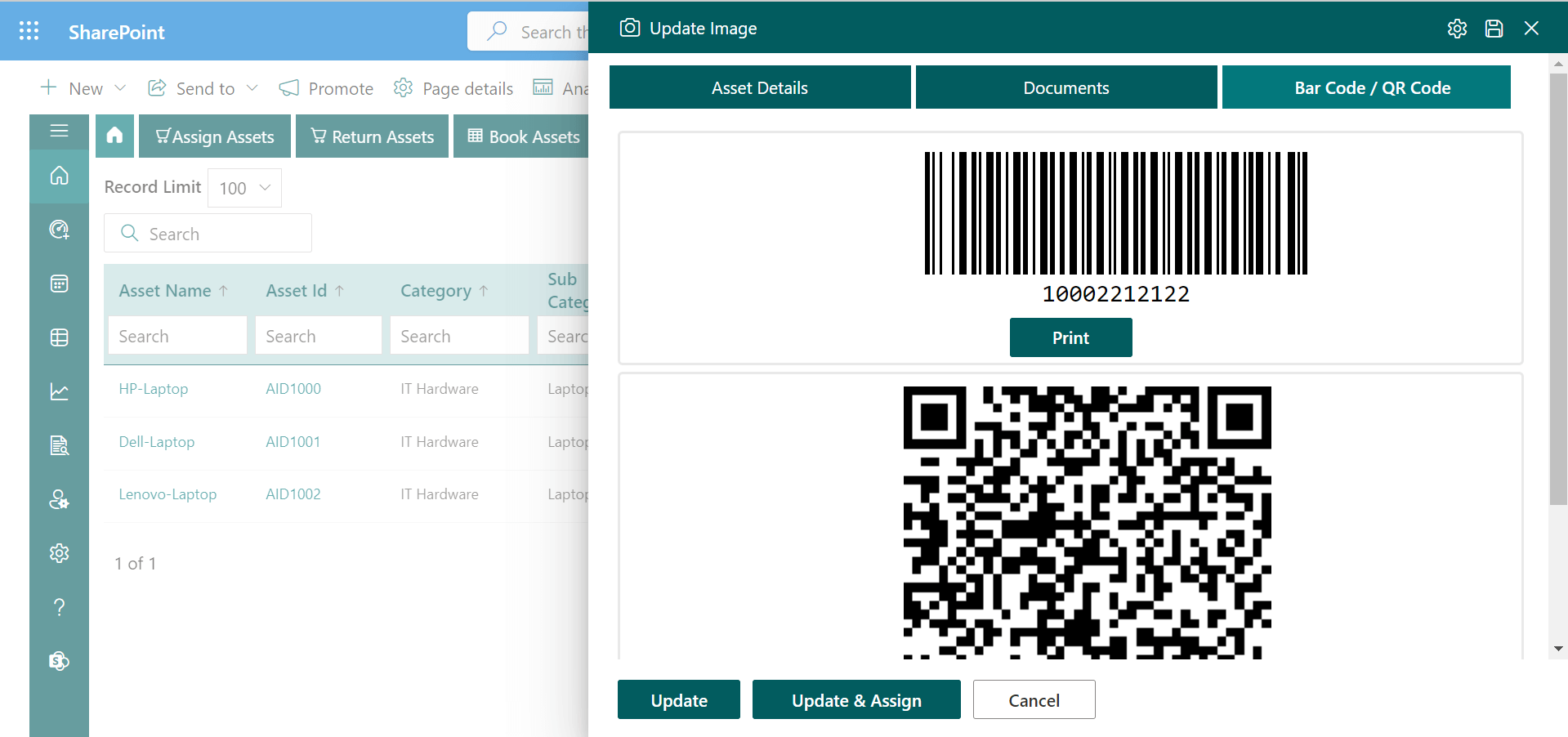
Use asset tags, QR codes or barcodes to support identification and physical verification.
4. Operation and Utilization
Monitor how frequently equipment is used.
Identify underused devices, overloaded machines, and assets that could be reassigned.
5. Maintenance and Repair
Schedule inspections, software updates, repairs, and warranty checks.
Document completed work so future decisions reflect actual equipment condition.
6. Performance Evaluation
Review reliability, repair expenses, depreciation, and remaining useful life.
Compare continued maintenance costs against replacement options.
7. Retirement and Disposal
Remove outdated equipment from active inventory.
Follow approved recycling, resale, donation, and secure data disposal procedures.
The National Institute of Standards and Technology provides guidance for sanitizing storage media before disposal or reuse.
Still tracking equipment across spreadsheets?
Discover how Asset 365 can help organize asset records, track assignments, and improve equipment visibility.
Benefits and Business Impact
Effective equipment lifecycle management delivers measurable improvements when teams consistently maintain accurate records.
- Lower Ownership Costs: Track purchase prices, maintenance spending, and replacement expenses to understand total cost of ownership.
- Better Equipment Availability: Planned maintenance and timely replacement decisions help reduce avoidable interruptions.
- Improved Asset Utilization: Managers can reassign available equipment instead of purchasing unnecessary replacements.
- Stronger Financial Decisions: Reliable records support depreciation calculations, capital expenditure planning, and annual budgeting.
- Easier Compliance Reviews: Documented ownership, service history, and disposal decisions provide evidence during internal audits.
How to Implement Equipment Lifecycle Management
A successful implementation starts with accurate information, not expensive technology.
- Step 1: Create an Equipment Inventory: List every relevant asset, including its serial number, location, owner, purchase date, and current condition.
- Step 2: Classify Equipment: Group assets by department, equipment type, business importance, and replacement priority.
- Step 3: Assign Responsibility: Designate employees responsible for updates, maintenance coordination, transfers, and retirement approvals.
- Step 4: Establish Maintenance Schedules: Use manufacturer guidance, equipment condition, and operating requirements to determine service intervals.
- Step 5: Introduce Digital Tracking: Choose equipment management software that supports centralized records, ownership tracking, reporting, and controlled access.
- Step 6: Monitor Lifecycle Performance: Measure downtime, repair spending, asset utilization, and replacement trends.
- Step 7: Improve Your Process: Review results quarterly. Update procedures when audits reveal missing records or repeated equipment failures.
Start with one department, confirm data quality, and expand after the process works reliably.
Real-World Equipment Lifecycle Examples
Example 1: IT Equipment Across Multiple Offices
- Consider a company managing 450 laptops across three offices.
- During employee transfers, devices move without formal updates. The IT team cannot identify available equipment.
- A centralized asset register with employee assignments and transfer records would help prevent duplicate purchases.
Example 2: Manufacturing Equipment Maintenance
- A factory operates 25 production machines.
- One critical machine repeatedly fails because maintenance records remain in paper folders.
- Recording repair histories and scheduling inspections helps managers identify recurring faults and evaluate replacement costs.
Example 3: Construction Project Equipment
- A construction business shares tools across six project sites.
- Without checkout records, supervisors cannot determine who holds specialized equipment.
- Barcode-based asset identification and documented transfers improve accountability and equipment availability.
These are illustrative business scenarios, not reported customer case studies.
Best Practices for Equipment Lifecycle Optimization
Managing equipment effectively requires consistent processes and regular performance reviews.
- Maintain Accurate Asset Records: Update ownership, location, condition, and maintenance details whenever equipment changes hands.
- Prioritize Critical Equipment: Identify assets whose failure would interrupt operations, affect customers, or create safety risks. Give these assets closer monitoring and stronger maintenance controls.
- Track Total Cost of Ownership: Purchase price alone does not reveal equipment value. Include maintenance, energy consumption, repairs, insurance, and disposal expenses when comparing alternatives.
- Review Replacement Decisions Regularly: Replace equipment based on condition, reliability, security requirements, and financial impact rather than age alone.
- Establish Clear Disposal Policies: Require documented approvals, secure data removal, and responsible recycling.
Common Equipment Management Mistakes
Even experienced managers make avoidable equipment lifecycle mistakes.
- Mistake 1: Tracking purchases but ignoring transfers: Equipment records become unreliable when ownership changes are not documented.
- Mistake 2: Waiting for breakdowns: Reactive repairs can interrupt critical operations and increase emergency spending.
- Mistake 3: Replacing equipment too early: Unnecessary replacements consume budgets that could support more urgent business needs.
- Mistake 4: Ignoring disposal documentation: Missing retirement records create accounting discrepancies and potential security concerns.
- Mistake 5: Choosing software without testing workflows: A system may look impressive but fail to support actual equipment assignments, approvals, or reporting requirements.
Avoid these mistakes through clear policies, employee training, and regular audits.
Role of AI and Technology in Equipment Lifecycle Management
Modern equipment lifecycle management software replaces disconnected records with accessible digital information.
Automated Asset Tracking
Barcode and QR code systems help employees identify equipment and update records accurately.
Predictive Maintenance
AI models can analyze sensor readings, operating patterns, and historical failures to estimate maintenance needs.
However, predictive maintenance requires reliable data and suitable monitoring equipment.
Digital Reporting
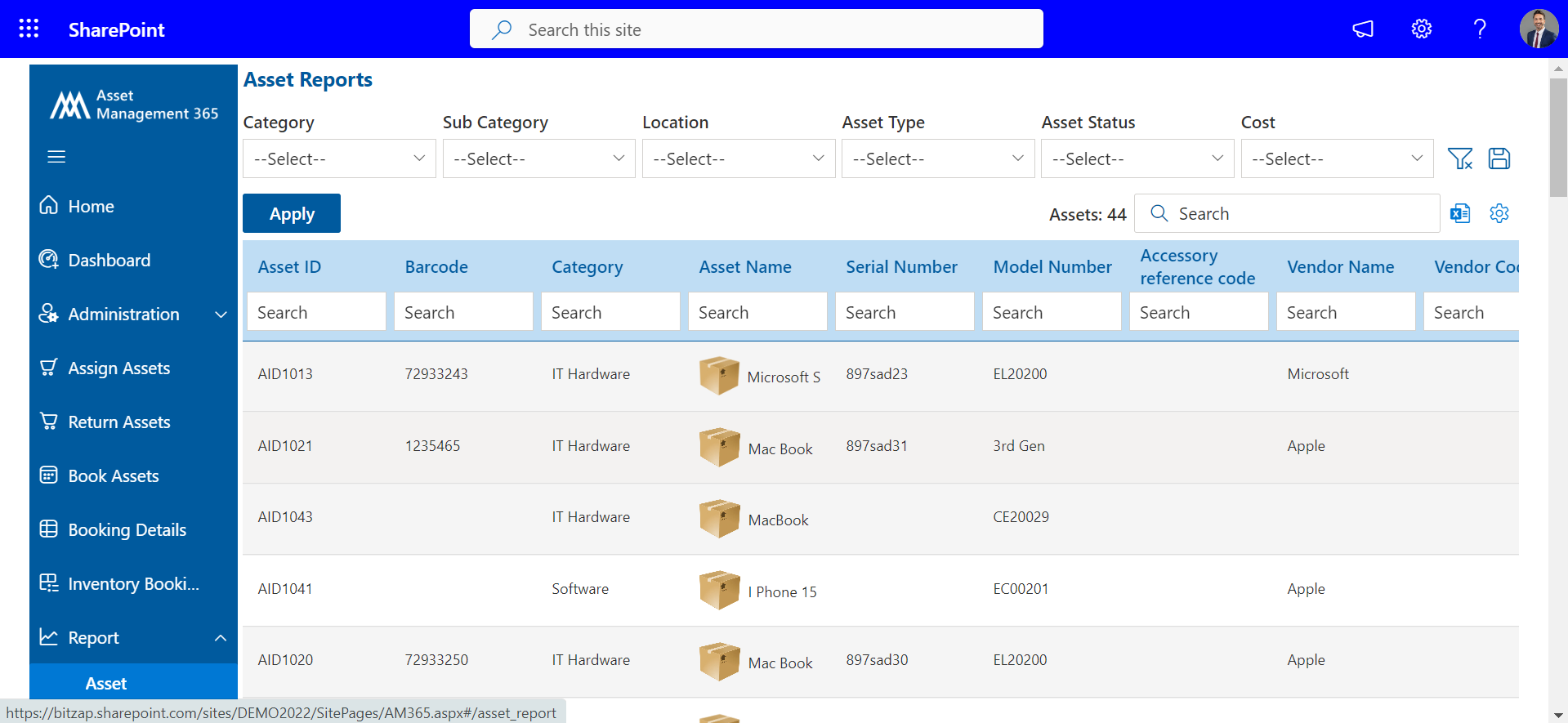
Dashboards help managers review equipment status, repair trends, and utilization across departments.
Microsoft 365 Asset Management
Organizations already using Microsoft 365 may prefer equipment tracking solutions that fit their existing work environment.
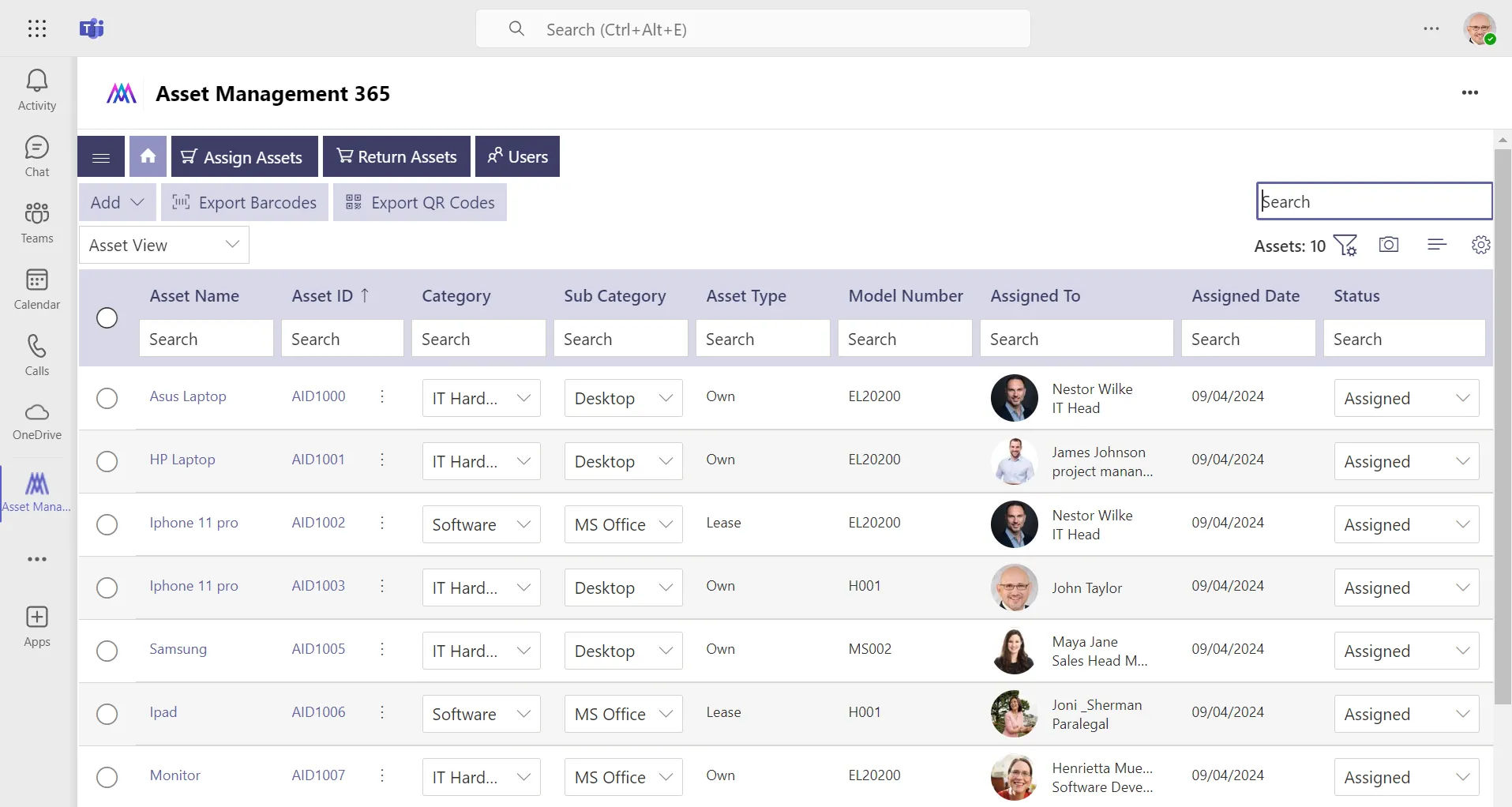
Asset 365 provides SharePoint-based asset management capabilities for organizing equipment information and tracking business assets.
Teams should verify specific integrations, automation features, and maintenance capabilities during product evaluation.
Know where your equipment is. Understand what needs attention.
Replace scattered asset records with a more organized approach to equipment tracking.
How to Choose the Right Equipment Lifecycle Management Software?
The best equipment lifecycle management software should match your asset types, operational requirements, and existing technology. Evaluate these capabilities before purchasing:
- Asset ownership and location tracking
- Maintenance history and scheduling
- Custom reporting and dashboards
- Microsoft 365 integration
- Vendor support and implementation costs
Spreadsheet Tracking vs Dedicated Software
Feature | Spreadsheets | Dedicated software |
Asset records | Manual updates | Centralized records |
Ownership tracking | Requires manual coordination | Structured assignments |
Audit history | Limited without extra controls | Often built into workflows |
Reporting | Manual preparation | Configurable reports |
Scalability | Difficult with frequent changes | Better suited to growing inventories |
Spreadsheets may work for small, stable inventories. Dedicated equipment tracking software becomes more valuable when organizations manage frequent transfers, multiple locations, and complex reporting requirements.

Why Consider Asset 365?
- Asset 365 is designed for organizations seeking asset management within their Microsoft 365 environment.
- It can help teams organize equipment records, improve asset visibility, and support accountability.
- For IT leaders and operations executives, the key consideration is whether its available features match existing workflows and governance requirements.
Conclusion
Equipment lifecycle management helps businesses protect investments, reduce unnecessary spending, and maintain reliable operations. Success depends on accurate records, preventive maintenance, clear responsibilities, and timely replacement decisions. For organizations using Microsoft 365, Asset 365 offers a practical option for improving equipment visibility and organizing asset information.
Stop guessing where equipment is or when it needs attention!
Book a Free Demo of Asset 365.
Frequently Asked Questions
What is the equipment lifecycle?
The equipment lifecycle describes the stages an asset passes through, from initial planning and purchase to daily operation, maintenance, replacement, and final disposal.
How many stages are in an equipment lifecycle?
A practical model includes seven stages:
- Planning
- Procurement
- Deployment
- Operation
- Maintenance
- Evaluation
- Retirement.
Organizations may combine or divide stages depending on operational requirements.
What is the difference between equipment lifecycle management and asset management?
Equipment lifecycle management focuses on decisions throughout an asset’s useful life. Asset management covers broader activities, including inventory control, ownership, financial records, utilization, and governance.
How can businesses extend equipment life?
Follow manufacturer maintenance recommendations, monitor equipment condition, train users, address recurring faults, and replace damaged components when economically reasonable.
When should equipment be replaced?
Consider replacement when repair costs rise, reliability declines, security support ends, or newer equipment offers better long-term value.
Can SharePoint support equipment lifecycle tracking?
Yes. SharePoint can store equipment records and support workflows. Specialized solutions such as Asset 365 can provide additional asset management capabilities within Microsoft 365.