
Asset Tagging Machine: Complete Guide to Smarter Asset Tracking in 2027

An asset tagging machine creates durable identification labels that help businesses track equipment, prevent losses, and maintain accurate inventory records. When combined with asset management software, it helps IT teams monitor ownership, locations, maintenance, and every stage of an asset’s lifecycle.
- Asset Identification: An asset tagging machine prints barcode and QR code labels to identify and track business equipment accurately.
- Better Asset Visibility: Helps IT teams monitor asset locations, ownership, status, and movement across departments.
- Faster Inventory Audits: Reduces manual tracking, improves inventory accuracy, and simplifies equipment verification.
- Cost Savings and Accountability: Helps prevent asset loss, reduce unnecessary purchases, and improve asset lifecycle management.
- Smarter Tracking with Asset 365: Connects asset tagging with SharePoint asset management to track equipment, manage assignments, automate workflows, and improve operational efficiency.
What Is an Asset Tagging Machine?
- An asset tagging machine is a device that prints identification labels for physical assets such as laptops, servers, monitors, office equipment, and industrial tools.
- These labels contain unique identification numbers, barcodes, or QR codes that connect physical equipment to digital inventory records.
- An asset tag printer commonly uses thermal transfer or direct thermal printing technology. Businesses can select different label materials based on equipment type, operating conditions, and expected lifespan.
- For example, an IT manager can print a barcode label for a new laptop, attach it, and link the identification number to an employee record.
- When someone scans the label, authorized staff can retrieve the equipment’s details through a connected asset tracking system.
How Does an Asset Tagging Machine Work?
The process follows five steps:
- Create a unique asset identification number.
- Generate a barcode or QR code.
- Print the label using an asset label printer.
- Attach the tag to the equipment.
- Scan the label to access its digital record.
The machine produces the physical identification label. Asset management software stores and updates the information connected to that label. This distinction matters because printing labels alone does not create an effective asset tracking system.
Why Is an Asset Tagging Machine Important?
Imagine managing 2,000 company laptops across five offices. Employees change departments, devices require repairs, and remote workers return equipment through different locations.
Without reliable identification, finding one missing laptop can involve several emails, spreadsheets, and phone calls. An asset tagging machine helps businesses establish consistent equipment identification.
Better Asset Visibility
Every tagged device receives a unique identity.
IT teams can connect that identity to ownership, location, condition, and purchase information.
Stronger Accountability
When employees receive equipment, the asset record can identify who holds each device.
This reduces confusion during transfers and employee departures.
Faster Inventory Audits
Instead of manually comparing serial numbers, employees scan equipment labels and verify records.
Improved Security
Accurate inventories support better cybersecurity decisions.
The National Institute of Standards and Technology emphasizes unique identifiers and updated asset inventories as important parts of security management.
Common Problems Businesses Face Without Asset Tagging
Poor equipment identification creates problems that often remain unnoticed until an audit or urgent replacement request.
Missing Equipment
- A project manager requests ten laptops for new employees.
- The inventory spreadsheet shows twelve available devices, but nobody knows their physical locations.
- Purchasing more equipment becomes the easiest option, even when unused devices already exist.
Duplicate Asset Records
- Two employees enter the same laptop under different names.
- Finance counts both entries, creating inaccurate inventory information.
Slow Employee Offboarding
- An employee leaves without returning a monitor.
- HR confirms the departure, but IT cannot verify which equipment was assigned.
Difficult Maintenance Tracking
- A damaged printer receives repairs, but its service history remains disconnected from the equipment record.
- The next technician repeats earlier troubleshooting steps.
Inaccurate Financial Reporting
- Missing purchase dates, asset values, and disposal records make depreciation calculations harder.
- These issues show why businesses need identification labels connected to reliable digital records.
Key Features of an Asset Tagging Machine
Choosing the right equipment requires understanding printing quality, scanning compatibility, and daily operating needs.
1.Barcode and QR Code Printing
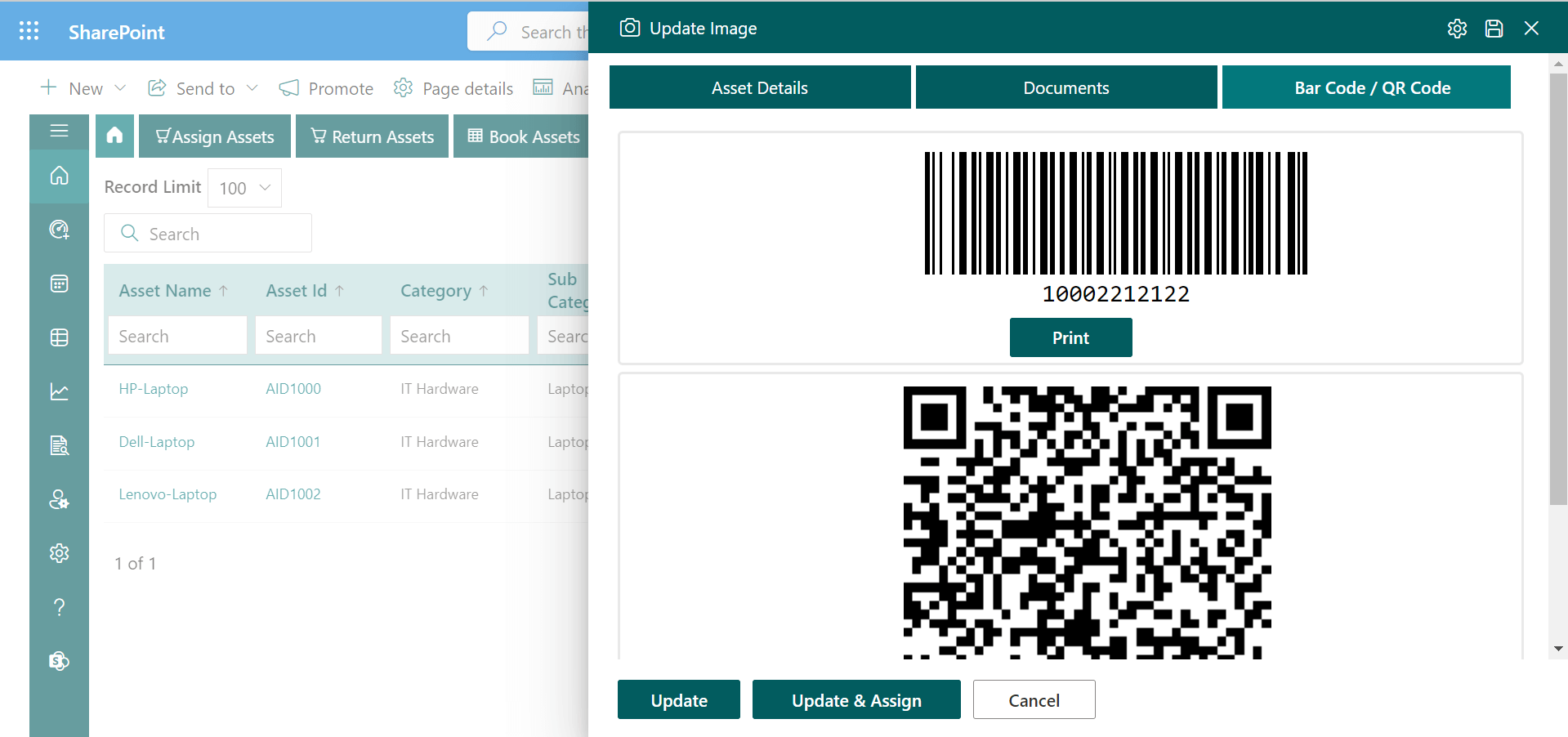
- A barcode asset tagging machine prints labels that scanners can read quickly.
- QR codes can hold more encoded information than traditional one-dimensional barcodes.
- However, businesses should usually store detailed equipment information in their management system rather than directly on the label.
2. Durable Label Materials
Common materials include:
- Polyester labels for office equipment
- Vinyl labels for curved surfaces
- Tamper-evident labels for sensitive devices
- Metal labels for demanding industrial environments
- Weather-resistant labels for outdoor equipment
Select materials based on heat, moisture, cleaning chemicals, and expected handling.
3. High-Resolution Printing
- Clear printing improves scanning reliability.
- Small labels for laptops and networking equipment may require higher print resolution.
4. Unique Asset Identification
- Each label should contain a permanent identification number.
- Avoid assigning the same number to different devices.
5. Bulk Label Printing
- Organizations receiving hundreds of devices need batch printing capabilities.
- Bulk printing reduces repetitive work during equipment onboarding.
6. Software Compatibility
Check whether the printer supports your preferred barcode formats, label templates, and inventory workflows.
GS1 explains that barcodes support automatic identification and data capture, improving the speed and accuracy of information entry.
Benefits and Business Impact of Asset Tagging
An asset tagging machine delivers greater value when identification becomes part of daily operations.
- Reduced Equipment Loss: Clear ownership records help teams identify missing equipment sooner.
- Lower Administrative Workload: Scanning reduces repeated manual searches and data entry.
- Better Purchasing Decisions: Accurate inventory records reveal equipment that can be reassigned instead of replaced.
- Improved Audit Readiness: Tagged equipment makes physical verification easier.
- Stronger Lifecycle Management: Teams can connect asset records to maintenance, warranty, depreciation, and disposal information.
How Can Businesses Measure ROI?
- Consider a company with 1,500 devices.
- If employees spend five minutes manually identifying each device during an annual audit, the process requires 125 working hours. Reducing that time to two minutes per device would save 75 hours.
- This is an illustrative calculation, not a guaranteed performance result.
- Businesses should also measure missing assets, inventory accuracy, replacement spending, and employee time.
How to Implement an Asset Tagging System Step by Step
Successful implementation requires more than purchasing a printer.
Step 1: Audit Existing Equipment
Create an inventory of laptops, monitors, servers, mobile devices, tools, and other valuable assets.
Identify missing serial numbers and duplicate records.
Step 2: Define Identification Rules
Establish a consistent numbering format.
For example: IT-LAP-0001 identifies a laptop.
OPS-TOOL-0042 identifies an operations tool.
Avoid including information that changes frequently, such as employee names.
Step 3: Choose Appropriate Labels
Match label materials to equipment conditions.
Test adhesion before purchasing large quantities.
Step 4: Configure the Printer
Set label dimensions, barcode formats, print resolution, and identification templates.
Step 5: Connect Digital Records
Create an asset database containing ownership, location, purchase date, warranty, condition, and status.
Step 6: Print and Attach Tags
Place labels where employees can scan them without damaging equipment.
Step 7: Test Scanning
Verify that each barcode retrieves the correct record.
Check readability under normal lighting and handling conditions.
Step 8: Train Employees
Teach staff how to record assignments, returns, transfers, and maintenance updates.
Step 9: Schedule Regular Audits
Perform periodic inventory checks and investigate missing equipment immediately.
Real-World Asset Tagging Examples
The following scenarios illustrate practical applications:
Example 1: IT Equipment Management
A company operates three offices with 800 laptops.
Each device receives a unique barcode label.
When an employee changes departments, IT scans the device and updates its assigned location.
The digital record preserves the transfer history.
Example 2: Construction Equipment Tracking
A construction business manages drills, testing devices, and safety equipment across multiple projects.
Durable tags identify individual tools.
Project managers scan equipment during checkout and return.
Missing items become easier to investigate.
Example 3: Healthcare Equipment Inventory
A hospital manages portable monitors and diagnostic devices.
Asset labels connect equipment to maintenance schedules and assigned departments.
Technicians can identify devices requiring inspection without searching through paper records.
These examples demonstrate operational workflows rather than documented customer results.
Best Practices for Effective Asset Tagging
Reliable asset identification depends on consistent processes:
- Use permanent IDs: Never reuse identification numbers after equipment disposal.
- Choose readable labels: Test scanners against printed tags.
- Protect sensitive information: Avoid displaying confidential employee details.
- Standardize placement: Attach labels in consistent locations.
- Update records immediately: Record transfers when equipment changes hands.
- Review damaged tags: Replace unreadable labels promptly.
- Assign responsibility: Identify who maintains inventory accuracy.
- Verify disposal: Preserve retirement records for financial and audit purposes.
Organizations should also document procedures for lost equipment, damaged labels, and unexpected inventory differences.
Common Asset Tagging Mistakes to Avoid
Buying the Cheapest Labels
Low-quality labels may fade or detach before equipment reaches retirement.
Evaluate total replacement costs instead of purchase price alone.
Using Multiple Numbering Systems
Different departments sometimes create separate identification formats.
This causes confusion when assets move between teams.
Ignoring Employee Training
Even excellent equipment cannot correct records when employees forget to report transfers.
Treating Tags as Location Trackers
A printed barcode does not automatically reveal an asset’s current physical location.
Someone must scan it or update its record.
Skipping Inventory Reviews
Outdated records weaken the value of every printed label.
Regular verification keeps information useful.
How AI and Technology Improve Asset Tagging
Modern asset management combines physical identification with connected software. An asset tagging machine identifies equipment, while digital systems organize the information collected throughout its lifecycle.
Barcode Scanning and Automation
Barcode scanning helps employees retrieve equipment records without manually entering identification numbers.
Automated workflows can support maintenance reminders, assignment updates, and return notifications.
AI-Powered Asset Management
AI can help teams review asset information, identify missing details, and support decisions using available records.
However, AI cannot reliably locate an unscanned device simply because it has a barcode.
How Asset 365 Supports Asset Tracking

Asset 365 is an AI-powered SharePoint asset management solution designed for Microsoft 365. It helps organizations connect equipment identification with asset assignments, location records, maintenance schedules, and lifecycle history. Its barcode scanning capabilities support equipment check-in, checkout, and record updates. Teams can also manage:
- Asset ownership and transfers
- Maintenance and warranty information
- Inventory records and audit history
- Employee asset acknowledgements
- Depreciation and reporting
Because Asset 365 works within Microsoft 365, organizations can manage asset information alongside familiar SharePoint and Teams workflows.
How to Choose the Right Asset Tagging Solution
The best choice depends on equipment volume, operating conditions, and existing technology.
Asset Tagging Machine vs Asset Management Software
- An asset tagging machine prints physical identification labels.
- Asset management software maintains the records linked to those labels.
- The printer supports identification, while software manages ownership, maintenance, transfers, and reporting. Businesses often need both solutions to maintain accurate equipment inventories across departments and locations.
What Should Buyers Evaluate?
Consider these questions:
- How many assets require identification?
- Will labels face moisture, heat, or heavy handling?
- Are barcode or QR code scanners already available?
- Does the system support existing Microsoft 365 workflows?
- Can employees update records from mobile devices?
- Are audit logs and access permissions available?
- What are the ongoing printing and software costs?
For Microsoft 365 organizations, Asset 365 offers a connected approach to equipment tracking. Confirm that the selected subscription includes the required barcode scanning features before purchasing.
Conclusion
An asset tagging machine provides the physical identification needed to manage business equipment accurately. However, lasting results require consistent labeling, employee accountability, reliable inventory records, and regular verification.
For organizations already using Microsoft 365, Asset 365 connects barcode-based identification with broader asset lifecycle management. Instead of searching spreadsheets for missing equipment, teams can maintain organized records and respond faster to operational needs.
Ready to improve asset visibility?
Explore Asset 365 and discover how connected asset tracking can support your IT operations. Book an Asset 365 Demo!
Frequently Asked Questions
What is the best asset tagging machine for businesses?
The best machine depends on printing volume, label durability, barcode compatibility, and budget. Thermal transfer printers are often suitable for durable equipment labels.
Can an asset tagging machine print QR codes?
Yes. Many modern label printers support QR codes, although compatibility depends on the printer model and software.
How much does asset tagging cost?
Costs depend on printer type, label materials, printing volume, scanners, and software subscriptions. Compare total ownership costs before selecting equipment.
Can I track laptops using asset tags?
Yes. Attach unique labels and connect them to inventory records containing employee assignments, locations, and equipment status.
Do asset tags work without internet access?
Printed labels remain readable without internet access. However, retrieving or updating cloud-based records may require connectivity.
What is the difference between RFID and barcode tagging?
Barcodes generally require optical scanning. RFID uses radio signals and can support identification without direct visual access, depending on the equipment.
Can SharePoint manage tagged assets?
Yes. SharePoint-based asset management applications can organize records, assignments, and equipment histories.