

Best Time Boxing Apps in 2027: 10 Tools to Plan, Focus & Track Time

- Timeboxing gives every task a fixed time limit. The best time boxing apps put that limit on your calendar and then measure what really happened.
- Timesheet 365 is our #1 pick for teams on Microsoft 365. It’s built into Teams and SharePoint, costs $3.60/user/month and comes with a 14-day free trial.
- Sunsama, Akiflow and Morgen suit solo planners. Motion and Reclaim.ai automate scheduling with AI.
- Toggl Track, Clockify, TickTick and Todoist offer free or low-cost entry points for tracking and planning.
Why Time Boxing Apps Matter More in 2027
Your calendar shows a free afternoon. Then the pings start: a Teams chat, a “quick” call, an urgent email. By 5 p.m. the important work still hasn’t been touched.
Time boxing apps fix this by giving each task a fixed window that ends when the window closes. The need is real: Microsoft’s Work Trend Index research on the “infinite workday” found employees are interrupted roughly every two minutes by meetings, emails or messages.
Below we compare 10 time boxing apps, from daily planners to AI scheduling assistants and time trackers. Timesheet 365 ranks first for organizations on Microsoft 365, and every competitor gets a fair, equal-length review covering features, pricing, pros, cons and who it suits best, so you can choose with confidence.
Time Boxing vs Time Blocking: What's the Difference?
Best Time Boxing Apps: Quick Comparison
| # | App | Starting Price | Free Trial / Plan | Key Timeboxing Feature | Best For |
| 1 | Timesheet 365 | $3.60/user/mo | 14-day free trial | Time tracking vs planned blocks + approvals | Microsoft 365 teams |
| 2 | Sunsama | ~$16/mo (annual) | 14-day trial | Guided daily planning | Mindful solo planners |
| 3 | Motion | ~$19/mo (annual) | 7-day trial | AI auto-scheduling | AI-first schedulers |
| 4 | Akiflow | ~$19/mo (annual) | 7-day trial | Universal inbox to calendar | Power users |
| 5 | Toggl Track | Free; ~$9/user/mo | Free plan (5 users) | One-click timer + reports | Measuring timeboxes |
| 6 | TickTick | Free; $35.99/yr | Free plan | Pomodoro timer + calendar | Budget users |
| 7 | Morgen | ~$15/mo (annual) | 14-day trial | Multi-calendar AI Planner | Multi-calendar pros |
| 8 | Todoist | Free; $4/mo | Free plan | Task durations on calendar | Simple task timeboxing |
| 9 | Reclaim.ai | Free; ~$8–$10/user/mo | Free Lite plan | AI-protected focus time | Meeting-heavy teams |
| 10 | Clockify | Free; $3.99/user/mo | Free plan | Timesheets + calendar view | Free team tracking |
10 Best Time Boxing Apps for 2027
1. Timesheet 365 – Best Time Boxing App for Microsoft 365 Teams
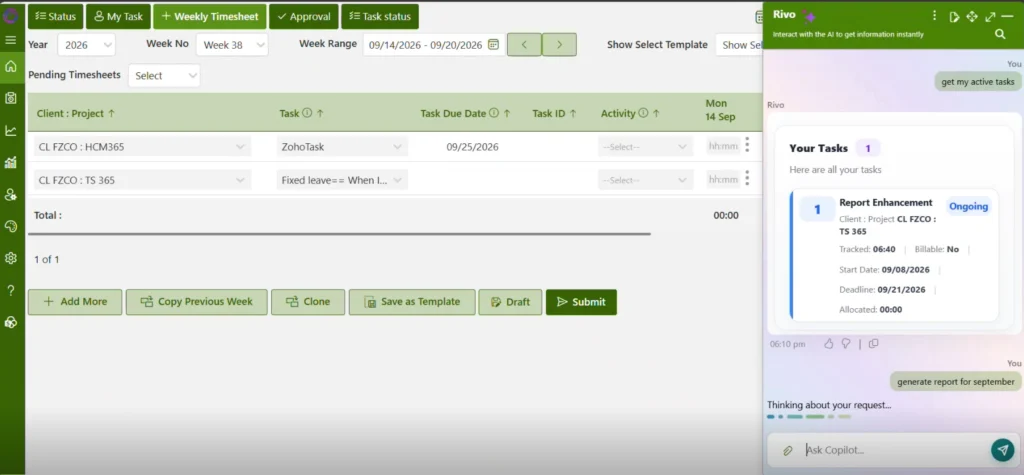
Most time boxing apps help one person plan one day. Timesheet 365 helps a whole organization plan time, log it against projects and tasks, and prove where it went, all inside Microsoft Teams with data stored in your own SharePoint.
- Track time against planned blocks: allocate hours to tasks, then log actual time with a timer or manual entries.
- Project and task-level allocation: every timebox has a clear home in a project, task or activity.
- Estimated vs actual time: catch the planning fallacy before it derails deadlines.
- Timesheet approvals: managers approve or reject weekly timesheets with comments.
- Reports and dashboards: utilization and project hours at a glance, with Power BI for deeper analysis.
- Billable vs non-billable hours: client timeboxes become accurate invoicing data.
- AI agent assistance: helps users log and summarize time faster and surfaces insights on where hours go.
- Microsoft Teams app: start timers, fill timesheets and approve entries without leaving Teams.
- SharePoint-native storage: data stays in your tenant, inheriting its security and compliance.
- Microsoft 365 ecosystem: works alongside Outlook, Power BI reporting and Power Automate approval flows.
Pricing: $3.60 per user per month, with a 14-day free trial.
Pros: Native to Teams and SharePoint; approvals and billable tracking; very low per-user cost.
Cons: Built for Microsoft 365 organizations; less focused on personal daily-planning rituals.
Best for: Microsoft 365 organizations that want timeboxing, time tracking and approvals in one place.
📅 Book a Demo: Timeboxing That Lives Where Your Team Already Works
Your team plans in Outlook and collaborates in Teams, so why track time in another app nobody opens?
2. Sunsama – Best for Mindful Daily Planning
Sunsama turns timeboxing into a calm daily ritual. It guides you through picking tasks, estimating durations and dragging them onto your calendar, then closes the day with a shutdown review.
- Guided daily and weekly planning
- Calendar time blocking with Google and Outlook
- Imports tasks from Asana, Jira, Notion and Slack
Pricing: ~$16/month annually ($20 monthly); 14-day free trial.
Pros: Prevents overcommitment by warning when your plan exceeds available hours; calm, clean interface.
Cons: Pricey for one user; no timesheets, approvals or billing.
Best for: Freelancers and knowledge workers who want intentional, realistic daily plans every day.
3. Motion – Best for AI Auto-Scheduling
Motion is an AI scheduling assistant that builds your timeboxes for you. Add tasks with deadlines and durations, and its AI fits them into open calendar time, re-planning whenever meetings move.
- AI auto-scheduling into calendar timeboxes
- Automatic rescheduling when plans change
- Projects and booking pages for small teams
Pricing: From ~$19/user/month annually; 7-day free trial.
Pros: Saves real planning time; strong for constantly shifting schedules.
Cons: Expensive; you trade some manual control, and tuning the AI takes time.
Best for: Busy professionals and small teams who want AI to build and rebuild their day automatically.
4. Akiflow – Best for Consolidating Tasks into Timeboxes
Akiflow gathers tasks from email, Slack, Notion, Asana and more into one universal inbox. From there, you drag tasks onto your calendar to create timeboxes, largely from the keyboard.
- Universal inbox with many integrations
- Drag-to-calendar time blocking
- Command bar for fast capture
Pricing: ~$19/month annually; 7-day free trial.
Pros: Very fast for power users; combines calendar and tasks in one view.
Cons: No free plan; little built-in time tracking, so no estimated vs actual view.
Best for: Power users juggling many tools who want one fast, keyboard-driven planning hub for daily timeboxes.
5. Toggl Track – Best for Measuring Timeboxes
Toggl Track is a time tracker rather than a planner, which is exactly why it matters: it shows whether your timeboxes held. One-click timers and detailed reports reveal how long tasks really take.
- One-click timer and calendar entries
- Projects, tags and billable rates
- Detailed effort reports
Pricing: Free for up to 5 users; ~$9/user/month annually.
Pros: Very easy to use; excellent reporting; generous free plan.
Cons: Doesn’t plan your day; approvals sit on higher tiers.
Best for: Freelancers and agencies that want hard data on whether timeboxes are realistic, and want sharper estimates.
6. TickTick – Best Budget All-in-One Planner
TickTick packs a to-do list, calendar, habit tracker and Pomodoro timer into one affordable app. Set task durations, view them on a calendar, and start a focus session straight from any task.
- Built-in Pomodoro timer with focus stats
- Calendar and timeline views (Premium)
- Habit tracker and Eisenhower Matrix
Pricing: Free plan; Premium ~$35.99/year.
Pros: Outstanding value; runs on every platform, including smartwatches.
Cons: Calendar views need Premium; limited team features; minimal AI planning; no timesheets or approvals.
Best for: Students and budget-conscious users who want a Pomodoro timer and planner in one.
7. Morgen – Best Calendar-First Planner
Morgen merges Google, Outlook and iCloud calendars into one view. You drag tasks from Todoist, Notion or ClickUp onto it as timeboxes, and its AI Planner suggests a realistic daily schedule.
- Unified multi-calendar view
- Drag-and-drop task time blocking
- AI Planner for daily schedules
Pricing: ~$15/month annually; 14-day free trial.
Pros: Ideal for juggling multiple calendars; the AI suggests plans rather than overriding your choices; clean design on desktop and mobile.
Cons: No time tracking for estimated vs actual comparisons; pricey compared with free calendars.
Best for: Professionals managing several calendars who want gentle AI guidance.
8. Todoist – Best Simple Task Manager for Timeboxing
Todoist, one of the world’s most popular task managers, now supports task durations and a calendar layout. Add a time and length to any task, and it appears as a block on your calendar.
- Task durations and calendar layout
- Google Calendar and Outlook sync
- Natural-language task input
Pricing: Free plan; Pro ~$4/month annually.
Pros: Fast, reliable and inexpensive; huge integration ecosystem, including Pomodoro and timeboxing add-ons.
Cons: No native time tracking or AI scheduling; timeboxing is a feature, not the core idea; basic team reporting.
Best for: Todoist fans who want light, affordable calendar timeboxing.
9. Reclaim.ai – Best AI Focus-Time Protector
Reclaim.ai is an AI scheduling assistant that defends your calendar. It auto-books focus time, habits and tasks into open slots, then moves them flexibly when new meetings land.
- AI-scheduled focus time, habits and tasks
- Smart meetings and scheduling links
- Google Calendar and Outlook support
Pricing: Free Lite plan; paid from ~$8–$10/user/month.
Pros: Protects deep work automatically; generous free tier; coordinates focus time across shared team calendars.
Cons: Works best when your whole week lives on the calendar; analytics show calendar time, not logged effort; no approvals.
Best for: Meeting-heavy individuals and teams that need protected focus time.
10. Clockify – Best Free Time Tracker for Large Teams
Clockify offers free time tracking for unlimited users. Timers, a calendar view and timesheets let teams check how planned timeboxes compare with the hours actually worked.
- Timer, manual entry and calendar view
- Project and task timesheets
- Reports and billable rates
Pricing: Free plan for unlimited users; paid from ~$3.99/user/month.
Pros: Unbeatable free tier; easy to roll out to large groups; useful reports and many integrations.
Cons: No day planning; approvals need paid plans; data lives outside Microsoft 365.
Best for: Cost-conscious teams needing straightforward time tracking and timesheets.
What Is Time Boxing?
Time boxing means giving one task a fixed window and working only on that task until the window closes. When time is up, you ship the result or deliberately book another box. Unlike an open-ended to-do list, every task has a clear start, a clear end and a clear goal.
The method gained wide attention through Marc Zao-Sanders’ Harvard Business Review article on how timeboxing works, which ranked it the most useful of 100 productivity techniques his team assessed.
- It exposes the planning fallacy. Buehler, Griffin and Ross’s classic study on why people underestimate task completion times shows we routinely expect tasks to take less time than they do. Tracking each timebox makes that gap visible.
- It cuts task switching. The American Psychological Association notes that switching between tasks can cost up to 40% of productive time.
- It forces decisions. A hard stop turns “almost done” into a clear choice.
- List the tasks that matter today.
- Estimate a realistic duration for each.
- Box each task onto your calendar.
- Work on only that task until the box ends.
- Review actual time against your estimate.
Most people skip step five, yet it’s the step that improves your plans every week.
Make Step Five Automatic
Planning a timebox is easy; knowing whether it held is the hard part. Timesheet 365 compares estimated and actual hours for every task, so your team’s estimates improve each week, right inside Microsoft Teams.
How to Choose a Time Boxing App
First decide whether you’re planning for yourself or a team, then check these criteria:
- Calendar time blocking: drag tasks onto Outlook or Google Calendar with durations.
- Time tracking: compare estimated vs actual hours.
- AI scheduling: auto-place and re-plan timeboxes.
- Team features: approvals, dashboards and billable hours.
- Ecosystem fit: Microsoft 365 teams adopt Teams-native tools far faster than another standalone login.
Finally, compare total cost per user: personal planners often cost $15–$30 per month, while team time tracking tools are far cheaper per seat. Pairing works well too: individuals plan in a personal time boxing app, while the team logs and approves actual hours in a timesheet app, closing the loop between plan and reality.
The Future of Timeboxing: AI Agents
The next wave of time boxing apps will help create and defend your plan, not just hold it. Expect predictive estimates learned from your past actual time, AI agents that draft timesheets from calendar and Teams activity, and shared team focus windows. Tools that combine planning, tracking and AI inside the platforms people already use every day, such as Microsoft Teams and Outlook, will have the clearest edge in 2027 and beyond.
Join Our Creative Community
FAQs About Time Boxing Apps
What is a time boxing app?
A time boxing app helps you assign a fixed time limit to each task and schedule it on your calendar.
Many also track actual time so you can compare plan vs reality.
What is the best time boxing app for Microsoft Teams?
Timesheet 365 is built natively for Microsoft Teams and SharePoint.
It tracks time against projects, routes approvals and costs $3.60/user/month.
Is timeboxing the same as time blocking?
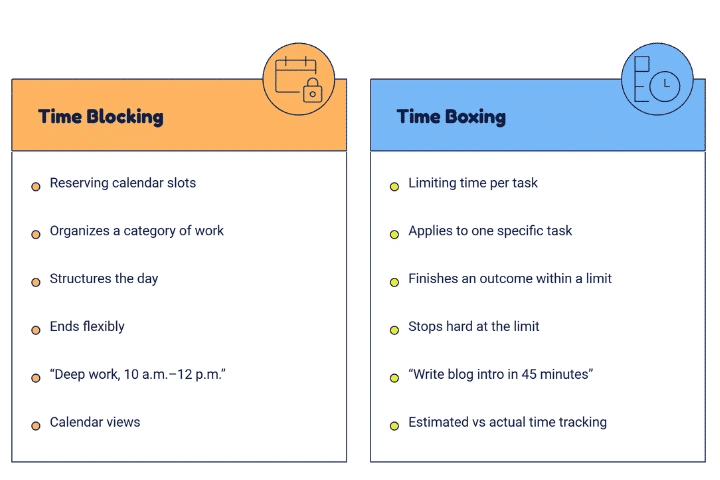
Not quite. Time blocking reserves calendar slots for types of work.
Timeboxing sets a hard limit and a goal for a specific task.
Are there free time boxing apps?
Yes. TickTick, Todoist, Toggl Track, Reclaim.ai and Clockify offer free plans.
Timesheet 365 offers a 14-day free trial.
Can AI help with timeboxing?
Yes. Tools like Motion and Reclaim.ai auto-schedule timeboxes on your calendar.
AI agents in Microsoft 365 apps can also help log and analyze time.


























