

Customer Service Knowledge Base: Guide & Best Practices (2027)

A customer needs help resetting their password. Another cannot access an invoice. Meanwhile, your support team answers the same questions every day, even though the solutions are already available somewhere.
The real problem is not always a lack of answers. It is that customers and employees cannot find them when needed.
- A customer service knowledge base helps users find answers without contacting support.
- It reduces repetitive tickets, saves time, and improves service quality.
- AI search, ticketing integration, and reporting make knowledge management easier.
- Clear instructions, regular updates, and performance tracking improve self-service.
- Helpdesk 365 helps Microsoft 365 teams create, manage, and share knowledge from resolved tickets.
A customer service knowledge base solves this problem by bringing helpful information into one searchable place. Instead of waiting for every answer, users can follow simple instructions, solve common issues, and contact support when they need more help.
In this guide, we will explain how knowledge bases work, their benefits, essential features, and the best practices businesses can follow in 2027.
What Is a Customer Service Knowledge Base?
A customer service knowledge base is a central library of information that helps customers and support teams find answers to common questions. It includes how-to guides, frequently asked questions (FAQs), troubleshooting steps, product instructions, and company policies.
Instead of asking a support agent for every issue, users can search the knowledge base and follow the available instructions.
For example:
Imagine an employee cannot connect to the office Wi-Fi. Normally, they would create an IT support ticket and wait for an agent.
With a knowledge base, the employee can search for “Wi-Fi connection issue,” open a troubleshooting guide, and follow the steps.
If the problem continues, they can create a ticket and share what they already tried.
This saves time for both the employee and the IT team.
How Does a Customer Service Knowledge Base Work?
A knowledge base follows a simple process:
- Information is collected: Support teams document common questions, solutions, and instructions.
- Articles are organized: Information is grouped into categories such as account access, billing, and troubleshooting.
- Users search for answers: Customers or employees enter keywords or browse relevant topics.
- Solutions are provided: Users follow the instructions to solve their problems.
- Content is updated: Support teams improve articles when products, policies, or procedures change.
A knowledge base for customer service works best when employees and customers can find the right information without knowing technical terms.
It should also provide a clear way to contact support if the suggested solution does not work.
Why Is a Customer Service Knowledge Base Important?
One challenge many support teams face is answering the same questions repeatedly.
Think about an IT department receiving requests related to password resets, software access, and account permissions.
An agent may spend several minutes explaining a process that has already been shared with other employees many times.
The issue is not that employees are asking too many questions. It is that useful information is not easily available.
A customer service knowledge base addresses this in several ways.
It reduces repeated questions. Users can find answers without creating a ticket for every basic issue.
It makes information consistent. Support agents can refer to the same approved instructions rather than giving different answers.
It makes onboarding easier. New employees and support agents can learn common processes without depending entirely on experienced colleagues.
It supports users outside working hours. Customers in different time zones can access help articles whenever they need them.
It protects important knowledge. When experienced employees change roles or leave, their solutions remain available to the team.
However, simply publishing more articles does not guarantee better support.
A knowledge base becomes valuable when its information is accurate, easy to understand, and regularly reviewed.
Types of Customer Service Knowledge Base Software
Not every business needs the same kind of knowledge base. Some organizations help external customers, while others mainly support their employees.
Understanding the differences makes it easier to choose suitable software.
1. Internal Knowledge Base
An internal knowledge base stores information for employees and support agents.
It may include IT troubleshooting guides, HR policies, software installation instructions, and internal procedures.
Example: An employee needs permission to use a business application. They search the internal knowledge base to understand the approval process before submitting a request.
Best for: IT departments, HR teams, finance teams, and internal service desks.
2. External Customer Knowledge Base
An external knowledge base provides self-service information to customers who use a company’s products or services.
Common topics include account setup, payments, subscriptions, product features, and returns.
Example: A SaaS customer wants to add another team member. They find a step-by-step guide on the company’s help center.
Best for: SaaS businesses, online stores, and customer support teams.
3. Helpdesk-Integrated Knowledge Base
This type connects knowledge articles with support ticket management.
Agents can refer to existing solutions while working on tickets and document new solutions after an issue is resolved.
Example: An IT agent fixes a recurring Outlook access problem. The solution is added to the knowledge base so other agents can use it for similar requests.
Best for: Organizations handling regular support tickets.
4. AI-Assisted Knowledge Base
An AI-assisted knowledge base helps users search for answers using everyday questions.
Depending on the software, AI may suggest related articles, summarize information, or help draft responses using existing knowledge.
Example: Instead of searching for a specific error code, an employee asks, “Why can’t I access my shared folder?”
The system may recommend articles about folder permissions and access settings.
Best for: Organizations with large knowledge libraries that need easier ways to find information.
Internal vs. External Knowledge Base: Key Differences
Feature | Internal Knowledge Base | External Knowledge Base |
Main users | Employees and support agents | Customers and product users |
Content | Internal processes and troubleshooting | Product guides and FAQs |
Access | Restricted to approved users | Public or customer-only |
Main purpose | Help teams work and solve issues | Support customer self-service |
Example | Employee software access guide | Customer account setup guide |
Key Features of Customer Service Knowledge Base Software
Choosing knowledge base software becomes easier when you understand which features actually help users.
Here are eight capabilities worth considering.
Search Functionality
Users should be able to search using everyday words, not only exact article titles.
For example, a search for “forgot my password” should help users find an article called “How to reset your account password.”
Knowledge Article Management
Support teams need a simple way to create, edit, organize, and publish articles.
An easy editor allows agents to document solutions without spending too much time formatting content.
Categories and Navigation
Articles should be grouped into clear topics such as Billing, Account Access, Software Issues, and Getting Started.
This helps users browse when they are unsure what to search for.
Role-Based Access
Some articles contain internal information that customers should not see.
Access controls allow administrators to decide who can view, edit, or publish specific content.
Ticketing System Integration
Connecting a knowledge base with a ticketing system allows agents to reuse previous solutions.
It also helps teams identify which support requests need better documentation.
AI-Powered Search Assistance
AI features can help users find relevant content based on the meaning of a question.
However, AI responses should rely on accurate, approved information and provide a path to human support.
Knowledge Base Analytics
Reports help managers understand which articles receive attention, which searches fail, and where users still need help.
This information can guide future improvements.
Article Feedback and Updates
Users should be able to report whether instructions were useful.
Support teams also need a way to review old articles and update them when processes change.
Benefits of a Customer Service Knowledge Base
A well-managed knowledge base improves more than the speed of answering questions. It can change how support teams use their time.
Faster Problem Resolution
Customers and employees can access troubleshooting instructions without waiting for an available agent.
This is particularly useful for common problems with clear solutions.
Reduced Support Workload
When users solve routine problems themselves, support agents can spend more time investigating requests that need personal attention.
For example, an IT team may handle fewer basic software setup questions after publishing clear installation guides.
Better Customer Experience
Customers appreciate receiving helpful answers without repeating their problems across different channels.
A clear guide also helps them understand what to do if their first attempt fails.
Consistent Support Information
When all agents use approved documentation, customers are less likely to receive conflicting instructions.
This matters when teams handle account access, billing policies, or security-related requests.
Easier Employee Training
New support agents can refer to documented solutions while learning how to handle common issues.
The knowledge base becomes a learning resource as well as a support tool.
Improved Support Planning
Article usage and ticket trends can show managers where customers struggle.
For example, frequent questions about a software installation may indicate that the installation process itself needs improvement.
The real benefit is not simply reducing the number of tickets. It is helping people solve problems with less effort.
How Helpdesk 365 Helps With Customer Service Knowledge Base Management
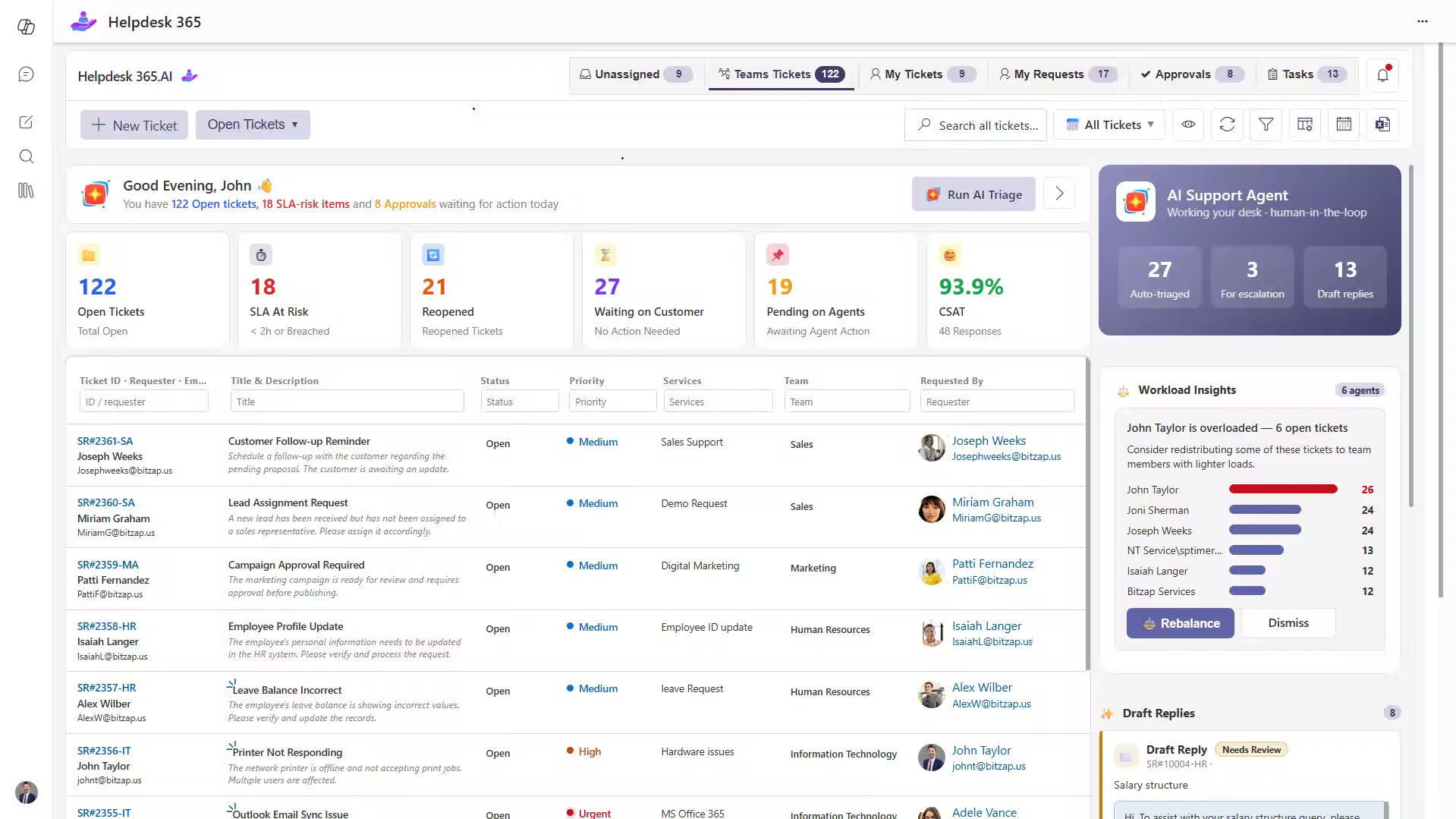
For businesses using Microsoft 365, Helpdesk 365 provides helpdesk software that connects ticket management with knowledge sharing.
As a Microsoft 365-based solution, it helps IT, HR, finance, and other internal support teams manage requests while keeping useful solutions available for future reference.
1. Create Knowledge Articles From Resolved Tickets
Support tickets often contain valuable information, but that knowledge can become difficult to find once a ticket is closed.
Helpdesk 365 allows agents to create knowledge articles directly from resolved tickets.
Practical example:
Consider an IT team receiving multiple requests about a Microsoft Teams sign-in issue.
An agent investigates the problem, identifies the cause, and resolves the ticket.
Instead of keeping the solution only in that ticket, the team can turn it into a knowledge article containing:
- The problem and common symptoms.
- The possible cause.
- The steps used to resolve the issue.
- What employees should do if the issue continues.
Before publishing, the agent should remove personal details and confirm that the solution applies to other users.
The next time a similar request arrives, another agent can search for the article rather than investigate the same issue from the beginning.
2. Find Solutions Using Keyword Search
Helpdesk 365 provides keyword-based knowledge search, helping support agents locate previous solutions and instructions.
This is useful when the agent who originally resolved an issue is unavailable.
3. Share Knowledge Across Support Teams
Agents can contribute, edit, and improve articles, helping teams maintain a shared collection of useful information.
This reduces reliance on individual employees for answers to common problems.
4. Keep Knowledge Articles Updated
When a process changes, teams can revise existing articles to reflect the current instructions.
For example, an IT admin can update a software installation guide after the company introduces a newer application version.
5. Review Knowledge Base Performance
Helpdesk 365 provides knowledge base insights that help teams understand article usage and identify gaps in available information.
Managers can use these insights alongside ticket data to decide which topics need attention.
Why this matters: Support knowledge should not remain hidden inside individual tickets, emails, or conversations. Helpdesk 365 helps teams reuse what they learn while resolving everyday requests
Best Practices for Building a Customer Service Knowledge Base in 2027
A successful knowledge base is not measured by how many articles it contains.
What matters is whether people can find reliable answers and solve their problems.
Here are the practices that deserve the most attention.
Start With Real Customer Questions
Before writing articles, review the questions already reaching your support team.
Look at recent tickets, email requests, chat conversations, and repeated issues.
For example, if employees regularly ask how to install approved software, create a guide that explains the exact installation process.
Start with questions that occur often and have clear, repeatable solutions.
Use Simple, Search-Friendly Article Titles
Write titles using words customers would naturally search for.
Instead of:
“Account Credential Recovery Procedure”
Use:
“How to Reset Your Account Password”
The second title is easier to understand and matches the question a user is likely to ask.
Write Clear, Step-by-Step Instructions
Avoid long explanations when a user needs a direct answer.
A useful troubleshooting article should explain the problem, provide the steps, and tell users what to do if those steps fail.
Example: How to Request Software Access
- Open your organization’s IT support portal.
- Select New Service Request.
- Choose Software Access.
- Enter the application name and reason for access.
- Submit the request and check its status.
- Turn Repeated Ticket Resolutions Into Articles
When agents solve the same problem several times, consider documenting the solution.
A practical workflow is:
Identify repeated issue → Verify solution → Create article → Review → Publish → Update when needed
This helps teams build their knowledge library around real support needs instead of guessing which topics might be useful.
Assign an Owner to Every Article
Each article should have someone responsible for keeping its information correct.
For example, IT may own software troubleshooting articles, while HR owns employee leave policy guides.
Review articles after product updates, policy changes, or reports of incorrect instructions.
Keep Human Support Available
Not every problem can be solved through self-service.
If an employee has a serious account access issue, a knowledge base should not force them through several articles before they can contact support.
Add a visible option to submit a ticket or reach an agent.
Prepare Knowledge Content for AI-Assisted Support
As businesses plan their support operations for 2027, AI-assisted search is an important consideration.
AI tools may help users ask questions in natural language and receive answers based on knowledge articles.
However, poor source information can still produce incorrect responses.
To prepare, use clear headings, write one main solution per article, keep instructions current, and restrict access to private information.
The priority should be trusted answers, not simply more AI-generated content.
Track Knowledge Base Performance
Publishing articles is only the beginning. Managers should review whether the content actually helps users.
These five measures provide a useful starting point.
Metric | What It Tells You |
Search success rate | Whether users find relevant answers |
Article helpfulness rate | Whether readers rate an article as useful |
Repeat ticket volume | How often the same issues still reach support |
Self-service resolution rate | How often users confirm they solved a problem |
Average resolution time | Whether agents are resolving requests faster |
Example:
Suppose users repeatedly search for “printer not connecting,” but support tickets for the same problem remain high.
This could mean the article is difficult to find, its instructions are unclear, or the problem cannot be solved through the documented steps.
Review the search results, test the instructions, and examine the related tickets before deciding what to change.
Remember that article views and reduced ticket counts alone do not prove that users solved their problems.
Test Articles With Real Users
Before publishing an important guide, ask someone unfamiliar with the process to follow it.
Observe where they become confused or ask for clarification.
If they cannot complete the task without additional help, improve the article.
How to Choose the Right Customer Service Knowledge Base Software
The best knowledge base software is not necessarily the product with the longest feature list.
It is the one that fits your users, existing tools, and support process.
Understand Who Will Use It
First, decide whether the knowledge base is for customers, employees, support agents, or a combination of these groups.
A public SaaS help center has different needs from an internal IT knowledge library.
Check Your Existing Software
Consider where support requests already arrive.
For Microsoft 365 organizations, integration with SharePoint, Microsoft Teams, and existing ticket workflows may reduce the need to move between separate applications.
Test the Search Experience
Use five real questions from your support tickets.
Ask someone unfamiliar with the system to find the correct articles.
Check whether the search results match the words that customers actually use.
Review Security and Access Controls
Confirm who can read, create, edit, and publish articles.
This is especially important for organizations storing internal processes, employee information, or technical instructions.
Evaluate Content Maintenance
Find out how easily agents can update articles, review changes, and remove outdated information.
A knowledge base that is difficult to maintain will lose value over time.
Compare Pricing and Future Needs
Review licensing, setup effort, available integrations, reporting, and any additional charges for AI features.
Choose software that supports your current team without making future changes unnecessarily difficult.
A Simple Knowledge Base Software Evaluation Checklist
Before selecting a platform, confirm that your team can:
- Find answers using common search terms.
- Create articles without technical knowledge.
- Control access to private information.
- Update outdated instructions.
- Connect knowledge with support requests where needed.
- Measure article usefulness and search performance.
- Get help when self-service does not work.
For IT managers: Prioritize security, integration, and ongoing maintenance.
For CEOs and business leaders: Focus on employee productivity, customer experience, and whether the software reduces repeated support work.
Conclusion
A customer service knowledge base helps businesses turn repeated questions into useful answers that people can access when needed.
But building a library of articles is only the first step. The real value comes from documenting proven solutions, keeping instructions accurate, and making information easy to find.
As AI becomes more common in support, reliable knowledge will become even more important.
For organizations using Microsoft 365, Helpdesk 365 brings ticket management and knowledge sharing closer together, helping teams capture solutions and reuse them across daily support operations.
Turn resolved tickets into useful knowledge and make support easier for your team
Join Our Creative Community
Frequently Asked Questions
1. What is a customer service knowledge base?
A customer service knowledge base is a searchable collection of FAQs, guides, troubleshooting steps, and support information. It helps customers and agents find answers to common problems without starting a new support conversation every time.
2. What is the difference between a knowledge base and a help desk?
A knowledge base stores reusable answers and instructions. A help desk manages support tickets, assignments, replies, and resolutions. When connected, agents can use knowledge articles while resolving requests and document new solutions for future use.
3. How do you create a customer service knowledge base?
Start by reviewing common support questions. Group related topics, write simple instructions, add useful screenshots, and assign article owners. Publish the most important guides first, then improve them using customer feedback and support ticket trends.
4. What should be included in a customer service knowledge base?
Include frequently asked questions, account setup instructions, product guides, troubleshooting steps, billing information, service policies, and contact options. Internal knowledge bases may also include employee procedures and technical support instructions.
5. Can AI improve a customer service knowledge base?
Yes. AI can help users find relevant articles, suggest answers, and assist with content creation. However, the results depend on the accuracy of the source material. Human review and proper access controls remain important.
6. What are the best practices for knowledge base management?
Use clear titles, document real customer questions, assign content owners, review outdated articles, collect feedback, and measure whether users successfully solve their problems.


























