Recruitment Hiring Dashboard: Key Metrics and Benefits for HR Managers

- A recruitment hiring dashboard gives HR managers one centralized view of hiring activity, candidate progress, and performance
- Spreadsheets and manual reports create visibility gaps, slow decisions, and inaccurate numbers
- The metrics that matter most: open positions, pipeline stages, time-to-hire, recruiter performance, source effectiveness, and cost per hire
Recruitment Management 365 provides better hiring visibility within Microsoft 365.
Recruiters handle applications, interviews, job openings, and hiring decisions every day. When this information sits in different spreadsheets and emails, tracking progress becomes difficult. Managers may miss stalled candidates, delayed interviews, or positions requiring attention.
A Recruitment dashboard brings essential hiring information into one visual view. It helps HR managers monitor recruitment activity, spot bottlenecks, and make informed decisions.
This guide explains Hiring dashboard metrics, real examples, implementation steps, and how Recruitment Management 365 supports Modern hiring teams.
What Is Recruitment Dashboard?
A recruitment dashboard is a visual reporting workspace that displays hiring activities, candidate management, job openings, and recruitment results. Instead of checking separate reports, HR managers can review key information through charts, counts, and trend lines.
Hiring overview: See open positions, applications, screening activity, interviews, and hires.
Candidate progress: Understand how applicants move through recruitment stages.
Job visibility: Monitor requisitions and posting statuses in one place.
Recruitment trends: Review changes in application volumes over time.
Team coordination: Identify activities that need follow-up or decisions.
Dashboards are most useful when their data is accurate, regularly updated, and clearly defined.
Why Do HR Managers Need a Hiring Dashboard?
Hiring involves recruiters, interviewers, hiring managers, and HR leaders. Without shared information, teams may struggle to understand what is happening or where decisions are delayed.
Faster visibility: Review the hiring pipeline without requesting multiple status updates.
Clear priorities: Spot pending requisitions, incomplete interviews, and outstanding feedback.
Better planning: Compare job openings with available applicants and recruitment activity.
Consistent reporting: Use common definitions when discussing hiring progress.
Improved collaboration: Help stakeholders focus on the same recruitment information.
A dashboard supports decisions, but it cannot replace structured interviews, recruiter judgment, or fair hiring practices.
Key Recruitment Dashboard Metrics to Track
The best recruitment dashboard metrics depend on hiring goals. Some measure daily workload, while others assess speed, cost, or effectiveness. Combine operational counts with carefully defined performance indicators.
Open positions: Number of vacancies currently being recruited for.
Applications received: Total applications recorded during a selected period.
Candidates by stage: Applicants in screening, interviews, shortlisting, or other stages.
Interviews scheduled: Interviews arranged for candidates and hiring teams.
Total hires: Candidates who have completed the organization’s defined hiring milestone.
Candidate sources: Applications attributed to referrals, LinkedIn, job portals, or career websites.
Recruitment Dashboard Example: Recruitment Management 365
The actual Recruitment Management 365 dashboard shows hiring activity through summary cards, donut charts, and a monthly applicant trend chart. It gives HR managers a practical view of the information they may need during recruitment reviews.
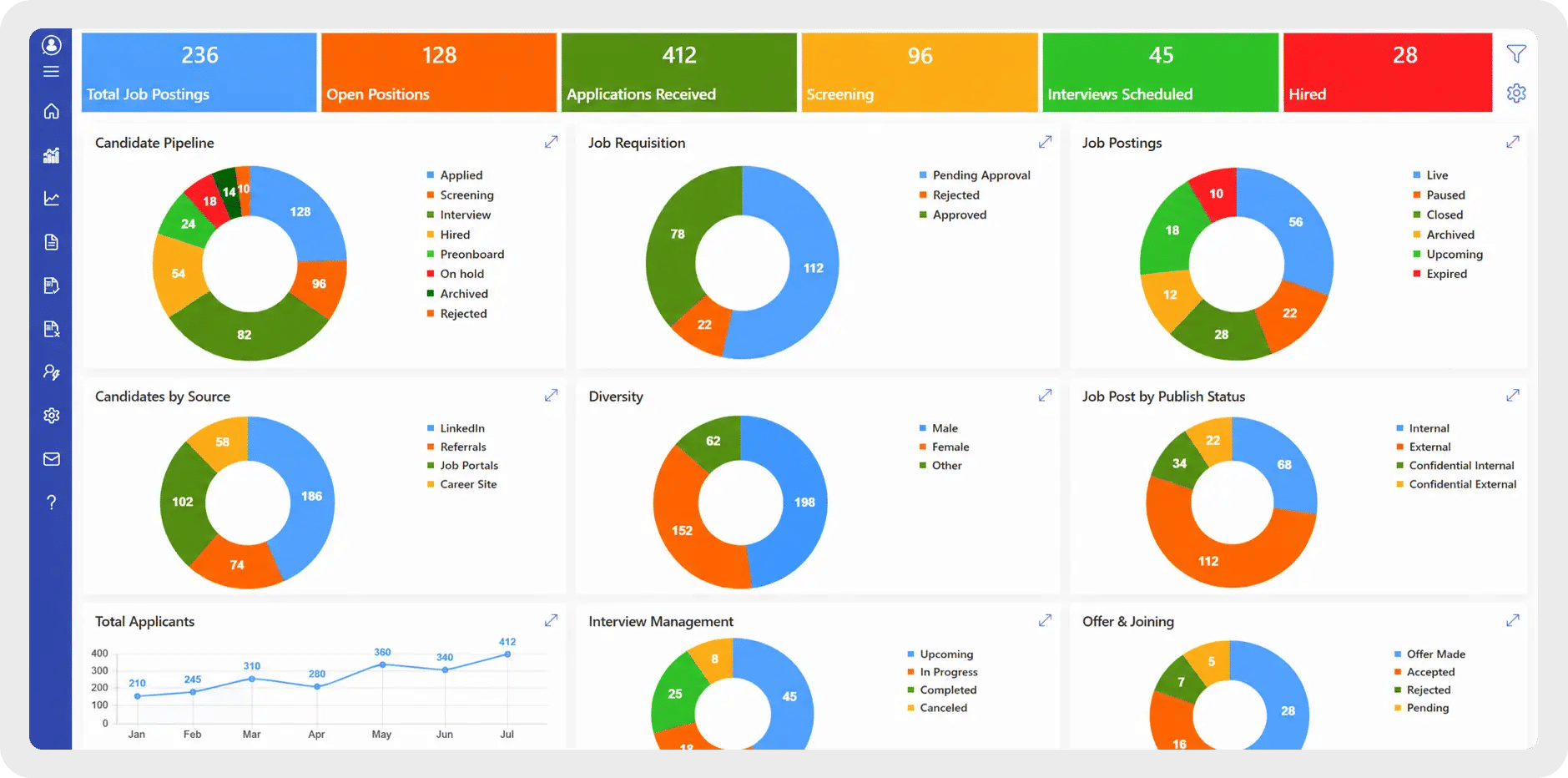
The recruitment overview displays total job postings, open positions, applications received, screening activity, interviews scheduled, and hired candidates. Managers can quickly review overall recruitment activity before exploring individual hiring stages.
The candidate pipeline organizes applicants across stages such as applied, screening, interview, shortlisted, hired, on hold, archived, and rejected. This helps recruiters understand candidate distribution and investigate potential hiring delays.
Job requisition reports help managers track pending, approved, and rejected requests. Job posting reports provide visibility into live, paused, closed, upcoming, and expired vacancies.
Candidate Sources and Applicant Trends
Candidate source reports identify applications received through LinkedIn, employee referrals, job portals, and career websites. Monthly applicant trends help hiring managers understand recruitment activity over time.
Interviews, Offers, and Joining
Interview management reports track upcoming, in-progress, completed, cancelled, and feedback-pending interviews. Offer management reports help recruiters monitor offers made, accepted, rejected, and pending.
Together, these capabilities provide HR teams with a clearer understanding of recruitment activities, candidate movement, and hiring progress across different stages.
Book a Demo to see how Recruitment Management 365 helps your team manage recruitment activities and track hiring performance.
How to Build an Effective Hiring Dashboard?
Adding charts isn’t the goal. Supporting better decisions is.
Faster hiring? Better candidate quality? Higher offer acceptance? Balanced recruiter workload? Better collaboration with hiring managers? Pick your goals first.
Question | Metric |
Are we hiring fast enough? | Time-to-hire |
Which channels bring quality candidates? | Source effectiveness |
Where are candidates leaving? | Funnel conversion rates |
Pull data automatically from your applicant tracking system, career page, job boards, and interview scheduling tools. Centralizing this cuts manual updates and improves accuracy.
Step 4: Build Views by Role
Hiring managers need interview progress. Leaders need trends and forecasts. One dashboard, different views for different people.
Benefits of a Recruitment Dashboard
Useful dashboards turn routine recruiting data into information that teams can act on. Benefits depend on data quality, adoption, and the decisions made from the reports.
Greater transparency: Stakeholders can review hiring activity using shared information.
Earlier bottleneck detection: Stage counts highlight where candidates may be waiting.
Better resource allocation: Hiring leaders can prioritize vacancies and interview capacity.
More informed sourcing: Candidate source data helps assess which channels attract applicants.
Stronger reporting: Standardized visuals make recurring recruitment meetings more productive.
Improved accountability: Pending activities become easier to identify and assign.
Track Recruitment Performance with Recruitment Software
Recruitment Management 365 brings recruitment activities into a structured hiring environment. Its dashboard provides visibility into applicant stages, job requisitions, posting statuses, sourcing channels, interviews, and offers.
Monitor pipelines: Review candidate distribution across recruitment stages.
Track openings: Check vacancy and job posting activity.
Review sources: Understand where recorded applications originate.
Follow interviews: Identify upcoming sessions and pending feedback.
Monitor offers: Review offer and joining statuses.
Support Microsoft 365 teams: Explore recruitment workflows alongside familiar workplace tools, subject to configuration.
For organizations hiring inside Microsoft 365, these capabilities can support more consistent recruitment discussions and informed hiring decisions.
Conclusion
Recruitment success takes more than finding candidates — it takes visibility into every stage of the process. A recruitment hiring dashboard brings that visibility together: data, metrics, and insight in one place, instead of hours spent collecting reports and reacting to problems after they’ve already cost you a hire.
With the right dashboard, recruiters track candidate movement, managers collaborate better, and leaders decide based on real numbers — not guesswork. Recruitment Management 365 provides a connected recruitment dashboard for organizations seeking better visibility into their hiring processes.
Frequently Asked Questions
What is a recruitment hiring dashboard?
A centralized tool that shows open positions, candidate stages, recruiter performance, time-to-hire, and other hiring metrics in one view — so HR managers can track progress and decide faster.
Why do HR managers need one?
For real-time visibility into hiring activity, faster spotting of delays, clearer recruiter performance tracking, and better coordination between recruiters and hiring managers.
What metrics should it track?
Open positions, candidates per stage, time-to-hire, candidate source, interview progress, offer acceptance rate, recruiter performance, and cost per hire.
How does it actually improve hiring?
By showing exactly where candidates get stuck, which roles need attention, and which sourcing channels perform best — so teams can fix the right problem instead of guessing.
Dashboard vs. ATS — what's the difference?
An ATS runs recruitment activity: applications, resumes, interview workflows. A dashboard analyzes that ATS data and turns it into visual reports and insight.
Can it automate hiring reports?
Yes — it can pull data automatically, update reports in real time, and track metrics without manual spreadsheet work.
How does it help recruiters specifically?
By showing their assigned roles, candidate pipelines, priority openings, and performance — and flagging exactly where their process needs adjusting.