
Task Management: A Complete Package for Modern Teamwork
Task Management Software provides teams with transparency, organization, and responsibility. No more unperformed tasks and constant reminders. Instead, each person is aware of the task, the time and the priority. This guide will explain what task management is, why it matters, and how to choose the right tool.

.webp?updatedAt=1764685582097)
What Is Task Management Software?
A task management software helps your organization stay organized by focusing on three key components: task, responsible person, and timeline. All information tasks, files, comments, and status updates, that was previously scattered across emails and messages can now be accessed in one centralized, easy-to-use platform.
If your team is already a part of the Microsoft 365 ecosystem, then Microsoft task management tools will be a big help in this regard. You have the option to generate and supervise tasks right within the app that you are most accustomed to and like, which are Teams, Planner, Power Automate, and SharePoint. Especially, the SharePoint task management is a great help as it brings together tasks, documents, and collaboration in one place for everyone to work with and be accessed. With Microsoft task management tools, you will be able to:
- Create and organize tasks
- Assign owners
- Add files or notes
- Set due dates and reminders
- Monitor progress instantaneously
There is no necessity to switch between applications, as everything takes place in the area where your group already works. Task management helps because:
- Responsibilities are transparent
- Deadlines are visible
- Progress is easy to check
- Feedback and updates stay in one place
- The whole team stays aligned
The most suitable Microsoft task management solution will be one that is well integrated with the Microsoft 365 ecosystem. SharePoint task management and Microsoft Planner are excellent examples as they allow all the participants to be informed without using extra tools or creating any confusions.
With the right task management system, work will be more organized, communication will be easier, and the team will be able to accomplish more, all without being stressed.
.webp)
Why Task Management is Important for the Success of the Team
If tasks are divided among emails, chats, notebooks, or the memory of the people involved, there is going to be a case of missed things eventually. It gets pretty hard to figure out what the most important thing is, who has the power, or what the next step will be. This situation will lead to a lot of irritations, waiting time, and misunderstandings in communication.
Tools like Microsoft task management and SharePoint task management help fix that. They bring all operations to one collective location so that everybody is aware of what to do and when it has to be done. One systematic approach for all teams, whether small or large, not only eases the process but also makes everything orderly and nice to go.
All Your Tasks Together: My Tasks puts all your activities in one location. You continuously know the dates by which things should be done and what is demanding your attention so nothing is missed. It has a role in keeping you organized, attentive, and within the limits of time.
Jointly All Projects Under One Roof: By means of multi-project tracking, one can have all the projects visible at the same time and in the same place. Nothing will be missed and everyone will be informed of the situation. It will help your team to be in sync and working without interruption.
Organize with the Help of Custom Tags: Custom tags are your helpers in classifying tasks according to their importance, condition or kind. They allow you to spot the most important things without any additional hunting.This keeps the focus of your group extremely sharp and minimizes stress.
Choose the View That Suits You Best: Tasks get organized in the way that best suits you upon switching back and forth between List, Board, Calendar, or Timeline views. Selecting the view according to your team’s habits does the trick in making planning and tracking very simple.
Plan Ahead with Smart Scheduling: Utilizing a shared calendar, you can schedule your tasks in advance. It helps in avoiding rushes at the last moment and keeps everything orderly. Therefore, your group will be well-coordinated, and collaborating will be comfortable.
Work Better as a Team: Sharing updates and transferring tasks become easier with Microsoft tools like Teams, Planner, and SharePoint. No one misses out on what is happening so things do not get lost. This facilitates your team to work together in an uninterrupted and clear manner.
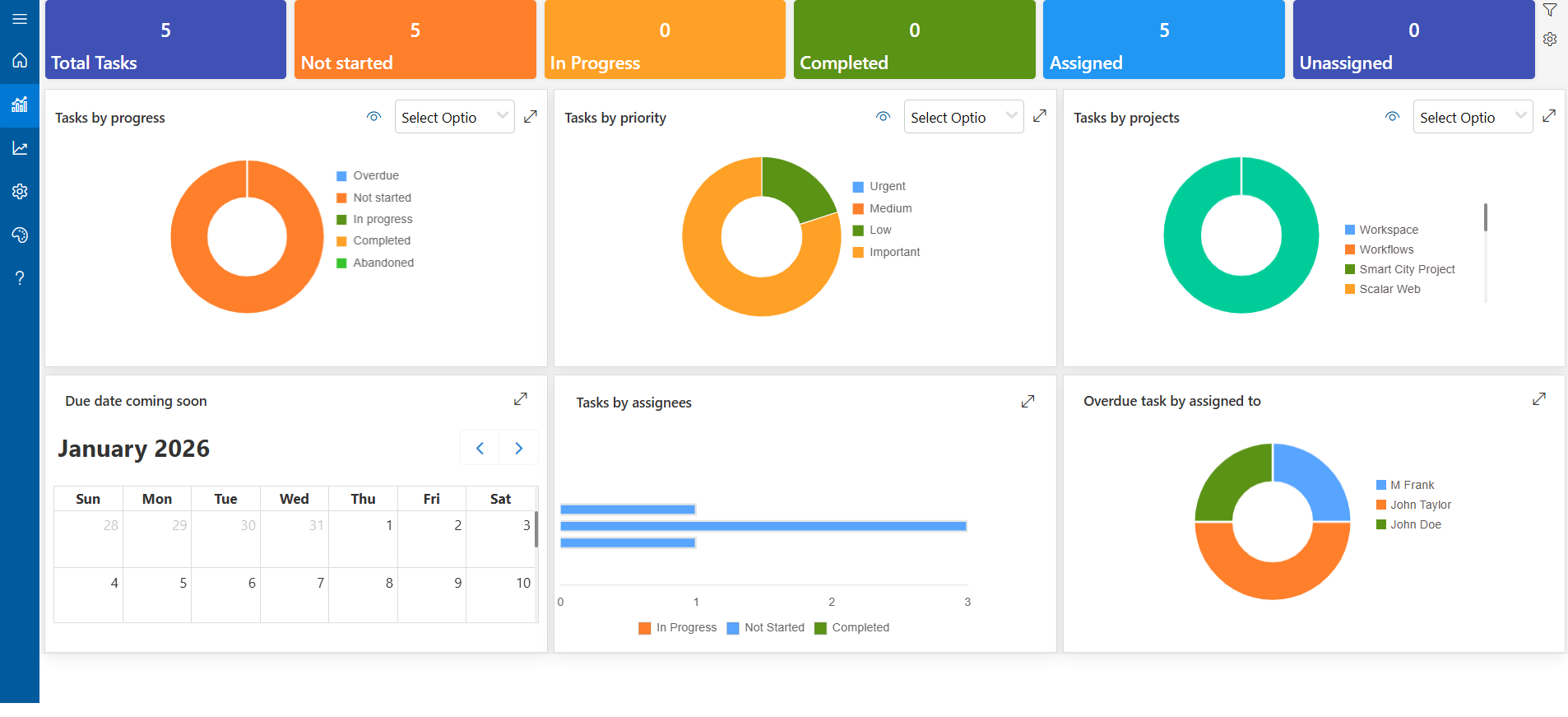
See Progress at a Glance: The work’s progress is manifested through reports and dashboards. It allows you to see what is going well and what requires your participation. This is the way your team can make better decisions with less effort.
Task Management Software Core Features
Best task management software gives your team all the tools required for organization, collaboration, and timely completion of work. This is a very user-friendly system that integrates tasks, projects, updates, and progress tracking into one unified system.
To-Do Lists: You have the option to create and manage tasks using to-do lists in one convenient location. Keep them organized by categories so you can easily see what needs to be done without any effort. This way, you can easily keep track of your progress and work without any stress.
%202.webp)
Priority Levels: You are able to categorize tasks according to their priority levels as High, Medium, or Low. This helps you to focus on the most important things.
Assignment: Tasks can be easily allocated to members of the team, which indicates to everyone what their duties are. This generates a clear ownership and accountability. This helps the team work closely together without misunderstandings.
Collaboration Tools: The collaboration tools enable the team to work side by side in one place. The users will be able to attach files, leave comments, and have discussions directly in the tasks. It proves to be a good thing for collaboration and collective knowledge of the team.
Timeline Made Simple: Deadlines are assigned and every due date is kept in check. Automatic alerts and updates are received, so nothing goes unnoticed. This makes the team finish work on time and remain organized.
%201.webp)
Automated Alerts: The reminders that are sent automatically keep everybody informed about the coming deadlines, hence nothing gets overlooked. Additionally, the whole team is always up to date regarding the priorities and the dates, which helps in completing the work on time and consequently, decreases the level of stress.
Turn Collaboration Into Results With Smarter Task Management
How to Select the Most Suitable Task Management Software
To choose the right task management software, it is necessary to discover a tool that is customized to the requirements of your group. It should ensure that you are organized, monitor tasks, and facilitate management of the team’s work.
Everything in One Place
The tasks, updates, and priorities are located in one central hub. No more switching between spreadsheets, emails, and notes, your team is concentrated and organized.
.webp)
Your Tasks, Your Way
Control the work in your own style with lists or drag-and-drop boards. With SharePoint lists and Power Automate, you can make boards that match your team’s workflow and be just as easy with task management.
Real-Time Visibility
You are constantly aware of the status of tasks performed, without, blocked or pending. Dashboards and reports make it very easy to track progress, assist your team, and update stakeholders about the process.
Notifications to Stay on Track
Automatic reminders for due dates, overdue tasks, comments, or changes in status are the best way to keep nothing unnoticed. Make sure deadlines are met and that work is performed within the time limit.
Microsoft 365 Integration
This is linking your tasks with Microsoft tools which are already familiar to your team, like Teams, Outlook, Word, Excel, and SharePoint. No new applications or retraining are necessary, task management is still and easily done.
Reports & Analytics
Track changes, find tasks that take the longest, and spot problem areas. Use the reports to keep work flowing smoothly and plan ahead.
Secure Access
Determine who has access to which tasks, apply the policies, and carry out storage of finished work. Thanks to SharePoint governance features, your data is not only secure and well-organized, but your team’s work is also appreciated.
Here Are 5 Best Task Management Software Solutions
| Rank | Software Name | Best For | Key Highlight |
| 1 | Task Management 365 | Microsoft 365 Teams & SharePoint Users | Microsoft 365 was a major factor in its full construction. It works with Teams and SharePoint without any interruptions, keeps all information in your Microsoft environment, and utilizes Power Automate for workflows. |
| 2 | Trello | Small to Medium Teams & Visual Workflows | The drag-and-drop interface is very useful when it comes to making the planning and collaboration activities easier. It works with numerous widely used applications. |
| 3 | Asana | Project Management & Team Collaboration | User-friendly layout, task relations, and chronological perspectives. Provides assistance to the groups in monitoring the entire process of the work with clear responsibility. |
| 4 | ClickUp | All-in-One Productivity & Customization | Extensive options for view customization, automation, and integration offer high flexibility. A single platform for ubiquitous collaboration among task management, documentation, goal setting, and time tracking. |
| 5 | Monday.com | Team Workflow & Cross-Functional Projects | All the above mentioned features of collaboration, reporting dashboards, and visual progress tracking will be available in real-time. |
Task Management for Microsoft 365 (Teams and SharePoint)
In case your group is utilizing Microsoft 365, then a task management tool customized for it will definitely ease the process of managing work. It merges Teams and SharePoint into one location for creating, following, and managing tasks while ensuring the team is updated.
Microsoft Teams
Have everything pertaining to your team, tasks, and project updates in one location. It will be very easy for you to collaborate, you will see the progress instantly, and you will be able to finish everything much quicker without changing apps.

SharePoint
By utilizing SharePoint, all your documents, projects, and discussions are kept in one secure, user-friendly workspace. Your group has all the tools they need available in one spot, which not only simplifies teamwork but also makes it impossible for projects to lose their momentum.
Step-by-Step Guide for Developing a SharePoint Task Management System
The present documentation describes a quite functional Task Management System built with Microsoft 365 only, hence no external software is required. The solution relies on the SharePoint List for housing all the tasks centrally and on Power Automate for handling notifications, reminders, and updates regarding the status in a convenient way.
.webp)
1. Create the Site and Task List
Set Up a Dedicated Site: Start by creating a SharePoint Team or Communication Site just for task management. This gives your team one secure place to store tasks, stay organized, and access everything quickly.
Make Your Task List: The following step is to create a personalized SharePoint List that will serve as your primary task monitor. To maintain clarity and facilitate management, add useful columns such as task name, priority, due date, assignee, and status.
Task Name | ID | Priority | Project | Bucket | Progress | Due Date | Assigned To | Completed By | Completed On | Source |
2. Submission and Interface
Create a Task Submission Form: Use Microsoft Forms or Power Apps to let team members add new tasks easily. You just have to ensure that the form you create maps the columns present in your SharePoint Task Lists.
Link the form to the list: Use Power Automate to add new submissions as new items to your SharePoint tasks list automatically.
Customize Views: Create, multiple views of say, “My Task,” “Upcoming Tasks,” or “Completed Task,” to help team filter out.
3. Automation and Management
Utilize Power Automate to make the workflow easier: Create workflows that are easy and let tasks go through without any manual work.
Notifications: When a task is created, updated, or finished, send out email or Teams alerts automatically, so that everyone is aware of the important changes.
Assignments: Allocate tasks according to the type of project, priority, or the role of the person in the team without manually doing it.
Reminders: To ensure that everyone is on time, send out automatic reminders just before the deadline.
Permissions: Define access rules clearly so that only the right people can do it create, edit, or mark the task as done, thus, keeping everything tidy and safe.
4.Enhancements
Integrate with Microsoft Teams: Directly incorporate your share point task list and submission form into a Teams channel so that the team members can see the tasks, update the progress, and collaborate without changing the app.
Add Helpful Resources: Use a SharePoint page to organize essential items for the project like rules, templates, or tips on how to do it best.
.webp)
How to Build a SharePoint Task Management System That Works for Your Team
Mistakes to Avoid When Adopting a Task Management System
The implementation of a new task management tool has the potential to carry out teamwork more quickly, more transparently, and in a more organized way, but this will only be possible if the tool is properly integrated. In order to maximize your team’s benefits, steer clear of these typical missteps:
No Clear Setup or Structure
In the absence of organized projects, priorities, or task categories, there is a high possibility of confusion. It is better to take some time beforehand to decide how tasks will be tagged, given out, and followed up rather than doing it after the whole team has started using the system.
Making the System Too Complex
I will confess you can easily get to the point of being very excited and thus creating a lot of custom workflows, automations and rules at once but to do so might only end up bringing confusion to the users. Start simple, let the team adjust, and add advanced features step by step.
Leaving the Team Out of the Process
The people in your team should experience the change as their own and not feel like they are resisting it. Solicit opinions and allow them to try new functionalities. The easy doingness of adoption follows when users feel they are listened to.
No Clear Assignments or Deadlines
Tasks that do not have owners or due dates often get neglected at the end. It is hence necessary that each responsibility is assigned to a person along with a timeline to maintain transparent accountability.
Choosing a Tool Based Only on Features
The strongest instrument does not necessarily mean the most practical one. Choose the system that corresponds to your team’s existing working style, particularly if it integrates seamlessly with Microsoft 365, SharePoint, Planner, and Teams.
Future Trends in Task Management
The intelligence level of task management tools is on the rise. No longer will the future systems merely follow your tasks, but they will also assist you with planning, remaining ahead, and performing your work with better productivity. Here what is coming:
Intelligent Automation
The tasks will automatically change their status, allocate to the respective person and arrange themselves according to the patterns, deadlines, and team roles, thus requiring significantly less manual input.
AI-Driven Proposals
The application will assist you in anticipating hold-ups, establishing achievable deadlines, and recommending the ideal time to work in accordance with your calendar and workload.
Better Integrations
Email, chat, documents, workflows will all be more smoothly interconnected so there will be no need to switch between apps to complete the job.
More Personalization
The individual will be able to see the tasks in the way that suits him/her best simple lists, calendars, dashboards, or timelines. Task management of the future is going to be less effort, fewer tools, and more clarity, thus, work becoming easier not heavier.
Conclusion
Hiring new team members can be a thrilling experience, but if not properly managed, late deadlines, misunderstandings, and poor communication can disrupt the process. Task Management 365 will take care of the organizing part for the tasks, keep your staff in sync, and make the flow of work faster. Bring all the people together in one spot, eliminate the disorder, and allow your team to perform at its best.
_cctPX33tF.webp)

.webp)
Frequently Asked Questions
What does task management software do?
Task management software helps teams plan, organize, and track work in one place. It replaces scattered emails, messages, and spreadsheets with a system where tasks, deadlines, files, and updates are easy to see and manage.
Why should my team use task management software?
Your team should use task management software to avoid missed deadlines, repeated mistakes, and communication gaps. It helps everyone stay organized, know their responsibilities, and work more efficiently, especially when multiple projects are running at once.
Is Microsoft 365 good for task management?
Yes. Microsoft 365 is ideal for task management because tools like Teams, SharePoint, Planner, and Power Automate work together. You can assign tasks, receive reminders, track progress, and collaborate, without switching apps. This saves time and keeps work consistent.
How do I choose the best task management tool?
Choose a task management tool that fits your workflow, supports automation, shows real-time progress, and integrates with the tools your team already uses. If your company uses Microsoft 365, a solution built specifically for it like Task Management 365, is often the best choice.
What are the key features to look for in task management software?
The most useful features include task assignment, due dates, reminders, file sharing, real-time dashboards, automation, and multiple views (list, board, calendar, or timeline). These features help teams stay organized and ensure nothing gets missed.
Can task management software help my team work faster?
Yes. Task management software improves teamwork by making responsibilities clear, reducing back-and-forth communication, and keeping all project information in one place. This leads to faster decisions, fewer delays, and better project outcomes.
Try It Free, No Obligation










Schedule a free personalized 1:1 demo
By proceeding, you accept Cubic Logics’s terms and conditions and privacy policy





Don't leave yet,
get up to 30% special offer
until 31st March 2026
Enter your business email ID and we will send a personalized coupon code straight to your inbox.
Please provide your contact details, we will connect with you soon!
Please provide your contact details, we will connect with you soon!
By proceeding, you accept Cubic Logics Terms and Conditions and Privacy Policy
Schedule a free personalized 1:1 demo
By proceeding, you accept Cubic Logics’s terms and conditions and privacy policy








By proceeding, you accept Cubic Logics Terms and Conditions and Privacy Policy