
Best Expense Management Software for Small business in 2026
Managing expenses is key to small business success. As your business grows, having simple expense management software for small business helps you track spending across teams and stay in control.


Overview: Expense Management Software for Small Business
If you are still managing expenses manually, it may be the right time to move to a smarter system. Modern expense management software for small business help track and organize expenses in real time and can connect with your accounting software. This allows business owners to spend less time on routine tasks and more time focusing on growth and better results.
Surprisingly, more than 60% of small businesses still depend on old methods like paper receipts and spreadsheets. This process takes a lot of time and often leads to mistakes, slow reimbursements, and poor financial tracking. These issues can result in extra spending, missed tax benefits, and weak budgeting, which can affect the business over time.
That’s why using small business expense tracking app can make a big difference. It simplifies how you track business spending and gives you a clear view of where your money is going. It also reduces manual work and helps avoid costly mistakes. With features like receipt capture, approval steps, and automatic expense sorting, businesses can save time and stay aligned with company rules and tax needs.
By adopting the right expense management software, small businesses can:
Eliminate manual data entry and minimize costly errors with automated expense management and intelligent reporting, saving time and reducing operational inefficiencies across your finance processes. Gain instant visibility into spending patterns with real-time dashboards, enabling smarter budgeting decisions and more accurate financial forecasting for long-term growth.
Ensure policy compliance by setting automated rules and approval workflows, reducing unauthorized expenses, improving accountability, and preventing fraudulent claims effectively. Streamline reimbursements with faster processing and automated approvals, ensuring employees get paid on time, boosting morale, and maintaining consistent productivity.
Centralize all expense data into one unified Expense management software for small business, improving financial transparency, simplifying audits, and giving you complete control over your business spending.
Key Factors to Consider When Choosing Expense Management Software
Selecting the right expense management software plays a big role in how well your business handles finances. Instead of picking a tool based only on features, it’s important to look at what actually fits your day-to-day operations. When you focus on the right factors, you can choose a solution that saves time, reduces manual work, and gives you better control over spending. Here are four key areas to look at:
1. Understand Your Business Needs
Before comparing different expense management tools, start by clearly defining what your business requires. Every company handles expenses differently, so knowing your exact needs will help you choose the right fit.
Ask yourself:
- What kind of expenses do you track?
(Travel, office supplies, client meetings, or project costs) - How many team members will use the software?
The system should support your current team and future growth. - Do you need real-time tracking?
Instant updates can help with better planning and budgeting. - Do you require approval steps?
If multiple people are involved, an approval system can help manage expenses better.
2. Simple and Easy-to-Use Interface
A tool is only useful if your team can use it without difficulty. Choose expense management software for small business that is easy to understand so employees can start using it without long training sessions. Mobile access is also important, especially for teams that travel or work remotely.
Features that improve usability include:
- Receipt Upload: Users can click a photo and attach it directly to expenses.
- Auto Categorization: Expenses are sorted automatically, saving time during review.
- Clean Dashboard: A simple layout that makes it easy to track and manage expenses.
3. Compatibility with Your Accounting Tools
Your expense management software for small business should work well with your existing accounting system. This helps avoid repeated data entry and keeps all financial records in sync. For example, Expense 365 integrates smoothly with tools like QuickBooks, allowing expenses to be recorded and organized automatically. This makes tasks like monthly closing faster and easier to manage.
4. Pricing and Long-Term Value
While some expense management software for small business offer free plans, they may not include all the features your business needs as it grows. Instead of focusing only on price, think about the overall value the software provides.
Consider:
- Initial setup costs
- Training time and effort
- Availability of customer support
- Future upgrade costs as your business expands
A good solution should not only fit your current budget but also support your business in the long run without frequent changes.
5. Data Security and Access Control
Protecting your financial data is just as important as managing it. When choosing expense management software for small business, make sure it offers strong security features and proper access controls. This helps keep sensitive information safe and limits access based on roles within your team.
Key things to look for:
Data Encryption: Keeps your financial data protected during storage and transfer.
Role-Based Access: Allows you to control who can view, submit, or approve expenses.
Audit Trails: Maintains a clear record of all actions, making it easier to track changes and review activity.
Regular Backups: Helps prevent data loss and keeps your records safe over time.
A secure system not only protects your business information but also builds trust within your organization and supports better financial management.
Contracts often include commitments such as payment terms, service delivery timelines, and compliance requirements. When these obligations are not tracked properly, businesses may overlook important responsibilities. A contract management software helps track these responsibilities and keep teams informed about upcoming tasks.
Top 15 Expense Management Software for Small Business in 2026
Managing business expenses efficiently is no longer optional it’s essential for growth, control, and profitability, which is why choosing the right expense management software in 2026 can make a significant difference for small businesses.
1. Expense 365
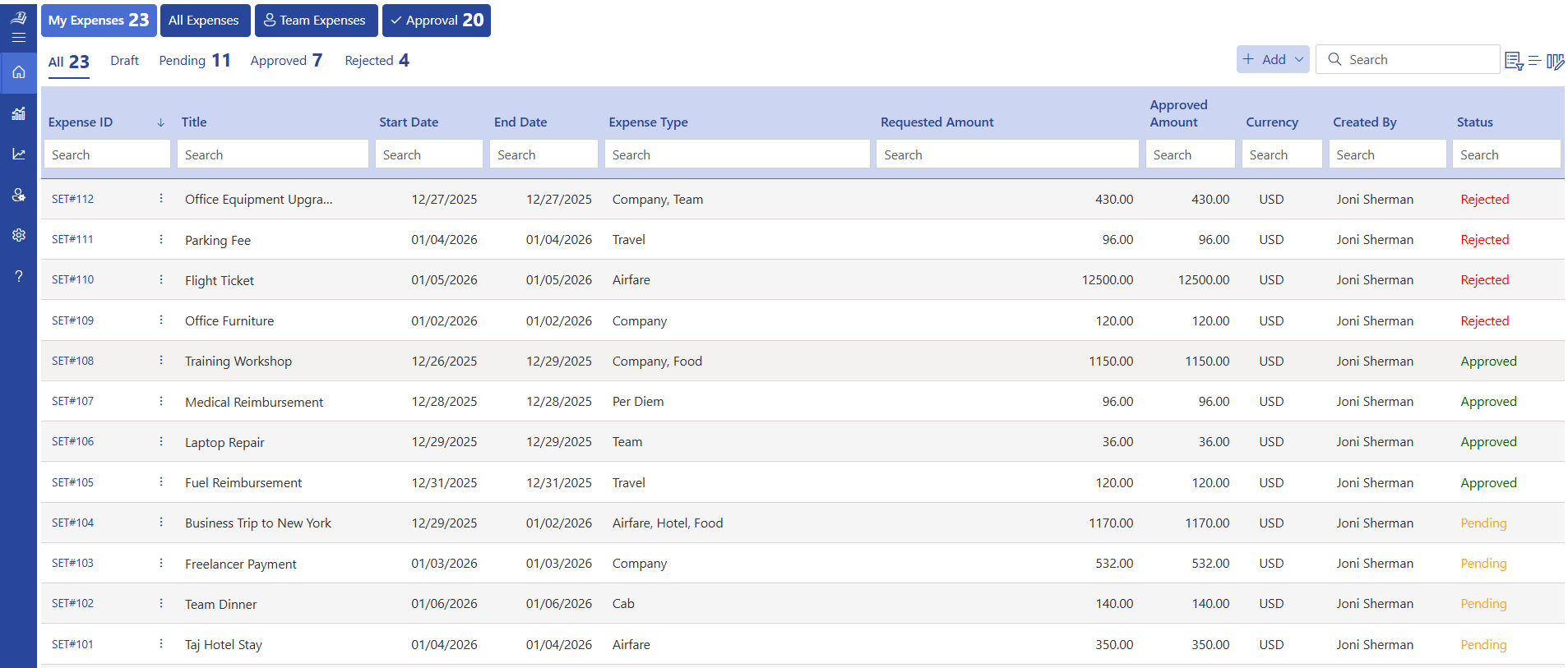
Expense 365 is built for small and growing businesses that want full control over spending without adding complexity. Expense 365 is built within the Microsoft 365 environment, which makes it a strong choice for companies already using tools like SharePoint, Teams, Outlook, Power BI, Power Automate, QuickBooks and Xero. This expense management software for small business focuses on visibility, policy control, and faster approvals. Many users have praised it for its ease of use and expense monitoring features. Teams can track expenses, manage reimbursements, and handle company spending from one place while keeping everything connected with their daily workflow.
Key Features
- Microsoft 365 integration
- Real-time expense tracking
- Multi-level approval workflows
- Receipt capture and storage
- Policy-based expense controls
- Automated reimbursement tracking
- Custom expense categories
- Dashboard and reporting insights
- Mobile-friendly usage
- Role-based access control
- Audit-ready data records
Best Known For
Deep Microsoft ecosystem integration for business users
Ratings
G2: 4.8/5
Microsoft AppSource: 5
2. Expensify
Expensify is a widely used expense management software for small business that makes spend tracking simple and quick for teams of all sizes. It is known for its easy receipt capture and fast expense reporting, which helps employees record expenses without spending too much time. The platform also supports reimbursements and integrates with accounting tools, making it easier for finance teams to manage records. This expense tracking software is ideal for companies that want a simple setup, quick adoption, and a user-friendly experience.
Key Features
- Smart receipt scanning
- Expense report creation
- Auto-categorization
- Mileage tracking
- Corporate card reconciliation
- Approval workflows
- Reimbursement tracking
- Accounting integrations
- Mobile app access
- Multi-currency support
Best Known For
Easy receipt capture and quick expense reporting that works well for daily use
Ratings
G2: 4.5/5
Capterra: 4.5/5
3. Happay
Happay is a popular expense management software for small business and mid-sized companies that want better tracking of employee spending and corporate cards. It combines expense reporting, travel management, and payment solutions into one platform. Businesses can analyse spending across teams, automate approvals, and gain better visibility into where money is going.
Key Features
- Corporate card management
- Travel and expense integration
- GST-compliant expense tracking
- Auto expense categorization
- Mileage tracking
- Budget controls
- Real-time spend alerts
- ERP integrations
- Multi-currency support
- Vendor payments tracking
Best Known For
Corporate card + expense tracking in one platform
Ratings
G2: 4.5/5
Capterra: 4.5/5
4. Rippling
Rippling combines HR, IT, and finance tools into one system, making it useful for companies that want expense tracking connected with employee data. As an expense management software for small business, it helps manage employee expense reimbursement, corporate cards, and spending policies while linking everything to payroll and onboarding systems.
Key Features
- Expense management with payroll sync
- Corporate card issuance
- Employee data integration
- Automated expense approvals
- Spend policy enforcement
- Global payments support
- Receipt matching
- Financial reporting
- Mobile expense tracking
- Multi-entity support
Best Known For
All-in-one platform combining HR, IT, and finance
Ratings
G2: 4.8/5
Capterra: 4.9/5
5. Spendesk
Spendesk is designed for finance teams that want more control over company spending. It offers prepaid cards, invoice management, and expense tracking in one platform. This expense management software for small business helps companies track expenses as they happen and set clear spending limits for teams.
Key Features
- Prepaid company cards
- Invoice management
- Budget allocation per team
- Approval workflows
- Real-time spend tracking
- Receipt capture
- Accounting integrations
- Subscription tracking
- Spend analytics
- Multi-user roles
Best Known For
Spend control with prepaid cards and budgeting tools
Ratings
G2: 4.6/5
Capterra: 4.7/5
6. Payhawk
Payhawk is a modern spend management platform built for businesses that want full visibility and control over company spending across teams and locations. It combines company cards, expense tracking, and accounts payable into one system, helping finance teams manage spending from one place. For companies handling international operations, Payhawk supports multiple currencies and local compliance needs. This expense management software for small business is a good fit for growing teams that want clear tracking, faster expense approval process, and better control over budgets without adding extra tools.
Key Features
- Company cards with limits
- Expense tracking automation
- Accounts payable management
- Multi-currency support
- Real-time reporting
- Approval workflows
- ERP integrations
- Receipt scanning
- Budget tracking
- Tax compliance tools
Best Known For
Strong global spend control with company cards, budget tracking, and support for multiple countries
Ratings
G2: 4.6/5
Capterra: 4.6/5
7. Ramp
Ramp is designed to help businesses understand and reduce unnecessary spending while managing expenses and payments in one place. It offers company cards along with insights that show where money is being spent and where savings are possible. The platform also supports bill payments and expense tracking, giving finance teams a clear view of expenses in dashboard. This expense management software for small business is a great choice for companies that want to track spending and find ways to save more over time.
Key Features
- Corporate cards with cashback
- Spend insights and savings suggestions
- Automated expense categorization
- Bill payment management
- Approval workflows
- Vendor insights
- Real-time alerts
- Accounting integrations
- Budget controls
- Receipt matching
Best Known For
Smart spend insights that help businesses reduce costs and manage money better
Ratings
G2: 4.8/5
Capterra: 4.9/5
8. Zoho Expense
Zoho Expense is a simple and budget-friendly tool that helps businesses track and manage expenses without complexity. It is part of the Zoho ecosystem, which makes it a good choice for companies already using Zoho apps. The platform supports travel expense management and reporting, all in one place. This expense management software for small business is well suited for teams that want an affordable option with useful features and easy setup.
4. Set Obligation Alerts
Key Features
- Receipt auto-scan
- Expense reporting
- Travel expense tracking
- Multi-currency support
- Approval workflows
- Policy rules setup
- Mileage tracking
- GST compliance
- Integration with Zoho apps
- Analytics dashboard
Best Known For
Affordable pricing with useful features and strong integration with Zoho apps
Ratings
G2: 4.5/5
Capterra: 4.6/5
9. Brex
Brex provides corporate cards and expense management tools built mainly for startups and fast-growing companies. It offers flexible credit limits and rewards that match business spending needs. The platform also helps track expenses, manage budgets, and monitor spending in real time. This expense management software for small business is a strong option for companies looking for financial flexibility along with modern corporate card management.
Key Features
- Corporate cards with rewards
- Expense tracking automation
- Spend limits per employee
- Real-time reporting
- Receipt capture
- Accounting integrations
- Travel expense tracking
- Multi-currency support
- Vendor payments
- Budget controls
Best Known For
Startup-friendly corporate cards with rewards and flexible spending options
Ratings
G2: 4.8/5
Capterra: 4.5/5
10. Emburse
Emburse offers a collection of expense management tools that support businesses at different stages. It focuses on automation, visibility, and policy control to help teams manage expenses, invoices, and reimbursements in one place. The expense management software for small business also provides useful expense report management features for finance teams. It is a good choice for companies that want flexible solutions based on their needs.
Key Features
- Expense report automation
- Invoice management
- Policy enforcement
- Travel expense tracking
- Mobile receipt capture
- Approval workflows
- Analytics and reporting
- Integration with ERP systems
- Audit tracking
- Multi-entity support
Best Known For
Flexible expense solutions that support different business needs and team sizes
Ratings
G2: 4.5/5
Capterra: 4.3/5
11. Navan (Formerly TripActions)
If your business spends a lot on travel, Navan makes things much easier by combining booking and expense tracking in one place. Employees can book trips and log expenses without switching tools, while finance teams can accurately track how much is spent on mileage. Instead of separate systems, everything stays connected. For companies exploring an expense management software for small business, Navan works best when travel is a regular part of operations.
Key Features
- Travel booking system
- Expense tracking
- Real-time spend visibility
- Receipt capture
- Policy controls
- Approval workflows
- Rewards for employees
- Multi-currency support
- Reporting dashboard
- Integration with accounting tools
Best Known For
Helping businesses track travel costs clearly while keeping bookings and expenses in one place
Ratings
G2: 4.7/5
Capterra: 4.6/5
12. Sage
Sage is not just an expense tool it is a full accounting system that also covers business spending. Expense management software for small businesses makes it useful for companies that want fewer tools and more control over finances in one place. Expenses, invoices, taxes, and reports all stay connected, which helps business owners understand where money is going.
Key Features
- Expense tracking within accounting
- Invoice management
- Financial reporting
- Budget tracking
- Tax management
- Bank reconciliation
- Multi-user access
- Cloud-based access
- Integration with payroll
- Cash flow insights
Best Known For
A single system where accounting and expense tracking work together for better financial clarity
Ratings
G2: 4.6/5
Capterra: 4.6/5
13. Tipalti
Handling payments across countries can get complex, and that’s where Tipalti stands out. It focuses on managing global payments, supplier invoices, and compliance in one place. Businesses can track expenses while also managing accounts payable and vendor payouts. This makes it useful for companies working with international partners. As an expense management software for small business, Tipalti adds extra value for teams dealing with global transactions.
Key Features
- Global payment automation
- Accounts payable management
- Tax compliance tools
- Supplier onboarding
- Invoice processing
- Multi-currency payments
- Approval workflows
- Fraud detection tools
- ERP integrations
- Reporting dashboard
Best Known For
Supporting global payments, vendor management, and compliance in one connected system
Ratings
G2: 4.5/5
Capterra: 4.6/5
14. Omnicard
Omnicard takes a simple approach to expense management by focusing on prepaid company cards. Businesses can issue cards to employees, set limits, and track spending instantly. This removes guesswork and gives clear control over daily expenses. It works well for teams that prefer a straightforward system. Many businesses consider it as an expense management software for small business when they want direct control over employee spending.
Key Features
- Prepaid corporate cards
- Real-time expense tracking
- Spend limits
- Receipt capture
- Approval workflows
- Budget controls
- Mobile app
- Reporting tools
- Multi-user access
- Vendor payments
Best Known For
Simple and clear control over employee spending through prepaid cards
Ratings
G2: 4.3/5
15. Rydoo
Rydoo is built for speed and ease, especially for teams that rely on mobile devices. Employees can quickly scan receipts, submit expenses, and move on without delays. Finance teams get instant visibility into submitted expenses and can approve them faster. This makes daily expense monitoring much smoother. Businesses searching for an expense management software for small business often choose Rydoo for its fast and mobile-friendly experience.
Key Features
- Mobile-first expense tracking
- Receipt scanning
- Real-time expense submission
- Approval workflows
- Mileage tracking
- Policy setup
- Multi-currency support
- Reporting dashboard
- Integration with accounting tools
- Travel expense tracking
Best Known For
Quick expense submission with a strong mobile experience for employees and teams
Ratings
G2: 4.4/5
Capterra: 4.4/5
Conclusion
Selecting the right expense management software for small business plays an important role in how small businesses manage their money and daily operations. A good solution helps track spending, organize records, and give a clear view of where funds are going. With features like automation, integrations, and real-time insights, businesses can handle expenses faster and make better financial decisions.
Among the available options, Expense 365 is a strong choice for growing teams due to its practical features, flexible setup, and easy adoption. Choosing the right platform not only improves expense tracking but also supports better planning and long-term business growth.
Frequently Asked Questions
What options do small businesses have to set approval workflows based on employee roles?
Most expense management software small business allow companies to define approval levels based on roles, departments, or expense value, so approvals follow a clear structure.
In what ways does expense management software for small business track spending across multiple business locations?
The expense management software for small business uses location tags, departments, or cost centers to categorize expenses, making it easy to track spending across branches.
What is the most effective way to handle employee reimbursements using expense management software for small business?
Employees submit expenses with receipts, and once approved, the expense management software for small business tracks and records reimbursements for easy payout processing.
How does expense management software small business handle multi-currency transactions for global operations?
Many expense management software small business support multi-currency transactions and automatically convert them based on current exchange rates.
How do small businesses set and manage expense policies within the software?
Policies can be configured for spending limits, categories, and approval rules based on business needs.






















