

_mVFFaHUZhS.webp)
The leave management of the employees should not be a puzzle to solve. An intelligent leave management system such as a time off app assists HR departments and managers to plan, approve and track leaves easily without the hassle of using spread sheets and manual labour.
Goodbye misunderstandings and communication. Having everything centralized, your team will be visible, save time and make sure that the working process in departments will be smooth.
Time Off Manager 365 is a powerful time off app that simplifies PTO and leave management for HR teams and employees. Fully integrated with Microsoft 365, it automates leave tracking, approvals, and compliance while providing real-time visibility.
The app boosts productivity by reducing errors, saving HR time, and increasing transparency. With features like mobile access, shared calendars, analytics, and customizable email notifications, it ensures smooth leave management for SMBs and remote teams.
Key Features of a Modern Time Off App
A great time off application is not any other HR tool, but it is your silent friend that will keep everyone on track. The most vital features that businesses ought to seek are listed below.
1. Centralized Dashboard
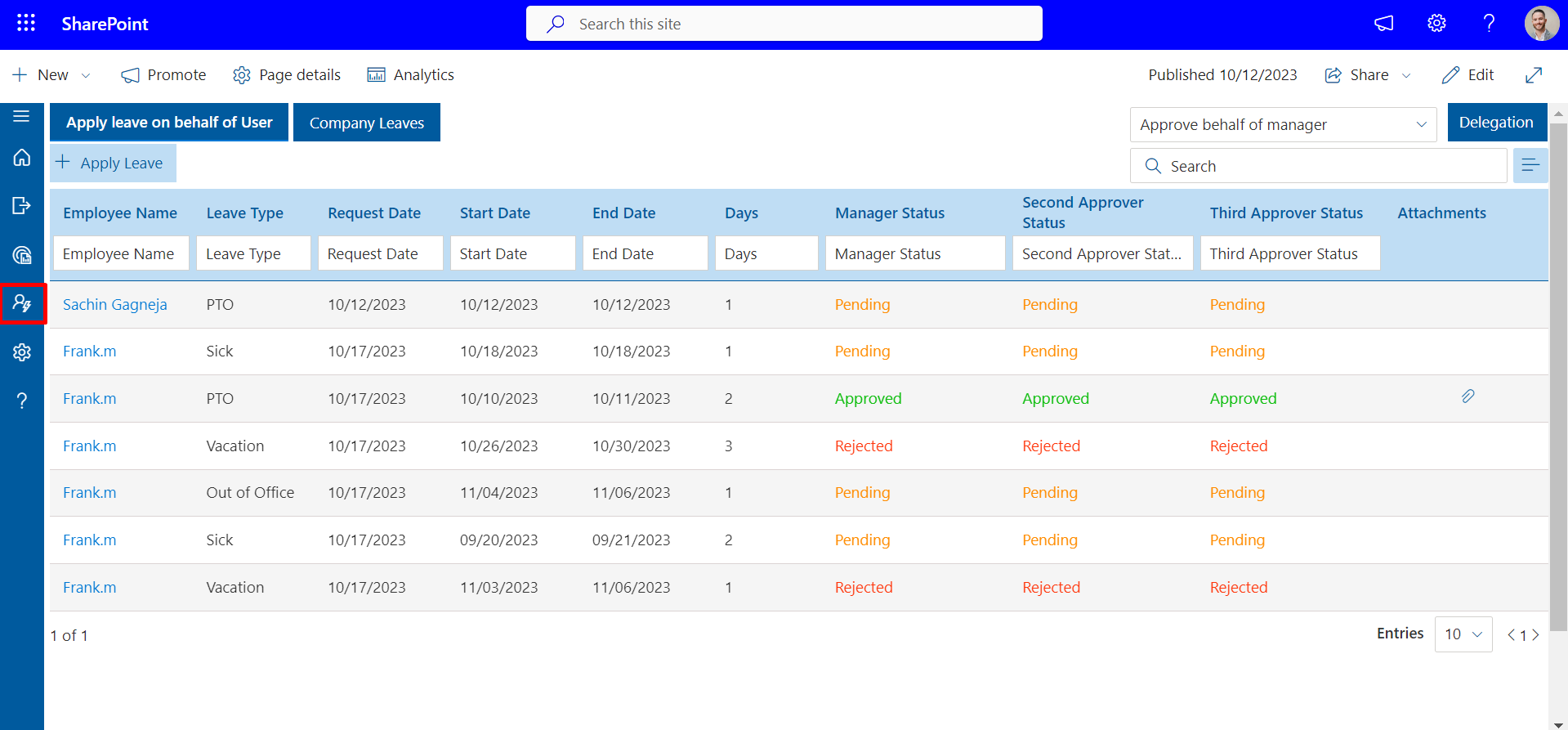
All leave requests, balances and approvals of the employees are presented in a single location. HR professionals can go through, accept or reject within seconds. Before managers sign on a request, they can easily verify the availability of a person.
2. Automated PTO Tracking

A high-tech PTO tracker will automatically calculate your accruals by policy hours worked, seniority or location. No more manual updates. Any granted day off request automatically alters the balance of the employee.
3. Custom Leave Policies
Every company possesses its own leave policies. A good application enables the HR departments to establish types of leave like vacation, sick leave, bereavement, or parental leave. You can establish carry-over limits, half-days and various accrual rates per department.
4. Real-Time Notifications
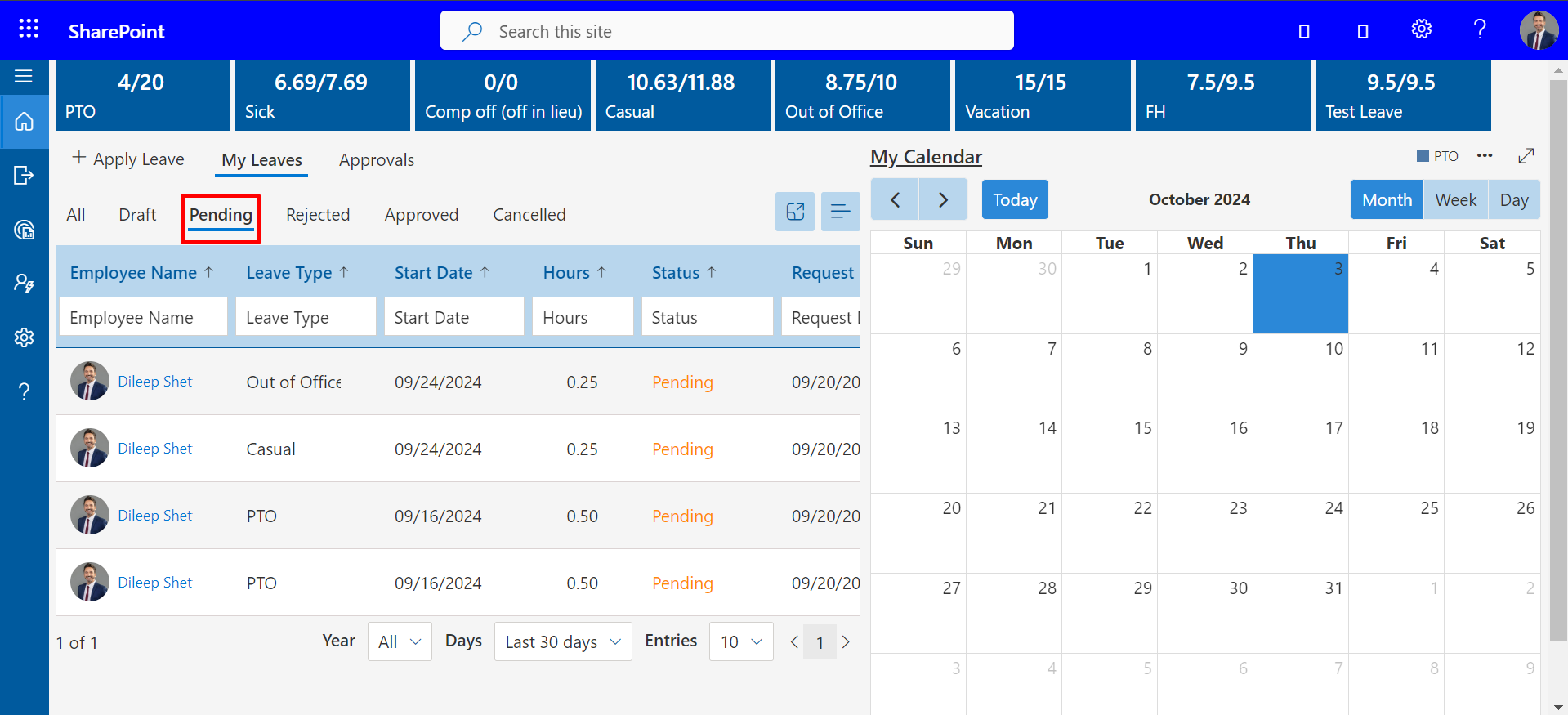
The employees are updated instantly when their requests are approved or modified. Managers receive notifications on outstanding requests. This maintains a fast and open communication that minimizes emails back and forth.
5. Integration of Shared Calendar

A common calendar shows who is off and when. The fact that it can be integrated with Microsoft Outlook, Google Calendar, or Teams eliminates overlapping leaves. When one is absent, other people can make plans.
6. Mobile Access
Remote and hybrid teams require flexibility. An employee leave tracking software allows employees to request leave through their phone, and managers can grant them leave at any time and place.
7. Role-Based Permissions
The access controls enable HR, managers and employees to see what they require. It is also private and yet visible to supervisors and payroll.
8. Analytics and Reports
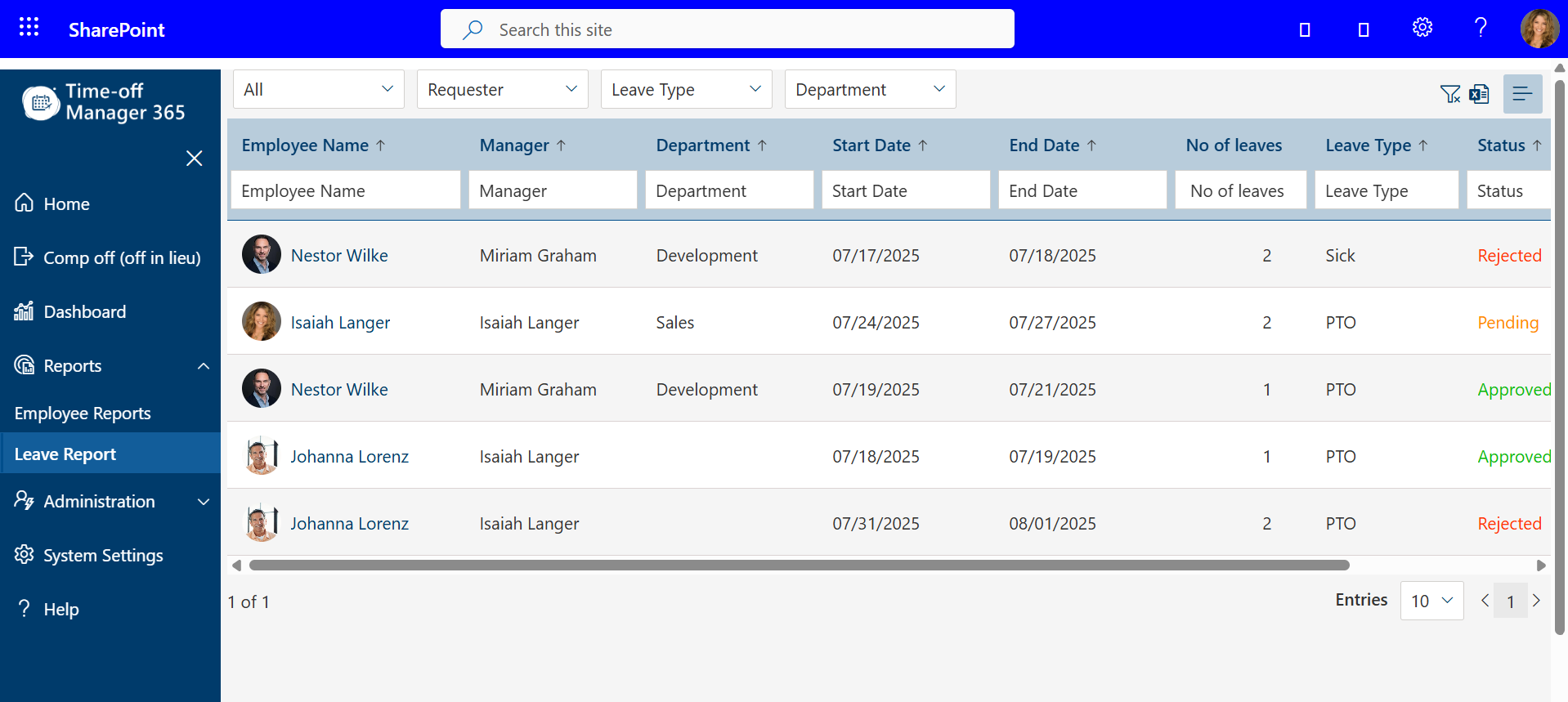
A detailed dashboard will point out trends, such as who leaves most, which departments have the most absenteeism, or impending coverage lapses. This information is used to plan workloads and staffing.
9. Payroll Systems Integration
The approved leaves are automatically updated with payroll, preventing deductions or payout errors. According to SHRM, Research indicates that automated HR integrations can minimize payroll errors by more than 85% 2024.
10. Compliance and Security
The system monitors the local labor laws and company policies to remain in compliance. The records are encrypted to ensure that employee data is secure and at the same time transparent to audit.
Benefits of Using a Time Off App
A contemporary time off application is not only a matter of convenience that has a direct impact on productivity, trust, and retention. This is the way it alters the dynamics in the workplace.
- Saves Time and HR Resources
Spreadsheets that are done manually take up precious HR time. Automation can reduce administration by 70% and liberate teams to work on strategic projects. (Source: HR Cloud Report 2024) - Fewer Errors
Balances are accurate because of automated calculations. HR professionals do not have to work with incompatible data in Excel and payroll. Any single mistake can take hours to fix; automation prevents this. - Improves Transparency
The employees are able to view their leave balances at any time. Managers are aware of who is away and there are no surprises. All people operate on the same information. - Enhances Employee Trust
Fairness matters. In cases where approvals are based on established rules that are displayed in the PTO time tracker, employees are assured of HR decision. Avoidance of ambiguous policies results in increased participation and reduced turnover. - Managers are Better Planned
Managers get insight into the staffing levels weeks in advance. They can manage workloads, make backups and ensure that the quality of service remains intact even in the season of high vacation. - Promotes a Healthy Work Culture
The fairness of time off tracking motivates individuals to take breaks. When employees take their vacation, they are 23% more productive on their return (source: U.S. Travel Association 2023). That is easy with an appropriate time off tracking system. - Allows Remote and Hybrid Work
Online access to leave records keeps everyone in line with teams located at different locations. Remote workers love the fact that they can make self-service requests. - Ensures Compliance
All leave requests are checked against policy and regional laws, which is done automatically. This will avoid unintentional violations that can result in conflicts or fines. - Data-Driven Insights
The trend of leave analysis is used to determine burnout, absenteeism, or pressured departments. HR can intervene in time to keep morale and productivity up. - Increases Staff Morale
When individuals are able to plan holidays without delays and misunderstandings, satisfaction increases. This is why 60 percent of the organizations that have implemented leave automation state that they have achieved higher engagement scores (source: LinkedIn Workplace Survey 2024).
Top 5 Time Off Software Solutions
The following are the five best leave-management sites that are transforming the way companies manage paid time off and scheduling. Each of them assists in streamlining HR processes- but one of them is obviously more prominent.
1. Time Off Manager 365
Best when used by Microsoft 365 users and expanding SMBs.
Overview:
Time Off Manager 365 is an application that is fully integrated with Microsoft 365, which is why it is the best option to use when an HR team already utilizes Outlook, Teams, or SharePoint. Nothing is new–there is no additional logins or learning curve.
Key Features:
- Built-in support of Microsoft 365 and Teams.
- Immediate leave balance monitoring and authorization.
- PTO and accruals are automated.
- Departmental calendar sharing.
- Complex organizations have multi-level approvals.
- Constructed in accordance with the local leave regulations.
- Cloud-based dashboard available everywhere.
Benefits:
- Tools used by employees and managers are familiar.
- No additional training was needed to log in using Microsoft credentials.
- Eliminates duplication through the synchronization of data.
- Proposals are fully transparent, and there is no confusion.
Why We Love It:
Time Off Manager 365 provides the most seamless integration in Microsoft environments. It is not only compatible it is native, which is meant to act as an extension of your day-to-day workflow.
2. BambooHR
Most suitable in One-stop HR Management.
Overview:
BambooHR is a powerful HR solution that integrates PTO tracker, hiring, onboarding, and performance management systems. It enables the HR departments to handle the data of the employees, grant them leave, and receive reports in a single centralized system.
Key Features:
- Request and approvals of PTO within the HR portal.
- Employee self-service dashboards.
- Calendar synchronization
- Built-in reporting
Benefits:
- Ideal in small to mid size businesses that want a full HR package.
- Offers transparency and self-service access and effective communication tools.
- Needs further configuration to integrate with Microsoft 365 as opposed to Time Off Manager 365.
3. Gusto
Better with Payroll-Driven Teams.
Overview:
Gusto is also known to have payroll functions but can also be used as a basic leave tracking program. It is best suited to businesses that desire to handle payroll, PTO, and employee data within a single location.
Key Features:
- Balance calculations of PTO trackers Automatically.
- Payroll deductions that are integrated.
- Basic employee self-service portal.
Benefits:
- Integrates time-off and payroll in one platform.
- Provides a clean and easy to use interface to the employees and HR teams.
- Makes the work of the administration easier, but does not have advanced analytics and the ability to share a calendar with more specialized tools.
4. Zenefits
Most Compliance-Concentrated Organizations.
Overview:
Zenefits provides powerful regulatory compliance solutions, which make sure that PTO policies do not contradict the regional labor laws and the company standards. Being a trusted time off application, it makes complicated HR procedures easier and keeps the accuracy and compliance of various locations.
Key Features:
- Regional policy templates.
- Multi-type leave set up.
- Manager approval workflows
- Compliance alerts
Benefits:
- Best suited to medium-sized companies with complicated labor laws.
- Checks compliance to minimize manual errors.
- Feel overwhelming to smaller teams because it has a lot of features.
5. Calamari
Most effective when using remote teams and international teams.
Overview:
Calamari is a hybrid and global workforce time off platform. It also works with several languages and time zones, which is why it is suitable to distributed teams that require a uniform communication and presence in different areas.
Key Features:
- Mobile app for Android & iOS
- Slack and Google Workspace integration.
- Leave balance transparency
Benefits:
- Good option with remote or hybrid teams that have to work across the world.
- Improves teamwork with integrations in real-time with popular tools.
- Poor integration with Microsoft 365 in relation to Time Off Manager 365.
Why Time Off Manager 365 Is Perfect for Your Business
The optimal HR tools do not only make the processes quicker but also make the work life better. The difference between Time Off Manager 365 and other automation software is that it is both automated and familiar. It is designed as a native product to be used by Microsoft 365 users and does not require you to learn a new system, it merely upgrades what you use daily.
The app makes all the processes of tracking, approving, and complying with PTO easier whether you are a small business that is growing, or you are handling several departments. HR professionals are fond of the fact that it saves them a lot of manual labour, whereas managers enjoy the fact that it makes team scheduling transparent immediately.
Small and Medium Businesses built
Time spent on administration is important to the owners of small and medium business. You just want your HR and payroll to work. Time Off Manager 365 assists in doing so by eliminating the needless complexity.
Why SMBs love it:
- Easy installation: Be up and running in hours–no code writing, no IT support.
- Scalable: The app can be expanded with your needs, regardless of whether you have 10 employees or 1,000.
- Economical: There is no necessity to have several HR systems; this application manages all the leaves.
- Microsoft-compatible: Works perfectly with Outlook and Teams, which you use every day.
- Cloud-based: Anywhere, anytime access- ideal with hybrid teams.
SMBs receive a system that seems to be custom-made to their workflow instead of using generic software. The interface used by Microsoft is familiar, which guarantees zero learning curve, thus adoption by teams is quick and painless.
Top Reasons to Choose Time Off Manager 365
That is why an increasing number of organizations are moving to Time Off Manager 365 to manage employee leaves effectively and openly.
- Smooth Coordination
All the employees, HR, and managers operate on the same dashboard. All people are in touch with each other, which minimizes misunderstandings and removes conflicting schedules.
- Fewer Mistakes
Payroll and leave records are maintained using automated calculations. There are minimal human mistakes and time spent on reconciliation is cut by many hours.
- Full Transparency
Shared calendars ensure that all approved leaves are visible and no one will have to deal with overlapping time off and last-minute surprises.
- Faster Approvals
Workflow automation and real-time notifications will make sure that any leave request receives a prompt and traceable reply.
- Compliance Confidence
HR does not have to be concerned about breaking the laws on leave as the regional regulations are in place. The system identifies problems before they occur automatically.
- Time Savings
Manual tracking is a thing of the past. The saved hours can be used by the HR teams in hiring, engagement, and other strategic objectives.
How Time Off Manager 365 Solves Common HR Challenges
Most HR managers continue to do PTO manually in spreadsheets or old systems. A recent study in SHRM discovered that 47 percent of HR departments are experiencing payroll and scheduling issues because of manual leave management. Time Off Manager 365 automates, makes transparent, and uses data to streamline these challenges, making leave management a breeze.
- Automation eliminates human labor
Manual input in spreadsheets and emails can be a cause of delays and errors. Time Off Manager 365 automates all the processes of the leave tracking software so that the HR teams can concentrate on the strategic activities instead of repetitive tasks.
- Precise PTO tracking
Balances are updated automatically upon approval of every request. This guarantees that the employees and managers can trust the data they are using to manage PTO tracking and avoid confusion and errors that usually occur when using manual tracking.
- Audit trails
All the leave requests, approvals and adjustments are documented in the system. This provides an overall audit trail of compliance and reporting and provides the HR with a strong leave management system that is transparent and accountable.
- Reduced payroll differences
With the combination of leave data and scheduling and payroll systems, the chances of human error are minimized. Proper vacation tracking will make sure that all the time-off balances of the employees are right, avoiding conflicts and disputes.
- Increased employee satisfaction
Employees develop confidence that their requests are managed in a fair, transparent and efficient manner. Having a clear visibility of the schedule and automated approvals, teams become more empowered to plan their time off without delays and uncertainty.
How Time Off Manager 365 Solves Common HR Challenges
Time Off Manager 365 enables HR departments and managers to tailor email notifications to each step of leave management. Since the platform is applied in leave requests, first-, second-, and tertiary-level approvals, employees and approvers are automatically informed.
The main advantages of the email templates option:
- Automated Notifications: Employees get real-time updates on the application, approval, or rejection of leave requests.
- Customizable Templates: Customize the email subject and body using placeholders [Username], [Leavetype], [Startdate], [Enddate], etc.
- Specific Leave Information: Each notification contains the title of the leave, the type of leave, the person requesting it, the approvers, the start/end dates, the number of days, and whether it is recurrent or not.
- Stability Within Teams: Uniformity in messaging helps minimize confusion and makes all approvals go through the same process.
- Easy Management: Time Off Manager 365 dashboard allows admins to edit or add new email templates without any technical knowledge.
This aspect guarantees effective communication, unhindered approvals and proper monitoring of employee leaves within the organization. Automation of all the notifications will allow the HR teams to concentrate on strategic activities rather than manually pursuing requests.
Conclusion
Using Time Off Manager 365, it is easy and clear to manage the leave of employees. It is created to serve users of Microsoft 365 and simplifies the process of tracking PTO, eliminates scheduling issues, and provides a range of pricing options to suit all businesses.
Are you willing to change the way your company handles time off?
Schedule a demo of Time Off Manager 365 now and see how automation can add clarity, accuracy, and efficiency to your HR process.
Join Our Creative Community
Frequently Asked Questions
What is the best time off app for small businesses?
People often ask which is the best time off app to manage employee leave efficiently. The best time off app for small businesses should allow easy PTO requests, automated leave balances, and integration with payroll and calendar systems to simplify HR operations.
How do I improve time off management in my company?
Many users search for ways to improve time off management. A time off management solution, like a leave tracker app or vacation tracking software for small business, helps automate approvals, reduce errors, and provide real-time visibility of employee leave.
Is there a reliable time off cloud solution for remote teams?
Remote teams often need a time off cloud platform. A time off cloud system allows employees to request leave from anywhere, while managers can approve or track vacations in real time, ensuring smooth operations across multiple locations.
What should I look for in a leave tracker app?
People often ask what features a leave tracker app must have. Key features include automatic PTO calculations, shared calendars, mobile access, real-time notifications, and compliance with local labor laws to make time off management simple and error-free.
Why use vacation tracking software for small business?
Business owners often search for vacation tracking software for small business to simplify HR tasks. This software helps automate leave requests, maintain accurate records, and reduce payroll errors, ensuring employees and HR have full transparency over time off.


_JiluXJRGNl.svg)























