

_mVFFaHUZhS.webp)
Work should feel simple. Leisure is not something that causes stress. However, confusion, delays, and frustration in leave tracking remain a common issue in many teams. PTO management software is the solution to this issue because instead of using spreadsheets, emails, and vague rules, the entire organization can use a single automated system and feel confident about it.
Employees want fairness. Managers need visibility. HR requires compliance. Businesses demand speed. All these requirements are unified in automated leave tracking and transform time off into a seamless and trustworthy experience.
✓ Manage employee leave requests directly within SharePoint and Microsoft 365, without switching between multiple tools.
✓ Automate leave approvals, balance tracking, and notifications to reduce manual HR work and delays.
✓ Give employees and managers real-time visibility into leave balances, calendars, and request status.
✓ Time Off Manager 365 improves accuracy, compliance, and team productivity with centralized leave management.
The Reason Why Time Off is Still a Complex Issue at Work
Time off is deeply personal. It is related to health, family, burnout, trust, and balance. Employees feel neglected when their leave requests are not processed in time or when they are not counted. Managers are under pressure when there is uncertainty in the policies. HR is vulnerable when the records are inaccurate.
There are still many organizations that rely on methods that are outdated, including:
Email-based approvals
They are buried in inboxes, lost on busy days, or lost in lengthy reply chains. They leave the employees waiting without knowing whether they are on leave or not.
Excel spreadsheets
Manual updates lead to more chances of error, duplication, and old balances—particularly when the same file is edited by more than one person.
Paper forms
Paper documents slow down all processes, involve manual follow-ups, and are forgotten or lost in audits.
Shared calendars
Calendars indicate who is off but not why, how long, and whether it was authorized, which creates overlap and scheduling issues.
Verbal confirmations
Informal approvals are confusing in the future.
Verbal agreements do not always get put down in writing, leading to conflicts and policy contradictions. Such systems do not work when teams expand. They result in hidden costs, slower decision-making, and demotivation. PTO management software eliminates this friction by automating, making visible, and trusting guesswork.
What Is PTO Management Software?
PTO management software is a computerized technology that automates the process of tracking the leaves of employees. It handles vacation, sick leave, personal days, holidays, and custom types of leaves under a single platform.
Rather than making guesses about balances or seeking approvals, all people can view live data. Orders are made according to company rules. Approvals move faster. Records stay accurate.
In essence, PTO management software assists organizations in:
- Allow the workers to ask to take leave.
- Facilitate fast approval of leave by managers.
- Track leave balances accurately.
- Implement company leave policies.
- Be in line with labor laws.
Automation minimizes human error and creates trust within the work environment.
Importance of Automated Leave Tracking
The workplace has changed. Teams are remote. Schedules are flexible. Expectations are higher. The manual leave tracking is incapable of keeping pace with the work demands of the modern times. Spreadsheets, emails, and informal approvals were not created to support distributed teams or real-time decision-making.
Automated leave tracking will make sure that:
Employees are always aware of their balance.
The balances of leaves are automatically updated, guessing is eliminated, and the employee does not have to call the HR to ask simple questions.
Teams availability is immediately visible to managers.
Instantaneous dashboards indicate who is unavailable, who is available, and where coverage holes might emerge—before they can even become issues.
HR prevents payroll and compliance mistakes.
Automated regulations ensure that company policies are applied uniformly and minimize errors that may cause payroll errors or legal liability.
Leaders organize capacity of the workforce more effectively.
The proper leave data will enable the leadership to predict the workloads, plan projects, and avoid burnout among teams.
Gartner claims that automated HR systems enable companies to cut down on administrative workload, which can then be used to work more on people, performance, and growth—rather than paperwork.
Solution to These Problems by PTO Management Software
Automation eliminates the friction of the leave process. Rules replace guesswork. Data replaces memory. Decision-making is quicker, more impartial, and uniform throughout the organization.
Organizations using PTO management software enjoy:
- Calculations of accruals that are updated automatically and correctly according to policy rules, tenure, and usage.
- Approval processes that are policy-driven and guarantee consistency in decisions and improved response time.
- Real-time leave balances that keep the employees updated and minimize HR inquiries.
- Unified leave records that avoid the scattered information and enhance accountability.
- Ready-to-audit reports that facilitate compliance, accuracy of payroll, and internal audits.
Employees believe that they are supported and confident in the process. Managers are ready to think in advance. HR is secure with the correct records and systems that are in compliance.
Basic Elements of Successful PTO Management Software
The value of solutions is not equal. The most effective tools are based on simplicity, transparency, and control—easing time off among employees and simplifying it among HR teams.
Essential features include:
- Self-service leave requests by employees that make them less reliant on HR to carry out regular activities.
- Decision-making workflows that are automated, fast, and consistent.
- Balance tracking in real-time and without confusion and manual follow-ups.
- Adaptable leave policies that can be customized to company regulations, locations, and positions.
- Team and regional leave planning through company holiday maps that synchronize.
- Team availability dashboards to assist managers to avoid scheduling conflicts.
- Integration of payroll system that guarantees correct computation of salaries.
- Legal compliance and internal audit reporting.
These features, combined, make the experience smooth-sailing—from the time an employee makes a leave request to the day they return to work.
The Importance of the Employee Leave Experience
Employees recall the way systems at their workplace make them feel. The process of a gradual, perplexing, or unjustified leave sends the wrong signal and silently undermines trust.
The powerful PTO management software provides:
- Trust in equitable treatment by adherence to uniform policies.
- Openness of leave policies to make employees aware of their position at all times.
- Quick approvals that are considerate, time- and planning-wise, of employees.
- More confidence in leadership founded on transparency and fidelity.
Gallup says that engaged employees are 21% more productive. Engagement, morale, and long-term performance are directly facilitated by simple, respectful, and reliable leave processes.
HR Benefits: Accuracy, Compliance, and Control
HR teams have a burden and liability. Even minor mistakes in tracking the leaves may result in controversies, salary problems, or expensive fines.
PTO management software assists the HR by giving:
- Robotized policy administration that cuts down on hand interpretation.
- Proper calculation of accruals of leaves according to the set rules.
- Regularity in application of rules within teams, roles, and places.
- Easy-to-follow audit trails that facilitate internal reviews and inspection.
- Adherence to the regional labor regulations and company regulations.
PwC states that automation can help decrease the number of errors in HR compliance by a quarter, providing HR departments with more control, confidence, and time to work on strategic initiatives.
Key Benefits of Adopting an Electronic Timesheet App
Most organizations are not aware that leave management influences the culture of the company. Morale is enhanced when the employees believe in the process. With visibility of leaders, planning is enhanced and decision-making within teams is improved.
Save 10+ Hours Every Week with Time off Manager 365
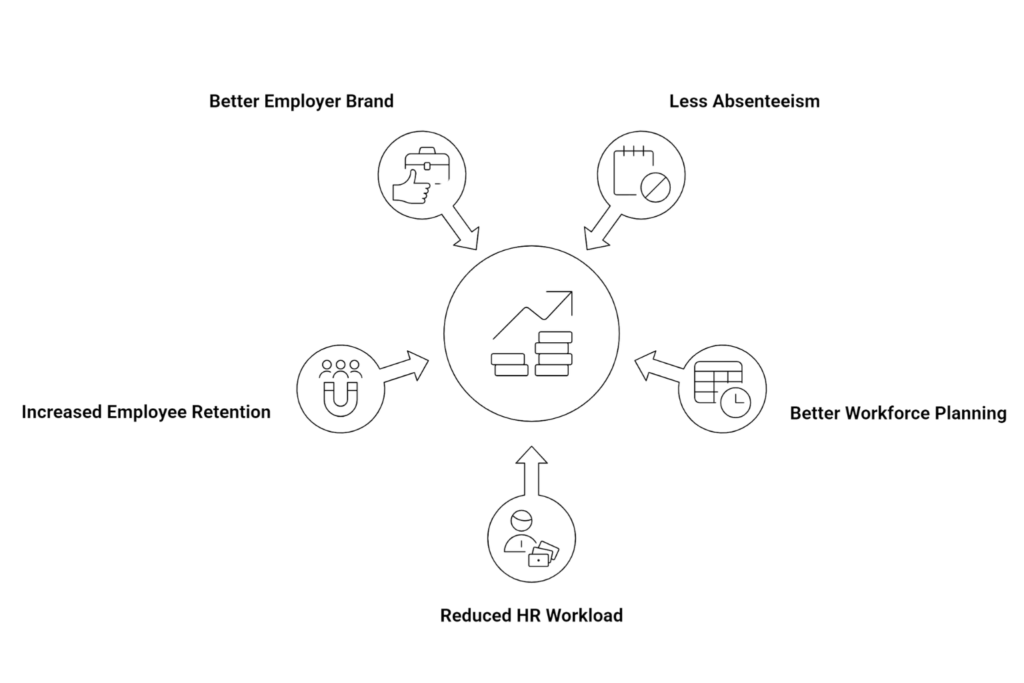
Business-level benefits include:
- Less absenteeism through enhanced planning and accountability.
- Better planning of workforce with real-time and precise leave information.
- Reduced HR workload through the removal of repetitive manual processes.
- Increased employee retention through trust, fairness, and transparency.
- Better employer brand through good employee experiences.
Automated, Clear, and Fair PTO Policies
Inconsistency is a source of confusion. Trust is destroyed when the interpretation of rules is different. With automation, leave policies are always applied equally.
Through PTO management software, an organization can:
- Assign accrual policies by position, place, or job category.
- Establish carryover and expiration limits automatically.
- Implement regional labor policies automatically.
- Support unlimited PTO models with structured tracking.
- Monitor probation and eligibility time correctly.
Inequality is seen, quantifiable, and justifiable—enhancing the level of trust among employees, managers, and HR.
Remote Teams and Hybrid Teams PTO Management Software
Clarity is more important than ever in distributed teams. Visibility and consistency are critical when employees are spread across different locations and time zones.
Automated leave tracking helps in flexible working by:
- Centralizing access to allow employees and managers to stay on track from anywhere.
- Eliminating geographical obstacles that make approvals and tracking difficult.
- Synchronizing calendars between regions to prevent conflicts and coverage gaps.
- Supporting time zone planning for more productive work and scheduling.
The Microsoft Work Trend Index indicates that 73 percent of workers desire flexibility in the workplace. This transition requires technology to facilitate it with systems designed for modern and distributed work.
The Importance of System Integration
Leave management tools cannot work independently. Disconnected systems increase errors and decrease efficiency.
Integration enhances precision and efficiency by linking PTO data between platforms.
Top PTO management software is compatible with:
- Payroll systems to promote correct calculation of salaries.
- HR systems for uniform employee recordings.
- Calendar applications for real-time visibility.
- Collaboration tools to keep teams informed.
Integration removes duplicate data entry, manual work, and error-prone information, building a more reliable and connected HR ecosystem.
Time Off Manager 365 Integrated with Microsoft 365 Teams
Time off manager 365 is designed to be used with Microsoft 365 existing organizations. It integrates perfectly with Microsoft Teams, Outlook, and SharePoint—so leave management is an extension of daily work.
Key benefits include:
- Native use of Microsoft Teams without the additional login or switching of apps.
- Live leave tracking in collective calendars to plan.
- Automated approval processes minimize time wastages and manual follow-ups.
- Adaptable leave policy set-up to suit company regulations and areas.
- Protect Microsoft-based environment to enterprise security standards.
Workers apply leave directly in Teams. Managers do approvals without emails. HR manages all of that in one place and can see and control it.
The Reason Why Familiar Tools Enhance Adoption
Time Off Manager 365: By integrating with Microsoft 365
- Saves time on training since workflows are familiar.
- Growing usage every day by going to the employees wherever they are working.
- Enhances the accuracy of data because of real-time and system-driven changes.
- Maintains the natural workflow without interfering with productivity.
Reporting That Makes Better Decisions
In the absence of data, leaders make assumptions rather than facts. Transparent reporting transforms the leave data into practical knowledge.
Automated leave tracking will give information on:
- Patterns of absence that unravel with time.
- Staffing patterns based on the usage by the departments.
- Behavior of seasonal leave that facilitates improved planning.
- Policy effectiveness that demonstrates what is working and what requires fine-tuning.
Scalable PTO Administration of Expanding Businesses
Techniques that are effective in small groups fail when organizations become larger and more complicated.
PTO management software is scalable by:
- Sustaining various sites and remote working teams.
- Controlling policy differences by role, region, and contract.
- Management of larger teams without the need to work harder manually.
- Ensuring the accuracy of data with the growth of volume and use.
- The systems must grow with the business and not against it in order to make growth manageable.
The Role of Automation in Burnout Reduction
Burnout is more likely to occur when rest is challenging to reach or approvals are questionable.
Automated leave tracking supports healthy leave by:
- Eliminating approval processes that demoralize employees to take breaks.
- Showing balances in an easily understandable manner.
- Promoting scheduled absences over last-minute absences.
The WHO says that burnout diminishes productivity by 20%. Basic systems are easy to maintain and keep to ensure the safety of employees and their performance over time.
Remaining Regulatory and Compliant in Regions and Laws
Various sites have different labor regulations and manual tracking adds to compliance risk.
The PTO management software facilitates compliance by:
- The automatic application of regional labor laws.
- Monitoring the compulsory leave policies.
- Backing up audits and records with straightforward records.
- Automation minimizes legal risk, enhances consistency, and secures the organization.
PTO Management Software: How to Select the Right Solution
All PTO solutions are not suitable for all organizations. The correct decision is the one that is easy to use, easily scalable in the long term, and easily integrated with the tools that your teams are already dependent on.
The important aspects to consider are:
All PTO solutions are not suitable for all organizations. The correct decision is the one that is easy to use, easily scalable in the long term, and easily integrated with the tools that your teams are already dependent on.
- Native interoperability with Microsoft 365: The software must be able to operate directly in Microsoft Teams, Outlook, and SharePoint so that the employees can request leave and the managers can approve that leave without leaving their workspace.
- Employee and manager friendliness: A user-friendly interface saves on training and promotes the use of the interface within teams.
- Easy interface with the current systems: The use of payroll, HR systems, and Microsoft calendar makes sure that the data flow is correct and there are no duplicates.
- Individualized leave policies: The system should accommodate the company-specific regulations, local labor regulations, and emerging business requirements.
- Expandability to larger organizations: As the business grows, it should not become more complex, but be able to manage more users, locations, and policies.
- Transparent and practical reporting: The reports are supposed to give real-time compliance, workforce, and leadership reports.
The appropriate PTO management software, in particular, the one that is integrated with Microsoft, is time-saving, risk-reducing, and trust-building, as it fits in the daily workflow.
The PTO automation payback is reflected in daily work, not only in balance sheets. It enhances the way individuals feel, work, and cooperate.
ROI Which Goes Beyond Cost Reductions
- Quick approvals that do not interfere with the time and planning of employees.
- Less conflict because of proper policies and proper records.
- Less HR workload through manual tasks that have been removed.
- Increased employee involvement based on trust and transparency.
Based on a survey by Forrester, many mid-sized companies realize a quantifiable ROI of HR automation in 12 months, by increasing efficiency and enhancing the employee experience.
The Reason Why Now Is the Time to Upgrade
Automation postponement is costly and complex in the long run. Manual systems cannot withstand growth, pressure, and scale. Teams expand. Expectations rise. Strictness in compliance is increased. Remote work becomes normal. The technology should be developed to facilitate contemporary work—before inefficiencies become threats. Modernization now forms a better basis of growth, clarity, and stability of the workforce in the long term.
Conclusion
Modern organizations require accurate, fair, and scalable leave management systems. PTO management software eliminates the complexity of the manual process, enhances transparency, and introduces a uniform experience that employees, managers, and HR teams can count on daily.
The difference is made evident when automation is put into action. Request a demo to see how Time Off Manager 365 makes PTO management within Microsoft 365 simpler and allows your teams to save time, remain compliant, and manage time off with confidence.
Join Our Creative Community
Frequently Asked Questions
Does it have any PTO management software that is free?
The Time Off Manager 365 has a free 14-day trial, which enables businesses to enjoy complete automation of PTO, approvals and reporting without any initial cost or obligation.
Is Time Off Manager 365 the right PTO management software in a small business?
Yes. Time Off Manager 365 is a product that is targeted at small and growing companies that require easy installation, custom policies, and integration with Microsoft 365 without complicated implementation.
Why is Time Off Manager 365 one of the best PTO tracking software solutions?
Its built-in Microsoft Teams interface, automated leave management, real-time visibility, and compliance-ready reporting features provide it with a dependable and scalable PTO tracking system.
Is it possible to use it as vacation tracking software in small business teams?
Yes. Time Off Manager 365 assists small businesses to manage vacations, holidays, sick leaves and other types of leave accurately in a single centralized system.
Does Time Off Manager 365 have PTO app that can be used daily?
Yes. Time Off Manager 365 is an app in Microsoft Teams that allows employees and managers to request and approve a leave in a PTO, which is easy and quick.


_JiluXJRGNl.svg)























