

IT Helpdesk Solution for Microsoft 365: 10 Things to Consider

An IT helpdesk solution for Microsoft 365 gives IT teams one organized system to capture requests, assign work, track SLAs, automate routine tasks, and support employees through tools they already use.
- Centralizes tickets, ownership, SLAs, communication, and reporting in Microsoft 365.
- Integrates with Teams, SharePoint, Entra ID, and workflows for smoother support.
- Key features include automation, self-service, analytics, security, and scalability.
- AI can speed up classification, responses, recommendations, and issue detection.
- The right solution should fit existing processes and help teams resolve requests faster.
The right platform connects Microsoft Teams, SharePoint, Microsoft 365 identities, workflows, reporting, and knowledge resources so support becomes easier to manage, measure, and improve.
For IT managers and administrators, that matters because support rarely fails from lack of effort. It fails when requests are scattered across emails, Teams messages, spreadsheets, phone calls, and personal follow-ups.
A forgotten password request may seem small. Multiply that by hundreds of employees, software access requests, device problems, onboarding tasks, permission changes, and business-critical incidents, and the problem becomes operational.
The goal is not simply to create tickets. It is to build a reliable support process around Microsoft 365.
What Is an IT Helpdesk Solution for Microsoft 365?
An IT helpdesk solution for Microsoft 365 is a support management system that lets organizations receive, organize, assign, track, resolve, and report employee IT requests while working closely with Microsoft 365 applications such as Teams, SharePoint, Outlook, and Microsoft Entra ID.
Unlike an email inbox, it creates ownership and accountability around every request.
Employees get a clear way to ask for help. Agents see assigned work, priorities, deadlines, history, and related information. Managers gain reporting that shows where support is working and where problems keep returning.
A capable system normally covers incidents such as application failures and device issues, plus service requests such as software installation, account access, permissions, and equipment requests.
The strongest Microsoft 365 helpdesk approach also fits existing employee habits instead of forcing people into another disconnected portal.
Why Do Microsoft 365 Businesses Need an IT Helpdesk Solution?
Microsoft 365 may already be the digital workplace for your organization. Employees communicate in Teams, exchange email through Outlook, store documents in SharePoint, and manage identities through Microsoft Entra ID.
Yet IT requests often remain disconnected from that environment.
An employee messages an administrator in Teams. Another sends an email. A manager calls about an urgent issue. Someone else adds a row to a shared spreadsheet.
The IT team now has four queues without actually having a queue.
That creates a simple but expensive problem: nobody has a complete picture of demand.
Support quality also has a direct effect on employee experience. HappySignals reported that IT services and support represented 47% of open-text feedback about overall IT experience in its 2025 benchmark.
A structured IT helpdesk solution gives the team a single operating model for handling that demand.
Problems You Face Without a Structured IT Helpdesk
Without a structured IT helpdesk, support requests can become difficult to track, prioritize, and resolve. Learn how poor ticket management affects response times, team productivity, and employee satisfaction and what you can do to fix it.
Requests Get Lost
A Teams message can disappear under dozens of conversations. Emails get buried. Verbal requests depend on memory.
When an employee asks, “What happened to my request?” the administrator may need to search several places before answering.
Nobody Knows Who Owns the Issue
Shared inboxes often create the classic assumption: somebody else will handle it.
Two technicians may work on the same problem while another request receives no attention.
Priorities Become Subjective
The person who sends the most messages can receive attention before someone facing a genuine business outage.
Without defined priority rules, urgency becomes whoever shouts loudest.
SLA Performance Is Difficult to Measure
If timestamps, ownership, response time, and resolution time are not consistently recorded, managers cannot reliably calculate SLA compliance.
They discover missed commitments after users complain.
Repetitive Requests Consume Skilled IT Time
Password questions, access requests, software installation guidance, printer problems, and Microsoft 365 how-to questions can consume hours.
Recent HDI research cited by HCLSoftware found that 34% of organizations reported increasing ticket volumes, while 54% said support work had become more complex.
That makes manual coordination increasingly difficult to sustain.
10 Things to Consider When Choosing an IT Helpdesk Solution for Microsoft 365
A useful evaluation should go beyond asking whether software can “create tickets.”
Consider how well the platform fits employee behavior, IT processes, security requirements, reporting needs, and your Microsoft 365 architecture.
1. Microsoft Teams Integration
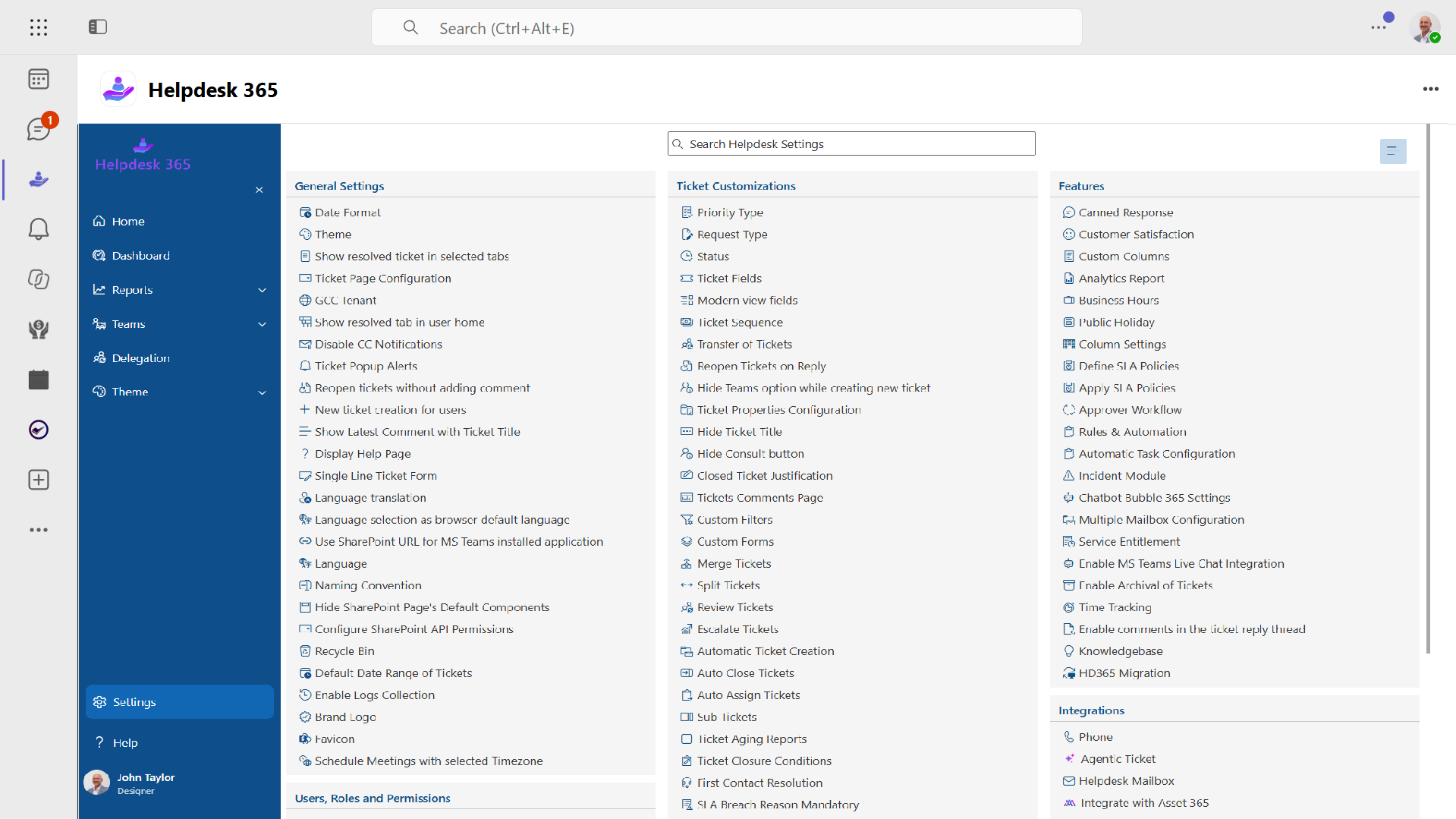
Start where employees already communicate.
A Teams-integrated helpdesk should allow users to submit requests, receive notifications, check status, and interact with support without constantly switching applications.
For IT agents, Teams integration can reduce the gap between conversations and formal support records.
Imagine an employee reporting a VPN failure through chat. Without integration, the technician may solve the issue but never record it. The next technician cannot learn from the incident, and management never sees the trend.
A better process turns the interaction into trackable work.
Ask vendors:
- Can employees create tickets from Teams?
- Can agents receive assignment notifications?
- Can users check ticket status?
- Can support conversations remain linked to requests?
- Does the experience work on desktop and mobile?
Integration should improve adoption, not simply add another Teams tab.
2. SharePoint Integration
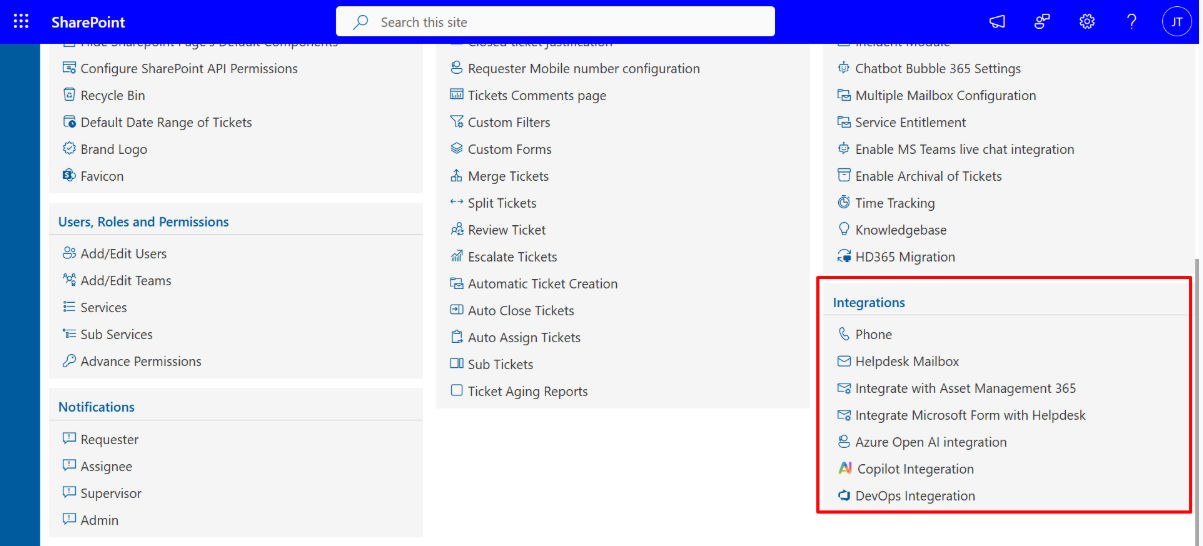
SharePoint is already used by many Microsoft 365 organizations for documents, internal sites, policies, and business information.
An IT helpdesk solution that works with SharePoint can help organizations keep support data close to their existing Microsoft environment.
This can be particularly valuable when your team wants familiar administration, controlled access, searchable knowledge content, or connections with existing SharePoint resources.
Microsoft states that Teams files are stored in SharePoint and that customer files stored there are encrypted using AES 256-bit keys.
Still, do not assume that every product advertised as “Microsoft 365 integrated” uses Microsoft services in the same way.
Ask exactly where ticket records, attachments, configuration data, and knowledge articles are stored.
3. Ticket Management
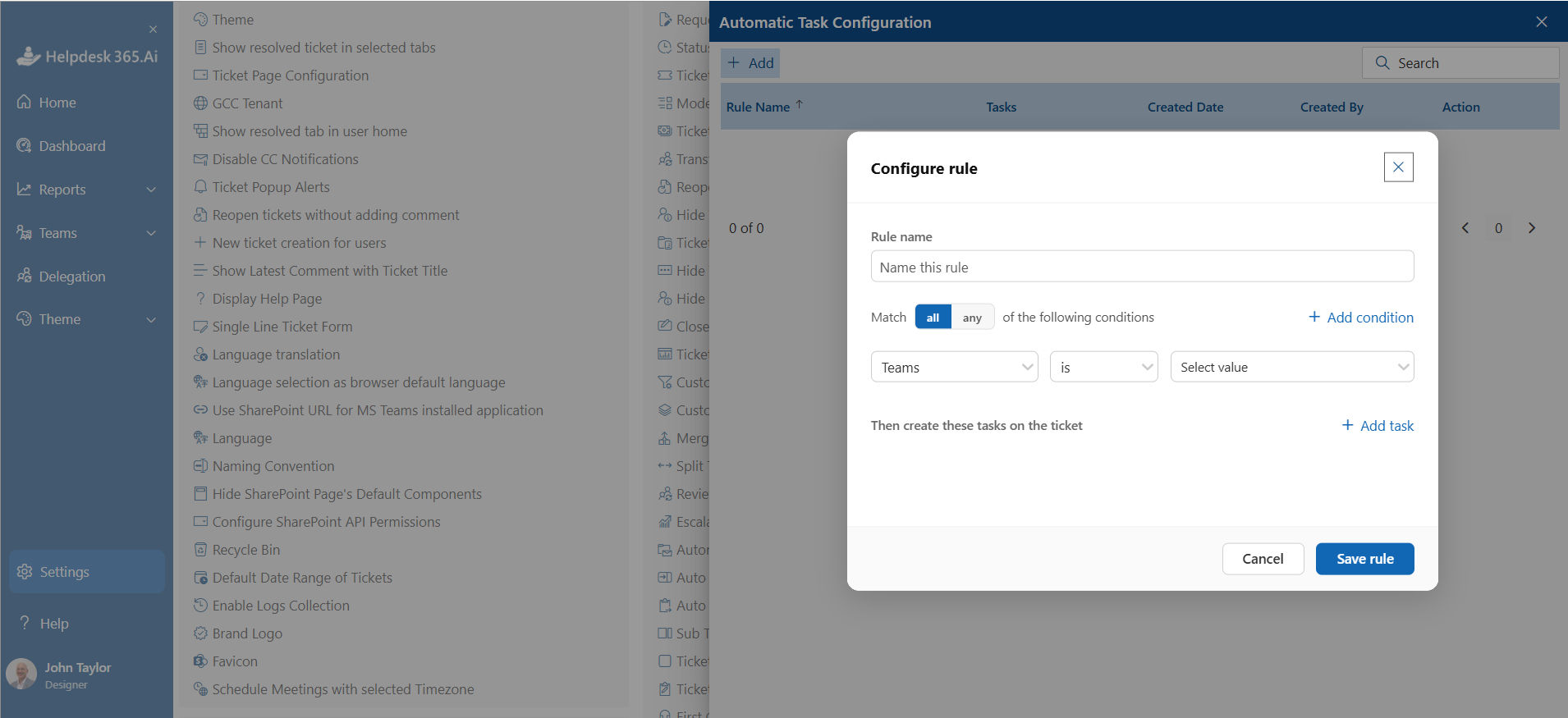
Ticket management is the operational center of the system.
Each request should have enough structure to answer five questions immediately:
- What happened?
- Who reported it?
- Who owns it?
- How urgent is it?
- What happens next?
Look for customizable categories, statuses, priorities, attachments, comments, ownership, ticket history, requester information, and searchable records.
Agents should not need ten clicks to update a basic request.
A practical IT helpdesk solution should also distinguish between incidents and service requests. A broken laptop and a request for Adobe access are both tickets, but they require different workflows, approvals, and measurements.
4. Automated Ticket Assignment
Manual assignment works until volume increases.
Then the helpdesk manager becomes a human traffic controller.
Routing rules should automatically direct requests using criteria such as category, department, location, issue type, agent expertise, or workload.
For example, an account-access request could go to the identity team while a damaged laptop request goes to endpoint support.
Automated ticket assignment examines information such as request type, category, department, location, priority, or technician availability and sends the ticket to the appropriate support queue or agent. Good routing reduces manual triage, shortens waiting time, prevents overlooked requests, and gives IT managers a more consistent way to distribute workload
Automation should handle predictable decisions while still allowing administrators to override assignments when needed.
5. Self-Service Knowledge Base
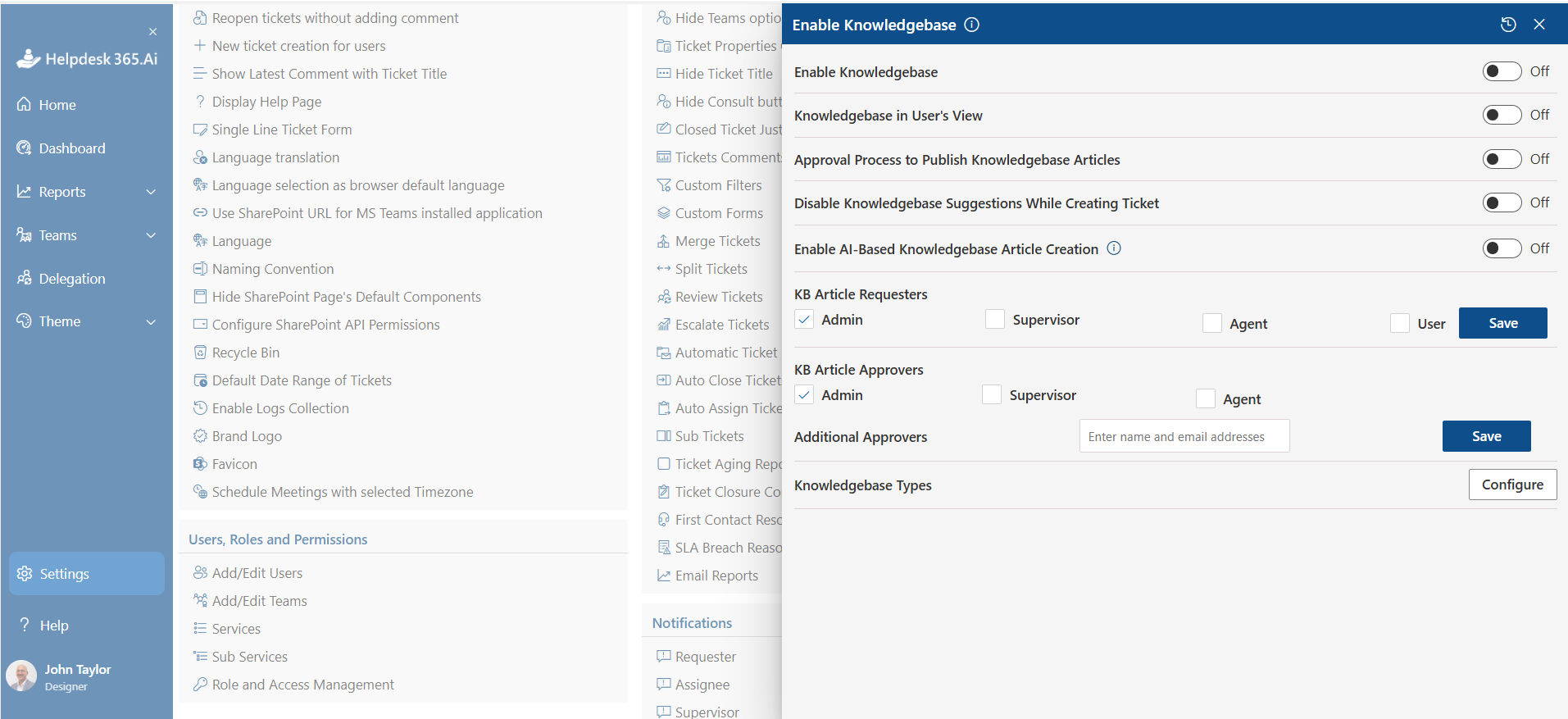
Not every problem needs an IT technician.
Employees should be able to find reliable answers for common questions such as connecting to VPN, setting up MFA, mapping printers, requesting software, or recovering access.
The key word is reliable.
A knowledge base filled with outdated screenshots and five versions of the same instructions creates more confusion than value.
Connect articles to ticket categories and search behavior. Review which articles employees open, which searches return no useful result, and which issues still become tickets.
Those gaps tell you what content to improve next.
Self-service should reduce unnecessary requests without making employees feel that IT is refusing to help.
6. SLA and Priority Management
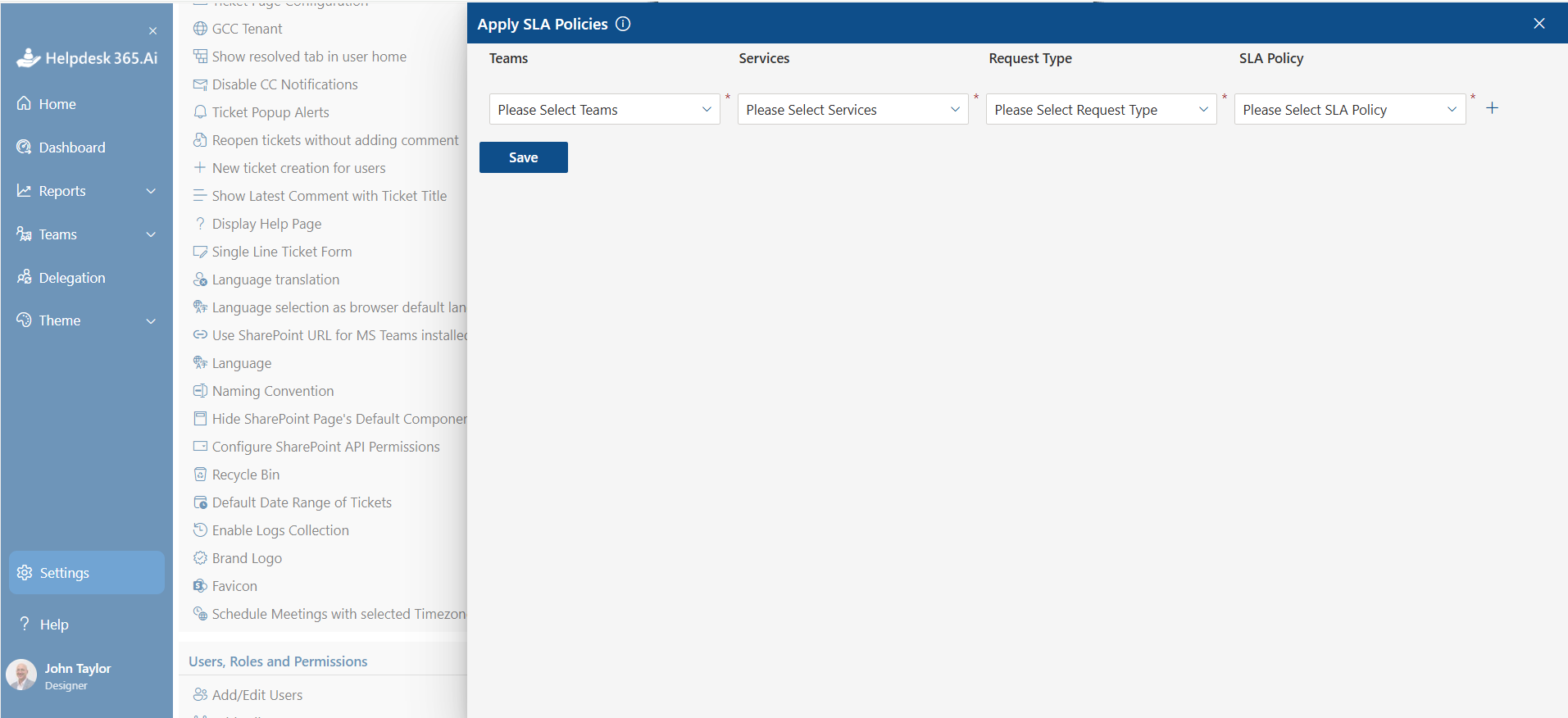
Every ticket is important to the person reporting it, but not every ticket has equal business impact.
Your IT helpdesk solution should support clear priority and SLA rules.
For example:
- P1: company-wide or critical service outage
- P2: major function unavailable for several employees
- P3: individual user unable to complete normal work
- P4: low-impact request or general question
The system should track response and resolution targets and warn agents before deadlines are missed.
Managers should also separate SLA numbers from actual employee experience.
HDI highlights metrics such as mean time to resolution, first-contact resolution, customer satisfaction, and backlog aging as useful measures for understanding service desk performance.
A ticket closed within SLA can still represent a poor experience if the employee received no useful communication for hours.
7. Incident and Request Management
Incidents and service requests should not follow identical paths.
An incident restores something that stopped working. A service request asks IT to provide something standard.
Consider a new employee who needs Microsoft 365 access, a laptop, security groups, and business applications. That is a repeatable service request and should follow an approved workflow.
Now compare it with Microsoft Teams becoming unavailable for an entire department. That is an incident requiring rapid investigation, communication, escalation, and restoration.
Your chosen system should support both without forcing administrators to build complicated workarounds.
This distinction also improves reporting because managers can see whether the team spends its time fixing failures or fulfilling planned requests.
8. Reporting and Analytics
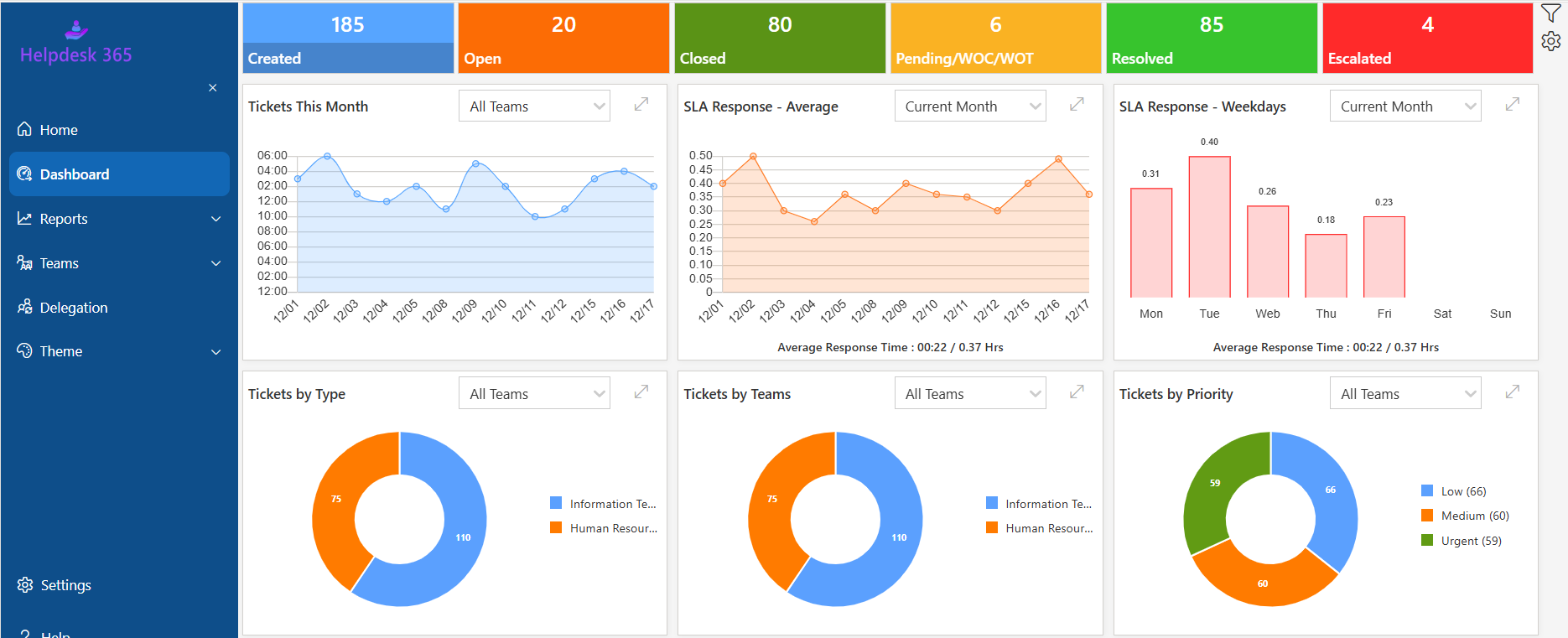
A dashboard full of colorful charts is useless if it cannot answer operational questions.
Managers need to know:
- How many tickets arrive each week?
- Which categories are increasing?
- Where are SLA breaches happening?
- Which issues reopen most often?
- How old is the backlog?
- What is average resolution time?
- Which requests could be automated?
- How satisfied are employees?
Reporting should move the helpdesk from reacting to individual tickets toward finding patterns.
Suppose password-related tickets increase sharply every Monday. That may point to an authentication, training, or policy problem.
Solving the underlying cause creates more value than simply closing those tickets faster.
9. Workflow Automation
Automation should remove repetitive administrative work, not automate every decision because the feature exists.
Good candidates include:
- Ticket acknowledgments
- Category-based assignment
- Approval requests
- SLA reminders
- Escalations
- Status notifications
- Employee onboarding requests
- Access approvals
- Closure surveys
Start automation with one frequent, predictable request. Map every decision, approval, notification, and exception. Automate only the repeatable steps, test the workflow with real users, measure time saved and failure rates, then expand. This approach is safer than attempting to automate the entire service desk before understanding where exceptions occur.
For Microsoft-focused environments, examine how the platform works with Power Automate and related Microsoft services.
10. Security and Microsoft 365 Compatibility
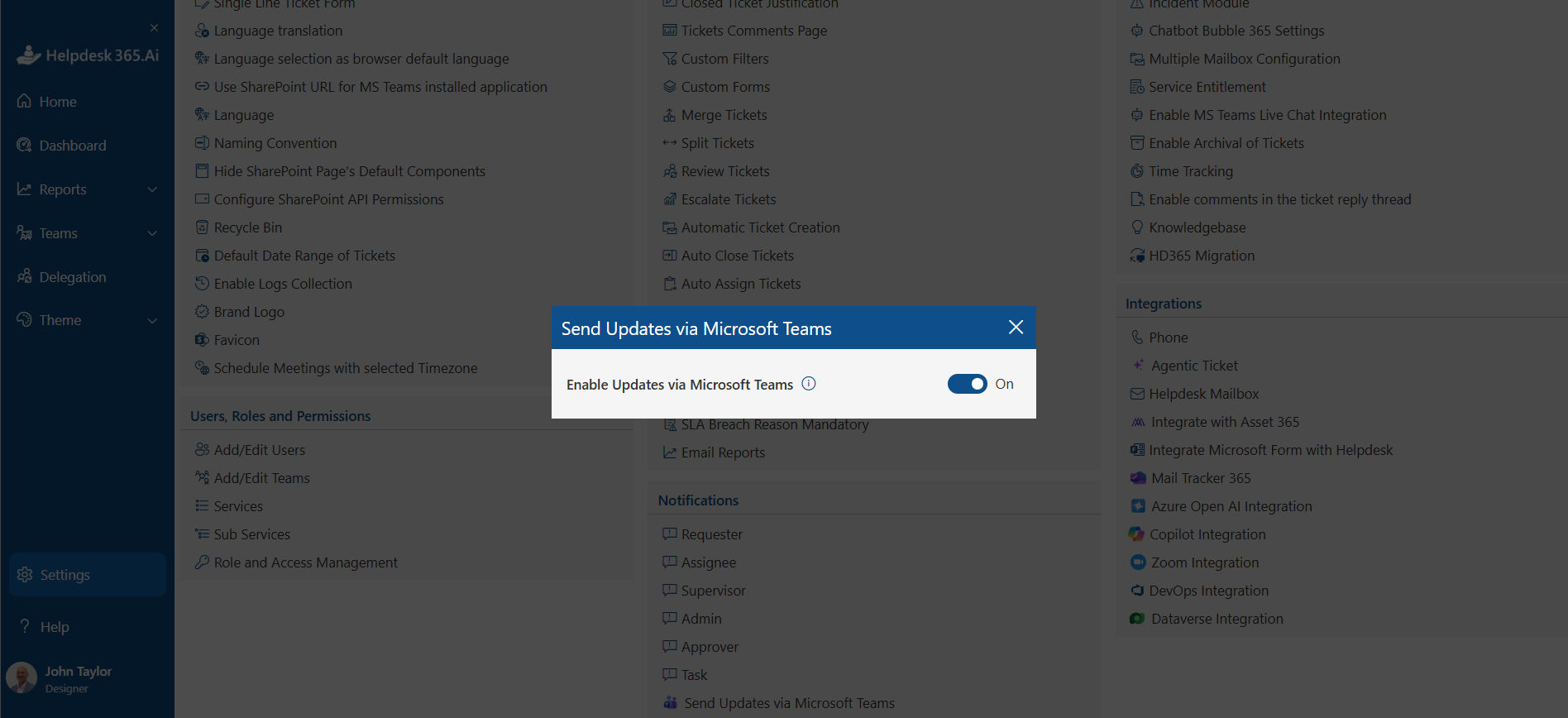
Helpdesk tickets can contain employee names, device details, screenshots, access information, business documents, and descriptions of security incidents.
Security cannot be an afterthought.
Check authentication, permissions, encryption, audit capabilities, data location, administrative roles, retention options, and vendor access.
Microsoft Teams supports capabilities including Microsoft Entra ID single sign-on, encryption in transit and at rest, retention, data loss prevention, eDiscovery, legal hold, and audit search.
However, using Microsoft 365 does not automatically make every third-party helpdesk compliant with your organization’s requirements.
Microsoft also describes cloud compliance as a shared responsibility between the provider and customer.
Ask vendors for precise technical answers rather than accepting a generic “Microsoft compatible” claim.
IT Helpdesk Solution vs. Basic Ticketing Software
| Basic Ticketing Software | IT Helpdesk Solution |
|---|---|
| Mainly records, assigns, updates, and closes support requests. | Manages the broader IT service process around tickets. |
| Best for small teams with simple support needs. | Better suited for growing organizations with more complex support needs. |
| Usually offers basic ticket management. | Includes SLAs, automation, knowledge management, approvals, reporting, self-service, and incident handling. |
| May have limited integrations. | Can integrate with Teams, SharePoint, identities, and Microsoft workflows. |
| Can work well for a 20-person company with simple requests. | More suitable for a 500-person organization with multiple departments, locations, approval paths, and SLA commitments. |
| May become limiting as support needs grow. | Provides stronger process control and room to scale. |
| Best choice when you need simple ticket tracking without extra complexity. | Best choice when you need structured support processes and long-term scalability. |
Benefits of a Microsoft 365-Integrated IT Helpdesk Solution
A Microsoft 365-integrated IT helpdesk connects support with the tools employees already use, such as Microsoft Teams and SharePoint. This makes it easier for employees to raise requests and gives IT teams better control over tickets, communication, and daily support work.
One Place for Support Requests
Employees have a clear place to submit their IT issues instead of sending requests through different emails, chats, or channels. IT teams can manage these requests from one central queue, making it easier to track open, pending, and resolved tickets.
Faster Assignment
Automated rules can assign tickets based on the request type, department, priority, or support team. Routine requests can reach the right person without an IT administrator checking every request manually, helping reduce delays.
Better Employee Communication
Employees can receive automatic confirmations when their requests are submitted, along with updates as the ticket moves through the support process. This gives employees visibility into their requests and reduces the need to repeatedly ask IT for status updates.
Clear Accountability
A structured helpdesk keeps a record of ticket ownership, timestamps, actions, comments, and status changes. IT managers can see who handled a request, how long it took, and whether escalation was required.
Better Decisions
Helpdesk reports can show patterns across support requests. IT leaders can identify recurring technical problems, common employee questions, training needs, overloaded teams, and areas where automation could reduce repetitive work.
More Time for Important Work
When routine ticket routing, notifications, and simple support requests are handled automatically, IT professionals spend less time on repetitive administration. They can focus more on important work such as security, infrastructure, system migrations, and major incidents.
Proven Business Impact
The benefits can extend beyond simple ticket management. Microsoft has reported that Mobile Zone reduced incident-resolution time by 50% using an internal IT service-desk agent in Teams. Microsoft has also cited La Trobe University’s agent as resolving 71% of inquiries, showing how integrated support tools can help teams handle common requests more efficiently.
How to Implement an IT Helpdesk Solution Step by Step
A successful IT helpdesk solution needs clear workflows, ownership, automation, and regular improvement. Follow these steps to build a support process that works for both employees and IT teams.
Step 1: Map Current Support Channels
Identify where employees currently report IT issues, such as email, Microsoft Teams, calls, forms, and spreadsheets. This helps uncover lost or duplicate requests and shows which channels should connect to one central helpdesk.
Step 2: Review Ticket Types
Group common requests into simple categories such as Microsoft 365, hardware, software, password resets, network access, onboarding, and security. Clear categories make it easier to route tickets correctly and analyze support trends.
Step 3: Define Ticket Ownership
Assign each ticket category to the right team or agent and set clear escalation rules. Defined ownership prevents requests from sitting unattended and helps employees get support from the right person faster.
Step 4: Establish Priorities and SLAs
Set priorities based on business impact and urgency. Define response and resolution targets for each level so agents know which issues require immediate attention and when tickets should be escalated.
Step 5: Build a Simple Request Experience
Keep ticket forms short and easy to understand. Ask only for essential information such as issue type, description, affected application or device, and business impact. Simple forms improve adoption and reduce incomplete requests.
Step 6: Configure Automation
Automate repetitive tasks such as ticket confirmations, assignments, approvals, SLA reminders, status updates, and escalations. Start with frequent, predictable tasks and expand automation as your support process becomes more mature.
Step 7: Build a Knowledge Base
Turn common support issues into short self-service articles. Cover topics such as password resets, VPN access, Microsoft Teams, and SharePoint permissions. Keep articles accurate and update them as systems or processes change.
Step 8: Pilot With Real Users
Test the helpdesk with one department before a company-wide rollout. Watch for confusing categories, unnecessary fields, routing problems, and unclear notifications. Use feedback to improve the experience before expanding it.
Step 9: Train Support Agents
Train agents on ticket ownership, priorities, SLAs, escalation, documentation, and closure procedures. Consistent practices help teams resolve requests faster while creating reliable ticket records for future reference.
Step 10: Measure and Improve
Track ticket volume, response time, resolution time, SLA compliance, backlog, recurring issues, and employee satisfaction. Use these insights to identify bottlenecks, improve knowledge content, automate repetitive work, and address recurring problems.
An IT helpdesk implementation does not end at launch. Regularly reviewing support data and employee feedback helps the system stay effective as your Microsoft 365 environment and business needs change.
Best Practices for Microsoft 365 Helpdesk Management
Managing a Microsoft 365 helpdesk effectively requires simple processes, clear ownership, and regular improvements. These best practices can help IT teams provide faster and more consistent support.
Keep the Support Experience Simple
Make it easy for employees to submit and track requests through familiar tools such as Microsoft Teams. Keep forms short, use clear language, and avoid unnecessary steps that may discourage users from following the correct support process.
Use Clear Ticket Categories
Create consistent categories for common issues such as Microsoft 365, hardware, software, access, network, and security. Avoid too many similar categories, as they can confuse employees and make reporting less accurate.
Automate Repetitive Tasks
Automate predictable work such as ticket assignment, notifications, SLA reminders, approvals, and escalations. Keep human involvement for complex, sensitive, or unusual issues that require judgment.
Build Knowledge Around Real Issues
Create knowledge articles based on frequently submitted tickets. If employees repeatedly ask about password resets, Teams access, or SharePoint permissions, provide clear self-service guidance that addresses those specific problems.
Review Unresolved and Reopened Tickets
Check unresolved, overdue, and reopened tickets regularly. These requests can reveal workflow problems, missing knowledge, incorrect assignments, or issues that were closed before being fully resolved.
Track Employee Satisfaction
Measure employee satisfaction alongside response time, resolution time, SLA compliance, and ticket volume. Operational metrics show how the helpdesk performs, while employee feedback shows how support actually feels to users.
Focus on Recurring Problems
Look beyond closing tickets and identify why the same issues keep returning. Resolving 200 similar tickets quickly is useful, but finding and fixing the root cause can prevent those 200 tickets from happening again.
The Role of AI in Modern IT Helpdesk Solutions
AI can help IT teams reduce repetitive work, improve ticket handling, and give employees faster access to support. The real value comes from applying AI to specific helpdesk problems rather than adding it simply as another feature.
Automate Ticket Classification
AI can analyze incoming requests and suggest the right category, priority, or support team. This reduces manual triage and helps important issues reach the right agent faster.
Improve Self-Service Support
AI can understand employee questions and recommend relevant knowledge articles or troubleshooting steps. Employees can solve common issues without waiting for an IT agent, reducing repetitive ticket volume.
Help Agents Respond Faster
AI can summarize long ticket conversations, suggest responses, and surface information from previous incidents. Agents spend less time reviewing ticket history and more time solving the actual problem.
Identify Recurring IT Issues
AI can detect patterns across support requests and highlight similar incidents. If the same Microsoft 365, access, or device issue keeps appearing, IT teams can investigate the root cause instead of repeatedly treating individual tickets.
Use AI Where It Creates Measurable Value
Do not evaluate an IT helpdesk solution simply by asking whether it includes AI. Ask which support problem the AI solves and whether it improves resolution time, self-service, agent productivity, or ticket reduction.
Keep Human Oversight
AI should support IT agents rather than replace judgment where it matters. Security incidents, sensitive employee requests, unusual technical problems, and high-impact decisions should still involve human review.
The best AI helpdesk strategy connects automation to clear workflows and measurable outcomes. When AI handles repetitive work while IT professionals focus on complex issues, organizations can improve support without sacrificing control.
How to Choose the Right IT Helpdesk Solution
Build your shortlist around operational fit rather than the longest feature list.
Score each product on:
- Teams integration
- SharePoint compatibility
- Ticket usability
- Automation
- Knowledge capabilities
- Security
- Administration effort
- Scalability
- Implementation complexity
- Total cost
Then test your three most common support scenarios.
For example, ask vendors to demonstrate a password issue, software-access approval, and urgent service outage from submission through closure.
This reveals far more than a polished dashboard demo.
For organizations already centered on Microsoft 365, HelpDesk 365 can be considered when the goal is to manage support within the familiar Microsoft ecosystem, including Teams and SharePoint-based working patterns.
Evaluate it against the same requirements you would apply to any platform. Product fit matters more than brand familiarity.
Conclusion:
The right IT helpdesk solution should match how your employees work and how your IT team manages support. Focus on Microsoft Teams and SharePoint integration, ticket management, automation, SLAs, self-service, reporting, and security.
For organizations already using Microsoft 365, HelpDesk 365 can bring scattered support requests into one organized system while helping IT teams manage and resolve issues more efficiently.
Join Our Creative Community
Frequently Asked Questions
What is an IT helpdesk solution?
An IT helpdesk solution is software and supporting processes used to capture, organize, assign, resolve, and measure employee technology requests. It provides IT teams with structured ticket management, ownership, priorities, communication history, SLAs, automation, knowledge resources, and reporting.
What should an IT helpdesk solution include?
At minimum, look for ticket management, assignment rules, priorities, SLA tracking, notifications, searchable history, knowledge management, reporting, security controls, and automation. Microsoft 365 organizations should also examine Teams, SharePoint, identity, and workflow compatibility.
Can an IT helpdesk solution integrate with Microsoft Teams?
Yes. Many modern platforms provide Teams integration. The depth varies considerably, however. Check whether employees can actually submit and track requests inside Teams rather than merely receiving notifications there.
Is an IT helpdesk solution different from ticketing software?
Yes. Ticketing software primarily manages ticket records. A full helpdesk system adds broader capabilities such as service workflows, knowledge management, self-service, SLA control, automation, analytics, approvals, and integrations.
How does an IT helpdesk solution improve IT support?
It gives every request an owner, priority, history, status, and measurable timeline. Automation reduces administrative work, while analytics help managers find recurring problems. Employees also receive clearer communication and more predictable support.


_JiluXJRGNl.svg)























