

_eH2jDg7dZ.png)
Every IT manager knows the pressure of a support request sitting unanswered. Employees wait. Work stops. Frustration grows. In today’s fast-moving business environment, how quickly your IT team responds to and resolves issues isn’t just a matter of efficiency, it’s a matter of business survival.
- SLAs define clear response and resolution time commitments, without them, IT teams lack accountability and direction.
- An IT support ticketing system automates SLA tracking, ticket prioritization, and escalation workflows, removing manual guesswork.
- Tracking the right SLA metrics (first response time, resolution time, CSAT, and compliance rate) is essential for continuous improvement.
- The right online ticketing system for IT support prevents SLA breaches through intelligent routing, automated alerts, and real-time dashboards.
Why Response and Resolution Times Matter in IT Support
Think of response time and resolution time as two pillars of great IT service. Response time is how fast your team acknowledges a problem. Resolution time is how fast they fix it. When either of these slips, productivity dips and trust erodes.
Organizations that fail to respond quickly to IT issues face real costs: employee downtime, missed deadlines, customer dissatisfaction, and in some cases, serious financial and reputational damage. Research consistently shows that employees who experience frequent IT disruptions are less productive and less satisfied at work.
The Growing Importance of SLAs in Modern IT Service Management
Service Level Agreements (SLAs) have moved from being a nice-to-have contractual detail to a core pillar of modern IT service management. Organizations today are expected to define exactly how fast they will respond and resolve different types of IT issues, and then prove they are doing so.
With more businesses relying on cloud services, remote work, and digital tools, the tolerance for IT downtime has shrunk dramatically. SLAs give structure to these expectations and provide a way to measure whether your IT support team is genuinely delivering value.
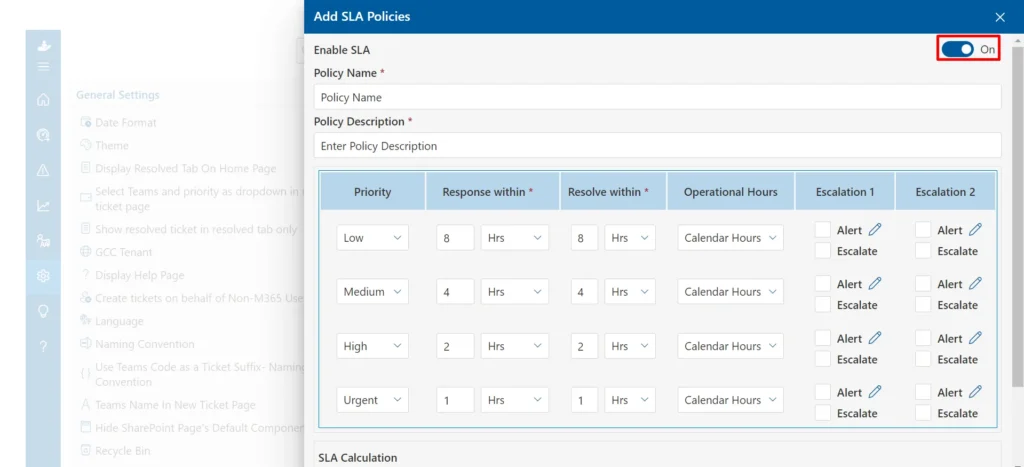
How an IT Support Ticketing System Helps Organizations Meet SLA Commitments
An IT support ticketing system brings order to what can otherwise be a chaotic support environment. Instead of relying on emails, spreadsheets, or informal conversations to track issues, a modern ticketing system centralizes every request, assigns it a priority, attaches an SLA target, and monitors progress in real time.
With the right system in place, your team spends less time figuring out what to work on next and more time actually solving problems. Automated alerts fire before deadlines are missed, escalations happen without manual intervention, and managers get clear visibility into performance at all times.
What Is an SLA (Service Level Agreement)?
If you are new to IT service management, SLAs might sound like a complex legal concept. In reality, they are simply agreements that define what level of service a team commits to delivering.
Definition and Purpose of SLAs
A Service Level Agreement (SLA) is a formal commitment between an IT service provider and the people or teams relying on that service. It specifies measurable targets, such as how quickly a support request will be acknowledged and how long resolution should take.
The purpose of an SLA is straightforward: eliminate ambiguity. Instead of users wondering when their issue will be fixed, they know there is a defined timeframe. Instead of IT teams making judgment calls about urgency, SLAs provide clear guidance.
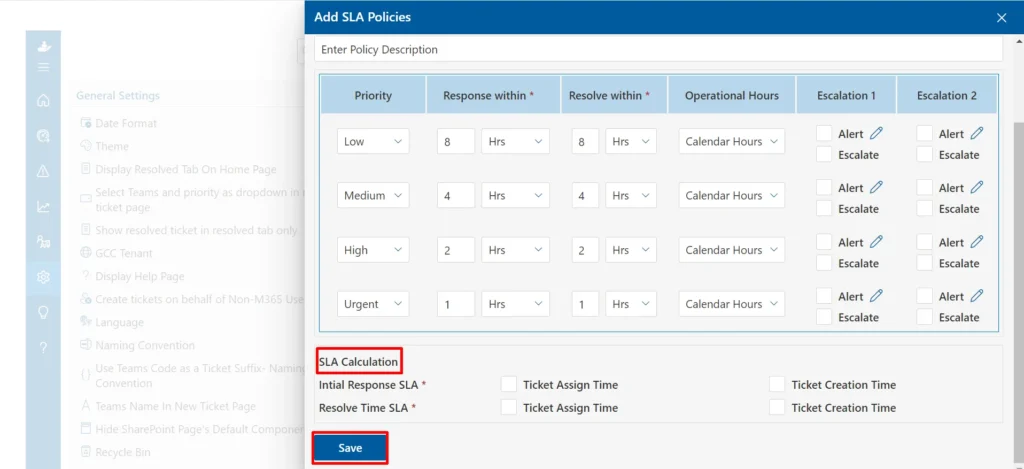
Key Components of an SLA
A well-structured SLA typically includes the following components:
- Scope of service — what types of issues and requests are covered
- Response time targets — how quickly the team will acknowledge a ticket
- Resolution time targets — how long the team has to fully resolve the issue
- Priority levels — how issues are categorized (critical, high, medium, low)
- Escalation paths — what happens when a target is at risk of being missed
- Reporting and review processes — how performance will be tracked and shared
Common SLA Metrics Used in IT Support
The most widely used SLA metrics in IT support include first response time, mean time to resolution (MTTR), SLA compliance rate, escalation rate, and customer satisfaction (CSAT) score. We will look at each of these in detail later in this guide.
Quick Tip
Keep your SLA language simple and specific. If your team and users both cannot easily understand the targets, the SLA will not work as intended.
Why SLAs Are Essential in an IT Support Ticketing System
You might wonder: can we just try our best without formal SLA commitments? Technically, yes. But in practice, teams without SLAs tend to be reactive, inconsistent, and often overwhelmed. Here is why SLAs are a must-have for any IT support operation.
Setting Clear Service Expectations
SLAs tell users exactly what to expect when they submit a ticket. If a critical system goes down, they know your team will respond within one hour. If they have a low-priority software question, they understand it might take 24 to 48 hours. This transparency reduces the volume of follow-up queries and ‘Where is my ticket?’ messages that waste everyone’s time.
Improving Accountability and Transparency
When response and resolution targets are documented, it becomes easy to hold individuals and teams accountable. Managers can see which agents are consistently meeting their SLAs and which are falling behind. Teams can identify patterns in delays and work to address root causes.
Ensuring Consistent Support Experiences
Without SLAs, the quality of IT support can vary wildly depending on who is working that day, how busy the team is, or simply who submitted a ticket first. SLAs create a consistent baseline of service so that every user, regardless of their department or seniority, receives reliable support within a defined timeframe.
Reducing Delays and Unresolved Tickets
One of the silent killers of IT productivity is the backlog of unresolved or forgotten tickets. SLAs with automated escalations ensure that no ticket falls through the cracks. When a ticket is approaching its deadline, the system alerts the assigned agent. If no action is taken, it escalates automatically to a supervisor or a different team.How SLAs Work in a Ticketing System for IT Support
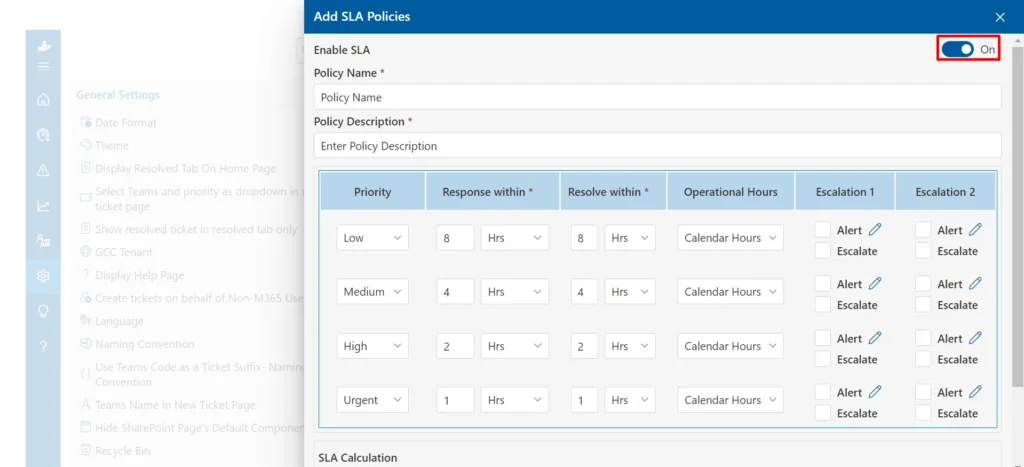
Understanding how SLAs function within a ticketing system helps IT managers set up the process correctly and get the most out of their investment.
Ticket Creation and Categorization
The process begins when a user submits a support request. This can happen through an email, a self-service portal, a chat message, or a phone call. The ticketing system captures all relevant details, the user’s name, the nature of the issue, the timestamp, and the affected system or service.
Once a ticket is created, it is automatically categorized. Common categories include hardware issues, software problems, network access, account-related requests, and general IT service requests. Proper categorization ensures the ticket is routed to the right team or individual.
Assigning SLA Targets Based on Priority
After categorization, the system assigns a priority level. Most IT teams use four levels: critical, high, medium, and low. Each priority level has associated SLA targets. For example:
- Critical (system-wide outage): respond in 15 minutes, resolve within 1 hour
- High (significant business impact): respond in 1 hour, resolve within 4 hours
- Medium (important but not urgent): respond in 4 hours, resolve within 1 business day
- Low (general request or query): respond in 8 hours, resolve within 3 business days
Monitoring Response and Resolution Times
Once a ticket is open and assigned, the SLA clock starts ticking. The ticketing system monitors the time elapsed in real time. Agents can see at a glance how much time they have before their SLA target is breached. Managers get a live view of all open tickets and their SLA status, allowing them to intervene if necessary.
Escalation Workflows for SLA Breaches
When a ticket approaches its SLA deadline without resolution, the system triggers an escalation workflow. This might mean sending an automated email to the agent, notifying their manager, or reassigning the ticket to a more senior technician. Escalation workflows are defined in advance and run automatically, removing the need for manual oversight.Key SLA Metrics Every IT Team Should Track
Measuring the right things is crucial for SLA success. Here are the five metrics that every IT manager should monitor closely.
First Response Time
This is the time between when a user submits a ticket and when an IT agent first acknowledges it. First response time is often the first impression users have of your support team. A fast first response, even if the issue is not immediately resolved, reassures users that their problem is being taken seriously.
Resolution Time
Resolution time measures how long it takes to fully resolve a ticket from the moment it was created. This is the most direct measure of your team’s effectiveness. Tracking average resolution time by ticket type and priority level helps identify where bottlenecks are occurring.
SLA Compliance Rate
This metric tells you what percentage of tickets are resolved within their SLA target. A compliance rate of 90% or above is generally considered good, though your target may vary depending on your organization’s standards. Declining compliance rates are a warning sign that your team is under-resourced or that SLA targets need to be revisited.
Escalation Rate
The escalation rate shows how many tickets are being escalated before they are resolved. A high escalation rate may indicate inadequate first-line support, unclear escalation policies, or unrealistic SLA targets. It is a useful metric for identifying training needs and process gaps.
Customer Satisfaction (CSAT)
Meeting an SLA target does not automatically mean users are happy. Customer satisfaction scores, typically gathered through post-ticket surveys, give you qualitative feedback on the user experience. High CSAT scores alongside high SLA compliance rates indicate your IT support is genuinely delivering value.
Benefits of Using an Online Ticketing System for IT Support to Manage SLAs
Moving to an online ticketing system for IT support transforms how your team manages SLAs — from a manual, error-prone process to an automated, data-driven one.
Automated SLA Tracking
Instead of manually checking ticket ages and deadlines, the system does it for you. Every ticket has a visible SLA countdown, and automated alerts fire when action is needed. This removes human error from the equation and ensures nothing is missed.
Real-Time Visibility into Ticket Status
Managers and team leads can see the status of every open ticket at any moment. They can identify at-risk tickets, reassign workloads, and make informed decisions without waiting for end-of-day reports. This real-time visibility is simply not possible with email-based or spreadsheet-based tracking.
Improved Team Productivity
When agents know exactly what their priorities are and have the system guiding their workflow, they spend less time deciding what to work on and more time actually resolving issues. Automated workflows reduce repetitive administrative tasks, freeing up capacity for more complex work.
Faster Issue Resolution
Ticketing systems with built-in knowledge bases allow agents to find solutions quickly, without starting from scratch each time. Integration with remote support tools means agents can take action directly from the ticketing interface, reducing back-and-forth communication and speeding up resolution.
Better Reporting and Performance Analysis
Online ticketing systems generate detailed reports on response times, resolution rates, SLA compliance, and team performance. These reports help IT managers make evidence-based decisions about staffing, process improvements, and SLA target adjustments.
Ready to strengthen your SLA management? The right IT support ticketing system makes all the difference.
SLA Prioritization: Managing Different Ticket Types Effectively
Not all tickets are created equal. Effective SLA management requires treating different ticket types differently, with appropriate response targets for each.
Critical Incidents
Critical incidents are situations where a core business system or service is completely unavailable. Examples include a company-wide network outage, a server crash, or a security breach. These require the fastest SLA response times — often within 15 to 30 minutes — and immediate escalation if not resolved quickly. Every minute counts, and the entire support team may need to be mobilized.
High-Priority Service Requests
High-priority tickets involve significant business impact but do not necessarily mean a full system is down. For example, a key executive unable to access a business-critical application, or a department’s shared drive becoming inaccessible. These should be responded to within an hour and resolved within a few hours.
Standard Support Tickets
The majority of IT support tickets fall into the standard category. These include software installation requests, password resets, printer issues, and email configuration problems. While they may not be urgent, they still need to be handled within a defined timeframe to avoid a growing backlog. Typical SLA targets here range from a few hours to one business day.
Low-Priority Requests
Low-priority tickets cover general questions, minor enhancement requests, or issues that users can work around easily. These have longer SLA windows — often two to three business days — but they still need to be tracked and resolved to prevent them from aging indefinitely.
Pro Tip
Review your ticket distribution regularly. If more than 30% of your tickets are classified as high or critical, your priority definitions may need recalibrating. Most organizations should see the bulk of tickets in the standard or low category.
How an IT Support Ticket System Helps Prevent SLA Breaches
Preventing SLA breaches is far better than reacting to them. A well-configured ticketing system gives your team the tools to stay ahead of deadlines rather than always playing catch-up.
Automated Alerts and Reminders
The system sends automated notifications at key points in a ticket’s lifecycle, for example, when 50% of the SLA time has elapsed, when 80% has elapsed, and again when the deadline is imminent. These proactive alerts give agents time to act before a breach occurs, rather than discovering after the fact that a deadline was missed.
Automated Alerts and Reminders
The system sends automated notifications at key points in a ticket’s lifecycle, for example, when 50% of the SLA time has elapsed, when 80% has elapsed, and again when the deadline is imminent. These proactive alerts give agents time to act before a breach occurs, rather than discovering after the fact that a deadline was missed.
Intelligent Ticket Routing
Modern ticketing systems use rules-based or AI-assisted routing to assign tickets to the right agent automatically. By matching ticket type, category, and priority to the agent with the relevant skills and availability, the system ensures that tickets reach someone capable of resolving them as quickly as possible.
Escalation Management
Escalation workflows are pre-configured to trigger automatically when SLA deadlines are at risk. Rather than a manager needing to monitor every ticket, the system handles escalation automatically, notifying the right people, reassigning the ticket if necessary, and logging the escalation for reporting purposes.
Workload Balancing Across Support Teams
A good ticketing system gives managers visibility into each agent’s current workload. If one agent has a queue of 15 tickets while another has only 3, the manager can redistribute work to prevent any single agent from becoming a bottleneck. Some advanced systems do this balancing automatically.
Common SLA Challenges in IT Support and How to Overcome Them
Even with the best intentions, SLA management can run into difficulties. Here are the most common challenges and how to address them.
Unrealistic SLA Targets
One of the biggest mistakes organizations make is setting SLA targets based on aspirations rather than actual capacity. If your team regularly misses SLA targets, the targets may simply be too aggressive for your current team size and volume. The fix is to baseline your current performance, set realistic targets that stretch but do not break your team, and improve incrementally over time.
Ticket Backlogs
A growing backlog of unresolved tickets is a sign that incoming ticket volume exceeds your team’s capacity. Address backlogs by triaging aggressively to close or deprioritize low-value tickets, temporarily reassigning resources, and using automation and self-service tools to deflect common requests before they even become tickets.
Resource Limitations
IT teams are often understaffed relative to the demands placed on them. While hiring is one solution, there are others. Self-service knowledge bases can reduce ticket volume significantly. Automation can handle routine tasks. And structured shift patterns can ensure coverage during peak demand periods.
Poor Ticket Prioritization
When everything is marked urgent, nothing truly is. Inconsistent or overly generous prioritization leads to SLA targets that are impossible to meet and a frustrated IT team. Implement clear, objective criteria for each priority level and train your team, and your users, to apply them consistently.
Best Practices for SLA Management in a Ticketing System IT Support Environment
Getting SLA management right takes more than just installing software. Here are the practices that separate high-performing IT support teams from average ones.
Define Achievable SLA Goals
Start with targets your team can actually meet. It is better to consistently achieve a 4-hour response target than to miss a 1-hour target every week. Build credibility first, then tighten targets over time as capacity and processes improve.
Align SLAs with Business Needs
Your SLA targets should reflect what actually matters to the business. A payroll system outage on payday deserves a faster SLA than a request for a new screensaver. Work with business leaders to understand which systems and services are truly critical, and design your SLA tiers accordingly.
Review and Optimize SLA Policies Regularly
Business needs change, team sizes change, and technology changes. Review your SLA policies at least quarterly. Look at compliance rates, escalation patterns, and user satisfaction scores to identify where adjustments are needed.
Use Automation Wherever Possible
Automation is your SLA management superpower. Automate ticket categorization, priority assignment, routing, escalation triggers, and status notifications. The less time your agents spend on administrative tasks, the more time they have for actual problem solving.
Monitor Performance Continuously
Do not wait for a quarterly review to discover that SLA compliance has dropped from 92% to 71%. Set up real-time dashboards that give managers instant visibility. Configure automated reports to be delivered daily or weekly so trends are spotted early.Essential Features for SLA Management in an IT Support Ticketing System
If you are evaluating or upgrading your IT support ticketing system, here are the features you absolutely need for effective SLA management.
Custom SLA Rules
No two organizations are the same. Your ticketing system should allow you to create custom SLA rules based on ticket category, priority, department, time of day, or any other relevant criteria. Rigid, one-size-fits-all SLA settings are often inadequate for complex IT environments.
Automated Escalations
As discussed throughout this guide, automated escalations are essential. Look for a system that allows you to define multi-tier escalation paths, from agent to team lead to IT manager, with different triggers at each stage.
SLA Dashboards
A good SLA dashboard gives managers a real-time view of ticket status, SLA compliance rates, and at-risk tickets. It should be visual, intuitive, and accessible from any device. Dashboards replace the need for manual reporting and enable faster decision-making.
Performance Analytics
Beyond real-time dashboards, the system should generate historical performance analytics. How has SLA compliance trended over the past six months? Which ticket categories have the lowest compliance rates? Which agents are consistently performing well and which need support? These insights drive continuous improvement.
Multi-Channel Ticket Management
Users should be able to submit tickets through the channel that is most convenient for them — email, web portal, chat, phone, or even mobile app. The ticketing system should capture all of these inputs and manage them within a single, unified interface. Multi-channel capability reduces friction for users and ensures no request is missed.
Measuring the Success of Your SLA Strategy
Implementing SLAs is just the beginning. The real value comes from continuously measuring, learning, and improving. Here is how to build a culture of SLA success.
Tracking SLA Compliance Trends
Do not just look at whether you met SLAs today, look at how compliance is trending over weeks and months. A team that is at 85% compliance but improving week over week is in a far better position than one sitting at 90% but declining. Trends reveal the direction of travel, and that is what matters most for long-term improvement.
Evaluating Team Performance
Use ticketing system data to evaluate team performance fairly and objectively. Look at average resolution times, first-contact resolution rates, and SLA compliance per agent. Use this data for coaching conversations and to recognize high performers. Avoid using these metrics punitively, the goal is improvement, not blame.
Identifying Bottlenecks
Performance analytics will often reveal hidden bottlenecks in your support process. Perhaps tickets in a particular category consistently breach their SLA targets, pointing to a skill gap in your team. Or perhaps tickets submitted late in the day consistently miss targets, suggesting a coverage issue. Data makes these patterns visible so you can address them directly.
Improving Service Delivery Over Time
Use your SLA data as an engine for continuous improvement. Run regular retrospectives with your IT team to discuss what is working and what is not. Invite input from users through satisfaction surveys. Feed these insights back into your SLA policies, team training, and system configuration. SLA management should never be static.
The Future of SLA Management in Online Ticketing Systems for IT Support
The IT support landscape is evolving rapidly. The ticketing systems of tomorrow are already starting to emerge today, and they are smarter, more predictive, and more proactive than anything that came before.
AI-Driven SLA Predictions
Artificial intelligence is beginning to transform how SLAs are managed. Rather than simply tracking whether SLA targets are being met, AI-powered systems can predict which tickets are likely to breach their SLA before it happens. They analyze historical patterns, ticket volume, agent availability, issue complexity, and surface early warnings that allow managers to intervene proactively.
Smart Ticket Prioritization
AI can also assist with ticket prioritization, going beyond simple keyword matching to understand the true business impact of an issue. By analyzing context, which user submitted the ticket, what systems are involved, what the current state of the business is, smart prioritization ensures that the most impactful issues always get attention first.
Predictive Support Workflows
Some advanced systems are beginning to predict issues before they become tickets. By monitoring system health data, user behavior patterns, and historical incident data, predictive tools can alert IT teams to potential problems before users even notice them. This shifts IT support from reactive to proactive, fundamentally changing the value it delivers to the business.
Advanced Reporting and Analytics
The next generation of IT ticketing platforms will offer increasingly sophisticated analytics — connecting SLA performance data with business outcomes, workforce planning insights, and budget data. IT managers will be able to demonstrate the ROI of their support operations with much greater precision, making the case for investment in technology and resources far easier.
Looking Ahead
Organizations that invest in modern, AI-capable IT support ticketing systems today will be well positioned to deliver the faster, smarter, and more proactive support that the workforce of tomorrow will expect.
Conclusion
SLAs are not bureaucratic paperwork. They are the backbone of a trustworthy, high-performing IT support operation. When defined clearly, tracked consistently, and used as a driver of continuous improvement, SLAs transform IT support from a reactive firefighting function into a strategic business asset.
Join Our Creative Community
Frequently Asked Questions
Why SLAs Are Critical for Efficient IT Support
Without SLAs, IT support lacks structure, accountability, and direction. Users do not know what to expect. Teams do not know what to prioritize. And managers do not have the data they need to make informed decisions. SLAs bring clarity to all three of these dimensions, creating a foundation on which great IT support can be built.
The Role of Automation in Meeting SLA Targets
Manual SLA management does not scale. As ticket volumes grow, as teams become more distributed, and as user expectations rise, automation becomes essential. Automated tracking, alerts, escalations, and routing ensure that SLA commitments are honored consistently — without depending on individual agents to remember every deadline.
How the Right IT Support Ticket System Improves Service Quality and Operational Efficiency
The right online ticketing system for IT support is more than just a tool for logging requests. It is a platform for delivering consistent, accountable, and measurable service. It gives users confidence that their issues will be handled promptly. It gives IT agents clarity about their priorities and workloads. And it gives managers the real-time visibility and historical data they need to lead their teams effectively.
Whether you are setting up your first IT support ticketing system or upgrading an existing one, prioritizing SLA management capabilities is one of the most important decisions you can make. The returns — in productivity, user satisfaction, and operational efficiency — are well worth the investment.


_JiluXJRGNl.svg)























