

10 Key Benefits of Using Ticketing Software for IT Support Teams
_eH2jDg7dZ.png)
Is your IT team still managing support requests through spreadsheets, email chains, or shared inboxes? If so, you’re not alone, but you’re leaving measurable efficiency gains on the table. Modern IT ticketing software transforms how support teams operate, turning reactive chaos into a structured, data-driven operation that delights users and empowers technicians alike.
Ticketing software simplifies IT support by centralizing issue tracking and management, ensuring efficient task prioritization and faster resolutions. It automates workflows, improving response times and enhancing customer satisfaction.
With built-in analytics, it helps identify recurring problems and monitor team performance. Integration with other tools creates a seamless support system, allowing IT teams to work more efficiently and deliver better service.
IT support teams are under constant pressure, rising ticket volumes, tighter SLAs, distributed workforces, and ever-growing security demands. The solution isn’t hiring more staff; it’s working smarter. That begins with the right IT ticketing system. In this comprehensive guide, we explore the ten most impactful benefits of IT ticketing software and why your organization can’t afford to operate without one.
Benefits of Using Ticketing Software for IT Support
Ticketing software for IT support helps teams manage, track, and resolve support requests in a structured and efficient way. It brings visibility, accountability, and faster response times, improving overall service quality for both teams and users.
Streamlined Issue Tracking and Management
Before ticketing systems existed, IT teams relied on a patchwork of emails, phone calls, sticky notes, and chat messages to manage support requests. The result? Issues fell through the cracks, duplicate work piled up, and frustrated users were left wondering if anyone was even working on their problem.
IT ticketing software creates a single, centralized hub for every incoming request. The moment a user submits an issue, whether through email, a self-service portal, or a chat widget, a ticket is automatically generated, time-stamped, categorized, and queued for action. Every action taken on that ticket is logged: who opened it, what steps were taken, when it was escalated, and when it was resolved.
Pro Tip: Organizations that document their processes build institutional knowledge. When IT teams capture resolution patterns in tickets, they can later publish help articles, FAQs, and knowledge base content, all of which drives organic search traffic to company portals.
This end-to-end visibility means no request is ever lost. Managers get a real-time dashboard of queue health; technicians know exactly what to work on next; and users can track their ticket’s status without sending a follow-up email every few hours. The outcome is a dramatically more organized, accountable support operation.
Improved Response Times and Resolution Rates
faster mean time to resolution with ticketing software
more tickets resolved per agent per day
reduction in SLA breaches after implementation
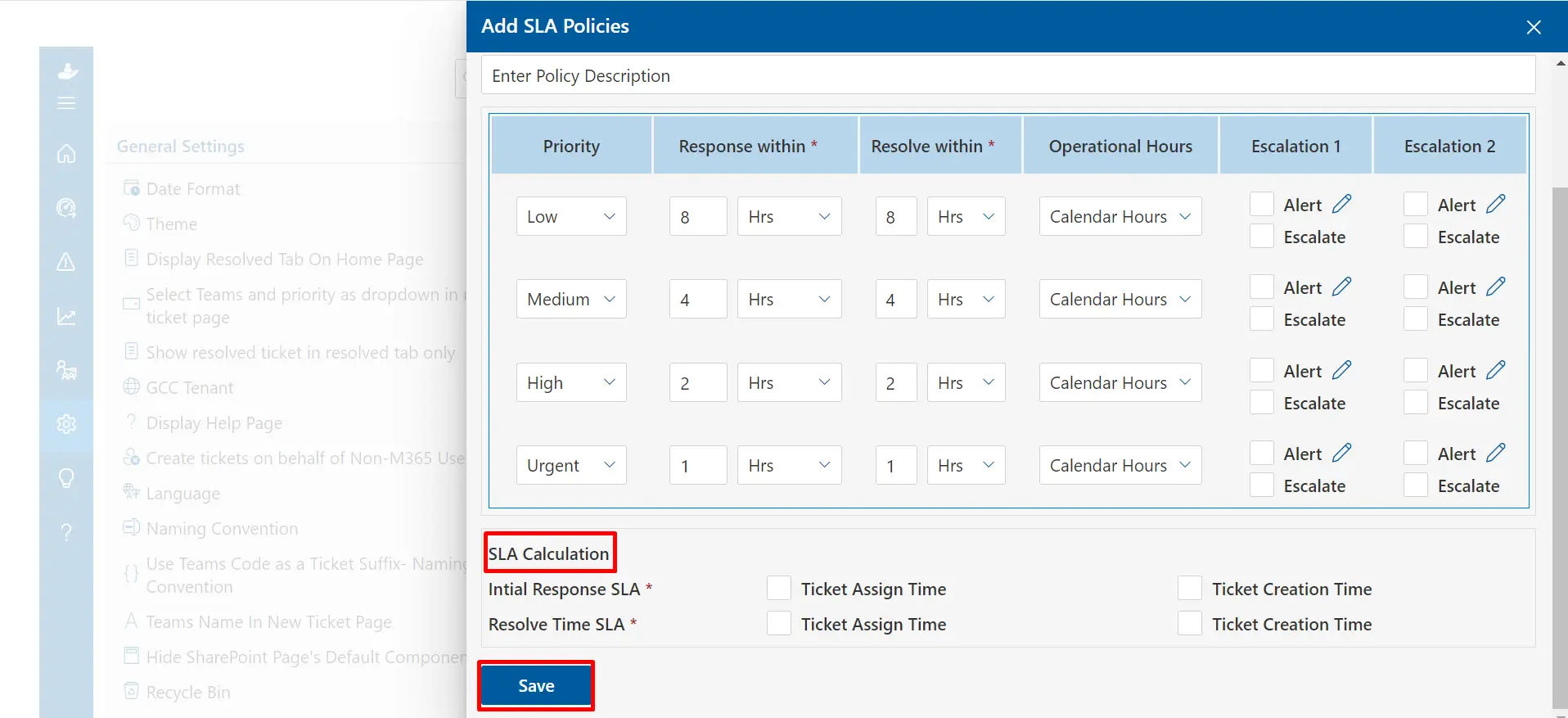
Speed is the currency of IT support. Users don’t care about your team’s workload, they care about how fast their laptop gets fixed. IT ticketing software directly attacks slow response times through structured SLA (Service Level Agreement) management. Every ticket can be assigned a priority level, critical, high, medium, low, with corresponding response and resolution time targets baked in.
When an SLA deadline approaches, the system automatically sends alerts to the assigned technician and their supervisor. Critical tickets that remain unacknowledged are automatically escalated to the next tier. This proactive escalation matrix means nothing ages in the queue unnoticed. The measurable result is a consistent reduction in both mean time to respond (MTTR) and mean time to resolve (MTTRes) — two of the most closely watched KPIs in IT service management.
Over time, the system also builds a repository of past resolutions. Technicians searching for solutions to recurring issues can find documented fixes in seconds rather than starting from scratch, further compressing resolution times.
Enhanced Collaboration and Communication
Complex IT issues often require multiple people to resolve. A network outage might involve the network team, the server team, a third-party ISP, and a project manager, all needing to coordinate in real time. Without a shared platform, communication happens in scattered email threads that are painful to track and easy to misread.
Ticketing software gives every stakeholder a shared, structured workspace. Internal notes allow technicians to communicate privately within a ticket without the user seeing back-end troubleshooting discussions. Ticket assignment and @mention features notify the right people instantly. When ownership transfers between teams, the entire history travels with it, no more “can you forward me that email chain from last Tuesday?”
Key collaboration features to look for: internal private notes, multi-agent ticket assignment, team inboxes by department, escalation workflows, and real-time status notifications for all stakeholders.
Many modern ticketing platforms also integrate with communication tools like Microsoft Teams, and SharePoint, so engineers can jump into a video call directly from a ticket without losing context. The result is faster, cleaner collaboration, and fewer things falling through the cracks between teams.
Better Resource Allocation and Prioritization
Not all IT issues are created equal. A forgotten password is an inconvenience; a compromised server is a business emergency. Without a structured ticketing system, the loudest user often gets served first, regardless of business impact. This leads to critical infrastructure issues languishing while low-priority requests consume agent time.
IT ticketing software introduces intelligent prioritization frameworks. Using predefined rules, tickets are automatically scored based on urgency (how quickly does this degrade?) and impact (how many users or systems are affected?). A ticket submitted by a call center with 50 agents blocked from working will automatically outrank a single user’s Wi-Fi connectivity complaint.
On the resource side, managers gain a live view of agent workloads, open queue sizes, and skill-based routing effectiveness. If one technician is overloaded while another sits idle, tickets can be redistributed with a click. Over time, capacity planning becomes much more accurate, organizations can spot patterns (Monday mornings are always chaotic; end-of-quarter sees a spike in access requests) and staff proactively rather than reactively.
Automated Task Assignment and Routing
Manual ticket assignment is a hidden productivity killer. In small teams, a dispatcher might spend 30–60 minutes each morning sorting and assigning overnight tickets. In larger organizations, this becomes a dedicated role. IT ticketing software eliminates this overhead through intelligent automation.
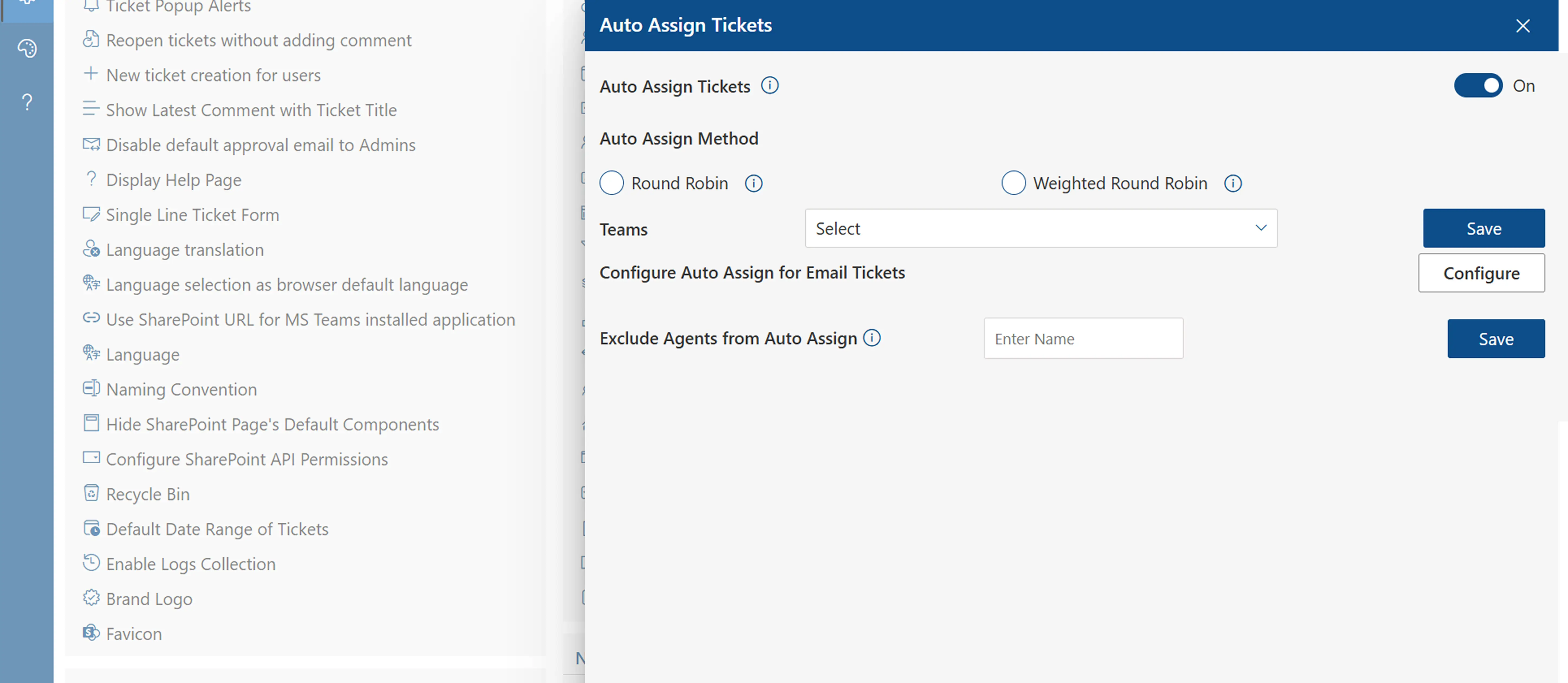
Skill-based routing
Route tickets to agents with matching certifications or specializations automatically.
Round-robin load balancing
Distribute tickets evenly across available agents to prevent burnout and backlogs.
Auto-categorization
AI-powered tagging categorizes incoming tickets before a human ever reads them.
Trigger-based workflows
If/then rules fire automatically, escalate, reassign, notify, or close without manual input.
Beyond assignment, automation handles follow-up reminders, customer satisfaction surveys, SLA warning alerts, and ticket closure after a set period of inactivity. The cumulative effect is significant: teams that have implemented automation report reclaiming several hours per week per agent, time redirected to complex problem-solving rather than administrative busywork.
Comprehensive Reporting and Analytics
You cannot improve what you cannot measure. This axiom is especially true in IT support. Ticketing software transforms every interaction into structured data, enabling a depth of analysis that simply isn’t possible with email-based support.
Standard dashboards surface real-time metrics: open ticket count, tickets created vs. resolved today, average response time, SLA compliance rate, and agent workload distribution. Historical trend reports reveal whether performance is improving or deteriorating over time, which ticket categories are growing fastest, and which issues consume the most resolution time.
Power metrics to track: First Contact Resolution (FCR) rate, Average Handle Time (AHT), reopen rate, ticket deflection rate via self-service, and Customer Satisfaction Score (CSAT). These numbers tell the real story of team performance.
For IT leaders, this analytics capability is invaluable during budget conversations. Presenting concrete data, “our team resolved 12,400 tickets last quarter with an average CSAT of 4.7/5 and an SLA compliance rate of 94%”, makes a far stronger case for headcount or tooling investments than anecdotal impressions. Data-driven IT management is not a nice-to-have; it’s the foundation of a credible, growing IT function.
Increased Customer Satisfaction and Experience
Internal users are customers too. When an employee submits a support request, their experience with the IT team directly affects their perception of the broader organization, their productivity, and in some cases their decision to stay or leave the company. IT ticketing software addresses every touchpoint in the user journey.
Self-service portals empower users to submit tickets on their own terms, 24/7, from any device, without waiting for a phone to be answered. Automated acknowledgment emails confirm that the request was received and provide a ticket number for reference. Status update notifications keep users informed without requiring them to chase the IT team. And post-resolution satisfaction surveys close the loop, collecting feedback that drives continuous improvement.
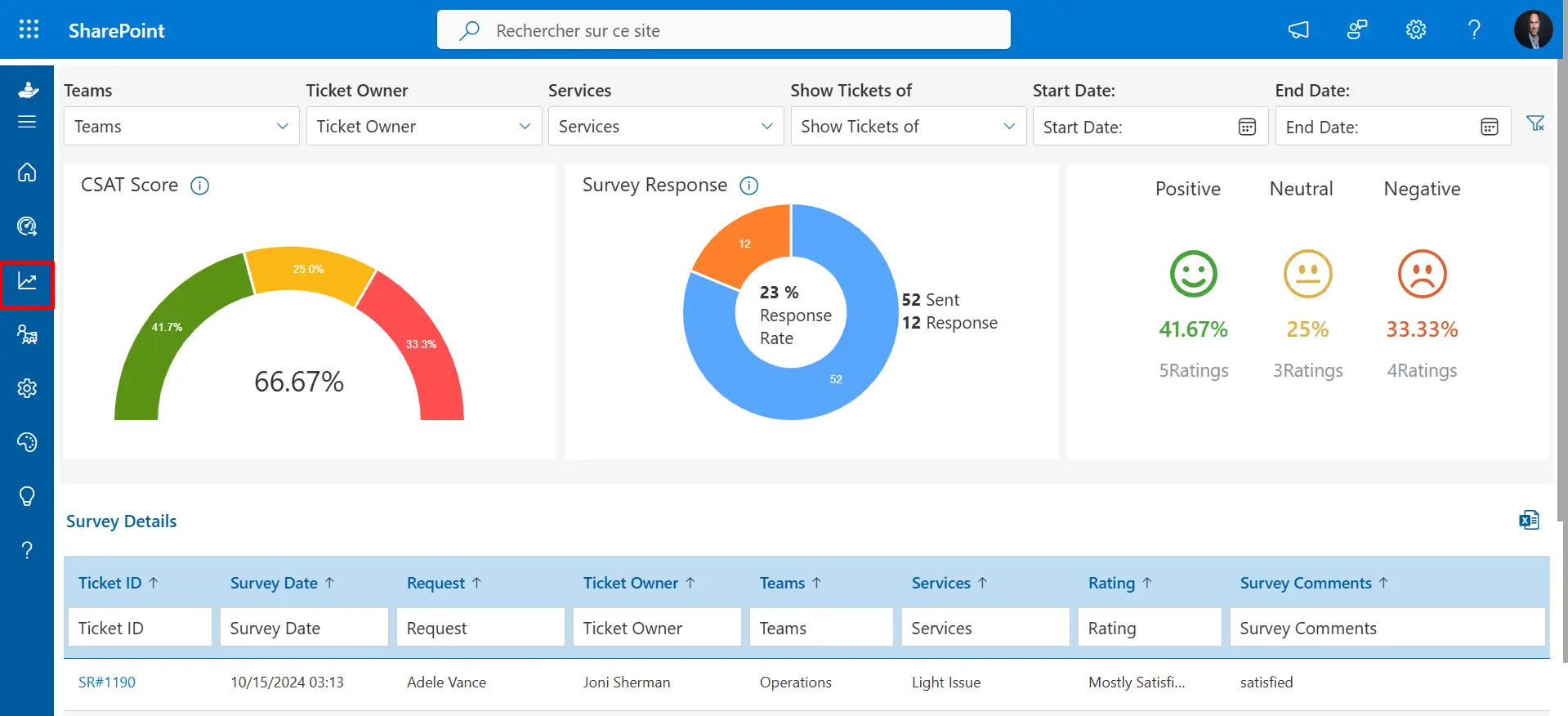
Teams that implement ticketing software consistently report notable improvements in user satisfaction scores within the first 90 days. The reason is simple: transparency and reliability build trust. When users can see their ticket progressing through the system, they feel heard, even before the issue is resolved.
Integration with Other IT Tools and Platforms
No IT tool lives in isolation. Your ticketing system needs to speak fluently with the rest of your technology stack to deliver maximum value. Modern IT ticketing platforms are designed with integration as a core capability, not an afterthought.
Common integrations include monitoring and alerting tools (PagerDuty, Nagios, Datadog), asset management systems (ServiceNow, Lansweeper), directory services (Active Directory, Okta), communication platforms (Slack, Microsoft Teams), and ITSM frameworks (JIRA Service Management, Zendesk). When your monitoring tool detects a server down, it can automatically create a P1 ticket, assign it to the on-call engineer, and send a Slack alert, all without human intervention.
This interconnected ecosystem eliminates context switching, reduces duplicate data entry, and ensures that the ticketing system reflects the true state of your IT environment in real time. For organizations pursuing ITIL alignment or ISO 20000 certification, robust tool integration is a prerequisite,and a well-integrated ticketing system is the backbone that makes it achievable.
Scalability for Growing IT Support Needs
A startup with 20 employees has fundamentally different IT support needs than a mid-market company with 2,000 employees, and yet many organizations try to scale using the same ad-hoc processes they used from day one. This approach breaks down quickly, usually at the worst possible time: during a period of rapid growth.
IT ticketing software scales with your organization. Adding new agents, creating additional queues for new business units, expanding to multi-location support, or enabling multi-language portals for international teams are configuration changes, not infrastructure projects. Cloud-based ticketing platforms in particular offer virtually unlimited capacity, with no hardware to provision and no upgrade cycles to manage.
This scalability also extends to volume spikes. When a major system update triggers hundreds of tickets simultaneously, the system queues, prioritizes, and routes them automatically, your team’s capacity is amplified, not overwhelmed. Organizations can grow their headcount, their geographic footprint, and their service catalog without a corresponding linear increase in support complexity.
Enhanced Security and Data Privacy
IT support teams handle some of the most sensitive data in an organization: user credentials, access request history, network configuration details, vulnerability reports, and compliance audit trails. Managing this information through unencrypted email or shared spreadsheets is not just inefficient, it’s a security and regulatory liability.
Enterprise-grade ticketing platforms are built with security-first architecture. Role-based access controls ensure that technicians only see the tickets relevant to their scope. All ticket data is encrypted both in transit and at rest. Comprehensive audit logs record every action taken on every ticket, providing the forensic trail required for SOC 2, GDPR, HIPAA, and ISO 27001 compliance audits.
Security features to prioritize: SSO and MFA support, granular RBAC, field-level encryption for sensitive data, immutable audit logs, data residency controls, and automatic PII redaction in ticket exports.
For organizations in regulated industries, healthcare, finance, government, these capabilities aren’t optional. But even for organizations outside regulated sectors, data breaches are expensive. A ticketing system that enforces proper access controls and produces clean audit trails is a meaningful layer of your broader cybersecurity posture.
Conclusion
Incorporating Helpdesk 365 ticketing software into IT support teams offers numerous advantages, from streamlining issue tracking and improving response times to enhancing collaboration and automating task assignments. With detailed reporting and analytics, IT teams can continuously optimize their performance and deliver a better user experience. Ultimately, Helpdesk 365 boosts both the efficiency and satisfaction of IT support teams, enabling them to meet the growing demands of businesses and users alike.
Frequently Asked Questions
What is IT support ticketing software?
IT support ticketing software helps track, manage, and resolve IT-related issues by assigning tickets to appropriate team members, ensuring efficient handling and resolution of problems.
How does ticketing software improve response times?
Ticketing software automates ticket routing, prioritizes issues based on severity, and ensures faster task assignments, leading to quicker responses and resolutions.
Can ticketing software help improve collaboration within IT teams?
Yes, it facilitates better communication by allowing team members to assign, update, and track tickets in real-time, making collaboration smoother and more efficient.
What role does reporting and analytics play in ticketing software?
Reporting and analytics help identify trends in support issues, measure team performance, and gain insights into customer satisfaction, allowing IT teams to continuously improve their processes.
Is ticketing software scalable for growing IT teams?
Absolutely! Most ticketing software solutions are scalable, enabling businesses to easily add users, expand functionality, and manage a larger volume of support tickets as their IT support needs grow.


_JiluXJRGNl.svg)























