

Helpdesk 365 vs SharePoint Empower: Which Is Best for Your Team?
_eH2jDg7dZ.png)
Finding the right tool for your support team can be tricky, especially when two products look similar on the surface but serve very different purposes.
- Helpdesk 365 is built for support teams, it handles tickets, SLAs, and automation in one place, while SharePoint Empower is primarily a document and collaboration platform.
- If your team needs fast ticket resolution, automated routing, and SLA compliance, Helpdesk 365 is the stronger fit.
- SharePoint Empower works well for internal knowledge sharing and document management but lacks native ticketing and helpdesk workflows.
- Helpdesk 365 integrates with Microsoft Teams, Outlook, and leading ERP tools, making it ideal for businesses already in the Microsoft 365 ecosystem.
In this blog, we break down both tools side by side. We look at features, use cases, strengths, and weaknesses so you can make a clear and confident decision for your team.
What Is Helpdesk 365?

Helpdesk 365 is a dedicated customer support and ticketing platform built natively inside Microsoft 365. It is designed for teams that need to manage a high volume of support requests, whether from customers, dealers, internal employees, or partners.
The tool converts incoming queries from email, Microsoft Teams, and portals into structured support tickets. Each ticket is tracked, prioritised, and routed to the right team member automatically. With built-in SLA timers, escalation rules, and real-time dashboards, Helpdesk 365 gives support teams full visibility and control over every request.
It is used across a range of industries including manufacturing, IT, retail, and education, by teams that need a reliable, scalable way to deliver consistent support without juggling multiple tools.
Key things Helpdesk 365 is known for:
- Dedicated ticketing system: Every request gets a ticket with a unique ID, priority level, and owner.
- SLA management: Set response and resolution deadlines. Get automatic escalations before deadlines are missed.
- Microsoft Teams integration: Agents can raise, update, and close tickets directly inside Teams.
- Omni-channel support: Capture requests from email, Teams, web portals, and chat in one unified inbox.
- Customisable fields: Capture specific data points like machine serial numbers, department names, or request categories.
What Is SharePoint Empower?
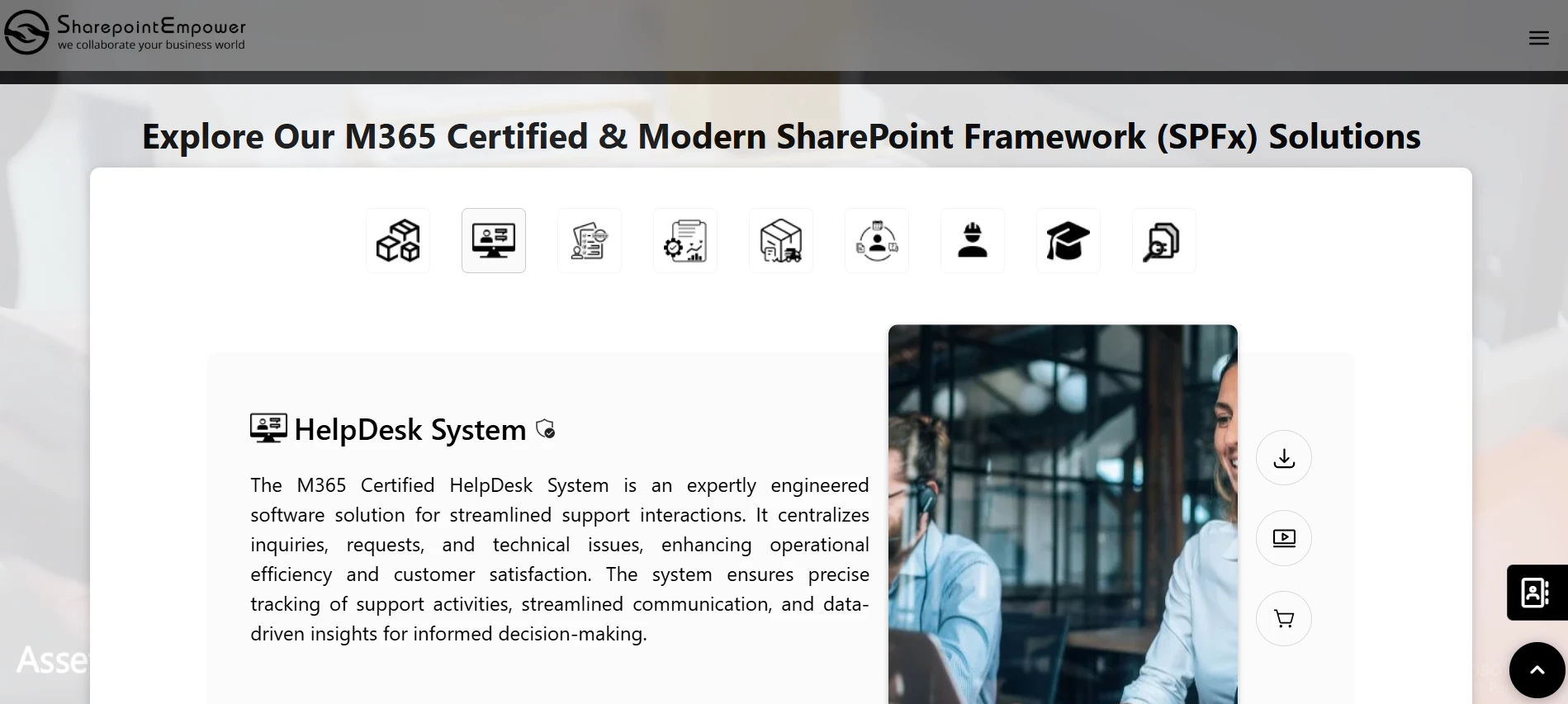
SharePoint Empower is a solution built on top of Microsoft SharePoint. It helps organisations manage internal processes, documents, and employee communication within the Microsoft 365 environment.
SharePoint Empower is primarily focused on document management, intranet portals, and team collaboration. It allows companies to build internal portals, manage forms, store files, and run basic workflows using SharePoint and Power Platform tools.
It is popular with companies that already rely on SharePoint for document storage and want to extend it with structured forms, approval workflows, and basic request management, without investing in a separate platform.
Key things SharePoint Empower is known for:
- Document management: Store, version, and share files and documents in organised libraries.
- Intranet portals: Build internal communication hubs for different departments or teams.
- Basic form workflows: Create simple forms and approval flows using Power Automate.
- SharePoint lists: Track tasks and items using built-in list views.
- Microsoft 365 native: Works within the existing Microsoft 365 setup without extra installation.
See Helpdesk 365 in Action
Get a personalised walkthrough of how Helpdesk 365 can work for your team. No credit card needed.
Helpdesk 365 vs SharePoint Empower: Core Differences at a Glance
At a high level, these two tools serve different purposes. Understanding the difference in intent is the first step in choosing the right one.
Helpdesk 365 is purpose-built for support operations. Every feature, from ticket creation to SLA escalation to agent dashboards, is designed around the idea of resolving customer or employee issues as quickly and efficiently as possible.
SharePoint Empower, on the other hand, is a collaboration and document management solution. It can handle basic request workflows, but it was not built with customer support or ticketing as its primary use case.
Think of it this way:
- If your team manages support tickets and needs SLAs, routing, and reporting — Helpdesk 365 is built for that.
- If your team needs a central place to store documents, build intranet pages, and run internal approvals — SharePoint Empower fits that job.
The confusion between the two often happens because both live inside the Microsoft 365 ecosystem and both claim to help teams work better. But the jobs they do are fundamentally different.
Ticketing and Issue Management
Helpdesk 365
Ticketing is the heart of Helpdesk 365. Every incoming request — whether it comes from an email, a web form, a Teams message, or a support portal — automatically becomes a structured ticket.
Each ticket gets:
- A unique ticket ID for easy tracking
- A priority level (low, medium, high, critical)
- An assigned agent or team
- An SLA timer that counts down to the resolution deadline
- Custom fields specific to your business (e.g., department, product model, location)
Agents can view all tickets in a single queue, filter by status or priority, add internal notes, and communicate with customers, all without leaving the platform. Nothing slips through the cracks.
SharePoint Empower
SharePoint Empower does not have a native ticketing system. Teams that want to manage requests inside SharePoint Empower typically build custom lists or forms to capture information. These can work for very simple use cases, but they lack the structure and automation that a real support team needs.
There are no built-in SLA timers, no automatic ticket assignment, and no real-time queue management. Managing high volumes of support requests through SharePoint lists requires significant manual effort and custom development.
Verdict: If ticketing is central to your work, Helpdesk 365 is the clear choice. SharePoint Empower is not a ticketing tool.
Automation and Workflow Rules
Helpdesk 365
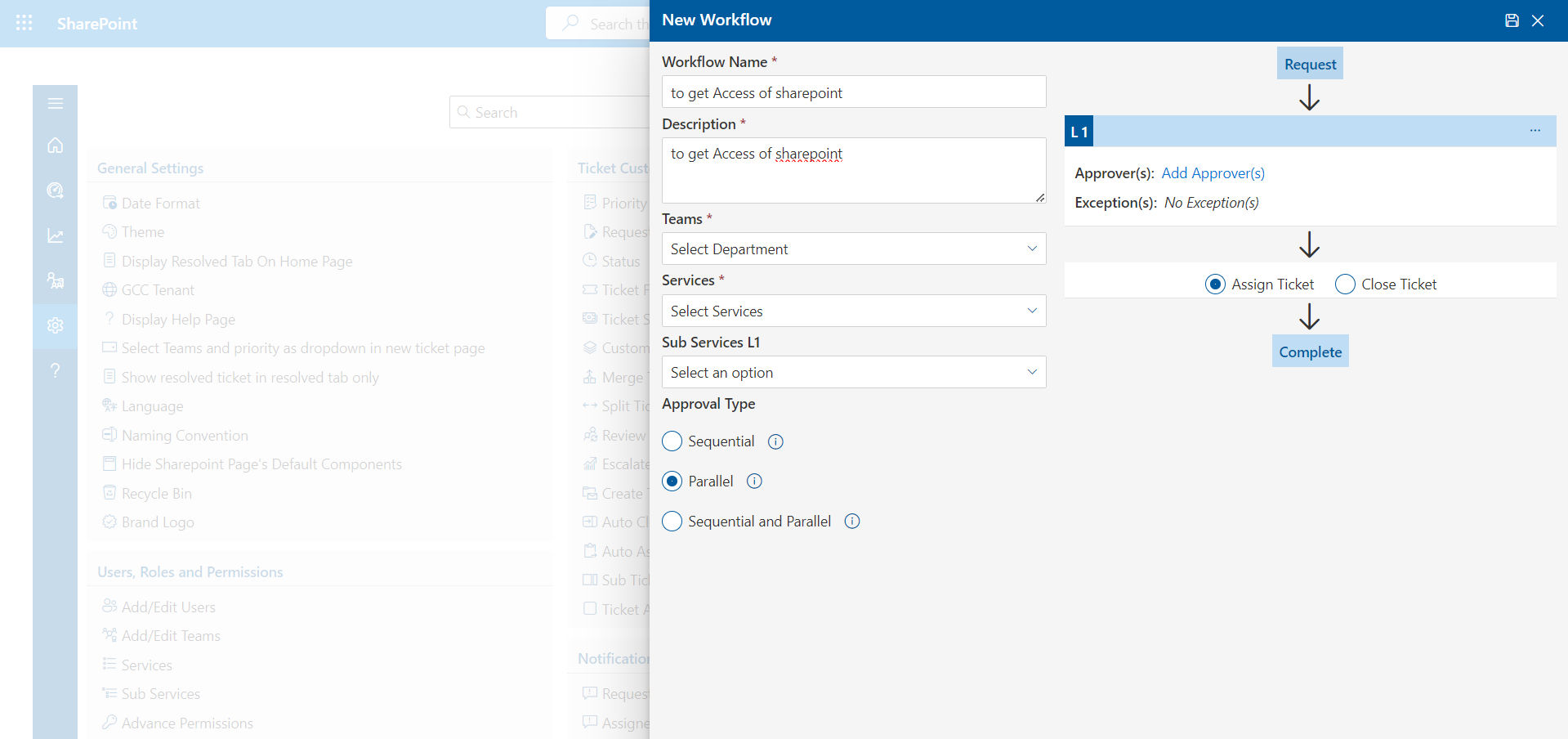
Helpdesk 365 comes with a built-in, no-code automation engine. You can set rules that trigger actions based on ticket conditions — without writing any code.
Examples of what you can automate:
- Auto-assign tickets with the word ‘urgent’ to the senior support team
- Send an acknowledgement email the moment a ticket is created
- Escalate a ticket automatically if it hasn’t been responded to in 2 hours
- Tag tickets by category and route them to the right department
- Trigger a weekly defect report and send it to the QA manager every Monday
These automations save hours of manual work every week and ensure consistency across your team.
SharePoint Empower
SharePoint Empower relies on Power Automate for workflow automation. Power Automate is a powerful tool, but building even simple workflows requires some technical knowledge. For complex support workflows, like SLA-based escalation or multi-condition ticket routing, the setup can become time-consuming and difficult to maintain.
For teams without a dedicated IT resource, this is a real barrier.
Verdict: Helpdesk 365 wins on ease of automation. Its built-in engine requires zero technical knowledge. SharePoint Empower automation is possible but demands more setup effort.
SharePoint Empower
SharePoint Empower relies on Power Automate for workflow automation. Power Automate is a powerful tool, but building even simple workflows requires some technical knowledge. For complex support workflows, like SLA-based escalation or multi-condition ticket routing, the setup can become time-consuming and difficult to maintain.
For teams without a dedicated IT resource, this is a real barrier.
Verdict: Helpdesk 365 wins on ease of automation. Its built-in engine requires zero technical knowledge. SharePoint Empower automation is possible but demands more setup effort.
Start Your Free 14-Day Trial
Try Helpdesk 365 with your real team and workflows. No credit card required. Cancel any time.
Self-Service and Knowledge Base
Helpdesk 365
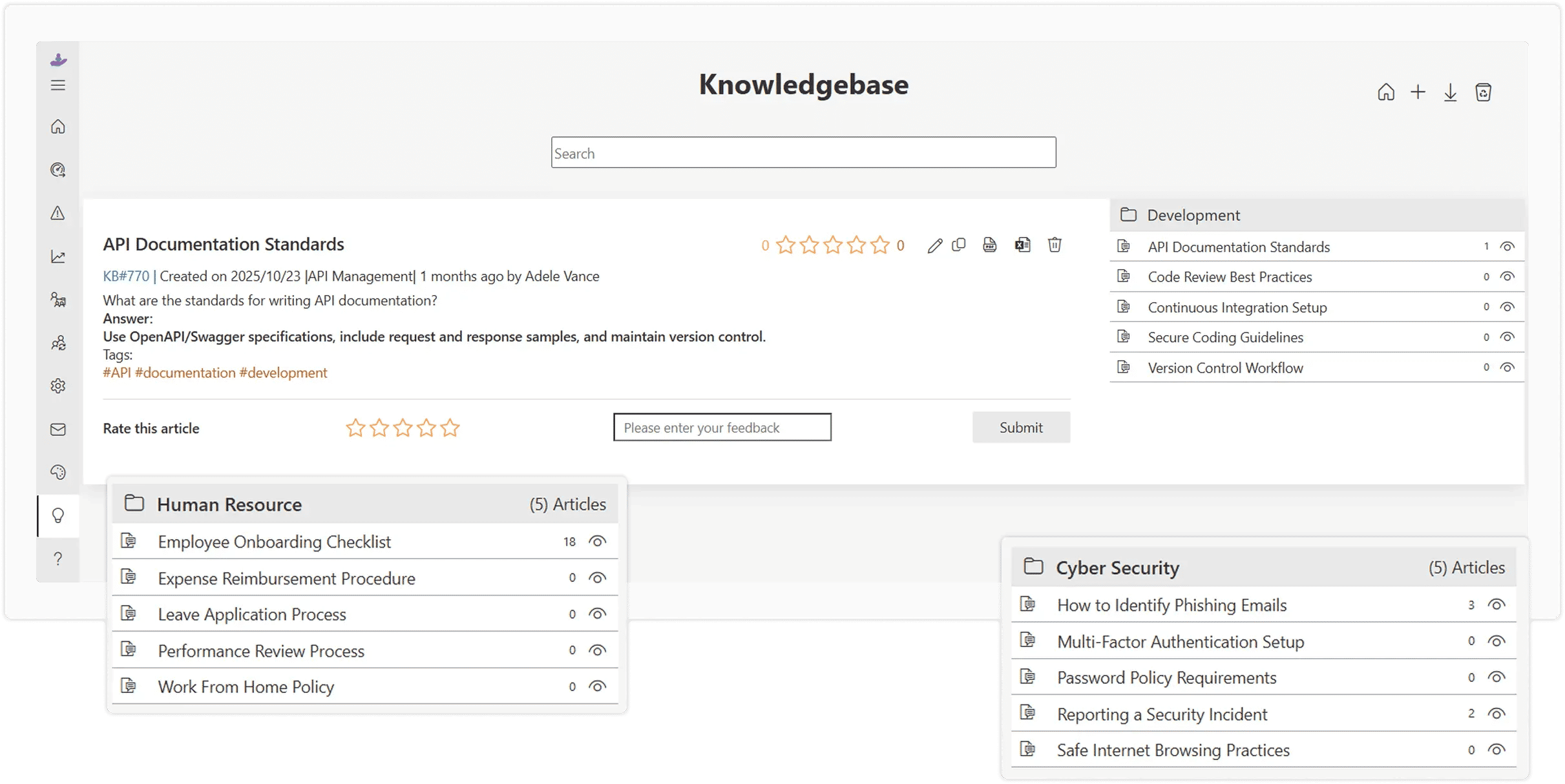
Helpdesk 365 includes a fully branded self-service portal and knowledge base. You can publish articles, FAQs, troubleshooting guides, and manuals that your customers or employees can search and access before raising a ticket.
This reduces your inbound ticket volume significantly. When someone raises a ticket, the platform automatically suggests relevant articles, giving customers a chance to resolve their issue on their own.
The portal can be customised with your own domain name, logo, and colour scheme. You can also create separate portals for different departments, product lines, or customer groups.
SharePoint Empower
SharePoint Empower supports document libraries and intranet pages that can function as an internal knowledge base. You can create pages with guides and FAQs, and users can search for documents within the SharePoint environment.
However, this is primarily an internal tool. Building a branded customer-facing self-service portal with ticket integration is not something SharePoint Empower supports out of the box.
Verdict: For external self-service, Helpdesk 365 is the better tool. SharePoint Empower is suitable for internal document access but not for customer-facing portals with ticket deflection.
Reporting and Analytics
Helpdesk 365
Helpdesk 365 comes with built-in reporting dashboards that give your team real-time visibility into support performance. You can track:
- Number of tickets raised, resolved, and pending
- Average first response time and resolution time
- SLA compliance rates by team, agent, or ticket category
- Customer satisfaction (CSAT) scores collected after ticket closure
- Recurring issue trends by product, department, or customer
You can also schedule automated reports to be delivered to specific stakeholders — for example, a weekly ticket summary for your operations manager or a monthly SLA report for your leadership team.
For industries with compliance requirements, like ISO 9001 in manufacturing, the tamper-proof audit trail in Helpdesk 365 records every action taken on every ticket, making audits straightforward.
SharePoint Empower
SharePoint Empower does not have built-in support analytics. You can build custom reports using Power BI if you are already using it, but this requires additional setup and licensing. For teams looking for out-of-the-box support reporting, SharePoint Empower falls short.
Verdict: Helpdesk 365 provides ready-to-use support analytics. SharePoint Empower requires custom development for equivalent reporting.
Integrations
Helpdesk 365
Helpdesk 365 integrates natively with the tools that support and operations teams use every day:
- Microsoft Teams: Raise, update, and resolve tickets without leaving Teams.
- Outlook: Every email becomes a ticket automatically.
- Power Automate: Connect to hundreds of apps and trigger workflows across systems.
- SharePoint: Store, manage, and access ticket-related documents, knowledge base articles, and support resources from a centralized location.
- Microsoft Dynamics: Link support tickets to customer records in Dynamics.
SharePoint Empower
SharePoint Empower works well within the Microsoft 365 family. It integrates with Teams, OneDrive, and other Microsoft apps as expected. For external integrations, like ERP connections, customer support tools, or third-party reporting systems, it depends on Power Automate connectors, which can require custom configuration.
Verdict: Both tools work inside the Microsoft ecosystem, but Helpdesk 365 offers deeper, support-specific integrations — especially with ERP systems and external support channels.
See How Helpdesk 365 Connects With Your Teams
Microsoft Teams — Helpdesk 365 integrates with the tools you already use.
Collaboration Features
Helpdesk 365
Helpdesk 365 is built for teams where multiple people need to work together on a single customer issue. Key collaboration features include:
- Private internal notes: Team members can add notes visible only to agents, not to the customer.
- Ticket watchers: Loop in a manager, QA lead, or senior engineer without transferring ownership.
- Approval workflows: Route requests that need sign-off, like out-of-warranty replacements or refunds, to the right stakeholders automatically.
- Teams notifications: Field teams and remote workers get ticket updates directly in Teams on any device.
SharePoint Empower
SharePoint Empower is strong on internal collaboration in the traditional sense. Teams can co-author documents, use comment threads on files, and share updates via intranet pages. However, these are collaboration features built for document and project work, not for customer support ticket resolution.
There is no equivalent to private ticket notes, SLA-based escalation notifications, or multi-agent ticket collaboration in SharePoint Empower.
Verdict: For support-focused collaboration, Helpdesk 365 is the right tool. SharePoint Empower excels at document collaboration, not ticket resolution.
Security and Compliance
Helpdesk 365
Helpdesk 365 is built with enterprise-grade security and compliance requirements in mind. Key security features include:
- SOC 2 Type 2 certified
- AES-256 data encryption at rest and in transit
- GDPR-compliant data handling
- Single Sign-On (SSO) and Two-Factor Authentication (2FA)
- Hosted on AWS and Azure for high availability and data sovereignty
- Full audit trail for every ticket action, required for ISO 27001 compliance
SharePoint Empower
SharePoint Empower inherits the security controls of Microsoft 365, which are robust. Microsoft’s platform provides enterprise-grade security, conditional access, and compliance certifications. However, the audit and compliance features for support operations specifically, are not part of SharePoint Empower out of the box.
Verdict: Both tools are secure. Helpdesk 365 goes further with support-specific compliance features audit trails.
Who Should Use Helpdesk 365?
Helpdesk 365 is the right choice if your team:
- Receives and manages support tickets from customers, dealers, or internal employees
- Needs to meet response and resolution SLAs consistently
- Wants to automate ticket routing, escalation, and follow-up communications
- Requires a self-service portal or knowledge base for customers
- Works across multiple channels, email, Teams, web forms, and portals
- Needs compliance-grade audit trails
- Is in manufacturing, IT, retail, education, or any service-heavy industry
Who Should Use SharePoint Empower?
SharePoint Empower is the right choice if your team:
- Primarily needs document management and file storage within Microsoft 365
- Wants to build internal intranet pages and communication hubs
- Is looking for simple approval workflows using Power Automate
- Does not need dedicated ticketing or customer-facing support
- Already uses SharePoint heavily and wants to add basic request management on top
Helpdesk 365 vs SharePoint Empower: Full Comparison Table
| Feature | Helpdesk 365 | SharePoint Empower |
| Microsoft Teams Integration | Native & built-in | Limited / add-on |
| Ticketing System | Advanced with SLA timers | Basic ticketing |
| Custom Fields (Serial No., Model) | Included on all plans | Limited customization |
| SLA Escalation & Auto-routing | All plans | Higher plans only |
| ISO 9001 Audit Trail | Built-in, tamper-proof | Not available |
| Self-Service Knowledge Base | Fully branded portal | Basic FAQ module |
| Automation & Workflow Rules | Advanced, no-code builder | Limited templates |
| Analytics & Defect Trend Reports | Real-time dashboards | Basic reports only |
| ERP Integration (SAP, Dynamics) | via Power Automate / REST API | Not available |
| Free Trial | 21 days, no card needed | 14 days, card required |
| Dedicated Onboarding Support | All plans | Enterprise plans only |
Conclusion
Both Helpdesk 365 and SharePoint Empower serve different business needs. SharePoint Empower excels in document management and collaboration, while Helpdesk 365 is purpose-built for managing support requests, automating workflows, and meeting SLA targets.
Many organizations use both together, SharePoint for document management and Helpdesk 365 for ticket management. If your goal is to streamline support operations, improve response times, and deliver better service, Helpdesk 365 is the better choice.
Frequently Asked Questions
Is Helpdesk 365 only for large companies?
No. Helpdesk 365 is designed to scale from small support teams to large enterprise operations. You can start with a small team and grow as your needs expand. The onboarding process is simple, and most teams are up and running within a day.
Can SharePoint Empower replace a helpdesk tool?
Not really. SharePoint Empower can handle very basic request management through custom lists and forms, but it lacks native ticketing, SLA management, and support-specific automation. For teams with more than a handful of weekly requests, a dedicated helpdesk tool like Helpdesk 365 will serve you much better.
Does Helpdesk 365 work with Microsoft Teams?
Yes. Helpdesk 365 has a native Microsoft Teams integration. Agents can raise, view, update, and resolve tickets directly inside Teams, without switching between apps. This is especially useful for field teams, remote workers, or any team that primarily communicates via Teams.
Can I use both Helpdesk 365 and SharePoint Empower together?
Absolutely. Many organisations use Helpdesk 365 for customer-facing support and ticketing, while continuing to use SharePoint for internal document storage and intranet needs. The two tools complement each other well, and Helpdesk 365 can connect to your SharePoint environment via Power Automate or the REST API.
How long does it take to set up Helpdesk 365?
Most teams are fully live within a single business day. Helpdesk 365 includes a dedicated onboarding session where our team helps you configure ticket categories, SLA rules, routing logic, and your support portal. No IT project or lengthy implementation is required.
Does Helpdesk 365 offer a free trial?
Yes. You can try Helpdesk 365 free for 14-days with no credit card required. You get access to all features during the trial so you can test it with your real team and workflows before making any commitment.


_JiluXJRGNl.svg)























