

Helpdesk 365 vs Crow Canyon Helpdesk: Which Microsoft 365 Helpdesk Should You Choose?
_eH2jDg7dZ.png)
If your company runs on Microsoft 365, you already know the appeal of a helpdesk that lives inside Teams, Outlook, and SharePoint instead of forcing your team into yet another browser tab. Two names come up again and again in this space: Helpdesk 365 and Crow Canyon Helpdesk. Both promise native Microsoft integration, ticket automation, and reporting. But they take very different paths to get there.
- Both Helpdesk 365 and Crow Canyon Helpdesk run natively inside Microsoft 365, Teams, and SharePoint.
- Helpdesk 365 is built for speed a no-code setup that most teams complete in under 10 minutes.
- Crow Canyon Helpdesk uses the low-code NITRO Studio, which gives deep customization but needs more setup effort.
- Helpdesk 365 holds a strong 4.7 out of 5 rating on G2 from 200+ verified reviews.
- Your best pick depends on whether you want fast, simple ticketing or maximum configurability.
IT managers, HR teams, and support leads often start this comparison after outgrowing shared inboxes or a spreadsheet-based tracker. Requests get lost, nobody knows who owns what, and there’s no easy way to prove response times to leadership. Moving to a dedicated ticketing system solves that, the real question is which one fits the way your organization already works.
This guide breaks down how Helpdesk 365 and Crow Canyon Helpdesk compare on setup, features, automation, self-service, reporting, and real user ratings, so you can pick the right one for your support team without spending weeks testing both.
See how a modern Microsoft 365 helpdesk feels in real life.
Why a Microsoft-Native Helpdesk Matters
A generic, standalone helpdesk can work fine on its own, but it usually means teaching employees a new login, a new interface, and a new place to check for updates. A Microsoft-native helpdesk skips that friction entirely. Employees raise a request from a tool they already use every day, Teams, Outlook, or a SharePoint page, and agents work from the same environment.
There are three practical benefits worth calling out. First, adoption is faster because there’s nothing new to learn. Second, your data stays inside your own Microsoft 365 tenant instead of a third-party cloud, which matters for IT and compliance teams. Third, you can connect the helpdesk to tools you already rely on, Power Automate, Power BI, Azure AD, without custom integration work. Helpdesk 365 and Crow Canyon Helpdesk both deliver on this promise, which is exactly why they’re so often compared against each other rather than against generic SaaS helpdesks.
What Is Helpdesk 365?

Helpdesk 365, built by Cubic Logics, is a ticketing system designed specifically for organizations already invested in Microsoft 365. It installs directly into SharePoint and syncs with Microsoft Teams, Outlook, Power BI, and Power Automate. Employees can raise a ticket from a Teams chat, an email, or a simple form, and the system automatically converts it into a tracked ticket with an ID, priority, and owner.
The platform leans heavily on AI. Built-in automation reads incoming requests, suggests categories, routes tickets to the right agent, and even drafts summaries so agents don’t have to re-read long email threads. Helpdesk 365 also supports IT, HR, Finance, and other departments from the same platform, each with its own workflow and branding.
Because it is a no-code product, most teams can install it, configure basic categories and SLAs, and start receiving tickets on the same day — without help from a developer or a SharePoint consultant.
What Is Crow Canyon Helpdesk?

Crow Canyon Software has been building Microsoft 365 and SharePoint business applications for more than two decades. Its helpdesk product, now called NITRO Help Desk, also runs natively inside SharePoint and Teams, converting emails and portal submissions into tickets with SLA policies, escalation rules, and reporting dashboards.
What sets Crow Canyon apart is NITRO Studio, its own low-code workflow and forms engine. Instead of picking from a fixed set of options, admins can design custom forms, multi-step approval flows, and complex routing logic from scratch. This flexibility is powerful, but it comes with a steeper learning curve — many organizations bring in a consultant or their internal SharePoint admin to get the most out of it.
Crow Canyon’s helpdesk is often chosen by larger, process-heavy organizations, government agencies, universities, and enterprises, that already have the in-house skills to manage a highly configurable system.
Helpdesk 365 vs Crow Canyon Helpdesk: Quick Comparison
Before diving into each feature area in detail, here is a side-by-side snapshot to help you quickly narrow down which platform lines up with your team’s priorities.
Feature | Helpdesk 365 | Crow Canyon Helpdesk |
Platform | Microsoft 365, Teams, SharePoint, Outlook | Microsoft 365, Teams, SharePoint (NITRO Studio) |
Setup time | Under 10 minutes, no-code | Longer, often needs IT/consultant help |
AI features | Built-in AI ticket routing, summaries, Copilot | AI agents added in newer NITRO releases |
Customization | No-code forms and workflows | Deep low-code customization via NITRO Studio |
Best for | Fast-growing SMBs and mid-market teams | Larger orgs with dedicated SharePoint admins |
G2 rating | 4.7 / 5 (200+ reviews) | No verified G2 review score at publish time |
Free trial | 14 days, no credit card | Available on request |
Still weighing your options? Talk to a helpdesk specialist for a side-by-side walkthrough.
Feature-by-Feature Comparison
Numbers on a table only tell part of the story. Here is how the two platforms actually differ once your team is using them day to day.
Helpdesk 365 favors simplicity. Ticket categories, SLA timers, and routing rules are configured through guided screens, and most teams are live within minutes of installing the app from the Microsoft AppSource marketplace. Tickets can arrive from email, Microsoft Forms, Teams messages, or a self-service portal, and each one is automatically tagged with a unique ID so nothing slips through the cracks.
Crow Canyon Helpdesk, powered by NITRO Studio, gives you more building blocks, custom fields, multi-department queues, and conditional logic, but assembling them takes longer. Teams without a dedicated SharePoint resource often need onboarding support from Crow Canyon’s team to get fully set up. Once configured, though, the ticket structure can be tailored almost exactly to an organization’s internal process.
Both products are Microsoft-native, so this category is closer than most. Helpdesk 365 lets agents manage tickets directly from a Teams tab, with notifications and updates appearing inside the conversation, so nobody has to switch windows to respond to a request. Crow Canyon Helpdesk also runs inside Teams and SharePoint, and because it is built on NITRO Studio, it can tie directly into other Crow Canyon apps like asset management or purchase requests if your organization already uses them.
For organizations standardized entirely on the Microsoft stack, this tight coupling means fewer permissions to manage and one less vendor’s security posture to evaluate, a detail IT and security teams tend to appreciate during procurement reviews.
Helpdesk 365 was designed around AI from the start. It auto-categorizes tickets, suggests priority levels, summarizes long threads, and can resolve simple requests like password resets without agent involvement. This is one of the areas where Helpdesk 365 reviewers consistently highlight time savings, since agents spend less time triaging and more time actually resolving issues.
Crow Canyon has added AI agents to its newer NITRO Help Desk releases, including sentiment analysis and auto-routing. These features are newer to the platform and generally require more configuration to match the out-of-the-box automation that Helpdesk 365 offers, though the payoff is a routing engine that can be tuned to very specific business rules.
Helpdesk 365 includes a searchable, AI-assisted knowledge base and a chatbot widget that suggests articles as employees type their request — cutting down repetitive tickets before they’re even submitted. Articles can be organized by department, so IT, HR, and Finance each get a self-service experience relevant to their own users.
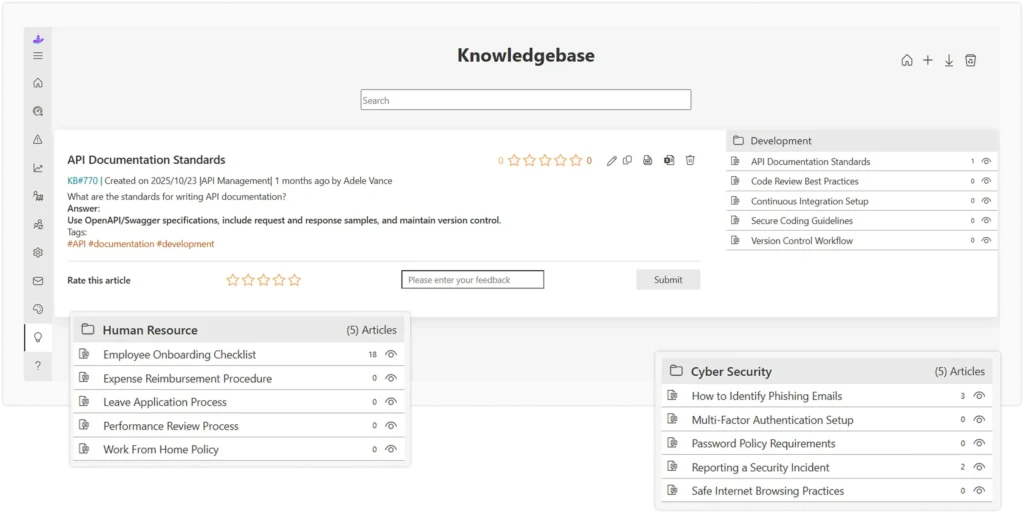
Crow Canyon Helpdesk also supports a self-service portal with a knowledge base, and because it is built on NITRO Studio, the portal’s layout and fields can be customized more extensively — useful if you need a very specific look and feel for different departments or business units.
Helpdesk 365 provides ready-made dashboards for ticket volume, resolution time, and agent performance, plus Power BI integration for teams that want to build their own reports on top of the raw data. Managers can filter by department, agent, or ticket category without waiting on IT to build a custom query.
Crow Canyon Helpdesk offers similarly strong reporting, with the added benefit of NITRO Studio’s custom report builder, so if your default dashboards don’t show exactly what you need, you can build one from scratch, provided you’re comfortable with the tool. This makes it a good fit for teams that need highly specific, recurring reports for leadership or compliance.
This is where the two platforms diverge the most. Helpdesk 365 is built for teams that want to be productive on day one, with a modern interface that needs little to no training — new agents are typically comfortable within their first day. Crow Canyon Helpdesk trades some of that immediacy for configurability — it rewards teams willing to invest time in NITRO Studio with a system tailored precisely to their processes, though new agents may need a short walkthrough before they’re fully confident navigating it.
Because both products run inside your own Microsoft 365 tenant, your ticket data never leaves your organization’s environment. Neither vendor stores your data on a separate third-party cloud, which is a major reason IT teams choose Microsoft-native helpdesks over standalone SaaS tools in the first place. Access control, encryption, and compliance settings inherit directly from your existing Microsoft 365 and Azure AD policies, so there’s no separate security model to maintain.
Real-World Use Cases
Seeing how each platform fits into an actual workday makes the differences easier to picture.
Internal IT support
An employee messages a password reset request in Teams. Helpdesk 365 automatically converts the message into a ticket, resolves it through its AI assistant, and closes the loop without an agent ever touching it. Crow Canyon Helpdesk can achieve the same outcome, but the auto-resolution workflow needs to be built in NITRO Studio first.
HR request tracking
An HR team wants every leave request, onboarding task, and policy question tracked in one place with its own SLA. Both platforms support a dedicated HR queue; Helpdesk 365 offers this as a ready-made department template, while Crow Canyon Helpdesk lets you design the exact fields and approval chain your HR policy requires.
Multi-department shared services
A mid-sized company wants IT, HR, and Facilities all raising tickets through one Teams-based front door, with each department’s tickets routed and reported on separately. Helpdesk 365 handles this out of the box with department-specific workflows. Crow Canyon Helpdesk can match this setup too, once the queues and routing rules are configured in NITRO Studio.
Implementation and Onboarding Experience
How a helpdesk feels in a demo and how it feels three weeks into actual use are often two different things. Helpdesk 365 is deployed straight from the Microsoft AppSource marketplace, and Cubic Logics provides guided onboarding along with the trial, so most teams can define ticket categories, SLAs, and department queues on their own without a formal implementation project.
Crow Canyon Helpdesk usually involves a more structured onboarding process, especially for organizations that want custom NITRO Studio workflows from day one. Crow Canyon’s team offers training and implementation support, but budget the extra time if your rollout depends on custom forms or multi-step approvals rather than the default setup.
Curious how Helpdesk 365 compares to what you’re using today?
Which One Should You Choose?
Regular Asset Audits and Adjustments
There isn’t a single right answer, it depends on your team’s size, technical resources, and how much customization you actually need. Think about how many people will use the system, whether you have someone in-house who can manage SharePoint workflows, and how quickly you need to be up and running.
Choose Helpdesk 365 if:
- You want a helpdesk that’s ready to use within minutes, without a developer.
- Your team values AI-powered automation out of the box.
- You support multiple departments (IT, HR, Finance) and want one consistent, modern interface.
- You want a platform with a strong, independently verified G2 track record.
Choose Crow Canyon Helpdesk if:
- You have an in-house SharePoint admin or consultant who can build custom workflows.
- Your processes are complex and don’t fit a standard ticketing template.
- You’re already using other Crow Canyon apps and want everything on one low-code platform.
Many teams also start with a shortlist of two or three helpdesk tools, run a short trial with each, and let their agents weigh in before making a final call. Since both Helpdesk 365 and Crow Canyon Helpdesk offer trial access, this is a low-risk way to validate your choice before rolling it out company-wide.
Conclusion
Helpdesk 365 and Crow Canyon Helpdesk both solve the same core problem, bringing structured, trackable support into the Microsoft 365 tools your team already uses. Helpdesk 365 leans toward speed, AI automation, and a shorter learning curve, backed by a strong G2 rating from real users. Crow Canyon Helpdesk leans toward deep customization through NITRO Studio, which suits larger or more process-heavy organizations willing to invest the setup time.
If you want to get a modern, AI-powered helpdesk running inside Teams and SharePoint without a long implementation project, Helpdesk 365 is worth testing first. Either way, the fact that both platforms live inside Microsoft 365 means you won’t have to migrate your data to a separate cloud or retrain your team on an unfamiliar interface — the switch from email chaos to structured ticketing should feel almost seamless.
Whichever direction you lean, the best next step is the same: run a real trial with your own ticket types, your own team, and your own SLAs, and see which platform your agents reach for without being told to.
Join Our Creative Community
Frequently Asked Questions
Is Helpdesk 365 only for IT support?
No. Helpdesk 365 supports IT, HR, Finance, and other internal departments from the same platform, each with its own ticket categories and workflow.
Does Crow Canyon Helpdesk work outside of SharePoint?
Crow Canyon Helpdesk is built to run natively inside SharePoint and Microsoft Teams, so an active Microsoft 365 environment is required.
Which platform is easier for a small team to set up?
Helpdesk 365 is generally faster to deploy for small and mid-sized teams, since it doesn’t require custom development to get started.
Can both platforms integrate with Power Automate and Power BI?
Yes. Both Helpdesk 365 and Crow Canyon Helpdesk connect with Power Automate for workflow automation and Power BI for custom reporting.
Do these platforms keep our data inside our own Microsoft 365 tenant?
Yes. Both products run inside your organization’s Microsoft 365 environment, so ticket data stays within your own tenant rather than a separate third-party cloud.
Do I need a SharePoint admin to run either platform?
Helpdesk 365 is designed so day-to-day admins can manage it without deep SharePoint knowledge. Crow Canyon Helpdesk benefits from having a SharePoint-savvy admin on hand, especially if you plan to build custom NITRO Studio workflows.
Can I try either platform before committing?
Yes. Helpdesk 365 offers a free, fully featured 14-day trial for one Microsoft 365 tenant. Crow Canyon also offers a trial and demo on request, so you can test both against your own real-world ticket categories before deciding.


_JiluXJRGNl.svg)























