

Helpdesk 365 vs Cireson Tikit: Which Microsoft 365 Helpdesk Wins?
_eH2jDg7dZ.png)
Both Helpdesk 365 and Cireson Tikit promise a faster, AI-powered way to manage support tickets inside Microsoft 365. But they are built differently, and that difference matters once you start rolling them out to real teams. This guide compares both tools feature by feature, in plain English, so you can decide with confidence.
- Helpdesk 365 runs on both SharePoint and Microsoft Teams, giving it more deployment flexibility, while Cireson Tikit works almost entirely inside Teams.
- Helpdesk 365 has a much stronger review base on G2, with a 4.7/5 rating from over 216 verified reviews, compared to Tikit’s 4.7/5 from just 7 reviews.
- Both tools use AI to speed up support, but Helpdesk 365 goes further with AI ticket summaries, knowledge base suggestions, and Agentic AI features across IT, HR, and Finance.
- Tikit works best for Teams, IT teams tied to Azure DevOps, while Helpdesk 365 is built from day one to support multiple departments with easier setup and stronger reporting.
Helpdesk 365 vs Cireson Tikit: Why This Comparison Matters
If your company runs on Microsoft 365, you already have two strong, Microsoft-native options for managing support tickets: Helpdesk 365 and Cireson Tikit. Both tools sit inside tools your team already uses every day. Both use AI to speed up resolution. And both aim to replace messy email threads with a structured, trackable ticketing system.
But the two tools take very different paths to get there. Helpdesk 365 is built on SharePoint and links tightly with Teams, Outlook, Power BI, Power Automate, and Microsoft Copilot, giving IT, HR, and Finance teams one shared, flexible home for every kind of request. Cireson Tikit, by contrast, lives almost entirely inside Microsoft Teams chat, drawing on Cireson’s long background in IT service management tools.
This guide breaks the comparison into clear sections: platform architecture, ticketing and automation, AI capabilities, Microsoft 365 integrations, multi-department support, reporting, security, ease of setup, and real user ratings on G2. By the end, you will know exactly which tool fits your organization’s way of working.
This comparison matters most if you are choosing a helpdesk for the first time, switching away from email-based support, or replacing an older, clunkier ticketing tool. Picking the wrong platform usually does not show up on day one. It tends to show up months later, when agents avoid the tool, requesters keep emailing instead of opening tickets, or your reports cannot answer a simple question like “how many HR tickets are overdue this week.” The sections below are written to help you avoid that outcome.
What Is Helpdesk 365?

Helpdesk 365 is a SharePoint and Microsoft Teams ticketing system built for organizations that already live inside Microsoft 365. It centralizes support requests from IT, HR, Finance, and other departments into one searchable, automated workspace. Because it is built on SharePoint, all ticket data stays inside your own Microsoft 365 tenant, so there is no separate third-party database to manage.
Helpdesk 365 is best known for:
- AI-powered ticket routing, summarization, and knowledge base suggestions, with support for Microsoft Copilot and OpenAI.
- Multi-department mailboxes so IT, HR, Finance, and other teams can each run their own queue inside one tool.
- Built-in dashboards and reports for SLA tracking, ticket trends, and team performance, with Power BI integration for deeper analysis.
- Fast setup, with many teams reporting they are up and running in under ten minutes.
- GCC and GCC High compliance options for government and highly regulated environments.
Helpdesk 365 offers a free trial and a forever-free single-agent plan, making it easy for small teams to test the platform before rolling it out company-wide.
The product is built by Apps365 and it is recognized by G2 for ease of use and customizable helpdesk workflows. It is a fit for organizations of almost any size, from a five-person internal IT team to a multinational rolling out shared services across IT, HR, and Finance on one platform.
What Is Cireson Tikit?
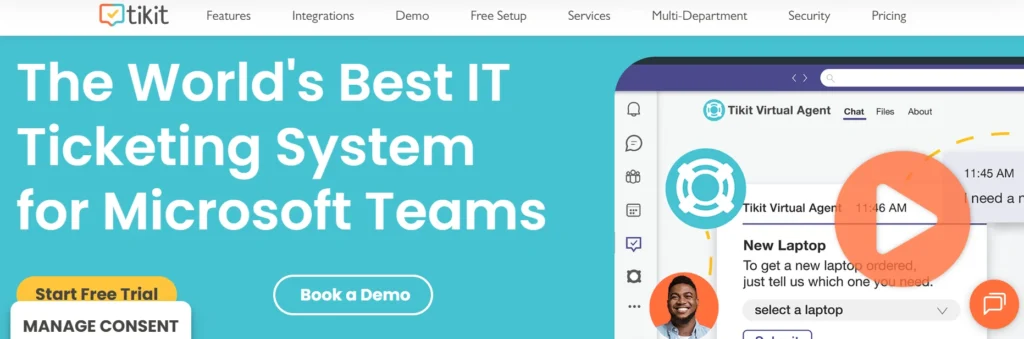
Cireson Tikit is an IT service management tool built by Cireson, a company that has worked on Microsoft-first ITSM products since 2011. Tikit is designed to be used almost entirely inside Microsoft Teams chat, letting agents create, update, and resolve tickets without leaving a conversation. A simple right-click on any Teams message can turn it into a ticket.
Cireson Tikit is best known for:
- Deep integration with Microsoft Entra for single sign-on and Microsoft Intune for device troubleshooting.
- An AI virtual agent, built on Azure OpenAI, that answers common questions before a ticket is even created.
- Workflow automation through Power Automate and Azure Logic Apps, including onboarding and offboarding flows.
- Native Azure DevOps integration, which appeals to IT teams that also manage software development tickets.
- SOC 2 Type 2, GDPR, and HIPAA compliance for security-conscious organizations.
Tikit also supports other departments such as HR, Facilities, Marketing, and Accounting, though its core design and most of its case studies are centered on IT and DevOps-style support teams working inside Teams.
Tikit is a newer product compared to Cireson’s long-standing on-premise tools, which means its feature set is still expanding. Several reviewers note that some requested features are on Cireson’s roadmap rather than already shipped, which is worth factoring in if you need a specific capability on day one rather than in a future release.
SEE IT FOR YOURSELF
Curious how Helpdesk 365 looks inside your own Teams and SharePoint setup?
Helpdesk 365 vs Cireson Tikit: Quick Comparison Table
| Category | Helpdesk 365 | Cireson Tikit |
| Platform foundation | SharePoint + Microsoft Teams | Microsoft Teams only |
| Best fit for | IT, HR, Finance, and mixed departments | Teams-first IT and DevOps teams |
| AI capabilities | AI summaries, AI knowledge base, Agentic AI, Copilot support | AI virtual agent on Azure OpenAI |
| Microsoft integrations | Teams, Outlook, SharePoint, Power BI, Power Automate, Copilot | Teams, Entra, Intune, Power Automate, Azure DevOps, Power BI |
| Reporting & analytics | Built-in dashboards plus Power BI | Power BI and Excel reporting |
| Compliance | GCC, GCC High, Microsoft 365 standards | SOC 2 Type 2, GDPR, HIPAA |
| Setup time | Often under 10 minutes | Typically a few days for full rollout |
| G2 rating | 4.7 / 5 (216+ reviews) | 4.7 / 5 (7 reviews) |
Helpdesk 365 vs Cireson Tikit: Feature-by-Feature Comparison
1. Platform Architecture
Helpdesk 365 runs on SharePoint, with a full Teams app layered on top. This means your tickets, files, and workflows live in a familiar SharePoint structure that IT admins already know how to manage, while end users still get a clean Teams or web experience. Cireson Tikit takes the opposite approach: it is built Teams-first, with no SharePoint dependency.
For organizations that are 100% Teams-centric, that can feel simpler. But for organizations that already use SharePoint for intranets, document storage, or other line-of-business apps, Helpdesk 365’s SharePoint foundation means less new infrastructure to learn and support.
2. Ticketing and Workflow Automation
Both tools let agents create, assign, and resolve tickets without leaving Microsoft Teams. Helpdesk 365 adds rule-based automation for ticket assignment, categorization, and escalation, plus a no-code workflow builder that non-technical admins can configure themselves
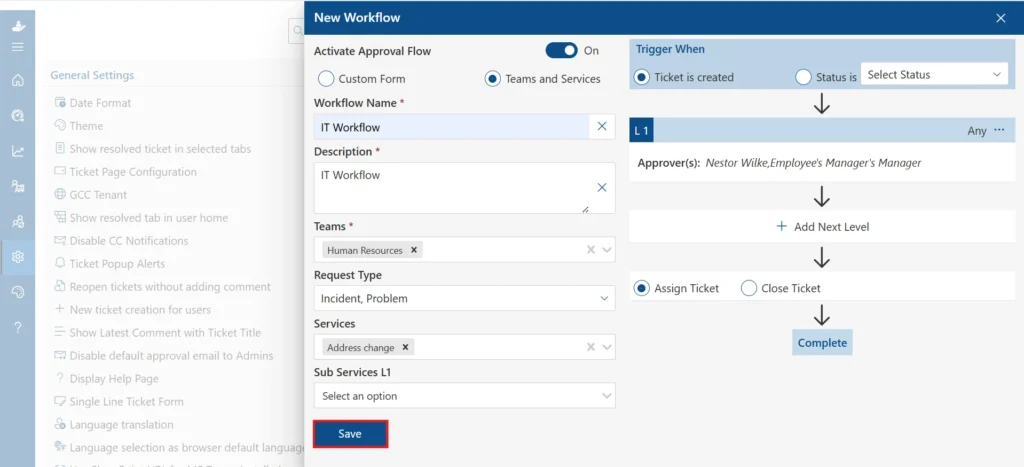
Tikit relies more heavily on Power Automate and Azure Logic Apps for custom workflows, which gives technical teams flexibility but usually needs more setup time and Power Platform know-how to get right.
3. AI and Automation Capabilities
Cireson Tikit’s AI virtual agent uses Azure OpenAI to answer repetitive questions from a knowledge base before a ticket is logged. Helpdesk 365 matches that with its own AI-driven ticket deflection, and goes further with AI text summarization for long ticket threads, AI-suggested responses for agents, and newer Agentic AI features that can draft replies automatically based on ticket context. For teams that want AI support across every department, not just IT, Helpdesk 365’s broader AI feature set is a meaningful advantage.
4. Microsoft 365 Ecosystem Integration
Tikit shines in IT-specific integrations: Microsoft Entra for single sign-on, Microsoft Intune for live device data, and Azure DevOps for development teams. Helpdesk 365 covers the same Microsoft 365 staples, Teams, Outlook, and Power Automate, while adding deeper Power BI reporting and native Microsoft Copilot support. If your support needs stretch beyond IT into HR or Finance, Helpdesk 365’s integrations are built with that wider scope in mind from the start.
5. Multi-Department Support
Helpdesk 365 was designed for IT, HR, and Finance teams to each run their own ticket queues, forms, and approval flows inside a single tool, with department-level mailboxes and permissions baked in. Cireson Tikit also supports HR, Facilities, Marketing, and Accounting use cases, but most of its marketing, case studies, and feature depth still center on IT and DevOps workflows. Organizations planning to roll a single helpdesk out company-wide, not just to IT, will generally find Helpdesk 365’s multi-department design more mature.
6. Reporting and Analytics
On G2, Helpdesk 365 users score its reporting and analytics features at 9.7 out of 10, ahead of several well-known competitors, citing detailed dashboards and trend analysis as a standout strength.
Tikit offers Power BI and Excel-based reporting as well, letting IT teams build dashboards aligned to their own KPIs. Both are solid, but Helpdesk 365’s built-in reporting tends to need less manual setup to get useful insights on day one.
7. Security and Compliance
Cireson Tikit is SOC 2 Type 2, GDPR, and HIPAA compliant, which will reassure healthcare and regulated industries. Helpdesk 365 meets Microsoft 365 security standards and offers GCC and GCC High compliance options, which matters for government contractors and public sector teams.
Both tools keep your data inside Microsoft’s cloud infrastructure rather than a separate third-party server, so the real decision here usually comes down to which specific certification your industry requires.
8. Ease of Setup and Learning Curve
Many Helpdesk 365 users on G2 report deployment in under ten minutes, with a no-code configuration screen for ticket fields, workflows, and notifications. Some reviewers do note a learning curve once they move past the basics into advanced automation.
Tikit’s setup generally takes a bit longer, since admins often need to configure Power Automate flows and Entra or Intune connections before the system reflects their organization’s full structure. For teams that want to be live fast with minimal technical lift, Helpdesk 365 tends to have the shorter runway.
Pros and Cons at a Glance
Feature Area | Helpdesk 365 | Cireson Tikit |
Platform Support | Works across SharePoint, Teams, Outlook, and the web. | Primarily focused on Microsoft Teams. |
Department Coverage | Built for IT, HR, Finance, Facilities, and other departments. | Primarily designed for IT service management teams. |
Reporting & Analytics | Strong reporting capabilities with a 9.7/10 G2 rating. | Provides reporting, but analytics are not a major differentiator in reviews. |
User Reviews | 216+ verified G2 reviews provide broader buyer confidence. | Smaller review base with 7 G2 reviews. |
Microsoft Ecosystem Integration | Deep integration with Microsoft 365 applications. | Native integration with Microsoft Entra ID and Intune. |
Azure DevOps Integration | Available through integrations and workflows. | Strong fit for organizations already using Azure DevOps. |
AI Capabilities | Automation and workflow management features. | AI virtual agent powered by Azure OpenAI. |
Compliance | Supports enterprise security and governance requirements. | Includes SOC 2 Type 2, GDPR, and HIPAA compliance. |
Potential Drawbacks | Advanced automation features may require a learning curve; occasional slow loading reported by some users. | Less SharePoint-native flexibility; some features are still on the product roadmap. |
Example:
Using the same $1,500 laptop example, declining balance depreciation uses a fixed percentage to depreciate the asset each year, with the depreciation expense decreasing over time.
SEE THE AI IN ACTION
Watch how Helpdesk 365’s AI automation cuts ticket response time across departments.
Real-World Scenarios: IT, HR, and Finance Support
Feature lists only tell part of the story. Here is how each tool tends to play out in three common, everyday situations.
Scenario 1: An IT Help Desk Handling Password Resets and Hardware Requests
Both platforms handle this well. An employee messages a bot in Teams, the AI tries to resolve it with a knowledge base article, and if that fails, a ticket is created automatically and routed to an available agent. Tikit’s tie-in with Intune is a genuine plus here, since agents can pull live device data without switching tools. Helpdesk 365 covers the same ground with its own automated routing and adds AI summarization, so a manager scanning a long thread of back-and-forth replies can read a short summary instead of the full history.
Scenario 2: HR Onboarding a New Employee
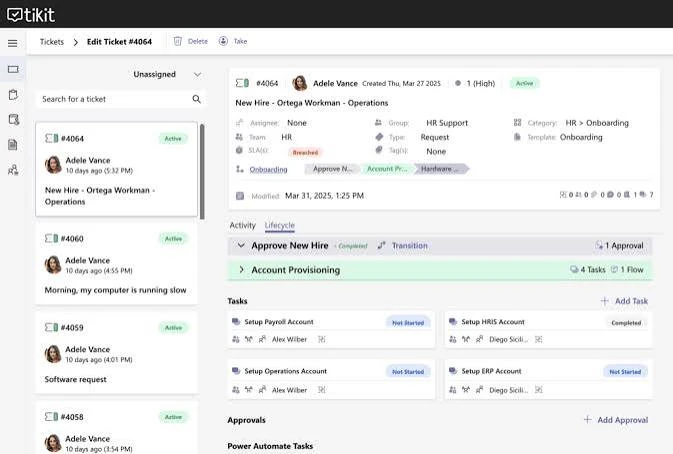
This is where the gap widens. Helpdesk 365 lets HR run its own ticket queue, approval workflow, and onboarding checklist inside the same system IT already uses, without needing custom Power Automate flows built from scratch. Cireson Tikit can technically support HR requests too, but most of its automation examples and built-in templates are written with IT and DevOps processes in mind, so HR teams may need more custom setup to get the same smooth experience.
Scenario 3: Finance Approving a Purchase or Reimbursement Request
Finance teams need clear approval chains, audit trails, and SLA reminders so requests do not sit untouched. Helpdesk 365’s approval workflows and department-level mailboxes are built for exactly this kind of structured, multi-step process. With Tikit, finance-style approval flows are possible through Power Automate, but they generally require more configuration work up front since they are not the platform’s primary use case.
Which Tool Should You Choose?
The right choice depends on how your organization already works and how far you want your helpdesk to reach.
1.Choose Helpdesk 365 if: you want one ticketing system that serves IT, HR, Finance, and other departments, you already use or are open to using SharePoint alongside Teams, you want strong built-in reporting without heavy setup, or you want a platform with a large, verified track record on G2.
2. Consider Cireson Tikit if: your support needs are almost entirely inside IT, your team is deeply invested in Azure DevOps workflows, and you are comfortable building custom automation through Power Automate and Logic Apps.
For most growing organizations that need a helpdesk to scale beyond IT, into HR onboarding, Finance approvals, and other shared services, Helpdesk 365’s broader department support, deeper AI feature set, and far larger base of verified G2 reviews make it the safer, more proven long-term choice.
A Quick Checklist Before You Decide
Ask your team these questions before making a final call:
- Will more than one department (HR, Finance, Facilities) eventually use this helpdesk, or is it IT-only forever?
- Does your organization already use SharePoint, or are you fully Teams-only with no plans to change?
- Do you need built-in reporting on day one, or are you comfortable building dashboards in Power BI yourself?
- How much weight do you put on a large, independently verified review history versus a smaller, newer one?
- Is your team tied closely to Azure DevOps for software development tickets specifically?
If your answers point toward multiple departments, an existing SharePoint footprint, and a preference for proven, well-reviewed software, Helpdesk 365 is the stronger match. If your answers point toward an IT-only, DevOps-heavy Teams environment, Cireson Tikit remains a reasonable option to evaluate.
Conclusion
Both Helpdesk 365 and Cireson Tikit are capable, Microsoft-native helpdesk tools, and neither is a bad choice. Cireson Tikit does a genuinely good job for IT teams who live inside Teams and want close ties to Azure DevOps, Entra, and Intune.
But for organizations that want one flexible system to support every department, with deeper AI automation, stronger built-in reporting, faster setup, and a much larger base of verified user reviews backing it up, Helpdesk 365 comes out ahead. It gives you the reach of SharePoint, the convenience of Teams, and the proof of over 200 real-world reviews, all in one platform
Join Our Creative Community
Frequently Asked Questions
Is Helpdesk 365 better than Cireson Tikit for multi-department support?
Yes, in most cases. Helpdesk 365 was built from the ground up for IT, HR, Finance, and other departments to share one tool with separate queues and permissions. Cireson Tikit supports other departments too, but its strongest feature depth remains in IT and DevOps-style support.
Does Helpdesk 365 work without SharePoint?
Helpdesk 365 is built on SharePoint, so a Microsoft 365 tenant with SharePoint access is required. It also runs as a full app inside Microsoft Teams, so end users can submit and track tickets without ever opening SharePoint directly.
Which tool has better AI automation, Helpdesk 365 or Tikit?
Both use AI to deflect repetitive tickets and speed up responses. Helpdesk 365 offers a wider AI feature set, including ticket summarization, AI knowledge base suggestions, and Agentic AI, across IT, HR, and Finance, while Tikit’s AI virtual agent is focused mainly on IT-style self-service.
Is Cireson Tikit only for Microsoft Teams users?
Tikit is built primarily for Microsoft Teams, with optional web portals available on higher-tier plans. Helpdesk 365 also works inside Teams, but adds a native SharePoint experience as well, giving teams more ways to access the same tickets.
Can Helpdesk 365 and Cireson Tikit be used outside of IT support?
Yes, both tools are marketed for use beyond IT. Helpdesk 365 was designed from the start to support HR, Finance, and other departments alongside IT, with separate queues and forms for each. Cireson Tikit also lists HR, Facilities, Marketing, and Accounting as supported use cases, though its feature depth and case studies still lean more heavily toward IT and DevOps teams.
How long does it take to set up Helpdesk 365 compared to Cireson Tikit?
Helpdesk 365 is generally the faster of the two to get running, with many users reporting a working setup in under ten minutes for basic use, since it relies on guided, no-code configuration. Cireson Tikit usually takes longer to fully configure, since most custom workflows, Entra connections, and Intune integrations are set up through Power Automate rather than built-in wizards.


_JiluXJRGNl.svg)























