

The Role of ITSM Ticketing Systems in Delivering Better IT Support
_eH2jDg7dZ.png)
Think about the last time an IT issue slowed you down at work. Maybe your laptop stopped connecting to the network, or a software tool stopped working right in the middle of a project. You reached out to IT support, but then what happened?
- ITSM ticketing systems act as a single hub for all IT support requests, making sure nothing falls through the cracks.
- Automation in ticket routing, prioritization, and escalation speeds up resolution and reduces manual work for IT teams.
- Self-service portals and knowledge bases empower employees to solve common issues on their own, reducing ticket volume.
- Built-in reporting and analytics help IT teams track performance, meet SLA targets, and continuously improve service quality.
If your company uses an ITSM ticketing system, your request was logged, assigned, tracked, and resolved through a structured process. If not, it might have been lost in an email inbox, forgotten on a chat message, or delayed because no one knew who was responsible.
In this blog, we will walk you through everything you need to know about ITSM ticketing systems, what they are, how they work, what benefits they bring, and how to get the most out of them. Whether you run a large enterprise IT team or a small helpdesk, this guide is for you.
What Is an ITSM Ticketing System?
ITSM stands for IT Service Management. It refers to the way IT teams plan, deliver, manage, and improve the IT services they provide to employees and customers. ITSM is not just about fixing broken computers, it covers everything from handling new software requests to managing major system outages.
At the heart of ITSM is the ticketing system. A ticket is simply a recorded unit of work. When someone reports a problem or requests a service, a ticket is created. That ticket holds all the important details, who raised it, what the issue is, its priority level, its current status, and who is working on it.
Think of it like a boarding ticket at an airport. Just as your boarding pass tracks your journey from check-in to boarding, an ITSM ticket tracks your IT issue from the moment it is raised to the moment it is resolved.
How ITSM Ticketing Systems Centralize IT Support Requests
Before ITSM ticketing systems became common, IT teams managed requests through emails, phone calls, spreadsheets, and sticky notes. This created several problems. Requests got lost. No one knew who was working on what. There was no way to measure performance.
An ITSM ticketing system solves all of this by acting as a single point of contact for all IT-related requests. Whether an employee sends an email, fills out a web form, calls the helpdesk, or submits a request through a self-service portal, all of that goes into one central system. Every ticket is visible, tracked, and managed in one place.
This centralization gives IT teams a clear picture of their workload. It ensures accountability. And it makes sure nothing slips through the cracks, no matter how busy the team gets.
Did You Know?
According to industry reports, IT teams that use a centralized ticketing system can resolve issues up to 30% faster compared to those relying on email-based support. Centralization removes confusion and creates clarity at every stage of the support process.
Ready to Centralise Your IT Support?
Explore how an ITSM ticketing system can transform the way your team handles IT requests — from a single, unified dashboard
How ITSM Ticketing Systems Improve IT Support Operations
Standardizing Service Delivery Processes
One of the biggest advantages of an ITSM ticketing system is that it brings consistency to IT support. Without a standard process, two agents might handle the same type of issue in completely different ways. This leads to uneven service quality, confused users, and difficulty in training new team members.
An ITSM ticketing system defines exactly how each type of ticket should be handled. When a new ticket comes in, the system assigns it to the right team based on the issue type. It sets a priority level. It defines response and resolution timelines. And it guides agents through the steps needed to close the ticket properly.
This standardization means that even if different people are working on similar issues, the quality of service remains consistent. Users get the same experience every time they reach out to IT support.
Ensuring Accountability and Visibility Across Support Teams
Accountability is one of the most common challenges in IT support. When there is no clear system, it is easy for tasks to fall through the cracks or for agents to assume someone else is handling an issue.
An ITSM ticketing system removes this ambiguity. Every ticket is assigned to a specific agent or team. The system records who did what and when. Managers can see the status of every open ticket at any time. If something is taking too long, it is immediately visible on the dashboard.
This transparency benefits everyone. Agents know what they are responsible for. Managers can allocate workload fairly. And end users can check the status of their own requests without having to follow up repeatedly.
Want Full Visibility into Your IT Support?
See how real-time dashboards and ticket tracking can help your IT managers stay on top of every open issue — before it becomes a problem.
Streamlining Incident and Service Request Management
Managing Incidents Efficiently
In ITSM, an incident is an unplanned interruption to an IT service or a reduction in the quality of an IT service. Common examples include a server going down, a network outage, or an application crashing unexpectedly.
Incident management is all about restoring normal service as quickly as possible. The faster an incident is resolved, the less impact it has on business operations.
An ITSM ticketing system supports incident management in several ways. When an incident is reported, it is immediately logged with all relevant details. The system categorizes and prioritizes it based on impact and urgency. It assigns the ticket to the right team automatically. And it tracks the resolution process from start to finish.
For major incidents that affect a large number of users, the system can link multiple related tickets together so teams can see the full picture and coordinate their response more effectively.
Software and Licensing
Unlike hardware, software does not physically degrade, but it becomes less valuable over time as new versions are released, and older versions become unsupported. Software licenses also have a set period of validity, after which they may need to be renewed or replaced. For businesses, depreciating software helps accurately reflect its value over its lifecycle, ensuring that companies don’t overstate the asset’s worth.
In addition to general software, businesses must account for the depreciation of various software licenses. These licenses may lose value as newer versions are released, or as vendors stop supporting older software versions.
Handling Employee Service Requests Through a Structured Workflow
A service request is a formal request from a user for something new, a new laptop, access to a software application, a password reset, or an account setup. Unlike incidents, service requests are not about fixing a broken service. They are about delivering a new one.
An ITSM ticketing system handles service requests through a structured workflow. When an employee submits a request, the system checks what approvals are needed, routes the ticket to the right fulfillment team, and tracks progress until the request is completed.
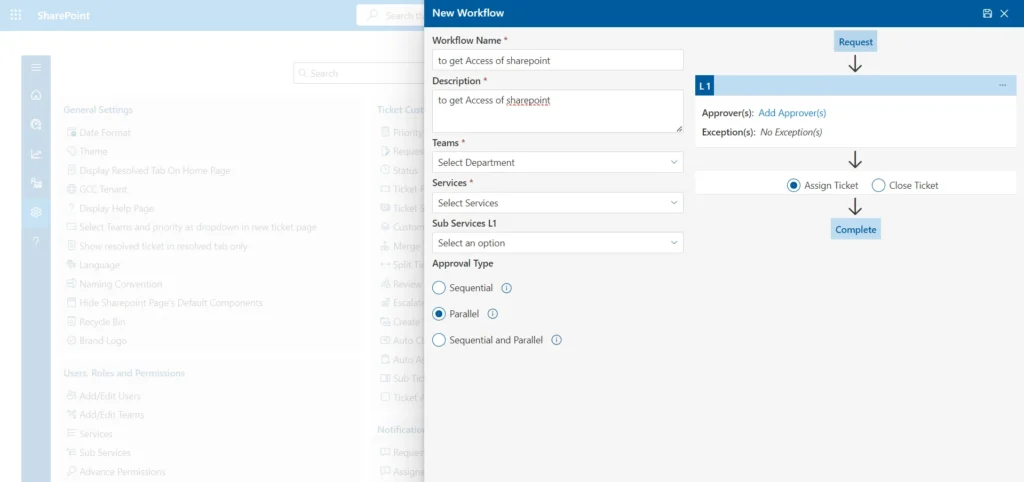
This structured approach ensures that service requests are handled in a consistent, timely manner. It also creates a record of every request, which is useful for auditing, budgeting, and planning future IT resources.
Automating Ticket Routing, Prioritization, and Escalation
Intelligent Ticket Assignment
In the early days of IT support, a manager or senior agent would manually read each new ticket and decide who should handle it. This took time and was prone to human error. Busy periods meant delays in assignment, and mistakes led to the wrong people receiving the wrong tickets.
Modern ITSM ticketing systems use intelligent automation to handle ticket assignment instantly. When a ticket is created, the system reads the details, the category, the issue type, the department it came from, and the skills required, and automatically routes it to the most appropriate agent or team.
Some advanced systems use AI and machine learning to improve assignment over time. The more tickets the system processes, the better it becomes at predicting who should handle each type of issue. This leads to faster assignment, fewer mistakes, and better overall service quality.
Priority-Based Workflows
Not all IT issues are equally urgent. A password reset request is important but not critical. A payroll system going down on salary day is an emergency that needs to be fixed immediately.
An ITSM ticketing system helps IT teams prioritize their work by assigning each ticket a priority level — typically based on two factors: impact (how many people or processes are affected) and urgency (how quickly the issue needs to be resolved).
Priority-based workflows ensure that high-impact, high-urgency issues are always handled first. Lower priority tickets are queued accordingly. This prevents agents from spending time on minor tasks while critical issues are left waiting.
Priority-Based Workflows
Not all IT issues are equally urgent. A password reset request is important but not critical. A payroll system going down on salary day is an emergency that needs to be fixed immediately.
An ITSM ticketing system helps IT teams prioritize their work by assigning each ticket a priority level — typically based on two factors: impact (how many people or processes are affected) and urgency (how quickly the issue needs to be resolved).
Priority-based workflows ensure that high-impact, high-urgency issues are always handled first. Lower priority tickets are queued accordingly. This prevents agents from spending time on minor tasks while critical issues are left waiting.
Escalation Management for Critical Issues
Sometimes a ticket needs to be escalated. This might happen because an agent cannot resolve an issue within their skill level, because a ticket is about to breach its SLA deadline, or because the issue has grown in severity since it was first logged.
ITSM ticketing systems support both manual and automatic escalation. Automatic escalation rules can be configured to move a ticket to a senior agent or specialist team if it has not been updated within a set timeframe. This ensures that critical issues never get stuck and always receive the attention they need.
Automate Your Ticket Routing Today Stop spending time manually assigning tickets. Let intelligent automation handle routing, prioritization, and escalation — so your team can focus on solving problems.
Enhancing SLA Compliance and Service Performance
Tracking Response and Resolution Times
A Service Level Agreement (SLA) is a commitment between the IT team and the business. It defines the expected response time (how quickly IT will acknowledge a ticket) and the resolution time (how quickly IT will fix the issue). SLAs are usually different for different priority levels, a critical outage might have a 1-hour resolution SLA, while a low-priority request might have a 3-day SLA.
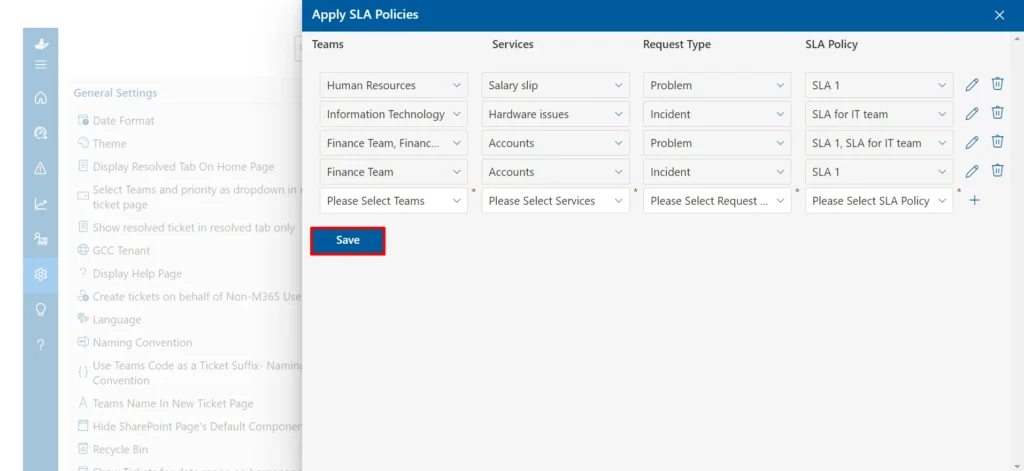
An ITSM ticketing system tracks every ticket against its SLA automatically. As soon as a ticket is created, the system starts a clock. If the ticket is not responded to or resolved within the agreed timeframe, the system flags it and triggers alerts to the relevant agents and managers.
This real-time tracking means SLA breaches are caught early, not discovered after the fact. Agents are reminded of approaching deadlines. Managers can step in if needed. And the business can be confident that IT support is delivering on its promises.
Meeting Service Level Commitments Consistently
Meeting SLAs consistently requires more than just tracking. It requires the right workflows, the right automation, and the right information at the right time.
An ITSM ticketing system supports consistent SLA compliance by automating ticket assignment (so tickets go to the right people without delay), sending timely alerts (so agents are aware of approaching deadlines), providing real-time dashboards (so managers can see overall SLA performance at a glance), and generating reports (so teams can analyze trends and identify areas where SLAs are frequently missed).
Over time, this data helps IT teams improve their processes. If a certain type of ticket is consistently breaching SLAs, the team can investigate why and make changes, whether that means adding more resources, improving documentation, or adjusting workflows.
Empowering End Users with Self-Service Capabilities
Self-Service Portals
A self-service portal is a web-based interface where employees can submit their own IT requests and track their status, without needing to call the helpdesk, send an email, or wait for someone to get back to them.
From a self-service portal, users can browse a catalogue of available IT services, submit requests for standard items like new software or hardware, report incidents, check the status of existing tickets, and read knowledge base articles to solve issues on their own.
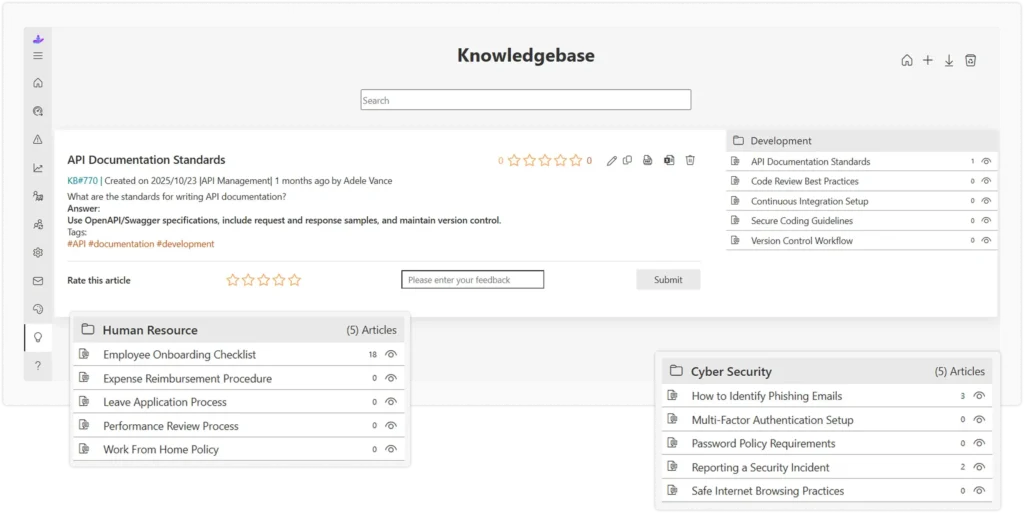
Self-service portals put the power in the hands of the user. They reduce the volume of calls and emails the IT team receives. And they set clear expectations, users know what services are available and how long each one typically takes.
Knowledge Base Integration
A knowledge base is a library of articles, FAQs, guides, and how-to documents that help users solve common problems on their own. When integrated with an ITSM ticketing system, the knowledge base becomes a powerful tool for both users and agents.
For users, the knowledge base appears directly within the self-service portal. When they start describing their issue, the system suggests relevant articles that might help them resolve it without raising a ticket at all. For agents, the knowledge base is a reference tool that helps them resolve tickets faster, especially for recurring issues they may not deal with every day.
A well-maintained knowledge base significantly reduces the volume of repetitive support requests. When users can help themselves, agents have more time to focus on complex issues that genuinely need their expertise.
Reducing Repetitive Support Requests
Some IT issues come up again and again. Password resets, software installation requests, VPN access problems, these types of tickets can make up a large portion of a helpdesk’s daily workload. While each one is quick to handle individually, they add up to a significant drain on IT resources.
By combining self-service portals, knowledge base articles, and automated workflows, an ITSM ticketing system can dramatically reduce the volume of these repetitive requests. Users find answers themselves. Standard requests are processed automatically. And agents are freed up for work that truly needs their attention.
Empower Your Employees with Self-Service Find out how a self-service portal and integrated knowledge base can cut your ticket volume and improve the employee experience at the same time.
Leveraging Reporting and Analytics for Continuous Improvement
Monitoring Ticket Trends and Support Performance
An ITSM ticketing system is not just a tool for managing today’s tickets. It is also a source of valuable data about how your IT support operation is performing over time.
Built-in reporting tools allow IT managers to monitor key metrics such as the total number of tickets received, average response and resolution times, SLA compliance rates, agent workload and productivity, and end-user satisfaction scores.
These reports can be generated on a daily, weekly, or monthly basis and shared with IT leadership and business stakeholders. They give a clear, data-driven picture of IT support performance and help identify trends before they become problems.
Identifying Recurring Issues and Bottlenecks
One of the most valuable uses of ticketing data is identifying recurring issues. If the same type of problem is appearing in tickets again and again, it suggests an underlying root cause that needs to be addressed, not just individual tickets that need to be closed.
For example, if your reports show that 20% of all tickets in a given month are related to a specific software application crashing, that is a clear signal that something needs to be fixed at the root level. Maybe the software needs an update. Maybe additional training is needed. Or maybe the software itself needs to be replaced.
Similarly, reporting can reveal bottlenecks in the support process. If certain types of tickets consistently take longer to resolve, or if a particular team is always overloaded, the data points directly to where improvements are needed.
Using Data to Optimize IT Services
Beyond fixing problems, reporting and analytics help IT teams improve proactively. By analysing ticket data over time, IT teams can predict periods of high demand and plan staffing accordingly, identify knowledge gaps and create targeted training programs, assess the effectiveness of self-service content and improve it, and build a business case for additional resources or tooling upgrades.
This shift from reactive to proactive IT management is one of the key benefits of a mature ITSM ticketing system. Instead of just reacting to problems, the IT team starts preventing them.
Turn Your Ticket Data into Actionable Insights Discover how built-in analytics and reporting in modern ITSM tools can help your team identify trends, reduce ticket volume, and improve service quality over time.
Feature | What It Does for Your IT Team |
First Response Time | How quickly the IT team acknowledges a new ticket after it is submitted. |
Resolution Time | The total time taken to fully resolve a ticket from creation to closure. |
SLA Compliance Rate | The percentage of tickets resolved within the agreed SLA timeframe. |
Ticket Volume | The total number of tickets received in a given period — split by category, priority, and team. |
First Contact Resolution | The percentage of tickets resolved in a single interaction without escalation. |
End-User Satisfaction | Satisfaction scores collected from users after their ticket is closed. |
Re-open Rate | The percentage of tickets that are reopened after being marked as resolved. |
Backlog Size | The number of open tickets at any point — a key indicator of workload balance. |
By tracking these KPIs consistently, IT teams can spot problems early, celebrate improvements, and make informed decisions about where to invest time and resources.
Pro Tip: Start Small, Then Scale
If you are new to ITSM ticketing systems, do not try to configure every feature at once. Start with the essentials — ticket logging, assignment, and basic SLA tracking. Once the team is comfortable, gradually introduce self-service, automation, and advanced reporting. This staged approach leads to better adoption and fewer early-stage issues
Start Optimizing Your ITSM Ticketing System Today
Use these best practices as a checklist to evaluate your current setup — and identify the changes that will have the biggest impact on your team and your users.
Conclusion
An ITSM ticketing system is essential for delivering efficient, consistent, and high-quality IT support. It centralizes support requests, automates workflows, enables self-service, and provides valuable insights for continuous improvement.
Whether you’re implementing a new system or optimizing an existing one, the right ITSM ticketing solution helps make IT support faster, more reliable, and more effective for both IT teams and end users.
Start your free trial today and discover how a modern ITSM ticketing system can streamline support operations and improve service delivery.
Join Our Creative Community
Frequently Asked Questions
How does an ITSM ticketing system improve IT support?
An ITSM ticketing system improves IT support by centralizing all requests in one place, ensuring every ticket is logged, assigned, tracked, and resolved through a defined process. It reduces missed requests, speeds up response times, and gives IT managers full visibility into support performance — all of which leads to a better experience for end users.
What is the difference between incident management and service request management?
Incident management deals with unplanned disruptions to IT services, such as a system crash or network outage — and focuses on restoring normal service as quickly as possible. Service request management handles planned requests for new services or items, such as a new laptop, software access, or a password reset. Both are managed through the ticketing system but follow different workflows, approval processes, and SLA timelines.
How do ITSM ticketing systems help with SLA compliance?
ITSM ticketing systems track every ticket against its agreed SLA automatically. As soon as a ticket is created, the system starts monitoring response and resolution deadlines. It sends alerts to agents when a deadline is approaching and escalates tickets automatically if they are at risk of being breached. Real-time dashboards and reports give managers a clear view of SLA performance at all times.
Can small IT teams benefit from an ITSM ticketing system?
Absolutely. In fact, small IT teams often benefit the most from a ticketing system because they have fewer people to manage a high volume of requests. Even a basic ticketing system helps small teams stay organized, avoid missed requests, respond consistently, and track their performance over time. Many modern ITSM tools offer flexible pricing and lightweight configurations that are ideal for smaller teams.
What features should an ITSM ticketing system include for effective IT support?
The most important features to look for include a self-service portal for end users, automated ticket routing and assignment, SLA tracking and alerts, a knowledge base integration, incident and service request management workflows, escalation management, real-time dashboards and reporting, and multi-channel ticket submission (email, portal, phone). Advanced systems may also include AI-powered categorization, predictive analytics, and integration with monitoring tools for automated ticket creation.


_JiluXJRGNl.svg)























