


It matters because one weak review can turn a small receipt problem into overspending, delayed reimbursement, inaccurate books, tax risk, or fraud.
- Expense review verifies business purpose, receipts, policy compliance, coding, approvals, duplicates, and supporting details before reimbursement or posting.
- A structured review process helps finance teams identify questionable claims earlier and reduce approval delays.
- Consistent expense checks protect budgets, improve record accuracy, and support smoother reporting and audits.
- The biggest gains come from clear policies, automated checks, exception alerts, and a documented review trail.
A strong expense review process asks, “Is the expense business-related, accurate, documented, policy-compliant, unique, and approved by the right person?”
That sounds basic, yet the pressure on finance teams is real. In a 2025 GBTA study, 63% of travel buyers named manual and time-consuming expense submission as the most common expense-reporting pain point, while 55% viewed automated receipt capture and matching as an important improvement.
This guide explains how expense review works, where companies lose control, which review features matter, the mistakes to avoid, and how Expense 365 can support a more consistent approval process.
What Is an Expense Review Process?
An expense review process is the set of checks a business uses to examine expense claims before approval, reimbursement, accounting, or final posting. It covers expenses paid personally by employees, corporate card charges, travel costs and other business spending.
The goal is to confirm that each expense is valid, documented, correctly classified, and allowed by company rules.
A typical expense review follows this flow:
- An employee submits an expense with the amount, date, merchant, category, business purpose, and receipt.
- The system or reviewer checks whether required information is present.
- Policy rules are applied, such as meal limits, hotel caps, mileage rules, restricted merchants, or receipt thresholds.
- The claim goes to the correct manager, cost-center owner, project lead, or finance reviewer.
- Exceptions are questioned, corrected, rejected, or approved with justification.
- Approved expenses move to reimbursement, card reconciliation, accounting, and reporting.
- The final record keeps the receipt, decision, comments, dates, and reviewer actions for future reference.
Good expense review is risk based. A $14 parking charge should not receive the same scrutiny as a $4,000 hotel bill, repeated charge, or late claim with missing proof.
This keeps finance from wasting time on routine transactions while still applying stronger judgment where the cost of a mistake is higher.
What Does an Expense Reviewer Check?
An expense reviewer usually checks seven areas: business purpose, receipt evidence, amount accuracy, policy compliance, accounting category, approval authority, and duplication risk.
For example, imagine a sales manager submits a $186 dinner for four people after a client meeting. A useful review does more than confirm the receipt total. It checks who attended, whether the meal limit was exceeded, whether the client purpose is recorded or whether the same receipt was charged
That level of context turns expense review from a checkbox into a financial control.
Why Expense Review Matters
Expense review matters because small spending decisions become financial statements, tax records, project costs, budgets, and cash outflows. Weak checks can create larger problems later.
It Protects Cash Before It Leaves
Finance teams often discover spending problems after reimbursement because review happened too late or only checked whether a receipt existed. A proper expense review can stop duplicate reimbursement claims, unsupported purchases, personal spending, or costs above policy limits before payment.
It Makes Reimbursement Fairer
Consistent review rules reduce uneven treatment. Staff know what evidence to provide, approvers know what to check, and finance can explain each decision.
It Improves Accounting Quality
A valid expense can still be coded incorrectly. A software subscription entered as office supplies, a client dinner assigned to the wrong project, or a hotel bill booked to the wrong entity can distort reports. Review gives finance a chance to correct coding before month-end expense reconciliation becomes harder.
It Creates an Audit Trail
Auditors and finance leaders may need to know who approved an expense, when it was approved, what evidence supported it, and why an exception was accepted. A documented expense review creates that history instead of relying on inbox searches or someone’s memory.
Challenges Faced Without a Strong Expense Review
Informal expense review usually creates many small issues that stay hidden until month end, an audit request, or a delayed reimbursement complaint.
Duplicate Claims Slip Through
An employee may upload the same taxi receipt twice or claim a hotel charge already paid on a corporate card. Memory-based review can miss both.
Receipts Become the Only Test
A receipt proves a purchase happened, not that it was necessary, business related, within policy, correctly coded, or unique. Treating “receipt attached” as “expense valid” leaves gaps.
Managers Approve Too Quickly
Busy approvers may click through long claim lists simply to clear the queue. Rubber-stamp approval defeats expense review.
Policies Live in Documents, Not Decisions
When policy rules are not built into the process, reviewers must remember limits and exceptions, making enforcement depend on individual knowledge.
Missing Details Create Rework
A vague note such as “client dinner” may trigger messages asking who attended, which account the cost belongs to, or why the amount exceeded the limit. Each follow-up delays both finance and the employee.
Late Review Hides Budget Problems
If claims sit pending for weeks, department leaders see an incomplete picture of spending. A team may believe it has budget remaining while a large group of unapproved expenses is waiting in the queue.
Different Reviewers Make Different Calls
One manager accepts screenshots, another requires itemized receipts. One department allows late claims, another rejects them. Inconsistent decisions create employee frustration and make policy harder to defend.
Expense Review Management Features That Matter
Expense review software should do more than move a claim from “submitted” to “approved.” The most useful features help reviewers focus on exceptions, gather evidence quickly, apply policy consistently, and preserve a clear decision record.
1. Automated Policy Checks
Policy checks compare a claim with company rules before or during approval.
The automated expense management can flag expenses above category limits, claims submitted after a deadline, missing receipts, restricted merchants, weekend transactions, or costs outside approved travel dates.
The key is visibility. A reviewer should see exactly which rule was triggered and what action is required. A generic red warning with no explanation only creates another manual investigation.
2. Receipt Capture and Data Extraction
Receipt capture turns an image into usable expense data.
The receipt capture app should identify details such as merchant, date, amount, tax, and currency, then compare them with what the employee submitted.
This reduces basic checking work and helps reviewers notice mismatches. Expense 365, for example, states that its AI receipt processing extracts fields including date, vendor, amount, and tax, then uses that data to prepare the expense record.
3. Duplicate Expense Detection
Duplicate detection compares new claims with existing receipts, transactions, or expense records. It should look for repeated amounts, merchants, dates, receipt images, and card matches.
This matters because duplicates are not always fraud. An employee can easily forget that a receipt was already submitted last week.
Detecting the duplicate expenses before reimbursement saves the awkward recovery process afterward.
4. Smart Approval Routing
Approval routing sends each expense to the right reviewer based on rules such as department, amount, project, location, cost center, or expense type.
A $40 team lunch might need one manager. A $6,000 conference expense may require a department head and finance.
High-risk exceptions may need another control layer. Routing should reflect financial authority rather than a one-size-fits-all chain.
5. Exception Alerts and Reviewer Comments
Reviewers need a way to focus on unusual claims instead of reading every transaction with equal intensity.
Alerts can highlight missing evidence, overspending, unusual merchants, policy violations, or possible duplicates.
Comments are equally important. If an exception is approved, the reviewer should record the reason so there is a clear record of the decision for future reviews and audits.
6. Real-Time Status and Review Dashboards
A useful dashboard shows submitted, pending, rejected, approved, and reimbursed expenses.
Finance can spot aging claims, overloaded approvers, repeated exceptions, and unusual spending patterns.
Expense 365 describes a real-time expense dashboard for viewing submitted, approved, and pending expenses, which can help teams track claim status and spending activity.
7. Complete Audit History
Every review should preserve the submission, receipt, edits, policy flags, decisions, comments, dates, and outcome.
That lets finance explain rejections or exceptions with evidence instead of reconstructing email history.
A complete audit trail also makes reviews more consistent and easier to verify later.
Ready to simplify your expense review process?
Expense 365 brings policy checks, receipt verification, approval workflows, and reimbursements into one place, built natively for Microsoft 365.
Benefits and Business Impact of Better Expense Review
A stronger expense review process gives finance better control, employees clearer decisions, managers faster visibility, and leadership more reliable data.
Fewer Unapproved or Unsupported Expenses
Automated checks and clearer review standards stop more problems before payment. The savings may come from duplicate claims, policy breaches, incorrect amounts, personal purchases, or missing documentation.
Consistent review also encourages employees to handle receipts, categories, explanations, and policy limits more carefully.
Quick Approval Process
Risk-based review can move clean, low-value expenses quickly while sending exceptions for deeper checks.
GBTA reported in 2025 that 67% of surveyed business travelers use expense systems, showing that digital expense handling is already common.
The next opportunity is not simply collecting claims electronically; it is making the expense approval workflow itself faster and more intelligent.
Better Spend Visibility
Pending expenses matter because they represent money the business has already committed or employees expect to recover.
When spend status is visible, finance can see both approved and outstanding spend rather than waiting for completed reimbursements.
That gives budget owners a more realistic view of available funds.
Cleaner Month-End Close
When categories, receipts, cost centers, projects, and approvals are checked earlier, accountants spend less time fixing expense data during close. The expense review process becomes an upstream quality control for reporting.
Stronger Policy Compliance
Rules are easier to follow when employees receive immediate, specific feedback. Instead of discovering at month end that a hotel exceeded the limit, a system can flag the issue when the claim is submitted.
More Useful Management Data
Expense data can show more than total spending.
Review patterns reveal which policies cause frequent exceptions, which teams submit late, which merchants appear repeatedly, and where budgets are under pressure.
That insight helps finance improve policy instead of only policing it.
Common Expense Review Mistakes
Even companies with expense software can have a weak review process. Technology cannot fix unclear ownership, poor policy design, or careless approvals by itself.
- Reviewing Every Expense the Same Way: Equal review wastes time. Low-risk, low-value claims with complete evidence should move faster than unusual, high-value, or policy-breaking expenses.
- Setting Rules That No One Can Explain: If employees regularly ask what a rule means, the policy is too vague. Review criteria should include clear thresholds, examples, required evidence, and defined exception paths.
- Approving Without Business Context: A receipt alone does not explain why the expense was incurred. Require a meaningful business purpose for categories where context matters, such as meals, entertainment, gifts, travel changes, and unusual purchases.
- Ignoring Corporate Card Matching: Reviewing employee claims and card transactions separately can allow the same expense to appear in both channels, increasing the risk of duplicate reimbursements.
- Treating Exceptions as Automatic Rejections: Not every policy exception is incorrect. The better approach is to flag the exception, document the reason, and approve or reject it based on the available facts.
- Leaving Old Claims in the Queue: Delayed reviews make expenses harder to verify, leave budgets incomplete, and create unnecessary follow-ups. Aging claims should trigger reminders or escalation.
Best Practices for an Effective Expense Review Process
The best expense review process is strict for high risk and simple when evidence is strong.
- Define what reviewers must verify. Create a short checklist covering business purpose, receipt, amount, policy, category, duplicate risk, and approval authority.
- Set approval thresholds. Use different review paths for ordinary claims, high-value expenses, policy exceptions, and sensitive categories.
- Require itemized evidence where it matters. A card slip showing only a total may not explain meals, tips, taxes, or restricted items.
- Build policy rules into submission. Tell employees about missing receipts or exceeded limits before the claim reaches a manager.
- Match receipts to card transactions. This reduces duplicate reimbursement and makes reconciliation easier.
- Track review aging. Measure how long claims remain pending by manager, department, and expense type.
- Review exception trends monthly. Repeated exceptions may signal an unrealistic policy, training gap, or spending problem.
- Document overrides. An approved exception should include a reason and named decision maker.
- Test the process with real cases. Use examples such as duplicate hotel charges, missing itemized meal receipts, weekend purchases, and late submissions to see whether controls behave as intended.
How Expense 365 Helps the Expense Review Process
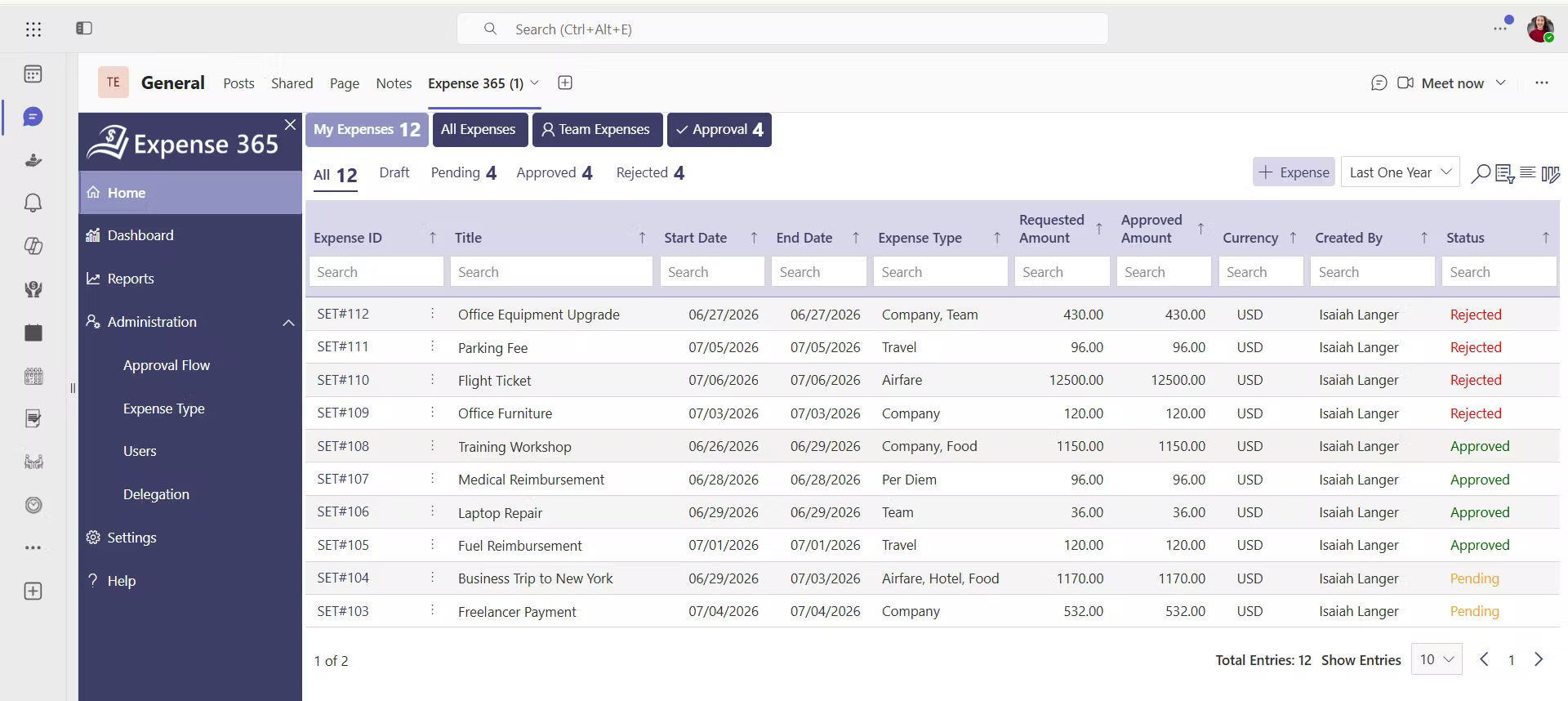
Expense 365 is built for organizations that want expense submission, review, approval, reporting, and records connected within the Microsoft 365 environment.
It works with SharePoint, Microsoft Teams, Outlook, Power BI, QuickBooks, and Xero, while supporting features such as AI receipt scanning, approval workflows, corporate card management, reporting, per diem, and budget controls.
- Review Receipts Faster: Extracts vendor, date, amount, and tax details for quicker verification.
- Catch Duplicate Claims: Helps identify repeated receipts or claims before reimbursement.
- Route to the Right Approver: Automatically sends expenses to the appropriate manager or department.
- Approve in Microsoft Teams: Lets managers review and approve or reject expenses within Teams.
- Keep Review Evidence Together: Centralizes receipts, expense records, and approval activity for easier audits.
- Focus on Exceptions: Helps reviewers spend less time on routine claims and more on unusual or high-risk expenses.
Conclusion
A strong expense review process helps finance teams verify claims, enforce policies, catch duplicates, speed up approvals, and maintain accurate records.
Start by identifying where reviews slow down or where errors occur most often. Then improve your review rules, approval workflows, and exception handling.
With Expense 365, you can streamline expense reviews, automate key checks, and keep approvals and expense records together in Microsoft 365.
Frequently Asked Questions
How often should a company review its expense review policy?
Review it at least annually and sooner when travel patterns, tax rules, business locations, card programs, fraud risks, or company budgets change. Also review exception data monthly or quarterly. If the same rule is broken repeatedly by otherwise valid claims, the policy may need clarification or adjustment
Can expense review handle different approval rules for different departments?
Yes. Approval workflows can route expenses according to department, employee role, expense type, amount, or other defined rules.
What happens when an expense violates company policy?
The expense can be flagged for review rather than automatically rejected, allowing the reviewer to assess the circumstances and document the decision.
Does expense review replace finance team's judgment?
No. Automation handles repeatable checks, while finance and managers retain control over exceptions and approval decisions.
Can we route different expenses to different reviewers?
Yes. Approval routing can be based on factors such as department, expense category, employee, amount, or approval authority.


_JiluXJRGNl.svg)























