

The Ultimate Guide to Creating and Managing a Employee Contact List
_eH2jDg7dZ.png)
An employee contact list keeps important employee details such as names, roles, phone numbers, and email addresses in one organized place. It helps teams quickly reach the right person and improves internal communication. Keeping the contact list updated ensures accurate information and helps employees connect with colleagues easily across departments.
By keeping contact information accurate, secure, and easily accessible, businesses can foster efficiency and connectivity across departments. This guide explores best practices for creating, managing, and maintaining a comprehensive employee contact list to support organizational success.
Maintaining a structured employee contact list helps organizations improve communication and collaboration across teams. Studies show that 86% of employees and executives cite lack of effective communication and collaboration as the primary cause of workplace failures, highlighting the need for organized employee information and easy contact visibility. A well-managed contact list helps employees connect with the right colleagues quickly and supports smoother internal communication.
Why a Employee Contact List is Essential
An up-to-date employee contact list is a fundamental asset for any organization. It serves as a central hub for employee information, facilitating seamless communication and collaboration across departments.
Having quick access to employee directory contact details ensures that urgent messages reach the right people without delay, especially in critical situations. Additionally, it fosters a collaborative work culture by making it easier for employees to connect with one another.
Keeping the list prevents communication gaps, ensuring that new hires are integrated smoothly while former employees are promptly removed to avoid confusion. Ultimately, an efficient employee contact list contributes to productivity and organizational coherence.
Best Practices for Creating a Employee Contact List
Developing a structured and reliable employee contact list requires careful planning. Follow these best practices to optimize its accuracy, security, and usability:
1. Define the Key Information
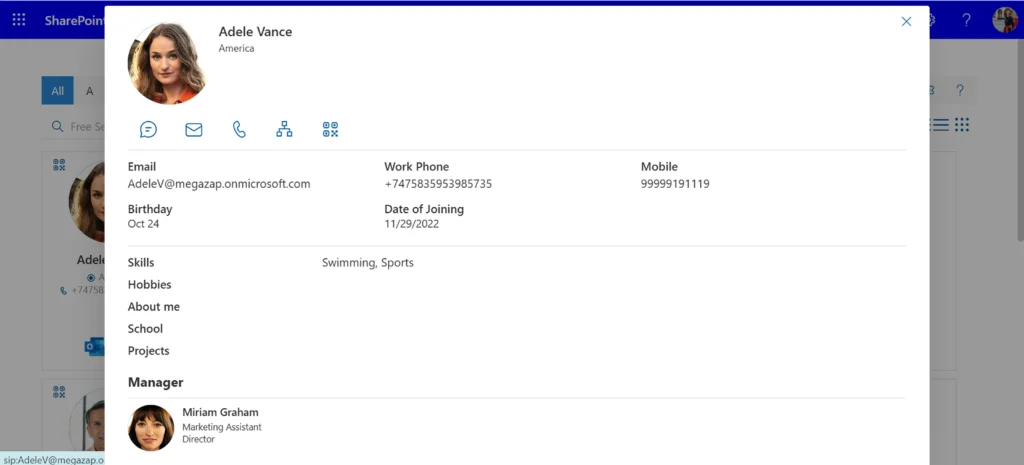
Determine which details should be included, such as:
- Full name
- Job title
- Department
- Email address
- Office phone number
- Mobile number (if applicable)
- Office location
- Manager or team lead
- Emergency contact details
2. Maintain Accuracy and Consistency
- Regularly update the list to reflect personnel changes.
- Establish a process for employees to report updates to their contact details.
- Conduct routine audits to ensure the information remains reliable.
3. Centralize and Organize Access
- Store the contact list in a secure, easily accessible location, such as a cloud-based database or contact management system.
- Organize contacts alphabetically, by department, or by job role for easier navigation.
- Implement role-based access permissions to ensure data security.
4. Implement Security Measures
- Use encryption and password protection to prevent unauthorized access.
- Comply with data privacy regulations such as GDPR or CCPA.
- Limit editing permissions to designated personnel, such as HR or IT teams.
5. Regular Review and Maintenance
- Set periodic reminders for HR or administrative teams to verify and update records.
- Conduct data validation checks to identify and correct outdated or incorrect information.
6. Train Employees on Usage
- Educate employees on how to access, update, and use the contact list responsibly.
- Encourage a culture of accountability where everyone ensures their details remain current.
Enhancing Communication with a Employee Contact List
An efficient contact list streamlines communication and improves workflow in multiple ways:
- Simplifies Access to Contact Information
Employees can quickly find and connect with colleagues, saving time and reducing frustration.
- Supports Remote and Hybrid Work
Ensures that remote employees can easily reach teammates and supervisors, fostering productivity despite location barriers.
- Strengthens Emergency Communication
Enables the rapid dissemination of urgent messages, ensuring safety and swift response during crises.
- Integrates with Communication Tools
Syncing the list with internal messaging and collaboration platforms enhances efficiency and eliminates redundant searches.
- Reduces Miscommunication Risks
A single, well-maintained source of employee contacts minimizes errors and misunderstandings.
Choosing the Best Employee Directory Solution
Selecting the right employee directory solution is important for organizations that want to improve internal communication and make employee information easy to find. A well-designed directory helps employees quickly locate colleagues, understand team structures, and connect with the right person for a specific task.
When evaluating different solutions, organizations should consider several important factors.
Centralized Employee Information
The directory should provide a single place where employee information such as names, job titles, departments, phone numbers, and email addresses can be stored and managed. A centralized system ensures that employees can easily find accurate information without searching through multiple sources.
Advanced Search and Filtering Options
An effective employee directory should allow users to search for colleagues using employee search filters such as department, job role, location, or skills. These features make it easier for employees to identify the right contact within large organizations.
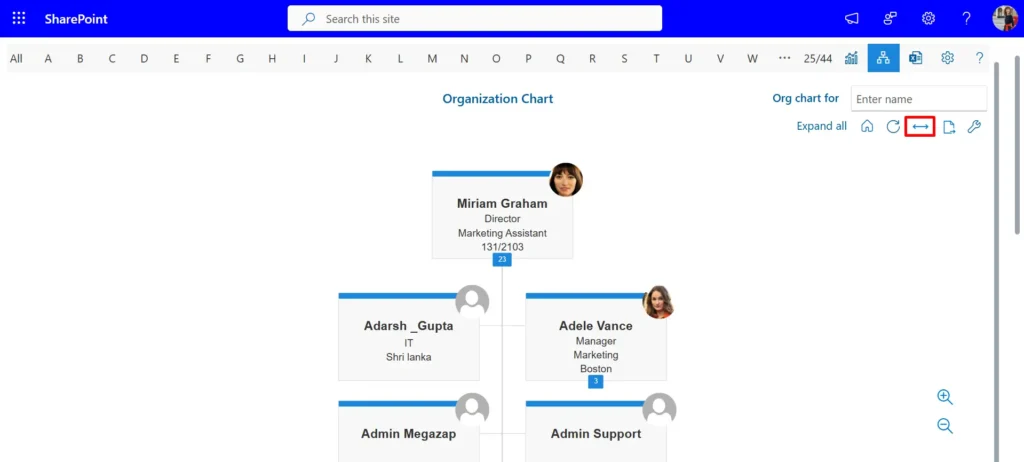
Organizational Chart Visibility
A clear organizational chart helps employees understand reporting relationships and team structures. This feature supports better communication by showing who manages whom and how different teams are connected.
Easy Profile Management
Employee information changes frequently due to promotions, department changes, or contact updates. The directory should allow quick and simple profile updates so information remains accurate and reliable.
Integration with Workplace Tools
The best employee directory solutions integrate with existing workplace platforms such as Microsoft Teams, SharePoint, or other collaboration tools. Integration helps employees view colleague information within the tools they already use daily.
User-Friendly Interface
A simple and intuitive interface ensures employees can navigate the directory without difficulty. Easy navigation encourages regular use and helps employees quickly find the information they need.
Security and Data Control
Since employee directories store personal and professional information, strong security measures and role-based access controls are essential to protect sensitive data.
By evaluating these factors, organizations can select an employee directory solution that supports communication, improves collaboration, and keeps employee information organized as the workforce grows.
Maintenance Tips for HR Professionals
HR teams play a critical role in ensuring the contact list remains useful and accurate. Key maintenance strategies include:
- Standardized Updating Procedures: Define clear steps for adding, updating, or removing employees.
- Regular Data Audits: Schedule quarterly reviews to correct discrepancies.
- Integration with HR Systems: Sync with payroll and employee records to minimize inconsistencies.
- Encouraging Employee Self-Updates: Provide access for employee to edit their own details while maintaining oversight.
- Ensuring Compliance: Stay up to date with privacy regulations and adjust policies accordingly.
Educating Employees on Updating Their Information
To ensure accuracy, employees must understand the importance of keeping their contact details current. Training strategies include:
- Explaining the Impact of Outdated Information: Highlight risks such as missed messages and emergency delays.
- Emphasizing Compliance with Company Policies: Reinforce that updating contact details is a requirement.
- Providing Simple Update Methods: Offer an intuitive self-service portal or a quick online form.
- Conducting Awareness Sessions: Organize periodic training on maintaining accurate records.
- Recognizing Compliance: Reward employees who proactively keep their information up to date.
Conclusion
A well-structured employee contact list is a crucial tool for fostering communication, supporting remote work, improving emergency preparedness, and enhancing overall workplace efficiency. By implementing a robust SharePoint employee directory system and following best practices for maintenance, organizations can ensure seamless connectivity and collaboration among employees.
Join Our Creative Community
Frequently Asked Questions
Why is maintaining a staff contact list important?
It enables seamless communication, facilitates teamwork, and ensures quick response during emergencies.
What details should be included in the staff contact list?
Essential details include employee name, job title, department, email, phone numbers, office location, and supervisor contact information.
How can organizations protect employee contact details?
By implementing encryption, restricted access, compliance with data protection laws, and regular security audits.
By adopting a strategic approach to contact list management, organizations can optimize internal communication and ensure their workforce remains connected and engaged.


_JiluXJRGNl.svg)























