


Employee training is one of the most significant investments an organization makes. According to the Association for Talent Development (ATD), U.S. companies spend an average of $1,252 per employee on training each year. Yet a large share of that investment is wasted when employees enroll in courses that are irrelevant to their role, never completed, or disconnected from business goals.
The solution is approval-based enrollment structured process where a manager, administrator, or designated approver reviews training requests before a course begins. When implemented through a platform like LMS 365, this process becomes simple, scalable, and measurably effective.
This guide explains why approval-based enrollment matters, the real business benefits it delivers, and how organizations are using LMS 365 to build smarter, more accountable training programs.
- Approval-based enrollment ensures employees take training that is relevant to their roles and development goals.
- Structured approval workflows improve compliance, accountability, and course completion rates.
- Organizations reduce training waste by directing budgets toward high-value learning opportunities.
- LMS 365 simplifies enrollment approvals with automation, role-based learning paths, and built-in Microsoft 365 integration.
What Is Approval-Based Enrollment?
Approval-based enrollment adds a structured layer of oversight to your training program. Instead of allowing employees to sign up for any available course at will, enrollment requests are routed to a designated approver typically a direct manager, HR administrator, or department lead.
The approver reviews the request, considers whether the training aligns with the employee’s role, development goals, and current priorities, and then approves, declines, or redirects the request. This ensures that learning is intentional not accidental.
It also helps organizations maintain better control over training budgets and resource allocation by ensuring that only relevant and high-impact courses are approved. This reduces unnecessary enrollments, improves training ROI, and creates a more focused learning experience where employees are guided toward courses that directly support both their individual growth and the organization’s strategic goals.
Why Approval-Based Enrollment Matters
Approval-Based Enrollment ensures only verified and authorized users gain access, improving security and maintaining control over who joins the system.
It also reduces misuse and keeps enrollment aligned with organizational policies and compliance standards.
1. Maintaining Training Quality
When employees can enroll freely in any course, the quality and relevance of training suffers. A 2022 McKinsey survey found that 58% of employees feel their training does not align with their actual job responsibilities a clear signal that unrestricted enrollment alone is not enough.
Without guidance, employees frequently:
- Choose courses based on curiosity rather than job relevance
- Skip foundational courses and jump to advanced programs
- Enroll in training they have already completed
- Delay essential compliance or mandatory training
An approval workflow ensures every enrollment decision is deliberate and aligned with both the employee’s development plan and the organization’s objectives.
Research from the Josh Bersin Academy (2023) supports this directly: organizations where managers are actively involved in enrollment decisions see 82% higher course completion rates compared to those with open, self-directed enrollment.
Example: A customer support representative requests access to a leadership development course. Their manager reviewing the request inside LMS 365 recognizes that the employee would benefit more from completing customer service certification first. The manager redirects the request with a recommended learning path, creating a more structured and effective development journey.
2. Supporting Compliance Training Requirements
For many organizations, compliance training is not optional. The Brandon Hall Group found that 42% of compliance training is delayed or skipped in organizations that operate with open-enrollment policies a statistic that represents real regulatory and financial risk.
Industries including healthcare, finance, manufacturing, and technology face strict regulatory requirements that mandate specific training completion. Failure to comply can result in audits, fines, or operational disruptions.
Without oversight, employees may:
- Prioritize optional courses over required compliance training
- Delay mandatory certifications until deadlines pass
- Create gaps in training records that fail during audits
Approval-based enrollment helps organizations enforce training priorities. Within LMS 365, compliance courses can be configured as mandatory prerequisites — employees cannot enroll in optional training until all required compliance modules are completed and marked current
LMS 365 Advantage:
LMS 365 integrates natively with Microsoft 365, allowing compliance training records to be tracked, reported, and audited alongside existing organizational data — making regulatory reporting faster and significantly more accurate.
3. Optimizing Training Budgets
According to the ATD State of the Industry Report (2023), U.S. organizations invest an average of $1,252 per employee on training annually. When employees enroll in courses they never complete, that investment is directly wasted.
The scale of the problem is measurable. The Towards Maturity Benchmark Report (2022) found that the average e-learning course completion rate in organizations without structured enrollment sits at just 24% meaning more than three-quarters of courses started through open enrollment are never finished.
With approval-based enrollment in LMS 365, managers can prioritize high-cost training for employees who will directly benefit maximizing return on learning investment and ensuring resources reach the right people at the right time
Key Benefits of Approval-Based Enrollment
Benefit | What It Means for Your Organization |
Improved Learner Accountability | Employees who actively request approval are significantly more committed to completing the training they start. |
Targeted Skill Development | Managers guide employees toward courses aligned with career growth and measurable business goals. |
Better Compliance Management | Mandatory training is prioritized, reducing compliance risk and simplifying audit reporting. |
Cost Efficiency | Training budgets are directed toward high-value learning reducing wasted spend on incomplete or irrelevant courses. |
Enhanced Reporting & Visibility | Approval workflows generate trackable data on training requests, departmental trends, and completion rates. |
Structured Learning Paths | Employees follow role-appropriate learning journeys instead of choosing courses at random. |
How LMS 365 Enables Approval-Based Enrollment
LMS 365 is a learning management system built natively on Microsoft 365 and SharePoint. Its approval-based enrollment capabilities are designed to be powerful without being complicated and because it lives inside the Microsoft ecosystem your team already uses, adoption is fast and friction is low.
Manager Review Workflows
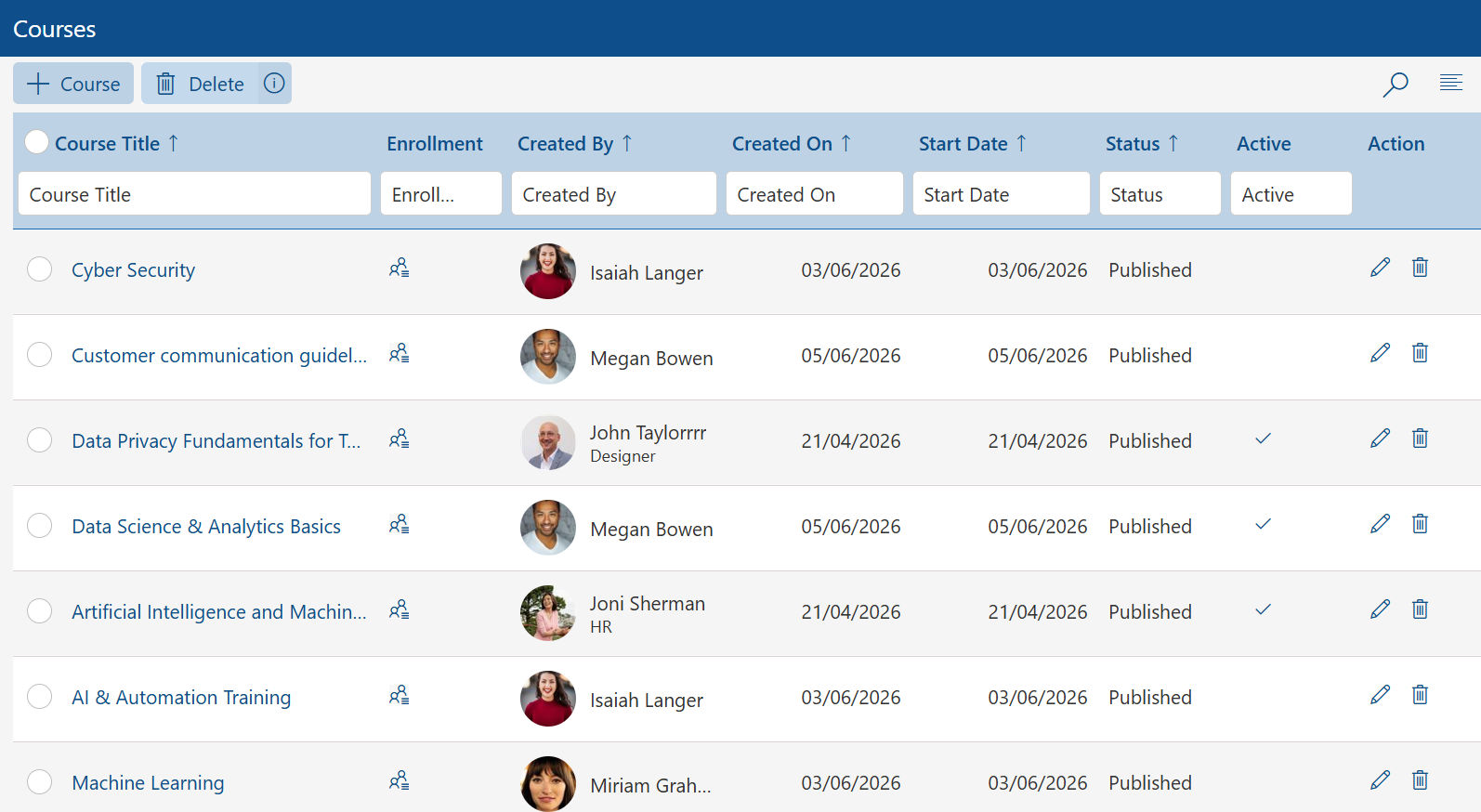
LMS 365 routes enrollment requests directly to the appropriate approver. Approvers receive notifications through Microsoft Teams or email, review requests in a familiar Microsoft 365 environment, and approve or decline with a single action no separate system to learn.
Automated Approval Triggers
Not every course needs manual review. LMS 365 supports intelligent automation to reduce administrative burden:
- Mandatory compliance and onboarding courses are automatically approved and assigned
- High-cost certifications or premium programs require multi-level authorization
- Role-based learning paths auto-enroll employees based on department, job title, or team
Role-Based Learning Paths
LMS 365 makes it easy to build structured learning paths for every role new employee onboarding, sales enablement, leadership development, compliance certification, and more. LinkedIn’s Workplace Learning Report (2023) found that 94% of employees say they would stay longer at a company that invests in their development. Structured, role-aligned learning paths are one of the most effective ways to demonstrate that investment.
Reporting and Analytics
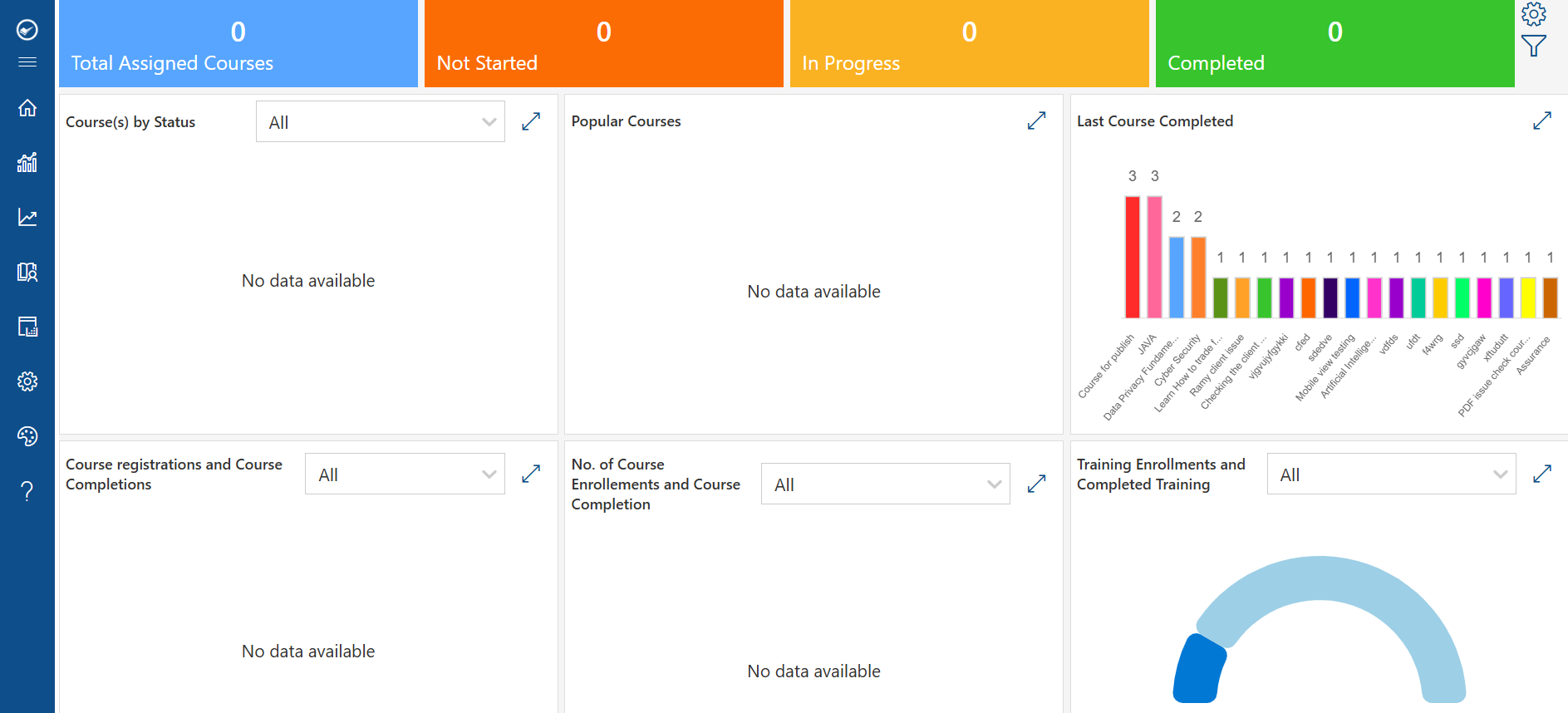
LMS 365 provides full visibility into the enrollment process, including training requests submitted, approval turnaround times, completion rates, compliance status by employee and team, and skill gap analysis based on enrollment data.
The CIPD Learning at Work Survey (2023) found that 70% of L&D professionals cite proving training impact as their top challenge. LMS 365 reporting gives training leaders the evidence they need to demonstrate ROI clearly to business leadership.
The Hidden Costs of Open Enrollment
Open, unrestricted enrollment may seem convenient, but industry data consistently shows it creates problems that are difficult to manage at scale. Organizations with open-enrollment policies report average e-learning completion rates of just 24% (Towards Maturity, 2022), with 42% of compliance training delayed or skipped entirely (Brandon Hall Group, 2023). Meanwhile, 40% of employees who leave within their first year cite poor or irrelevant training as a contributing factor (LinkedIn, 2023) a retention cost that far exceeds any administrative savings from removing enrollment controls.
|
Challenge |
Business Impact |
|
Low completion rates |
Average e-learning completion without structured enrollment: 24% (Towards Maturity, 2022) |
|
Compliance training gaps |
42% of compliance training is delayed or skipped in open-enrollment organizations (Brandon Hall Group, 2023) |
|
Budget waste |
At $1,252 per employee annually (ATD, 2023), courses left incomplete represent significant direct cost |
|
Poor skill alignment |
58% of employees say training does not match their actual job needs (McKinsey, 2022) |
|
Retention risk |
40% of employees who leave within a year cite poor or irrelevant training as a factor (LinkedIn, 2023) |
Signs Your Organization Needs Approval-Based Enrollment
If any of the following challenges sound familiar, your organization may be ready for a more structured enrollment process:
- Training completion rates are consistently below 50% across departments
- Your training budget is growing but measurable skill improvements are limited
- Compliance training is frequently delayed or incomplete at audit time
- Employees are enrolling in courses with no connection to their role or goals
- Training administrators lack visibility into what employees are learning and why
- High-cost certifications are underutilized or left incomplete
LMS 365 can help address each of these challenges through intuitive approval workflows, automated assignment rules, and comprehensive reporting — all within the Microsoft 365 environment your team already knows.
How Approval-Based Enrollment Works in an LMS
Approval-based enrollment is a structured way of controlling who gets access to training courses inside a Learning Management System (LMS). Instead of allowing employees to self-enroll freely, each request goes through a review process before access is granted. This ensures training aligns with job roles, business priorities, compliance requirements, and individual development goals.
Here’s how the workflow typically works in more detail:
1. Employee Requests Course Enrollment
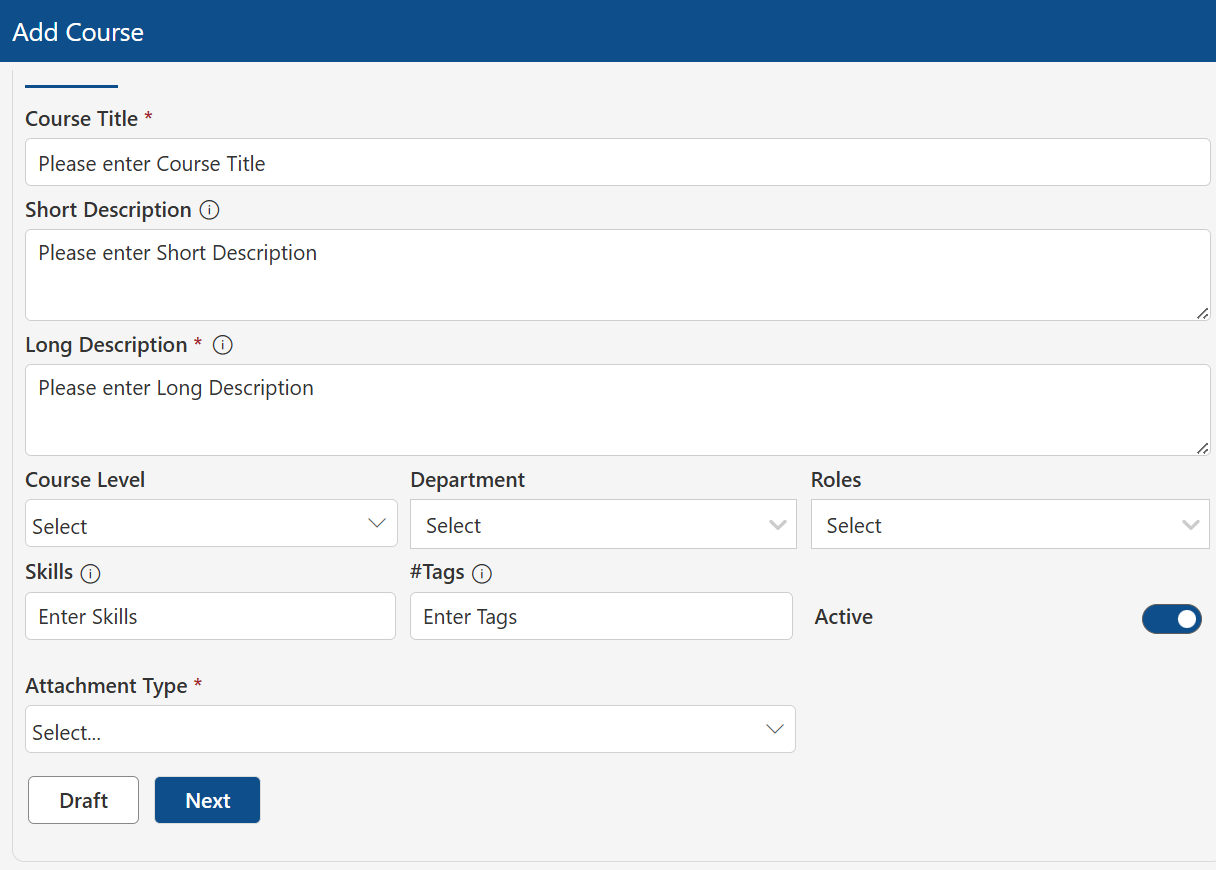
The process begins when an employee identifies a training need and submits a request for a specific course. This could be for skill development, onboarding, compliance training, or role-specific learning. In many LMS platforms, this request is made directly from the course catalog with a single click, and the employee may also be asked to provide a short justification.
At this stage, the system logs key details such as the course name, requester identity, department, and request time.
2. Request Is Routed to the Approver
Once submitted, the request is automatically sent to a predefined approver. This is usually a direct manager, HR representative, team lead, or training administrator depending on how the organization is structured.
Some organizations use multi-level approval, where a request must pass through more than one stakeholder (for example, manager approval followed by HR validation for budgeted or compliance-heavy training).
3. Evaluation of the Request
The approver reviews the request using predefined criteria. This step is important because it ensures training decisions are intentional rather than random.
Common factors considered include:
- Whether the course matches the employee’s current role
- Alignment with performance goals or development plans
- Relevance to team or department needs
- Budget constraints (if the course is paid)
- Compliance or mandatory training requirements
- Availability of alternative or more suitable courses
In some systems, approvers also see employee learning history, making it easier to decide whether the course is appropriate or redundant.
4. Decision: Approve, Reject, or Redirect
After review, the approver makes one of three decisions:
- Approve: The employee is granted immediate access to the course.
- Reject: The request is denied, often with a reason provided so the employee understands why.
- Redirect: The approver suggests a more relevant course or learning path instead of the requested one.
The redirect option is especially useful in structured learning environments, as it helps guide employees toward more meaningful training rather than simply denying access.
5. Notification and Access Control
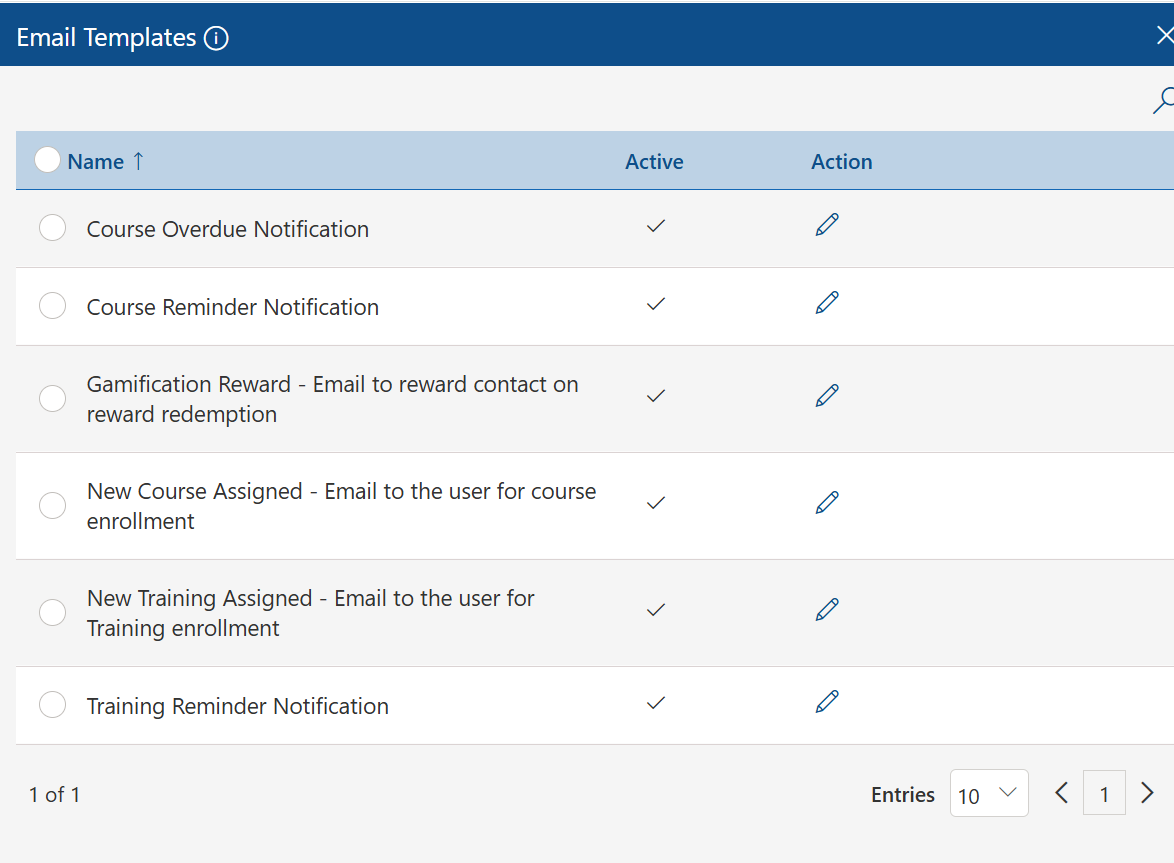
Once a decision is made, the system automatically notifies the employee. If approved, the course is unlocked in their dashboard. If rejected or redirected, the employee receives feedback or recommendations.
This automated communication reduces delays and eliminates the need for manual follow-ups between employees and managers.
6. Tracking and Reporting in the LMS
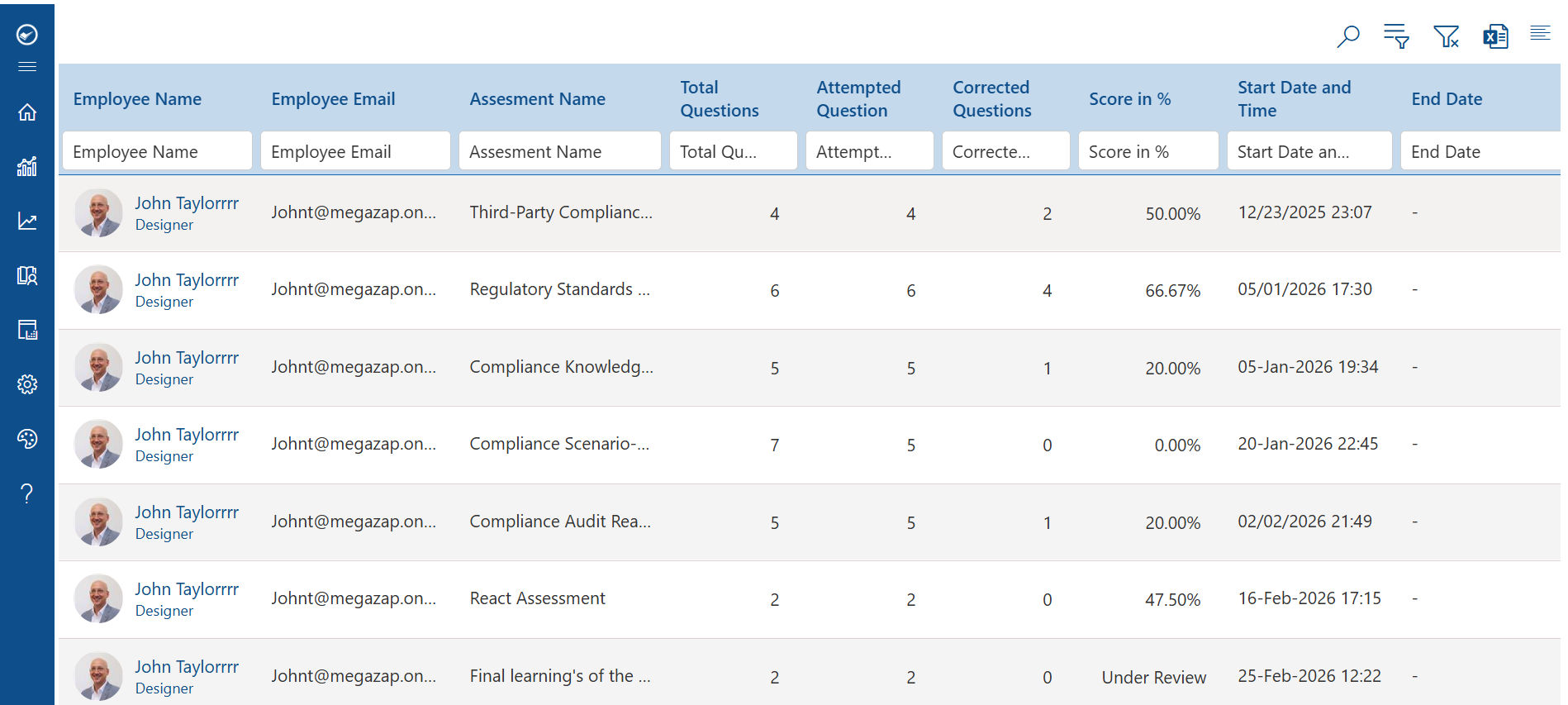
After access is granted, the LMS continues to track learner activity. This includes:
- Course progress
- Completion status
- Time spent on modules
- Assessment results
Managers and administrators can then use this data to evaluate training effectiveness and ensure that learning investments are delivering value.
Why This Workflow Matters
Approval-based enrollment helps organizations maintain better control over learning resources. It prevents unnecessary or misaligned training, ensures compliance for regulated industries, and improves learning ROI by focusing on relevant skill development.
At the same time, it creates a more guided learning experience for employees, where training is connected to actual career growth rather than random course selection.
How to Implement Approval-Based Enrollment Successfully
Step 1: Define Your Approval Structure
Determine who will serve as approvers for different types of training. Direct managers typically handle routine approvals, while HR or training administrators manage compliance and certification programs. LMS 365 supports multi-level approval chains for high-value training requests.
Step 2: Build Role-Based Learning Paths
Work with department leaders to identify the core training required for each role. Build structured learning paths in LMS 365 for new employee onboarding, sales enablement, compliance certification, and leadership development. This reduces ad hoc enrollment requests and creates a clear training baseline for every employee.
Step 3: Configure Automation Rules
Set up automated triggers for predictable scenarios — mandatory compliance courses auto-assign, onboarding training enrolls immediately at hire, and high-cost certifications require additional authorization. Automation reduces administrative effort without removing necessary oversight.
Step 4: Communicate the Process Clearly
Employees are more likely to follow a process they understand. Communicate the purpose of the workflow, how to submit requests, and expected turnaround times. LMS 365 delivers notifications and updates directly through Microsoft Teams, keeping employees informed without adding email overhead.
Step 5: Monitor, Measure, and Improve
Use LMS 365 reporting tools to track approval turnaround times, completion rates, and training outcomes. With 70% of L&D professionals struggling to prove training impact (CIPD, 2023), consistent reporting against defined metrics is essential to demonstrate program value and secure future investment.
Conclusion
The data is clear. Organizations with open, unmanaged enrollment face completion rates as low as 24%, compliance gaps in over 40% of mandatory training, and significant budget waste on courses that are never finished. Without structure, training programs deliver a fraction of their potential value.
Approval-based enrollment changes this. By ensuring every enrollment decision is intentional and aligned with business goals, organizations see measurably higher completion rates, stronger compliance outcomes, reduced training costs, and better visibility into learning impact.
LMS 365 makes this process straightforward. Built on Microsoft 365, it delivers powerful approval workflows, automated assignment tools, role-based learning paths, and the reporting capability to prove training ROI all within a platform your organization already trusts.
If your organization is ready to move from open, unmanaged enrollment to a structured, data-driven approach to employee learning, LMS 365 is the right place to start
Ready to Get Started?
Explore how LMS 365 can help your organization build smarter enrollment workflows, improve compliance training completion, and maximize your learning investment. Visit www.lms365.com to learn more or request a personalized demo.
Join Our Creative Community
Frequently Asked Questions
What is approval-based enrollment in an LMS?
Approval-based enrollment requires a manager or administrator to authorize an employee’s training request before the course begins. Instead of giving unrestricted access to all courses, requests go through a defined workflow ensuring every training decision is role-relevant and aligned with business goals.
Why should managers approve employee training requests?
Manager involvement ensures training aligns with an employee’s role, performance goals, and team priorities. According to the Josh Bersin Academy (2023), organizations where managers are involved in enrollment decisions see 82% higher course completion rates compared to open-enrollment setups.
How does approval-based enrollment improve compliance training?
Without oversight, employees often prioritize optional courses over mandatory compliance training. The Brandon Hall Group found that 42% of compliance training is delayed or skipped in open-enrollment organizations. Approval workflows let you configure compliance courses as prerequisites so required training always comes first.
Can approval-based enrollment reduce training costs?
Yes. With average training spend at $1,252 per employee (ATD, 2023) and open-enrollment completion rates as low as 24% (Towards Maturity, 2022), a large portion of budget goes toward courses never finished. Approval workflows ensure high-cost programs go to employees who are ready and motivated to complete them.
How does LMS 365 handle enrollment approvals?
LMS 365 routes training requests to the designated approver via Microsoft Teams or email. Approvers review and action requests in one click within Microsoft 365. Mandatory courses can be auto-approved, while high-cost certifications can require multi-level sign-off all tracked and reportable within the platform.
What is the difference between open enrollment and approval-based enrollment?
Open enrollment lets employees self-register for any course without oversight. Approval-based enrollment requires manager authorization before access is granted. Open enrollment averages just 24% completion rates and higher compliance risk. Approval-based enrollment improves completion, enforces training priorities, and gives L&D leaders better visibility into learning activity.


_JiluXJRGNl.svg)























