


All expanding businesses have one similar challenges, that is the inability to trace the money trail.
Expense Tracker 365 is a powerful tool that can be used to streamline expenses management in both small and large companies. It is a combination of automation, AI functionality, and intelligent reporting that provides businesses with the transparency they require to control expenses and enhance decision-making.
Be it the cost of travelling employees, office supplies, monthly subscriptions, and so on, handling costs manually usually results in lost receipts and unstandardized records.
It is at this point that a business expense tracker would be invaluable. It assists organizations to document, track and manage all business transactions in an organized manner.
In this article, we will explore the significance of monitoring business expenditure, feature, advantages and best practices to control business expenditures.
What Are Business Expenses?
Business expenses are defined as all costs that are incurred in the normal operation. They consist of rent, utilities, employee reimbursements, marketing, software subscriptions, business trips and client entertainment.
These are essential expenditures in the day-to-day operations and are usually deductible in taxes provided they are recorded properly.
Monitoring these monthly business expenses does not only assist in financial reporting, but also in compliance during audit and also in identifying unnecessary expenditure that can be optimized.
Types of Expenses Tracked with Business Expense Tracker
Businesses deal with many types of expenses every day and keeping them organized helps in better financial visibility and smarter planning. To help you understand better, here are some key expense categories every business can track using a business expense tracker.
1. Employee Expenses
Employee-related costs are a major part of any business. This includes salaries, bonuses, incentives, reimbursements, and other benefits. A software for tracking expenses helps you keep a clear record of all employee payments, making it easy to review and manage spending overtime.
2. Office & Operational Costs
Daily operations come with regular expenses such as office rent, electricity bills, internet charges, maintenance, and utility services. Tracking these with help of expense management apps helps you understand your monthly spending patterns and plan budgets more effectively.
3. Travel Expenses
Employees spend on flights, train tickets, cabs, fuel, and hotel stays while traveling for work. A business expense tracker helps capture each expense with proper details, making approvals and reimbursements faster. It also helps track travel spending patterns across teams and trips.
4. Sales Expenses
Sales teams often spend on client meetings, product demos, local travel, and small event costs. With a expense management platform, these expenses can be recorded along with purpose and outcomes, giving clear visibility into sales-related spending.
5. Meals & Client Meetings
Employees may pay for business lunches, dinners, or coffee meetings with clients and teams. These expenses can be logged with details like date and purpose, making it easy to process reimbursements through a business expense tracker. It also helps maintain proper records for internal tracking.
6. Training & Development Expenses
Employees may invest in courses, certifications, workshops, or industry events for skill growth. The software allows you to record these expenses and support employee development initiatives. It also highlights how much is being invested in team growth.
Why Should Business Expenses Be Tracked?
Tracking business expenses will provide organizations with full control of money usage. Even profitable businesses can have a problem with cash-flow without proper records. A business expense tracker app is a reliable tool that assists businesses to analyse their expenditure patterns in real time.
1. Financial Clarity
Businesses have a clear picture of how all the expenses are used. An effective business expense tracking application will assist them in better financial management their budgets and making better financial decisions. Having a clear picture, the management will find it easy to pinpoint areas in which costs can be minimized or optimized.
2. Budget Adherence
Tracking the business expenses on a regular basis will help companies to prevent unnecessary spending and make correct estimates of the costs to come. Frequent expense tracking also assists in the establishment of achievable goals and enhancing general financial discipline.
3. Tax Efficiency
Expenses that are well documented are very easy to file taxes. It also assists in minimizing errors and makes the company immune to compliance issues in case of audit. In the long run, it is also possible to have a well-kept expense record that allows businesses to claim deductions they are entitled to without having to panic.
4. Employee Accountability
When the employees can record their expenses using a business expense tracker app, it promotes honesty and accountability. No one remains unaware of the expenditures made or their purpose. This transparency fosters trust within teams and cultivates a culture of financial accountability.
5. Data-Driven Decision-Making
Cost information is helpful in the analysis of expenditure trends. The managers can identify trends, where the money is flowing and change company policies to enhance cash management.In the long run, these insights enable businesses to make sound decisions that are supported by actual data rather than conjectures.
Key Features of Business Expense Tracker Software
Expense Tracker 365 is a new business expense tracker that is developed to make complicated financial operations easy. The following are its best features that are aimed at making expense tracking smarter.
1. Artificial Intelligence and Scanner Camera
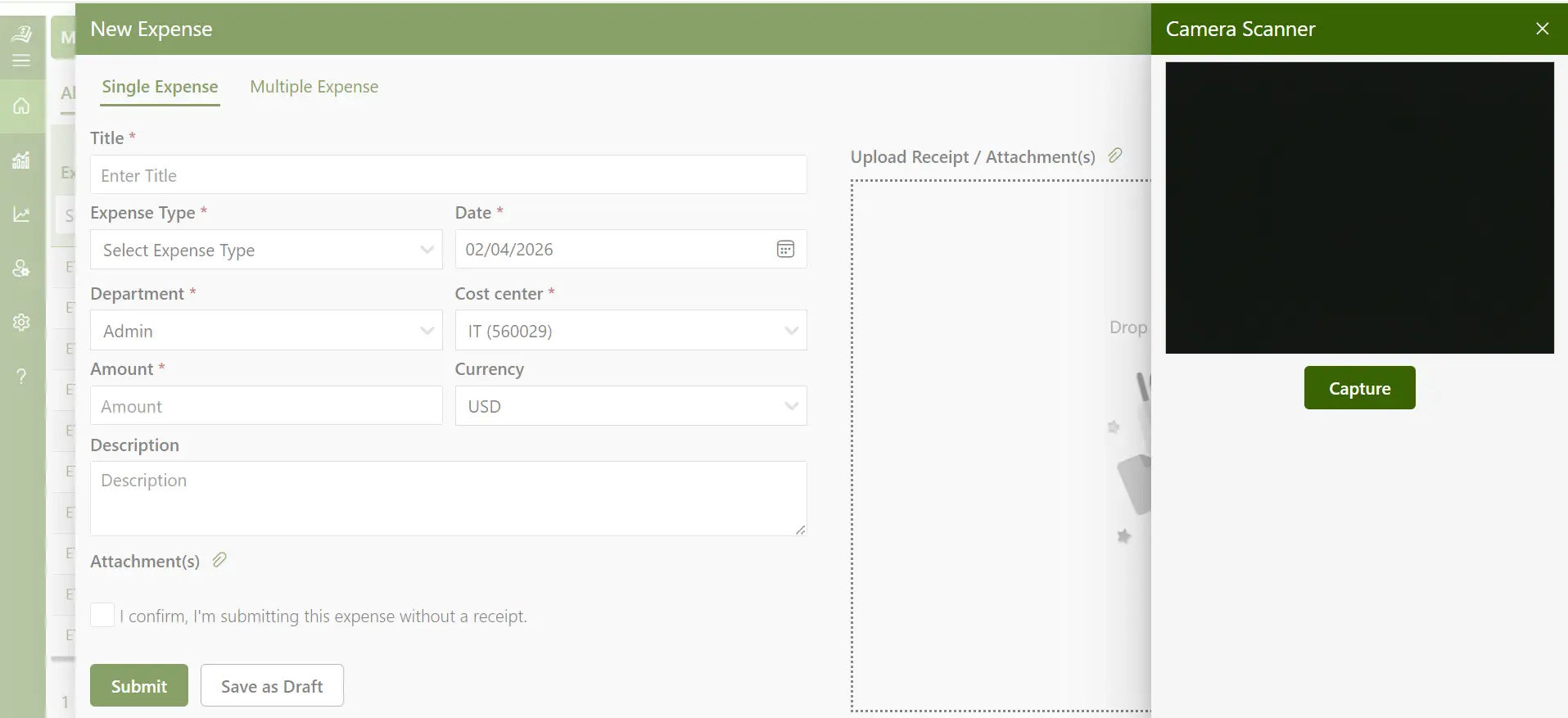
The research from Stanford University, stats that 78% of organizations now use AI in at least one business function
Expense Tracker 365 is an application that is equipped with cutting-edge AI features that automatically identify data on scanned receipts.
The inbuilt scanner of the camera reads the name of merchants, their dates and amounts instantly.
They do not have to enter the data manually but can just scan a receipt and the AI will automatically classify it correctly in a few seconds. AI expense management saves much time of administration and enhances accuracy in reporting.
2. Automation
The business expense tracker app automates the daily financial operations such as expense classification to approval processes.
The managers are also able to pre-establish rules by department, project, or cost center and then routing can be done automatically to approve. Expense management with automation feature saves on duplication of work and maintains the cost life cycle in order.
As an illustration, monthly recurring costs like internet bills or office rents can be automatically entered and approved as per set up settings.
3. Per Diem Management
Managing daily allowances for employees during business travel becomes easier with a business expense tracker. Instead of tracking every small receipt, companies can assign a fixed per diem amount for meals, travel, and other daily needs.
With a business expense tracker, you can set per diem rates based on location, travel duration, or company policy.
Employees can easily log their travel days, and the system calculates the total allowance automatically.
4. Expense Delegation
One person does not have to handle all the expenses. Expense Tracker 365 enables the user to assign the submission or approval of expenses to a specific team of individuals.
The department heads are able to delegate duties to the finance departments or assistants without any loss of visibility or control.
This is flexible and assists the companies to continue even in cases where key personnel are not available.
Recommended Reading: Business Expense Tracker Application for Multi-User Teams
5. Corporate Card Management
The application combines with corporate cards. All the transactions are automatically synchronized, classified, and compared with receipts.
This gets rid of discrepancies between card statements and manual expense entries. Administrators are also able to track spending limits, prevent unauthorized purchases, and create instant statements to audit or reimburse.
The business expense tracker also provides real-time spending insights and alerts, enabling proactive control over budgets and improved financial decision-making.
6. Mileage Expenses
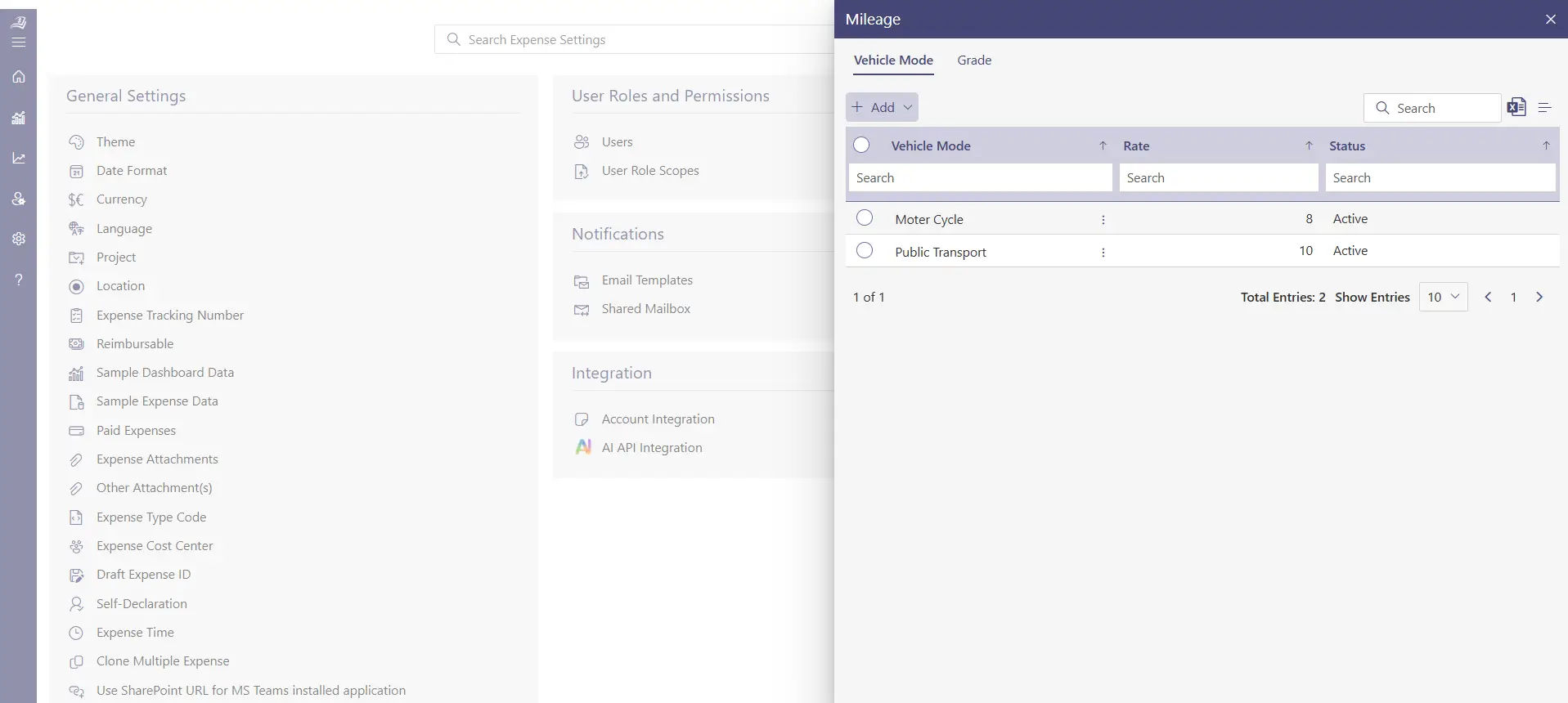
Businesses that have employees who travel frequently have always found it difficult to track the mileage expenses.
Expense Tracker 365 makes it easy through mileage tracking. With the app, employees have the ability to record distance, routes and purpose of travel.
Reimbursements are then computed by the system using organizational policies or government mileage rates.
7. Travel Expense
Business travel may include several elements tickets, accommodation, meals and local transport. All these are brought together in the business expense tracker.
Employees can post receipts, classify expenses in terms of trips and even associate them with projects. The finance teams are then able to approve or reject travel expenses on a case-by-case basis, which allows complete transparency within the departments.
Having all the arrangements under a single platform, companies can easily track the expenditure on traveling as well as reimbursements without delays.
8. Multiple Currencies
International organizations are usually struggling to control the costs in different currencies. The business expense tracker supports various currencies where the exchange rates are automatically converted to the real-time exchange rates.
This simplifies the process of submitting and reviewing expenses by multinational teams without concerns of the value being inconsistent or errors in conversion.
It assists in financing teams to be accurate in global operations and eases currency management of international employees.
9. Multi-Factor Authentication
The security is the first consideration when handling financial information. To prevent unauthorized access to user accounts, the business expense tracker uses multi-factor authentication.
This is an inbuilt feature that integrates the use of passwords with secure verification codes that only verified users can access sensitive financial records.
This extra security gives companies the ability to spend without fear that their financial information is never at risk.
10. Expense Reports
Effective expense management is based on comprehensive reporting. The business expense tracker produces detailed reports with project, employee, department, or custom filters.
The expense reports assist the management to know the trend of spending and develop strategies to maximize budgets.
It is also possible to export reports to comply, account, or audit them in various formats: PDF, Excel, and CSV.
Benefits of Using Business Expense Tracker Application
The selection of the appropriate business expense tracker is associated with a broad variety of advantages. Expense Tracker 365 does not only make the process of recording and reporting much easier, but it also changes the way businesses handle finances.
1. Better Financial Transparency
Business expense tracker gives a transparent picture of all the transactions. Dashboards show real-time summaries of expenditures, by type, department or employee.
Such transparency enables the businesses to know when they are spending too much and make sound decisions on the budget.
Finance teams can also access visual data without the need to search through spreadsheets to find the details of expenses.
2. Quicker Reimbursements
Delayed payments can negatively impact employee satisfaction. A business expense tracker accelerates the reimbursement process through digital submissions and automated approvals.
Once receipts are uploaded, the system automatically validates them against company policies and notifies approvers in real time.
As a result, employees receive reimbursements faster, while finance teams save valuable time on claim verification and processing.
3. Expense Fraud Prevention
According to the Association of Certified Fraud Examiners, organizations lose nearly 5% of their annual revenue to fraud. This highlights the importance of implementing pre-spend controls and strict policy checks.
Business expense tracker includes advanced fraud-detection capabilities that identify duplicate claims, inflated receipts, and unauthorized expenses in real time.
With these controls in place, businesses can protect themselves from financial misconduct and ensure every department remains compliant with internal policies.
4. Integration with Existing System
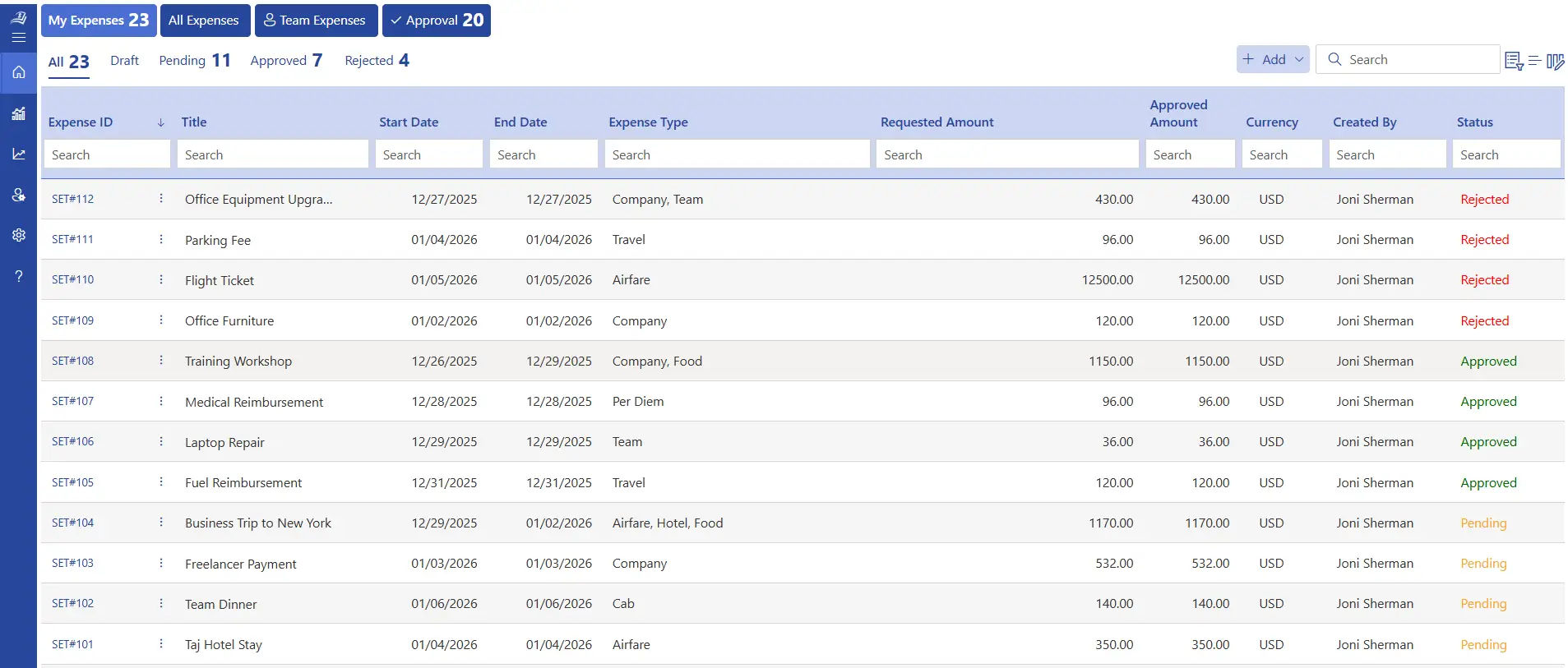
According to a study QuickBooks report, 37 percent of businesses are seeking improved interconnection of their digital tools.
Expense Tracker 365 integrates seamlessly with Microsoft 365 applications and other widely used accounting systems such as QuickBooks.
These intelligent integrations automatically align the expense information in all departments to enable teams to collaborate effectively and provide businesses with a clear and integrated picture of their finances, human resources and operations.
5. Ease of Use
The interface of the platform is easy to use and needs little training. With only a few simple taps, employees are able to submit expenses, track reimbursements and view reports.
The business expense tracker will enable companies to embrace digital expense tracking in a fast and assured manner by emphasizing on a user-friendly design.
It saves time to all and makes the control of expenses a smooth part of everyday work.
6. Extensive Spend Management
Beyond individual transactions, a business expense tracker gives organizations complete control over the entire spend lifecycle. From expense requests and approvals to reimbursements, every step is digitally recorded for transparency and accuracy.
Managers can set spending limits, define policies, and enforce compliance standards ensuring streamlined operations and effective control over overall business expenditures.
The system also provides analytical insights that help identify spending patterns and optimize budget allocation across departments.
7. Unified Global Operations
Beyond individual transactions, a business expense tracker gives organizations complete control over the entire spend lifecycle.
Managers can set spending limits, define policies, and enforce compliance standards ensuring streamlined operations and effective control over overall business and global expenses.
The business expense tracker also provides analytical insights that help identify spending patterns and optimize budget allocation across departments.
5 Best Practices to Implement While Tracking Business Expenses
While much of the process can be automated with a business expense tracker, adopting smart practices helps businesses gain even greater value. These strategies promote accuracy, transparency, and long-term financial control.
1. Classify Expenses
Categorized expenses simplify the process of knowing where money is spent and the utilization of budgets. It also makes reporting easier and aids businesses to make sound financial decisions.
- Break down group costs into easy to understand and simple categories such as travel, utilities or marketing.
- Adopt uniform naming systems to ensure that every department has the same system.
- Periodically revise and update categories to meet new business requirements.
2. Set Realistic Budgets
Budgets are financial guides to all teams or projects. Establishing realistic limits helps keep expenditures within bounds and helps to make smarter predictions.
- Assign certain budgets on past expenditure and projected increase.
- Monitor expenditure to ensure that it is within the approved limits.
- Modify budgets due to changing priorities or initiation of new projects.
3. Use Real-Time Tracking
The live tracking eliminates delays and lost information. It enables companies to examine expenditure trends in real time and act before things escalate.
- Request the employees record expenses at the end of every transaction.
- Quickly upload receipts using the mobile application.
- Check daily spending activity on real-time dashboards.
4. Apply Approval Workflows
A good expense approvals process provide an additional level of control. They assist in checking every cost prior to its processing, making financial operations transparent and safe.
- Establish levels of approvals according to the amount or department.
- Automated notifications can be used to accelerate manager reviews.
- Maintain an electronic record of all approvals to facilitate an audit.
5. Review Reports Frequently
Periodic review of reports enables the leaders to know how they spend and identify areas where they can do better. It is a preventative means of maintaining business finances.
- Arrange monthly or quarterly review of expense reports.
- Compare the actual expenditure with the budgeted values to determine the differences.
- Share knowledge between teams to enhance financial awareness.
How Expense 365 Assists During the Workflow?
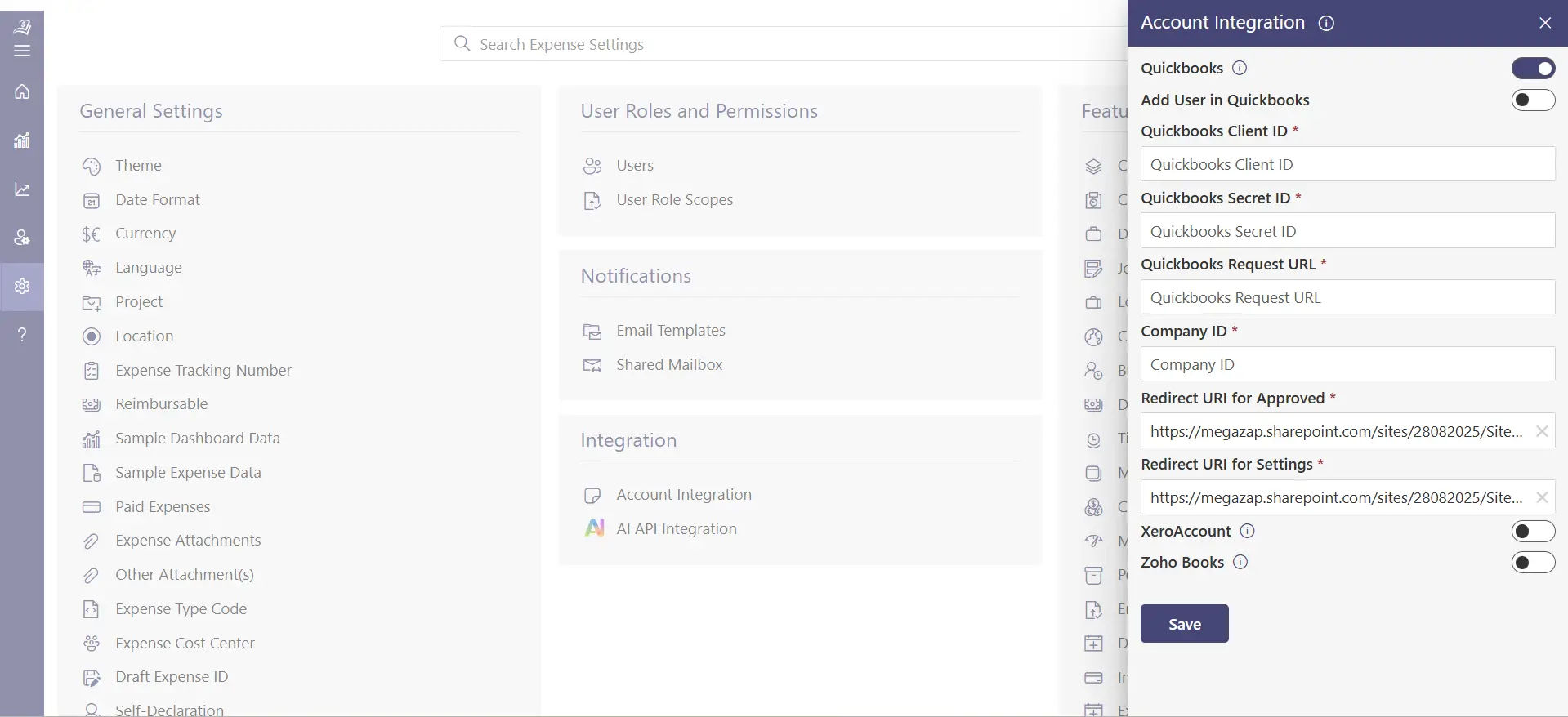
Expense 365 is an effective and efficient business expense tracker application designed to integrate well with the Microsoft ecosystem. It integrates well with other applications, including SharePoint, Microsoft Teams, Outlook, Power BI, Power Automate, and QuickBooks, to provide a single platform of managing expenses.
Through its smart capabilities, businesses can handle the whole expense process through submission, approval and reporting and analysis in a single place.
Hear from our Happy Clients – G2 Platform
Expense Tracker 365 is a great app with excellent support. The advanced features make it a complete tool & has really improved our expense tracking and reporting workflow.
Steps to Create a Workflow in Microsoft using Expense Tracker 365
Expense Tracker 365 is fast and easy to use in designing an expense workflow in Microsoft. The following is how you can install it successfully.
- Open the App – Click your Microsoft dashboard, then open Expense Tracker 365, and then click New Expense List. You may begin immediately with the included Expense Manager layout that is business friendly.
- Add Core Expense Data – Select the pre-existing columns and enter the required information such as type of expense, amount, name of person requesting and status of approval. This maintains your financial records in order and uniform.
- Track Approvals Effectively – Add an Approval Date field to track when every expense request was reviewed and approved. It enhances accountability and simplifies the process of auditing.
- Keep Track of Reimbursements – Add a Reimbursement Due Date column to automatically send notifications and assist the finance department to make payments on time.
- Add Proof of Purchase – Add an Invoice Upload column where users can add digital receipts and bills directly, and all supporting documents are stored in a single place.
- Add Vendor Information – Add a Vendor Details field to store contact information of supplier or payee. With this information in the bag, it is easy to follow up and make payments.
- Tag Department Ownership– Add a Department column to associate each expense with the business unit. This is more clear in the analysis of departmental expenditure.
- Customize Viewing Options – Customize Views that show pending approvals, high-value transactions or vendor-wise expenses. This enables the teams to see what is important at a glance.
This workflow, once set up, will enable finance departments to have greater control over costs in Microsoft 365.
Conclusion
It is no longer feasible to control costs with the help of spreadsheets or paper receipts and it is frequently too time-consuming. Expense Tracker 365 is a business expense tracker that helps companies to record, review, and manage all expenses in real time easily and more intelligently.
Begin streamlining your expense management now. Sign up with a 14-day free trial and no credit card details required. See how easy it is to control your business costs using Expense Tracker 365.
Join Our Creative Community
Frequently Asked Questions
What expenses can I claim on business?
Users can claim any expense that is necessary and directly related to running your business. Common examples include office rent, utilities, equipment, software subscriptions, marketing costs, employee salaries, travel, and training expenses.
What are the actual expenses of a business?
Actual expenses refer to the real costs your business incurs during operations. These include day-to-day running costs such as raw materials, internet bills, transportation, depreciation, and maintenance essentially, anything you pay to keep the business running smoothly.
Can I claim my restaurant bill if I went for an office project as a business expense?
Yes, you can if the meal was directly related to business activities. For example, if it was a client meeting, team project discussion, or business travel meal, you can claim it as a business expense. Always keep the receipt and a short note about the business purpose for record-keeping.
Can employees scan their receipt via mobile?
Yes. Employees can easily scan and upload their receipts using their mobile devices. This helps ensure quick submission, accurate recordkeeping, and faster reimbursements.
Does the expense tracker provide custom configurations?
Yes. Our expense tracker is fully customizable users can set approval workflows, expense categories, limits, and reporting formats to match your company’s policies and structure.


_JiluXJRGNl.svg)























