

AI in ITSM: How AI Is Changing IT Service Management

AI in ITSM uses artificial intelligence to improve how IT teams receive, understand, route, resolve, and prevent service issues.
It matters because support demand keeps growing while IT leaders still need faster resolution, stronger SLAs, better employee experiences, and tighter control over cost and risk.
- AI in ITSM works best first on repeated work such as triage, routing, password resets, summaries, knowledge retrieval, and access requests.
- The main value is less coordination effort, not simply adding a chatbot.
- Clean ticket history, reliable knowledge, clear ownership, and sound workflows are prerequisites.
- Human review remains important for security, major incidents, exceptions, and risky changes.
- Measure MTTR, first-contact resolution, SLA performance, deflection, reopen rate, and satisfaction instead of counting AI interactions.
The biggest problem is often not the technical fix. It is the manual work between a user reporting an issue and the right technician taking action.
AI can reduce that coordination. It can understand requests, recommend knowledge, summarize long cases, predict risks, and trigger approved workflows while people handle judgment, exceptions, and high-impact decisions.
Gartner reported in April 2026 that 53% of infrastructure and operations leaders with AI wins said those wins occurred in ITSM. Yet only 28% of I&O AI use cases fully met ROI expectations. AI in ITSM can create real value, but only when it solves a defined service problem and fits the operating model.
What Is AI in ITSM?
AI in ITSM is the use of machine learning, natural language processing, generative AI, predictive analytics, and AI agents to improve IT service management. It can understand requests, classify tickets, recommend knowledge, summarize cases, predict issues, and perform approved actions. The goal is better service outcomes with less manual coordination, not automation for its own sake.
IT service management covers the processes used to design, deliver, support, and improve IT services. Common areas include incident management, request fulfillment, problem management, knowledge management, change enablement, service levels, and asset-related support.
AI adds pattern recognition and language understanding to those processes. Traditional automation might say, “If category equals password reset, send template A.” AI can interpret different ways users describe the same problem, review context, and recommend or start the correct workflow.
Employees rarely describe issues in clean ITSM language. “VPN broken,” “I can connect but internal apps will not open,” and a screenshot in Teams may describe the same problem. Natural language processing can map them without forcing users to learn service catalog terms.
AI in ITSM is also moving beyond question answering. Gartner’s 2026 market definition describes AI applications in ITSM as tools that extend ITSM workflows with intelligent advice and actions for business users and IT teams.
AI in ITSM Is Not Basic Automation
Rules are ideal when conditions and actions are known. AI is useful when the input is messy or the recommendation depends on context.
A practical design uses AI to interpret a request and deterministic automation to perform controlled steps without giving a model unlimited authority.
Map the manual touches in your five highest-volume ticket types. The best first AI use case is usually work your team repeats every day.
Why AI in ITSM Matters
IT support becomes harder as organizations add SaaS applications, cloud services, remote users, devices, identities, integrations, and security controls. The service desk is where that complexity becomes visible.
A routing delay can become a resolution delay. A ticket sits in the wrong queue, gets reassigned, loses SLA time, and prompts the user to chase IT again. None of that activity fixes the issue.
AI in ITSM can read the request, infer the service, identify urgency signals, suggest priority, route the ticket, pull relevant history, recommend knowledge, and prepare a response. The technician starts with context instead of a blank screen.
Adoption is already broad. A 2025 service management survey reported that 98% of responding organizations were using AI in some capacity, 93% reported increased employee efficiency, and 91% said AI was saving money. A related incident management study found that 74% of respondents considered security risk a top barrier to expanding AI.
The caution matters. Gartner found that poor data quality or limited data availability contributed to AI project failure for 38% of I&O leaders who faced setbacks. The same percentage cited persistent skill gaps. AI does not automatically repair weak process foundations.
Key Components and Features of AI in ITSM
The most useful AI in ITSM capabilities include intelligent ticket classification, routing, priority suggestions, ticket summaries, knowledge recommendations, conversational self-service, urgency detection, predictive incident analysis, change-risk scoring, agent assistance, automated request fulfillment, and service analytics. The right feature set depends on whether your biggest problem is queue volume, slow resolution, repeat incidents, weak self-service, or poor visibility. Teams evaluating different platforms can use an ITSM softwares list to compare available solutions and identify which tools best match their service management requirements
Intelligent Ticket Classification and Routing
AI can read the subject, description, affected service, user context, and similar incidents to suggest a category and assignment group. This reduces manual triage and the “ticket ping-pong” that damages response times.
Better routing can also consider workload and expertise, sending work to an available technician who has solved similar cases.
AI Ticket Summaries and Agent Assistance
An escalated case may contain many comments, notes, and chat messages that a technician must understand before acting.
Generative AI can summarize the issue, actions already attempted, current status, blockers, and next steps. It can draft replies or suggest troubleshooting steps. The technician should still verify facts before sending or acting.
Knowledge Search and Content Creation
Knowledge bases fail when articles are hard to find or become stale. AI can match plain-language questions to relevant guidance, recommend articles during ticket handling, detect gaps, and draft new content from resolved cases.
Use approved knowledge for grounding, with human owners responsible for accuracy and review.
Conversational Self-Service
A useful virtual agent does more than repeat FAQ text. It should understand intent, ask for missing information, surface approved knowledge, create a ticket when needed, and trigger safe workflows such as a password reset.
A chatbot that only answers questions can become another barrier. A service assistant that can complete governed tasks removes work.
Predictive Incident and Problem Management
AI can analyze monitoring signals, incident history, ticket clusters, and recent changes to identify patterns humans may miss. If many users report slow performance after one deployment, correlation can point teams toward a shared cause instead of separate incidents.
Predictive models can also flag unusual behavior before a full outage. Current ITSM guidance repeatedly highlights this move from reactive handling toward proactive detection and root-cause analysis.
Change Risk and Impact Analysis
AI can review historical changes, configuration relationships, affected services, timing, and previous failures to provide a risk signal.
It should support human reviewers, not become an unquestioned approval engine, especially when changes affect critical services, sensitive data, or many users.
AI Agents and Governed Actions
Agentic AI can plan and carry out multi-step work within set boundaries. An agent might interpret an onboarding request, confirm approvals, create accounts, assign licenses, update the ticket, and notify the requester.
It requires identity controls, action limits, audit trails, fallback rules, and human escalation.
Benefits of AI in ITSM
The best benefits are measurable at the service level.
- Faster response and resolution: Automatic categorization, summaries, knowledge suggestions, and routing reduce the time before useful work begins.
- Lower manual workload: Repetitive requests and ticket updates can be handled without taking technician attention from harder issues.
- Better SLA performance: AI can identify tickets likely to breach based on age, priority, queue conditions, and historical patterns.
- More consistent support: AI-supported categorization and guided workflows reduce differences in how similar tickets are handled.
- Stronger knowledge reuse: Resolved incidents can become searchable guidance for agents and users.
- More proactive operations: Connected service, monitoring, asset, and change data can reveal repeated patterns and emerging risk.
- Better technician experience: Less repetitive administration leaves more time for diagnosis, improvement, and business support.
💼 Baseline one pain point for four weeks. If routing delay, repeated requests, or handoff reading time is high, test one AI capability against that baseline before expanding.
AI in ITSM vs. Traditional ITSM
| Area | Traditional ITSM | AI-Enabled ITSM |
| Ticket intake | Forms, email, manual reading | Intent detection and data extraction |
| Classification | Technician choice or fixed rules | Context-aware category suggestions |
| Routing | Queue rules | Skills, workload, history, and context |
| Knowledge | Keyword search | Semantic search and recommendations |
| Incidents | Reactive investigation | Correlation, prediction, guided diagnosis |
| Requests | Manual steps or scripts | Conversational intake plus governed actions |
| Changes | Human review of records | AI-assisted risk and impact analysis |
| Reporting | Historical dashboards | Trend detection and forecasting |
| Human role | Performs most steps | Reviews exceptions and complex decisions |
Best Practices for Implementing AI in ITSM
Start AI in ITSM in five steps: identify one costly repeated workflow, clean the data supporting it, define what AI may recommend or execute, run a controlled pilot with human review, then measure service outcomes before scaling. Expand only when accuracy, security, user experience, and operational value meet agreed thresholds. This phased approach builds trust while limiting avoidable risk.
1. Start With a Service Problem
Do not begin with, “We need an AI chatbot.” Begin with, “Access requests create hundreds of tickets and manual routing adds 40 minutes.”
2. Choose High-Volume, Low-Variability Work
Password resets, common access requests, ticket categorization, summaries, basic knowledge questions, and status updates are good starting points because outcomes are easier to define.
Market guidance recommends repetitive workflows before autonomous handling of complex incidents.
3. Clean the Data
Review ticket categories, closure codes, resolution notes, knowledge articles, CMDB records, asset relationships, and change history.
If “Email,” “Outlook,” “M365 Mail,” and “Messaging” all mean the same service, clean that taxonomy first. Otherwise, AI learns inconsistency.
4. Keep Human Review Where Risk Is High
Require human approval for privileged access, security events, major incidents, production changes, sensitive employee data, and unusual cases.
A safe system should recognize low confidence and escalate instead of inventing certainty.
5. Control Data and Actions
Define what information AI can read, what it may write, which systems it can call, and what actions require approval. Apply least-privilege access, logging, retention rules, and role-based controls.
6. Build Feedback Into the Workflow
Let agents flag recommendations as wrong, incomplete, or risky. Review failures and update knowledge, rules, or models as conditions change.
7. Measure Service Outcomes
Do not celebrate because a virtual agent handled 10,000 conversations. Measure whether users solved problems faster, fewer tickets reopened, SLAs improved, technicians saved time, and recurring incidents declined.
Useful metrics include MTTR, first-contact resolution, deflection, reassignment rate, SLA breaches, reopen rate, automation success, CSAT, and cost per resolved request.
Risks, Governance, and Human Oversight
This deserves separate attention because weak governance can erase the gains from AI in ITSM.
Gartner’s 2026 Hype Cycle for AI in ITSM states that valuable outcomes depend on proper governance and foundational ITSM data.
Incorrect Guidance
Generative AI can produce a confident answer that is outdated or wrong. Ground responses in approved knowledge and ticket context. Require confirmation before risky actions.
Excessive Automation
A workflow may be technically automatable but still be a poor candidate. If exceptions are common or the cost of a wrong action is high, use AI for recommendations rather than execution.
Sensitive Data Exposure
Tickets can contain employee details, screenshots, device data, business information, and security indicators. Set clear rules for model access, retention, logging, and third-party processing.
Loss of Human Access
Users should not be trapped behind AI. In a 2026 Gartner service and support survey, 87% of customers said access to a human agent was essential when companies use generative AI. The design lesson still applies: escalation should be easy when an issue is urgent, unusual, or blocked by automation.
Invisible Decisions
If AI changes priority, assignment, access, or approval paths, leaders need an audit trail showing what influenced the action and who remains accountable.
The Impact of AI on ITSM Roles and Technology
AI is changing service desk work more than it is removing the need for service management.
Technicians will spend less time reading repetitive tickets and more time validating recommendations, handling exceptions, improving knowledge, diagnosing difficult problems, and designing better workflows.
Team leads will monitor automation quality, false positives, confidence thresholds, and AI-driven changes in queue behavior. IT administrators will increasingly govern connector permissions, data residency, retention, and auditability.
Knowledge ownership becomes more important, too. Generative AI depends on trustworthy sources. A language model does not turn stale policy into correct policy.
The technology stack is also converging. ITSM platforms increasingly connect ticket data with collaboration tools, observability, identity, asset records, knowledge, workflows, and analytics.
From Copilots to Agentic ITSM
The first wave focused on drafting and summarizing. The next wave adds action.
Agentic ITSM can move from “Here is how to reset access” to completing approved steps, validating the result, updating the ticket, and notifying the user.
Gartner’s 2026 research on agentic ITSM recommends a stepped approach so organizations improve service without overspending or removing human controls too quickly.
Where Helpdesk 365 Fits Into an AI-Enabled ITSM Strategy
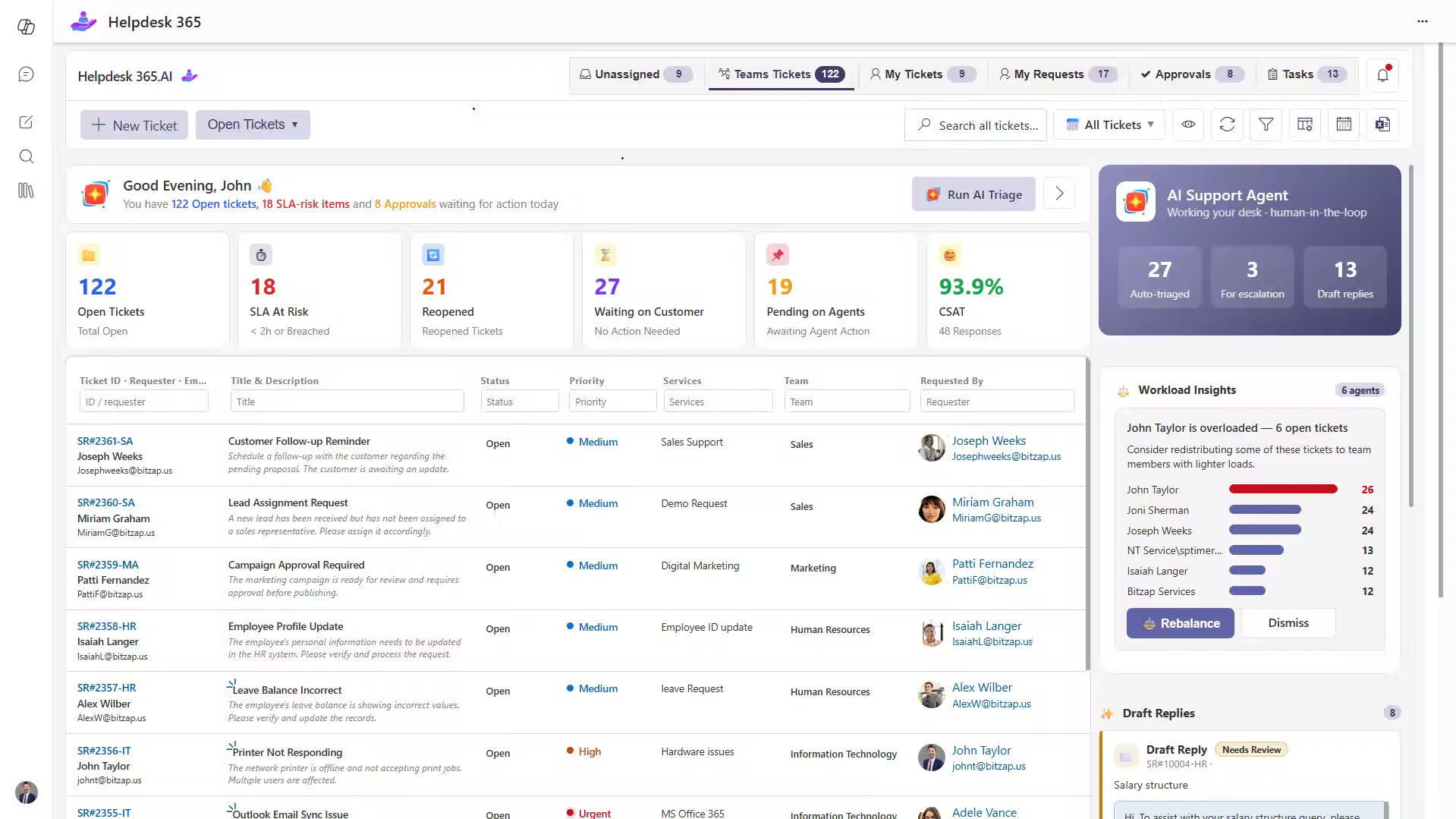
For Microsoft 365-focused organizations, the practical question is whether AI can improve support without creating another disconnected work environment.
Helpdesk 365 is built on Microsoft 365 and supports ticketing through SharePoint, Teams, and Outlook. Its current feature set includes Copilot integration, AI ticket summaries, AI agents, AI knowledge-base responses, routing and prioritization, SLA controls, workflows, self-service, and connections with Power Automate and Power BI.
The evaluation question should not be, “Does it have AI?” Ask, “Can it improve the exact workflow we struggle with while keeping our Microsoft 365 governance understandable?”
💼 Plan your demo around two or three real workflows. Bring sample ticket types, routing rules, SLA targets, and security questions so you can evaluate operational fit instead of only reviewing generic features.
How to Measure AI in ITSM Success
Build a before-and-after scorecard. Track baseline performance before the pilot, then compare the same metrics after implementation.
Use three layers:
- Service outcomes: MTTR, first-contact resolution, SLA achievement, reopen rate, backlog age, and satisfaction.
- Automation quality: Classification accuracy, routing accuracy, auto-resolution success, escalation rate, and failed actions.
- Business impact: Technician hours saved, support cost per request, downtime avoided, and capacity created for improvement work.
Match the metric to the use case: summaries should reduce reading time, routing should reduce reassignment, and self-service should reduce repeat contacts.
Gartner found only 28% of I&O AI use cases fully met ROI expectations, while 20% failed outright. Measurement needs to be designed before rollout, not added later.
Conclusion
AI in ITSM is changing service management by reducing manual coordination, improving ticket understanding, finding knowledge faster, supporting technicians, predicting some issues, and completing approved workflows.
The winning approach is disciplined. Start with a painful repeated process. Clean the data. Define boundaries. Keep people involved where judgment and risk are high. Measure service outcomes, then expand when the evidence supports it. Good governance turns helpful AI into dependable IT service.
For Microsoft 365-focused organizations, Helpdesk 365 can provide an AI-enabled path that keeps ticketing, collaboration, knowledge, workflows, and reporting close to tools employees already use. If your goal is fewer handoffs, faster resolution, and stronger service visibility, book a demo and test the platform against your real ticket flows.
Ready to improve IT service management with AI ?
See how it can support your real IT workflows.
Join Our Creative Community
Frequently Asked Questions
Will AI replace IT service desk technicians?
No. AI can reduce repetitive work, but technicians remain necessary for complex diagnosis, exceptions, security-sensitive decisions, major incidents, relationship management, and process improvement. Roles will shift toward supervision, judgment, knowledge quality, and automation design.
What are the best first use cases for AI in ITSM?
Start with high-volume work that follows predictable patterns: ticket classification, routing, summaries, password resets, common access requests, knowledge recommendations, status updates, and FAQ support. They are easier to measure and control than broad autonomous incident resolution.
How does generative AI help ITSM?
Generative AI can summarize tickets, draft replies, explain technical steps, create knowledge drafts, and provide conversational answers grounded in approved sources. It is strongest as an assistant when outputs are reviewed and connected to reliable organizational knowledge.
What is agentic AI in ITSM?
Agentic AI goes beyond generating text. An AI agent can plan and execute multiple service steps, such as checking policy, requesting approval, provisioning access, validating completion, and updating the ticket. Because it can act, permissions, audit trails, limits, and human escalation are essential.
What data does AI in ITSM need?
Useful inputs can include ticket text, categories, resolutions, knowledge articles, service catalog records, CMDB relationships, asset data, monitoring events, change history, SLA data, and user context. Accuracy, access controls, freshness, and consistency matter more than raw volume.


_JiluXJRGNl.svg)























