
Microsoft PerformanceManagement: Essential Guide
Microsoft Performance Management tools streamline reviews, goals, and feedback, driving team growth and performance with seamless integration.


What is Microsoft Performance Management?
Microsoft Performance Management is a modern approach to evaluating and improving employee performance within the Microsoft 365 ecosystem. Unlike traditional review methods that rely on long, stressful processes and outdated tools, it fosters a continuous cycle of feedback, growth, and accountability. By seamlessly integrating with the tools you already use, like Teams, Outlook, and SharePoint, it makes performance management an ongoing part of daily operations rather than a once-a-year event.
This system enables real-time tracking and personalized feedback, empowering employees to grow and improve consistently. It’s designed to ensure that feedback is always timely and actionable, turning performance reviews into valuable opportunities for growth. With performance management embedded in familiar workflows, employees can continuously adjust and develop, rather than waiting for periodic, formal assessments.
One of the key advantages of Microsoft Performance Management is its ability to maintain clarity and focus across teams. By aligning performance goals with organizational objectives, everyone has a clear understanding of how their individual contributions impact the larger mission. This creates a shared sense of purpose and helps teams stay on track toward achieving long-term success.
Additionally, by making feedback an ongoing process rather than an event, Microsoft Performance Management helps to reduce the anxiety often associated with annual reviews. Employees receive regular check-ins, ensuring they understand expectations and can make necessary adjustments, rather than waiting for a big review at the end of the year. This consistency encourages a growth mindset throughout the year.
Why is Microsoft Performance Management Different?
What sets Microsoft Performance Management apart is its effortless integration with the Microsoft 365 tools your team is already using. No need to adopt a new software platform or change your current workflows. Performance management becomes natural and easy to embrace as it aligns perfectly with the tools employees are already familiar with. This seamless experience increases engagement, drives better performance, and promotes a culture of trust, collaboration, and success.
The unique advantage of this system is that it doesn’t add more complexity to employees’ routines. Instead of learning a new tool, employees and managers alike can leverage what they already use every day. This ensures smoother adoption and better results, as the system blends seamlessly into existing processes. The focus shifts from merely completing reviews to fostering continuous improvement, making performance management a constant part of how the team works together.
Moreover, this integration also helps eliminate the confusion often caused by fragmented systems. Since performance tracking and feedback are aligned with tools like Teams and Outlook, both managers and employees can stay on the same page, ensuring that nothing falls through the cracks. This makes performance management not just easier, but also more effective.
By centralizing performance management within the Microsoft 365 environment, it streamlines communication and ensures that feedback, goals, and performance data are all accessible in one place. This accessibility removes unnecessary barriers, making it easy for both managers and employees to track progress, collaborate, and align efforts toward achieving collective success.
Take the next step toward better support operations.
Core Features of Performance Management 365
Performance Management 365 takes performance reviews and employee development to the next level by embedding all key processes within Microsoft 365. This ensures smooth adoption, simple navigation, and powerful results because it integrates directly with tools like Teams, Outlook, SharePoint, and Planner. Whether your team is working remotely or in a hybrid environment, Performance Management 365 provides everything you need to set goals, track progress, and deliver meaningful feedback seamlessly.
Here’s a deeper look at the features that make Performance Management 365 smarter, faster, and ideal for modern, hybrid teams:
Goal Setting and Tracking within Teams or Outlook
Setting and tracking SMART goals for individuals, teams, or the organization becomes effortless within Teams or Outlook. Progress is tracked in real-time with dynamic visual updates, and tasks can be linked directly to Microsoft Planner for easy execution. Automated alerts notify you of overdue goals or approaching deadlines, centralizing everything in one platform to eliminate scattered goal tracking. This helps increase accountability and keeps everyone focused on the right priorities. With everything integrated, teams can quickly adjust and stay aligned with business objectives.
Integrated 1:1 Meeting Notes
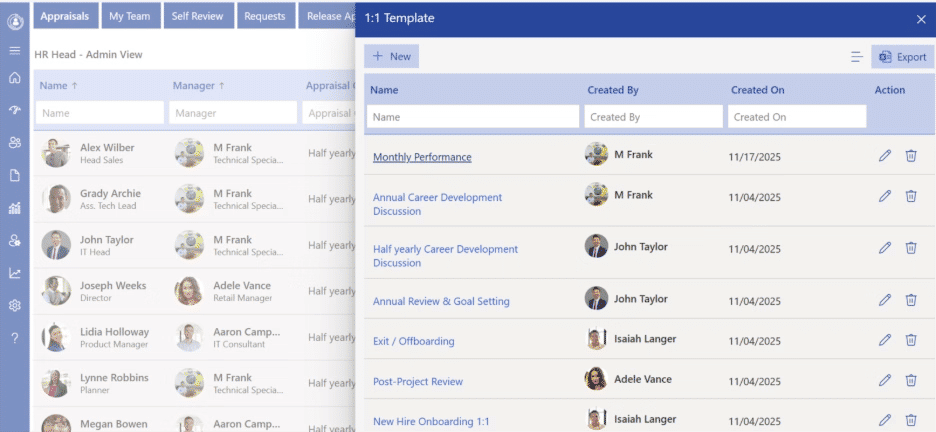
Meeting notes are logged in real-time and synced with employee goals, keeping all feedback secure, time-stamped, and easily accessible. This helps build a continuous performance narrative and provides a valuable resource for future reviews and development discussions. By eliminating scattered documents, it ensures that all feedback is captured in one place. It also strengthens communication between employees and managers, fostering trust and growth.
Real-Time Feedback and Recognition
Giving instant feedback and recognition is easy. Shoutouts can be sent via Teams, achievements can be linked to goals or OKRs, and team wins can be highlighted in department channels, creating a positive, motivating workplace culture. By embedding recognition into daily workflows, it encourages a consistent feedback loop. This helps improve morale and drives sustained performance across teams.
Effortless Performance Reviews
The review process is streamlined with pre-built templates in Microsoft Forms, auto-populated with data from goals, feedback, and 1:1 notes. Customizable review flows, automated reminders, and integration with SharePoint ensure a smooth, efficient review process while keeping historical data easily accessible. This allows managers to focus on meaningful discussions rather than administrative tasks. Employees also feel more informed and confident throughout the review cycle.
Live Power BI Dashboards for Instant Insights
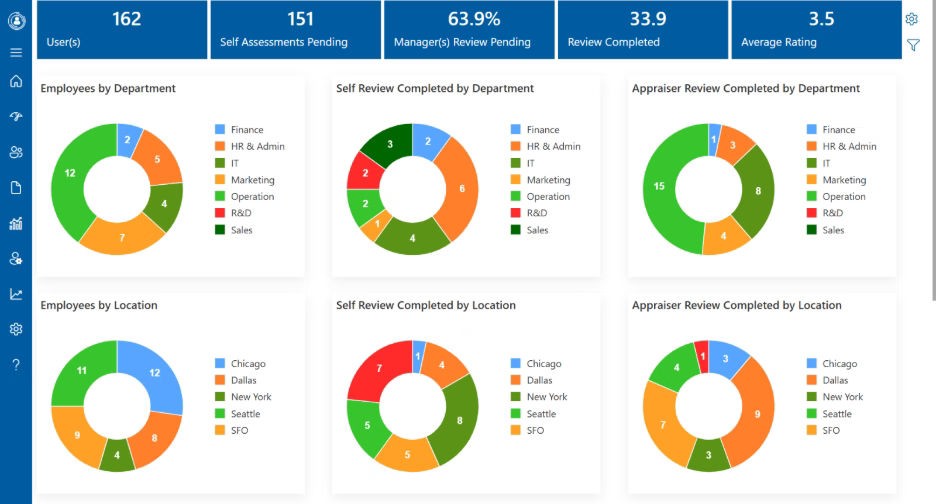
With Power BI integration, real-time performance data is visualized at individual and team levels. You can instantly compare performance across departments or timeframes, making it easier to identify top performers or areas needing improvement, all without manual reporting. These dashboards provide actionable insights that can drive informed decision-making. They empower leadership with the data needed to take timely actions and optimize team performance.
Role-Based, Secure Access with Azure AD
Azure Active Directory integration allows you to set visibility rules based on roles like employee, manager, or HR, ensuring sensitive information remains secure. Single Sign-On (SSO) and enterprise-grade security ensure safe, compliant access. This protects employee privacy while ensuring that relevant stakeholders can access the data they need. The system also supports compliance with industry security standards, providing peace of mind.
Smart Reminders and Notifications
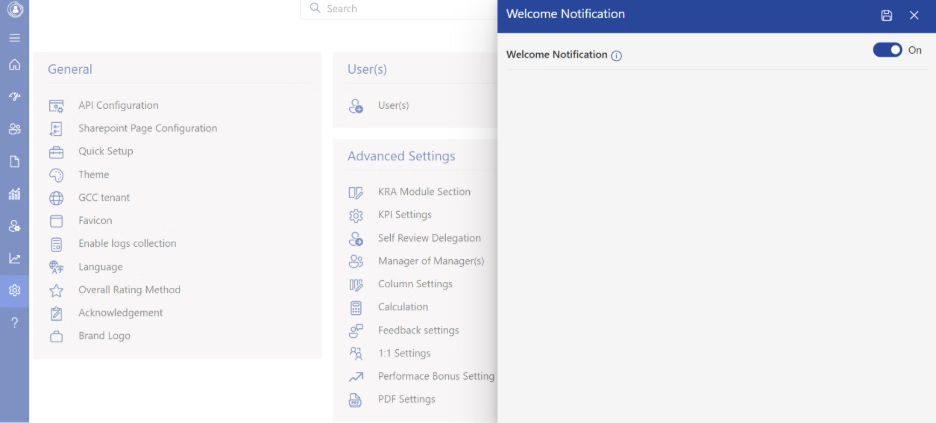
Automated reminders and notifications ensure performance tasks and reviews stay on track. You’ll receive timely nudges in Teams or Outlook, and custom workflows can be set up to fit your team’s needs, keeping everyone on schedule without manual intervention. These reminders are designed to keep teams focused and prevent any tasks from falling through the cracks. It ensures that deadlines are met without the need for constant follow-up.
Seamless SharePoint & Planner Integration
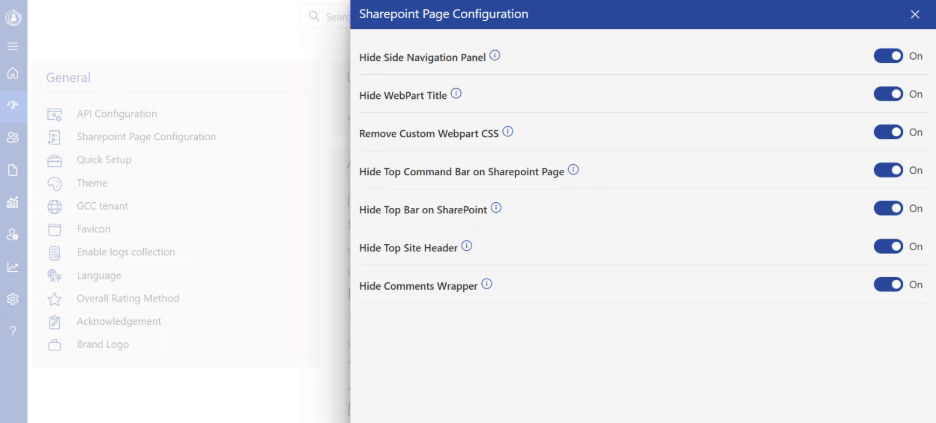
Performance goals are linked to tasks in Planner, with progress tracked in real-time. Review forms, feedback, and goal templates are securely stored in SharePoint, creating an organized, searchable history of performance conversations that’s easy to access. This integration fosters collaboration by allowing teams to work with the tools they already know. It ensures all performance data is stored in a central, accessible location for better management.
Self-Review
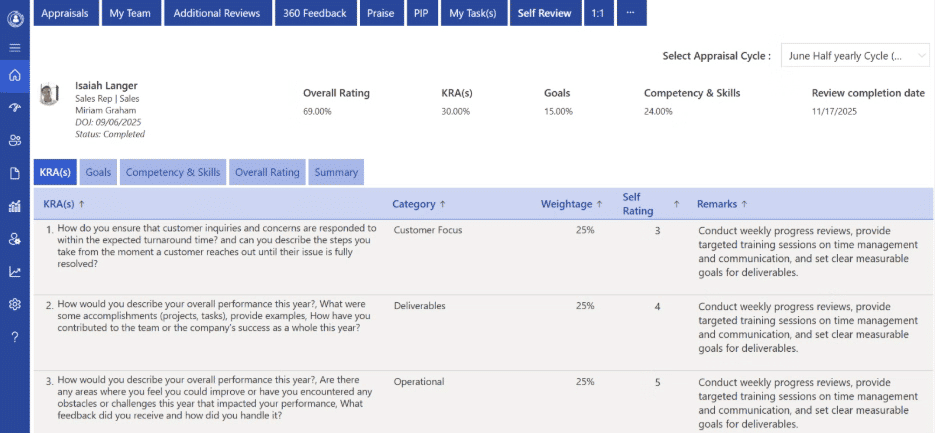
The self-review feature allows employees to reflect on their progress, strengths, and areas for improvement. By aligning self-reviews with goals and feedback, employees can actively participate in their growth, leading to more productive and insightful performance check-ins. This feature promotes self-awareness, empowering employees to take ownership of their development. It also enables managers to have more meaningful conversations during performance reviews.
Elevate your support system and empower collaboration with Helpdesk Software.
How to Choose the Right Performance Management Software
Choosing the right performance management software is crucial for optimizing employee performance, improving team collaboration, and driving organizational success. When selecting a software solution, consider these key factors to ensure it aligns with your organization’s needs:
Integration with Existing Tools
Ensure the software integrates seamlessly with the tools your team already uses, like Microsoft Teams, Outlook, SharePoint, and Planner. This will reduce the learning curve and increase adoption, making performance management an ongoing part of daily work.

Customization Options
Look for a software solution that allows customization to fit your company’s unique performance management processes. From setting goals and tracking progress to tailoring performance reviews, having flexibility will ensure that the software meets the specific needs of your team.
Real-Time Feedback and Recognition
Instant feedback is essential for keeping employees motivated and on track. Choose software that allows for quick recognition and real-time feedback through integrated tools like chat, team channels, or meetings, encouraging a culture of continuous improvement.
Data Visualization and Reporting
he ability to visualize performance data in real-time can provide actionable insights. Ensure the software includes features like Power BI integration or customizable dashboards that allow for quick comparisons, tracking progress, and identifying top performers or areas needing improvement.
Security and Privacy
he ability to visualize performance Employee performance data is sensitive, so choosing a software solution with robust security features is essential. Look for options that offer role-based access controls, encryption, and integration with trusted security frameworks like Azure Active Directory (Azure AD) to ensure data privacy and compliance with regulations. data in real-time can provide actionable insights. Ensure the software includes features like Power BI integration or customizable dashboards that allow for quick comparisons, tracking progress, and identifying top performers or areas needing improvement.
Here are 5 Best Performance Management Software
Rank | Software Name | Best for | Key Highlight |
1 | Performance Management 365 | Seamless integration with Microsoft 365 | Easy integration with Teams, Outlook, SharePoint, and Planner for streamlined performance management. |
2 | Lattice | Continuous feedback and growth | Real-time feedback, goal tracking, and performance reviews all in one platform. |
3 | 15Five | Employee engagement and development | Built-in self-reviews and weekly check-ins for fostering continuous improvement. |
4 | BambooHR | Small to medium-sized businesses | Easy-to-use interface with customizable performance review templates and goal tracking. |
5 | Leapsome | Employee learning and performance | Focuses on aligning performance goals with personalized learning and development plans. |
Performance Management 365 for Microsoft 365 (Teams and SharePoint)
For organizations already using Microsoft 365, Performance Management 365 offers seamless integration with Teams and SharePoint, enhancing performance management within your existing ecosystem.
Microsoft Teams Performance Management
Employees and managers can set, track, and review goals directly within Teams. Performance reviews, feedback, and progress tracking are integrated, making 1:1 check-ins and task assignments simple and collaborative without switching platforms.

SharePoint Performance Management
Performance data, feedback, and reviews are securely stored within SharePoint, ensuring easy access and management. This integration keeps everything within your Microsoft infrastructure, simplifying security and user authentication.
Step-by-Step Guide for Creating a Microsoft Performance Management System
A guide for creating a Microsoft Performance Management system outlines how to build a comprehensive performance management tool using native Microsoft 365 tools, specifically by using SharePoint Lists for tracking employee performance and Power Automate for managing workflows and automation.
Step | Action | Description |
01 | Set Up Performance Management Site | Create a dedicated SharePoint site for performance management to centralize employee reviews, goals, and feedback. |
02 | Customize Goal and Review Forms | Adjust form fields to capture employee performance data such as goals, progress, feedback, and ratings. |
03 | Build Workflows | Use Power Automate to set up automated workflows for goal tracking, review updates, feedback notifications, and reminders. |
04 | Create Performance Views | Set up different views like “Ongoing Goals,” “Completed Reviews,” and “Employee Progress” to filter and manage performance data. |
05 | Configure Permissions | Define roles such as managers and employees to control who can submit, view, or edit performance data. |
06 | Train and Launch | Share system instructions with users, train employees and managers on how to use the tool, and launch the system across the organization. |
1. Create the Site and List
Set Up a Dedicated Site: Create a new SharePoint Communication or Team Site specifically for performance management. This site will house all performance management tools and ensure security and organization.
Create the Performance List: The core of the system is a custom SharePoint List that tracks employee performance, goals, feedback, and reviews. Define necessary columns such as:
- Employee Name
- Review Period
- Performance Goal
- Status
- Feedback
- Rating
- Assigned To
2. Submission and Interface
Create the Submission Form: Use Microsoft Forms or Power Apps to create a user-friendly interface where managers or employees can input performance goals, feedback, and ratings.
Link the Form to the List: Use Power Automate to create a workflow that automatically takes the data submitted via the form and adds it as a new item (performance record) in your SharePoint List.
Customize Views: Create multiple List Views to help filter and track progress, such as “Ongoing Reviews,” “My Reviews,” and “Completed Reviews,” for both managers and employees to track performance data easily.
3. Automation and Management
Set Up Workflows (Power Automate): Use Power Automate to define automation rules for key actions:
- Notifications: Send automatic email notifications to managers when a performance review is due, and to employees when feedback is provided.
- Assignment: Automatically assign reviews to managers based on employee department or role, ensuring reviews are managed effectively.
- Permissions: Configure specific permissions for who can submit and edit performance data (e.g., only managers can edit reviews, employees can only view their own).
4. Enhancements
Integrate with Teams: Embed the performance management forms and the SharePoint List into a dedicated Microsoft Teams channel for easy access by both managers and employees. This allows everyone to track goals, progress, and feedback directly within Teams.
Add a Knowledge Base: Create a separate SharePoint Page or List to serve as a knowledge base for performance management tips, goal-setting guidelines, and best practices, providing employees with self-service resources for improving their performance.
.webp)
A Guide to Building a SharePoint Ticketing System for Your Team
Mistakes to Avoid When Adopting a Microsoft Performance Management System
Implementing a performance management system within the Microsoft ecosystem can significantly improve efficiency and employee development, but several common pitfalls can undermine its effectiveness. Avoid these mistakes to ensure a smooth adoption process:
- Not Aligning with Organizational Goals
One of the biggest mistakes isfailing to align the performance management system with the organization’s overall goals and strategy. Ensure that the performance management system is designed to measure outcomes that are relevant to the business objectives. Without this alignment, employees may struggle to see how their performance directly impacts the organization’s success. - Overcomplicating the Process
Whileit’s important to track progress and set goals, overcomplicating the process with excessive metrics or a rigid system can hinder productivity. Keep the process simple and user-friendly. Use Microsoft 365 tools like Teams, Outlook, and SharePoint to keep everything accessible and easy to manage. - Ignoring Employee Engagement
A performance management system should focus on empowering employees, not just tracking their performance. Avoid making the system solelyabout evaluations and ratings. Encourage continuous feedback and make sure employees are involved in setting their own goals. Failing to engage employees in the process can lead to frustration and lack of buy-in. - Lack of Regular Feedback and Check-ins
Another mistake is relying only on annual performance reviews. Waiting for a yearly check-in to give feedback is ineffective. Instead, adopt a continuous feedback approach within Microsoft Teams to allow for real-time updates, feedback, and conversations. Frequent check-ins ensure that employees stay on track and can adjust quickly if needed. - Not Providing Adequate Training
For your employees and managers to fullybenefit from the new system, proper training is crucial. Without adequate training on how to use the performance management system within Microsoft 365, employees may find it difficult to navigate and adopt the system. Ensure all users understand how to set goals, track progress, and give feedback. - Failing to UseData Effectively
A performance management system is only as good as the data it collects. Don’t make the mistake of ignoring the valuable insights that the system can provide. Use tools like Power BI to visualize performance data, track trends, and make informed decisions that can help optimize the performance management process. - NotCustomizing forSpecific Needs
While Microsoft 365 tools are flexible, not customizing them to suit your organization’s specific performance management needs can lead to inefficiency. Customize the SharePoint Lists, Teams channels, and workflows to align with the unique goals and structure of your organization. A one-size-fits-all approach may not provide the best results. - Inadequate Security and Permissions
Performance data is sensitive, and failure to properly configure security settings and permissions can lead to data breaches or misuse. Be sure to use Microsoft Azure Active Directory to manage access control, ensuring that only authorized personnel can access and manage performance data. This will protect employee privacy andmaintain compliance with data regulations. - Overlooking Integration with Other Tools
Microsoft 365 is a powerful ecosystem, and one of the mistakes is not fullyleveraging other Microsoft tools. Ensure that your performance management system integrates seamlessly with tools like Microsoft Planner for task management, OneDrive for document storage, and Outlook for scheduling feedback sessions. Proper integration enhances the system’s effectiveness. - Neglecting to Collect Feedback on the System
Finally,don’t forget to regularly gather feedback on the performance management system from both employees and managers. Failing to collect insights on how the system is working can lead to missed opportunities for improvement. Use surveys or quick check-ins within Microsoft Teams to make adjustments and ensure the system meets the needs of all users.
Future Trends in Microsoft Performance Management
As organizations continue to embrace digital transformation, the future of performance management within the Microsoft 365 ecosystem is evolving rapidly. Here are some key trends to watch for in the coming years:
Increased Use of AI and Machine Learning
In the near future, Microsoft Performance Management systems willlikely incorporate more artificial intelligence (AI) and machine learning (ML) capabilities. These technologies can help analyze performance data in real time, predict potential performance issues, and suggest personalized development plans for employees. AI-powered insights will assist managers in making data-driven decisions, allowing for more accurate feedback and performance forecasting.
Enhanced Integration with Microsoft Teams
As Microsoft Teams continues to be the central hub for collaboration, future performance management systems will further integrate with Teams for real-time feedback, goal tracking, and performance discussions. Expect even more advanced features such as in-chat feedback, automated check-ins, and virtual coaching sessions directly within Teams, enabling managers and employees to have more dynamic and immediate performance conversations.
Greater Focus on Employee Well-being and Development
Future performance management tools will put a stronger emphasis on holistic employee development, including well-being, work-life balance, and mental health. Microsoft’s ecosystem may include more tools to measure and track these aspects alongside performance goals. Features such as regular well-being check-ins, personalized growth plans, and resilience training could become core components of performance reviews, ensuring employees are supported not just professionally, but also personally.
Real-Time, Continuous Feedback
Moving away from annual or quarterly reviews, the future of performance management will emphasize continuous, real-time feedback. With the help of Microsoft 365 tools like Teams and SharePoint, employees will receive feedback morefrequently and immediately after key activities or milestones, allowing them to make real-time adjustments. This shift to continuous feedback will enhance employee growth and foster a more agile work environment.
Personalized, Data-Driven Development Plans
As performance management tools evolve, expect more personalized and data-driven development plans. By analyzing historical performance data and feedback, Microsoft Performance Management systems will suggest customized learning and career development paths for employees. The use of Microsoft tools like Power BI will further enable managers to visualize trends and tailor development plans to suit individual strengths and areas for improvement.
Integration with Other Business Tools and Data Sources
The future of Microsoft Performance Management will see deeper integration with a wider range of business tools and data sources. For example, HR, payroll, project management, and customer relationship management (CRM) systems will be better integrated toprovide a more comprehensive view of an employee’s overall contribution and performance across various touchpoints. This will help create a unified view of employee performance, improving decision-making and strategic planning.
Increased Focus on Diversity, Equity, and Inclusion (DEI)
With an increasing focus on diversity, equity, and inclusion (DEI), performance management systems will evolve to better track and promote inclusive practices. Expect future Microsoft Performance Management tools to include DEI-focused goals and metrics, helping organizations measure and improve their inclusivity efforts in real time.
Conclusion
Adopting a Microsoft-based performance management system empowers organizations to streamline their processes and create a more collaborative, data-driven environment. By integrating seamlessly with tools like Teams, Outlook, and SharePoint, it allows for real-time feedback, continuous goal tracking, and more efficient performance reviews, helping both employees and managers stay aligned with organizational objectives.
As the system evolves, future trends such as AI-powered insights, continuous feedback, and a stronger focus on employee well-being will further enhance its effectiveness. With better integration, personalization, and data-driven development plans, Microsoft’s performance management solutions will continue to foster a culture of growth, inclusivity, and long-term success.


Frequently Asked Questions
What is Microsoft Performance Management 365?
Microsoft Performance Management 365 is an integrated performance management system within the Microsoft 365 ecosystem. It enables organizations to set clear goals, track progress, and conduct Microsoft Performance Reviews seamlessly inside familiar tools like Teams, Outlook, SharePoint, and Power BI. This helps create a culture of continuous feedback and growth.
How does the Microsoft Performance Management Tool benefit teams?
The Microsoft Performance Management Tool offers real-time feedback, goal tracking, and performance reviews inside Microsoft 365. It integrates directly into tools employees already use, streamlining workflows, improving engagement, and allowing for faster decision-making with real-time insights from Power BI.
Can the Microsoft Performance Management App help with goal setting?
Yes! The Microsoft Performance Management App allows managers and employees to set SMART goals, track progress in real-time, and align performance with company objectives. Integration with Planner ensures goals are tied to actionable tasks, making it easier to stay on track and monitor progress.
How does Microsoft Performance Management 365 ensure secure data management?
Microsoft Performance Management 365 leverages Azure AD for secure access management. Role-based access ensures that only authorized users can access sensitive information, keeping performance data safe and compliant with enterprise security standards.
How does performance management in Microsoft Teams improve employee productivity?
Performance management in Microsoft Teams allows managers and employees to set goals, track progress, and share real-time feedback—all within the same workspace. It keeps communication clear, aligns teams with organizational objectives, and provides insights to recognize achievements and address challenges. By bringing performance discussions directly into daily collaboration, performance management in Microsoft Teams enhances engagement, accountability, and overall productivity.
What is Microsoft Performance Evaluation and how does it work?
Microsoft Performance Evaluation is a system designed to assess employee performance through regular reviews, feedback, and goal-setting processes. It provides managers with tools to track an employee’s progress, highlight achievements, and identify areas for improvement. The evaluation process helps align personal performance with organizational goals, fostering growth and development for both the employee and the company.
How can Microsoft Performance Evaluation improve employee productivity?
Microsoft Performance Evaluation enhances employee productivity by offering continuous feedback, clear goal-setting, and structured performance reviews. It helps employees understand their strengths and areas for improvement in real time. With regular evaluations, employees are better equipped to make adjustments and improve their performance, ultimately contributing to the overall success of the organization.
Schedule a free personalized 1:1 demo
By proceeding, you accept Cubic Logics’s terms and conditions and privacy policy










Try It Free, No Obligation





Please provide your contact details, we will connect with you soon!
Please provide your contact details, we will connect with you soon!
By proceeding, you accept Cubic Logics Terms and Conditions and Privacy Policy
Schedule a free personalized 1:1 demo
By proceeding, you accept Cubic Logics’s terms and conditions and privacy policy








By proceeding, you accept Cubic Logics Terms and Conditions and Privacy Policy