
Complete Guide to Microsoft Employee Onboarding in 2026
Microsoft employee onboarding helps new hires quickly get familiar with company tools, culture, and workflows using Microsoft 365 apps, ensuring productivity and engagement from day one.
The beginning of a new job is exciting and difficult. To HR leaders and managers, it is important to make the first week count to long-term retention and performance. This is where the appropriate Microsoft Employee Onboarding Software will be necessary.
It simplifies the process of paperwork, arranges training programs, and gives all new employees a similar experience. Digitizing the process will help companies to minimize manual work, as well as provide a more interactive and supportive experience to employees since the first day.
The major organizations are also upgrading their plans in 2026, using Microsoft Employee Onboarding 365 and Microsoft Teams to provide a digital-first, seamless onboarding process. Such platforms enable smooth teamwork, centralized interaction, and effective task control, which is why they are suitable in the case of hybrid and remote employee onboarding.
With the integration of established HR practices and the Microsoft ecosystem, the companies will be able to make new employees feel connected, supported, and empowered to achieve success immediately.
What is Microsoft Employee Onboarding 365?
Microsoft employee onboarding is far beyond the creation of accounts and the issuance of a laptop. It is a systematic, interactive process that is meant to introduce new employees, make them feel part of the company, and become productive employees in a shorter time.
An effective employee onboarding program will help new employees feel supported, informed, and connected since the first day of their employment, which will become the basis of their long-term success.
Fundamentally, Microsoft onboarding utilizes the Microsoft 365 platform comprising Teams, SharePoint, Outlook, and Power Automate to provide a centralized, digital workspace to all new employees. Employees can access one secure hub where they can:
- Availability of vital resources: In SharePoint or OneDrive, new employees can immediately access company policies, training resources, HR documentation, and role-specific guides. This demand-based access also removes confusion, delays, and also makes sure that they have the latest information at their fingertips.
- Introduce themselves to their team: With the help of Microsoft Teams, employees can join special channels of onboarding, engage in group chats, and make video calls. This online communication makes them develop relationships at the early stages, feel accepted, and know the dynamics of the team even when they are at home.
- Monitor task progress: Custom-made Power Automate-based automated checklists, reminders, and status updates ensure that new hires stay on time. Whether it is in filling in compliance forms or in completing training modules, they can easily see what has been done and what is still awaiting completion, and the managers can easily check the progress without micromanagement.
With the combination of these aspects, Microsoft Teams employee onboarding app will combine the efficiency of operations with humanity. Regardless of whether it is the onboarding of new employees onboarding (remote, hybrid, or in-office), all people get the same quality experience.
Since all is incorporated into tools, which they will use daily, the learning curve will be shorter, confidence will build quicker, and managers will be able to easily keep track of progress without having to go on a hunt to find spreadsheets or infinity emails. This strategy will turn onboarding into an HR process into a retention, productivity, and cultural fit driver on the first day.
Why Microsoft Employee Onboarding Matters in 2026
In the modern hybrid-first, high-paced work environment, onboarding is not a box to be checked anymore; it is a business asset. It is the key to the difference between “You are hired and “You are thriving”.
An effective onboarding experience can transform a scared new employee into a committed, networked, and productive employee who can make a difference on the first day.
Combining such tools as Microsoft Employee Onboarding and SharePoint with the system of structured processes and new employee onboarding checklists, the organizations can make sure that nothing is missed and each new employee feels assisted during the transition.
The Business Case for Great Microsoft Employee Onboarding
Retention Boost
Workers who undergo an effective onboarding process have a higher chance of staying with an organization three years or more SHRM 69%. This retention is not only helpful in minimizing the cost of onboarding a new employee many times, but also helps preserve institutional knowledge, improve workplace culture, and create stronger teams in the long term.
Companies that invest in uniformity and concern in the short run save a lot of money in terms of recruitment and training in the long term.
Quickened Acceleration to Productivity.
Organized onboarding has the potential to boost the productivity of new-hires by over 50 percent in the initial 90 days. Having a centralized digital workspace and an in-built employee onboarding app, new employees do not spend time trying to figure out where to get certain documents or whom to speak to. Rather, they are able to find resources fast, go through necessary procedures and begin working on projects nearly instantly. This is not only effective to the employee but it also speeds up team output.
Stronger Culture Fit
Gallup has a staggering 33 percent of employees who make decisions within the first week of their employment as to whether they have a future with the company or not. The initial impressions are important, and an onboarding experience that conveys the values, fosters relationships, and facilitates teamwork makes new employees feel like they are part of the team.
Once culture fit is achieved at the very beginning, long-term engagement and loyalty are to be expected as well, making employees become brand evangelists and dedicated contributors.
The Risks of Neglecting Onboarding
In the absence of a well-defined and enabling onboarding plan, the threats to the organization are high:
- Turnover peaks: In case of improper onboarding, the new employees usually feel lost, unsupported, or not part of the team. This sense of not fitting in and direction may lead to them dropping out in the initial few months hence a revolving door of workers. High turnover causes recurrent hiring processes, increased recruitment expenses as well as wastage of training.
- In addition to the financial implication, it also affects the team dynamics and imposes extra pressure on the already existing employees who must fill the gap until new employees are recruited.
- The involvement is compromised: The employees might not find their way into the organization without having a well-organized guidance and integration. They may be unaware of expectations, responsibilities, and the way to work with peers effectively. Such confusion may lead to disengagement, lack of motivation and isolation.
In the long run, the unengaged employees would perform less, productivity would be lowered and the general team environment would be impacted negatively on morale and performance of the business.
Recruitment ROI is reduced to zero: Recruiting talent is a significant investment that entails sourcing, interviewing, background checks and onboarding costs. But when new employees drop out because of poor onboarding, then the investment is wasted before the employee can even make a difference.
This not only negates the payback but also slows the projects, disrupts the business continuity and harms the brand of the employer. The outcome is a waste of resources and opportunities to create long-term contributors.
2026 Demands a Smarter Approach to Microsoft Employee Onboarding
With remote and hybrid work models becoming the new normal, onboarding can no longer be a one-size-fits-all. It must be uniform, individualized and adaptable regardless of the location of the employees. That is where the Microsoft employee onboarding ecosystem of Microsoft, which is driven by Teams and SharePoint, fits.
It offers HR executives the means to create role-based, high-touch experiences and automate common activities. The outcome is a more streamlined process that leads to a more powerful employee engagement, less administrative work, and provides businesses with a definite competitive edge when it comes to attracting and retaining the best employees.
The Role of Microsoft Teams in Employee Onboarding
Imagine Microsoft new Teams employee onboarding as a virtual office with a virtual headquarters that never closes and always remains connected and takes new employees through their initial days step by step.
Regardless of whether the employees are in the office, working at home or in other parts of the world, Teams offer a structured and interactive environment that integrates communication, resources, and training into a single well-organized environment. The outcome is more intimate, interactive, and smooth onboarding.
1. Specialized Recruitment of New Employees
A Teams channel entitled new hire welcome turns out to be the hub of all things a new employee requires. One can pin a copy of the employee onboarding checklist, orientation guides, schedules, and even HR policies at the top to access them easily.
Leadership and team introduction messages can be added directly to the channel and the employees can feel connected without the noise of spamming emails.
This provides a stable, friendly online environment that facilitates the ease of locating information and fosters free dialogue.
2. Robots and Automation to Be Efficient
Repetitive onboarding activities can be automated through Power Automate to save time and minimize errors in the hands of HR. An example of this is that once a new employee is hired, a new employee onboarding email can be automatically sent, a new employee can be assigned a personalized list of tasks, and a new employee can receive reminders about outstanding forms or training modules.
Milestones are automatically alerted upon completion, and this enables the managers to be aware of the progress being made and direct the employees to the next step without having to follow up manually.
3. Connection Building Meetings & Introductions
With the help of the meeting tools of Teams, organizations can organize structured introductions with leaders, project managers, and team members. Live question and answer sessions are used to explain the company’s processes, values, and tools, and informal coffee chats are used to make social connections.
Such interactions make one feel part of the team, and new employees can become part of the culture within a short time, even in remote or hybrid environments.
4. Training Material in a Single Central Location
Viva Learning and Microsoft Stream are seamlessly integrated with Teams and provide new employees with direct access to training resources. All the content can be found in a single location, whether it is self-paced learning modules or culture videos and recorded classes.
The tracking of the progress in real time will allow the HR and managers to identify the gaps in knowledge at an early stage and support the employees before they start to fall behind schedule during the first weeks.
5. Microsoft Teams Integration End-to-End Management
With the incorporation of Teams into the wider Microsoft Employee Onboarding 365 ecosystem, organizations can make it a full onboarding center. Each phase provides acceptance, onboarding activities, training, and feedback gathering, and even reviews of probation can be organized within Teams.
Individual onboarding portals based on each position and analytics dashboards can simplify the process of monitoring progress and quantifying success, providing HR leaders with insights to improve continuously.
6. Document Sharing and Document Storage Are Centralized
As a result of the inclusion of SharePoint and OneDrive in Teams, all onboarding documents, tax forms, and training manuals are stored in a single location safely. This provides version control, removes confusion, and allows a completely paperless onboarding process, which makes compliance and record-keeping an easier task of HR.
New employees do not have to search on several platforms, and this saves time and frustration. The centralized system is also more secure since sensitive information about employees is secured within the Microsoft ecosystem.
7. On-the-Fly Cooperation with Co-Workers
New employees can work on projects immediately through Teams. The co-authoring and shared workspaces in Word, Excel, and PowerPoint promote engagement and learning and make employees feel that they are important contributors in the initial stages of their career.
This real-time teamwork assists in breaking silos and providing the new employees with an opportunity to learn with experienced employees. It also creates a sense of teamwork and confidence because they are immediately engaged in significant work.
8. Individual Dashboards and Analytics
Integrating Teams and Power BI, managers will be able to view visual dashboards to monitor the progress of onboarding every new hire. These insights can be used to identify strengths, areas of concern, and enable HR to refine the experience to make the most of it.
Individualized analytics simplify the comparison of onboarding results between teams, positions, or locations. In the long run, this data-driven solution can be used to improve processes to make sure that each new employee gets the most optimal beginning.
9. Feedback Loops of Continuous Improvement
Feedback mechanisms within Teams provide new employees with a voice. Quick check-ins, surveys, or polls help to get important information about the effectiveness of the onboarding process and help HR to improve the strategies and provide a more positive experience to future employees.
Organizations can respond to this feedback to demonstrate that they appreciate employee feedback, which enhances trust and engagement. The frequent feedback loops also form an open culture, and employees feel freer to share their experiences.
10. Long-Term Engagement After Onboarding
Microsoft Teams is not only useful during the initial few weeks. It preconditions further cooperation, mentorship, and professional growth. Communities of practice to role-based learning groups Teams can be used to maintain engagement long after onboarding.
The availability of learning and networking opportunities at all times keeps the employees developing in their positions. The long-term strategy does not only help in retention but also develop future leaders in the organization.
The Complete Microsoft Employee Onboarding Process
Onboarding is not only a one-day orientation these days. It is an organized process that is backed by the current Microsoft new employee onboarding software that starts prior to the date of employee joining and continues even into the first year.
Under Microsoft Employee Onboarding ecosystem, all the steps are automated, customized, and made to make employees feel confident, connected, and capable on the first day. The following is a step-by-step five-stage road map:
Stage 1: Preboarding
Key Features for a Successful Microsoft Teams Employee Onboarding Program
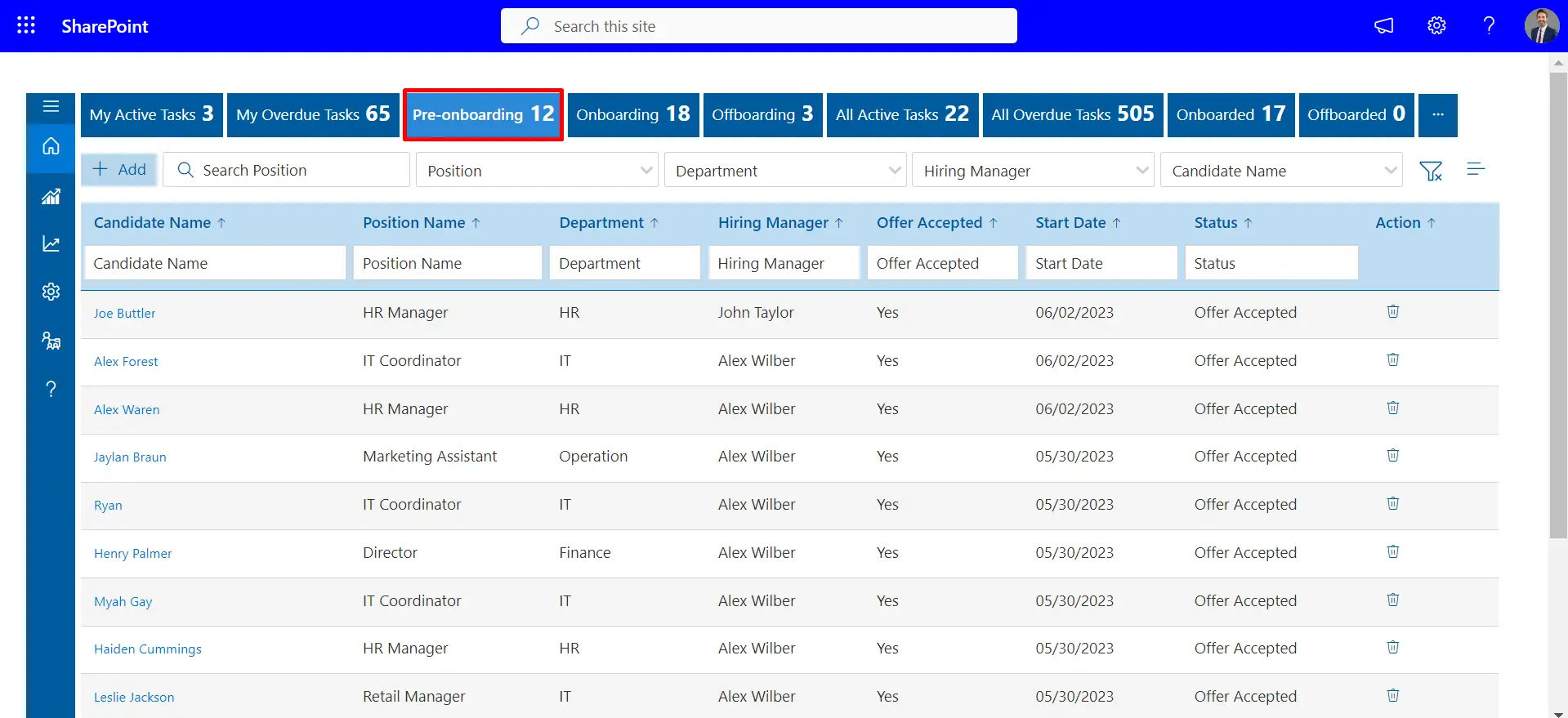
The process begins when a candidate makes acceptance. This step is made easy by employee onboarding software which sends automated welcome emails, login credentials and customized onboarding schedules.
Using Microsoft Employee Onboarding Teams, the HR can post a preboarding portal where new employees can access introductory materials, company handbooks, and compliance forms long before the first day. It not only helps to avoid overwhelming the first day but also creates excitement and a sense of belonging.
Stage 2: Orientation
The orientation provides the basis of employee success because it introduces new employees to the vision, culture, and people of the company. Organizations can conduct live welcome sessions, introduce leadership via recorded video, and make digital org charts available using Teams and SharePoint.
Contrary to the old-fashioned orientations, onboarding software makes all things centralized, available 24/7, and automatically monitored. This assists the new employees in taking in the information at their pace and yet remaining engaged.
Stage 3: Role-Specific Training
There is no universal job, and Microsoft employee onboarding software allows customizing learning according to each job. Managers can also use Viva Learning to allocate self-paced training, compliance certifications, and job-specific materials.
It is also possible to organize mentorship programs directly in Teams, which provides workers with an opportunity to ask questions, individual coaching, and confidence in their new duties.
Automated reminders are used to make sure that deadlines are met without the interference of the HR.
Stage 4: Culture Integration
Effective onboarding is not limited to systems and processes. It is all about establishing real relationships. Using Teams, new employees can be integrated into special social networks, have virtual coffee breaks, and be part of community groups that mirror the culture of the company.
Combining the collaboration of work with informal communication, the onboarding software provides the environment in which employees can feel a part of the team very fast. This assimilation is useful in promoting retention through trust and belonging.
Stage 5: Ongoing Learning and Development
Onboarding is not a one-time process but a continuous development process that continues beyond 30 days. The software of onboarding employees at Microsoft allows scheduling quarterly check-ins, providing personalized career development opportunities, and sharing learning resources in real-time.
Dashboards allow employees to monitor their progress, and managers to understand performance and engagement. Notably, the entire employee lifecycle is also supported by software, which links onboarding to applications such as an employee offboarding checklist, which facilitates the process of transitioning the employee to a different position or out of the company.
A genuinely efficient Microsoft Teams employee onboarding program that incorporates structure, customization, and ongoing enhancement. With intelligent automation, centralized solutions, and people-centered approach, the HR leaders can make onboarding a strong developmental experience.
The use of employee onboarding software will facilitate seamless implementation and adherence to the best practices of onboarding. The following are ten major characteristics that show innovation and effective onboarding strategies.
1. Automated Task Lists

Through Microsoft Planner or To Do, companies can develop role-specific, ready-made checklists, which automatically allocate tasks to new employees, managers and IT support. Automation does not leave anything behind in terms of creating accounts and filling out digital paperwork to scheduling introductions and training.
This does not only save the HR manual work but also shortens the onboarding schedule.
Automating tasks through the best employee onboarding software will provide the new employees with a clear roadmap on the first day and minimize confusion and delays.
2. Document Library Centralized
SharePoint serves as a safe repository of all essential onboarding resources policies, IT configuration guidelines, benefits information, and position-specific manuals. New employees will be able to get all that immediately on any device, and there will be no lost files and misunderstandings. The creation of a centralized space by using best practices in onboarding enhances the retention of knowledge and allows employees to access information quickly.
3. Feedback Loops
Using Microsoft Employee Onboarding Forms, HR will be able to gather structured feedback at the end of week one, month one and quarter one. These insights point out areas of pain, success and areas of improvement. Through responding to feedback, HR will continually improve the onboarding experience to keep it in line with changing needs.
4. Integrated Training
Viva Learning and Microsoft Stream integrate all training in Teams. New employees are able to take role-based modules, company culture videos and monitor their learning without leaving their working environment.
5. Analytics & Reporting
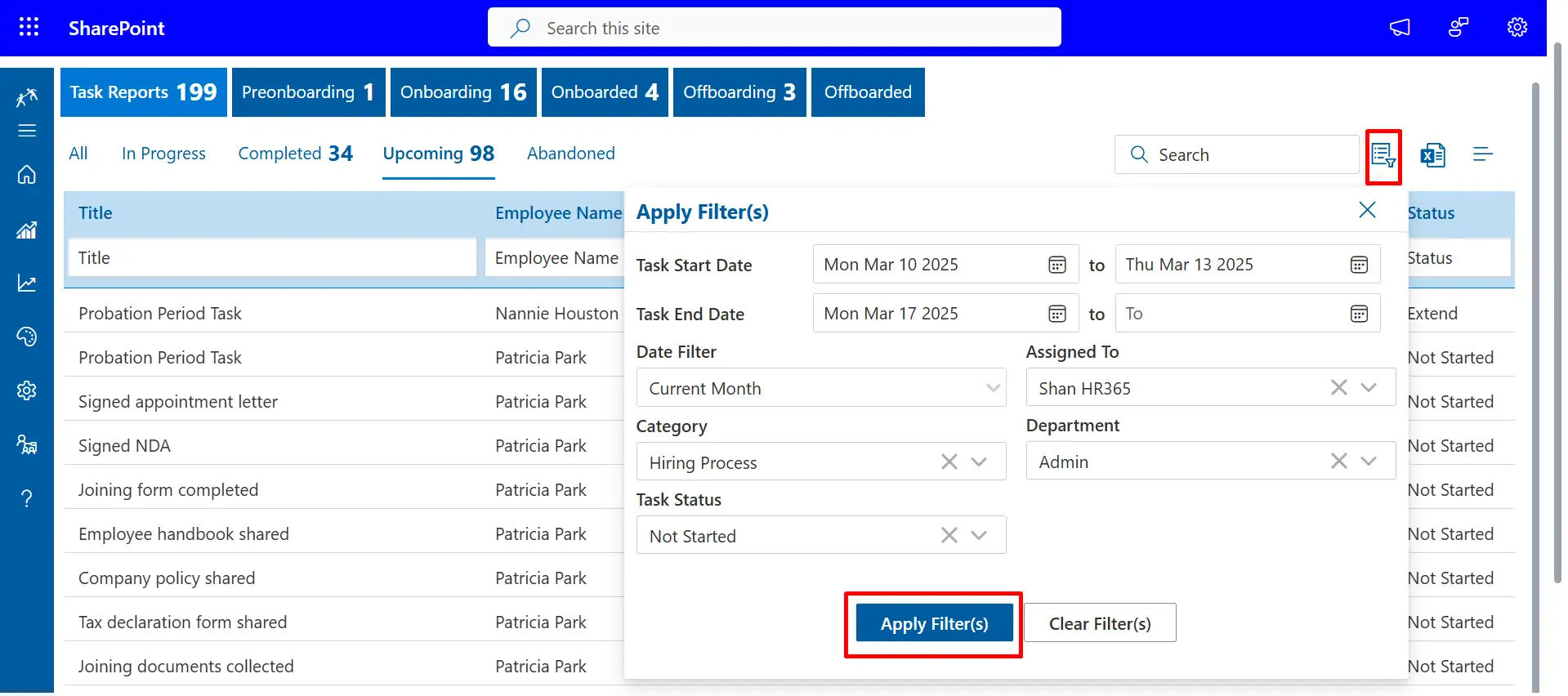
With the help of Power BI, HR leaders can track the onboarding metrics in real time, starting with task completion, and ending with engagement levels. These analytics will identify bottlenecks, quantify the effectiveness of programs, and give data-driven insights to the leadership.
The most effective employee onboarding software will use these insights to make proactive changes so that the program can always achieve quantifiable outcomes.
6. Individual Onboarding Experiences
Each position is unique and onboarding should be the same. Organizations can offer a different experience to every employee by customizing content, training, and checklists in Teams.
The use of best practices onboarding will make the process of personalization faster and more productive, as well as increase the overall satisfaction of employees.
7. Smooth Co-operation Channels
Specific Teams channels used by new employees promote free communication and mutual support. Employees are able to pose questions, exchange knowledge, and socialize.
These teamwork spaces are constructed using employee onboarding software, which provides an inclusive environment where employees can flourish, especially in a hybrid or remote environment.
8. Paperless Onboarding Process
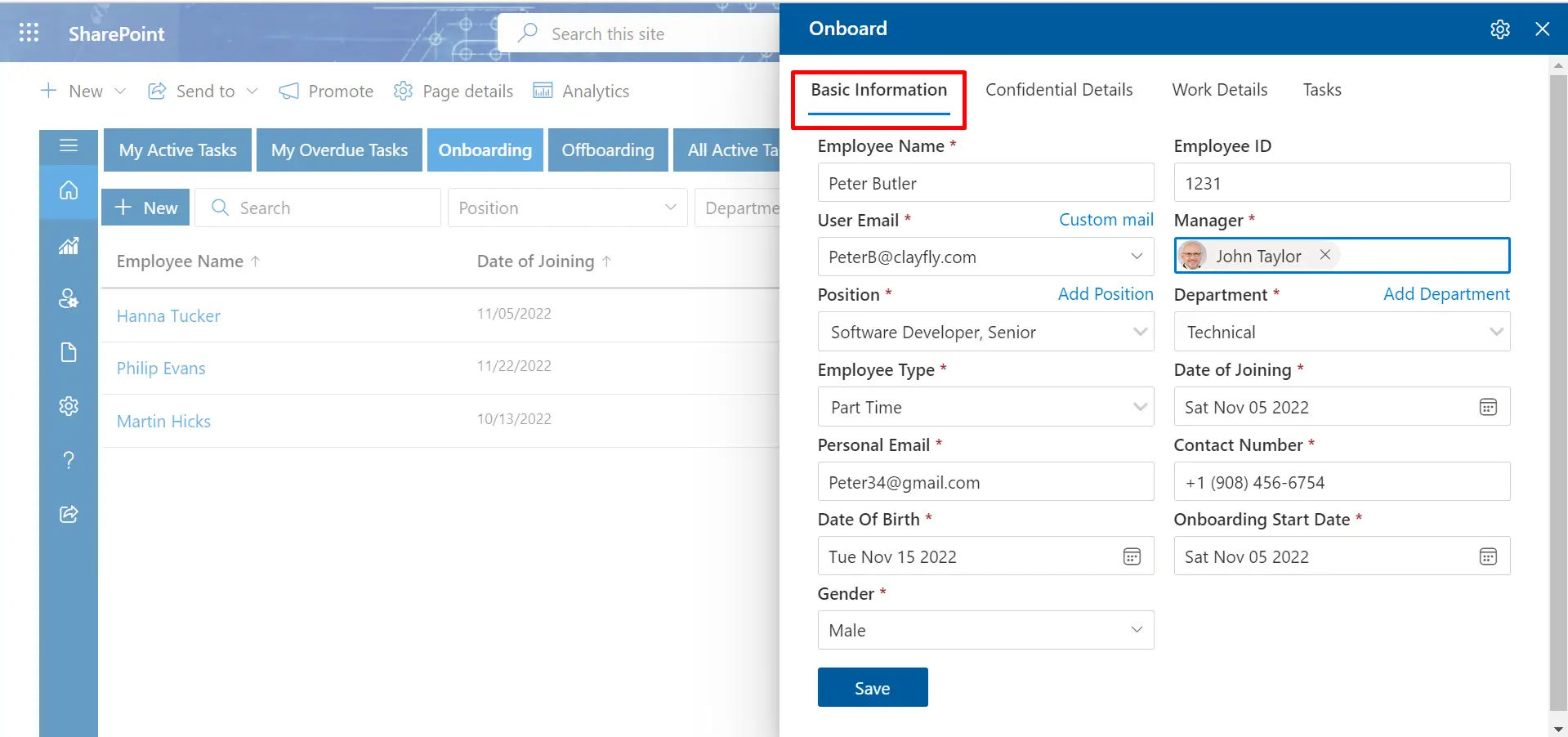
Switching to a paperless onboarding system will save time and increase efficiency. HR can do away with manual repetitive work and compliance and accuracy are still maintained with digital forms, automated approvals, and electronic signatures built into Teams and SharePoint.
Paperless approach is a vital onboarding best practice and helps in sustainability efforts.
9. Manager & Buddy Involvement
Onboarding of employees is best done when managers and fellow employees are involved. Teams facilitate the use of scheduled check-ins, buddy programs, and mentorship that provide new hires with constant support. The integration of culture, confidence, and early attrition are enhanced when these steps are incorporated into onboarding software.
10. Lifecycle Integration and Offboarding
The most effective programs do not end with onboarding as they relate to the whole employee lifecycle. The ecosystem provided by Microsoft Employee Onboarding enables organizations to connect onboarding activities to career development strategies, performance appraisals, and formal offboarding.
Benefits of Using Microsoft for Employee Onboarding
By utilizing the employee onboarding tools provided by Microsoft, the HR, IT, and the new employees experience a change in the hiring process. Onboarding nowadays is not only about the digitalization of forms, it is a process of providing a seamless, interactive, and comfortable experience that helps the employees to go through their first workday to the point of complete productivity.
Through automation, centralized tools, and personal experiences, Microsoft helps organizations to provide efficient, consistent, and employee-centric onboarding. Monitoring onboarding metrics enables HR to assess the engagement, completion of tasks, and the effectiveness of the program in general to improve it constantly.
For HR Teams
Streamlined workflows:

HR teams can be overwhelmed by manual onboarding procedures, spreadsheets that are spread all over, and follow-ups. Microsoft Teams, Planner, and SharePoint automate the repetitive processes of sending welcome kits, assigning e-learning modules, scheduling orientation sessions, and monitoring progress.
This will enable the HR to concentrate on establishing valuable relationships with the new recruits instead of wasting time on administrative duties.
Compliance tracking:
Audits and regulatory compliance It is essential that the records of signed documents, safety certifications, and training completions are kept. Using SharePoint, all the necessary documents are safely stored in a central place, and they are readily available when they are required.
HR departments do not have to search email trails or paper documents and this saves mistakes and enhances efficiency.
Reduced manual follow-up:
Teams and Outlook reminders are automated to make sure that new hires fill in the forms, attend the mandatory sessions, and meet the deadlines without the HR sending them several follow-ups. This saves time and ensures that the onboarding process is on schedule.
For IT Departments
Secure access control:
Securing important company information starts on the first day. With Azure Active Directory, the IT departments are able to provide new employees with the resources they require and ensure a high level of security without compromising their productivity. Role based permissions provide compliance and reduce chances of unauthorized access.
Streamlined account provisioning:
The manual account setups may be time consuming and prone to errors. The tools of Microsoft enable IT to create Microsoft 365 accounts, Teams channels, SharePoint sites, and email setups within a few clicks even before the employee is hired. This will make sure that new employees are able to get down to business without wasting time.
Streamlined IT support:
Onboarding Automated onboarding saves IT teams on repetitive requests and follow-ups. Onboarding is a predictable and quicker process due to standardized provisioning templates and workflows, enabling IT staff to concentrate on more valuable projects.
For New Hires
Centralization of resource access:
Teams or SharePoint can provide new employees with all the policies, contacts, training modules, and forms in a single hub. This saves time, lessens confusion and enables fast self service. All is arranged so that it can be easily referred to and the employees feel confident and supported even during the first day.
Focused expectations and organized direction:
Individualized schedules, task list, and learning modules demonstrate to new employees what is required of them in the first week, month, and so on. This transparency creates trust and hastens the working process, as well as provides the employees with a clear roadmap to success.
Faster team integration:
Virtual introductions, team channels, and informal chats allow new employees to get acquainted with coworkers and managers in the shortest possible time, which makes them more engaged and feel belonging even in remote or hybrid environments. Relationship building at an early stage promotes teamwork and knowledge exchange.
Lifecycle connection:
Microsoft Employee Onboarding tools connect onboarding to future transitions, such as employee offboarding, so that the employee experience is a seamless, continuous experience. This is a strategy that promotes long-term involvement and retention.
Best Practices for Microsoft Employee Onboarding in 2026
To build a Microsoft employee onboarding experience that is seamless to both the HR and IT and the new hires, the activation of Teams or SharePoint is not enough. The objective is to create an orderly, people-centered experience that embraces employees, strengthens organizational culture, and enables them to work fast without excessive manual workload.
With the help of Microsoft 365 Tools (Teams, SharePoint, Power Automate, Viva Learning, and Stream), and Microsoft teams new employee onboarding, organizations can develop a scalable, automated, and highly personalized onboarding process that is beneficial to all.
1. Personalize the Onboarding Journey
Individualizing the experience will help the new employees feel appreciated and instantly attached to their colleagues.
- Teams channels departmental: Each department has its own workspaces, documents, tasks and contacts. This means that new employees can immediately access the resources they require to perform.
- Have a buddy or mentor: Have recurring Teams check-ins during the first month to give advice and answer questions. Gives employees a sense of support and decreases the learning curve in the first weeks.
- Video message by their manager: Included in the onboarding portal or delivered through Teams chat. Establishes a personal relationship and instills the company culture at the very beginning.
According to Gallup research, 87 percent of the employees report being more connected when onboarding is personalized to their role and objectives.
2. Preboarding Before the First Day
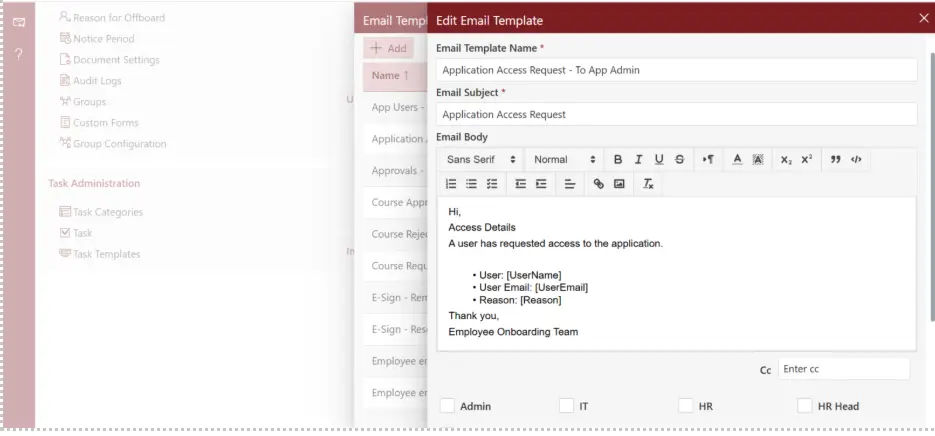
The pre-employment process creates enthusiasm and decreases anxiety among recruits.
- Share mission and values: SharePoint welcome portal, videos, leadership biographies, and important policies. New employees are made aware of the purpose of the company and they identify with the vision of the company at an early stage.
- Send first-week agenda through Outlook: Helps employees to plan and be aware of what to expect. Lessens anxiety on the first day and enables easier assimilation into the team.
- Warm Teams welcome: A brief message text with links to the necessary resources creates a favorable first impression. Fosters builds direct contact and interaction prior to their commencement.
SHRM records an 11 percent increase in retention of structured preboarding companies.
3. Keep Information Bite-Sized
The division of content into mini modules enhances learning and memorization.
- Assign microlearning modules through Viva Learning. Promotes targeted learning that is easy to handle and does not overwhelm new employees.
- Conduct policy walkthroughs using short 15-minute Teams. Maintains interest and makes sure that the important information is taken in.
- Give one-page instructions rather than long PDFs. Enhances the ease of reference of important policies and directions at any time.
Why it is important: Microlearning increases retention by up to 80% (Journal of Applied Psychology).
4. Automate Routine Tasks
Automation saves time and minimizes errors enabling teams to concentrate on strategic activities.
- Automated welcome messages, task reminders and policy acknowledgments. Assures uniformity in communication and minimizes human error.
- Establish regular calendar events in check-ins and training. Maintains new employees within the organization without having to keep a close eye on them.
- Automatic role-based or department-based workflow assignments. Facilitates the process of onboarding and makes sure that all the activities are done effectively.
Tip: Automation should be accompanied by a detailed IT employee onboarding checklist to make sure that all technical arrangements are made in an efficient manner.
5. Combine Synchronous and Asynchronous Learning
The flexibility of all employees is guaranteed by the provision of live and on-demand learning.
- Live sessions: Team introductions and Q&A in Teams. Encourages communication and enables employees to pose questions instantly.
- On-demand access: Store lessons in Microsoft Stream to watch any time. Offers flexibility to the employees in various locations and time zones.
6. Promote Interaction at the Very First Day
Early involvement creates a sense of belonging and leads to retention in the long term.
- Arrange virtual coffee meetings in Teams. Helps recruits begin to develop relationships within a relaxed environment.
- Polls, icebreakers and fun surveys using Microsoft Forms. Fosters engagement and makes the onboarding process more engaging.
- Announce new employees publicly in a company-wide Teams announcement. Develops a feeling of appreciation and belongingness at the outset.
7. Collect Feedback Regularly
Feedback listening and acting will guarantee continuous improvement.
- Administrate surveys using Teams or Microsoft Forms at the end of week one and month one. Gathers initial impressions and finds out the areas of improvement.
- Analyze and determine bottlenecks using Microsoft employee onboarding software. Allows making decisions based on data to optimize the onboarding process.
- Close the loop by improving the shares on the basis of feedback. Demonstrates to new employees that their contributions are appreciated, and instills trust and interest.
8. Highlight Company Culture
Culture must be incorporated in all interactions and not orientation only.
- Share success stories, photos and milestones using a specific Teams channel. Strengthens organizational principles and fosters solidarity among the staff.
- Ask leaders to send welcome messages or attend live drop-ins. Shows that the leaders are accessible and enhances engagement.
Why it is important: Glassdoor mentions that 32 percent of employees remain in their positions mainly due to a good company culture.
9. Track Progress with Data
The progress measurement will guarantee the effectiveness of onboarding and promote the ongoing optimization.
- Monitor task completion, engagement, and learning using Power BI dashboards. Gives insight into the level of adaptation and task completion by the employees.
- Track the use of Teams channels, documents and training. Determines the most valuable and the need of improvement resources.
- Optimize content and schedules. Always makes sure that onboarding is maximally impactful.
Advantage: Onboarding based on data is half as efficient in achieving learning objectives LinkedIn Learning Report.
Employee Onboarding 365: Streamline, Automate, and Optimize Your Onboarding Process
Employee Onboarding 365 is an all-inclusive platform that will change your onboarding experience by integrating with Microsoft 365 applications, such as Teams, SharePoint, Outlook, and Power Automate. It streamlines complicated onboarding processes, makes them compliant, and makes employees more productive on the first day.
The platform will be created to offer a smooth, organized and highly personalized onboarding process so that all new employees feel at home and ready to work the first day.
1. Onboarding Journey Automation
Employee Onboarding 365 automates the onboarding process by eliminating manual work by HR and IT departments. It guarantees that all the processes of sending welcome emails to assigning training are carried out smoothly and thus the onboarding process is smooth and uninterrupted.
Delays and errors are also eradicated through automation and HR can concentrate on engagement and relationship building instead of pursuing administrative tasks.
2. Role-Based Onboarding Tasks
The platform enables the HR to design department or role specific onboarding activities, such as document submissions, policy acknowledgements, and training modules. New employees are provided with a customized workflow, and the appropriate content is presented when it is needed.
Employees can easily know their duties, training needs, and expectations of the company by tailoring tasks to each job, resulting in a faster productivity rate.
3. Inbuilt Calendar and Reminders
New employees, managers and team members are kept on track by automated notifications and calendar events. Notifications about the outstanding activities and the scheduled meetings minimize procrastination and keep everybody on schedule.
This proactive strategy assists managers and HR departments to be aware and enhance accountability throughout the organization, which makes the onboarding process predictable and structured.
4. Document Management is centralized
A centralized SharePoint repository is used to store all documents company policies, training manuals, compliance forms, etc. related to onboarding. This makes accessibility easy, version control and removes confusion that arises due to scattered files.
Employees are able to locate and access important documents very fast, and the learning curve is minimized as well as employees get all they require at their fingertips.
5. Employee Self-Service Portal
Onboarding portal is a portal where new employees can fill in forms, send in documents, and monitor their progress. This gives them the autonomy to control their onboarding process and lessens administrative workload to HR.
The self-service portal enhances engagement as well by providing employees with a view of their onboarding activities and deadlines, and the process becomes transparent and intuitive.
6. Secure and Compliant
Employee Onboarding 365 uses Microsoft 365 security measures to safeguard employee sensitive information. The platform is also in line with industry standards, which protects information during the onboarding process.
This safe space instills confidence in the employees and makes sure that the HR teams comply with the regulatory and internal requirements without extra work.
7. Analytics and Reporting
In-built analytics and Power BI enable the HR and leadership to track the onboarding performance, detect the bottlenecks, and implement changes based on the data. Measures such as completion rate of tasks and time to productiveness assist in making the process more refined all the time.
These insights can guide HR to make wise decisions, streamline the workflow, and make the onboarding program always address the organizational objectives.
8. Customizable Workflows
Any organization is different. Employee Onboarding enables the HR teams to tailor workflows to the company’s policies, departmental requirements and individual roles and therefore, the onboarding process is flexible and scalable.
The ability to create customizable workflows also allows organizations to apply best practices, consistency, and be able to adapt fast to changes in team structures or processes.
9. Key Benefits
- Quick employee onboarding and performance.
• Less administrative effort on the part of HR and IT.
• Role-specific and personalized onboarding.
• Improved employee participation and retention.
• Full insight and management of onboarding metrics.
Conclusion
Onboarding is not only about orientation, but a great opportunity to motivate engagement, loyalty, and high performance on the first day. With Microsoft Employee onboarding software, it is possible to develop a smooth, automated, and personalized experience that links, trains, and empowers new employees. Automate processes, remove paperwork, and assist employees to begin making contributions sooner.
Get the benefits of 14 days free trial without credit card. Smart and quicker onboarding with no credit card and no setup hassles. Create a workforce that is prepared to succeed on their first day and make their onboarding a high-impact process.
Frequently Asked Questions
What is Microsoft employee onboarding?
Microsoft employee onboarding is the process of welcoming and integrating new hires using Microsoft tools like Teams and SharePoint. By centralizing resources, communication, and training in one place, Microsoft employee onboarding ensures a consistent and engaging experience for all employees.
How does Microsoft Teams employee onboarding help new hires?
Microsoft Teams employee onboarding acts as a central hub where new hires can access resources, schedules, and training materials. With chat, meetings, file sharing, and collaboration tools, Microsoft Teams employee onboarding makes the process organized, interactive, and accessible from anywhere.
Can Microsoft employee onboarding be automated and personalized?
Yes, Microsoft employee onboarding can be automated and personalized using Microsoft 365 tools. Workflows can be set up to assign role-specific resources, track progress, and deliver a seamless experience making Microsoft employee onboarding both efficient and engaging.
Is Microsoft Teams employee onboarding secure with Microsoft 365?
Yes, Microsoft Teams employee onboarding leverages Microsoft 365’s enterprise-grade security for account provisioning and data protection. Role-based permissions ensure employees only see relevant content, making Microsoft Teams employee onboarding safe and compliant.
Do I need technical skills to set up Microsoft employee onboarding?
No, Microsoft employee onboarding is designed for simplicity with pre-built templates, guided setup, and best-practice workflows. With Microsoft new employee onboarding features, HR and IT teams can launch programs quickly without requiring advanced technical expertise.






















