
Maximizing the Value of IT Assets with SharePoint Asset Management
_eH2jDg7dZ.png)
Managing IT assets efficiently is crucial for businesses that rely on technology to maintain operations. Whether it’s computers, software, or networking equipment, maximizing the value of these assets ensures businesses maintain operational efficiency, minimize costs, and maintain regulatory compliance.
Maximizing the Value of IT Assets with SharePoint Asset Management allows businesses to efficiently track and manage assets using a centralized platform. SharePoint automates workflows, provides real-time visibility, and enhances team collaboration, optimizing asset performance.
By automating the asset lifecycle, SharePoint ensures proper maintenance, compliance, and security, reducing costs and extending asset lifespan. It helps businesses make informed decisions and maximize asset utilization.
SharePoint, a powerful platform within Microsoft 365, can help streamline IT asset management by offering centralized tracking, enhanced collaboration, and powerful automation tools. In this comprehensive guide, we explore how businesses can leverage SharePoint Asset Management to maximize the value of their IT assets.
What is IT Asset Management?
IT asset management (ITAM) is the process of managing a company’s hardware, software, and other technology resources throughout their lifecycle, from acquisition to disposal. Effective ITAM ensures that organizations are using their assets efficiently, extending their lifespan, and ensuring compliance with regulatory standards.
With the rapid pace of technological change, businesses need tools that can help them keep track of their assets, monitor performance, and plan for future upgrades or replacements. This is where SharePoint Asset Management comes into play.
Benefits of Using SharePoint for Asset Tracking
SharePoint offers a range of features that make it an excellent platform for managing IT assets. Some of the key benefits include:
- Centralized Repository: SharePoint allows businesses to create a centralized database where all IT assets are stored, tracked, and managed. This eliminates the need for manual tracking and ensures that all stakeholders have access to real-time information.
- Customizable Workflows: SharePoint enables the creation of custom workflows to automate asset management processes, including procurement, maintenance scheduling, and asset retirement.
- Scalability: SharePoint can handle IT asset management for organizations of all sizes, from small businesses to large enterprises, ensuring that your asset management system grows with your company.
- Integration with Microsoft 365: SharePoint integrates seamlessly with other Microsoft 365 tools like Power Automate, Excel, and Teams, providing a powerful ecosystem for asset management.
- Enhanced Collaboration: SharePoint’s collaboration tools enable teams to work together more effectively on asset-related tasks, improving communication and decision-making.
Centralized Repository for IT Assets
A centralized repository keeps all IT asset information in one organized location. It helps teams easily view asset details, track ownership, and maintain accurate records without scattered data.
Organizing IT Assets in SharePoint
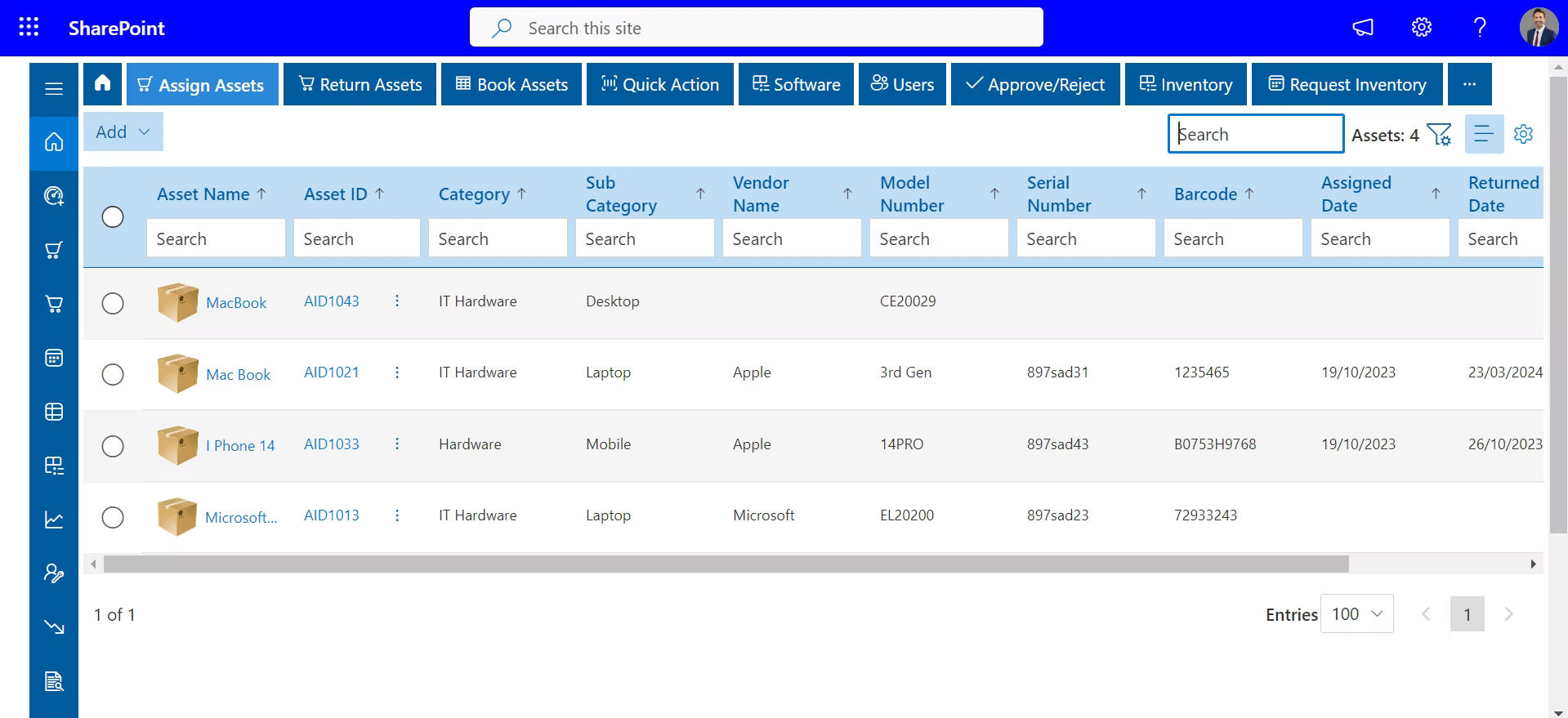
One of the primary advantages of using SharePoint for IT asset management is its ability to organize and centralize asset data. SharePoint’s document libraries and lists can be used to create a centralized repository where businesses can track the details of their IT assets, including hardware specifications, software licenses, maintenance schedules, and purchase histories.
For example, businesses can set up different libraries for hardware assets (e.g., computers, servers, printers) and software assets (e.g., licenses, subscriptions). SharePoint’s metadata features allow assets to be categorized based on asset type, department, or location, making it easier to search and filter assets when needed.
Creating a Centralized Database for Better Tracking and Management
With SharePoint, businesses can create a robust IT asset management system that not only stores asset information but also provides detailed reports and dashboards to track asset performance. A centralized database makes it easy for teams to:
- Access up-to-date information on asset status, location, and condition.
- Track the ownership and assignment of assets across departments or locations.
- Keep detailed records of maintenance schedules, repair histories, and warranties.
- Monitor software licenses and ensure compliance with vendor terms.
This centralized approach reduces errors caused by manual tracking and ensures that all stakeholders have access to the most current and accurate asset data.
Enhanced Collaboration Through SharePoint
SharePoint helps teams work together by keeping IT asset information in a shared and organized space. This allows departments to update records, share documents, and coordinate tasks related to asset management more effectively.
How SharePoint Enhances Team Collaboration for Asset Management
Effective IT asset management requires collaboration among various teams, including IT, finance, and operations. SharePoint’s collaboration features make it easier for teams to work together in managing assets. For instance, teams can use SharePoint to:
- Share asset data and status updates in real-time.
- Assign tasks, schedule maintenance, and track progress through SharePoint’s task lists.
- Collaborate on asset reports using SharePoint’s integration with Microsoft Teams and Outlook, ensuring that all relevant team members are kept in the loop.
By creating shared spaces for asset-related tasks and documentation, SharePoint helps break down silos and encourages cross-functional teamwork, which is essential for effective asset management.
Role of Document Sharing and Task Tracking in IT Asset Management
SharePoint’s document sharing and task tracking capabilities are key to streamlining IT asset management. Teams can:
- Share documents related to asset purchases, warranties, maintenance records, and vendor contracts.
- Track asset service requests, repairs, and maintenance through custom task lists and workflow automation.
- Use versioning to keep track of updates to asset data and ensure that everyone is working with the most current information.
This enhanced collaboration helps ensure that nothing falls through the cracks and that assets are properly maintained and optimized throughout their lifecycle.
Automating IT Asset Lifecycle Management
Automating IT asset lifecycle management helps organizations track assets from procurement to retirement without manual effort. It ensures timely updates, maintenance tracking, and better control over asset usage and status.
Automating Asset Tracking from Acquisition to Disposal
SharePoint enables businesses to automate the entire IT asset lifecycle, from procurement to disposal. By creating custom workflows and leveraging Power Automate (part of Microsoft 365), businesses can automate processes such as:
- Procurement and Asset Acquisition: Automatically create records for new assets as they are acquired, including asset tags, purchase orders, and delivery details.
- Asset Assignment: Automatically assign assets to employees or departments based on predefined rules or requests.
- Maintenance Scheduling: Set up automated reminders for regular maintenance or software updates, ensuring assets are always up to date and performing at their best.
- Asset Disposal: When assets reach the end of their useful life, businesses can set up automated workflows to ensure proper disposal, including data wiping and recycling.
Automation not only saves time but also reduces errors associated with manual tracking, ensuring that assets are managed efficiently and in compliance with industry standards.
Streamlining Maintenance Schedules and Updates
SharePoint’s workflow automation tools can streamline maintenance schedules, making it easier to stay on top of asset updates. For example:
- Businesses can set up automated reminders for routine maintenance, such as hardware upgrades or software renewals.
- SharePoint can automatically generate alerts when assets are nearing the end of their useful life or warranty period, prompting teams to take action before issues arise.
By automating maintenance schedules and updates, SharePoint ensures that IT assets are always in optimal condition, reducing downtime and improving overall performance.
Real-Time Asset Tracking and Reporting
Real-time asset tracking helps teams stay informed about the current status and location of IT assets. Reporting tools provide clear insights into asset usage, condition, and performance for better management decisions.
Using SharePoint’s Tools for Real-Time Asset Visibility
One of the most powerful features of SharePoint is its ability to provide real-time asset tracking. SharePoint’s list views and Power BI integration allow businesses to gain deep insights into asset performance, location, and condition. Using SharePoint’s built-in tools, businesses can:
- Track asset status in real-time, whether it’s in use, under maintenance, or retired.
- Monitor asset availability, ensuring that teams always know where their assets are and if they are in good condition.
- Visualize asset data through dashboards and reports, giving stakeholders a comprehensive view of asset performance.
This real-time visibility helps businesses make data-driven decisions about asset utilization, replacement, and maintenance, ensuring that assets are always performing at their best.
Generating Reports for Asset Performance, Depreciation, and Status
SharePoint’s integration with Power BI enables businesses to create detailed reports on asset performance, depreciation, and status. Businesses can generate customized reports that include:
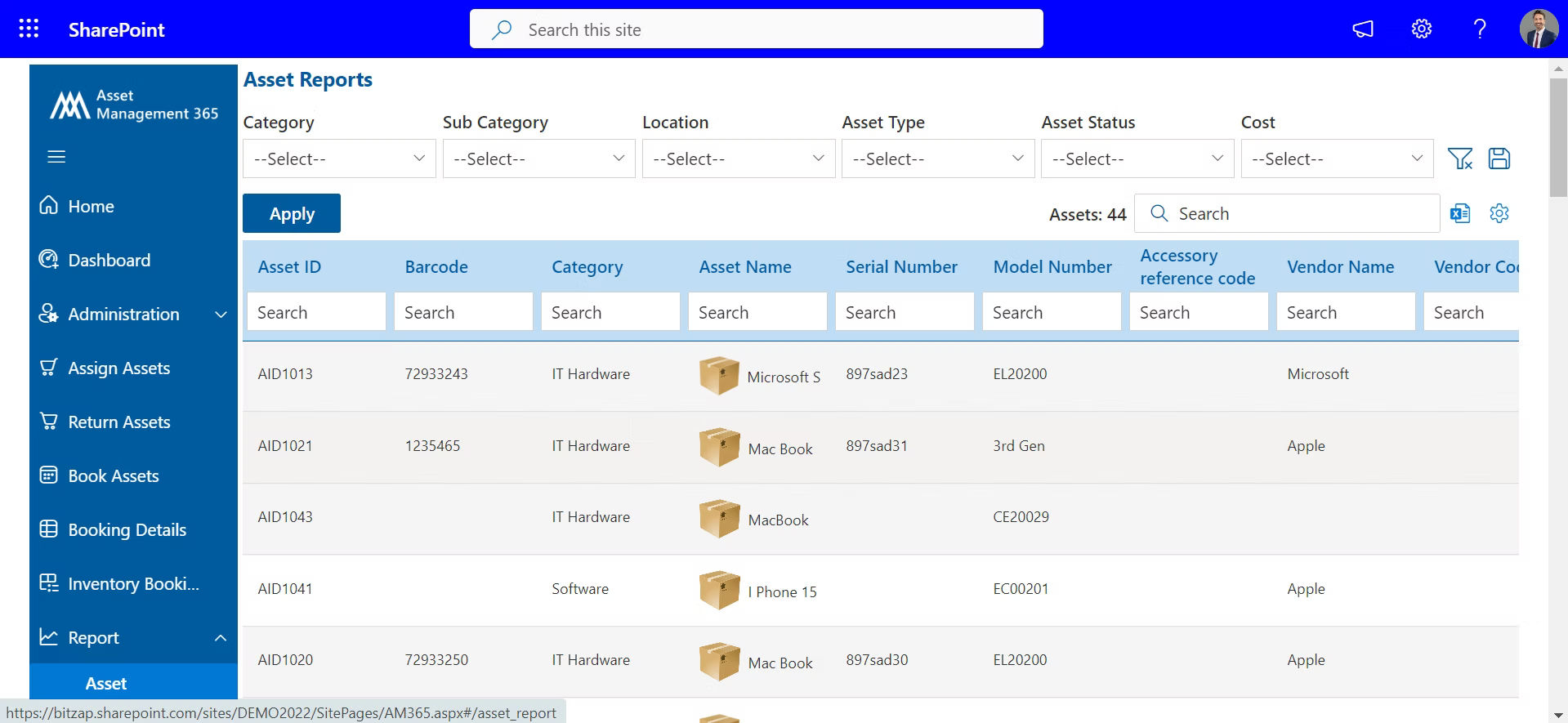
- Asset utilization rates and performance metrics.
- Depreciation schedules to ensure compliance with accounting standards.
- Maintenance history, repair costs, and warranties.
By generating these reports, businesses can identify underperforming assets, track depreciation accurately, and make informed decisions about when to replace or upgrade assets.
Improving Compliance and Security with SharePoint
SharePoint helps maintain proper records and permissions to support compliance requirements. It also protects IT asset information by controlling who can view or update asset data.
How SharePoint Ensures Regulatory Compliance for IT Asset Management
Compliance with regulatory standards is a critical aspect of IT asset management. SharePoint provides several tools to ensure that businesses adhere to regulatory requirements, including:
- Audit Trails: SharePoint’s version control and logging features provide a complete audit trail of asset-related activities, including acquisitions, updates, and disposals. This is essential for maintaining compliance with standards such as SOX (Sarbanes-Oxley) and ISO 27001.
- Document Control: SharePoint’s document management features allow businesses to store and organize asset-related documents in compliance with regulatory requirements, ensuring that records are easily accessible for audits and reviews.
By leveraging SharePoint’s compliance features, businesses can ensure that their asset management practices meet industry standards and regulations.
Leveraging SharePoint’s Security Features to Protect Asset Data
SharePoint offers robust security features that help protect sensitive asset data. These include:
- Access Control: SharePoint allows businesses to set permissions and restrict access to asset-related data, ensuring that only authorized users can view or modify sensitive information.
- Data Encryption: SharePoint supports data encryption both in transit and at rest, providing an added layer of protection for asset-related data.
- Regular Backups: SharePoint automatically backs up data, ensuring that asset records are protected against loss or corruption.
By leveraging SharePoint’s security features, businesses can protect their IT assets and ensure that asset data remains secure and compliant with industry standards.
Conclusion
Maximizing the value of IT assets requires efficient management, regular maintenance, and informed decision-making. SharePoint Asset Management provides businesses with the tools they need to track, automate, and optimize the lifecycle of their IT assets, from acquisition to disposal. By centralizing asset data, enhancing collaboration, automating workflows, and ensuring compliance and security, SharePoint helps businesses extend the life of their IT assets, reduce costs, and improve overall efficiency.
For organizations looking to streamline IT asset management and ensure long-term value from their assets, Asset Management 365 is an ideal solution built on SharePoint.
Book a demo today to see how Asset Management 365 can help you optimize your asset management processes.
Join Our Creative Community
Frequently Asked Questions
What is SharePoint Asset Management?
SharePoint Asset Management refers to using SharePoint’s tools to organize, track, and manage IT assets. It centralizes asset data, automates workflows, and improves collaboration across teams.
How does SharePoint help in IT asset tracking?
SharePoint provides a centralized platform where businesses can track asset status, location, and ownership. It enables real-time visibility and accurate data through customizable asset lists and workflows.
What are the benefits of using SharePoint for IT asset management?
The benefits include centralized asset tracking, enhanced team collaboration, automation of lifecycle management, real-time visibility, and improved compliance with regulatory standards and security.
How can SharePoint improve team collaboration for asset management?
SharePoint enhances collaboration by allowing teams to share asset data, track tasks, and communicate in real time. It integrates with Microsoft Teams and Outlook, fostering seamless teamwork on asset-related processes.
How does SharePoint ensure IT asset compliance and security?
SharePoint ensures compliance and security through document management features, audit trails, access control, data encryption, and versioning to protect sensitive asset information and maintain regulatory standards.


_JiluXJRGNl.svg)























