
_mVFFaHUZhS.webp)
Time off that is paid is now a fundamental requirement in contemporary workplaces. As the number of teams increases, and they work remotely and use Microsoft Teams daily, the process of manually tracking leaves becomes slow and unreliable.
Paid time off management software assists organizations to monitor, grant and manage employee leave effectively. It eliminates the use of spreadsheets and emails, providing a centralized system to the HR teams and employees.
It is integrated with such tools as Microsoft Teams, enhancing visibility, compliance, and efficiency in the workflow. Teams are able to plan more effectively, minimize mistakes and have equitable and consistent leave management throughout the organization.
Paid time off management software provides the HR teams with a clear method of managing requests, approvals, and records. It eliminates the confusion and makes the employees aware of their time off without additional emails and spreadsheets.
Having an organized leave management system will provide the organizations with increased insight into the availability of the teams. This aids in planning, compliance, and easier daily operations in expanding teams.
What Is Paid Time Off Management Software
Paid time off management software is an online platform that assists companies in the management of employee leaves including vacation, sick days, personal days, and holidays. HR teams do not use spreadsheets or email chains to manage policies, balances, approvals, and records; instead, they use a single platform to control them.
This software supports:
- Tracking of vacation and sick leaves by teams, location, and work schedules.
- PTO accrual regulations which automatically compute earned time according to company policy.
- Defined workflow and real-time request visibility for manager approvals.
- Self-service of submitting requests, checking balances, and history viewing by employees.
- Audit-compliant, payroll-compliant, and labor-compliant records.
Paid time off management software can be used when integrated with Microsoft Teams to enable employees and managers to manage leave requests without leaving their workspace.
Why PTO Tracking Software Is Important in 2026
Work patterns have changed. Distribution of teams, hybrid work is the new normal, and employees demand clarity and speed.
A 2024 SHRM research report indicates that 67 percent of HR leaders believe that inaccurate tracking of leaves leads to payroll and compliance risks. The paid time off management software minimizes these risks by standardizing the leave processes within the teams.
Why Organizations Are Using Paid Time Off Management Software
1. Less error than spreadsheets
- Manual spreadsheets tend to create wrong balances and omissions.
- Automated systems minimize the error of human beings because time off is calculated correctly and uniformly.
2. Transparency among employees
- Employees are able to view their available leave and request status any time.
- This minimizes misunderstanding and narrows down redundant queries to HR departments.
3. Faster approval cycles
- Digital workflows put requests straight to the appropriate manager.
- Approvals are faster with no delays due to emails or paperwork.
4. Better workforce planning
- Managers have the opportunity to see the availability of teams beforehand and prevent conflict of schedules.
- This facilitates easier planning of projects and allocation of resources.
5. Stronger policy compliance
- Automated regulations guarantee time off in accordance with company and legal policies.
- Audits and payroll verification are also supported by accurate records.
By 2026, organizations that continue to use manual PTO tracking can find it difficult to scale and stay compliant as teams increase and work models become more intricate.
According to SHRM studies, automated HR systems are very effective in minimizing administrative errors and enhancing compliance monitoring in organizations.
PTO Problems That HR Teams Experience
The problem with leave management is that HR teams tend to encounter the same problems when handling leaves manually.
Typical challenges include:
- Misunderstanding of PTO balances because of old spreadsheets or slow updates.
- Lost approval emails, which delay decision-making and irritate workers.
- Manual handling of policies by different departments or locations.
- Challenge in monitoring remote workers that operate at various time zones or schedules.
- Reduced reporting of audits in case of scattered or incomplete records.
Paid time off management software consolidates information and eliminates speculation. Employees are aware of their balance. Managers observe availability of teams. HR gets reliable records.
Microsoft Teams as a PTO Management Hub
Microsoft Teams has emerged as the main collaboration tool in most companies. The implementation of paid time off management software on Teams minimizes context switching and leaves tasks in the daily workflows.
Advantages of PTO Management Within Teams:
- Employees seek leave in the places they are already employed
Requests are placed directly in Teams without the need to log in to another system. This enhances adoption and lessens missed or late submissions. - Managers give more rapid approvals
Approvals are in real time and can be more conveniently acted on in the daily work. This prevents delays and follow-ups in approval. - Notifications are instant
Employees and managers are updated as soon as requests are placed or approved. This keeps everyone informed without additional emails. - HR data stays centralized
All leave information is stored in a single system linked to Teams. This enhances precision and ease in reporting and tracking compliance.
A study by Microsoft Work Trend Index established that employees like to do HR activities within collaboration tools, as opposed to using separate systems. This renders PTO tools based on Teams more efficient.
Paid Time Off Management Software Characteristics
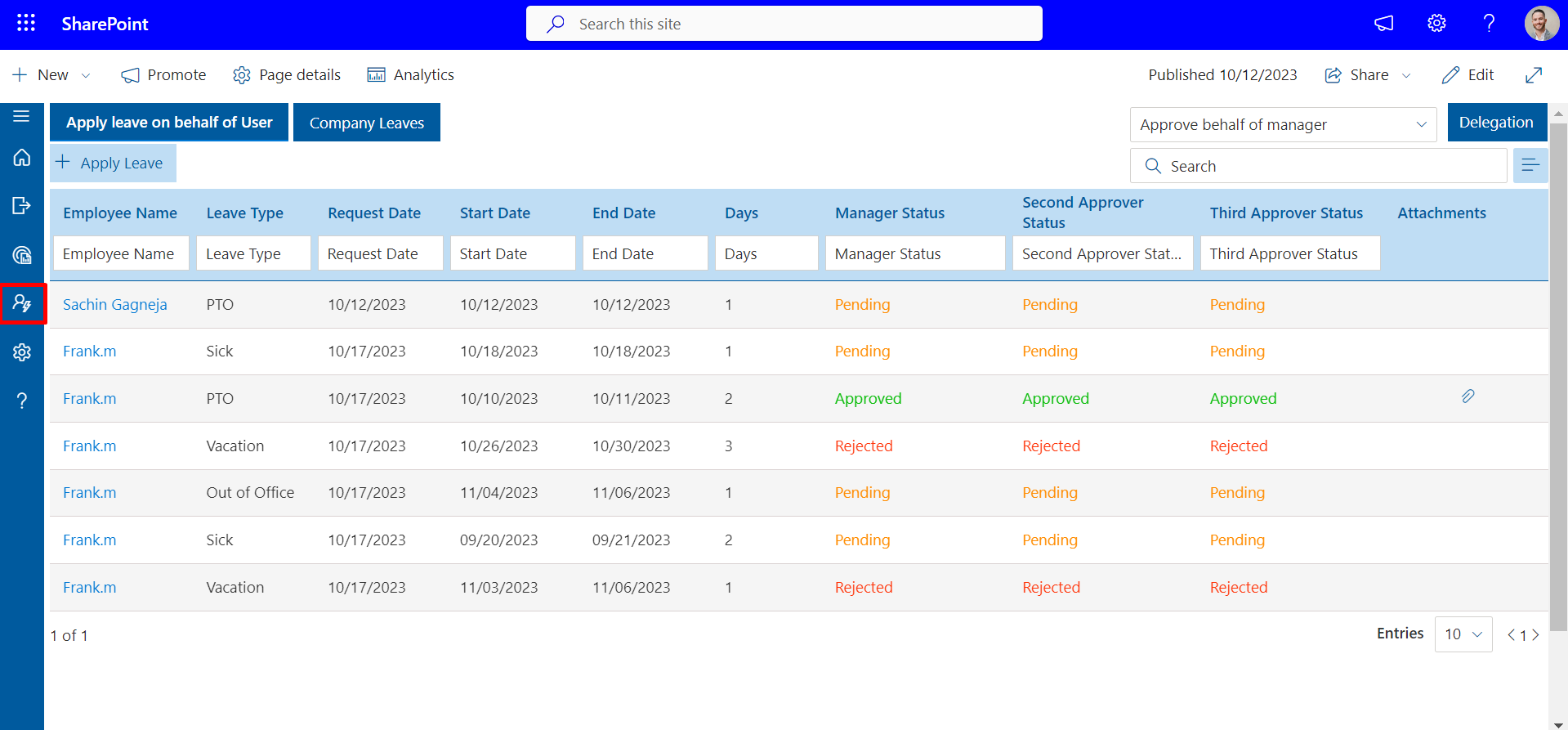
The paid time off management software solution is a modern tool that has several key features that assist HR departments to manage leave effectively and efficiently.
1. Leave Request and Approval
- Simple request forms
Employees are able to make leave requests quickly through easy and clear forms. This minimizes errors and enhances request completion rates. - Multi-level approvals
Requests may be approved according to the preset approval procedures depending on roles or departments. This guarantees that each request is reviewed by the right managers. - Auto-routing to managers
The system automatically forwards requests to the right approver. This eliminates manual forwarding and lessens approval delays.
2. PTO Accrual Management
- Monthly or yearly accruals
Time off is earned automatically based on company policy. This maintains accurate balances throughout the year. - Carryover rules
Unused leave may be rolled over subject to specified limits. This assists organizations in enforcing equitable and uniform policies. - Prorated balances
Automatic processes handle new hires and role changes. This guarantees fair leave calculations without manual adjustments.
3. Employee Self-Service
- Balance visibility
Employees can see available and used leave anytime. This enhances transparency and reduces HR inquiries. - Leave history
Requests and approvals are stored in one location. This allows employees to monitor their time off usage easily. - Policy access
Leave policies are clearly displayed within the system. This helps employees understand rules and eligibility.
4. Reporting and Analytics
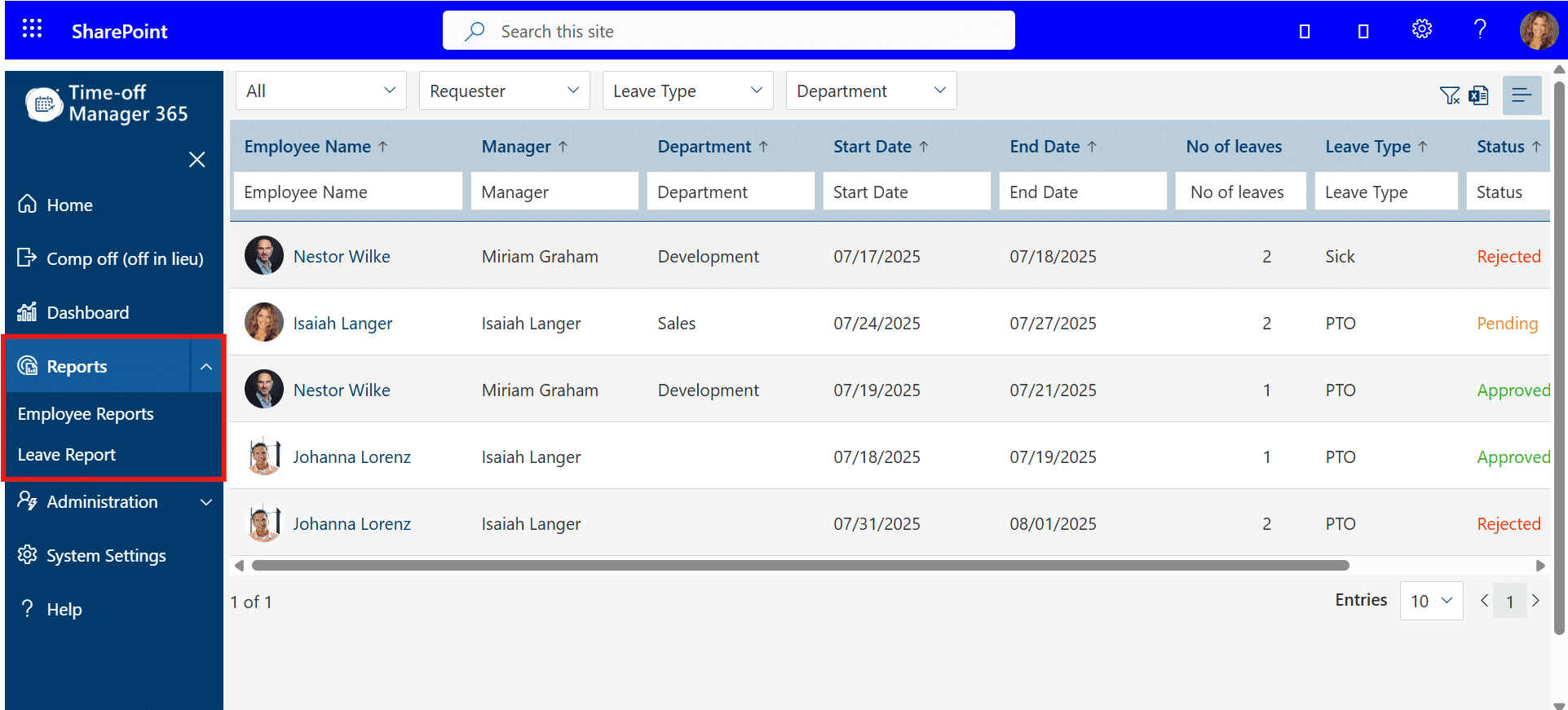
- Department-level summaries
HR teams can review leave usage at the team or department level. This supports improved workforce planning. - Absence trends
The system highlights trends in time off usage. This helps identify staffing or workload problems early. - Audit-ready exports
Reports can be downloaded for compliance or payroll purposes. This simplifies audits and recordkeeping.
Types of PTO
The software of paid time off management assists in various policy frameworks adopted by organizations. A good pto tracking program will allow the correct calculation of leaves and easy administration.
1. Accrual-Based PTO
- Time off is earned by employees over a period of time depending on the length of service, hours worked, or by the company policy.
- Balances are updated automatically in this system, eliminating the need to compute them manually.
- PTO based on accruals promotes inter-team and inter-role fairness.
2. Lump-Sum PTO
- Employees are given a set amount of days per year, irrespective of the number of hours worked.
- The system automatically monitors the usage and balance left.
- This simplifies the process of planning leave and payroll among HR teams.
3. Unlimited PTO
- Workers are allowed to take leaves when necessary and the emphasis is on productivity and not on strict balances.
- The system monitors usage to report and be transparent.
- Infinite PTO assists in keeping flexibility and at the same time, oversight is maintained.
4. Role-Based Policies
- Various leave policies may be applicable to departments, job descriptions, or even locations.
- The software automatically implements the appropriate policies upon the submission of requests.
- This guarantees uniformity in management and eliminates mistakes.
The workforce research paper published by Deloitte states that the number of leave disputes is reduced by 23% in organizations that have well-defined PTO policies.
Benefits of Compliance and Recordkeeping
Correct leave records are needed to meet both labour laws and internal policies.
The paid time off management software assists in:
- Keeping elaborate leave records
- Favouring local labour regulations
- Providing audit trails
- Reducing payroll disputes
This is particularly crucial for organizations that recruit in different locations or deal with hourly and salaried workers.
PTO Software in HR Executive Recruitment
HR executive recruitment teams consider systems that assist in long-term planning of the workforce. The management software of paid time off assists in ensuring that the teams are adequately staffed and the policy is consistent.
Paid time off management software will help by:
Offering workforce availability information
HR leaders and managers are able to know who is available at any given time. This enables more intelligent scheduling and minimizes project delays.
Favoring the standardization of policies
Departments and locations are treated equally regarding leave rules. This minimizes conflicts and eases onboarding of new employees.
Lessening administrative overhead
Automated approvals, accrual tracking, and reporting save HR teams time. This enables HR professionals to focus on strategic projects rather than manual work.
Enhancing employee experience
Balances and approvals are transparent to employees. Effective communication fosters trust and minimizes recurrent HR inquiries.
Recruitment leaders are progressively considering PTO systems as part of overall HR technology maturity, so new employees receive coherent and equitable policies.
The Paid Time Off Management Software and Support of Team Productivity
Unplanned absences impact project timelines and overall team efficiency. Paid time off software makes leave management more visible and accurate in planning.
Productivity advantages include:
Clear team calendars
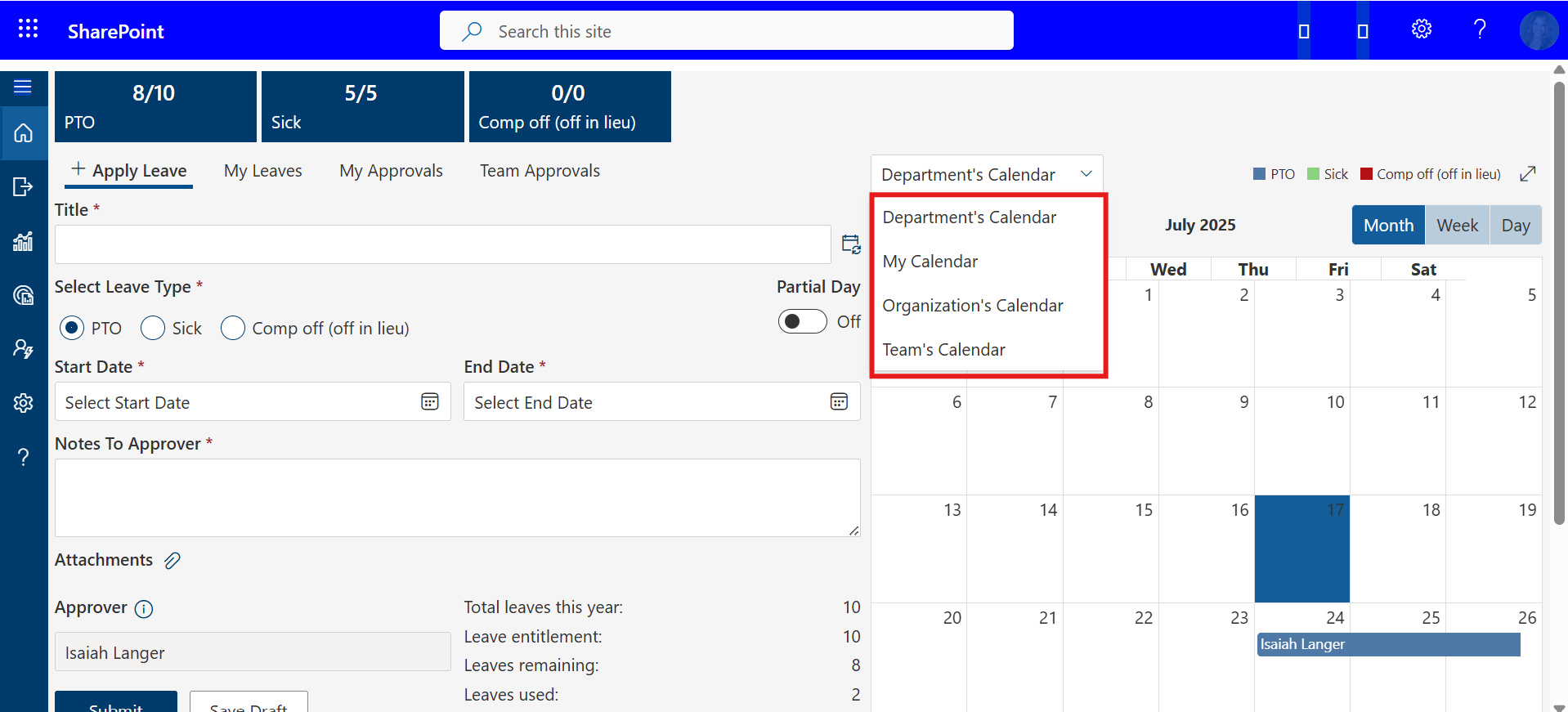
Managers and team members can see all leave requests. This assists in project scheduling and prevents overlapping absences.
Less last-minute conflicts
Scheduling conflicts are highlighted early through automatic notifications. Managers can redistribute work or reallocate tasks.
Better resource planning
HR and managers can distribute work according to actual availability. This ensures critical tasks are not understaffed.
Better accountability of managers
Managers receives notifications about outstanding approvals and workflow changes. This keeps leave management up to date and organizes within the team.
According to a Gartner HR systems research, companies that employ automated leave systems cut the number of scheduling conflicts.
Comparison of Popular PTO Management Tools
Below is a high-level comparison of commonly used PTO tools based on public information and review platforms.
Product Name | Key Benefits / Advantages | Typical Use Case | G2 Rating |
Centralized paid time off management software, real-time balance visibility, flexible policy configuration, smooth approval workflows | Organizations using Microsoft 365 and Teams for daily HR operations | ||
All-in-one HR platform, simple PTO setup, strong employee records management | Small to mid-sized companies needing HR and PTO together | 4.4/5 | |
Custom leave rules, automation options, scalable HR processes | Growing businesses with evolving PTO policies | 4.3/5 | |
Mobile-friendly access, easy leave requests, fast manager approvals | Deskless and frontline workforce environments | 4.7/5 | |
Schedule-aware leave tracking, visibility into shift coverage | Teams with shift-based or hourly work | 4.5/5 | |
Unified HR and IT workflows, automated PTO syncing with payroll | Companies seeking combined HR, IT, and finance tools | 4.6/5 | |
Payroll-linked PTO tracking, compliance-focused reporting tools | Mid-sized organizations with payroll-driven HR processes | 4.3/5 | |
Structured PTO policies, employee self-service portals | HR teams prioritizing internal transparency | 4.2/5 | |
Zenefits | PTO combined with benefits administration, basic analytics | Small businesses managing benefits and leave together | 4.1/5 |
Important HR Teams Evaluation Criteria
HR teams will generally look at the following when choosing paid time off management software:
Ease of Use for Employees
The program must be user-friendly and easy to use. An easy-to-use interface saves time on training and enhances adoption across all teams.
Policy Flexibility
Leave policies may be departmental, role-based, or location-specific. Adaptable designs make the software fit various organizational requirements.
Microsoft Teams Integration
Integration eliminates the necessity to switch platforms. It enables employees and managers to administer PTO within their daily workspace.
Reporting Capabilities
The system must produce clear and practical reports for HR and management. Comprehensive analytics aid in better decision-making and workforce planning.
Data Security Standards
HR and payroll information should be secured based on compliance laws. Sensitive employee information is protected by access controls and encryption.
According to a peer-reviewed HR systems study in the International Journal of Human Resource Management, usability is the leading factor in HR software adoption, affecting 42% of user satisfaction.
Remote and Hybrid Team PTO Software
Remote teams need regular leave monitoring to ensure smooth operations across locations and time zones. Proper tracking assists managers to plan work and maintain team productivity.
Paid time off management software assists in:
Serving More Than One Time Zone
Leaves and approvals are adjusted to the employee’s local time. This prevents confusion and ensures proper balance calculations across regions.
Monitoring Availability in Different Locations
Managers can view which team members are available at any given time. Visibility helps coordinate projects and prevents overloading specific employees.
Allowing Approvals to Be Asynchronous
Requests can be approved without requiring simultaneous presence of managers and employees. This supports distributed teams and reduces delays.
This ensures fairness and clarity for distributed workforces, maintaining trust and consistency in hybrid and remote teams.
Data Access Control and Data Security
HR data must be strictly controlled to protect sensitive employee information and ensure compliance. Paid time off management software provides secure data storage, auditing, and access to authorized personnel only.
The software includes:
Role-Based Access
Leave records can only be viewed or amended by authorized personnel. Provides appropriate access to managers, HR, and employees while minimizing errors or misuse.
Secure Data Storage
All PTO information is stored in encrypted databases and secure cloud systems. Prevents unauthorized access and safeguards sensitive data.
Activity Logs
All activities within the system are monitored and documented. HR teams can review changes, approvals, and requests to ensure accountability and transparency.
Adherence to ISO and SOC Standards
The software complies with established security frameworks and regulations. Helps organizations meet internal policies and external legal requirements confidently.
According to the Journal of Information Security, role-based access reduces data exposure incidents by 29%, highlighting the importance of controlled access.
Scalability for Growing Organizations
As teams grow, manual PTO tracking becomes cumbersome and error-prone. Paid time off management software maintains leave management efficiency at scale.
The software scales by:
- Supporting Several Departments – Manage leave consistently across teams and units.
- Dealing with Policy Differences – Automatically applies different rules based on role or location.
- Handling Large Volumes of Requests – Keeps approvals organized even with many employees.
This makes it suitable for startups and medium-sized organizations planning growth.
AI in Time Off Manager 365
The use of artificial intelligence makes paid time off management software smarter and more efficient in tracking leaves. AI enhances accuracy, visibility, and decision-making in Time Off Manager 365 without creating complexity for HR teams.
Key AI-driven capabilities include:
Smart Leave Pattern Analysis
Identifies common absences or abnormal trends, helping HR spot staffing issues early.
Predictive Insights
Considers future staffing gaps based on historical leave information, enabling improved team planning.
Automated Policy Checks
Ensures requests comply with company rules automatically, eliminating manual errors and inconsistencies.
Smart Notifications
Provides managers with timely alerts on pending approvals or unusual leave trends, keeping workflows on track.
Time Off Manager 365 enables HR teams to proactively manage leave, allocate resources efficiently, and maintain transparency across teams, particularly for remote or growing workforces.
AI helps HR departments shift from reactive leave tracking to proactive workforce planning. A 2023 study in the Journal of Artificial Intelligence in Human Resource Management found that AI-supported HR systems improved administrative efficiency by 34%.
These features make paid time off management software more reliable for expanding and distributed teams.
Conclusion
Paid time off management software simplifies leave tracking, approvals, and reporting and assists HR departments to minimize errors, save time, and ensure compliance. It enhances transparency, workforce planning and makes employees have a clear understanding of their leaves balances.
Request a demo of Time Off Manager 365 today to learn how your organization can streamline PTO management, improve team productivity, and make leave a seamless experience to employees.
Join Our Creative Community
Frequently Asked Questions
Does the paid time off management software have a free trial?
Yes! Time Off Manager 365 has a 14-day free trial period with no restrictions and features all the features that HR teams and employees can test the leave tracking, approvals, and reporting features.
Is the paid time off management software applicable to employees?
Absolutely. Our software will enable employees to request leave, view balances, and see the history of leaves with ease, and the managers and HR track approvals without complications.
Which is the most preferred paid time off management software?
Time Off Manager 365 is one of the most effective PTO solutions to use in organizations that use Microsoft Teams due to its centralized leave management, real-time visibility, and AI-driven insights.
What is the most appropriate PTO tracking software?
The most suitable PTO tracking software is one that is simple and yet sophisticated. Time Off Manager 365 has automated accruals, policy compliance, and built-in reporting, which is why it suits well with the mid-sized and growing teams.
Does it have small business vacation tracking software?
Yes! Time Off Manager 365 is used by companies of any size including small teams. It makes it easier to track vacation, lessen administrative efforts and make sure balances are accurate, even in small organizations.


_JiluXJRGNl.svg)























