

_eH2jDg7dZ.png)
Your IT helpdesk is the backbone of your business operations. When it works well, employees stay productive, customers stay loyal, and your IT team stays sane. When it doesn’t, everything grinds to a halt. Yet most organisations are running helpdesk operations that are reactive, disorganized, and wildly more expensive than they need to be.
A strong IT helpdesk is vital for efficiency and user satisfaction. Best practices like centralized ticketing, multi-channel support, and automation streamline operations and speed up issue resolution.
Regular staff training, a solid knowledge base, and strong IT security ensure a resilient helpdesk. Proactive monitoring and continuous improvement help prevent issues and keep everything running smoothly.
The global helpdesk software market is valued at $14.3 billion in 2025 and growing at 8–10% CAGR. Organizations not investing in structured helpdesk practices risk resolving tickets at $22 per manual ticket, compared to under $1 with automation. That gap is costing businesses millions every year.
What is IT helpdesk software?
IT helpdesk software is a tool that assists businesses in managing and resolving IT-related issues and support requests. It streamlines communication between users and the IT support team, ensuring that technical issues are tracked, prioritized, and resolved efficiently. This software is crucial for businesses that rely on IT infrastructure and aim to provide smooth operations and high user satisfaction.
Key Features of IT Helpdesk Software:
- Ticket Management:
Organizes and tracks support requests in the form of tickets, ensuring each issue is assigned, monitored, and resolved effectively. - Multi-channel Support:
Allows users to submit requests through various channels like email, live chat, phone, and web forms, making support more accessible. - Knowledge Base:
Provides self-service options for users, enabling them to resolve common issues by accessing a library of articles, FAQs, and troubleshooting guides.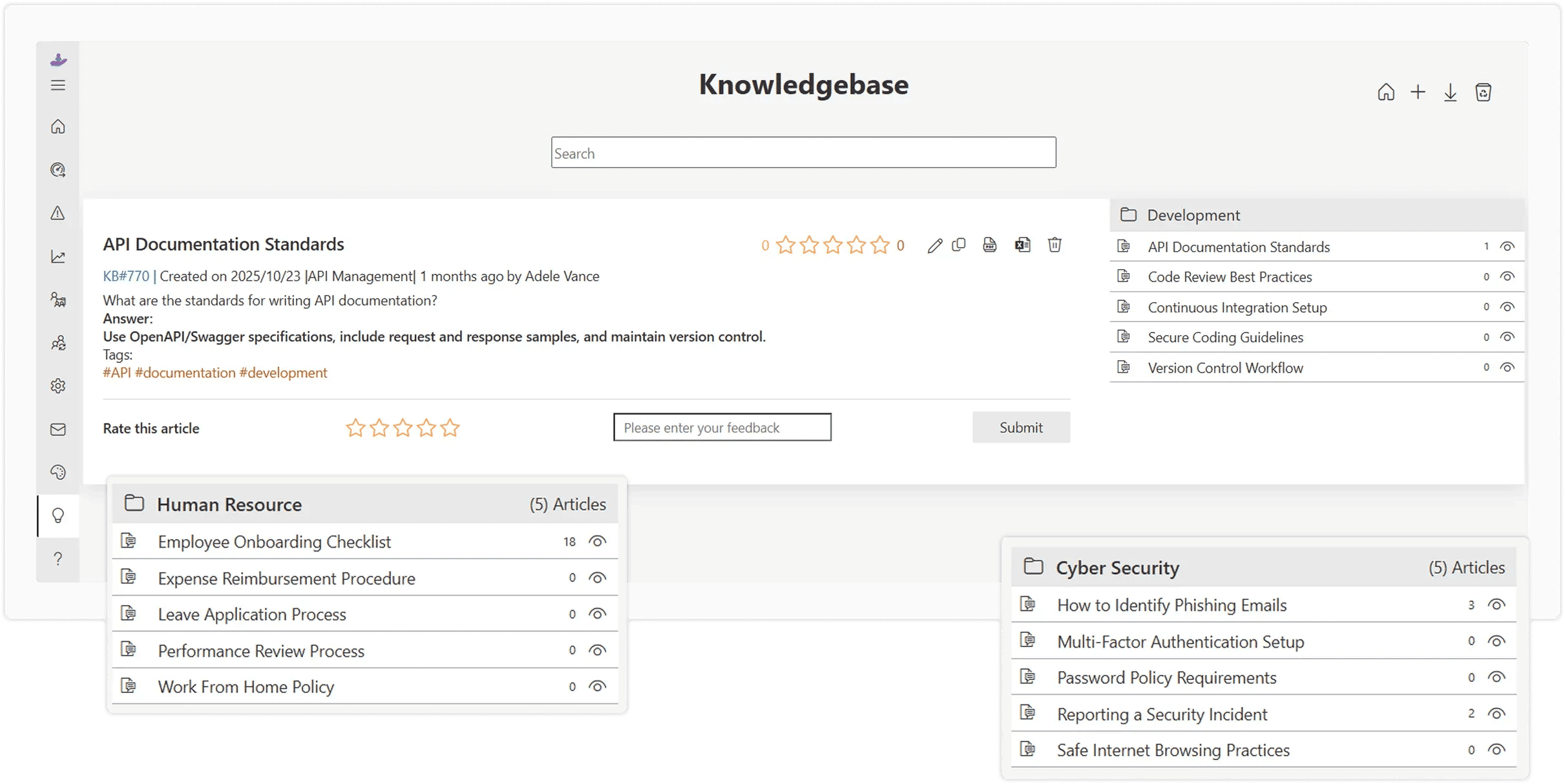
- Automation:
Automates repetitive tasks such as ticket assignments, reminders, and escalations, reducing the workload on support agents and improving response times. - Prioritization and SLA Management:
Allows IT teams to categorize tickets based on urgency and service level agreements (SLAs), ensuring critical issues are addressed first.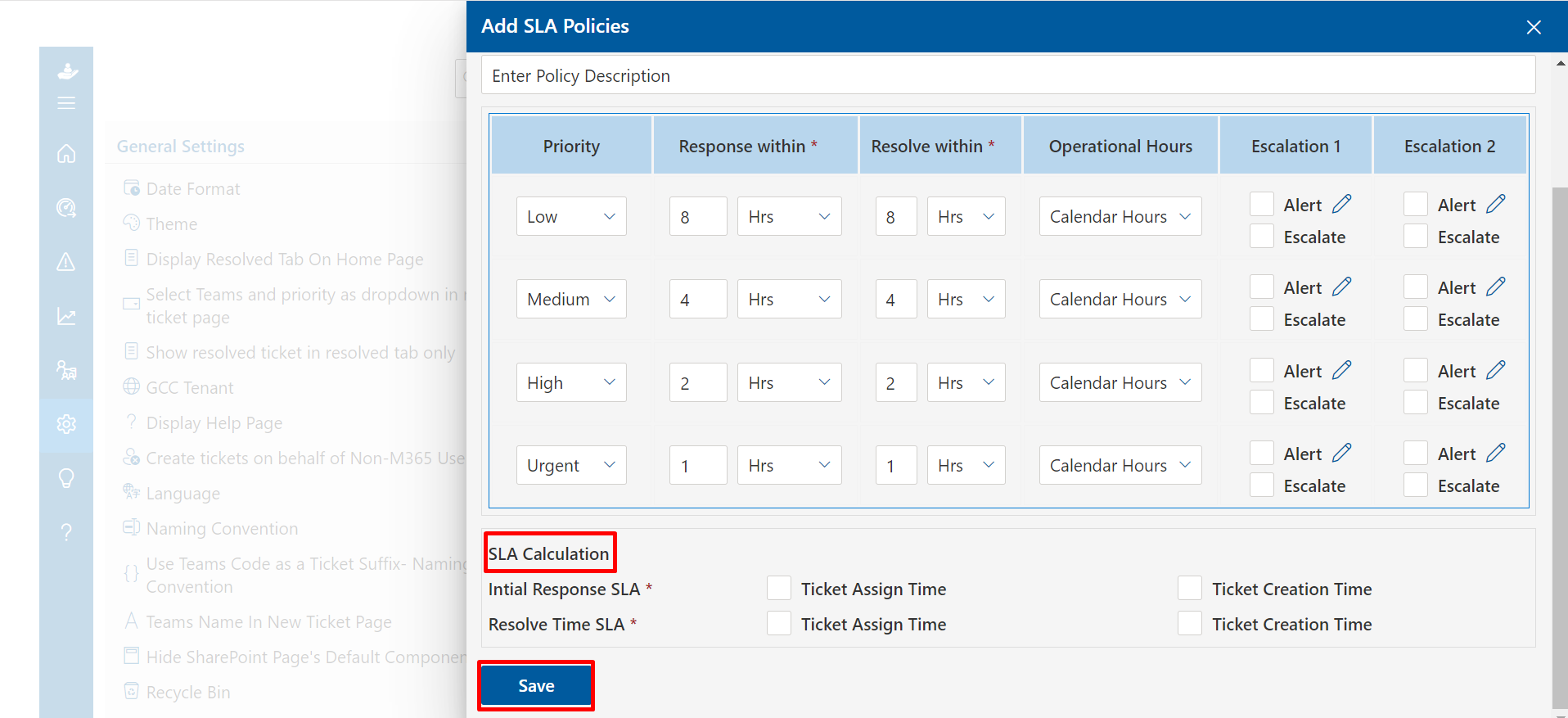
- Reporting and Analytics:
Offers insights into team performance, ticket trends, and customer satisfaction, helping businesses identify areas for improvement. - Collaboration Tools:
Facilitates seamless communication between IT support staff, allowing them to collaborate and resolve complex issues faster. - Security Features:
Ensures that sensitive data related to support requests is protected through encryption and secure access controls.
This guide breaks down the 10 most impactful IT helpdesk best practices backed by real data, so you can transform your support from a cost center into a genuine competitive advantage.
10 most impactful IT helpdesk best practices
An efficient IT helpdesk is crucial for maintaining smooth operations and ensuring user satisfaction. By implementing the right best practices, businesses can streamline support, enhance productivity, and resolve issues faster. Here are the 10 most impactful IT helpdesk best practices that can drive success in your organization.
Streamlining Ticket Management with a Centralized System
Without a centralized ticketing system, IT requests scatter across emails, Slack messages, hallway conversations, and sticky notes, making it impossible to prioritize, track, or measure anything. A centralized helpdesk platform collects every request into a single, organized queue system with clear ownership, priority levels, and resolution timelines.
Implementation Checklist
Choose a platform that supports email, chat, phone, and portal intake in one place
Define ticket categories and priority tiers (P1 Critical → P4 Low)
Set up automated routing rules based on issue type and urgency
Establish SLA targets and configure breach alerts
Train all staff to log every request, no shadow tickets
Evaluate helpdesk platforms based on ticket volume, team size, and integration needs. For SMBs, choose platforms with scalable solutions, strong automation, and affordable tiers to start.
Providing Multi-Channel Support for Enhanced Accessibility
Modern users expect IT support to meet them wherever they are, not wherever it’s convenient for IT. That means offering support via email, live chat, phone, a self-service portal, and increasingly, team messaging platforms like Microsoft Teams or Slack.
The business case is clear: when you restrict channels, you create friction that delays resolution and frustrates users. Multi-channel accessibility isn’t just a user experience nicety, it directly impacts productivity and satisfaction scores.
Key Channels to Support
Email — still the most-used digital support channel (54% of users prefer it)
Live Chat — 87% satisfaction rate, fastest response expectations (under 48 seconds)
Self-Service Portal — preferred by users for routine requests
Team Messaging Integration (Teams) — for internal IT support
The key to making multi-channel work is unification, routing every channel into the same centralized system so agents have full context regardless of how the user reached out. Customers should never have to repeat themselves.
Implementing Automated Solutions to Boost Efficiency
Automation is no longer a “nice to have” for IT helpdesks, it’s the primary lever separating high-performing teams from overwhelmed ones. From auto-routing tickets to AI-powered chatbots that resolve common issues without human intervention, automation compresses resolution times and frees your best technicians to focus on complex problems.
The most impactful automation targets are repetitive, high-volume tasks: password resets, account unlocks, software access requests, and basic troubleshooting. These consume enormous agent time but carry zero complexity, making them perfect candidates for full automation.
Top Automation Opportunities
AI chatbots for Tier 1 queries (password resets, FAQs, status updates)
Intelligent ticket routing based on category, urgency, and agent skills
Automated SLA escalation and breach notifications
Canned responses and template suggestions for common issues
Auto-close rules for resolved tickets with no response
Start small: Automate your top 5 most frequent ticket types first. Once you validate the workflow and user experience, expand automation coverage methodically. Track deflection rates monthly to measure ROI.
Developing a Knowledge Base for Self-Service Support
A well-built knowledge base is the most scalable support asset your IT team can create. It empowers users to resolve issues on their own, 24/7, without waiting for an agent, while simultaneously reducing inbound ticket volume for your team.
Effective knowledge bases go beyond a static FAQ page. They include step-by-step troubleshooting guides, video walkthroughs, searchable indexed content, and regular updates driven by recurring support tickets. Think of it as your IT team’s institutional knowledge made accessible to everyone.
Building a High-Impact Knowledge Base
Analyze your top 20 most common ticket types, write guides for all of them first
Use clear, jargon-free language accessible to non-technical users
Include screenshots, GIFs, and short video walkthroughs
Make it searchable with strong tagging and categorization
Review and update articles quarterly, or whenever related tickets spike
The compounding effect is significant: every article that successfully deflects 10 tickets per month eliminates thousands of support interactions per year. Organizations with mature knowledge bases consistently report 20–40% reductions in inbound ticket volume within 6 months of launch.
Training Helpdesk Staff for Technical Expertise and Soft Skills
Your helpdesk technology is only as good as the people using it. Technical knowledge enables faster, more accurate resolutions, but soft skills like empathy, clear communication, and patience determine whether users leave an interaction feeling supported or dismissed.
The best IT helpdesk software teams invest in both dimensions continuously. Technical skills need refreshing as technology evolves, while soft skills require practice and coaching to develop. A structured training program isn’t a one-time onboarding event, it’s an ongoing operational investment.
Core Training Areas to Prioritize
Technical: Platform certifications, OS/network fundamentals, security protocols
Soft Skills: Active listening, de-escalation, plain-language communication
AI Literacy: Using AI tools, interpreting suggestions, knowing when to escalate
Process Training: SLA adherence, escalation paths, documentation standards
Continuous Learning: Monthly lunch-and-learns, quarterly skill assessments
Implementation Tip: Use ticket audits as training tools. Reviewing resolved tickets, what went well, what could be faster, what was communicated poorly, is one of the most targeted and cost-effective coaching methods available.
Prioritizing Security and Data Protection in IT Support
The IT helpdesk sits at a uniquely dangerous intersection: your team handles sensitive user data, has elevated system access, and interacts with users who may be targets of social engineering attacks. Without deliberate security protocols, the helpdesk itself becomes an attack vector.
Security-first helpdesk operations mean every interaction, from verifying a caller’s identity to processing a password reset, follows a documented, enforced protocol. It means never sharing your login details in chat, always keeping a record of access requests, and being cautious with any unusual requests by questioning them carefully.
Secuirty Protocls every IT Helpdesk Need
Multi-factor authentication for all helpdesk staff and admin access
Strict identity verification before any account action (never rely on caller ID alone)
Role-based access control, agents see only what they need
End-to-end encryption for all ticket data and communications
Regular security awareness training, including phishing simulations
Incident response playbooks for common attack scenarios
Ensure your helpdesk platform is SOC 2 compliant, GDPR-ready (if operating in the EU), and supports complete audit logging. Every access event should be traceable, who did what, when, and why.
Monitoring and Measuring Performance for Continuous Improvement
You cannot improve what you don’t measure. IT helpdesks that operate without defined KPIs and regular performance reviews are flying blind, unable to identify bottlenecks, justify staffing decisions, or demonstrate value to stakeholders. A data-driven helpdesk turns subjective feelings we seem busy into objective insights we have a 34% backlog increase on Mondays that needs staffing adjustment.
The goal isn’t to track every metric possible, it’s to track the right ones consistently and act on what the data shows. Start with a core set of KPIs, establish baselines, set targets, and review weekly.
The 7 core IT Helpdesk KPIs to Track
First Response Time (FRT) — How quickly agents acknowledge new tickets
Mean Time to Resolution (MTTR) — Average time from open to closed
First Contact Resolution (FCR) — Issues resolved without escalation or follow-up
Ticket Volume & Trends — Patterns that reveal systemic issues
Customer Satisfaction (CSAT) — Post-resolution survey scores
SLA Compliance Rate — % of tickets resolved within agreed timeframes
Agent Utilization — Capacity planning and workload balance
Build monthly performance dashboards for leadership that translate helpdesk metrics into business impact, hours saved, productivity recovered, incidents prevented. This transforms IT from a cost center into a visible strategic asset.
Offering Proactive Support to Prevent IT Issues Before They Happen
The best support ticket is the one that never gets submitted. Proactive IT support shifts your helpdesk’s posture from reactive fire-fighting to strategic issue prevention, identifying and resolving problems before they impact users, often before users even notice.
This requires monitoring tools, predictive analytics, and a culture that rewards prevention as much as fast resolution. When your monitoring stack alerts you that a server’s disk is at 89% capacity, your team remediates it before it causes a production outage, saving hours of reactive scrambling and lost productivity.
Proactive Support Strategies that Work
Deploy endpoint monitoring to detect hardware failures before they occur
Set up automated alerts for system thresholds (CPU, memory, disk, network)
Conduct scheduled preventive maintenance and software update cycles
Analyze ticket patterns monthly to identify recurring root causes
Send proactive communication about known issues and planned maintenance
Implement patch management automation to eliminate a major vulnerability class
Pair proactive monitoring with a problem management process, a formal workflow for identifying the root cause of recurring incidents and eliminating them permanently. This is what separates truly mature IT operations from teams that resolve the same issues over and over.
Conclusion
Adopting these IT helpdesk best practices can significantly enhance the efficiency, security, and overall performance of your support team. By streamlining ticket management, investing in employee training, and leveraging automation, businesses can resolve issues more swiftly and provide a better experience for end users. Proactively addressing IT challenges, maintaining robust security measures, and continuously improving processes ensure that your IT helpdesk remains a key asset in driving business success.
Join Our Creative Community
Frequently Asked Questions
What are IT helpdesk best practices?
IT helpdesk best practices are proven strategies and methods that help businesses improve their IT support services. They ensure quicker issue resolution, better customer satisfaction, and streamlined operations. Common best practices include ticket management, multi-channel support, automation, and proactive monitoring.
Why is a centralized ticketing system important in IT helpdesk operations?
A centralized ticketing system ensures all support requests are tracked, organized, and prioritized effectively. It helps IT teams resolve issues faster by assigning tickets to the right agents, improving transparency, and ensuring no requests are overlooked.
How does automation improve IT helpdesk efficiency?
Automation reduces the workload on helpdesk staff by handling repetitive tasks like ticket assignment, reminders, and escalations. This allows agents to focus on more complex issues, leading to faster response times and more efficient service.
What role does training play in IT helpdesk best practices?
Training is crucial for ensuring that helpdesk agents have the technical skills and soft skills needed to resolve issues efficiently. Regular training helps staff stay updated on new technologies, troubleshooting techniques, and effective customer service practices.
How does a knowledge base benefit IT helpdesks?
A knowledge base provides users with self-service options, allowing them to resolve common issues without contacting the helpdesk. This reduces the volume of requests, speeds up resolution times, and empowers users to find solutions independently.
What are the benefits of proactive IT support?
Proactive IT support involves monitoring systems for potential issues before they affect users. By identifying problems early, businesses can prevent disruptions, improve system uptime, and reduce the number of urgent support requests.
How does IT security factor into IT helpdesk best practices?
IT security is a critical aspect of helpdesk operations. Best practices include ensuring that all tickets are handled securely, protecting sensitive user data, and educating users on safe IT practices to prevent security breaches.
How can IT helpdesk software improve customer satisfaction?
IT helpdesk software can improve customer satisfaction by providing fast, consistent support, ensuring timely responses, and offering multiple communication channels. It can also track issue resolution, measure performance, and identify areas for improvement.
What should businesses look for when choosing an IT helpdesk platform?
When choosing an IT helpdesk platform, businesses should consider features like scalability, multi-channel support, automation, reporting capabilities, integration with existing tools, and user-friendliness. It’s also important to ensure the platform can meet the team’s specific needs.
How can performance metrics help improve IT helpdesk services?
Performance metrics, such as response time, resolution time, and customer satisfaction, help businesses track the effectiveness of their IT helpdesk. By analyzing these metrics, teams can identify inefficiencies, optimize workflows, and improve overall service quality.


_JiluXJRGNl.svg)























