

HR Ticketing Systems: Key Features, Benefits & Selection Guide
_eH2jDg7dZ.png)
If your HR team still runs on email threads and sticky-note reminders, you’re not alone, but you’re falling behind. The shift to HR ticketing systems is one of the most impactful operational upgrades a People team can make. This guide breaks down everything you need to know, from what these platforms actually do to how to pick the right one.
HR ticketing systems help organizations manage employee requests through a structured ticket-based process. Instead of scattered emails, each query is logged as a ticket, allowing HR teams to track, prioritize, and resolve issues efficiently.
By centralizing requests in one system, HR teams can respond faster, maintain better visibility into employee issues, and improve overall HR support while keeping records organized.
HR ticketing systems help organizations manage employee requests, queries, and HR-related issues through a structured ticket-based workflow. Instead of handling requests through scattered emails or messages, these systems convert employee inquiries into trackable tickets that HR teams can assign, prioritize, and resolve from a centralized platform.
This structured approach improves visibility, accountability, and response times while enhancing the overall employee experience. In fact, studies show that modern service desks using automation and structured workflows can reduce support ticket volume by up to 60%, significantly improving operational efficiency and response speed.
What Is an HR Ticketing System?
An HR ticketing system is a structured platform that allows employees to submit HR-related requests, and lets your HR team track, manage, prioritize, and resolve those requests in an organized, auditable way. Think of it as a help desk, but purpose-built for Human Resources.
Every employee request becomes a “ticket” with its own unique ID, status, owner, and history. Whether someone needs to update their bank details, ask about a leave policy, raise a workplace grievance, or request an onboarding document, it all flows through a single system rather than getting buried in an HR inbox.
HR Ticketing vs. Traditional Email Support:
Email-based HR support has zero accountability structure. Requests get missed, duplicated, and are nearly impossible to audit. An HR ticketing system solves all three problems by design.
Unlike a general IT help desk, an HR ticketing system is built around the specific workflows, compliance requirements, and sensitivity levels of HR data. Role-based permissions, HRIS integrations, and employee-specific context come standard, things a generic ticketing tool can’t provide out of the box.
| Aspect | HR Ticketing System | Traditional Email Support |
| Request Tracking | Every employee request is logged as a ticket with a unique ID for easy tracking. | Requests remain in email threads and can easily get lost or overlooked. |
| Visibility | HR teams can view all requests in one centralized dashboard. | Requests are scattered across individual inboxes. |
| Prioritization | Tickets can be categorized and prioritized based on urgency. | Difficult to prioritize without manually reviewing emails. |
| Accountability | Each ticket is assigned to a specific HR team member. | Responsibility is often unclear if multiple people are copied in emails. |
| Status Updates | Employees can check the status of their request anytime. | Employees must send follow-up emails to check progress. |
| Automation | Automated routing, reminders, and escalation workflows are possible. | Processes are mostly manual with limited automation. |
| Reporting & Insights | Provides reports on ticket volume, resolution time, and HR workload. | No structured reporting unless manually compiled. |
| Response Time | Faster responses due to structured workflows and assignment. | Slower responses due to email backlogs and manual handling. |
How HR Ticketing Systems Work
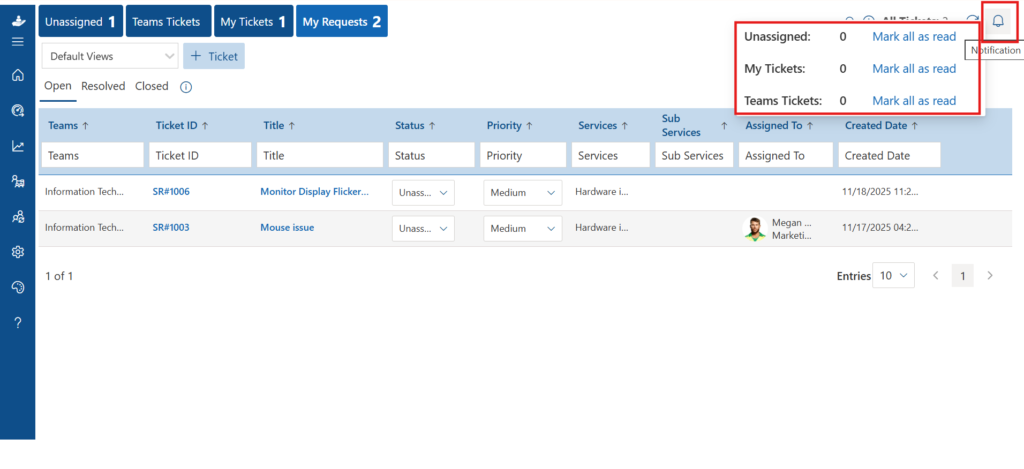
The core helpdesk workflow is straightforward, but the sophistication happens underneath the surface. Here’s how a typical request moves through the system:
Request Capture
An employee submits a request via a self-service portal, email, chat (Teams), or a mobile app. The system auto-creates a ticket with a reference number.
Auto-Categorization & Routing
The system categorizes the ticket (e.g., “Payroll Query”) and routes it to the right HR specialist or team based on predefined rules, or increasingly, AI-based classification.
Resolution & Collaboration
The assigned HR agent works the ticket. Internal notes, escalations, and document attachments are all tied to the ticket record. The employee gets status updates in real time.
Closure & Feedback
Once resolved, the ticket closes. The employee can rate the interaction. The data feeds into reporting dashboards for continuous improvement.
Closure & Feedback
Once resolved, the ticket closes. The employee can rate the interaction. The data feeds into reporting dashboards for continuous improvement.
See how HR ticketing systems manage and track employee requests through a structured ticket workflow.
Key Features of HR Ticketing Systems
Not all HR ticketing platforms are equal. The best ones combine operational depth with an experience that employees actually want to use. Here are the features that matter most:
Employee Self-Service Portal
Employees should be able to submit requests, check ticket status, and find answers to common queries, all without picking up the phone. A strong self-service portal reduces ticket volume by 30–40% for most organizations, because a significant chunk of HR questions are answered by a well-maintained knowledge base.
Smart Ticket Routing & Assignment
Manually sorting and assigning tickets is a productivity killer. The best systems use rule-based or AI-powered routing to send each ticket to the right person automatically, based on request type, employee location, business unit, or urgency level.
SLA Management
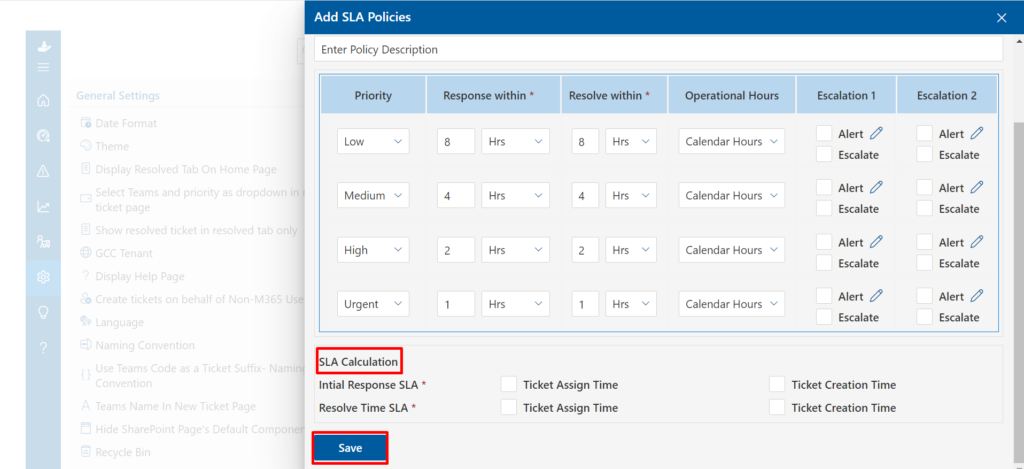
Service Level Agreements (SLAs) define how fast HR must respond and resolve different ticket types. Your system should automate SLA tracking, send alerts when deadlines are approaching, and flag breaches for management review.
HR Service Catalog
A service catalog lets HR publish a menu of available services, from requesting a salary certificate to filing a grievance. This structures intake, ensures employees know what’s available, and makes ticket categorization far more consistent.
Knowledge Base Integration
When a new ticket comes in, the system can surface relevant knowledge base articles before the employee hits “submit.” This deflects repetitive queries and empowers employees to self-serve on standard policy questions.
Core Benefits of an HR Ticketing System
1. Centralized Employee Support
Instead of requests scattered across inboxes, hallway conversations, every employee interaction lives in one place. This is the foundation of everything else, you can’t improve what you can’t see.
2. Faster HR Response Times
With automated routing, SLA tracking, and clear ownership, tickets don’t fall through the cracks. Employees get faster resolutions, and HR teams spend less time chasing down who’s handling what.
3. Reduced Administrative Workload
A well-configured HR ticketing system handles the low-value, repetitive work automatically, acknowledgment messages, status updates, deadline reminders, escalation triggers. HR professionals get their time back to focus on strategic work.
4. Better Compliance and Documentation
Every interaction is logged, timestamped, and searchable. When compliance audits happen, or when a grievance escalates, you have a complete, tamper-evident record of every action taken. This alone justifies the investment for many organizations.
5. Data-Driven HR Decision Making
Recurring issues surface in your analytics. If 40 tickets a month are asking about the same leave policy, that’s a signal to update your knowledge base, simplify the policy, or run a communication campaign. Without ticketing data, you’re guessing.
Pro Tip: Don’t evaluate AI features on vendor demos alone. Ask for real deflection rates and false-positive classification rates from existing enterprise customers in your industry.
HR Ticketing Systems by Use Case
The strength of a ticketing system comes from how well it maps to specific HR workflows. Here’s how it plays out across the most common HR functions:
| HR Function | Common Tickets | Key System Requirement |
| Onboarding | Document collection, system access, equipment requests | Multi-step workflow automation, task checklists |
| Leave Management | Policy queries, balance checks, leave application issues | HRIS sync, automated balance lookups |
| Payroll & Compensation | Payslip queries, salary corrections, tax forms | Payroll system integration, strict access control |
| Benefits Administration | Enrollment help, claim status, coverage questions | Self-service portal, document upload |
| Employee Relations | Grievances, conflict reports, disciplinary queries | Confidentiality controls, escalation workflows |
| Offboarding | Exit clearance, final payslip, reference letters | Checklist automation, cross-department coordination |
| Compliance Requests | Policy acknowledgments, training completion proofs | Audit trails, document management |
How to Choose the Right HR Ticketing System
The market is crowded. Here’s a practical framework for cutting through vendor noise and finding the system that actually fits your organization:
Step 1: Define Your Support Requirements
Start with volume and complexity. How many HR tickets do you handle per month? Across how many countries or locations? Do you need multilingual support? What’s your current SLA benchmark, and what’s your target? Answering these questions before you start demos will save you weeks.
Step 2: Identify Non-Negotiable Features
Native integration with your existing HRIS (Workday, SAP, BambooHR, etc.)
Role-based access controls that meet your compliance requirements
Self-service portal with knowledge base capability
SLA configuration and automated escalation rules
Reporting dashboards with exportable data
Mobile accessibility for your workforce
Data residency options if operating in regulated regions
Step 3: Evaluate Integration Depth
A ticketing system is only as powerful as the data flowing into it. Shallow integrations that just sync employee names are not enough. You want real-time data exchange, leave balances, org charts, compensation bands, so HR agents have full context when working a ticket without switching between five systems.
Step 4: Assess Scalability
What works for 200 employees often breaks at 2,000. Ask vendors specifically about performance at 5x your current headcount and request case studies from organizations of that size in your sector.
Step 5: Security and Compliance Considerations
HR data is some of the most sensitive data in an organization. Your ticketing platform must support encryption at rest and in transit, granular permission controls, audit logs, and compliance with applicable data protection regulations. If you operate in multiple jurisdictions, verify that data localization is configurable.
Step 6: Total Cost of Ownership
Licensing is just the start. Factor in implementation costs, ongoing support fees, integration development work, and the internal time required to configure and maintain the platform. Cloud-based SaaS HR ticketing systems typically have faster time-to-value and lower total cost than on-premise alternatives for most mid-market organizations.
Implementing Your HR Ticketing System
Even the best platform will underperform with a poor rollout. Here’s how to get implementation right:
Audit Your Current State
Document your existing HR request categories, approximate volumes, current resolution times, and the biggest pain points your team faces. This becomes the baseline for measuring ROI post-launch.
Design Your Service Catalog First
Before configuring anything technical, define the services HR will offer through the system. Clear categories up front make everything downstream, routing rules, SLAs, permissions, far easier to configure.
Configure Workflows and SLAs
Map each ticket category to the right team or individual, define SLA targets by priority tier, and build your escalation logic. Start conservative, you can tighten SLAs once the team is comfortable with volumes.
Populate the Knowledge Base
Before go-live, populate the knowledge base with answers to your 20 most frequently asked HR questions. This directly reduces Day 1 ticket volume and demonstrates immediate value to employees.
Train HR Teams and Communicate to Employees
Change management is often underestimated. Run hands-on sessions for HR staff and send clear communications to employees explaining the new process. A short explainer video showing how to submit a ticket dramatically increases adoption.
Monitor, Measure, Optimize
Set a monthly review cadence for the first quarter post-launch. Use your analytics dashboard to spot bottlenecks, SLA breaches, and knowledge base gaps early, before they become embedded bad habits.
HR Ticketing Metrics That Actually Matter
Dashboards are only useful if you’re tracking the right numbers. Here are the metrics that give meaningful insight into HR support performance:
Average Ticket Resolution Time: The single most important operational metric. Track this by category, not just overall.
First Contact Resolution Rate: What percentage of tickets are resolved without the employee needing to follow up? High FCR signals a knowledgeable team and good processes.
SLA Compliance Rate: Are you meeting the response and resolution commitments you’ve made? Aim for 95%+ across Tier 1 requests.
Ticket Volume by Category: Recurring spikes in specific categories are signals for process improvement or communication gaps.
Self-Service Deflection Rate: The percentage of potential tickets that were resolved via the knowledge base before submission. A key efficiency metric.
HR Team Productivity Rate: Tickets resolved per HR agent per day, normalized by ticket complexity. Tracks team efficiency over time.
Future Trends in HR Ticketing Systems
The HR technology landscape is moving fast. Here’s where HR ticketing systems are headed over the next 2–3 years:
Conversational HR Support at Scale
The interface is shifting from forms and portals to natural language. Employees will increasingly interact with HR support through conversational AI integrated directly into tools they already use, Microsoft Teams, or mobile apps, without even thinking of it as “submitting a ticket.”
Predictive Service Management
Instead of reacting to employee queries, forward-looking HR ticketing platforms will proactively surface potential issues. Systems will flag employees who haven’t completed mandatory compliance training, predict benefits enrollment confusion ahead of open enrollment, and alert managers to unusual patterns in employee requests that may indicate engagement risk.
Integrated Employee Service Management
The walls between HR, IT, Finance, and Facilities support are coming down. The next generation of platforms will offer unified employee service management, one portal for all internal support needs, with HR as a key pillar alongside IT and operations.
Hyper-Personalized Employee Assistance
As AI models get access to richer employee data (tenure, role, location, life stage), HR support responses will become increasingly personalized. The same question about parental leave will receive a tailored response based on the employee’s location, contract type, and years of service, automatically.
Conclusion
HR ticketing systems help organizations handle employee requests in a more organized and transparent way. By converting HR queries into trackable tickets, these systems improve response time, accountability, and overall employee support. Solutions such as Helpdesk 365 help HR teams manage requests efficiently through a centralized system while improving the employee experience and maintaining clear records of HR interactions.
Join Our Creative Community
Frequently Asked Questions
What is HR ticketing system?
An HR ticketing system is a tool that converts employee requests into trackable tickets. It helps HR teams organize, assign, and resolve queries such as leave requests, payroll questions, and policy clarifications in a structured way.
Why do organizations use HR help desk ticketing systems?
Organizations use HR help desk ticketing systems to manage employee requests efficiently, reduce response time, and maintain transparency. It ensures every request is logged, tracked, and resolved without getting lost in emails.
What features should ticketing system for hr have?
A ticketing system for hr should include ticket tracking, automated routing, a self-service portal, knowledge base support, reporting dashboards, and workflow automation to help HR teams handle requests effectively.
How does an HR ticketing system improve HR operations?
HR ticketing systems help centralize employee requests, improve response time, and provide visibility into HR activities. This helps HR teams manage workloads better and maintain clear records of employee interactions.
Can HR helpdesk ticketing systems support multiple departments?
Yes, many hr helpdesk ticketing platforms can support multiple departments such as HR, IT, and facilities. Solutions like Helpdesk 365 allow organizations to manage internal service requests from different teams within a single system.


_JiluXJRGNl.svg)























