

How to Track Contract Obligations Automatically: Complete Guide

Missing a contract deadline can lead to extra costs, compliance problems, or unwanted renewals. As contract volumes grow, spreadsheets and calendar reminders become harder to manage.
- Centralize contract obligations so teams can easily track deadlines, payments, renewals, deliverables, and compliance requirements.
- Use automated reminders to alert the right people before important contract dates.
- Track completed, pending, and overdue obligations through dashboards and reports.
- Assign a clear owner to each obligation to improve accountability and reduce compliance risks.
If you are struggling to track contractual obligations manually, you are not alone. Thousands of teams across industries face the same pain, and the good news is there is a smarter, faster, and more reliable way to handle it.
Automated contract obligation tracking solves this problem. It helps businesses identify obligations, assign owners, monitor deadlines, and send reminders before action is required.
In this guide, you will learn how to track contract obligations automatically, how the process works, and what features to look for in an obligation tracking solution.
What Are Contract Obligations and Why Do They Matter?
A contract obligation is a responsibility that one or more parties agree to fulfill under a contract. It may involve.
Common obligations include.
- Delivering a product or service by a certain date
- Making or receiving a payment
- Renewing or ending a contract within a notice period
- Meeting regulatory or compliance requirements
- Providing reports, audits, or certificates
- Meeting service or performance commitments
Missing an obligation can create financial, legal, or operational problems. For example, a missed renewal notice could lock a business into another contract term. A missed payment could lead to penalties. An overlooked compliance requirement could create regulatory risk.
Businesses therefore need a clear process for identifying, assigning, and tracking obligations throughout the contract lifecycle.
Challenges of Manual Contract Obligation Tracking
Spreadsheets, emails, and calendar reminders may work when a company manages only a few contracts. The process becomes harder as the number of agreements increases. Common problems include.
- Missed deadlines: Teams may overlook renewals, payments, and other important dates.
- Limited visibility: Contract information is often spread across emails, files, and spreadsheets.
- Unclear ownership: Employees may not know who is responsible for each obligation.
- Manual follow-ups: Contract managers spend time checking status and reminding stakeholders.
- Compliance risks: Missed requirements can create regulatory or legal problems.
- Difficult reporting: Teams may struggle to see which obligations are completed, pending, or overdue.
These problems make contract management slower and increase the risk of missed commitments. Automation gives teams one place to monitor obligations and take action before deadlines are missed.
Is Your Team Missing Contract Obligations Right Now?
You might not even know it yet. Thousands of companies discover missed obligations only after a penalty hits. Do not wait for that moment.
What Is Automated Contract Obligation Tracking?
Automated contract obligation tracking uses software to identify, organize, assign, and monitor commitments within contracts.
Instead of opening contracts one by one, teams can manage obligations from a central system.
A contract obligation tracking solution can help businesses:
- Identify important obligations
- Capture deadlines and renewal dates
- Categorize obligations
- Assign an owner
- Send reminders
- Escalate overdue tasks
- Track completion
- Maintain supporting records
- Create reports and dashboards
The goal is simple: Make every important contract commitment visible and easier to manage.
How Does Automated Obligation Tracking Actually Work? Step-by-Step
Understanding the process helps you appreciate why automation beats manual tracking every single time.
Step 1: Contract Upload and Centralization
Start by storing contracts in a central repository.
These agreements may include PDFs, Word files, signed documents, or contracts already stored in systems such as SharePoint.
A central location makes it easier for teams to find contracts and manage related obligations.
Step 2: AI-Powered Obligation Extraction
After a contract is added, AI analyses the contract and identifies important obligations. It can capture:
- Responsible parties
- Required actions
- Deliverables
- Due dates
- Contract conditions
AI can also find obligations hidden within longer contract clauses, reducing the need for manual review.
By understanding the context of contractual language, AI can identify obligations even when they are embedded within complex legal clauses.
Step 3: Obligation Classification and Assignment
Once an obligation is identified, it can be grouped by type, department, priority, or risk level.
Each obligation should also have a clear owner.
For example, payment obligations may go to finance, while vendor performance requirements may go to procurement.
Clear ownership reduces confusion and makes follow-up easier.
Step 4: Automated Notifications and Escalations
The software proactively sends contract reminders before important deadlines to help teams stay on track. Notification workflows can be configured based on organizational requirements.
Examples include:
- Renewal reminders sent to procurement teams before contract expiration
- Payment notifications delivered to finance teams before due dates
- Delivery deadline alerts assigned to project stakeholders
- Compliance reminders issued ahead of regulatory submissions
If an obligation remains incomplete, automated escalation workflows can notify additional stakeholders to reduce the risk of missed commitments.
Step 5: Obligation Fulfillment Tracking and Audit Trails
Some obligations require additional attention if they are not completed on time.
Automated escalation can notify managers or other stakeholders when an obligation becomes overdue.
This gives teams a chance to take action before the delay creates a larger problem.
Step 6: Reporting and Performance Insights
Real-time contract management dashboard provide visibility into obligation performance across all contracts. Organizations can monitor:
- Total active obligations
- Completed, pending, and overdue obligations
- Department-level completion rates
- High-risk and critical obligations
- Upcoming deadlines and renewal milestones
These insights enable legal, procurement, finance, and business teams to proactively manage contractual commitments and minimize operational risk.
Who Needs Automated Contract Obligation Tracking?
This is not just for large enterprises. Any organization managing more than a handful of contracts benefits from automation. Here are the personas who feel this pain most:
Legal and Compliance Teams
Legal teams need to know whether contract requirements are being met. Automated tracking gives them one place to view deadlines, responsibilities, and compliance obligations.
Procurement and Vendor Management
Vendor contracts often include delivery dates, service levels, renewal terms, and performance requirements. Automated tracking helps procurement teams monitor these commitments and hold vendors accountable.
Finance and Accounts Payable
Finance teams need to track payment dates, pricing terms, renewal fees, and other financial commitments. Automated alerts can help them prepare for upcoming payments and avoid missed deadlines.
Operations and Project Management
Project contracts may include several milestones, deliverables, and deadlines. Automated tracking shows project teams what needs to be completed, who owns each task, and when it is due.
Human Resources
Employment agreements contain important contractual obligations, such as probation reviews, benefit eligibility dates, policy acknowledgments, and notice requirements. Automated tracking helps HR teams manage these obligations consistently while supporting compliance and employee lifecycle management.
Built for Teams Like Yours
Whether you are in legal, procurement, finance, or operations. CLM 365 is designed for your exact workflow.
Key Features to Look for in a Contract Obligation Tracking Tool
Choosing the right contract obligation tracking solution is critical to ensuring long-term efficiency, compliance, and accountability. When evaluating a contract obligation tracking tool, consider the following capabilities:
AI-Powered Obligation Extraction
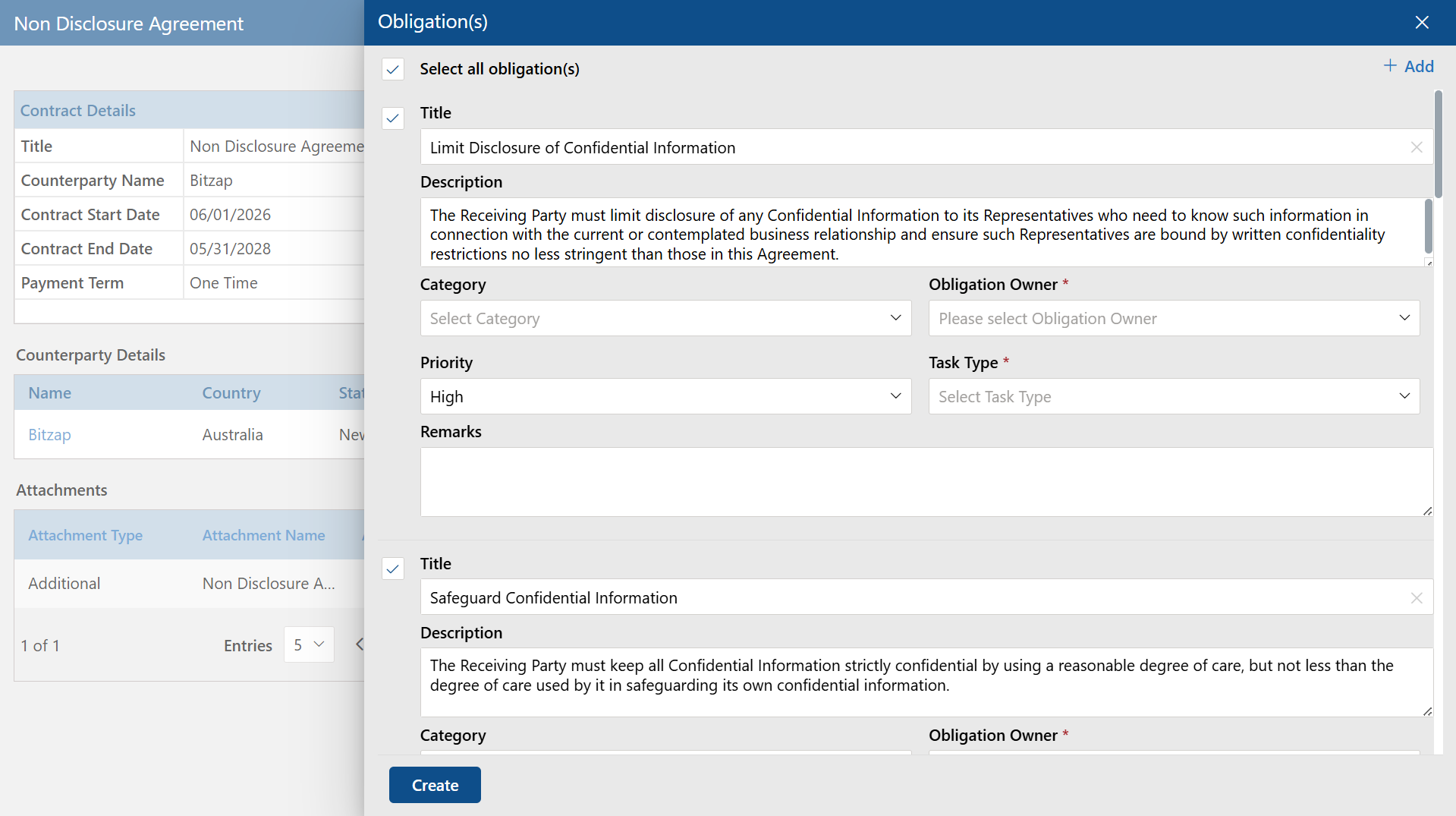
Manually reviewing contracts and entering obligation data can be time-consuming and prone to errors. AI-powered software summarizes contracts; automatically identifies obligations, deadlines, renewal terms, payment schedules, and other critical commitments directly. It reduces manual effort and improving accuracy.
Obligation Categorization
The ability to categorize obligations based on type, priority, department, contract value, or risk level makes it easier to organize and monitor contractual commitments. Structured categorization also improves reporting and searchability.
Role-Based Ownership and Assignment
Every obligation should have a clearly defined owner. A robust solution allows organizations to contract role-based access to assign responsibilities to specific users, ensuring accountability throughout the contract lifecycle.
Configurable Alerts and Notifications
Different obligations require different notification schedules. Look for a system that allows users to configure reminder timelines based on business requirements, helping stakeholders stay informed before critical deadlines occur.
Automated Escalation Workflows
Missed obligations can create financial, legal, and operational risks. Automated escalation workflows notify managers or designated stakeholders when obligations remain unresolved. This helps organizations take corrective action before deadlines are missed.
Comprehensive Audit Trails
Maintaining a detailed record of obligation-related activities is essential for contract governance and compliance. Audit trails should capture assignments, updates, approvals, completion records, and supporting documentation to provide complete visibility.
Integration with Existing Business Systems
The most effective solutions integrate seamlessly with the tools employees already use. Integration with Microsoft 365, SharePoint, Teams, Outlook, and other enterprise applications helps streamline workflows and improves user adoption.
Real-Time Dashboards and Reporting
Executives and contract managers need instant visibility into contract performance. Real-time contract management dashboard provide insights into active obligations, upcoming deadlines, completion rates, overdue commitments, and potential risk areas.
Compliance and Governance Reporting
Regulatory audits and internal reviews require accurate documentation. A strong contract obligation tracking solution should offer exportable reports, compliance summaries, and audit-ready records.
By selecting a solution with these capabilities, organizations can move beyond basic reminder systems and establish a proactive framework for managing contractual obligations efficiently and consistently.
Common Mistakes Businesses Make with Contract Obligations
Knowing what to avoid is just as important as knowing what to do. Here are some common mistakes businesses make when managing contract obligations and how automation helps fix them.
Treating the contract as complete after signing
Signing a contract is only the beginning of contract performance. After signature, teams still need to manage payments, contract deliverables, deadlines, compliance requirements, renewals, and other commitments.
Managing obligations in spreadsheets
Spreadsheets require employees to update information manually. As contract volumes increase, maintaining accurate information becomes harder. Automated tracking provides better visibility and reduces manual follow-up.
Not assigning a clear agent
One of the biggest reasons obligations get missed is that no one is clearly responsible for them. When ownership is unclear, teams assume someone else is handling it, and the task ends up being ignored. Every contract obligation should have a specific person or team responsible for tracking and completing it.
Ignoring auto-renewal clauses
Auto-renewal terms are easy to miss, especially when contracts are stored in different places or reviewed only when a problem comes up. Businesses may end up renewing a vendor or service agreement for another year simply because no one noticed the notice period. This can lead to unnecessary spending and reduced control over contract decisions.
Having no record of completed obligations
If there is no proper record of what was completed, when it was done, and who handled it, it becomes difficult to respond to disputes, audits, or compliance checks. Businesses need a reliable way to document fulfilment, store proof, and maintain a clear history of obligations.
Stay Ahead of Every Contract Obligation
Automate obligation tracking and keep every commitment visible, organized, and on track.
Best Practices for Automated Contract Obligation Tracking
Even with automation in place, following a few best practices can help organizations maximize visibility, accountability, and compliance.
- Store contracts in one central location.
- Assign an owner to every obligation.
- Group obligations by type and priority.
- Set reminders before important deadlines.
- Escalate overdue obligations automatically.
- Review upcoming and overdue tasks regularly.
- Keep proof when an obligation is completed.
- Use AI to identify obligations in contracts.
- Track high-risk obligations more closely.
- Review contracts regularly for new or changing requirements.
A simple and consistent process makes it easier for teams to manage obligations and reduce contract risk.
How CLM 365 Makes Contract Obligation Tracking Effortless?
CLM 365 helps organizations manage contract obligations from one central platform.
Teams can capture important contract information such as deadlines, payment terms, renewal dates, and compliance requirements. Obligations can then be assigned to responsible stakeholders and monitored throughout the contract lifecycle.
Automated reminders help employees prepare for upcoming dates instead of discovering them after they have passed.
Dashboards also give teams visibility into pending, completed, and overdue obligations.
Because CLM 365 works within the Microsoft ecosystem, organizations can connect contract management with familiar Microsoft tools and existing business processes.
The result is a more structured way to manage commitments while improving visibility and accountability.
Conclusion
Managing contract obligations manually can lead to missed deadlines, compliance risks, and limited visibility into contractual commitments. Automated obligation tracking helps organizations stay proactive by ensuring every obligation is identified, assigned, monitored, and fulfilled on time.
CLM 365 simplifies contract obligation management while improving accountability and compliance.
Ready to take control of your contract obligations? Explore CLM 365 and discover how automated obligation tracking can help your organization improve visibility.
Frequently Asked Questions
What types of contracts can CLM 365 track obligations for?
CLM 365 handles all contract types vendor agreements, client contracts, employment contracts, NDAs, leases, service-level agreements, and regulatory compliance contracts.
How does the AI extract obligations from contracts?
CLM 365 uses AI to read contract text and identify obligation clauses regardless of how they are written. The AI recognizes duty language, timelines, responsible parties, and conditions even in complex legal documents.
Do we need to migrate away from SharePoint to use CLM 365?
No. CLM 365 integrates directly with SharePoint. Your existing contracts stay exactly where they are. CLM 365 reads them from your SharePoint environment and surfaces the obligations.
How long does it take to set up automated contract obligation tracking with CLM 365?
Most organizations are up and running within a few days. Because CLM 365 connects to your existing Microsoft 365 environment, there is no complex infrastructure to build. Your team starts seeing extracted obligations almost immediately after connecting your contract repository.
What happens if an obligation is not fulfilled on time?
CLM 365 automatically escalates overdue obligations based on the rules you set. The system notifies the owner, their manager, and any other stakeholders you designate. Every step is logged, so you always have a clear record of what happened useful for both internal accountability and external disputes.
Table of Contents

Trusted by the Best

_JiluXJRGNl.svg)























