
_eH2jDg7dZ.png)
For businesses, understanding how to manage and calculate depreciation for IT assets is essential for accurate financial planning, tax savings, and efficient asset management. In this guide, we’ll cover everything you need to know about IT asset depreciation, including the types of assets, depreciation methods, tax implications, and best practices.
What is IT Asset Depreciation?
Depreciation is the accounting process of allocating the cost of an asset over its useful life. In the context of IT assets, depreciation is applied to hardware, software, and peripheral devices. It helps businesses reflect the decline in value of assets such as computers, servers, software, and even printers. Depreciation is an essential process for businesses to track, as it impacts financial statements, tax obligations, and budgeting.
Over time, the value of IT assets decreases due to factors such as wear and tear, technological advancements, and obsolescence. Depreciating these assets ensures businesses are not overvaluing their inventory and accurately reporting their asset values in financial statements.
Why Depreciation Matters for IT Assets
Depreciation is important for several reasons:
- Financial Planning: It helps businesses estimate the future value of their assets and plan for replacements or upgrades.
- Tax Benefits: Depreciation reduces taxable income, lowering the company’s tax burden and improving cash flow.
- Accurate Asset Management: By tracking depreciation, businesses can determine when assets need replacing, thus optimizing their IT investment strategies.
- Regulatory Compliance: Accurate depreciation ensures businesses comply with financial reporting standards, like Generally Accepted Accounting Principles (GAAP) and International Financial Reporting Standards (IFRS).
Types of Depreciable IT Assets
IT assets come in various forms, and each type requires its own approach to depreciation. The primary categories of depreciable IT assets include hardware, software, and peripheral devices.
Hardware: Servers, Computers, and Networking Equipment
Hardware assets, such as servers, computers, laptops, and networking equipment, are typically the largest portion of IT asset depreciation. These devices often have a limited useful life—usually ranging from 3 to 5 years—before they become obsolete or inefficient. As new models are released with better performance and features, older devices lose value quickly. Depreciating hardware over time ensures that businesses can account for their reduced value in the financial statements.
For example, servers may have a high initial cost but lose their value much quicker due to technological advances in cloud computing and networking equipment.
Software and Licensing
Unlike hardware, software does not physically degrade, but it becomes less valuable over time as new versions are released, and older versions become unsupported. Software licenses also have a set period of validity, after which they may need to be renewed or replaced. For businesses, depreciating software helps accurately reflect its value over its lifecycle, ensuring that companies don’t overstate the asset’s worth.
In addition to general software, businesses must account for the depreciation of various software licenses. These licenses may lose value as newer versions are released, or as vendors stop supporting older software versions.
Peripheral Devices (Printers, Monitors, etc.)
Peripheral devices such as printers, monitors, keyboards, and other office equipment also experience depreciation. While they tend to have a shorter lifespan compared to core hardware like computers, their value still declines over time. Depreciating peripheral devices ensures businesses can properly account for their declining value, which is important for budgeting and replacement planning.
Peripheral devices may lose value quickly due to advances in technology, particularly if they are replaced by more energy-efficient or feature-rich alternatives.
Depreciation Methods for IT Assets
There are several methods businesses can use to depreciate their IT assets. The method selected depends on the nature of the asset and how quickly it loses value.
Straight-Line Depreciation
Straight-line depreciation is the most common and straightforward method. It spreads the cost of an asset evenly over its useful life. This method is ideal for assets that lose value consistently over time, such as desktop computers and laptops.
Example:
If a laptop costs $1,500 and is expected to last for 5 years with a salvage value of $100, the annual depreciation expense is calculated as follows:
Annual Depreciation=Useful LifeCost−Salvage Value =51,500−100 =280per year
Thus, the laptop would depreciate by $280 annually over 5 years.
Declining Balance Depreciation
Declining balance depreciation is an accelerated method where an asset depreciates faster in the earlier years of its life. This method is suitable for IT assets that lose value more quickly, such as servers and computers, which may become obsolete faster due to technological advancements.
This method results in larger depreciation expenses in the earlier years, which reduces taxable income more significantly in the short term.
Example:
Using the same $1,500 laptop example, declining balance depreciation uses a fixed percentage to depreciate the asset each year, with the depreciation expense decreasing over time.
Units of Production Method
This method calculates depreciation based on the asset’s usage rather than its age. For instance, if a business uses an IT asset more intensively, the depreciation expense will be higher for each period of use. This method is typically used for machinery or equipment that is used at varying levels.
Although less common for IT assets, this method can be applicable for high-use devices, such as servers running 24/7 or heavily used workstations.
Calculating Depreciation for IT Assets
Key Factors in Depreciation Calculations
To calculate depreciation, several key factors must be considered:
- Initial Cost: This includes the purchase price of the asset, installation, and any additional costs associated with making the asset operational.
- Useful Life: The period over which the asset is expected to be used. This is determined based on factors like technology trends, obsolescence rates, and industry standards.
- Salvage Value: The estimated residual value of the asset at the end of its useful life.
- Depreciation Method: The approach used to allocate the asset’s cost over its useful life (e.g., straight-line or declining balance).
Practical Examples of Depreciation Calculation
To illustrate depreciation calculation, let’s take a common example:
A business buys a server for $5,000 with a useful life of 5 years and a salvage value of $500. Using the straight-line depreciation method, the annual depreciation expense is:
Annual Depreciation=55,000−500 =900per year
Thus, the server will depreciate by $900 every year for 5 years.
For declining balance depreciation, the asset will depreciate more in the first year compared to the straight-line method. If a fixed percentage of 20% is applied to the server’s book value each year, the depreciation expense for the first year would be:
First Year Depreciation=5,000×20%=1,000
The remaining value of the server will then be depreciated by 20% of the new book value in subsequent years.
Tax Implications of IT Asset Depreciation
How Depreciation Reduces Taxable Income
Depreciation is a non-cash expense, meaning it doesn’t require any actual outlay of funds. However, it reduces a company’s taxable income, lowering the amount of taxes owed. Depreciating IT assets allows businesses to deduct a portion of the asset’s cost each year, which directly affects their tax obligations.
Example:
If a company buys a server for $5,000 and depreciates it by $1,000 each year, the company can reduce its taxable income by $1,000 annually. This reduction in taxable income leads to lower taxes, improving cash flow for the business.
Benefits of Accelerated Depreciation
Accelerated depreciation methods like the declining balance method allow businesses to depreciate an asset more rapidly in the early years of its life. This approach provides tax benefits sooner, as larger depreciation expenses reduce taxable income in the short term.
By using accelerated depreciation, businesses can save on taxes in the early years and reinvest that money into purchasing new IT equipment or upgrading existing assets.
Best Practices in Managing IT Asset Depreciation
Regular Asset Audits and Adjustments
To ensure depreciation is being calculated accurately, businesses should regularly audit their IT assets. This involves verifying the value of assets, reviewing depreciation schedules, and adjusting them as necessary based on factors like upgrades, maintenance, or early disposal.
By performing regular audits, businesses ensure they are not overestimating the value of their IT assets and are in compliance with financial reporting standards.
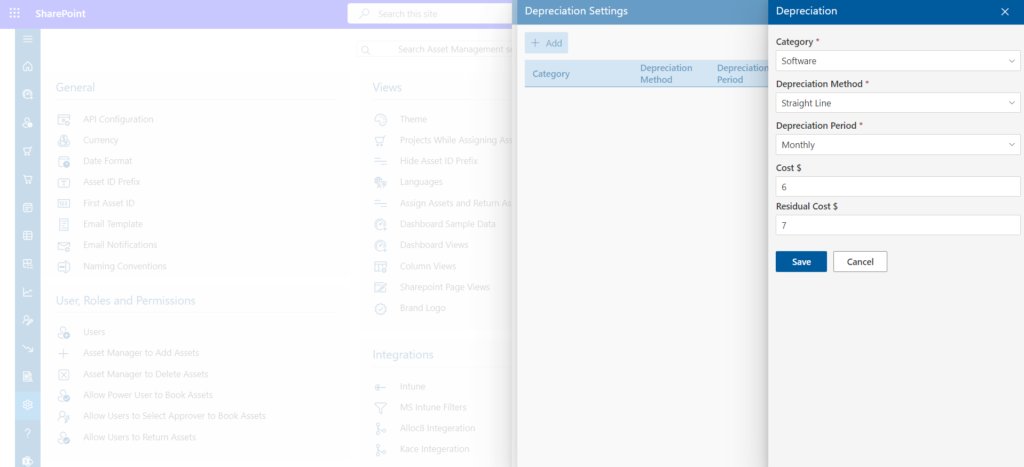
Integrating Depreciation with Asset Management Tools
Integrating depreciation tracking into asset management software is essential for streamlining the process. Modern asset management tools can automatically calculate depreciation and generate reports, making the process less time-consuming and reducing the risk of errors.
With the right tools, businesses can track asset lifecycles, plan for replacements, and keep accurate records of depreciation for tax and financial reporting purposes.
Conclusion
Understanding depreciation of IT assets is crucial for accurate financial planning, tax optimization, and effective asset management. By using appropriate depreciation methods, businesses can reduce their taxable income, plan for asset replacements, and make informed decisions regarding IT investments. Regular audits and the use of asset management tools such as Asset Management 365 help organizations track asset value over time, maintain clear records, and stay aligned with financial reporting requirements.
If you want a better way to monitor IT asset lifecycle and depreciation within your Microsoft environment, book a demo of Asset Management 365 to see how it can support your asset management process.
Join Our Creative Community
Frequently Asked Questions
What is the meaning of IT asset depreciation?
IT asset depreciation refers to the process of allocating the cost of IT assets, such as hardware, software, and peripheral devices, over their useful life. This accounting method reflects the decrease in value of these assets over time due to wear and tear or technological obsolescence.
How does depreciation affect my business's taxes?
Depreciation reduces taxable income by allowing businesses to deduct the cost of assets over time. This results in tax savings, as the depreciation expense lowers the amount of income that is subject to tax.
What are the different methods of calculating depreciation?
The three primary methods of calculating depreciation are:
- Straight-Line Depreciation: Spreads the cost evenly over the asset’s useful life.
- Declining Balance Depreciation: Depreciates the asset more in the earlier years.
- Units of Production Method: Depreciates based on usage or production.
Why should businesses depreciate their IT assets?
Depreciating IT assets helps businesses track their actual value over time, ensures financial accuracy, aids in planning for asset replacements, and offers tax benefits by reducing taxable income.
What are the benefits of accelerated depreciation?
Accelerated depreciation allows businesses to depreciate an asset more quickly in the earlier years, leading to larger tax deductions sooner. This can improve cash flow, which is beneficial for reinvesting in new technology.


_JiluXJRGNl.svg)























