


- CPQ SaaS helps businesses configure products, apply pricing rules, and generate accurate quotes through a cloud-based platform accessible from anywhere.
- By automating quote creation and approval workflows, CPQ SaaS reduces manual effort, accelerates sales processes, and improves team productivity.
- Real-time pricing updates, guided selling, and automated validations help minimize errors and ensure consistent, compliant quotes.
- CPQ SaaS scales with business growth, making it easier to manage complex product catalogs, subscription pricing models, and evolving customer requirements.
A regular business sells a fixed set of products, so writing a quote is quick.
A SaaS company sells subscriptions, tiers, add-ons, and usage-based charges that change from one deal to the next, so a single quote can have dozens of moving parts.
One wrong tier, one missed discount rule, or one outdated price sheet, and the sales team is stuck redoing the same quote three or four times before it goes out.
This is the exact problem CPQ SaaS software is built to solve. CPQ stands for Configure, Price, Quote, and when it runs as cloud software.
In this guide, we will walk through what CPQ SaaS does, how it works step by step, the features that matter most for subscription businesses.
What is CPQ SaaS?
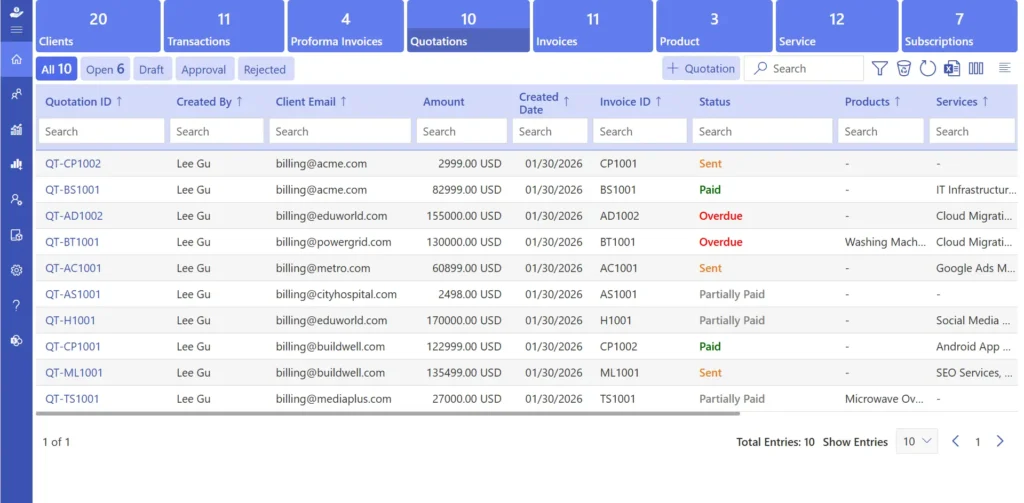
CPQ SaaS is Configure, Price, Quote software delivered as a cloud subscription rather than installed on a server. It gives sales reps a guided way to pick the right product combination, calculate the price automatically, and produce a quote that is ready to send.
For subscription-based business model, this matters more than it does for a business selling one product at one price. A typical SaaS CPQ solution must handle monthly and annual billing, multiple plan tiers, add-on modules, usage-based fees, free trial conversions, and mid-term upgrades or downgrades.
- Building a subscription package from a base plan plus selected add-ons.
- Applying the correct discount automatically based on contract length, seat count, or customer type.
- Routing a quote for manager approval when it falls outside standard pricing rules.
- Producing a quote document in the format a customer or finance team expects.
Why this matters right now
SaaS is one of the fastest-growing software categories. Grand View Research estimates the global software as a service market at $399.10 billion in 2024, projected to reach $819.23 billion by 2030 at a 12% annual growth rate.
A few things are pushing CPQ SaaS up the priority list for revenue teams:
- Buyers compare vendors quickly, so a slow or wrong quote can cost a deal before negotiation even starts.
- Sales reps already manage several pricing tiers, discount levels, and bundle combinations, and doing this from memory or an old spreadsheet invites mistakes.
- Faster quotation management and quicker approvals translate directly into faster deal closure.
- CPQ solutions for SaaS companies give sales leaders a clear view into win rates, average deal size, and where deals tend to stall.
- Good SaaS CPQ solutions also feed clean data into billing and finance, which matters for forecasting and renewals.
How CPQ for SaaS Works
It helps to know what happens behind the scenes once a sales rep opens a quote in a CPQ tool.
- Product configuration-The sales teams picks a base plan, then adds modules, seats, or usage tiers. The system only allows combinations that are valid, so a rep cannot accidentally combine two plans that were never meant to go together.
- Pricing calculation-Once the configuration is set, the software calculates the total automatically, factoring in any standard discounts, promotions, or recurring charges tied to the billing cycle.
- Quote generation-The system turns the configuration and pricing into a finished quote document, already formatted and ready to send. No copying numbers into a template by hand.
- Approval routing-If a discount goes beyond what a rep is allowed to offer on their own, the quote moves automatically to the right manager. The rep gets notified once it is approved or sent back with comments.
- Reporting – Sales and finance teams can see how long deals take from quote to close, where deals typically lose momentum, and which packages sell best.
Put together, this workflow takes the repeated manual steps out of quoting, so reps spend more of their time talking to customers and less time formatting documents or chasing approvals.
Features of CPQ SaaS Solutions
Not every CPQ tool is built the same way, but the strongest SaaS CPQ solutions share a common set of capabilities. Here is what to look for and why each one matters.
1) Custom product bundling
SaaS customers rarely want the exact same package. Some only need the core platform, others want every add-on and priority support included.
CPQ SaaS tools let reps mix modules into a bundle that fits the actual need instead of forcing a customer into a rigid plan.
This flexibility tends to increase average deal size too. When a buyer feels they are paying for exactly what they need, they are more likely to commit and stay subscribed longer.
2) Automated billing logic
Recurring billing gets complicated fast once discounts, proration, and tax rules from different regions enter the picture.
Research from Salesforce found that sales reps spend only about 30% of their time selling, with the rest going to administrative tasks like chasing approvals and rewriting quotes.
A solid CPQ SaaS platform calculates monthly, quarterly, or annual charges automatically, applies the right discount tier, and includes any active promotion, all without the rep doing the math by hand.
3) Approval workflows
A common bottleneck in B2B sales is waiting on a manager to approve a discount. According to Belkins, B2B deals now commonly involve 6 to 10 decision-makers, which means pricing decisions already take longer than most teams would like.
With SaaS CPQ solutions, small discounts within an approved range get cleared automatically, while larger ones route straight to the right person.
This removes a step that used to add days to a deal, and it means finance and sales leadership keep oversight without slowing every quote down.
4) System integrations
Sales teams typically work across a CRM, a billing platform, and sometimes a separate document tool for proposals.
When these are disconnected, pricing data gets copied manually between systems, and small mismatches creep in.
CPQ solutions for SaaS companies solve this by connecting directly to the tools already in use, so pricing, customer records, and order details stay in one place.
5) Tax and compliance support
Selling subscriptions across regions means dealing with different tax rules for each one.
Some CPQ platforms can act as a merchant of record, calculating and applying the right tax automatically on every transaction.
This takes a recurring headache off the finance team’s plate and lowers the risk of filing the wrong rate for a given country or state.
6) Audit trail and deal visibility
When a sales rep, a manager, and a finance team all touch the same deal, it is easy to lose track of who changed what.
CPQ SaaS tools log every edit to a quote, including who made the change and when, and they also show where a deal currently sits in the quote-to-order process.
This record is useful when reviewing past deals, training new hires, or settling a disagreement with a customer about what was agreed upon.
7) Analytics and reporting
Knowing which bundles sell, which pricing structures convert best, and where deals tend to get stuck is hard to track manually once deal volume grows.
CPQ analytics give sales managers a way to coach reps with real data, and they help finance teams forecast revenue with more accuracy because the underlying quote data is consistent.
8) Multi-currency and multi-region support
A SaaS company selling globally needs to quote in local currency and apply the correct regional tax automatically.
This is a feature that becomes essential the moment international customers start showing up in the pipeline, and it builds trust with buyers who would otherwise have to calculate a currency conversion themselves.
Benefits of Using CPQ Solutions for SaaS Companies
Adopting CPQ solutions for SaaS companies delivers a few concrete, measurable advantages.
1. Faster sales cycles
When quoting and pricing are automatic; reps move from proposal to close faster because they are not stuck waiting on a manual calculation or a template fix. For subscription businesses, this also means billing cycles can start earlier, which brings revenue in sooner rather than later.
2. More accurate pricing
CPQ SaaS calculates prices for every product bundle, add-on, and subscription term consistently, every time. This protects margins, keeps quotes aligned with what a customer actually agreed to, and avoids the kind of pricing disputes that come from a typo in a spreadsheet, like a missing digit turning a real discount into an accidental giveaway.
3. Better customer experience
Customers want a quote that is easy to read and clearly explains what they are paying for. A clean, professional quote generated by CPQ SaaS builds trust early in the relationship, which matters for renewals down the line. Buyers who understand exactly what is included are more likely to stick around.
4. Smoother approval management
B2B SaaS deals usually need sign-off from more than one person. Automated approval routing in a CPQ system sends discount or custom pricing requests to the right reviewer without the rep having to track it manually. This keeps deals moving and lets subscription billing start sooner, which supports steadier cash flow.
5. Real insight into what sells
A strong CPQ SaaS platform shows which plans, add-ons, or bundles are converting best, which deals need a follow-up, and which packages are bringing in the most revenue. Sales leaders can use this to adjust pricing and refine which offers actually get pushed in the field
Recommended Read: What Is SaaS Analytics & Its Benefits
6. Scales with the business
As a company adds subscription tiers, billing cycles, and regions, a good CPQ system grows along with it. New users, new plans, and new markets do not require rebuilding the entire quoting setup from scratch, so growth does not create extra manual overhead in the sales process.
Best Practices During SaaS CPQ Process
Getting real value out of SaaS CPQ solutions depends less on the software itself and more on how a company sets it up. These practices come up repeatedly among teams that get CPQ right.
- Define clear product configuration rules so only approved product combinations, add-ons, and bundles can be quoted.
- Keep pricing models simple with transparent tiers, recurring charges, and discount structures to speed up sales cycles.
- Automate approval workflows while setting reasonable discount thresholds that only escalate exceptions.
- Regularly review and update the product catalog to prevent outdated pricing, plans, or configurations from appearing in quotes.
- Train sales teams on pricing logic, configuration rules, and business processes not just how to use the software.
- Start with CPQ when pricing complexity grows, such as multiple plans, regional pricing, or expanding sales teams.
- Monitor key SaaS metrics like quote-to-close time, win rates, approval delays, and average discounts to continuously optimize performance.
Implementing SaaS CPQ Solutions
Implementing out SaaS CPQ solutions works best as a planned process rather than a single big switch. Here is a practical sequence.
- Evaluate CPQ solutions based on subscription billing support, multi-currency capabilities, integration requirements, and compatibility with existing CRM platforms.
- Integrate the CPQ platform with CRM, billing, and financial systems to enable seamless data flow and reduce manual work.
- Launch a pilot program with a single product line or a small sales team to identify and resolve configuration issues early.
- Provide cross-functional training for sales, finance, and operations teams to ensure smooth quote-to-cash processes.
- Monitor key performance metrics such as quote-to-cash time, win rates, approval cycles, and average deal value after implementation.
- Refine pricing rules, approval workflows, and product configurations based on performance data and user feedback.
- Expand deployment gradually across teams and product lines once the pilot phase demonstrates consistent results.
How Revenue 365 Helps SaaS CPQ?
Revenue 365 is built specifically to handle CPQ for subscription businesses inside the Microsoft ecosystem, connecting directly with SharePoint, MS Teams, Outlook, Power BI, and Power Automate. Because it runs on tools many SaaS teams already use daily, reps do not need to learn an entirely new system just to send out a quote.
If your sales team is still building quotes in spreadsheets or copying pricing between disconnected tools, that is usually the clearest sign it is time to look at a dedicated CPQ SaaS platform. Revenue 365 automates the configuration, pricing, and approval steps so reps spend more time with customers and less time formatting documents.
Conclusion
A subscription business cannot quote like a company that sells one fixed product. CPQ SaaS software exists because pricing tiers, add-ons, and usage-based charges multiply the number of ways a single deal can be configured, and doing that math by hand does not scale past a handful of reps.
If quoting is still eating up hours that your sales team could spend talking to customers, Revenue 365 is built to fix exactly that. Book a demo and see how it handles your actual pricing model, not a generic one.
Join Our Creative Community
Frequently Asked Questions
What is CPQ SaaS, and how is it different from traditional CPQ?
CPQ SaaS runs in the cloud, so sales teams can use it from any device without installing software or maintaining servers. Traditional CPQ is installed on-premises and needs manual updates and IT involvement for changes.
Can CPQ solutions work with subscription-based SaaS products?
Yes. SaaS CPQ solutions are built around subscription pricing, recurring billing, add-on modules, and mid-term plan changes, which is exactly what traditional CPQ tools were not originally designed for.
How does CPQ for SaaS help sales teams save time?
It automates the steps that used to take the most time: building the quote, calculating the price, and routing it for approval. Reps spend that saved time on customer conversations instead of paperwork.
Do small or early-stage SaaS companies need CPQ?
Not always right away. A company with one or two pricing tiers and a few deals a month can manage with a spreadsheet. Once a third tier, regional pricing, or a growing sales team enters the picture, CPQ SaaS software starts paying for itself quickly.
What's the difference between CPQ and a full quote-to-cash process?
CPQ covers configuration, pricing, and quote generation. Quote-to-cash is the larger process that continues after the quote, including contracts, billing, payment collection, and revenue recognition. CPQ is one stage within quote-to-cash, not a replacement for it.
Are analytics features available in SaaS CPQ solutions?
Yes. it show quote-to-close timelines, deal sizes, win rates by bundle, and revenue trends, which give sales and finance teams a clearer picture of what is working.


_JiluXJRGNl.svg)























