


In this blog, we will look at how CLM 365 helps teams handle contracts using tools they already use every day. You will see how it fits into the Microsoft ecosystem, automates approvals, and helps track important contract details. We will also explore how businesses can set it up and use AI features to review contracts faster and manage them better.
A CLM system changes this process. It gives businesses a structured way to create, review, store, and track contracts from start to finish.
Many organizations already see the need for better contract management. Research shows that 40% of a contract’s value can be lost because of poor contract management practices. WorldCC also estimates that contract value leakage costs businesses up to 9% of their annual turnover.
What is CLM System?
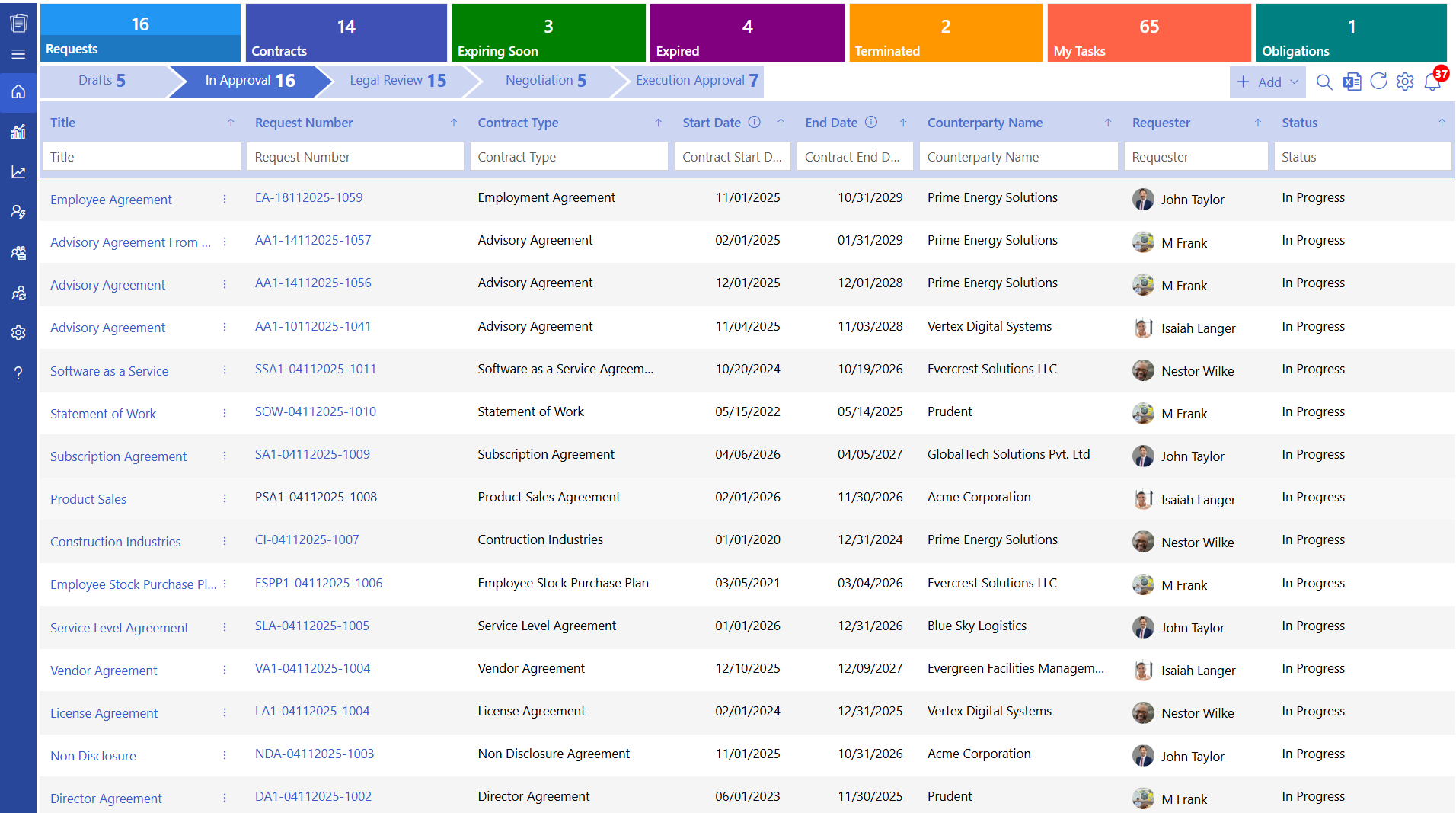
A CLM system stands for contract lifecycle management system. It is a digital platform that helps businesses manage contracts from creation to renewal or closure.
Contracts often pass through many stages. A legal team drafts the document. Managers review it. Finance checks pricing terms. Leaders approve it. After signing, teams must track deadlines and obligations.
When handled manually, these steps can take weeks.
A CLM system organizes the entire contract lifecycle in one place.
The system allows teams to:
- Create contracts using approved templates
- Send documents for review and approval
- Track contract versions
- Sign documents electronically
- Store contracts in a searchable repository
- Monitor obligations and renewal dates
How Does CLM Systems Work?
A CLM system manages contracts through a clear process. Each stage moves the contract from request to execution and long-term management. Below is a step-by-step overview.
1. Contract Request
The contract lifecycle begins when a department requests a new agreement. A procurement team may request a supplier agreement, a sales team may need a customer contract, and the HR department may request an employee agreement. The request is submitted through the contract lifecycle management (CLM) system, where the platform records key details.
2. Contract Drafting
After the request is approved, the contract draft is prepared. Instead of creating each document from the beginning, teams can use pre-approved templates and clauses available in the CLM system. According to Bloomberg Law, 62% of professionals report that drafting, reviewing, and negotiating contracts takes more than half of their contract management time. Using templates and clause libraries helps reduce the time spent on drafting.
3. Internal Review
Once the draft is ready, the contract moves to the internal review stage. Different departments review the sections related to their responsibilities. The legal team reviews legal terms, the finance team reviews payment conditions, and procurement teams review vendor obligations. Management may also review the commercial terms of the agreement.
4. Approval Workflow
After the review stage, the contract moves to the approval process. Managers review the agreement and approve it based on factors such as the contract value, business risk, and strategic importance. Each approval is recorded in the CLM system. This creates a clear record of the decisions made during the contract process.
5. Negotiation with External Parties
The contract is then shared with the external party, such as a supplier, partner, or client. Both sides may review the terms and suggest changes to certain sections of the agreement. The CLM system records each revision and maintains a history of the changes made to the contract. This allows teams to review different versions of the document when needed.
6. Contract Signing
Once both parties agree on the terms, the contract moves to the signing stage. The CLM system allows organizations to use electronic signatures, which allows contracts to be signed digitally. This removes the need to print and scan documents. After signing, the final version of the contract is stored in the system.
7. Contract Storage and Tracking
After signing, the contract remains active in the system. The CLM platform stores the agreement and tracks important details such as renewal dates, payment milestones, performance obligations, and expiry timelines. Teams receive notifications when important dates approach so they can review the contract at the right time.
8. Contract Renewal or Closure
When the contract reaches its end date, the organization reviews whether to renew, renegotiate, or close the agreement. The CLM system provides reminders and access to past contract information, which helps decision-makers review the agreement and decide the next steps.
Difference Between Manual and Automated CLM System
Many organizations still rely on spreadsheets and document folders to manage contracts. An automated CLM system changes the process significantly.
| Aspect | Manual Contract Management | Automated CLM System |
| Contract Creation | Contracts are written manually each time | Templates and clause libraries create contracts faster |
| Approval Process | Approvals happen through emails or physical signatures | Approval workflows route contracts to the right people automatically |
| Contract Storage | Documents stored in folders or shared drives | Central repository with search options |
| Tracking Deadlines | Teams track dates manually in spreadsheets | Alerts and reminders track milestones automatically |
| Version Control | Multiple versions saved separately which makes comparison difficult | Version history shows changes and maintains a single contract record |
Core Features of CLM System
A CLM system includes many features that support contract creation, tracking, and analysis. Below are some of the capabilities that organizations use regularly.
AI Powered Contract Management
Artificial intelligence is becoming an important part of modern contract management platforms. Recent studies show rapid adoption of AI across business operations, with 88 percent of organizations now using AI in at least one business function. In a CLM system, AI helps with tasks such as contract analysis, clause identification, risk detection, and contract search.
AI features can read long contract documents and identify clauses related to payment terms, obligations, or penalties. This allows legal teams to review agreements faster, especially when they handle many contracts each week.
Automated Approval Workflows
Contracts often require approval from several stakeholders before they can be finalized. Without a structured process, documents may remain in email inboxes for several days. An automated workflow sends the contract to the appropriate person based on predefined rules set within the system. Studies also show that up to 40% of a contract’s value can be lost because of inefficient contract management practices.
For example, contracts below a certain value may require approval from one manager, while high-value agreements may require approval from senior leadership.
Compliance Management
Compliance is an important concern for organizations that operate in regulated industries. Research shows that 43% of professionals consider compliance and regulatory requirements a major challenge in contract management.
A CLM system helps organizations manage compliance by maintaining approved clause libraries, recording approval history, and storing contracts in a secure digital repository. These records help organizations demonstrate that their contracts follow legal and regulatory standards.
Draft Comparison
During negotiation, contracts often go through multiple revisions before the final version is approved. Draft comparison tools allow users to compare two versions of a contract and review the exact changes made between them.
The system highlights added text, removed text, and modified clauses. This allows legal teams to quickly review modifications without manually checking each section of the document.
Clause Templates
Clause templates provide pre-approved legal language that teams can use while drafting contracts. Legal departments usually create a library of commonly used clauses that can be inserted into agreements. These clauses may include payment terms, confidentiality clauses, liability limitations, and termination conditions.
E-Signature
Electronic signatures allow contracts to be signed digitally without printing physical documents. The CLM system allows parties to review and sign agreements from different locations using secure digital signatures. This approach reduces the time required to complete the signing process and keeps signed documents stored within the contract management platform.
Contract Amendment
Business relationships often change over time, which may require updates to existing agreements. A contract amendment feature allows organizations to modify contract terms while keeping the original agreement stored in the system. The CLM system records every amendment and keeps a history of the changes made to the contract.
Contract Version Control
Version control helps organizations maintain a record of every revision made to a contract. When multiple team members review or edit a document, the system saves each version and identifies the most recent one. This helps teams work with the correct version of the contract and maintain a record of earlier revisions.
Reporting and Analytics
Contract data can provide useful insights for business decisions. Reporting tools in a CLM system allow organizations to analyse contract activity and performance.
For example, reports may show contract value by department, vendor contract volume, upcoming contract renewals, and the average time taken to complete a contract cycle. These insights help business leaders evaluate operations and improve their contract management strategy.
7 Benefits of CLM System
A CLM system provides several advantages for organizations that handle many contracts. Below are seven benefits businesses experience after adopting a structured contract management platform.
1. Faster Contract Creation
A CLM system provides templates and clause libraries that help teams create contracts quickly. Instead of drafting every document from the beginning, legal teams can use pre-approved templates to prepare agreements. This reduces the time required to prepare contracts and allows businesses to complete agreements faster.
2. Better Contract Visibility
When contracts are stored in a central repository, they become easier to locate and review. Users can search agreements using filters such as vendor name, contract value, department, or contract date. This is important because studies show that 90 percent of contracting professionals report difficulty finding contracts quickly.
3. Improved Approval Speed
Approval workflows within a CLM system help move contracts through the review process more quickly. Instead of sending documents through multiple email threads, the system routes the contract to the appropriate manager based on predefined approval rules. Managers can review and approve agreements directly within the platform.
4. Reduced Contract Value Loss
Contract management practices can affect business revenue. Research shows that contract value leakage may cost businesses up to 9% of their annual turnover. A structured CLM system helps organizations track obligations, payment milestones, and contract deadlines. This helps businesses monitor agreements more closely and protect contract value.
5. Better Compliance Management
Organizations must follow various legal and regulatory requirements when managing contracts. A contract management system stores approved compliance clauses and maintains records of approvals and contract decisions. These records help organizations demonstrate that their agreements follow legal standards and regulatory requirements.
6. Stronger Negotiation Insights
Reporting tools within a CLM system provide data that helps organizations understand contract performance. Businesses can review vendor contract terms, analyze renewal patterns, and evaluate contract cycle times. This information helps teams make more informed decisions during contract negotiations.
7. Organized Contract Lifecycle
A CLM system brings every stage of the contract lifecycle into a single platform. Teams can manage contract drafting, internal reviews, approvals, signing, and ongoing tracking within the same system. This structured approach helps organizations manage large volumes of contracts in a more organized way.
How CLM 365 Helps Businesses
CLM 365 is built on the Microsoft ecosystem and connects easily with tools teams already use, including Microsoft SharePoint, Microsoft Teams, Microsoft Outlook, Microsoft Copilot, Microsoft Power BI, and Microsoft Power Automate. This allows teams to handle contracts directly within their daily work tools.
The platform helps automate approvals, track obligations, and monitor important contract activities using AI-supported workflows. This reduces manual follow-ups and helps teams stay on top of compliance.
CLM 365 also offers enterprise-level security with a simple interface, making it suitable for both growing businesses and large organizations. It is backed by SOC 2 compliance, Microsoft certification, and support for GCC and GCC High environments.
Best for: SMBs and enterprises that want to improve and organize their contract management process.
How to Deploy CLM 365 in your Existing Workflow
- Review your current contract process and check how contracts are created, approved, and stored. Identify delays, missing steps, and manual work that slows down the process.
- List the tools your team already uses for drafting contracts, approvals, communication, and storage. This helps you understand where CLM 365 can fit into the existing workflow.
- Activate CLM 365 and connect it with Microsoft 365 to access its full capabilities.
- Integrate it with tools your team already uses such as Microsoft Outlook, Microsoft Teams, Microsoft SharePoint, Microsoft Copilot, and the Microsoft Word add-in so contracts can be handled within familiar applications.
- Set up approval workflows, assign role-based access, and enable alerts for key contract dates and milestones.
- Provide clear instructions and simple examples so your team can start using the system quickly.
- Track how the system is used and review performance regularly to find opportunities for improvement.
- CLM 365 also includes an AI assistant that can analyze contracts, highlight risks, identify obligations, and show key clauses, helping teams review contracts faster and focus on important details.
Conclusion
Contracts form the foundation of many business relationships. They define obligations, pricing terms, and service expectations.
Managing these agreements manually often leads to delays and difficulty locating documents.
A CLM system provides a structured approach to contract management. It helps organizations create contracts faster, manage approvals, track obligations, and analyze contract data.
With the growing use of AI and digital workflows many organizations are adopting contract lifecycle management platforms to improve operational efficiency.
Solutions like CLM 365 support businesses by providing contract creation tools, automated workflows, secure storage, and reporting capabilities.
For companies that handle hundreds of agreements each year a structured contract management system can significantly improve how contracts are managed.
Join Our Creative Community
Frequently Asked Questions
What is a CLM system used for?
A CLM system helps businesses manage the entire lifecycle of a contract. This includes drafting, reviewing, approving, signing, storing, and tracking agreements.
Who uses a CLM system?
Several departments use a CLM system including:
- Legal teams
- Procurement teams
- Sales departments
- Finance teams
These groups work together to manage contract creation and monitoring.
Why do companies adopt a CLM system?
Organizations adopt a CLM system to improve contract visibility, reduce delays in approvals, and track important contract dates.
Can small businesses use a CLM system?
Yes. Small businesses that handle multiple contracts with vendors or clients can benefit from using a contract management platform.
Does a CLM system support electronic signatures?
Most contract lifecycle management platforms include electronic signature capabilities. This allows agreements to be signed digitally.

Trusted by the Best

_JiluXJRGNl.svg)























