
Using Asset Management Solutions to manage Hardware and Software Assets
_eH2jDg7dZ.png)
If your business owns computers, servers, printers, or software tools, you already have assets to manage. The bigger your team grows, the harder it becomes to track all of these. That is where SharePoint asset management solutions come in. In this blog, we will walk you through everything you need to know about managing hardware and software assets, in plain, simple language.
Asset management solutions help organizations track hardware and software assets in a centralized system. They organize information about devices, applications, and licenses, making it easier to maintain accurate inventory and locate assets quickly.
By keeping asset records updated, these solutions help businesses monitor usage, manage licenses, and maintain better control over technology resources.
What Are Asset Management Solutions?
Asset management solutions are tools or software that help businesses keep track of everything they own, from physical devices like laptops and printers to software licenses and digital tools. Think of it like a smart inventory system, but built specifically for IT and business assets.
These tools help you see what you have, where it is, who is using it, and when it needs to be updated or replaced. Instead of relying on spreadsheets or memory, you get a clear, real-time picture of all your assets in one place.
In short, asset management solutions answer these basic questions for you:
- What assets do we own?
- Where are they right now?
- Who is using them?
- Are they still working fine?
- When do licenses or warranties expire?
Understanding Hardware and Software Assets in Organizations
Before we get into how asset management works, it helps to understand what counts as a hardware or software asset.
Hardware Assets
These are the physical items your company owns or uses. Examples include:
- Laptops and desktop computers
- Servers and networking equipment
- Printers and scanners
- Mobile phones and tablets
- Monitors, keyboards, and other peripherals
Software Assets
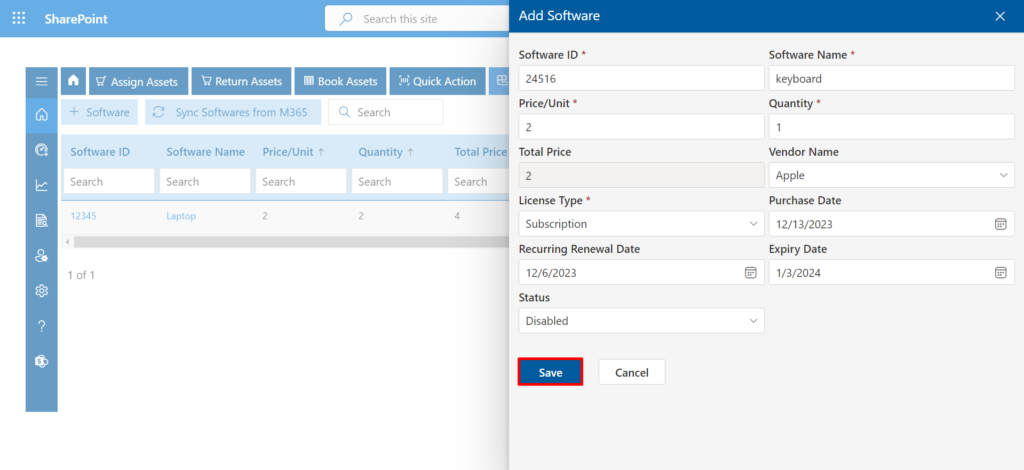
These are the digital tools and licenses your business pays for. Examples include:
- Operating systems (Windows, macOS, Linux)
- Productivity tools like Microsoft 365 or Google Workspace
- Design, accounting, or project management software
- Security tools like antivirus programs
Both types of assets cost money. Both need to be tracked properly. And both can cause real problems if they are not managed well.
Challenges of Managing Hardware and Software Assets Manually
Many small and mid-sized businesses still manage their assets using spreadsheets or basic notes. It might work for a while, but as your team grows, things start to fall apart quickly. Here is what that looks like in real life:
You Lose Track of Devices
When someone leaves the company, do you know exactly which laptop they had? If you are managing things manually, there is a good chance that device ends up forgotten in a drawer, or worse, it walks out the door.
Software Licenses Expire Without Warning
If you are not actively watching renewal dates, a software license can expire and suddenly your team cannot access a tool they need. This causes delays, frustration, and sometimes emergency purchases at higher prices.
You Pay for Things You Do Not Use
It is very common for businesses to pay for software seats that are no longer being used. An employee leaves, but their license keeps renewing. Over time, this adds up to a lot of wasted money.
Audits Become a Nightmare
If your business ever goes through a software audit, which can happen anytime a vendor wants to check if you are using their product legally, not having proper records can lead to fines or legal trouble.
IT Team Wastes Hours on Basic Questions
“Which laptop does John use?” “How many licenses do we have left?” “When does our antivirus renew?” These should be quick answers. But without a proper system, your IT team spends hours digging through files and emails to find out.
How Asset Management Solutions Help Track Hardware Assets
A good asset management solution takes the guesswork out of hardware tracking. Here is how it helps:
One Central Record for Every Device
Every laptop, phone, or server gets its own record in the system. You can see details like the device model, serial number, purchase date, warranty status, and who it is assigned to, all from one screen.
Automated Discovery
Many asset management tools can automatically detect devices connected to your network. So instead of manually adding each device, the system finds them for you. This makes the initial setup much faster.
Warranty and Maintenance Alerts
Asset management tools can send you alerts before a warranty expires or before a device is due for maintenance. This helps you plan ahead and avoid unexpected costs.
Asset Assignment and History
You can see the full history of any device, which employee had it, when it was last serviced, and any issues reported. This is especially useful when an employee leaves or when something goes wrong with a device.
Location Tracking
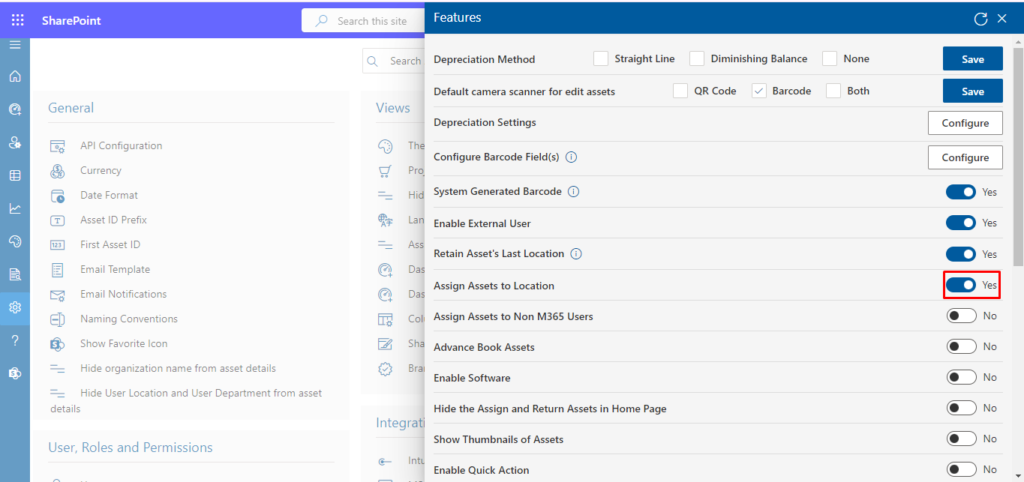
For businesses with multiple offices or remote teams, some asset management tools also let you track where each device is located. This makes it easy to manage assets across different sites without getting confused.
Managing Software Licenses with Asset Management Solutions
Software license management is one of the most valuable things an asset management solution does. Here is what it helps with:
Track All Licenses in One Place
No more digging through old emails to find a license key. All your software licenses, what they are, how many seats you have, and when they expire, are stored in one place. Your team can access this information instantly.
Avoid Over-Buying and Under-Buying
The system shows you how many licenses you are actually using versus how many you own. If you have 50 seats but only 30 people using a tool, you can cut back at renewal. If everyone is using all 50 and you are growing, you know to buy more.
Stay Compliant During Audits
Software vendors can audit your usage at any time. With proper records in place, you can quickly show that you are within your licensed limits, and avoid any fines or legal trouble.
Renewal Reminders
The system notifies you before a license renewal date so you can review, negotiate, or cancel before auto-renewing something you no longer need. This alone can save businesses thousands of dollars each year.
Control Unauthorized Software
Some asset management tools can detect if employees have installed software that was not approved by IT. This is important for keeping your network secure and making sure you are not accidentally violating any software agreements.
Key Benefits of Using Asset Management Solutions for Businesses
Let us quickly pull together the top reasons why businesses of all sizes are adopting asset management solutions:
- Save Money: Stop paying for unused software licenses and unused hardware. Get a clear picture of what is worth keeping and what can be removed.
- Save Time: Your IT team spends less time answering basic questions and more time on work that actually matters.
- Reduce Risk: Stay compliant with software license agreements and reduce the chance of financial penalties.
- Better Planning: Know when devices need replacing before they break down. Plan your IT budget with real data.
- Improved Security: Know what software is running on your network. Prevent unapproved installs and keep your systems safe.
- Scalability: Whether you have 10 employees or 10,000, asset management solutions grow with your business.
Conclusion
Managing hardware and software assets manually is a lot harder than it looks, and the cost of doing it wrong keeps adding up. You end up paying for things you do not need, losing track of equipment, and scrambling during audits.
Asset management solutions fix this by giving your business one clear, organized view of everything you own. They save you money, protect you from compliance issues, and help your IT team work without the constant chaos.
If your business is still running on spreadsheets and gut instinct, now is a good time to make the switch. The tools are more affordable and easier to use than ever, and the benefits show up almost immediately.
Join Our Creative Community
Frequently Asked Questions
What are asset management solutions?
Asset management solutions are tools that help businesses track and manage all their physical and digital assets, including computers, devices, software licenses, and IT equipment. They give you a complete, up-to-date view of everything your company owns.
What is the difference between hardware asset management and software asset management?
Hardware asset management focuses on physical devices, laptops, servers, printers, and so on. Software asset management focuses on digital tools and licenses, making sure you are using them within the allowed limits and not wasting money on unused seats.
Why do businesses need asset management solutions?
Businesses need these tools to save money, stay organized, remain compliant, and make better decisions about their IT spending. Without them, it is easy to lose track of devices, overpay for software, and face problems during audits.
How do asset management solutions help track software licenses?
They store all your license details in one place, show you how many seats you are using versus how many you own, send renewal alerts, and flag any unauthorized software on your network. This helps you avoid both overspending and compliance issues.
Can asset management solutions help prevent asset loss?
Yes. By keeping a record of every device, including who it is assigned to and where it is located, these tools make it much harder for assets to go missing. When an employee leaves, you can quickly check what they had and make sure everything is returned.


_JiluXJRGNl.svg)























