
Best Task Management Tool for Teams That Want More Done
If you are searching for the best task management tool, you are likely trying to improve team productivity, reduce missed deadlines and the right solution can make all the difference.


What is a Task Management Tool?
A task management tool is a program that supports individuals and groups in organizing, designating, monitoring, and carrying out assignments in an efficient manner. Essentially, it addresses five basic inquiries:
- What is to be done?
- Who is responsible?
- When is it due?
- What is the status?
- What comes next?
A modern task management system goes beyond checklists. It connects tasks with goals, timelines, teams, and outcomes creating one clear source of truth.
From Simple To-Do Lists to Smart Systems:
Old tools:
- Static lists
- Manual updates
- No insights
- No automation
Modern task management software:
- Real-time collaboration
- AI-powered suggestions
- Smart prioritization
- Automated workflows
- Deep analytics
This evolution is why choosing the best task management tool matters more than ever.
Why Teams Fail Without Proper Task Management
Poor task management is expensive. According to McKinsey, 41% of employees feel they are wasting too much time on low-value tasks.
The Most Common Challenges Teams Face at Work:
- Tasks get missed
- No visibility into progress
- Missed deadlines
- Overloaded employees
- Poor collaboration
- Constant status meetings
- Stress and exhaustion
These challenges do not mean your team is failing. They mean the way work is managed needs improvement. The solution is simple, the best task management tool built for how modern teams work today.
What Makes the Best Task Management Tool?
The quality of best task management tool can vary a lot. The best ones feel simple, powerful, and smart without adding extra effort or stress for the user.
Core Features That Make the Best Task Management Tool
The right task management tool does not just organize work, it helps teams deliver faster, stay aligned, and work with confidence. Here is what truly makes the difference:
1. Clear Task Ownership
Missed tasks usually happen because ownership is unclear. With the best task management tool, every task has:
- One clear owner
- One defined due date
- One measurable outcome
This removes confusion, improves accountability, and ensures nothing gets missed.
2. Smart Prioritization Powered by AI:
When everything feels urgent, teams lose focus. AI-driven task management helps teams:
- Highlight high-risk tasks early
- Suggest what to work on next
- Balance workloads across the team
Instead of reacting all day, teams stay focused on what drives results.
3. Real-Time Visibility That Drives Action
Leaders should not have to chase updates. A modern task management system gives instant clarity on:
- What is completed
- What is delayed
- What needs immediate attention
This visibility helps teams act faster, solve problems sooner, and stay on schedule.
4. Collaboration in One Place
Work breaks down when tools do not connect. The best task management tool brings everything together:
- Conversations stay with tasks
- Files are easy to find
- Mentions keep everyone aligned
With everything in one place, collaboration becomes simple and efficient.
5. Automation & AI That Saves Time
Manual work slows teams down. Modern task management software uses AI to:
- Auto-assign tasks
- Send timely reminders
- Predict delays before they happen
- Recommend next steps
This reduces busy work, saves time, and helps teams move faster with less effort.
The Rise of AI Task Management
The adoption of AI for task management has brought about a revolution in the way teams strategize, implement, and bring to completion their work.
The Role of AI in Enhancing Task Management
AI can:
- Analyze workload patterns
- Predict delays before they happen
- Suggest realistic deadlines
- Balance team capacity
- Find problems slowing work down
- Reduce decision fatigue
According to Gartner, AI-driven work tools can improve productivity by up to 40% when used correctly. The best task management tool uses AI not to replace humans, but to support better decisions.
Task Management Software vs Task Management System
Feature | Task Management Software | Task Management System |
Primary Focus | Manages complete workflows | |
Scope of Use | Works for simple tasks or small teams | Designed for teams, projects, and processes |
Automation | Limited or manual | AI-powered automation and smart actions |
Integration | Often standalone | Integrates with business tools |
Visibility | Basic task status | Real-time face-to-face assistance |
Reporting | Simple reports | Advanced insights and performance tracking |
Scalability | Limited as teams grow | Built to scale with business growth |
Best For | Small teams with basic needs | Growing teams and complex workflows |
Who Needs the Best Task Management Tool?
This guide is built for the people who make decisions and keep work moving.
1. Business Leaders & Founders
Challenges:
- Limited visibility into how work is progressing
- Business goals slipping due to missed execution
- Slow delivery across teams
What they need:
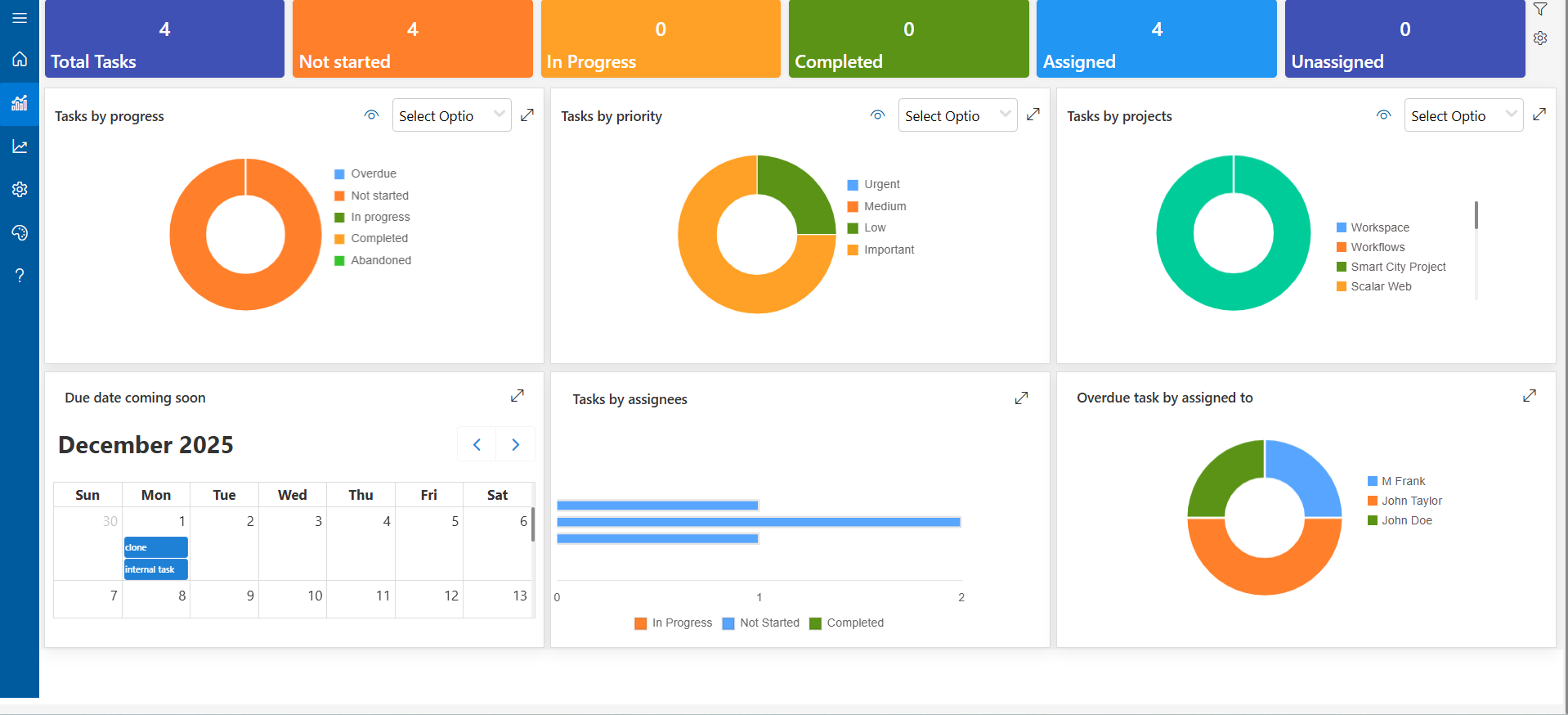
- Simple, real-time dashboards
- Clear, measurable results.
- Faster completion with less follow-up.
Use case:
In a single executive dashboard, leaders can see the live project progress, overdue tasks, and the workload of the team. Automatic progress tracking keeps goals on schedule without constant follow-ups, giving leaders clear visibility and confidence that work is moving forward.
2. Project Managers
Key challenges:
- Managing work across multiple tools
- Chasing updates
- Delays impacting timelines
What they need:
- Centralized control over all tasks
- Smart scheduling
- Early risk alerts
Use case:
Project managers are capable of gathering tasks to one place, giving them different levels of importance, and getting AI-assisted warnings about possible problems. Intelligent planning maintains the time limits and thus makes the projects not only on time but also less time required to get updates and follow up.
3. HR & Operations Teams
Key challenges:
- Processes lack structure
- Manual tracking slows progress
- Uneven workloads across teams
What they need:
- Structured workflows
- Balanced workloads
- Scalable processes
Use case:
Human Resources departments can make use of automating the processes of onboarding, leave approvals, and employee check-ins by using HR tools. With the help of built-in workload balancing and well-defined processes nothing will be missed in a large number of tasks.
4. Remote & Hybrid Teams
Key challenges:
- Communication gaps
- Time zone confusion
- Limited task clarity
What they need:
- Self-paced task tracking
- Real-time updates
- Shared visibility
Use case
Remote and hybrid teams keep in sync with asynchronous updates, instant notifications, and shared dashboards. Team members from different places can start working on tasks at any time, which cuts down on waiting time and eliminates misunderstandings.
Why It Matters
A task management system is not just a tool, it is a complete solution that works for any team and role. It provides for those in the role of leader, project manager, running the operation, or even working remotely, the following benefits:
- Understanding of duties and status
- Productivity through AI-assisted processes
- Control over team performance
- Scalability as your business grows
Key Benefits of Using the Best Task Management Tool
- Faster Execution:
The combination of clear task ownership, smart prioritization, and AI-assisted workflows allows the teams to spend less time on planning and more time on delivery. The speed of the flow of the projects is higher, and the deadlines are always met. - Higher Productivity:
The teams are able to work on the most critical tasks thanks to automation of reminders, balancing of workloads, and AI-driven task suggestions. The outcome is less busywork, more meaningful results, and measurable impact. - Better Collaboration:
The integration of communication, file sharing, and updates in one centralized platform has done away with endless meetings and misaligned workflows. Teams are in sync irrespective of whether they are in the office or working remotely. - Reduced Stress & Overload:
Clear task ownership and flexible deadlines help avoid slowdowns and make sure no one is overloaded. Teams feel they have the upper hand which in turn boosts morale. It helps reduce stress and supports long-term well-being. - Smarter, Data-Driven Decisions:
The use of advanced analytics together with real-time dashboards has provided leaders with very detailed views of task progress, team performance, and process efficiency. The decision-making comes to be quicker, more knowledgeable, and thus actionable.
Features to Look for When Choosing a Best Task Management Tool
Productivity, collaboration and team scaling are the main features that should be looked for in a task management solution. The following is a practical checklist:
Easy Task Creation: In seconds, quickly add tasks and designate owners to make sure nothing is overlooked and every team member knows his work.
Drag-and-Drop Workflows: See projects clearly, rearrange tasks with no hassle, and change the workflow as your needs change.
AI-Powered Recommendations: Get smart suggestions for what to do first, when to do it, and what to do next to move past slow points.
Workload Balancing: Automatically share out tasks so that no one is overworked and your entire department remains active and energized.
Custom Views (List, Board, Timeline): Pick the view that suits your team best, be it monitoring individual tasks or observing entire project timelines.
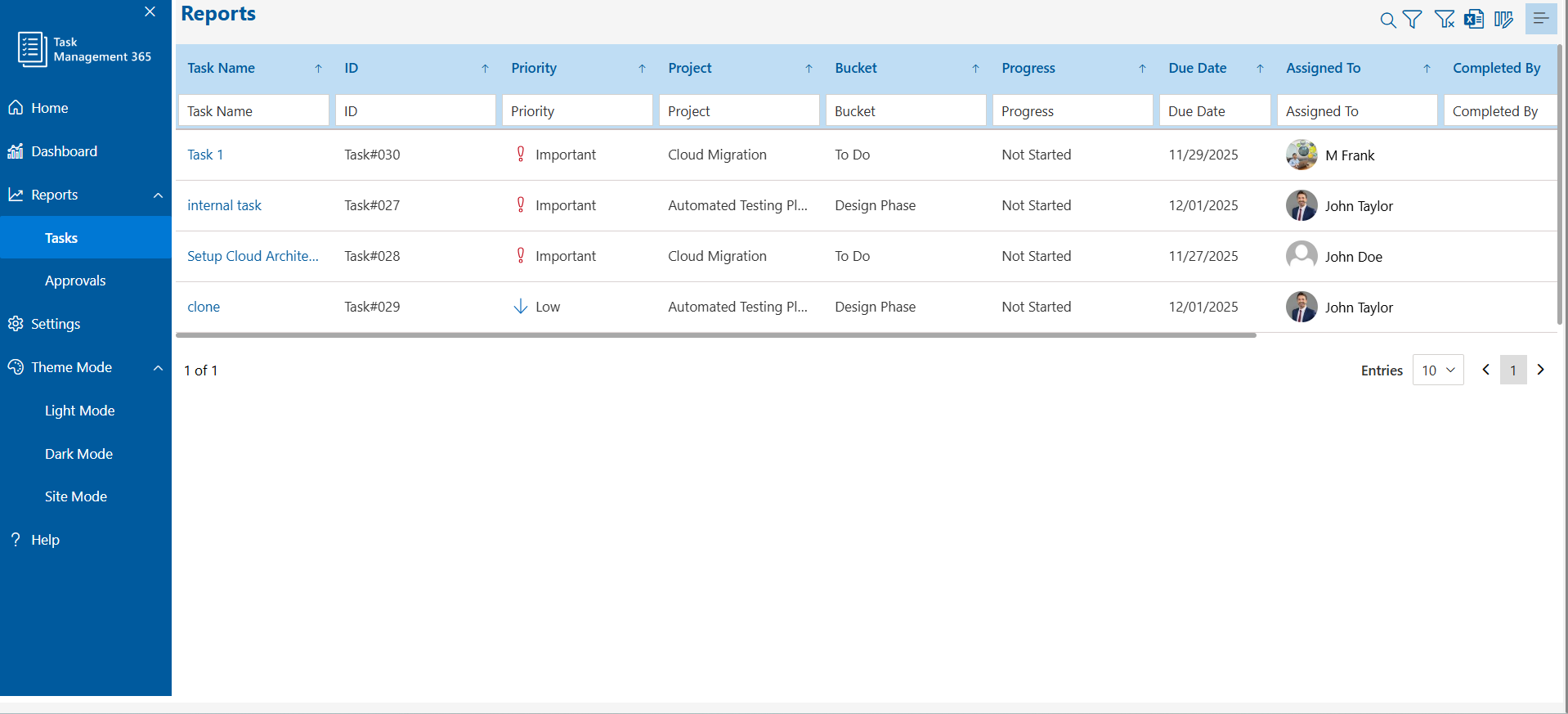
Real-Time Notifications: Receive instant updates about task progress, modifications, and due dates and no more going after updates.
Integration with Email, Chat, and Calendars: Connect smoothly with the tools your team is already using and keep all work synchronized.
Secure Data Handling: Data security of an enterprise level will ensure that sensitive information about the project stays protected.
Mobile Access: Task management is possible from everywhere and every device at anytime, so teams will be joined even while they are traveling.
Scalable Pricing: Flexible plans for every stage of business allow you to enlarge your team without worrying about your tool outgrowing your company.
Why Simplicity Wins in Task Management
Complex tools do not last. When a platform needs heavy training, constant updates, or confusing steps, teams stop using it. Work then falls back to spreadsheets, emails, and sticky notes, slowing everything down. The best task management tool keep things simple, so teams can focus on getting work done.
- Clear, simple language: Everyone understands tasks immediately.
- Fewer clicks: Complete actions faster without unnecessary steps.
- Guided workflows: The users are unconsciously led to carry out the tasks in the proper way.
- Intuitive design: The teams are spending less time in learning and more time in doing.
The truth is simple, the tools that are user-friendly will be the ones utilized.
How the Best Task Management Tool Supports Growth
As your company grows:
- Teams get larger
- Projects multiply
- Work becomes more complex
Without a strong system, growth can quickly become disorganized. Tasks get missed, deadlines slip, and teams lose alignment. The best task management tool changes everything:
Processes stay consistent: The processes remain the same though teams have increased and no steps are dropped.
Teams stay aligned: The teams act together on the same matter, as all members of the team are aware of the tasks to be done, the time when to do them, and the relation to higher objectives.
The leaders get the information they need: The immediate transparency allows the high-ranking officials to control the situation without having to ask for updates frequently.
This is the reason that companies with a fast growth rate invest in a strong project management system at the beginning, it ensures that the growth is smooth, predictable, and scalable.
5 Best Task Management Tools to Consider
Here are top tools that stand out for modern teams, combining simplicity, AI, and scalability:
Tool | Key Features | Best For |
Task Management 365 | AI data-driven intelligence, seamless connection with Microsoft 365 and SharePoint, real-time performance dashboards, and intelligent automation that does the job for you. | Task management system that is intelligent, scalable, and versatile for teams of all sizes. |
Asana | Visual project boards, timeline views, strong collaboration features | Teams that need visual planning and workflow tracking |
Trello | Simple Kanban boards, drag-and-drop task management | Small to medium teams preferring simple, intuitive boards |
Monday.com | Flexible workflows, automation, custom views | Growing teams needing adaptable workflows and automation |
ClickUp | All-in-one platform, task tracking, time management, reporting | Teams wanting a comprehensive, centralized task and project platform |
Each tool helps teams plan, track, and execute work efficiently, but the best choice depends on team size, complexity, and workflow needs.
Task Management Software Comparison
| Tool | Best For | Pricing | Free Trial | Key Features |
|---|---|---|---|---|
| Task Management 365 | Teams & enterprises | Custom | Yes | AI automation, dashboards |
| Asana | Workflow tracking | Mid-range | Yes | Timeline, collaboration |
| Trello | Small teams | Free/Paid | Yes | Kanban boards |
| Monday.com | Scaling teams | Mid-high | Yes | Custom workflows |
| ClickUp | All-in-one | Affordable | Yes | Task + time tracking |
Integrations
Integrations That Keep Work Connected
The efficiency of a task management software is directly proportional to how well it integrates with the tools your team is already using. Integrations are a sure fire way to save time, error-proof communications, and keep people all on the same page, regardless of the location or working style. Here are the Key Integrations that you should look out for:
Microsoft 365: Tasks can be synchronized with Outlook, Teams, and OneDrive so that emails, chat, and documents are linked directly to your projects.
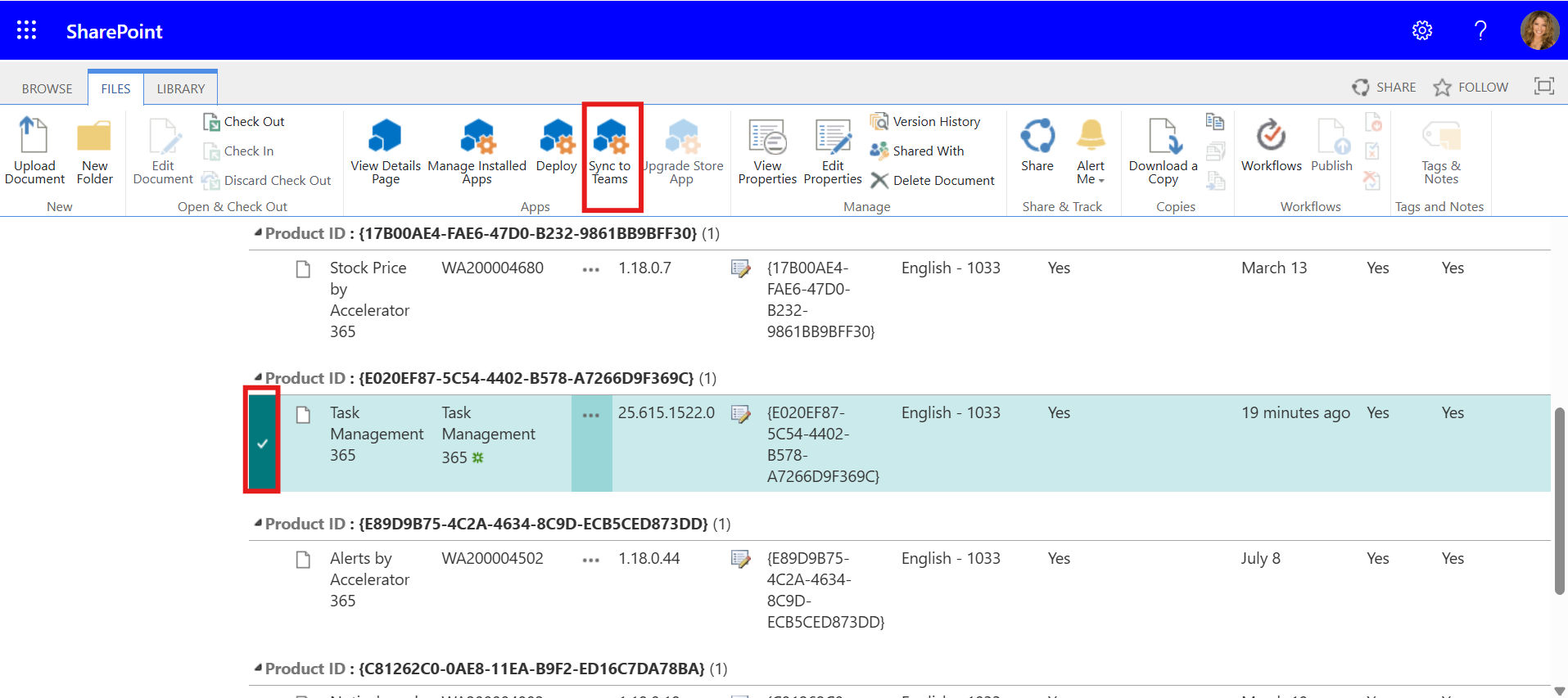
SharePoint: You can attach files, track document updates in real-time, and have a single source of truth for all your projects.
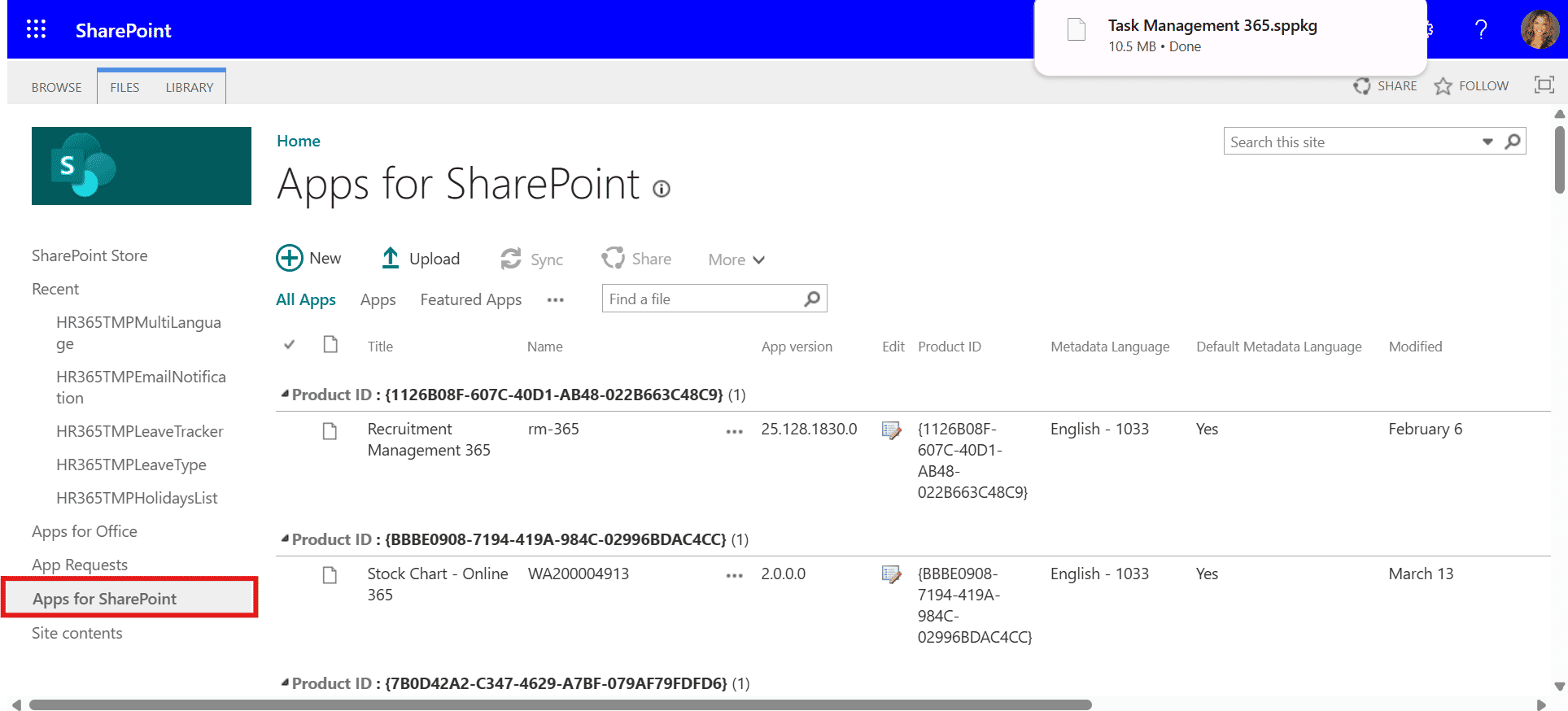
Email & Chat Platforms: You can turn messages into actionable tasks and keep conversations linked to projects without switching apps.
Calendars: You can automatically sync deadlines, milestones, and reminders to keep everyone on schedule.
Other Business Tools: You can connect with CRM, ERP, or analytics platforms to centralize workflows and improve visibility.
How to Implement Task Management Successfully:
Getting the most from a task manager is not just about having the tool itself, it is about combining the right technology with smart habits. Here is how Task Management 365 makes implementation simple and effective:
- Start with Simple Workflows: Quickly set up processes with pre-built templates and drag-and-drop workflows. Teams can easily follow clear, structured paths without any confusion.
- Train Teams Quickly: An intuitive interface and guided workflows make training last minutes, not hours. Everybody will be able to use the platform effectively from day one.
- AI Recommendations: AI-powered suggestions point out high-priority tasks, equal workloads, and foresee possible delays, so the teams always know which task is next.
- Regularly Review Performance: Leaders have the insights they need without being constantly checked. Real-time dashboards and advanced analytics have made it easy to track progress, spot where work slows down, and assess team performance.
- Keep Improving: It keeps monitoring trends and points out inefficiencies as well, thus letting the organization modify its workflows gradually and making them smarter and more efficient along with team expansion.
Common Mistakes to Avoid
Many teams use task management tools, but success depends on picking the right one. Watch out for these common mistakes:
- Choosing tools with too many features: Complexity overwhelms teams and reduces adoption.
- Ignoring user experience: If it is hard to use, people would not use it.
- Underestimating AI capabilities: Modern AI can automate repetitive work and highlight priorities, do not miss out.
- Not aligning tasks with goals: Tasks without clear objectives waste time and dilute impact.
- Treating task management as “just admin work”: Execution is strategy. The right tools help teams deliver results, not just track work.
Focus on tools that simplify execution, align teams, and actively drive work forward, because execution is what turns strategy into success.
Conclusion
Choosing the best task management tool for teams can transform how work gets done. From simple task tracking to AI-powered automation, the right software helps teams stay organized, productive, and aligned. Start a free trial of Task Management 365 to find the perfect fit for your business.


Frequently Asked Questions
Which task management tool works best for teams?
The best tool is easy to use, AI-powered, and scalable. It should match your team’s size, workflows, and goals, helping everyone stay aligned, focused, and productive from day one.
How does AI task management boost productivity?
AI takes care of repetitive planning, predicts delays, balances workloads, and recommends priorities. This means your team spends less time on busy work and more time on work that truly matters.
Is task management software suitable for small businesses?
Yes! Modern tools are flexible, affordable, and easy to adopt, making them perfect for startups and growing teams. You get enterprise-level features without the complexity or high costs.
Can task management systems work for remote or hybrid teams?
Absolutely. These systems give real-time visibility, clear task ownership, and shared dashboards, so teams stay aligned, no matter where they are or what time zone they work in.
What is the Best Task Management Tool for Teams?
The best task management software for teams in 2026 includes:
Task Management 365 – Best AI-powered task management system
Asana – Best for workflow and project tracking
Trello – Best simple task tracking software
Monday.com – Best for scalable team workflows
ClickUp – Best all-in-one productivity platform
How much does task management software cost?
Pricing ranges from free tools to premium enterprise solutions with custom pricing.
Try It Free, No Obligation










Schedule a free personalized 1:1 demo
By proceeding, you accept Cubic Logics’s terms and conditions and privacy policy





Please provide your contact details, we will connect with you soon!
Please provide your contact details, we will connect with you soon!
By proceeding, you accept Cubic Logics Terms and Conditions and Privacy Policy
Schedule a free personalized 1:1 demo
By proceeding, you accept Cubic Logics’s terms and conditions and privacy policy







