













AI-Powered Learning for Winning Teams Engage & Upskill 3X Faster
SharePoint LMS 365 provides a structured learning process. With easy course setup, clean dashboards, and in-app coordinated training, every employee can improve productivity every day.
Trusted by 11700+ businesses from 167 countries


LMS 365 inspires growth that feels personal, steady, and meaningful
SharePoint Learning Management System helps you quickly set up courses, track learning paths, and keep employees engaged. Everything runs within Microsoft 365 tools like Teams, Outlook, and SharePoint.
LMS 365 is now available on Microsoft Teams with
AI
AI That Supports Growth – Simple Training, Strong Results
AI in LMS 365 provides every learner with a strong start, maintained interest, and clarity on the course. It adds guidance to the process, saving time and building confidence in growth.
AI Course Introduction
AI Course Introduction in LMS 365 help learners start each course with clarity and confidence. The system creates simple, personalized introductions that explain what the course is about, what to expect, and why it matters. These intros adjust as content evolves, giving every learner a clear path from the very beginning. With a warm, easy-to-follow overview, employees feel prepared, focused, and ready to learn with purpose.
AI Generated Questions
AI Generated Questions in LMS 365 keeps learning digestible and effective. The AI auto generates questions based on your materials, builds in question modifications for every learner, and stays current as content changes. The feedback is clear, and learners have the ability to practice material on their own time. As a result, employees stay engaged and become competent and confident in their abilities.
Built to Work with Microsoft 365 & Beyond
Designed to integrate with Microsoft 365, it connects with Teams, Outlook, SharePoint, and other tools creating a unified ecosystem that delivers smooth, efficient, and intelligent support.
Connection that Works
Connect learning with the tools your team already uses. LMS 365 works smoothly inside Teams, Outlook, and SharePoint. This bringing courses and updates together in one connected space where everything stays in sync.
Smart Features, Real Impact
Everything your team needs to learn, improve, and move forward together.

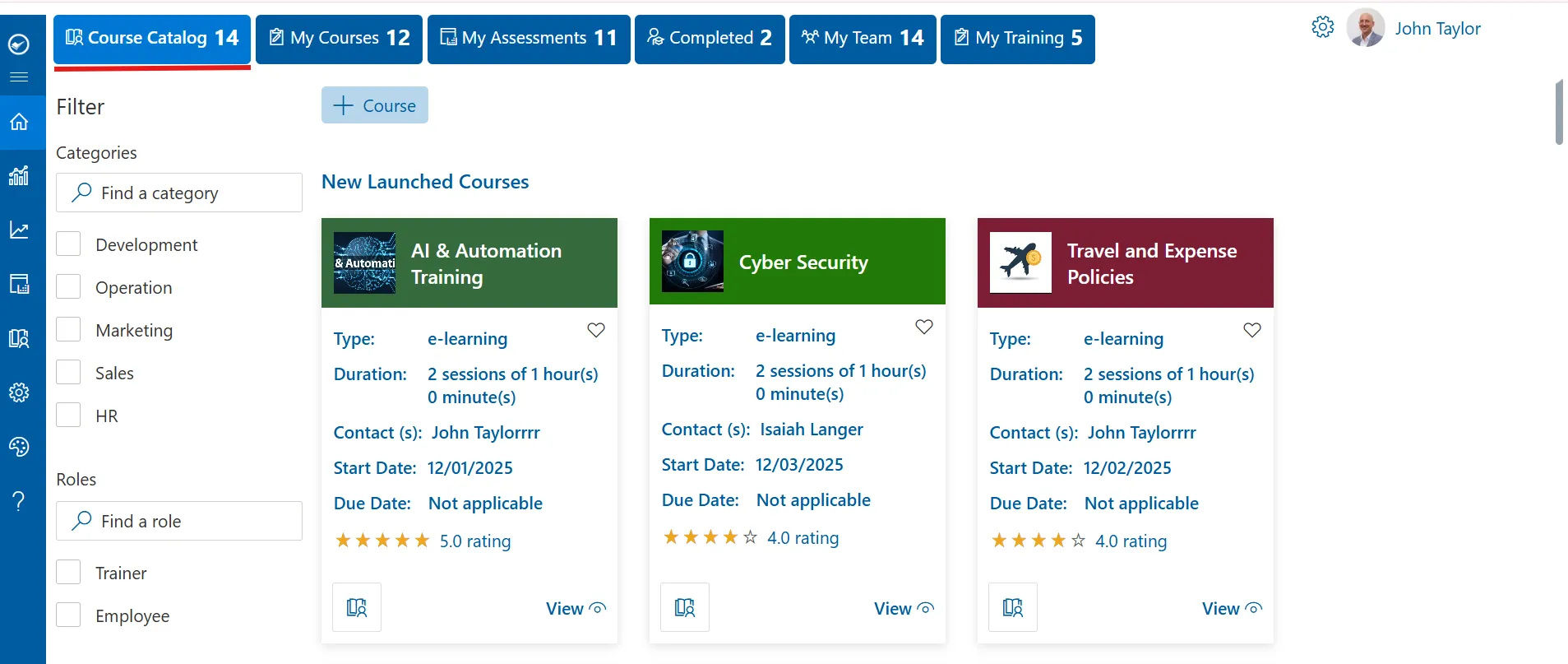
Courses & Chapters
Develop courses with chapters that clearly and simply break down and guide learners step-by-step through course material. With each chapter, learners are able to comprehend topics better, stay engaged, and confidently navigate their learning path.

Progress Tracking
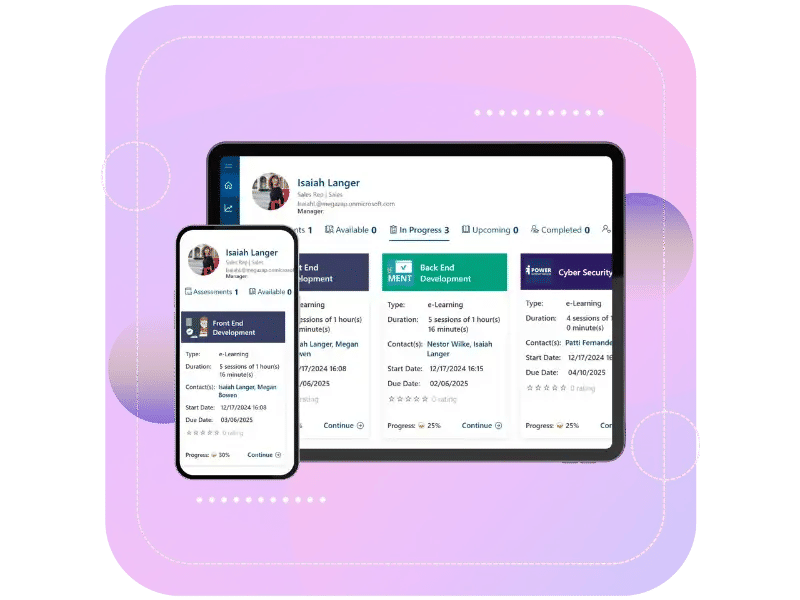
Progress Tracking provides the learner with clarity of their journey. The learner can see what chapters they have completed, what is upcoming, and how far they have progressed overall, sustaining their motivation and confidence in moving forward.
Real Time Feedback
Real Time Feedback allows learners to know where they stand immediately if an answer is correct or incorrect. Learners can receive responses to their answers quickly, which assists them to learn from mistakes, reinforce depth of understanding, and to move forward with clarity.

Automated Certification
Automated Certification immediately gives learners a sense of accomplishment at the completion of a course. Certificates are prepared without manual labor, and each learner has a visible statement of their course progress.
Enroll Course Report
The Enroll Course Report provides clarity to who has enrolled in each course. You are able to track enrollment counts, see participant information, and understand participation patterns at a glance.
Assessments
Assessments help learners check their understanding and stay aligned with course goals. They offer a clear way to review lessons, build confidence, and strengthen knowledge step by step.
Advanced Analytics and Reporting
Advanced Analytics and Reporting give you a deeper look into how learning is happening. Track course performance, learner progress, completion trends, and engagement levels all in one organized view that helps you make better decisions.

Email Templates
LMS 365 offers customizable email templates for key actions like course enrollments, reminders, and completions. Save time with pre-built messages that you can tweak to suit your style, ensuring clear communication and consistent updates.
Just In Time Knowledge Delivery
LMS 365 delivers personalized learning exactly when your team needs it, seamlessly fitting into their workflow. Recognize learning anxiety, offer smooth experience, celebrates every small win, making progress visible and motivating for your team.
Why LMS 365?
Let LMS365 handle everyday training tasks, so your teams can focus on learning and growth. Built for Microsoft 365, LMS365 makes creating, managing, and tracking training simple helping organizations of any size deliver better learning without the hassle.

Built for Microsoft 365
It works inside the tools you already use, like Teams, SharePoint, and Outlook. No setup headaches, it just fits in
Everything in One Place
All your courses and progress are organized in one spot. Track completed lessons, monitor learner progress, and see what needs attention. Everything stays clear and on track.
AI-Powered Efficiency
It assigns courses to the right learners automatically and provides helpful tips to make learning more efficient.
Secure & Scalable
Your learning data stays within Microsoft 365, ensuring it’s secure. And as your team grows, the system scales with you.
Live on Azure
Buy directly from Azure Marketplace or via your enterprise agreement.

Special Pricing for NPOs
Non-profits and government-funded educational institutes can avail exclusive rates.
Enterprise Pricing for 50+ Users
Organizations with more than 50 users can avail special pricing.
Apps 365 Advantage
Apps365 delivers smart, cloud-powered solutions that simplify operations and fuel growth. With seamless integrations and top-tier security, it helps businesses stay agile, efficient, and ahead of the curve.
Cyber Security
Cyber Security in GCC & GCC High within the Microsoft environment places high importance on stringent measures to protect sensitive government data, ensuring security with robust defenses and Microsoft applications.
GCC & GCC High
Our apps are built for GCC & GCC high tenants of US Federal clouds.
SOC2 Type II Certified
Our apps ensure security, compliance, and data protection
MS Azure Marketplace
Our apps are tested by Microsoft and available on MS Azure Marketplace
Microsoft Appstore
Our innovative applications are available on the Microsoft Appstore.
Customer Support
Your Support Team merges technical prowess with sincere care, fostering trust through expertise and empathy. They build lasting relationships, transcending mere service to create meaningful connections.
AI Enabled Apps
Our innovative apps are built with the options of Azure AI, Copilot, and custom AI solutions.
Swift Deployment
Choose any deployment method—Teams, Outlook, or SharePoint—that suits your preferences.
Modern UI/UX
Every app is crafted using the latest Fluent UI, ensuring seamless functionality across all devices.
Free Updates
Our valued subscribers enjoy unlimited support, enhancements, features, and updates.
SharePoint Consultant, Raymond West
California
Finance Manager, Exeevo
New York
IT Director, Frontier Waste Solutions
Texas, US
Sharepoint Developer, Recor Medical
Washington, US
Business Manager, Cerilon
Canada
Director of IT, JConnelly
New York
System Admin
Oregon, US
IT Manager, Pallas LLP
England, UK
IT Officer, HanmiGlobal Saudi
Saudi Arabia
ICT Manager, SMT Shipping
Europe
Barton Associates
Cofounder
Vice President of Operations
Head Of Information & Technology
Director of Infrastructure
Customer Testimonials
Hear from satisfied teams that have transformed their learning experience with LMS 365.
Clients Speak
One Platform for Every Learning Need
LMS 365 brings courses, progress, and feedback together inside Microsoft 365, giving you visibility, control, and seamless learning in one place.
Book a Personalized LMS 365 Demo!
Frequently Asked Questions
SharePoint doesn’t come with a built-in learning management system, but it can be transformed into one using LMS 365. This solution turns your existing SharePoint environment into a complete training platform where employees can access courses, track progress, and complete certifications without leaving the Microsoft 365 ecosystem they already use daily.
Microsoft 365 isn’t an LMS by itself it’s a productivity suite. However, LMS 365 is specifically built to work within Microsoft 365, creating a native learning management system that connects with Teams, SharePoint, Outlook, and other Office apps. This means your training happens where your employees already work, not on a separate platform.
LMS 365 is a cloud-based learning management system that lives inside your Microsoft 365 environment. It helps businesses create, deliver, and track employee training without adding new software or logins. Everything runs through the Microsoft tools your team already knows, making adoption faster and easier.
Yes, with LMS 365, SharePoint becomes a powerful learning management system. You can store training materials in SharePoint libraries, create course catalogs, track completions, and even build learning portals directly in your intranet. The system uses SharePoint’s security features to protect sensitive training content while keeping everything organized.
LMS 365 works directly inside Microsoft Teams, so employees can find courses, watch training videos, take quizzes, and check their progress without switching apps. Course notifications appear in Teams, and completed trainings sync automatically. This means learning happens in the flow of work instead of interrupting it.
A Microsoft Learning Management System like LMS 365 doesn’t require separate logins, new interfaces to learn, or complicated integrations. It uses your existing Microsoft 365 setup, including single sign-on, Azure security, and familiar navigation. Traditional LMS platforms sit outside your tech stack, but LMS 365 becomes part of it.
LMS 365 automates compliance training by enrolling employees in required courses, sending reminders for deadlines, tracking completions, and issuing certificates. You can set up recurring training schedules for annual certifications and generate reports to prove compliance during audits. Everything stays documented in one place.
Employees can access LMS 365 training on their phones or tablets through the Microsoft 365 mobile app or Teams mobile app. Courses are designed to work on smaller screens, and progress syncs across devices. This means someone can start a course on their computer and finish it on their phone during a commute.
LMS 365 can be installed and configured in a few hours since it conn
ects directly to your existing Microsoft 365 environment. There’s no need to migrate user data manually it syncs with Azure Active Directory automatically. Most organizations have their first courses live within a day or two.
LMS 365 lets you build courses using PowerPoint presentations, Word documents, videos from Stream, PDFs, and external content. You can add quizzes, assessments, and interactive elements. The course builder works like other Microsoft tools, so your training team won’t need special technical skills to create content.
The system automatically records when employees start courses, how much time they spend, their quiz scores, and completion dates. Managers can view their team’s progress through dashboards, and HR can pull reports using Power BI. Employees see their own learning history and upcoming required training in their personal dashboard.
LMS 365 uses Microsoft 365’s enterprise-level security, including data encryption, role-based access controls, and compliance with regulations like GDPR. Training materials stay protected in SharePoint with the same permissions you use for other documents. Since it’s hosted on Azure, you get Microsoft’s data center security without managing servers yourself.
You can use LMS 365 to train people outside your organization, including customers, contractors, vendors, and partners. The system works with Azure B2B guest accounts, so external users can access specific courses without getting full access to your internal SharePoint content. This makes it practical for customer onboarding, partner certification programs, and contractor safety training.
LMS 365 supports training content in multiple languages, which is important for global teams. You can create course versions in different languages, and the system interface automatically displays in each user’s preferred language based on their Microsoft 365 settings. This means employees in different countries can take the same training in their native language without needing separate course catalogs.
LMS 365 connects with popular HR systems through APIs and pre-built connectors, allowing automatic user enrollment based on job roles, departments, or hire dates. It also integrates with Power Automate to create workflows that trigger training when specific events happen like assigning safety courses when someone joins a warehouse team. Since LMS 365 runs on the Microsoft platform, connecting it to Dynamics 365, SAP, or other enterprise systems is straightforward compared to standalone platforms.
Schedule a free personalized 1:1 demo
By proceeding, you accept Cubic Logics’s terms and conditions and privacy policy


Try It Free, No Obligation


By proceeding, you accept Cubic Logics Terms and Conditions and Privacy Policy
Don't leave yet,
get up to 30% special offer until 25th December, 2025
Enter your business email ID and we will send a personalized coupon code straight to your inbox.
Please provide your contact details, we will connect with you soon!
Request for the custom price
By proceeding, you accept Cubic Logics Terms and Conditions and Privacy Policy
Schedule a free personalized 1:1 demo
By proceeding, you accept Cubic Logics’s terms and conditions and privacy policy


Request of the Free License
By proceeding, you accept Cubic Logics Terms and Conditions and Privacy Policy